
Our readers keep the lights on and the weekend projects moving. As an Amazon Associate, I earn from qualifying purchases.
Specs are compiled from manufacturer listings and verified buyer reviews and can change over time — please confirm the key details on the product page before buying.
Building a budget PC that looks clean and runs cool usually means wrestling a nest of fan and RGB cables. Daisy-chain ARGB fans fix that by linking together with one or two cables per cluster, so your build stays tidy without you needing to be a cable-management wizard. The real trick is finding a set that moves enough air, stays quiet enough to ignore, and plays nice with your motherboard’s lighting software — all without blowing your budget.
I’m Rikta — the founder and writer behind FitlyFast. This guide is built by comparing the manufacturers’ published specifications and the patterns across verified customer reviews, so you get each pick’s real strengths and trade-offs instead of marketing spin.
We’ve sorted through the options to find the six best budget daisy chain ARGB case fans that deliver strong cooling, easy installation, and vibrant lighting without the extra cable headache.
Our Picks at a Glance
How To Choose The Best Budget Daisy Chain ARGB Case Fans
Getting the right budget fans means looking past the flashy LEDs and checking a few key specs that determine whether your PC actually stays cool and quiet. Here is what really matters.
Airflow (CFM) and Static Pressure (mmH₂O)
CFM (cubic feet per minute) tells you how much air the fan pushes in open space — higher numbers mean better case ventilation. Static pressure (mmH₂O) measures how well the fan pushes air through resistance, like a radiator or a dust filter. For a standard case, look for at least 50 CFM. If you are mounting fans on a radiator or a thick front panel, you want around 2.0 mmH₂O or more.
PWM vs Voltage Control
PWM (pulse-width modulation) uses a 4-pin connector to let your motherboard adjust fan speed dynamically based on temperature. Voltage control (3-pin) changes speed by varying the power, which is less precise and often causes hum. Budget ARGB fans almost always use 3-pin for the lighting and 4-pin PWM for the motor — make sure your motherboard has the right headers for both.
Daisy Chain Connectivity
True daisy-chain fans link together with interlocking connectors so a cluster of three fans uses one or two cables total instead of six. Some budget fans only daisy-chain the PWM signal and require separate RGB cables per fan — read the fine print. Genuine daisy-chain fans dramatically cut cable clutter, making your build look cleaner and improving airflow inside the case.
Noise Level (dBA)
Noise is measured in decibels (dBA). Under 25 dBA is virtually silent; 25-30 dBA is quiet enough for most rooms; above 30 dBA you will hear a noticeable hum. Budget fans at full speed often sit around 28-32 dBA. The bearing type matters too — fluid-dynamic bearings (FDB) and hydro-dynamic bearings (HDB) are quieter and last longer than sleeve bearings.
Quick Comparison
| Model | Best For | Airflow (CFM) | Max Speed (RPM) | Noise (dBA) | Amazon |
|---|---|---|---|---|---|
| Thermalright TL-M12QW X3★ Best Overall | Best Overall Value | 68.9 | 2000 | 28.2 | Amazon |
| Asiahorse Dawn 120mmTop Airflow | High Airflow / Quiet | 71 | 1850 | 29 | Amazon |
| AsiaHorse COSMIQ 120mm | Included Controller / Music Sync | 68.5 | 2000 | 29.2 | Amazon |
| darkFlash INF34 120mm | Slim Profile / Budget Radiator | 50.4 | 2000 | 31.6 | Amazon |
| Cooler Master MF120 Lite | Brand Reliability / Low Noise | — | 1750 | 30 | Amazon |
| be quiet! Light Wings LX | Premium Build / Best Quiet | — | — | 31 | Amazon |
In‑Depth Reviews
1. Thermalright TL-M12QW X3 120mm ARGB Case Fans
The budget 3-pack that moves serious air without the noise premium.
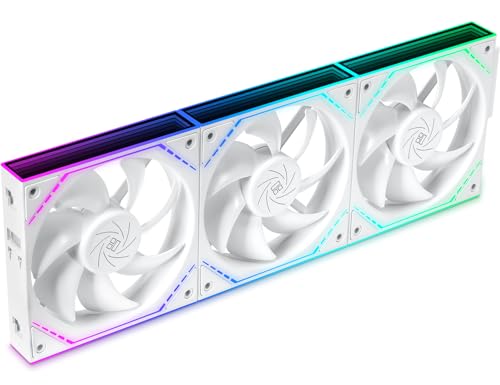
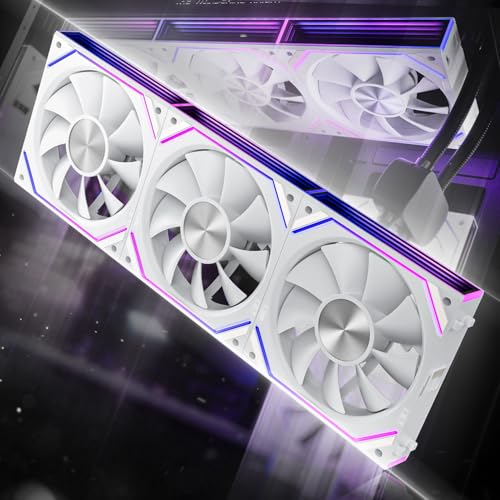
This three-fan set from Thermalright pulls 68.9 CFM of airflow at 2000 RPM and still keeps noise at 28.2 dBA — a combination that punches well above its price tier. What wins people over is the value: a 3-pack with dual-side infinity mirror ARGB lighting, fluid-dynamic bearings for longevity, and true daisy-chain wiring that lets you run all three fans on one cable. The crowd is firmly behind this one, with over 500 owners weighing in — and the consensus is that it delivers premium cooling and a clean look for about the cost of a single high-end fan.
The catch is that the daisy chain is a single cable for an entire row, so you cannot split them into a 2+1 configuration without an extra dongle. For most mid-tower builds using three front intakes or three top exhausts, that is exactly what you want — one less cable to hide. Buyers report “2000 RPM, strong airflow, quiet, PWM,” which basically sums up why this is the go-to for budget builders who refuse to compromise on fan speed or noise.
Why it wins
- Highest max RPM of any fan here at 2000 RPM with strong 68.9 CFM airflow
- Extremely quiet at 28.2 dBA, quieter than many pricier competitors
- One-cable daisy chain for the whole 3-pack keeps cable management clean
- Dual-side infinity mirror ARGB looks fuller in glass-side cases
What to know
- Daisy chain forces a single row — cannot run 2+1 without an extra adapter
- No dedicated RGB controller included; relies on motherboard 5V ARGB header
Best for budget builders who want top-tier airflow without noise: This dominates the price-to-performance category and works excellently for case intake or exhaust clusters.
Check your layout first: If your case requires two separate fan mounting zones (e.g., 2 front + 1 rear), plan for a Y-splitter dongle.
2. Asiahorse Dawn 120mm Case Fan, ARGB PWM
A single fan that beats most 3-packs on raw airflow — and runs quiet doing it.
It achieves this at 1850 RPM with noise capped at 29 dBA, thanks to its hydro-dynamic bearing (a bearing type that uses lubricating oil to reduce friction and wear). The forward and reverse blade design means you can buy separate forward and reverse models to get the correct airflow direction on both intake and exhaust without ever seeing the less attractive fan frame.
The build quality impresses immediately — owners note it feels sturdy and looks clean next to premium brands like Lian Li. This is a single fan, not a 3-pack, so if you are outfitting an entire case the cost adds up. Owners mention “good airflow, quiet, RGB syncs with Gigabyte Control Center,” and the daisy chain works with a single cable per cluster. Just note that the white LEDs lean slightly blue, so pure-white purists may want to check color accuracy before buying a set.
what separates it
- Highest measured airflow in this guide at 71 CFM
- Very quiet at 29 dBA with premium HDB bearing for long life
- Forward and reverse blade options let you match intake/exhaust perfectly
- Works with major RGB sync software (Gigabyte, MSI, Asus)
Single-fan caveat
- Single pack — filling a full case requires buying three, which pushes the total higher
- White LED hue runs slightly blue, not a true cool white
Best for builders who prioritize raw CFM over everything: Great as a focused intake fan or on a radiator that needs serious static pressure (2.6 mmH₂O).
Skip if you need the cheapest 3-pack: The single-fan price means three Dawns cost more than the Thermalright 3-pack with similar overall airflow.
3. AsiaHorse COSMIQ 120mm PC RGB Fans 3-Pack

A 3-pack with its own controller and a music-sync a neat extra — a genuine all-in-one solution.
The COSMIQ includes a dedicated RGB controller, which is a rare find at this price and a huge convenience if your motherboard lacks a 5V ARGB header or you just want independent lighting control without opening software. The built-in sound pickup module supports 8 music-rhythm light modes that pulse with your game audio or music — a feature you usually only see on much pricier kits. At 2000 RPM and 68.5 CFM, it matches the Thermalright on raw speed, though the noise level sits slightly higher at 29.2 dBA.
The daisy chain here is interlocking, reducing your cable count significantly per cluster. A few owners note the setup uses two cables for three fans rather than a single cable, which can be tight in some cases. Still, the overall effect is a tidy build with vivid, non-flickering RGB. As the review pages sum it up: “excellent quality switched from more expensive Corsair iCUE fans” — meaning this competes with the big names for a fraction of the outlay.
Why it stands out
- Includes a dedicated RGB controller — great if your motherboard lacks ARGB headers
- Music-sync lighting via built-in microphone adds dynamic visual feedback
- Strong 68.5 CFM airflow at 2000 RPM with FDB bearing for quieter operation
- Interlocking daisy chain cuts cable clutter significantly
Minor trade-offs
- Two cables per 3-fan cluster instead of one for some configurations
- Noise at 29.2 dBA is just a touch louder than the quietest options here
Best for first-time RGB builders who want plug-and-play control: The included controller and music sync make this a self-contained lighting solution that works with any motherboard.
Skip if absolute minimum cables are your priority: The interlocking setup is cleaner than standard fans, but the Thermalright single-cable chain is neater still.
4. darkFlash INF34 120MM PC Case Fan 3-Pack
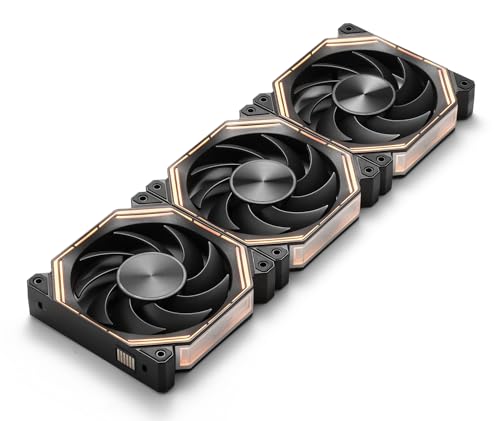
A slim-profile 3-pack that fits tight spaces and runs reliably — with a small airflow trade-off.
The darkFlash INF34 uses a slide-in daisy-chain mechanism with PIN-to-PIN interlocking, keeping the cable count low. At 50 CFM and 2000 RPM, it delivers lower throughput than the heavier hitters above — versus the Asiahorse Dawn’s 71 CFM. This makes it better suited as a supplementary exhaust fan or for a compact case where airflow paths are short and direct rather than fighting through thick radiators. The hydro bearing keeps noise at a reasonable 31.6 dBA, though it is audibly louder than the Thermalright’s 28.2 dBA.
Customers note easy installation and a clean look, but the RGB lighting gets mixed reviews on color accuracy. Performance reviewers point out it has “good airflow and static pressure” for its price, so it works well for a secondary build or a child’s PC where budget is tight and flashy lights matter more than peak cooling.
What works
- Slim 0.98-inch thickness fits where standard 25mm fans won’t
- Daisy chain with PIN-to-PIN interlock is easy and tool-free
- Hydro bearing extends fan life with less wear over time
What to weigh
- 50.4 CFM is noticeably lower than most competitors in this list
- 31.6 dBA is the loudest fan here at full speed
- RGB color accuracy is mixed — some units have sync quirks
Best for a budget secondary PC or a case with limited mounting depth: The slim profile and easy daisy chain make this a solid cheap option.
Skip for a high-performance gaming rig: The lower airflow and higher noise count against it when the Thermalright and Asiahorse options are within reach.
5. Cooler Master MF120 Lite 120mm PC Case Fan 3-Pack

A trusted brand’s entry-level 3-pack that trades max speed for quiet, stable operation.
The MF120 Lite runs at 1750 RPM — lower than the 2000 RPM options — which keeps noise to 30 dBA and makes it a genuinely quiet fan for daily use. The frosted blade design disperses the aRGB lighting evenly, creating a diffused glow that looks more premium than the harsh direct-LED effect on some budget fans. Cooler Master’s redesigned hybrid frame and tune curved blades improve airflow stability, delivering “higher airflow than OEM” fans in direct comparisons.
Installation is straightforward: daisy-chain the PWM and ARGB headers using the included splitter cable, then plug into your motherboard. The 3-pack comes with a splitter and locking screws, so you have everything you need for a three-fan setup. The main trade-off is that 1750 RPM means lower peak airflow than the Thermalright or Asiahorse fans, so it is slightly less suited to extremely high-heat builds. But for a standard gaming or productivity PC, the quiet operation and solid build quality make this a reliable choice.
Why choose it
- Only 1750 RPM makes it very quiet in normal use
- Frosted blade design creates uniform, diffused aRGB lighting
- Includes splitter cable and screws for a complete 3-fan install
- Trusted Cooler Master build quality and compatibility
One trade-off
- Lower max RPM means less peak airflow than 2000 RPM competitors
- Not ideal for extreme overclocking or unrestricted radiator builds
Best for builders who value near-silent operation over absolute peak performance: Great for a quiet media PC, office build, or a gaming rig where fan noise annoys you.
Skip if you need maximum cooling headroom: When you are cooling a hot CPU or GPU under extended load, the low max speed becomes a bottleneck.
6. be quiet! Light Wings LX 120mm PWM High-Speed Triple Pack

The prestige choice: German-engineered silence with high static pressure for demanding setups.
Be quiet! claims its name for a reason. The Light Wings LX generates up to 2.51 mmH₂O of static pressure (a measure of how hard it pushes air through tight spaces like radiator fins or mesh panels), so it can push air through dense radiators and mesh panels while staying quiet — owners describe it as “completely inaudible.” The 16 LEDs sit inside the hub and shine outward onto frosted blades, creating a uniform glow without visible hot spots. The ARGB cable has both an input and output connector, letting you daisy-chain multiple fans to a single motherboard header or controller.
The closed-loop motor technology (similar to cruise control in a car) monitors and corrects fan speed when the fan encounters resistance, so it always spins at the speed you set regardless of obstructions. This matters most on push-pull radiator configurations where standard fans slow down under back-pressure. The trade-off? At 31 dBA, the listed noise spec is a touch higher than the Thermalright at full speed, but the subjective experience from owners is that it sounds smoother and less intrusive. This is the premium pick for the builder who wants longevity, German engineering reputation, and near-silent operation at a higher price.
What justifies the price
- Excellent 2.51 mmH₂O static pressure for radiators and restrictive cases
- Closed-loop motor maintains exact RPM under resistance
- 16 hub-mounted LEDs with frosted blades for even, premium ARGB
- Build quality and quiet reputation from be quiet!
Premium caveats
- Highest price of any 3-pack in this guide
- Listed noise at 31 dBA is higher than budget alternatives
- No included RGB controller — relies on motherboard or separate controller
Best for the enthusiast who wants quiet operation and high static pressure on a radiator: If you have a liquid cooling system and want fans that don’t slow down under resistance, this is the pick.
Skip if price is the primary constraint: The Thermalright 3-pack delivers comparable real-world performance for nearly half the cost.
Understanding the Specs
Airflow (CFM) vs Static Pressure (mmH₂O)
CFM (cubic feet per minute) measures how much air a fan moves in open space — higher numbers mean better case ventilation. Static pressure (mmH₂O) measures how well a fan pushes air through resistance, like a radiator or dust filter. For a standard mesh case, 50-70 CFM is plenty. For a radiator, look for 2.0 mmH₂O or more. Budget fans often emphasize CFM; premium fans balance both.
PWM Control and Fan Headers
PWM (pulse-width modulation) is a 4-pin connection that lets your motherboard change fan speed based on CPU temperature, keeping things quiet at idle and ramping up under load. Budget case fans with ARGB lighting typically use 3-pin 5V for the lighting and 4-pin PWM for the motor. Make sure your motherboard has enough 4-pin fan headers and a 5V ARGB header (labeled ADD_HEADER).
Daisy Chain vs Standard Wiring
A true daisy-chain fan has interlocking connectors so you plug one fan into the next, and only one cable runs to the motherboard. This dramatically reduces cable clutter in your case. Many “daisy chain” budget fans only connect the PWM signal and still need separate RGB cables — read the product description carefully. Genuine daisy-chain fans like the Thermalright TL-M12QW run both power and lighting through a single chain.
Bearing Types and Noise Levels
Fluid-dynamic bearings (FDB) and hydro-dynamic bearings (HDB) use a layer of oil to reduce friction, making them quieter and longer-lasting than basic sleeve bearings. Noise is measured in dBA — under 25 dBA is whisper-quiet, 25-30 dBA is fine for most rooms, above 30 dBA you hear a clear hum. Budget fans at full speed tend to sit around 28-32 dBA.
FAQ
Can I daisy chain fans from different brands together?
Do I need a separate RGB controller for ARGB fans?
What is the difference between 3-pin and 4-pin fan connectors?
How many daisy-chain fans can I connect in one row?
Will budget daisy-chain fans fit on my radiator?
How do I sync RGB lighting across different brands?
Is there a difference between ARGB and standard RGB fans?
Do budget ARGB fans affect PC performance?
How long do budget daisy-chain fans typically last?
Final Thoughts: The Verdict
Across the board, the best budget daisy chain argb case fans winner is the Thermalright TL-M12QW X3 3-Pack because it delivers strong 2000 RPM cooling, quiet 28.2 dBA operation, and a true single-cable daisy chain — all at a price that undercuts competitors with similar specs. If you want the highest raw airflow possible in a single fan, grab the Asiahorse Dawn. And for a complete kit with its own controller and music-sync lighting, the AsiaHorse COSMIQ 3-Pack is the one to reach for.
How We Picked
We do not accept paid placement. Every pick is matched to a real buyer and a real use-case; we do not hands-on test units.
Sources & Methodology
Specifications: manufacturer listings and product documentation. Review insights: verified customer reviews, as of July 2026. Pricing: not shown on this page (it changes often); check the current price via the retailer link.
As an Amazon Associate, FitlyFast earns from qualifying purchases. This does not affect which products we feature.