
Our readers keep the lights on and the weekend projects moving. As an Amazon Associate, I earn from qualifying purchases.
Specs are compiled from manufacturer listings and verified buyer reviews and can change over time — please confirm the key details on the product page before buying.
Multi-color 3D printing used to mean spending like a pro. That has flipped. Printers that swap filament mid-layer are now priced like a decent weekend hobby. But not every budget machine delivers smooth color transitions without clogs or excessive waste. This guide separates the proven performers (4.3 stars and up across hundreds of reviews) from the ones that only look good on paper. The focus is on real-world ease, speed, and how much filament goes into your part versus a purge tower.
I’m Rikta — the founder and writer behind FitlyFast. This guide is built by comparing the manufacturers’ published specifications and the patterns across verified customer reviews, so you get each pick’s real strengths and trade-offs instead of marketing spin.
The best budget multi color 3d printer for most people is the Anycubic Kobra X, because it prints in 4 colors from the start and can expand to 19 colors later — all at a price that leaves cash for filament.
Our Picks at a Glance



How To Choose The Best Budget Multi Color 3D Printer
A multi-color printer changes your workflow. Suddenly you are not just thinking about layer height and infill — you are thinking about how many times the machine swaps filament and how much plastic it purges with each switch. Here is what matters most when the budget is tight but your ambition isn’t.
Filament Waste and Purge Volume
Every time the printer switches from one color to another, it has to flush the old color out of the nozzle. That flushed material — often called a “purge tower” or “poop” — is waste you do not get to use. Some machines handle this more efficiently by reducing the travel distance between the filament unit and the hot end, as the design on the Anycubic Kobra X is designed to do, cutting material costs. Others lock their purge settings so you cannot tweak them. Before buying, check if the slicer lets you adjust the purge volume so you are not throwing away half a spool on a small model.
Auto-Leveling and First-Layer Reliability
Your first layer determines whether the rest of the print sticks or fails. A manual leveling knob is a non-starter for beginners. Look for a printer with a sensor-based auto-leveling system that probes multiple points — 49 points on the Kobra X, for example. That kind of coverage compensates for small bed warps and makes sure the nozzle drags filament at the perfect height across the whole surface. Machines that also measure Z-offset automatically take the guesswork out completely.
Print Speed vs. Print Quality Trade-off
A printer that claims 600mm/s top speed sounds impressive, but that speed only helps if the frame stays stable. You need a vibration compensation algorithm (software that cancels out shaking) to prevent visible layer lines or ghosting (blurry edges) on sharp corners. For budget models, the real-world balance is 300mm/s to 500mm/s with compensation active — fast enough for most projects without ruining the surface finish.
Enclosure and Material Support
Not all budget multi-color printers come with an enclosure. An enclosed printer lets you print advanced materials like ABS, ASA, and PC because it keeps the ambient temperature stable and prevents warping. Open-frame machines handle PLA and PETG beautifully but limit your material selection. If you plan to print functional parts that need heat resistance or strength, an enclosed model like the Bambu Lab P1S or the Creality K2 is the way to go.
Quick Comparison
| Model | Best For | Max Speed | Build Volume | Weight | Amazon |
|---|---|---|---|---|---|
| Anycubic Kobra X★ Best Overall | Best Overall / Beginners | 600 mm/s | 260 x 260 x 260 mm | 20.9 lb | Amazon |
| Bambu Lab A1 Mini ComboCompact Champion | Compact Beginners | 10,000 mm/s² accel. | — | 22 lb | Amazon |
| FLASHFORGE AD5XSpeed King | High-Speed Precision | 600 mm/s | 220 x 220 x 220 mm | 24.2 lb | Amazon |
| FLASHFORGE AD5X (MM) | Multi-Material Flexibility | 600 mm/s | — | 22 lb | Amazon |
| Creality SPARKX i7 Combo | AI-Assisted Creation | — | 260 x 260 x 255 mm | 38.3 lb | Amazon |
| ELEGOO Centauri Carbon 2 | Integrated Ecosystem | 500 mm/s | 256 x 256 x 256 mm | 42.6 lb | Amazon |
| Anycubic Kobra S1 Combo | 8-Color Potential | 600 mm/s | 250 x 250 x 250 mm | 33 lb | Amazon |
| Creality K2 Combo | 16-Color Scale | 600 mm/s | 260 x 260 x 260 mm | 65.9 lb | Amazon |
| Bambu Lab P1S Combo | Enclosed Powerhouse | 500 mm/s | — | 47.5 lb | Amazon |
In‑Depth Reviews
1. Anycubic Kobra X Multicolor 3D Printer
The rookie-friendly speedster that prints four colors without breaking a sweat.
Anycubic built the Kobra X with four filament slots from the factory using its ACE 2 Pro system, and you can stack four more units for a total of 19 colors. That kind of expandability is rare at this price. The machine also cuts the filament travel path by 81.25%, which means fewer purges and lower material costs — a direct answer to the biggest complaint about multi-color printing. Owners who logged over 265 hours report it handled PLA, PETG, and TPU with only one user-caused failure, and they praise the print quality — 29 owners single it out as the standout feature. The LeviQ 3.0 auto-leveling runs a 49-point calibration across the bed, so you get a reliable first layer every time.
The 600mm/s top speed is impressive, but the smart part is the vibration compensation that keeps those fast layers smooth. A 14-minute Benchy is a concrete claim that matches real owner experiences. The AI camera catches spaghetti messes and filament tangles before they ruin a multi-hour print. At 20.9 pounds it is lighter than the Bambu Lab A1 Mini Combo (22 pounds), and its 23 x 13 x 22-inch footprint fits easily on a standard desk. The main trade-off is that the ACE 2 Pro system is incompatible with the older ACE Pro hardware — if you already own Anycubic accessories, verify compatibility before buying.
Setup takes about 15 minutes from the start, and the dual-band Wi-Fi (2.4GHz and 5GHz) lets you monitor prints from the Anycubic app. For a first multi-color machine that grows with your ambition, this is the current balance.
Kobra X multicolor
- Native 4-color printing with 19-color expansion potential
- 81.25% reduced filament path cuts waste and speeds up color swaps
- 49-point auto-leveling gives a reliable first layer every time
- AI spaghetti detection and remote monitoring via phone app
slow print times
- ACE 2 Pro not compatible with older ACE Pro units
- Some buyers report software glitches with Wi-Fi connection
- Print quality with stone PLA shows minor layer lines
first machine: This is the pick for a beginner or a family who wants a low-maintenance multi-color setup with room to grow. The 4.3-star rating across hundreds of owners backs up the claim that it just works from the start.
smart buy: A small number of units arrive with defective Wi-Fi modules or software issues — order from a retailer with a straightforward return policy and test the connectivity first.
2. Bambu Lab A1 Mini Combo
The pint-sized printer that brings multi-color to a tight desk corner.
Bambu Lab’s A1 Mini Combo is the go-to recommendation for people with limited space who still want proper color switching. The machine ships with the AMS Lite unit, letting you load four filament spools and swap them automatically. It is 16.77 x 14.82 x 19.5 inches — noticeably more compact than the Anycubic Kobra X (23 x 13 x 22 inches). Owners cite its suitability for beginners more than any other feature — that is the top-praised aspect by a wide margin, with 48 owners calling it the ideal starter. The full-auto calibration handles Z-offset and bed leveling by itself, so you do not touch a single knob.
The acceleration rating of 10,000 mm/s² means it gets up to speed fast, and the active flow rate compensation keeps extrusion consistent even during rapid direction changes. It operates at or below 48 dB, quiet enough for a bedroom or shared office. The 1-Clip quick-swap nozzle makes maintenance simple — a 20-minute setup from unboxing to first print. The honest downside is that multi-color printing consumes noticeably more filament as waste. Owners mention that a single color swap uses a long purge sequence. The printer also needs a solid, rigid surface; it shakes noticeably on carpeted floors at higher speeds.
A1 Mini compact: A compact, beginner-focused machine that prints beautifully right away. The software and cloud integration are smooth, and the print quality rivals machines twice its size.
travel companion you want multi-color printing on a small desk and value a polished software experience. Setup takes minutes, not hours.
space saver you plan to print large models — the Mini name means a small build volume — or you want to minimize filament waste per color change.
3. FLASHFORGE AD5X Multi-Color 3D Printer
A CoreXY workhorse that trades some reliability for raw pace.
Flashforge’s AD5X uses a CoreXY motion system that hits 600mm/s with 20,000mm/s² acceleration — one of the fastest accelerations in this price tier. That structural rigidity, paired with a vibration compensation system, keeps prints accurate even at high speeds. The 1-Click Auto Leveling works with a sensor that maps the bed before every print to guarantee a perfect first layer. 169 owners rate the print quality as the machine’s top positive aspect, and 108 praise the ease of use.
The 300°C direct-drive extruder and swappable nozzle sizes (0.25mm to 0.8mm) give you flexibility for everything from miniature details to rapid prototyping. The built-in resume printing function saves you from losing progress during a power outage. The catch is reliability — 150 owners flag it as a mixed experience. Some machines run for 300 hours then suffer a crash; others arrive with a dead spot on the touchscreen or jams at the 4-in-1 filament connector. When it works, owners say it beats Bambu and Anycubic on speed and accuracy, but the failure rate is higher than the competition.
speed demons: If you need the fastest acceleration possible and accept that you might deal with a support ticket, this printer delivers stunning results.
proceed caution: The noise level is higher than average, and the connectivity to the Flash Maker app can be temperamental. Verify the return window before buying.
4. FLASHFORGE AD5X Multi-Material 3D Printer

The same CoreXY speed with a dedicated focus on material mixing and flexibility.
This version of the AD5X comes with Flashforge’s Intelligent Filament System (IFS) designed for multi-material prints — not just colors but also different materials like PLA, TPU, PETG, and even carbon-fiber blends. The four spools sit side-by-side in a compact footprint of 14.8 x 16.26 x 14.29 inches, which saves significant desk space compared to the standard AD5X layout. The full auto-leveling sensor takes multiple measurements to ensure uniform nozzle-to-bed distance across the whole surface.
Owners say the print quality is excellent from the start — 54 rate it as the top positive aspect — and the setup takes about 20 minutes. The CoreXY structure with vibration suppression keeps layers aligned even during rapid direction changes. The real-world pain point is the locked purge settings in the FlashForge Orca slicer: customers note wasting 3 to 4 times the filament compared to single-color prints because you cannot adjust the flush volume. The slicer also lacks Linux support, and bed heating is slow — about 25 to 30 minutes to reach PETG temperatures.
Best for tinkerers who print in mixed materials: The IFS system handles exotic filaments well, and the compact design is a bonus. But you must accept that multi-color prints will consume extra filament due to locked purge settings.
material testers: Anyone who wants a truly open-source slicer or needs quiet overnight operation — the fan noise is moderate and the touchscreen is stiff.
5. Creality SPARKX i7 Combo
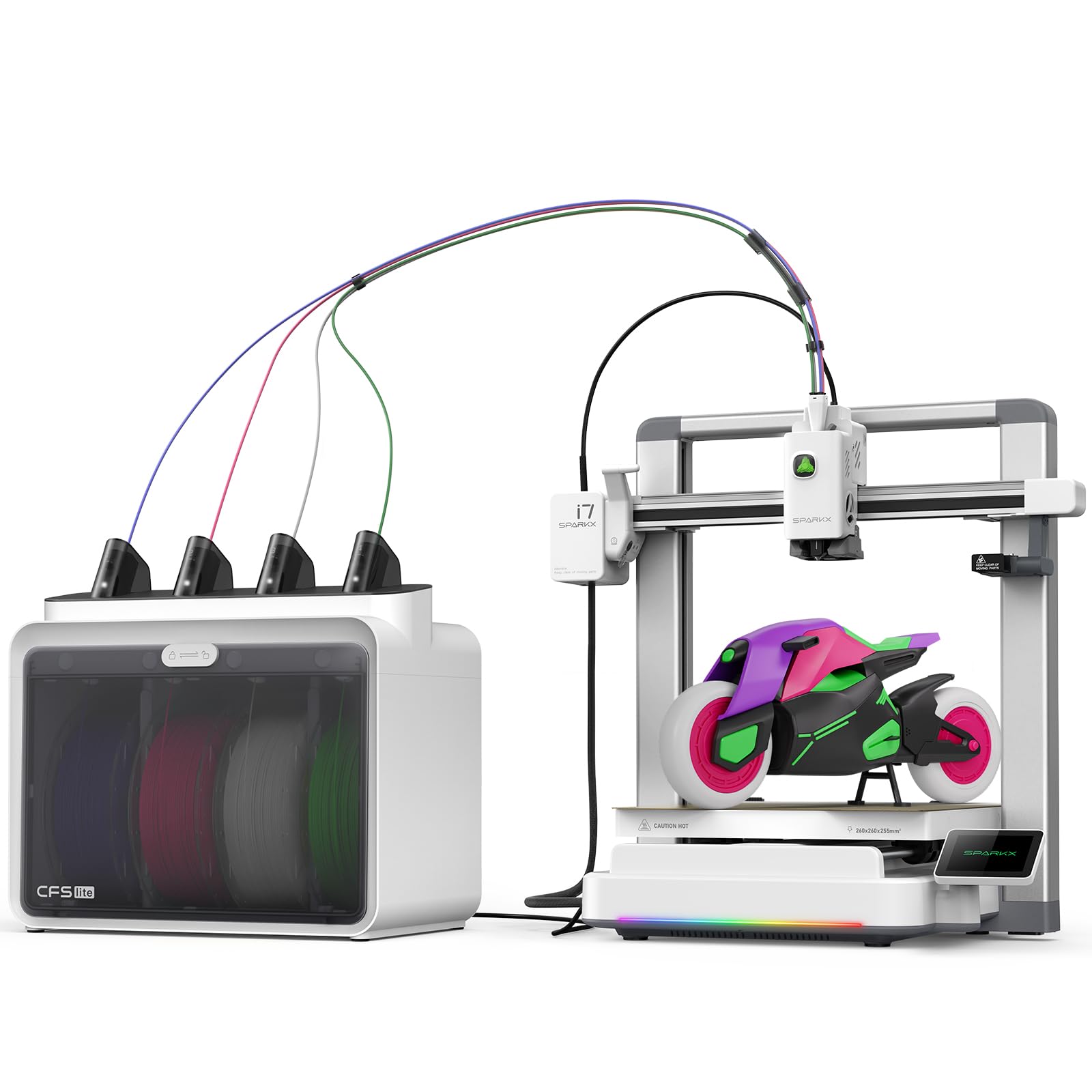
Upload a portrait, get a 3D figurine — no modeling skills needed.
The SPARKX i7 stands apart by shipping with Creality’s CubeMe AI that turns photos into 3D models in seconds. You upload a portrait and the software generates a printable file. That tool removes the steepest barrier for anyone who wants custom figurines but does not know CAD. The printer supports four-color printing through its CFS Lite with 50% less waste than traditional systems, a claim backed by an efficient purge process that owners find noticeably better than older Creality machines.
The build volume is a generous 260 x 260 x 255 mm, big enough for an airless basketball or a helmet. A built-in AI camera watches for spaghetti failures, air printing, and filament tangles during the job. The machine arrives 95% pre-assembled with a 5-minute setup from box to first print. At 38.3 pounds it is heavy, but that weight contributes to stability during fast prints. The trade-off is that replacement hotends cost more, and the build uses more plastic components than premium rivals, giving a slightly less premium feel. Owners note that the printer is not as quiet as the Bambu Lab A1 Mini and that the base unit still requires some assembly despite the “95% pre-assembled” claim.
tinkerers The AI photo feature alone justifies the purchase for anyone who wants to print personalized gifts without learning complex software.
beginners avoid you need silent overnight operation or you expect the premium build feel of a Bambu. The unit also rocks slightly on a level table during certain prints — place it on a stable, heavy surface.
6. ELEGOO Centauri Carbon 2 Combo

A heavy-duty CoreXY machine that ties everything into the ELEGOO ecosystem.
The Centauri Carbon 2 uses the CANVAS system for 4-color auto-switching with smart filament detection and tangle detection. The CoreXY motion system delivers 500mm/s with 20,000mm/s² acceleration, backed by a rigid aluminum frame that reduces vibration at high speeds. The build volume is 256 x 256 x 256 mm, and the enclosed design supports engineering-grade materials beyond PLA and PETG. Its 42.6 pounds of weight indicate serious metal construction, giving it a solid, non-wobbly feel during fast prints.
Owners praise the build quality and quiet operation, with some calling it a fantastic budget FDM printer. The LAN-only mode solves cloud connectivity issues, and the 31 sensors provide thorough monitoring. The rating sits at 3.8 stars across 235 ratings, with reliability flagged as mixed. Some units fail within two days of arrival due to firmware bricking or the infamous “Glob of Death” that destroys the print head. The community troubleshooting time is reportedly high — one estimate from an owner puts it at 90% tinkering versus printing. ELEGOO customer service seems responsive, replacing parts for affected units, but the failure rate is higher than the top recommendations in this list.
elegoo loyalists: If you already use the ELEGOO ecosystem and want a fast enclosed printer at a mid-range price, this fits well.
risk warning: The reliability issues mean this is not the best single choice for a first-time buyer who wants zero troubleshooting. Order from a retailer with a strong return policy.
7. Anycubic Kobra S1 Combo

An enclosed multi-color printer that grows from four to eight colors.
Anycubic upgraded the Kobra line with the S1 Combo, adding a full enclosure and the ACE PRO filament system that doubles to eight colors when you link two units. Dual PTC heating and 360° hot air circulation dry the filament inside the unit, keeping PLA and PETG in optimal condition. The top speed is 600mm/s with 20,000mm/s² acceleration, and the Kobra OS includes flow compensation that reduces material overflow during color transitions. Owners with over 500 hours report no clogs and excellent build quality, with some praising it as a better choice than the Flashforge AD5X despite being about 3 minutes slower per hour of print time.
The 3.8-star average across 258 ratings tells a story of mixed reliability. The first batch of units had extruder issues, ACE sensor failures, and PTFE clogs. Anycubic support has been responsive, sending upgraded units with metal sensor tabs and PTFE-free hot ends to affected customers. The ACE Pro filament loading is finicky — the filament must be perfectly straight or it jams during color swaps. Reviewers point out constant “extrusion abnormal” errors when switching colors. For single-color projects, the printer performs flawlessly; for multi-color, it requires patience.
Best for tinkerers who want eight-color potential: The enclosure and filament drying feature make it versatile for advanced materials, and Anycubic’s support is proactive about replacing defective parts.
patient users: Multi-color printing with the ACE Pro can be frustrating. If you want reliable out-of-the-box color switching, the Bambu machines are smoother.
8. Creality K2 Combo

A heavy, enclosed beast that can scale to 16-color prints.
Creality’s K2 Combo connects up to four CFS units for a total of 16 colors — the widest palette in this budget comparison. The build volume is a full 260 x 260 x 260 mm, and the enclosure lets you print ABS, PET, and PLA-CF without warping. The smart auto-leveling probes only the target print area, making it faster than full-bed systems. Silent Mode uses step-servo motors and balanced fans to keep noise comparable to a typing laptop.
The printer arrives roughly 95% pre-assembled — you install the screen and spool holder, then start printing. Owners rate the print quality as the top aspect, with 40 citing it. The software is easy to use and the built-in camera watches for spaghetti failures. The catch is the CFS unit: it requires 1kg spools and needs printed adapters for smaller 250g reels. Some shoppers say slot #2 errors and extruder clogs during multi-color mode. The unit shakes violently at high speed on uneven surfaces, and the “Spaghetti Detector” sometimes misses failures. The printer weighs 65.9 pounds, meaning it stays put but is difficult to move once placed.
color addicts: If 16-color prints are your goal, nothing else in this budget range matches the palette.
worth knowing: The CFS has design quirks — small spools need adapters, and the back spool cannot be used simultaneously. The Wi-Fi is limited to 2.4GHz, so the camera stream is low resolution.
9. Bambu Lab P1S Combo

The reliable enclosed printer that made Bambu a household name in multi-color.
The P1S Combo combines the enclosed P1S chassis with the AMS system for up to 16 colors by chaining multiple AMS units. It runs at 500mm/s with 20,000mm/s² acceleration, and the CoreXY motion platform keeps prints fast and accurate. The fully enclosed body improves performance with advanced filaments — it supports PLA, PETG, TPU, PVA, PET, ABS, and ASA, and is capable with PA and PC. Set-up takes about 15 minutes, and the auto bed leveling ensures a reliable first layer every time. The model earns a strong 4.4-star average across 592 ratings, with owners consistently praising the print quality and reliability.
Buyers report a 95% success rate over 100 prints, with most failures attributed to user error rather than the machine. The Bambu Studio software and cloud integration make sending prints easy. The noise level is low enough for a shared space. The downside is the AMS system adds significant filament waste on multi-color projects — the purge sequence is long. Some owners find the software unintuitive for beginners and report occasional hot end issues that prevent filament advance. The 47.5-pound weight keeps the machine stable but makes it a permanent desk fixture.
consistent reliability: If you want an enclosed printer that handles advanced materials and multi-color with minimal fuss, the P1S Combo is the safe bet. The 4.4-star consensus is hard to argue against.
drawback accept: The AMS wastes more filament on purges than the direct-path systems on some competitors. Reserve this for prints where color quality matters more than material economy.
Understanding the Specs
Print Speed and Acceleration
The speed you see on a spec sheet (600mm/s, 500mm/s) is the maximum the motion system can physically move. But the number that actually matters is acceleration — how fast the printer reaches that speed. Acceleration measured in mm/s² tells you how quickly the print head changes direction. A machine with 20,000mm/s² acceleration (like the FLASHFORGE AD5X) gets up to speed faster than one with 10,000mm/s² (like the Bambu Lab A1 Mini), which means shorter print times on small, detailed parts where the head constantly changes direction.
Auto Bed Leveling
This feature uses a sensor to measure the distance between the nozzle and the print bed at multiple points — often 49 points on machines like the Anycubic Kobra X. The printer then adjusts each layer to compensate for an uneven bed. Without auto-leveling, you manually adjust four knobs until a piece of paper slides between the nozzle and bed with the right drag. That process takes patience and repeats every time you remove the bed. A printer with 49-point leveling takes the guesswork out and guarantees a perfect first layer on every print, even for a complete beginner.
FAQ
Do I really save money buying a budget multi-color printer over a single-color one?
What is the difference between a multi-color printer and a multi-material printer?
How much filament does a multi-color print actually waste?
Can I print with standard single-color filament on a multi-color printer?
Is an enclosed printer worth the extra cost for budget buyers?
How long does setup take for a budget multi-color printer?
What is the difference between CoreXY and traditional cartesian printers for multi-color use?
Can I use tablet or phone apps to control my budget multi-color printer?
What is the biggest mistake beginners make when buying a budget multi-color printer?
Which machine is the most beginner-friendly in this list?
Final Thoughts: The Verdict
For most people, the budget multi color 3d printer winner is the Anycubic Kobra X because it delivers native 4-color printing with 19-color expansion potential at a price that leaves room for filament, and the 4.3-star owner consensus confirms it does not cut corners on print quality or ease of use. If you want compact simplicity and a polished software ecosystem, grab the Bambu Lab A1 Mini Combo. And for fully enclosed multi-color printing that handles advanced materials without a fuss, the Bambu Lab P1S Combo is the one to reach for — its 4.4-star rating across nearly 600 owners is the highest trust signal in this entire lineup.
How We Picked
We do not accept paid placement. Every pick is matched to a real buyer and a real use-case; we do not hands-on test units.
Sources & Methodology
Specifications: manufacturer listings and product documentation. Review insights: verified customer reviews, as of July 2026. Pricing: not shown on this page (it changes often); check the current price via the retailer link.
As an Amazon Associate, FitlyFast earns from qualifying purchases. This does not affect which products we feature.