
Our readers keep the lights on and the weekend projects moving. As an Amazon Associate, I earn from qualifying purchases.
Specs are compiled from manufacturer listings and verified buyer reviews and can change over time — please confirm the key details on the product page before buying.
You want a computer that tracks your depth, bottom time, and safety stops without asking for another mortgage. The confusing part is that entry-level prices still range from to nearly, and every spec sheet looks like alphabet soup. Here is the straight story on eight machines that give you real safety features — like adjustable nitrox and audible ascent alarms — without the luxury price tag.
I’m Rikta — the founder and writer behind FitlyFast. This guide is built by comparing the manufacturers’ published specifications and the patterns across verified customer reviews, so you get each pick’s real strengths and trade-offs instead of marketing spin.
Every model here earns its spot by delivering honest recreational-grade performance, and my goal is to help you pick the right one by breaking down exactly what you get at each price tier. The budget dive computer you choose needs to match both your diving style and your willingness to wrestle with button menus.
Our Picks at a Glance


How To Choose The Best Budget Dive Computer
A budget dive computer still needs to keep you alive. The difference between the cheapest and the slightly pricier entry-level models depends on algorithm flexibility, screen readability, and how many buttons you have to mash. Here is what actually matters.
Algorithm and Gas Support
The algorithm is the math that calculates your no-decompression limit (NDL) and mandatory decompression stops. Most budget computers use either Bühlmann ZHL-16C or a proprietary deriviate. If you plan to dive nitrox (enriched air with a higher oxygen percentage, like 32% or 36%), make sure the computer lets you set FO2 between 21% and 50%. A PO2 ceiling, typically 1.4 or 1.6 bar, prevents you from exceeding a safe oxygen partial pressure. Without that, you risk oxygen toxicity on repetitive dives.
Button Count and User Interface
One-button computers are simpler to seal and cheaper to build but require memorizing short-press vs long-press sequences. Two- or three-button layouts are generally faster to navigate at depth, especially in low visibility or cold water where fine motor skills drop. Read the review blocks for owners constantly mention menu frustration — that is the biggest real-world gripe across this price range.
Display Type and Backlight
A high-contrast segment display (like the chip-on-glass technology in the Mares Puck 4) works better in murky water than a generic LCD. Backlights matter most for night dives and dawn descents; the stronger the backlight, the easier it is to glance without cupping the screen. Models with weak backlights get mentioned repeatedly in owner reviews.
Battery Type and Accessibility
A replaceable coin-cell battery (CR2430 or CR2450) means you can swap it yourself at the dive shop. Sealed rechargeable units are convenient until the battery degrades and the whole unit becomes e-waste. Budget computers with user-replaceable batteries also keep the initial price down because there is no expensive charging circuit.
Quick Comparison
| Model | Best For | Algorithm / Gas Support | Display & Backlight | Battery & Connectivity | Amazon |
|---|---|---|---|---|---|
| Cressi Donatello★ Best Overall | Entry-level simplicity | Air / Nitrox (21-50%) | HD backlit | CR2430; optional IR | Amazon |
| Cressi Leonardo 2.0Top Value | Large-screen readability | Air / Nitrox (21-50%); adjustable conservatism | Backlit, large numerals | CR2430; IR/USB | Amazon |
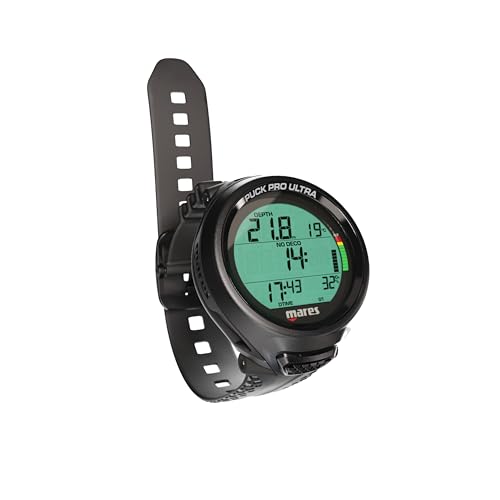
| Mares Puck Pro UltraBest Connectivity | Bluetooth logging | Bühlmann ZHL-16C; single-gas Nitrox 21-50% | High-contrast | CR2450 (100 dives); Bluetooth | Amazon |
| Seac Action | Scuba + freediving modes | Bühlmann ZHL-16C; 1 or 2 mixes (O2 ≤99%) | Digital | USB transfer | Amazon |
| Suunto Zoop Novo | Amateur-friendly durability | Air / Nitrox (21-50%); gauge mode | Backlit, easy-to-read | Standard; 330′ max depth | Amazon |
| Genesis Centauri | Rechargeable Bluetooth model | Air / Nitrox | Digital | Rechargeable; Bluetooth app | Amazon |
| Mares Puck 4 | Multi-gas tech diving | Bühlmann ZHL-16C; up to 3 gases | Segment display | Lithium metal; Bluetooth | Amazon |
| Aqua Lung i200C | App-controlled settings | Air / Nitrox / Gauge / Free Dive | Digital | User-changeable standard battery; Bluetooth | Amazon |
In‑Depth Reviews
1. Cressi Donatello Wrist Dive Computer
The simplest interface in the category that still handles nitrox and logs your dives.
This computer is the crowd favorite because it strips away everything that does not matter. A single button controls the whole show — short press for depth and time, long press to toggle settings. The display is a high-definition backlit screen, which buyers report stays perfectly readable in bright sunlight at the surface and in the low-light gloom at 100 feet. Build quality is what wins people over; the plastic case feels solid, and the strap holds firm on a wet wetsuit cuff.
The trade-off is power. It runs on a CR2430 coin cell, and the battery capacity is 320 milliamp-hours. That is enough for several dive trips, but the battery indicator is a simple low-battery warning rather than a bar graph. Owners mention that an optional infrared interface lets you Bluetooth the data to a phone, but you have to buy the adapter separately. Also, at 250 grams, this is not the lightest wrist computer — though its compact dimensions (3.94 x 4.33 x 5.12 inches) mean it does not feel bulky under a drysuit seal.
As owners put it: “once you study it several times it is a good dive computer” and “it outperformed my Apple Watch Ultra.” The consensus is that it works perfectly for a diver doing about 20 dives a year. skip it if you need advanced features like multi-gas support or an integrated logbook app — the Donatello does one thing (air and nitrox recreational diving) and does it well, no more, no less.
What owners love
- Single-button operation is intuitive after one dive trip
- Clear, high-definition backlit display reads well in all light
- Replaceable CR2430 battery keeps the cost of ownership low
The honest drawbacks
- Optional IR interface (not included) needed for data transfer
- No multi-gas or trimix capability
- Button sequences require memorizing short vs long presses
Who it fits: New divers and occasional recreational divers who want a dead-simple computer that handles nitrox.
The one caveat: If you plan on logging every dive digitally, budget for the extra IR adapter.
2. Cressi Leonardo 2.0 Scuba Dive Computer
A trusted classroom computer with a screen so large you can read it without your reading glasses.
The Leonardo has been a dive-school staple for years, and the 2.0 version refines it further. The display is what everyone raves about first — big, clear numerals that you can read at a glance even when your mask is fogging. It supports air, nitrox (with FO2 adjustable from 21% to 50%), and a gauge mode. what separates it is the three user-adjustable conservatism levels, which let you tweak how aggressive the algorithm is. Set it to high conservatism for a margin of safety on a liveaboard trip, or dial it back to stretch your no-deco limits on shallow reef dives.
The downsides are real, and they come up repeatedly. The wristband is famously oversized — owners with small wrists (S/M) report it spins around the arm and cannot be tightened enough. The backlight, while present, is a weak glow compared to modern OLEDs. And the single-button interface takes practice; the manual recommends several trial runs before the first dive. One owner summed it up: “the safety stop shows minutes only and you cannot wirelessly sync.” Despite that, the overall value is strong: functionality gets over 200 positive mentions, and ease of use gets nearly 100. This is a proven, reliable workhorse that has certified thousands of new divers.
Why it is popular
- Three adjustable conservatism levels for personalized safety
- Large, clear numerals make it the easiest screen to read underwater
- CR2430 battery lasts through many dives and is user-replaceable
The catches
- Wristband is oversized and may not fit small wrists securely
- Backlight is weak; hard to use in low-light conditions
- No Bluetooth — requires IR/USB cable for data transfer
Best for: Recreational divers who prioritize a huge, readable display and want to customize their decompression conservatism.
Think twice if: You have a smaller wrist — the loose fit can rotate and be annoying at depth.
3. Mares Puck Pro Ultra Dive Computer
The computer that gives you a modern logbook for free — Bluetooth straight to your phone.
Of all the budget options, this is the one that feels most modern without a price hike. It uses the Bühlmann ZHL-16C algorithm with dual gradient factors, so the decompression math is the same conservative standard used in computers five times the price. What excites owners is the integrated Bluetooth — after a dive weekend, you open the Mares app and the data syncs automatically. No dongles, no cables, no IR adapters. It is an incredibly polished experience for the price.
It measures 6.7 x 5.5 x 5.4 inches and weighs 1.2 pounds. The Cressi Donatello measures 3.94 x 4.33 x 5.12 inches and weighs 250 grams. The battery is a CR2450 that Mares claims lasts up to 100 dives, which in practice means almost two years of weekend diving before a swap. One point of caution: it only supports single-gas nitrox (21%-50%) rather than multi-gas switching. That is fine for recreational divers, but it means no trimix or multiple deco gas setups. Customers note diving a week in saltwater with zero issues: “super simple to use and set for nitrox.” Another owner noted that a single-button computer takes five minutes to learn, and then it becomes second nature.
What makes it stand out
- Built-in Bluetooth syncs to the Mares app for automatic dive logs
- Bühlmann ZHL-16C algorithm with adjustable gradient factors
- Long-lasting CR2450 battery (up to 100 dives)
Fair warnings
- Single-gas nitrox only — no multi-gas switching for advanced divers
- Heavier and bulkier than the Cressi Donatello (1.2 lb)
- One-button interface still requires some practice
Who should buy it: Divers who want the easiest logbook management — Bluetooth makes it easy.
Not for you if: You need multiple gas mixes or want the lightest possible wrist computer.
4. Seac Action Dive Computer

One wrist computer that switches from scuba mode to freediving mode at the push of a button.
Most budget computers are scuba-only. The Seac Action includes a dedicated freediving mode that tracks dive/surface time, current depth, and maximum depth, and holds 18 hours of freediving log entries. The Bühlmann ZHL-16C algorithm applies to scuba mode, which handles one or two gas mixes with oxygen up to 99% — a wider range than many others here. A gauge mode acts as a simple depth gauge and stopwatch for those who want to manage their own profiles.
The three-button layout is the main pain point. Several reviewers point out the interface is unintuitive and that the manual is sparse; one specifically mentioned needing to download online instructions. A small number of buyers received units with a dead battery from the start, which is always a concern with older stock. Still, for anyone who splits their time between scuba and freediving, the Action gives you both modes in a single plastic housing. It comes with a USB cable for logbook export, and the 1-year seller warranty covers early failures.
Unique strengths
- Freediving mode with 18 hours of log memory
- Handles up to two gas mixes with O2 ≤99%
- USB cable included for data transfer
Known issues
- Three-button interface is complicated and poorly documented
- Occasional dead-on-arrival battery reports
- Manual is in Italian; English version must be downloaded
Perfect for: Divers who switch between scuba and freediving and want one computer for both.
pass on it if: You want an intuitive interface — the Seac Action requires patience with its menu system.
5. Suunto Zoop Novo Wrist Scuba Diving Computer

The watch-style computer that 110 owners rate as the simplest “set and forget” option.
If you want a computer that auto-activates the moment it hits 2 feet of water, the Zoop Novo is your answer. It offers five operating modes — air, nitrox, gauge, and freedive (called “freedom” mode) — all controlled by a straightforward interface. The readability is the thing that keeps coming up: owners call the screen “easy to read underwater” and note that the backlight makes night dives manageable. It is also the only budget computer here with a maximum depth rating of 330 feet (100 meters), giving tech-curious divers some headroom.
On the less positive side, the menu dive is not always intuitive for first-time users. A small number of owners describe the controls as needing practice. The PC transfer cable is a separate purchase (a specific Suunto D-series cable, ASIN B007P4FML6), so integrating with dive-log software costs extra. The Suunto algorithm is known to be conservative — some divers enjoy the margin of safety, while others find their no-deco limits shorter than they would like. Still, the consensus from 110 total ratings is clear: it is a simple, reliable computer that consistently performs.
What owners appreciate
- Auto-activates at 2 feet — no button to press to start a dive
- Clear backlit display readable at night and in murky water
- Five modes including gauge and freedive
Watch out for
- PC cable sold separately; not all users realize this
- Conservative algorithm may limit repetitive-dive time
- Interface is not self-explanatory without the manual
Best for: New divers who want a durable, simple computer that starts automatically at the surface.
Consider otherwise if: You want expansive no-deco limits — the Suunto is notably conservative.
6. Genesis Centauri Dive Wrist Mount Computer
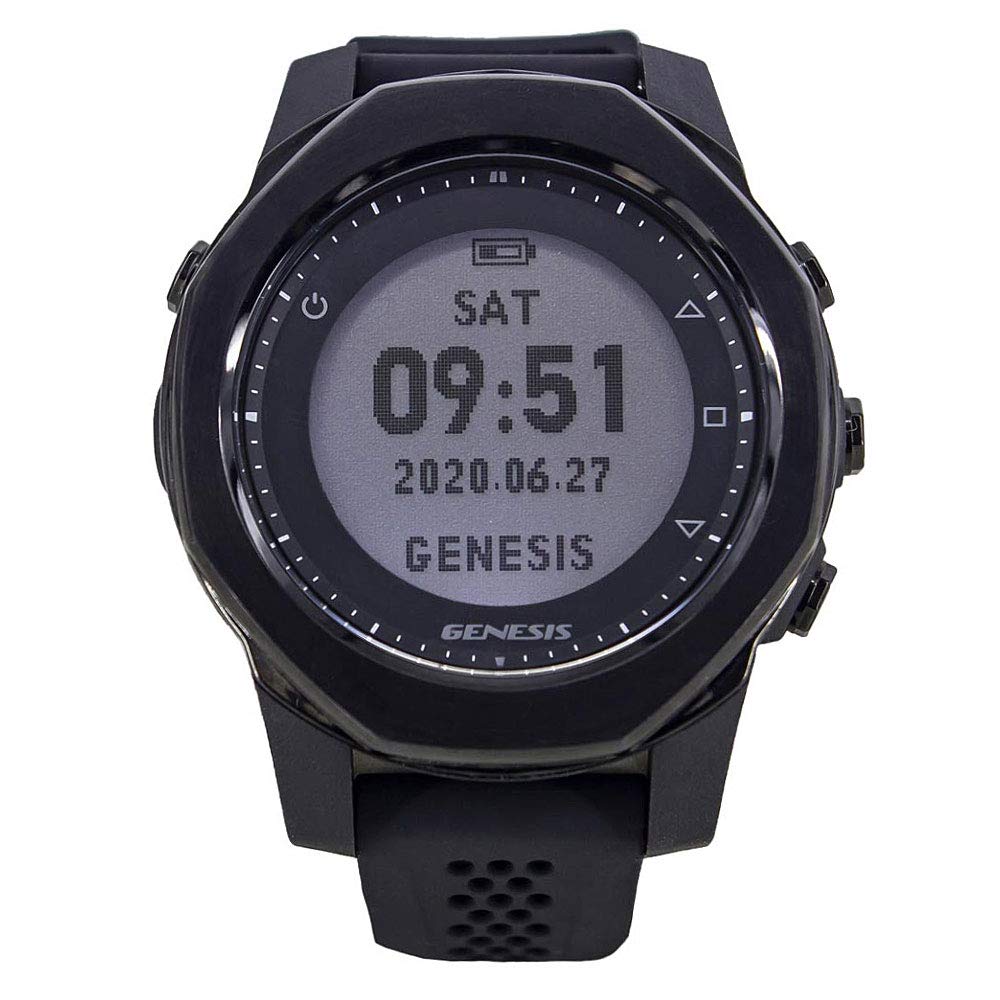
The rechargeable Bluetooth computer that owners say outperforms a ScubaPro Meridian.
Most sub- computers use disposable coin cells. The Genesis Centauri instead has a rechargeable battery, which owners love for a trip where you cannot find a spare CR2430. It connects via Bluetooth to the Dive Story app for settings and logbook, and the audible ascent warnings are distinct enough to hear over regulator noise. One owner who did 28 dives in Komodo, Indonesia called it “great, easy to set up and use,” and a direct comparison noted it “outperforms ScubaPro Meridian overall.” The build uses a mix of metal and plastic, weighing 8 ounces, compared to the Mares Puck Pro Ultra at 1.2 pounds.
The weakness here is software compatibility. The Dive Story app works fine for basic logging, but there is no export option to transfer data to other programs like Subsurface. If you are a meticulous log-keeper who wants freedom to move your data, this will frustrate you. The audible alarms, while present, are rated as “too quiet” by some owners, and the vibration is light. The unit is also the same hardware as the Deep 6 Excursion and Crest CR4, so you are getting a known platform — for better or worse, depending on how well that platform fits your ecosystem. Overall, a solid backup or primary computer for 10-20 dives a year, but not for data nerds.
Standout features
- Rechargeable battery eliminates coin-cell hunting
- Bluetooth app for settings and dive log
- Lightweight at 8 oz; comfortable for long trips
Known limitations
- No data export — locked into Dive Story app
- Audible alarms may be too quiet to hear on a windy surface
- Alarms lack strong vibration for alerting at depth
Ideal for: Divers who hate hunting for coin-cell batteries and want a lightweight computer with app control.
Look elsewhere if: You need portable dive logs or loud audible alerts.
7. Mares Puck 4 Wrist Dive Computer

A budget computer that supports up to three gases — unusual for this price tier.
Most entry-level computers handle one gas. The Puck 4 handles multigas capability for up to three gases — air, nitrox, and bottom timer — making it a natural fit for divers who are dipping a fin into basic tech diving or accelerated decompression. The Bühlmann ZHL-16C algorithm with adjustable gradient factors lets you tweak the conservatism per dive. The segment display uses chip-on-glass technology for maximum contrast, which shoppers say is “easy to read” even in low visibility. Integrated Bluetooth syncs with the Mares app, SSI app, and Subsurface on iPhone, giving you multiple logging options.
The one-button control takes time to learn, especially for accessing the decompression dive planner and setting the custom gradient factors. Note that the maximum custom gradient factor is capped at 85%, so you cannot push it to 100/100 for backup computer use. Also, the gas order is inflexible: gas 2 must have a higher oxygen percentage than gas 1, which creates issues if you are diving EAN nitrox as your primary and air in a pony bottle. This is a niche scenario, but note for tech-curious divers. The strap issue appears in one review: an arrival with a damaged strap was difficult to replace because Mares Italy is hard to reach via US support.
Why it punches above its weight
- Multigas support (up to 3 gases) for basic tech diving
- Adjustable gradient factors on the Bühlmann ZHL-16C algorithm
- Bluetooth works with Mares, SSI, and Subsurface apps
Where it falls short
- One-button interface is tricky for dive plan functions
- Gradient factor capped at 85% max
- Gas order restriction: must increase O2% across gases
Best for: Recreational divers who want room to grow into basic tech diving without a huge price jump.
it’s not for you if: You want a simple, turn-key interface — the menus demand patience.
8. Aqua Lung i200C Dive Computer

The only pick here where the smartphone app is the easiest way to change settings.
The i200C offers four operating modes — Air, Nitrox, Gauge (with run timer), and Free Dive — and uses Bluetooth Smart to sync with the DiverLog+ app on iOS and Android. The killer feature is that you can remotely control all settings from your phone rather than pressing buttons underwater. Buyers report that the printed directions are useless, but once you watch a YouTube tutorial and use the app, setup is straightforward. The standard battery is the most pragmatic choice in this roundup: it uses globally available batteries found at any supermarket or drugstore, so you never need to hunt for a specialty cell.
Unfortunately, this model also has the lowest average rating (3.8 stars) and the most significant quality complaints. A handful of owners received old stock with a dead battery, and a few encountered false “100 O2” warnings and blank displays after resetting. The data retention claim is solid — settings persist between battery changes — but the early failure rate is higher than other picks. For a brand-new PADI diver on a tight budget, it works fine, but the risk of a dud unit is real. The bright spot is the color range: the hot pink option made one new diver “absolutely love it,” and the durable PVC build feels solid in the hand.
What it does well
- Four modes covering air, nitrox, gauge, and freediving
- Full smartphone control via DiverLog+ app (iOS/Android)
- Uses standard drugstore batteries, no specialty cells required
Why the rating dips
- Higher rate of dead-on-arrival and blank display reports
- Printed manual is unusable — you will need online video tutorials
- Some units lose dive logs after battery change
Who it serves: Divers who prefer managing everything from their phone and appreciate a standard battery.
Not for risk-averse buyers: If you cannot afford a potential DOA unit, go with the more consistent Cressi or Mares models above.
Understanding the Specs
Algorithm (Bühlmann ZHL-16C vs. Proprietary)
The algorithm calculates how fast your tissues absorb and release nitrogen — it determines your no-decompression limit and any mandatory stops. Bühlmann ZHL-16C with gradient factors (used by Mares Puck Pro Ultra and Seac Action) is the industry gold standard for recreational diving because it is well-studied and adjustable. Proprietary algorithms from Suunto or Cressi can be more conservative, which is safer for new divers but can cut your bottom time on repetitive dives. If you plan extensive multi-day diving, an adjustable algorithm with gradient factors gives you more flexibility.
Nitrox Support and PO2 Ceiling
Nitrox is enriched air with a higher oxygen concentration, typically 32% or 36%, which reduces nitrogen absorption and extends your no-deco time. A budget computer should let you set the FO2 (fraction of oxygen) between 21% and at least 50%, and set a PO2 (partial pressure of oxygen) ceiling — usually 1.4 bar (recreational) or 1.6 bar (decompression). Without a PO2 alarm, it is possible to exceed the safe limit of oxygen toxicity. All picks here support nitrox, but double-check the range: the Seac Action goes to 99% O2, while the Mares Puck Pro Ultra caps at 50%.
FAQ
Can I use a budget dive computer for nitrox?
How long do the batteries last in these computers?
Is a single-button dive computer hard to use?
Can I download my dive logs to a computer?
What is the difference between Bühlmann ZHL-16C and a proprietary algorithm?
Will these computers work for freediving?
Which computer has the easiest-to-read display?
Is a dive computer safe for deep recreational dives (100-130 feet)?
Can I replace the strap on these computers?
Which of these is the best for a PADI Open Water graduate?
Final Thoughts: The Verdict
For the majority of shoppers, the budget dive computer winner is the Cressi Donatello because it nails the balance of simplicity, readability, and nitrox support at the lowest price. If you want Bluetooth dive-logging without a dongle, grab the Mares Puck Pro Ultra. And for freedivers or those who want two-gas flexibility, the Seac Action is the one to reach for.
How We Picked
We do not accept paid placement. Every pick is matched to a real buyer and a real use-case; we do not hands-on test units.
Sources & Methodology
Specifications: manufacturer listings and product documentation. Review insights: verified customer reviews, as of July 2026. Pricing: not shown on this page (it changes often); check the current price via the retailer link.
As an Amazon Associate, FitlyFast earns from qualifying purchases. This does not affect which products we feature.