
Our readers keep the lights on and the weekend projects moving. As an Amazon Associate, I earn from qualifying purchases.
Specs are compiled from manufacturer listings and verified buyer reviews and can change over time — please confirm the key details on the product page before buying.
Picking a budget inkjet printer usually depends on one real fear: you will save on the machine, and then bleed money on cartridges for years. The good news is that a few models on the market today break that cycle with genuinely reasonable ink costs and fast print speeds that do not feel like a step backward. The six options below balance upfront price with long-term running costs, and the Canon PIXMA TR7120 is the one worth buying first because it delivers the best speed-to-value — 14 pages per minute (ppm) in black and automatic two-sided printing — without forcing you into expensive ink refills.
I’m Rikta — the founder and writer behind FitlyFast. This guide is built by comparing the manufacturers’ published specifications and the patterns across verified customer reviews, so you get each pick’s real strengths and trade-offs instead of marketing spin.
You get a reliable all-in-one for homework, a compact model for a home office, or a machine that automatically prints on both sides — each pick keeps running costs low so you do not regret the purchase later.
Our Picks at a Glance


How To Choose The Best Budget Inkjet Printer
Buying a budget printer requires looking past the sticker price to the cost of ink and the features you will use every day. Here are the key specs to check before you click add to cart.
Print Speed: Pages Per Minute
Print speed is measured in pages per minute (ppm). A faster black-and-white speed, say 14 ppm versus 8 ppm, makes a real difference when you are printing a multi-page document. For occasional at-home use, anything above 7 ppm black is fine, but if you frequently print reports or assignments, aim for 10 ppm or higher.
Ink Cost and Cartridge Compatibility
The cheapest printer often uses the most expensive ink. Look for models that accept standard cartridges or allow generic (third-party) replacements. Some brands offer subscription services that deliver ink automatically, but check the fine print — after a free trial, you pay a monthly fee. A printer that works with affordable refills saves you the most money in the long run.
Automatic Duplex Printing
Automatic duplex (two-sided) printing prints on both sides of the paper without you having to flip the stack manually. It cuts paper use in half and is a huge convenience for multi-page documents. Manual duplex printing requires you to feed the pages back through, which is slower and prone to misalignment.
Connectivity: Wireless vs. USB-Only
Almost every modern printer supports wireless printing, but the quality of that connection varies. Dual-band Wi-Fi (2.4GHz and 5GHz) offers a more stable connection than 2.4GHz-only. If you plan to print from a smartphone or tablet, check that the printer works with Apple AirPrint or the brand’s own mobile app. USB connectivity is a reliable fallback if your Wi-Fi is finicky.
Quick Comparison
| Model | Best For | B&W Print Speed | Color Print Speed | Duplex Printing | Amazon |
|---|---|---|---|---|---|
| Canon PIXMA TR4720★ Best Overall | Ultra-budget all-in-one | 8.8 ppm | 4.4 ppm | Automatic | Amazon |
| Canon PIXMA TR7120Also Great | Fast daily printing | 14 ppm | 9 ppm | Automatic | Amazon |
| Brother MFC-J1410DW | Touchscreen & speed | 16 ppm | 9 ppm | Automatic | Amazon |
| Brother MFC-J1360DW | Balanced home office | 16 ppm | 9 ppm | Automatic | Amazon |
| HP DeskJet 4327 | Entry-level simplicity | 8.5 ppm | 5.5 ppm | Manual | Amazon |
| HP DeskJet 2855e | Compact dorm/student | 7.5 ppm | 5.5 ppm | Manual | Amazon |
In‑Depth Reviews
1. Canon PIXMA TR4720 All-in-One Wireless Inkjet Printer
The budget workhorse that packs a fax machine and an auto feeder into one small box.
Do not let the low price fool you — the Canon TR4720 is a genuine 4-in-1 (print, copy, scan, fax) with an Automatic Document Feeder and automatic duplex printing. It prints black documents at 8.8 pages per minute and color at 4.4 pages per minute, which is noticeably slower than the Canon TR7120 but perfectly adequate for basic household printing. The 100-sheet capacity is modest, but for occasional use it is rarely a problem. ENERGY STAR certification means it sips power — just 7W when active, 0.8W on standby.
The consensus among owners is that this printer hits the mark for the price — easy setup, decent print quality for everyday documents, and borderless photo prints up to 8.5 x 11 inches. The auto 2-sided printing works fast and jams rarely, according to those who use it regularly. It also supports Alexa for ink reordering, which is a neat convenience if you are already in that ecosystem. However, about a handful of owners mention it breaking after light use (around 50 pages), with the feeder snapping. That is a small but real risk at this price tier.
The main shortcoming is the color photo quality, which several owners call washed out or pastel. The starter ink cartridges deplete quickly, so budget for replacements soon after purchase. Desktop software feels outdated, and the manual is a 434-page PDF — not exactly inviting. Still, for under you get features (fax, ADF, duplex) that usually cost twice as much. It is the truest budget-friendly all-in-one in this list.
The value adds
- 4-in-1 with fax, ADF, and auto duplex at a very low entry price
- ENERGY STAR rated with low power consumption
- Supports Alexa ink reordering
The compromises
- Color photo quality is muted and washed out
- Print speed is slow — 8.8 ppm black, 4.4 ppm color
- A small number of units have durability issues
Best value if: you need fax capability and an auto document feeder without spending over.
Hold off if: you print color photos or high-volume documents — the speed and quality will disappoint.
2. Canon PIXMA TR7120 Wireless Color Inkjet Printer
The speed demon that keeps home printing from feeling like a chore.
You get your first page in seconds, not minutes. The Canon PIXMA TR7120 prints black documents at 14 pages per minute (ppm) and color at 9 ppm — versus the Canon PIXMA TR4720 at 4.4 ppm for color. The 2-cartridge hybrid ink system (one black, one tri-color) delivers sharp black text and vivid colors. Buyers praise the print quality most — 72 owners single it out as a standout feature. This printer suits anyone who prints multi-page color reports regularly and wants them done fast. skip it if you need a large paper tray (it holds 100 sheets) or a touchscreen display.
Setup is a strong point too, with 62 buyers noting it is straightforward. The 1.42-inch monochrome OLED display gives you a clear view of ink levels and settings without any confusing menus. Automatic duplex (two-sided) printing saves paper automatically, and the Auto Document Feeder (ADF) handles multi-page scanning and copying without you standing over it. The paper tray is on the smaller side, which a few owners mention as a minor trade-off, but for a compact home printer, it is a manageable one.
The recurring trade-off here is connectivity — about 34 owners give it mixed marks. Some find the Wi-Fi connects instantly, while others need a patient evening to get it on the network. If you have a dual-band router, the 2.4GHz or 5GHz support gives you a fighting chance. Once connected, the Canon PRINT App, Apple AirPrint, and Mopria Print Service cover all your mobile printing needs. For the price, this is the best value-per-speed ratio in this lineup.
What wins people over
- Print speed is genuinely fast — 14 ppm black, 9 ppm color
- Automatic duplex and Auto Document Feeder save time and paper
- OLED display makes navigation easy
The usual gripes
- Wi-Fi setup can be finicky for some users
- Paper tray is on the small side for heavy jobs
Reach for this if: you print multiple times a week and want a fast, reliable printer that will not slow you down.
Look elsewhere if: your Wi-Fi is temperamental and you prefer a wired-only connection.
3. Brother Work Smart 1410 Wireless Color Inkjet All-in-One (MFC-J1410DW)

The fastest black speed in the lineup with a touchscreen that makes setup feel modern.
Brother steps up here with the best black-and-white print speed in this group — 16 pages per minute — matched with a generous 2.7-inch color touchscreen. That display changes how you interact with the printer. Instead of pressing tiny buttons, you can tap through settings, monitor ink usage, and connect to cloud apps like Google Drive, Dropbox, and OneDrive directly from the screen. The setup process is well-regarded, with 25 buyers calling it straightforward, and many appreciate that it works with generic ink cartridges, keeping long-term costs low.
Your first page appears in 6.2 seconds for black — almost instantly. The Brother MFC-J1410DW includes automatic duplex printing (prints on both sides) and a 20-sheet Automatic Document Feeder (ADF — a tray that feeds multi-page originals without you standing there), making multi-page jobs easy. Its 150-sheet paper tray is more spacious than the Canon TR7120 (100 sheets). Print quality is what 30 owners praise most, calling it crisp and vivid. A few note mixed reliability — 27 owners flag occasional hiccups — but overall it is considered a sturdy home office machine. This is the pick if you want the fastest black printing (14 ppm) with a modern touchscreen. pass on it if you hate software hurdles during setup and want an out-of-the-box smooth experience.
Where this printer shines is for the home office user who needs speed and doesn’t want to fight with a tiny monochrome screen. The USB 2.0 port gives you a wired fallback if Wi-Fi acts up, and the Brother Mobile Connect app covers scanning and printing from your phone. The only real downside buyers mention is that ink can run through quickly, though that is a common theme across nearly every inkjet printer at this price point.
Strong suits
- Fastest black speed at 16 ppm, color at 9 ppm
- Large 2.7-inch color touchscreen makes operation easy
- Works with generic ink, cutting long-term costs
The trade-offs
- Ink consumption is on the higher side
- Some reliability concerns flagged by a portion of owners
Who it suits: home office users who want the fastest black printing and a modern touchscreen experience.
Who should pass: light users who print a handful of pages per month and want the lowest ink overhead.
4. Brother Work Smart 1360 Wireless Color Inkjet All-in-One (MFC-J1360DW)

The same speed as the step-up model, with a slightly smaller screen but a noticeably lower cost.
This Brother is a strong middle-ground play. It matches the top-tier 16 ppm black speed and 9 ppm color speed of the MFC-J1410DW, but drops the touchscreen to a simpler 1.8-inch color display. That change alone makes it more affordable while keeping the same printing engine underneath. The automatic duplex printing, 20-sheet ADF, and 150-sheet paper tray are all present, so your daily workflow does not take a hit. Decently priced ink refills are a consistent point in its favor — buyers report using generic cartridges with no issues.
The setup process splits opinion. Some owners find the phone app straightforward, while others struggle with the EasySetup software on a laptop. The fix is often to skip the software and install the full driver package from Brother’s website. Once running, the print quality is crisp on both black-and-white and color, and the printer handles thicker paper without complaint. It has been reliable for over six months for many users, making it a solid long-term investment for a home or small office.
Where this pick falls short of the MFC-J1410DW is the smaller screen, which makes navigating cloud apps and settings a bit less intuitive. Still, the Brother Mobile Connect app covers printing and scanning from your phone, so you can bypass the screen entirely. If you want the fastest Brother speed without paying for the touchscreen premium, this is the sensible buy.
Why it works
- Fast 16 ppm black and 9 ppm color speeds
- Automatic duplex and 150-sheet tray save time
- Affordable ink refills keep running costs low
Where it compromises
- Setup can be tricky, especially on Windows
- Smaller 1.8-inch screen feels basic vs the step-up model
Perfect for: budget-conscious buyers who want the fastest print speeds without paying extra for a larger touchscreen.
Not ideal for: anyone who hates software hurdles during setup and wants an out-of-the-box smooth experience.
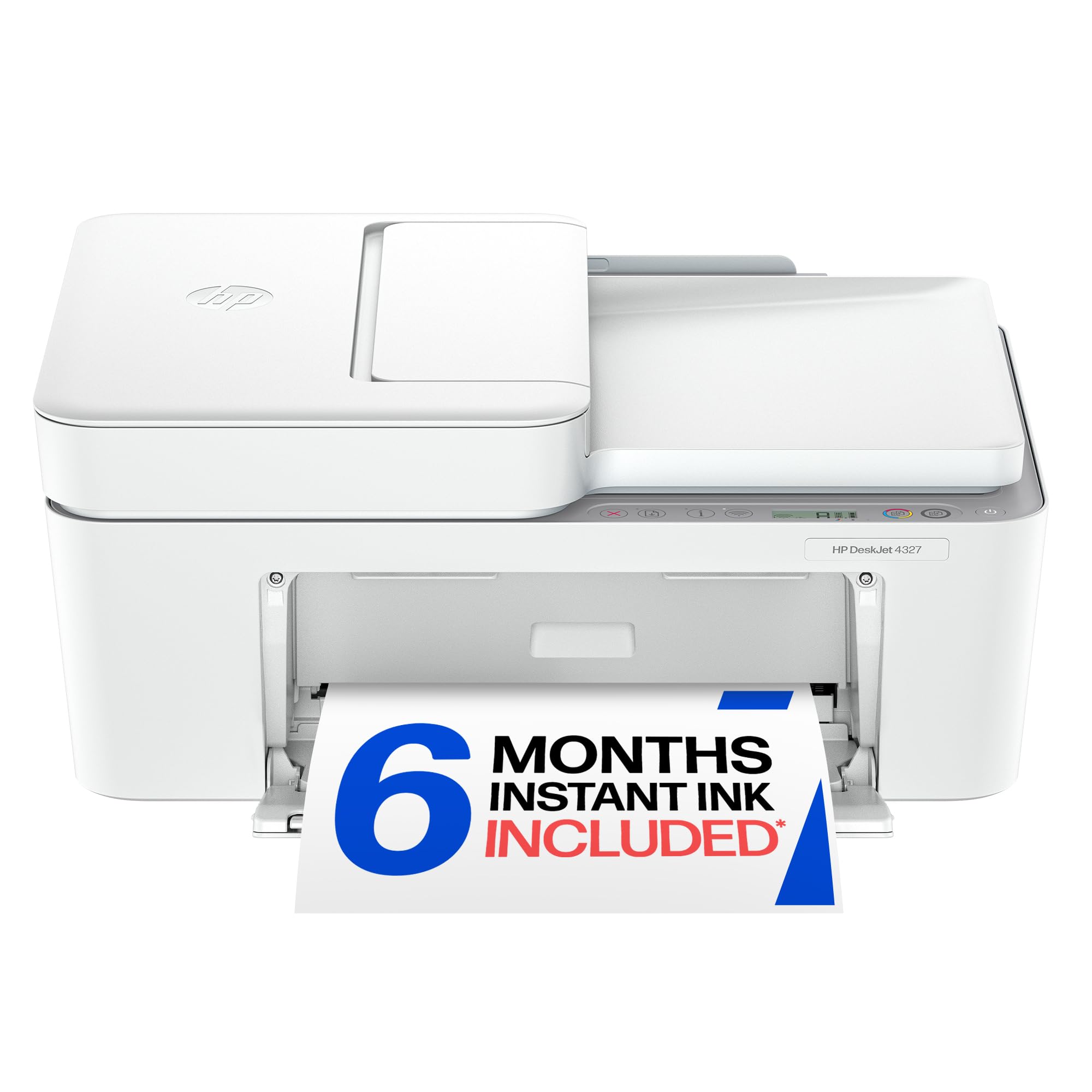
5. HP DeskJet 4327 Wireless All-in-One Color Inkjet Printer
An entry-level machine that leans on HP’s AI smarts to clean up web page prints.
HP’s DeskJet line has always been about simple, affordable home printing, and the 4327 continues that tradition. It prints black documents at 8.5 pages per minute and color at 5.5 ppm — close to the Canon TR4720 on speed. Where this printer tries to stand out is the HP AI feature, which automatically removes unwanted content and awkward layouts from web pages and emails so your prints come out clean. It is a genuinely useful trick if you frequently print recipes, itineraries, or anything pulled from a browser.
The 35-sheet auto document feeder and a 60-sheet input tray are adequate for light home use. Print quality earns the most praise from owners — 25 buyers highlight it as a strong point — and the setup is rated positively by 24 owners, calling it easy. It also includes a 6-month trial of HP Instant Ink, which delivers cartridges automatically; after that you pay a monthly fee. The printer is made with at least 70% recycled plastics and carries both ENERGY STAR and EPEAT certifications, so it scores well on sustainability.
The recurring weak spot is wireless setup. Several customers note that the wireless setup is confusing and difficult, with the printer dropping connectivity or simply failing to complete the process. No USB cable is included, so if you have trouble with Wi-Fi, you are stuck. This is a known frustration, and it is the top reason the overall rating sits at 3.8 stars. If you have a solid dual-band router and some patience, it works well, but less tech-savvy buyers may find it a headache.
The strengths
- AI-powered print cleaning makes web page prints look great
- 35-sheet ADF handles multi-page jobs
- Made from 70% recycled plastics, ENERGY STAR certified
The frustrations
- Wireless setup is often difficult and unreliable
- No USB cable included; relies on Wi-Fi working
Choose this if: you often print web pages and want AI formatting help with a low upfront price.
it’s not for you if: you do not want to wrestle with wireless setup or need a USB fallback cable.
6. HP DeskJet 2855e Wireless All-in-One Color Inkjet Printer

The ultra-compact that squeezes into a dorm or a corner desk without a fuss.
If space is tight, the HP DeskJet 2855e is the smallest printer here. It prints at 7.5 ppm black and 5.5 ppm color, making it the slowest in this lineup, but for a student printing assignments, recipes, and the occasional document, that speed is perfectly adequate. The 60-sheet input tray is small, but it works well for micro-batch jobs. The printer is only compatible with 2.4 GHz Wi-Fi, so if your network runs on 5 GHz, you will need to check your router settings before buying.
The HP Smart App is the main way to interact with this printer, and owners who use it report that setup takes under 20 minutes via a phone. The AI print feature, same as on the 4327, cleans up web page formatting automatically, which is a welcome touch for a budget model. Print quality gets good marks for crisp black text and vibrant color, and the compact design fits neatly into a dorm or small home office. HP includes a 3-month trial of Instant Ink with HP+ activation, after which a monthly fee kicks in.
The biggest criticism here is the software experience. Several owners say the printer works fine as hardware but that the HP software is a disaster — it forces account registration, the Windows download is painfully slow, and some units reject generic ink cartridges entirely, forcing you to buy expensive HP cartridges. This is the most common complaint, and it is a real reason to consider other options if you value software simplicity. For a light-use printer that fits in a tight space, it works, but be prepared for some digital friction.
Compact advantages
- Very small footprint, ideal for dorms or small desks
- AI formatting helps clean up web prints
- Easy 20-minute phone setup via HP Smart App
Software and ink issues
- Forces HP account registration and large software download
- Some units reject generic ink and require expensive HP cartridges
- Only works on 2.4 GHz Wi-Fi
Room for it if: you need the smallest possible printer and can work around the HP software quirks.
Not a fit if: you want to use cheap generic ink or you only have a 5 GHz Wi-Fi network at home.
Understanding the Specs
Print Speed (Pages Per Minute)
Print speed, measured in pages per minute (ppm), tells you how fast the printer churns out documents. Black-and-white (B&W) speed is always faster than color (color pages take more passes). A speed of 8 ppm or higher is fine for occasional use, while 14 ppm or above starts to feel genuinely quick. If you print multipage documents regularly, prioritize the higher ppm number — the gap between 8 ppm and 14 ppm adds up fast on a 20-page report.
Automatic Duplex vs. Manual Duplex
Automatic duplex (two-sided) printing flips the paper automatically so you can print on both sides without touching the tray. Manual duplex means you re-feed the printed pages by hand, which is slower and error-prone. Nearly every modern printer under now offers automatic duplex, but always check — saving paper and time is one of the best features you can get on a budget printer.
Auto Document Feeder (ADF)
An Auto Document Feeder (ADF) lets you load a stack of pages and have them fed through the scanner automatically, one by one. This is a huge time saver for copying or scanning multi-page documents. The number next to ADF (e.g., 20-sheet or 35-sheet) tells you how many pages it can hold at once. Without an ADF, you have to place each page on the scanner glass manually.
Cartridge Compatibility and Ink Cost
All inkjet printers come with starter cartridges that hold less ink than standard replacements. After those run out, you buy standard cartridges. Some printers accept generic (third-party) replacements, which can cut your ink costs by more than half. Others are programmed to reject generic cartridges, locking you into the brand’s own expensive ink. Check the product’s compatibility list before you buy if long-term ink cost matters to you.
FAQ
How many pages per minute should a budget inkjet printer manage?
Can I use generic ink cartridges in a budget inkjet printer?
What is the difference between automatic duplex and manual duplex printing?
Is an Auto Document Feeder (ADF) necessary for a home printer?
Will a budget inkjet printer work with my Mac or Windows computer?
How long do the starter ink cartridges last?
What does the ENERGY STAR certification mean for a printer?
Can I print from my phone without a computer?
How much does it cost to run a budget inkjet printer per year?
Which budget inkjet printer has the fastest black-and-white print speed?
Final Thoughts: The Verdict
For most buyers, the budget inkjet printer winner is the Canon PIXMA TR7120 because it is the best speed-to-value pick in this lineup — 14 ppm black, automatic duplex, and a very approachable price for the features it packs. If you want the fastest black printing with a modern touchscreen, grab the Brother MFC-J1410DW. And for the tightest budgets that still need an auto document feeder and fax, the Canon PIXMA TR4720 is the one to reach for.
How We Picked
We do not accept paid placement. Every pick is matched to a real buyer and a real use-case; we do not hands-on test units.
Sources & Methodology
Specifications: manufacturer listings and product documentation. Review insights: verified customer reviews, as of July 2026. Pricing: not shown on this page (it changes often); check the current price via the retailer link.
As an Amazon Associate, FitlyFast earns from qualifying purchases. This does not affect which products we feature.