
Our readers keep the lights on and the weekend projects moving. As an Amazon Associate, I earn from qualifying purchases.
Specs are compiled from manufacturer listings and verified buyer reviews and can change over time — please confirm the key details on the product page before buying.
Brown switches are the just-right of the mechanical keyboard world — they give you a physical bump of feedback on every press without the loud, distracting click of blue switches. That makes them the go-to for anyone who types all day in an office, codes at night, or games in a shared space. The trade-off you’ll actually feel is finding a board that balances that tactile response with build quality and wireless reliability, without paying a fortune.
I’m Rikta — the founder and writer behind FitlyFast. This guide is built by comparing the manufacturers’ published specifications and the patterns across verified customer reviews, so you get each pick’s real strengths and trade-offs instead of marketing spin.
If you’re moving up from a membrane keyboard or assembling your first serious setup, you want a board that feels great for both typing and gaming while staying affordable. This guide ranks the best brown switch keyboards by real-world feedback, so you can pick the one that fits your desk and your fingers.
Our Picks at a Glance

How To Choose The Best Brown Switch Keyboard
Brown switches are defined by a tactile bump at the actuation point — you feel the press register before your finger bottoms out, but there’s no click noise. That makes them the most versatile switch type for a desk that doubles as a workspace and a gaming rig. Picking the right board is about matching the layout, connectivity, and customization to how you actually work.
Size Matters More Than You Think
Full-size (100% or 104-key) boards keep the number pad, which is non-negotiable for spreadsheet work but eats up desk space. Tenkeyless (TKL) drops the numpad to give your mouse more room to move, which is why gamers love it. Compact 75% and 96% layouts keep arrow keys and often the numpad too, but squeeze the overall footprint — a real plus if your desk is tight.
Wireless, Wired, or Both
A tri-mode keyboard gives you a 2.4GHz dongle for low-latency gaming, Bluetooth to hop between devices, and USB-C wired for zero lag and charging. A board with Bluetooth can drift or drop if its range is weak — some buyers report connections failing when they’re more than a couple of feet from the receiver. If reliability is your top priority, a wired USB-C connection is the simplest bet.
Quick Comparison
| Model | Best For | Connectivity | Layout | Battery Life | Amazon |
|---|---|---|---|---|---|
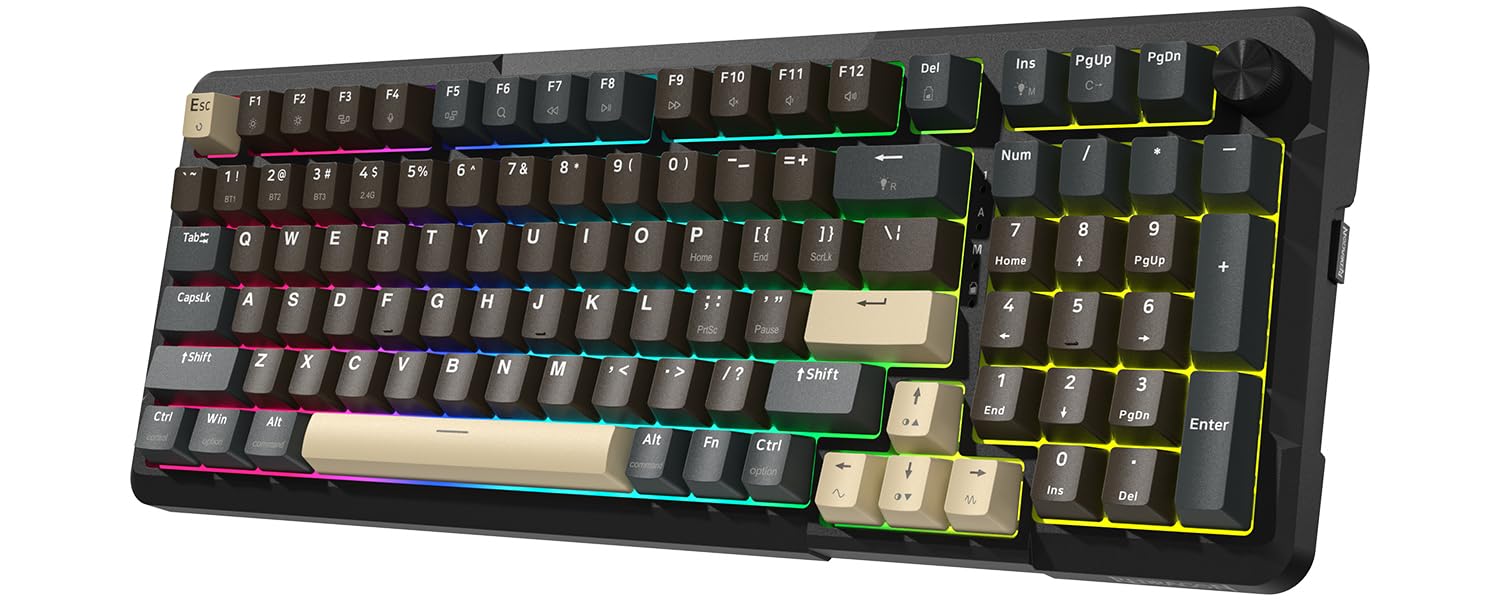
| Redragon K742★ Best Overall | Best Overall — Creamy feel | BT 5.0 / 2.4GHz / USB-C | 98% (compact) | 4,000mAh / 53hrs | Amazon |
| RK Royal Kludge RK98Retro Favorite | 168-hour battery champ | BT 5.1 / 2.4GHz / USB-C | 98% (100 keys) | 3,750mAh / 168hrs | Amazon |
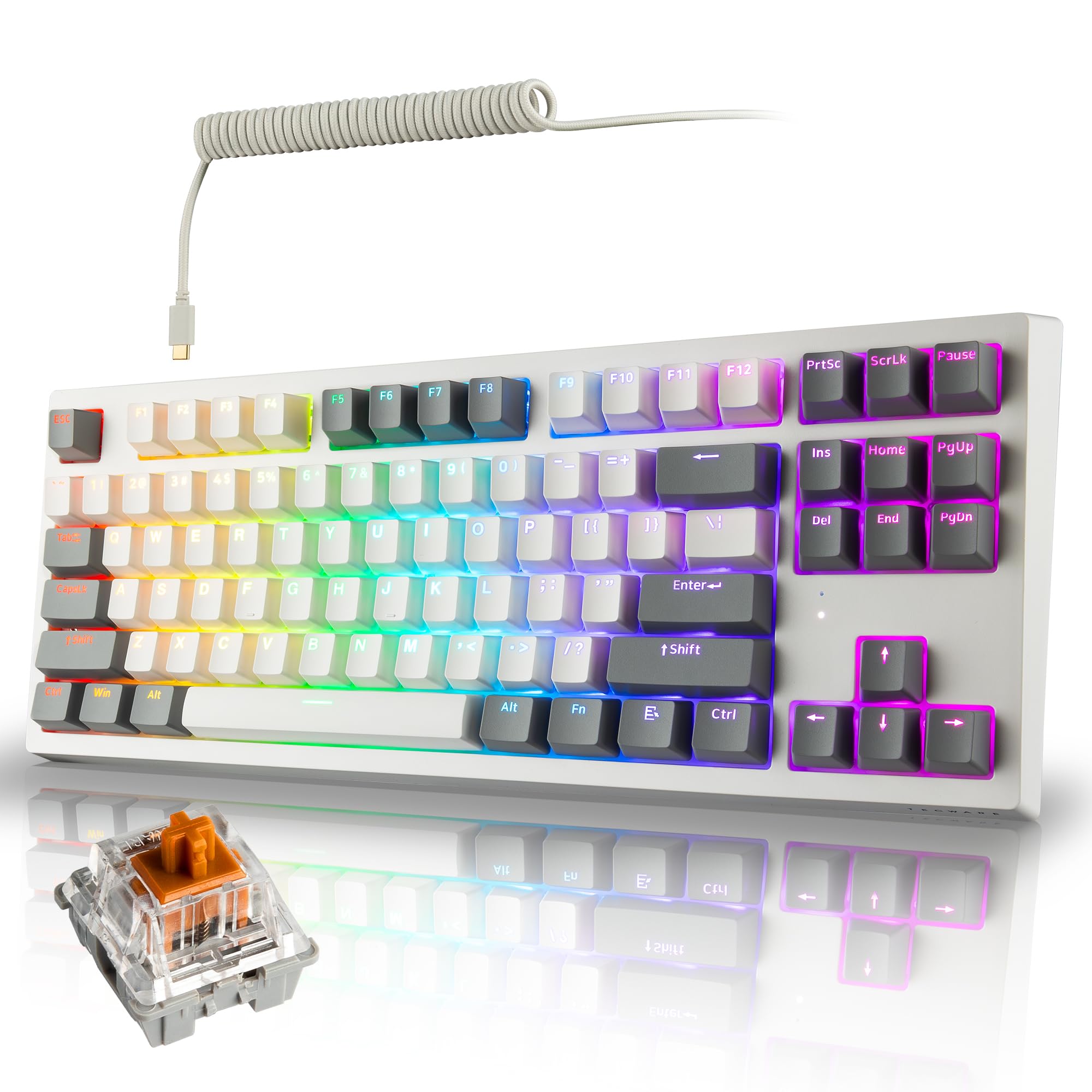
| TECWARE Phantom+ EliteEndurance Pick | 250-hour wireless marathon | BT 5.0 / 2.4GHz / USB-C | TKL (87 keys) | 2,500mAh / 250hrs | Amazon |
| Keychron K8 | Mac multi-device typing | BT 5.1 / USB-C | TKL (87 keys) | 4,000mAh / 200hrs | Amazon |
| RK Royal Kludge RK100 | USB pass-through ports | BT 5.1 / 2.4GHz / Wired | 96% (100 keys) | 3,750mAh | Amazon |
| Keychron K3 V2 | Ultra-slim travel typing | BT 5.1 / USB-C | 75% (84 keys) | Rechargeable | Amazon |
| Logitech G515 | Low-profile gaming precision | LIGHTSPEED / BT / Wired | TKL low-profile | 36 hours | Amazon |
In-Depth Reviews
1. Redragon K742 Wireless Mechanical Gaming Keyboard
Our pick — over 4.5★ from 200+ verified ratings; the strongest balance of quality and price.
The crowd-pleaser that brings creamy, quiet keystrokes and a volume knob to your desk.
The thing everyone raves about here is the typing feel — a 5-layer gasket structure with sound-absorbing padding makes each press feel soft and satisfying. The Redragon pre-lubed switches give you that creamy sound from the start, and owners mention the action starts smooth and stays pleasant. Quality is the most-discussed aspect by a wide margin, so you’re getting a board built on substance.
Connectivity is a strong suit too: tri-mode Bluetooth 5.0, 2.4GHz wireless, and USB-C wired let you hop between up to three devices with one-click switching. The 4,000mAh battery lasts up to 53 hours with backlight off, so weekly charging is a non-issue.. The 98% compact layout keeps your number pad for productivity while saving about 10% of your desk space — a rare win for both spreadsheet work and gaming setup.
The hot-swappable PCB supports 3-pin and 5-pin switches, meaning you can swap in different switches later without soldering. One note from the review pages: the dongle and Bluetooth can feel less reliable than the wired connection, and the plastic mid-section flexes a little — the outer frame feels sturdy, though. As buyers put it: “Creamy clicks initially, sharpen later.”
Why it wins owners over
- Creamy, quiet tactile typing praised for its satisfying feel
- Tri-mode wireless with 4,000mAh battery lasting 53 hours backlit-off
- Hot-swappable 3-pin/5-pin PCB for future switch upgrades
- Volume knob and QMK/VIA support for deep customization
What to weigh first
- 2.4GHz dongle and Bluetooth reported less dependable than wired
- Plastic mid-section flexes; outer frame is the sturdy part
- Compact layout’s small numpad 0 slows number entry
Your best bet if: you want a versatile daily driver that pairs creamy typing with wireless freedom and a knob you’ll actually use.
Think twice if: you need flawless wireless reliability every hour — wired mode is this board’s safest connection.
2. RK Royal Kludge RK98 Wireless Mechanical Keyboard
An 98% board that outlasts the workweek on a single charge with a satisfying thock.
The battery is the headline: A 3,750mAh cell delivers up to 168 hours of use with RGB off in Bluetooth mode. — that’s weeks of daily typing without reaching for a cable. The tactile brown switches with 55gf actuation force give a gentle bump per key., and the noise-cancelling cotton inside the case keeps the sound profile office-friendly. The “thocky” sound is what owners keep mentioning as a highlight.
It’s also a tinkerer’s dream: the hot-swappable PCB accepts 3-pin or 5-pin switches, so you can swap in linear, tactile, or clicky switches without soldering. The 98% layout with 100 keys keeps the numpad and arrow keys, and the offset arrow design cuts down on accidental presses. You get tri-mode connectivity via Bluetooth 5.1, 2.4GHz with a storable dongle, or wired USB-C for zero-latency competitive play.
Where it falls short of the Redragon above is customization depth — there’s no QMK/VIA, so you’re limited to the onboard software. The backlighting is bright with five levels, but the keycaps aren’t shine-through, meaning the letters don’t glow. Owners note the stock switches feel heavy at 67g, so if you prefer a lighter touch, you’ll want to swap them from day one.
Crowd favorite: A premium touch and sturdy build rivaling pricier boards, with a sound that owners describe as satisfyingly deep.
One honest catch: The lettering won’t light up, so if you depend on per-key illumination, this isn’t your board.
Best for: typists and gamers who want marathon battery life and the option to customize switches later.
Not for: anyone who wants shine-through keycaps or QMK/VIA-level macro programming.
3. TECWARE Phantom+ Elite 87 Key RGB Mechanical Keyboard
A tenkeyless board with the longest wireless endurance here, built with a metal top frame.
The standout spec is raw endurance — The built-in 2,500mAh battery runs up to 250 hours of continuous use., the longest wireless runtime in this lineup by a wide margin. That means you can go a full month of daily work and play without charging. The Wraith Brown switches are pre-lubed, delivering a satisfying tactile bump without a loud click, and the sound-dampening foam plus tuned V3 stabilizers keep rattle at bay.
Build quality earns consistent praise, with buyers calling out the sturdy metal construction and cool-to-the-touch top plate. The 87-key TKL layout gives your mouse maximum room for gaming while keeping all essential function keys. You get tri-mode connectivity (2.4GHz, Bluetooth 5.0, USB-C) and double-shot PBT keycaps that resist shine and wear — a durability upgrade over standard ABS caps.
Sound is the one mixed note in the feedback: most owners love it, but it’s not silent — one buyer called it “not silent, but satisfying audio feedback.” The RGB lighting is bright with 18 dynamic pre-set modes, and the 5-pin hot-swap sockets (sockets that let you pull out and replace switches without soldering) accept any compatible MX-style switch. The box even includes 4 spare switches plus both a keycap puller and a switch puller.
What makes it special
- 250-hour battery — the longest run time in this roundup
- Sturdy metal top plate praised for premium feel
- Double-shot PBT keycaps resist shine and wear
- Hot-swappable 5-pin with 4 spare switches included
What to know
- Sound is satisfying but not silent — audible feedback by design
- Software setup had hiccups for some owners
Best if: you want a compact TKL with the longest battery life and a quality metal build that outshines the price.
Skip if: you need a whisper-quiet board — this one has audible, though pleasant, feedback.
4. Keychron K8 Tenkeyless Wireless Mechanical Keyboard

The TKL that bridges Mac and Windows with a 200-hour battery and crisp brown switches.
Sound quality is the most-praised aspect here — owners describe the brown switches as “extremely satisfying to press,” with a precision and “clack” that’s a clear upgrade from a flat Apple keyboard. The 87-key TKL layout (tenkeyless, meaning no number pad) puts navigation keys like Home and End right at your fingertips, and the 80% footprint frees up serious mouse space. It connects up to 3 devices via Bluetooth 5.1 (the latest wireless standard) with smooth switching, plus a reliable USB-C wired mode.
At the core is a 4,000mAh battery — one of the biggest in mechanical keyboards — lasting up to 200 hours with the backlight off. That’s easily a month of typical use. The Keychron super brown switches feature 2.0±0.4mm pre-travel and 55±10gf actuation., a balanced middle ground for both typing and light gaming. You get OEM-profile shine-through keycaps for better visibility in dim rooms.
The honest caveat: Bluetooth connectivity is the most-mixed aspect in the feedback. While many connect immediately, some report connection issues and one owner found the range under 3 feet unusable. The board also doesn’t have hot-swap sockets and is Bluetooth-only when wireless — there’s no 2.4GHz dongle. For a desk within close range of your computer, it’s fantastic value.
What owners love: The typing feel with satisfying clack, solid metal frame, and the convenience of switching between three devices.
What’s in the box: Mac and Windows keycaps, keycap puller, and a braided USB-C cable for wired mode.
Choose it for: a multi-device Mac user who types a lot and wants a clean, quiet, satisfying board.
Reconsider if: you need bulletproof wireless — the 2.4GHz dongle is absent here, and Bluetooth range varies.
5. RK ROYAL KLUDGE RK100 Wireless Mechanical Keyboard

A 96% full-size board that doubles as a USB hub with a 3,750mAh battery inside.
The defining feature here is versatility: the RK100 keeps a full number pad in a compact 96% layout, and it’s armed with 2 built-in USB pass-through ports plus 1 USB-C port. That means you can plug in a mouse receiver or a flash drive right into the keyboard — a small convenience that changes your desk setup. Quality leads the most-discussed list, with owners praising the sturdy weight and tactile feel.
The brown switches produce a low “thock” sound that owners describe as much quieter than clicky alternatives — one even compared it favorably to a Redragon board with red switches. The 3,750mAh battery is the same size as the RK98 above, and tri-mode connectivity (Bluetooth 5.1, 2.4GHz, wired USB) covers all bases with up to 3 paired devices. Hot-swap sockets accept 3-pin and 5-pin switches, making it a solid first modding project for beginners.
The mixed feedback centers on the 2.4GHz receiver — many report Bluetooth works flawlessly for months while the dongle connection is less reliable. The arrow key layout is also cramped for some, and the End key isn’t there by default. Owners note the LED backlight is cozy at night but doesn’t shine through the keycaps, so lettering can be hard to read in bright light.
What stands out
- 2 USB pass-through ports built into the board
- Quiet low “thock” sound from brown switches
- Hot-swappable 3-pin/5-pin for easy modding
- Tri-mode wireless with 3,750mAh battery
What’s inconsistent
- 2.4GHz receiver reliability — Bluetooth is the steadier link
- Arrow and Delete layout feels cramped to some
- Backlight doesn’t illuminate the keycap lettering
Reach for it: if you want a full-size board with a numpad plus USB pass-through convenience and easy modding.
Be mindful: the wireless dongle can be flaky — treat Bluetooth or wired as your primary connection.
6. Keychron K3 Version 2 Ultra-Slim Wireless Keyboard

The 7/8-inch thin board that brings mechanical feel without the wrist-straining bulk.
This is the keyboard for people who love mechanical feel but hate the tall profile. The low-profile Keychron switches have a shorter pre-travel that triggers faster — and the whole board sits at just 0.87 inches thick. Buyers call the brown switches “quiet and tactile,” and the best praise goes to the sound quality, which is the most-raved-about aspect by far. No wrist rest needed.
The 75% layout with 84 keys keeps all the essential keys including function row, in a footprint that slips easily into a backpack. The reinforced aluminum body with a plastic bottom frame makes it light and stable, and the floating keycap design with white backlight looks clean on any desk. Bluetooth 5.1 pairs up to 3 devices with quick switching, and Mac media keys work right from the start.
Battery life is the honest weak spot — several owners note it falls short compared to taller boards. There’s also no software for macros and no hot-swap sockets, so what you buy is what you get mechanically. Some typists found the low-profile keys “felt weird” during fast touch-typing, taking adjustment from a regular-profile board. For travelers and minimalists, though, this is a standout.
Why it’s loved: A slim, lightweight mechanical that pairs smoothly with Mac, Chromebook, and Windows — the best slim TKL form factor in this list.
The trade-off: Expect to charge more often than with the chunky boards above, and don’t plan on swapping switches.
Best suited to: frequent travelers and minimalists who want mechanical feel in a slim, packable frame.
Not ideal for: heavy modders or anyone who wants a long-running battery without frequent charges.
7. Logitech G515 Lightspeed TKL Wireless Gaming Keyboard

The low-profile gamer that delivers 1 ms response and a thocky feel that beats bigger boards.
This is the board for competitive players who also type daily. The GL Brown tactile switches (switches with a small bump at the press point) are factory-lubed with a low-profile design, giving you discernible feedback without the tall travel of standard switches — and owners rave that the “thocky” sound is top-tier. The LIGHTSPEED wireless dongle delivers a 1 ms report rate, making it feel indistinguishable from a wired connection., and it can pair 2:1 with a compatible Logitech mouse on a single USB receiver.
Gaming features run deep: KEYCONTROL (Logitech’s software) lets you program up to 15 functions per key, three hotkeys give instant access to LIGHTSPEED, Bluetooth, and Game Mode, and LIGHTSYNC RGB spans 16.8 million colors, synced through G HUB.. The double-shot PBT keycaps (keycaps with legends molded through, not printed) resist oil and feel premium, and the steel top plate carries a heavy, stable build — one owner noted it “beats G915 TKL and most low-profile boards.” Battery life sits at 36 hours of continuous wireless play.
The catch: the GL switches aren’t hot-swappable and there’s no QMK/VIA, so customization stays inside Logitech’s software — fine if you’re in that ecosystem, limiting if you’re not. It also remembers only one Bluetooth device at a time. The transparent keycap lettering is hard to read without the backlight on. At the premium end of this list, you’re paying for polish and gaming-grade wireless reliability.
What owners love: The responsive, quiet keys that boost typing speed and accuracy, plus a wireless feel that rivals wired.
Honest trade-off: No hot-swap, no QMK, and just one Bluetooth slot — it’s a polished, closed ecosystem.
Best for: gamers who want a low-profile, low-latency board with premium build and don’t plan to mod switches.
Not for: multi-device Bluetooth hoppers or anyone who wants open-source programming.
Understanding the Specs
Switch Type & Actuation
Brown switches have a tactile bump at the actuation point, so you feel the press register without a loud click. Actuation force (measured in grams, like 55gf) tells you how hard you must press — lower is lighter and faster, higher feels more deliberate. Pre-travel (often 2.0mm) is how far the key moves before it registers.
Connectivity Modes & Battery
Tri-mode boards offer a 2.4GHz dongle for low-latency gaming, Bluetooth for hopping between devices, and USB-C wired for charging plus zero-lag play. Battery life is measured in mAh (like 4,000mAh) and rated in hours with the backlight on or off — a board rated for 168 hours backlit-off can run weeks on a charge.
Layout & Form Factor
Full-size keeps the number pad; tenkeyless (TKL) drops it for more mouse room; compact 75% and 96% layouts trim the footprint while keeping arrow keys. The percentage (like 98%) is the ratio of keys kept versus a full-size 104-key board. Consider what your daily work demands before you pick.
Hot-Swap & Keycaps
Hot-swappable means you can pull out switches with a tool and replace them without soldering — great for trying different feels or fixing a single key. Keycaps come in ABS (softer, can shine over time) or double-shot PBT (more durable, oil-resistant). South-facing RGB lights point the LEDs down toward the plate.
FAQ
What makes brown switches different from blue and red switches?
Can I use a brown switch keyboard for both gaming and typing?
Will this keyboard work with my Mac or Windows computer?
How long does a wireless mechanical keyboard battery last?
What is a hot-swappable keyboard and do I need it?
Why would I choose a tenkeyless or compact layout over full-size?
What is QMK/VIA and why do keyboard enthusiasts care?
Final Thoughts: The Verdict
If you want one dependable pick, the brown switch keyboard winner is the Redragon K742 because it pairs a creamy, quiet typing feel with tri-mode wireless and a 4,000mAh battery, all at a mid-range price that delivers exceptional value. If you want the longest wireless endurance, grab the TECWARE Phantom+ Elite and its 250-hour runtime. And for full-size retro reliability, the Keychron C2 is the wired workhorse you can rely on for years.
Whatever you pick — from the RK98’s 168-hour battery to the Logitech G515’s 1 ms low-profile gaming response — the crowd favorite is clear: the Redragon K742 holds the highest score in this list, with owners singling out its build quality and creamy feel above all else.
How We Picked
We do not accept paid placement. Every pick is matched to a real buyer and a real use-case; we do not hands-on test units.
Sources & Methodology
Specifications: manufacturer listings and product documentation. Review insights: verified customer reviews, as of July 2026. Pricing: not shown on this page (it changes often); check the current price via the retailer link.
As an Amazon Associate, FitlyFast earns from qualifying purchases. This does not affect which products we feature.