
Our readers keep the lights on and the weekend projects moving. As an Amazon Associate, I earn from qualifying purchases.
Specs are compiled from manufacturer listings and verified buyer reviews and can change over time — please confirm the key details on the product page before buying.
An all-in-one computer clears your desk by combining the tower and monitor into one unit, so you skip the cable mess. Your choice depends on a simple fork: do you need heavy multitasking for spreadsheets and video calls, or a dependable, low-cost machine for email and web work? This guide separates the genuine workhorses from the underpowered bargain bins, so you match the machine to your actual workload without overspending.
I’m Rikta — the founder and writer behind FitlyFast. This guide is built by comparing the manufacturers’ published specifications and the patterns across verified customer reviews, so you get each pick’s real strengths and trade-offs instead of marketing spin.
Whether you run a home office or manage a team, choosing the right all in one computer for business means balancing processor speed, memory, and long-term reliability for your daily workload.
Our Picks at a Glance


How To Choose The Best All In One Computer For Business
The biggest mistake first-time buyers make is assuming a high core count or a familiar brand name guarantees speed. For office work, the amount of memory (RAM) and the type of storage drive usually dictate how smoothly your day goes, especially when you run a browser, email, and a spreadsheet at the same time.
Match the Processor to the Workload
For email, web browsing, and document editing, an entry-level chip like an Intel Celeron or a Core 3 handles the basics. If your day involves heavy multitasking, large datasets, or video conferencing with many apps open, step up to an Intel Core i7 or an AMD Ryzen 7. These chips keep everything responsive without the lag you feel on cheaper models.
Don’t Skimp on RAM and Storage
For a business machine, 16GB of RAM is the sensible floor for comfortable multitasking, while 8GB is workable for light use. Storage matters just as much: a solid-state drive (SSD) makes booting and loading apps dramatically faster than an old hard drive. A faster PCIe NVMe SSD, like a 512GB or 1TB model, speeds up file transfers and program launches even more.
Look for Business-Ready Features
Beyond raw specs, check for a good webcam for video calls, a privacy shutter, and a comfortable keyboard and mouse in the box. Windows 11 Pro adds security and management features that small businesses appreciate. Also confirm you have the ports you need, like HDMI for a second display and an Ethernet port for a stable wired connection.
Quick Comparison
| Model | Best For | Processor | Memory | Storage | Amazon |
|---|---|---|---|---|---|
| Apple 2024 iMac (M4)★ Best Overall | Creative pros & ecosystem fans | Apple M4 chip | 16GB Unified | 256GB SSD | Amazon |
| STGSivir 23.8″ AIOValue Pick | Budget home office | Core i7-4700MQ | 16GB RAM | 512GB SSD | Amazon |
| Core Innovations 24″ AIOBudget Choice | Basic web & email | Intel Celeron N5095 | 4GB RAM | 128GB | Amazon |
| MECHAZER 27″ Curved AIO | Large-screen multitasking | Core i7-7700HQ | 16GB RAM | 512GB SSD | Amazon |
| Dell 24″ EC24250 | Balanced office work | Intel Core 3 100U | 8GB RAM | 512GB SSD | Amazon |
| Lenovo 24″ Business AIO | Heavy multitasking | Intel Processor N100 | 32GB RAM | 1TB PCIe SSD | Amazon |
| HP 24″ Ryzen 7 AIO | Fast home office work | AMD Ryzen 7 7730U | 16GB RAM | 512GB SSD | Amazon |
| Lenovo 27″ i7 AIO | Eyesight-friendly big screen | Intel Core i7-13620H | 16GB DDR5 RAM | 512GB SSD | Amazon |
| HP 24″ Touch AIO | Touchscreen versatility | Intel Processor N100 | 16GB DDR4 RAM | 1TB PCIe SSD | Amazon |
| Dell 27″ EC27250 | Spacious premium office | Intel Core 7 150U | 16GB RAM | 1TB PCIe NVMe SSD | Amazon |
| HP 27 Ultra 7 Business AIO | Power users & heavy apps | Intel Core Ultra 7 155U | 32GB DDR5 RAM | 1TB SSD | Amazon |
In‑Depth Reviews
1. Apple 2024 iMac (M4)
Our pick — over 4.5★ from 650+ verified ratings; the strongest balance of quality and price.
The powerhouse that turns your desk into a creative studio, wrapped in a thin, colorful frame.
If your business work leans into design, video, or presentation-heavy tasks, this is the machine that carries the crowd’s vote — a strong 4.6-star average across over 600 verified owners.. The heart of it is the Apple M4 chip with an 8-core CPU and 8-core GPU, which buyers report makes multitasking feel easy and app launches near-instant. You get 16GB of unified memory and a 256GB SSD, so everyday creative work like Canva editing flows without the stutter many feel on older Windows machines.
The 24-inch 4.5K Retina display is the real star, offering 500 nits of brightness and support for up to 1 billion colors. In plain terms, that means crisp text and vibrant, true-to-life colors that make spreadsheets and graphics alike look sharp. For video calls, a 12MP Center Stage camera keeps you framed as you move, while three studio-quality mics and six speakers with Spatial Audio deliver clear, room-filling sound. Owners describe it as bigger and sleeker than expected, with the touch-sensitive mouse winning particular praise for natural scrolling.
The catch is connectivity and ecosystem. The iMac offers up to four Thunderbolt 4 ports (a fast connection standard for data and displays), but several owners note the base configuration’s limited port selection, with some wishing for an Ethernet port and more USB-C options for peripherals like a printer. It also shines brightest if you already use an iPhone or iPad, since features like iPhone Mirroring and smooth copy-paste between devices work like magic. This is the premium pick for those who value design, speed, and a stunning display over raw port flexibility.
What wins owners over
- Blazing-fast M4 chip with 8-core CPU and GPU
- Stunning 24-inch 4.5K Retina display with 500 nits
- Excellent 12MP Center Stage camera and Spatial Audio speakers
- easy setup, with owners calling it better than Windows
What to weigh up
- Limited ports; some miss Ethernet and more USB-C options
- 256GB SSD is modest for heavy file storage
- Best value only if you’re already in the Apple ecosystem
The verdict: This is the best all-around business all-in-one for creative professionals and Apple fans who want top-tier performance and a gorgeous display.
Think twice if: You need many wired peripherals or prefer Windows-only software and a wider port selection.
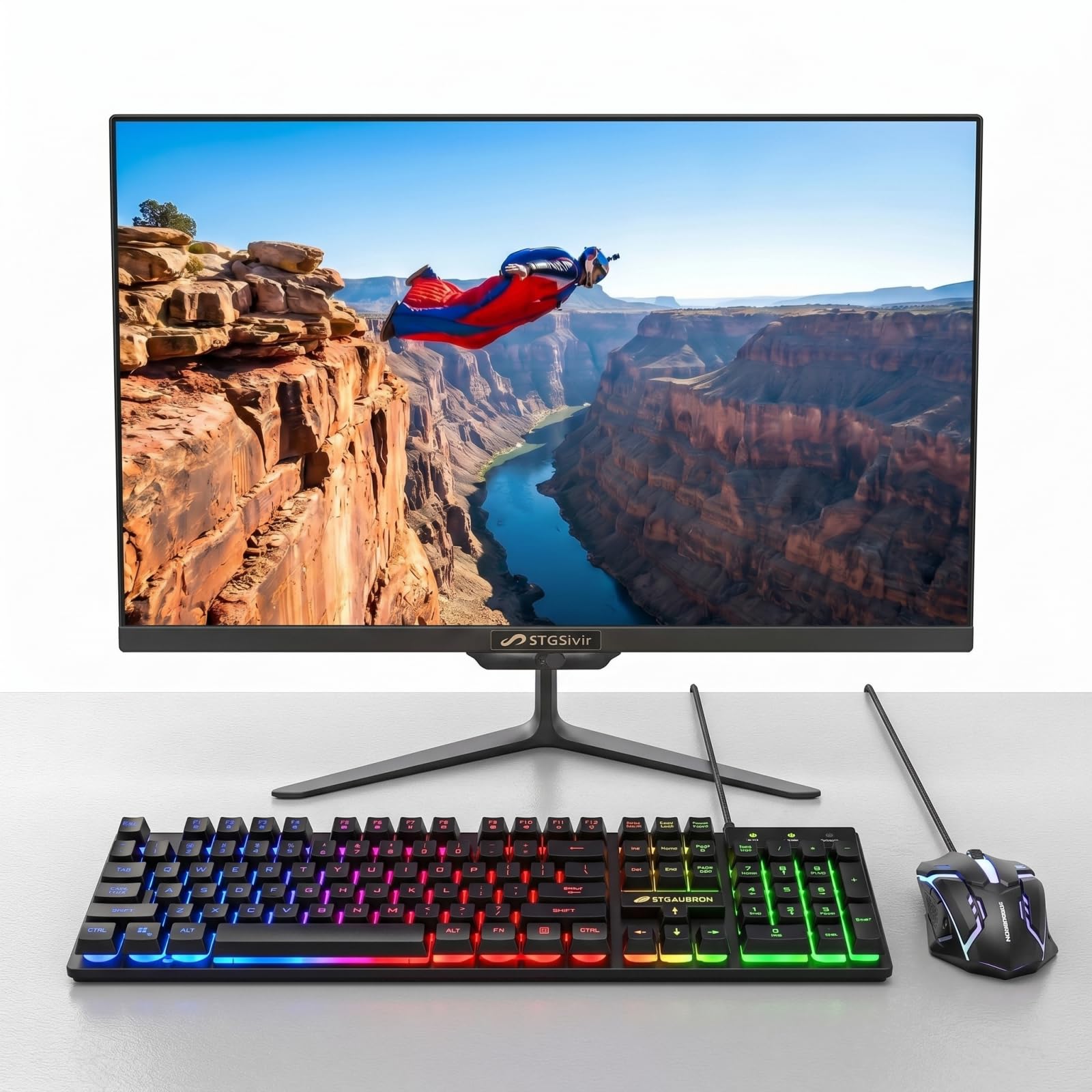
2. STGSivir 23.8″ All-in-One PC
A bargain-priced all-in-one that packs a Core i7 and 16GB of RAM for the budget-conscious office.
For a tight budget, this STGSivir offers surprising specs on paper — a 23.8-inch full HD display, a Core i7 processor, 16GB of memory, and a 512GB SSD. That memory and storage pairing gives you a 4x leap over entry-level rivals like the Core Innovations model’s 4GB, which means you can keep many browser tabs and office apps open without the machine gasping. The included RGB keyboard and mouse add a touch of flair to a home office setup.
The 1920×1080 full HD LED screen delivers clear, natural picture quality, and the built-in webcam lets you jump into video calls straight away. Connectivity covers the essentials — USB 3.0, an RJ-45 Ethernet port, HDMI, VGA, plus built-in Wi-Fi and Bluetooth 5.0. It’s pitched for study, home, and office work, including photo editing, streaming, and even day or crypto trading, all on a Windows 11 Home system.
The honest reality is that this machine divides opinion sharply. Some owners call it a steal and praise the included lifetime tech support. Others report freezing issues within minutes of use, and attempting to reach the manufacturer for help has, in several cases, gone unanswered. The speakers also come across as tinny. This is a true budget gamble: the specs are tempting, but reliability reports are mixed enough that it’s best for low-stakes home use, not a mission-critical office.
The upside
- Strong specs for the price: Core i7, 16GB RAM, 512GB SSD
- Lifetime tech support is included on paper
- Includes RGB keyboard, mouse, and a built-in webcam
The risk
- Reports of freezing and unresponsive manufacturer support
- Speakers sound tinny according to buyers
- Lower owner satisfaction than mainstream brands
Reach for this if: Your budget is very tight and you need a spec-rich machine for light home office work.
Look elsewhere if: Your business depends on daily, reliable uptime — the brand-loyal Dell and HP options are safer bets.
3. Core Innovations 24″ All-in-One Desktop PC
A low-cost, easy-to-use desktop for the average user who mainly needs web and email.
This Core Innovations model targets the simplest of office needs at an entry-level price. It runs on a 2.9 GHz Intel Celeron N5095 processor with 4GB of RAM and 128GB of storage, which is fine for email, light web browsing, and video calls. The 24-inch 1920×1080 FHD IPS display gives you a bright, wide-angle view for everyday tasks, and it’s easy to set up from the start with a keyboard and mouse included.
Owners praise it as a great-value computer for the average user, especially for its camera and voice chat capabilities right from the start. The screen size earns positive comments, and setup is genuinely plug-and-play. For a spare workstation, a front desk, or a second machine, it fits the bill for basic duties without any fuss.
The trade-offs are real, though. The most-discussed concern among reviewers is reliability, with several reporting their units stopped working within a year — including two used for a small business that both failed. Others note the 4GB of RAM feels limited and that the stand doesn’t tilt, leaving the screen at a fixed, awkward angle. This is strictly a light-duty machine for basic tasks; if your work involves heavy multitasking or you need a dependable daily driver, the extra investment in a Dell or HP is wise.
The positives
- Very affordable entry point for basic office work
- Easy to set up with keyboard and mouse included
- 24-inch FHD IPS display for clear everyday viewing
The limitations
- 4GB RAM and 128GB storage are minimal for multitasking
- Reliability is a concern, with some units failing within a year
- Stand does not tilt, limiting viewing angle adjustment
Ideal for: An occasional-use workstation or a budget-friendly first computer for simple email and web tasks.
Not ideal if: This is your primary business machine — the reliability record is too uncertain for daily dependence.
4. MECHAZER 27″ Curved All-in-One
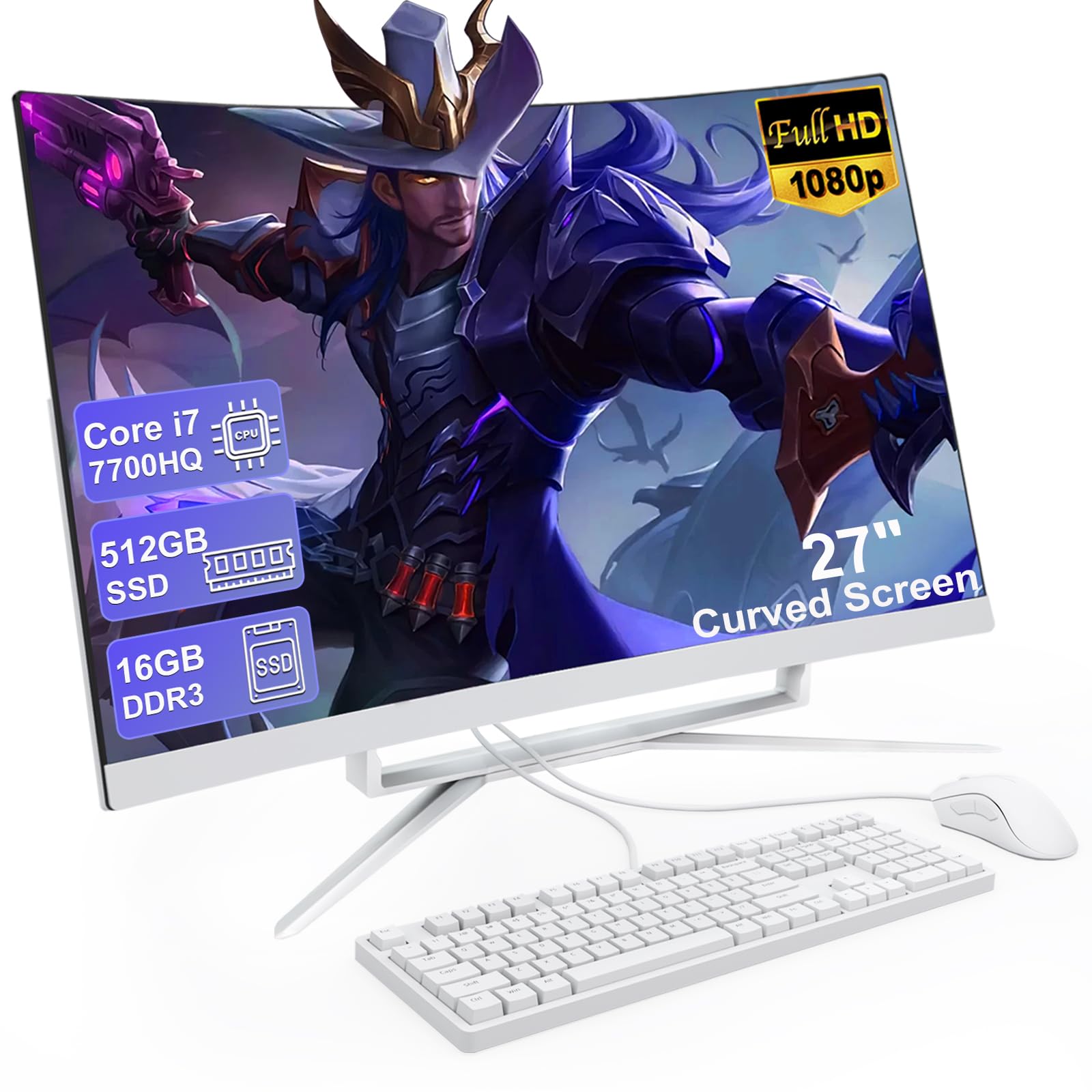
The rich curved-screen all-in-one that wraps your workspace around a fast Core i7.
For a desk where the screen is the centerpiece, this MECHAZER brings a 27-inch curved FHD display (Full High Definition, 1920×1080 resolution) that owners say feels rich, with clear colors and wide viewing angles. Under the hood sits a Core i7 7700HQ processor with 4 cores and 8 threads, reaching up to 3.8GHz, paired with 16GB of DDR3 RAM and a 512GB SSD. In daily use, that translates to fast startup, quick SSD boot times, and no lag when moving between office applications.
The design is genuinely modern and compact, with an ultra-narrow frame that boost the viewing area. A rich set of ports — including 4x USB 3.0, 2x USB 2.0, a USB 3.0 Type-C, VGA, HDMI, and an RJ-45 LAN port — means you can connect printers, external drives, and a second display without hunting for adapters. Built-in speakers remove the need for external ones and save valuable desk space. It also runs Windows 11 Home with no bloatware, which reviewers appreciate.
The main caveat is the pronounced curve, which one owner found bent over a bit too far toward the desk, making it feel like it leans in. The 16GB of DDR3 RAM is also non-expandable, so you’re locked into that amount. For a home office where you want a big, wrap-around screen for spreadsheets, design work, or streaming, this delivers strong performance and a distinctive look at a mid-range price.
What stands out
- 27-inch curved FHD display for an rich, wide view
- Fast Core i7 and 16GB RAM for smooth multitasking
- Abundant ports including USB-C, HDMI, and LAN
- Comes with keyboard and mouse, no bloatware
Keep in mind
- Curved screen may feel like it leans too far for some
- RAM is non-expandable, so 16GB is your ceiling
- Uses older DDR3 memory technology
Best suited to: Home office users who want an rich, large display and solid performance for multitasking.
Who should pass: Anyone who prefers a flat screen or foresees needing more than 16GB of memory down the line.
5. Dell 24″ All-in-One EC24250

The quiet, reliable workhorse that handles daily office tasks without breaking a sweat.
This Dell earns its place as a top performer with a strong owner following, praised for its speed and easy setup. It runs on an Intel Core 3 100U processor with 8GB of RAM and a 512GB SSD, which is ample for business applications, research, and even some light gaming. The 23.8-inch FHD display is crisp, with the IPS panel delivering 99% sRGB color coverage for vivid, true-to-life visuals. The design is clean and compact, with minimal cords, making it a tidy addition to any desk.
Beyond the core specs, Dell includes thoughtful touches for long workdays. The 5MP+IR camera with HDR technology keeps you looking sharp in challenging lighting, and the tilt adjusts from 0 to 20 degrees for the perfect angle. Dual Bluetooth speakers with Dolby Atmos provide loud, clear audio for music and video calls, and the machine runs so quietly that owners specifically note its silence. Connectivity is modern with Wi-Fi 6E and Bluetooth, plus a memory card reader.
The service package is a genuine business asset: 1 Year Onsite Service, where Dell comes to your home or office if an issue can’t be resolved remotely. Some users find the 8GB of RAM modest for heavy multitasking, but for standard office workloads, buyers consistently call it a great value for the price, noting its smooth performance and quick boot times.
Why owners rate it highly
- Fast and silent operation for everyday tasks
- Crisp FHD display with 99% sRGB color coverage
- Dolby Atmos speakers for clear audio
- 1 Year Onsite Service from Dell
What to consider
- 8GB RAM is on the lighter side for heavy multitasking
- No fingerprint reader for biometric login
The bottom line: A reliable, quiet, and well-supported office machine for standard business tasks and value-conscious buyers.
Consider more RAM if: You routinely run dozens of browser tabs and heavy applications simultaneously.
6. Lenovo 24″ Business All-in-One

A multitasking monster with 32GB of RAM and a 1TB drive to power through the busiest days.
Where most business all-in-ones stop at 16GB of memory, this Lenovo doubles down with 32GB of DDR4 RAM and a spacious 1TB PCIe NVMe SSD. That combination is a genuine edge for professionals juggling large spreadsheets, video editing, or dozens of open browser tabs without slowdowns. The 23.8-inch FHD IPS anti-glare display offers a comfortable 250 nits of brightness and 99% sRGB coverage, making it easy on the eyes for marathon work sessions.
It’s built on an Intel Processor N100 with 4 cores and a max turbo frequency of 3.40 GHz, which handles everyday productivity with ease. Connectivity is reliable with Intel Wi-Fi 6 and Bluetooth 5.2, alongside a solid port selection including USB-A, HDMI-out, and an Ethernet port. The included wireless keyboard and mouse keep your desk tidy, and Windows 11 Pro adds the security and management features businesses value.
Owners mention the computer works well overall, with one clever tip being to connect via wired internet first and update the Wi-Fi driver before going wireless. A few owners were caught out by the included UK-layout keyboard, so check what arrives in the box if that matters to you. This is a strong mid-range pick for anyone who prioritizes memory and storage headroom for future-proof multitasking.
Why it stands out
- Generous 32GB DDR4 RAM for heavy multitasking
- Roomier 1TB PCIe NVMe SSD for fast storage
- Windows 11 Pro with Wi-Fi 6 and Bluetooth 5.2
- Anti-glare FHD display for comfortable viewing
Before you buy
- Some units ship with a UK-layout keyboard
- No touch screen, so don’t expect one
- Check warranty status as units may be older stock
Grab this if: You want maximum memory and storage headroom for multitasking without jumping to a premium price.
Double-check if: A UK keyboard or an older manufacturing date would bother you — confirm what’s in the box before purchase.
7. HP 24″ All-in-One with AMD Ryzen 7

An AMD Ryzen 7 powerhouse that halves task times for the busy home office.
Speed is the headline here, thanks to a powerful AMD Ryzen 7 7730U processor paired with 16GB of RAM and a 512GB SSD. Owners consistently report that this HP cuts their task times in half compared to older machines., making it a genuine productivity booster. The 24-inch FHD display features an ultra-slim, three-sided micro-edge design with up to an 89% screen-to-body ratio, so you get a large viewing area in a compact footprint.
It’s built for collaboration, with a tiltable pop-up privacy camera, HP Video Controls, dual array microphones, and advanced noise reduction technology. That means you can flip the camera up for a video call and push it down for privacy when you’re done. The 512GB solid-state drive delivers boot times and file transfers roughly 15x faster than a traditional hard drive., giving you plenty of room for documents and quick boot times. Windows Hello lets you log in with your face, and Windows 11 Home provides a fresh, natural interface.
The recurring feedback is positive, with buyers loving the screen size, speed, and easy setup. One month in, owners remain very happy with the purchase. The honest drawbacks are a small keyboard with few USB ports, weak built-in speakers, and a non-adjustable stand. A few isolated reports mention reliability concerns like freezing, but the broad consensus is that this is an excellent value for a fast, well-rounded home office machine.
The highlights
- Fast AMD Ryzen 7 7730U halves task times
- Tiltable pop-up privacy camera for secure calls
- Ultra-slim micro-edge display with high screen-to-body ratio
- Windows Hello face login and 512GB fast SSD
The trade-offs
- Small keyboard and limited USB ports
- Speakers are weak and the stand doesn’t adjust
- No optical drive for discs
Choose this for: A fast, feature-rich home office hub where speed and video calls matter most.
skip it if: You need adjustable ergonomics or a more sturdy port selection for many peripherals.
8. Lenovo 27″ IdeaCentre AIO with Core i7
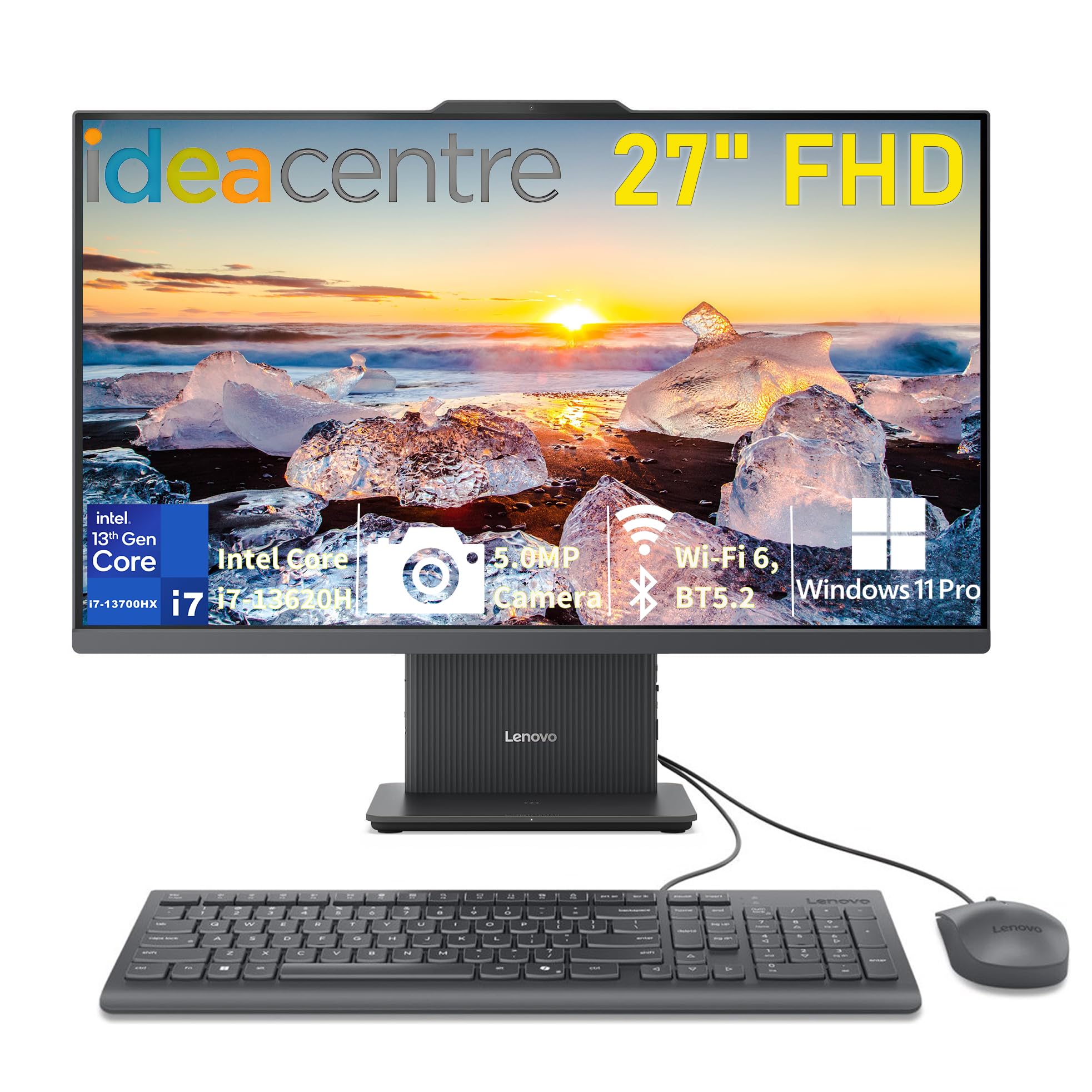
A 27-inch screen that’s a genuine relief for tired eyes, powered by a 13th Gen Core i7.
For anyone who spends hours staring at a screen, the 27-inch FHD IPS anti-glare display on this Lenovo is a welcome upgrade, with owners noting it’s great for those with poorer eyesight. The 3-side borderless design and 300 nits of brightness deliver crisp, clear visuals, while the 99% sRGB color coverage keeps colors accurate. It runs on a 13th Gen Intel Core i7-13620H processor with 16GB of fast DDR5-5200 RAM and a 512GB PCIe 4.0 NVMe SSD, so boot times are quick and apps load speedily.
Windows 11 Pro comes preinstalled, making it a secure, business-ready machine. Video calls are well-supported by the 5MP camera, dual microphones, and HARMAN stereo speakers. Connectivity is versatile with Wi-Fi 6, Bluetooth 5.2, and a range of ports including USB-C at 10Gbps, HDMI-in, and HDMI-out for flexible display setups. The Luna Grey chassis keeps the desk looking organized and stylish.
Reviewers are impressed with the speed and screen quality, describing it as fast and “super sturdy.” The major complaint is the limited number of USB ports — only two — which are also awkwardly located under the screen base, forcing some owners to buy a USB hub. There’s no SD card slot either. If you value a large, easy-on-the-eyes screen and snappy performance for online courses or business tasks, this is a compelling pick, but plan for a hub.
Why owners like it
- Large 27-inch anti-glare screen, great for tired eyes
- Fast 13th Gen Core i7 with 16GB DDR5 RAM
- 5MP camera and HARMAN speakers for calls
- Windows 11 Pro with Wi-Fi 6 and USB-C
The frustrations
- Only 2 USB ports, awkwardly placed under the screen
- No SD card slot for camera users
- May need a USB hub for multiple peripherals
Best for: Users who want a roomy, clear display and fast performance for business or online learning.
Be prepared if: You have many USB devices — budget for a separate hub to expand the sparse port selection.
9. HP 24 Touchscreen All-in-One

The touchscreen all-in-one that brings a hands-on feel to business and schoolwork.
Touchscreens are rare in the business all-in-one world, and this HP makes the most of it with a 23.8-inch IPS Full HD display that owners love for its vivid colors and responsive touch. It runs on an Intel Processor N100 with 16GB of DDR4 RAM and a spacious 1TB PCIe NVMe SSD, providing lightning-fast boot times and reliable storage for all your files. This is a machine that handles the busiest days with smooth multitasking and efficient operation.
For video conferencing, the HP True Vision 720p HD privacy camera uses temporal noise reduction, and integrated dual array digital microphones pick up your voice clearly. The anti-glare screen keeps reflections down in bright offices. Connectivity is modern with Realtek Wi-Fi 6 and Bluetooth 5.3, plus a versatile array of ports including a USB Type-C port. The included HP 125 white USB keyboard and mouse complete a clean, professional setup.
Owners describe it as a quality, reliable screen that’s perfect for home and small business use, with quick startup and excellent sound. The touchscreen is the standout feature, making navigation feel natural and intuitive. A minor snag: some units shipped without the right power cord, though customer support resolved it quickly. Reviewers also note a small learning curve coming from Windows 10. This is a solid, well-rounded choice if you want the flexibility of touch.
Why it wins fans
- Vivid touchscreen adds a hands-on, intuitive feel
- Spacious 1TB PCIe SSD with 16GB RAM
- Quality privacy camera and clear audio for calls
- Quick boot and smooth performance for business
What to note
- Some units arrived missing the proper power cord
- Small learning curve if you’re coming from Windows 10
- Entry-level N100 processor for basic-to-moderate tasks
Perfect for: Small businesses and home offices that want the interactivity of a touchscreen and ample storage.
Consider if: You don’t need heavy processing power and value the flexibility of a touch interface.
10. Dell 27″ All-in-One EC27250

A spacious, premium-feeling desktop with a clever stand that tucks your keyboard out of sight.
This Dell 27-inch model is built for a clutter-free, premium office experience, with an innovative stand that houses your keyboard neatly underneath the display. The FHD IPS display features 99% sRGB color coverage and 50% higher contrast., delivering vivid, true-to-life colors for work and streaming. Inside, the Intel Core 7 150U processor, 16GB of RAM, and a fast 1TB PCIe NVMe SSD ensure smooth performance, with owners noting it runs smoothly between programs.
The 5MP+IR camera uses HDR technology to keep you looking your best in challenging lighting, and it pops up for privacy when you push it down. You can adjust the tilt from 0 to 20 degrees for the perfect angle. Dell’s ComfortView Plus is designed to reduce harmful blue light emissions, helping keep your eyes comfortable during long sessions — and the refresh rate is 66% higher than the previous generation. for smoother viewing. Wi-Fi 6E and Bluetooth keep connections fast and modern.
Service is a standout for business use: 1 Year Onsite Service means Dell will come to your home or office if a covered issue can’t be resolved remotely, plus 6 Months of Dell Migrate to help move your old files over. Buyers praise the easy setup, great monitor size, and excellent value for money, calling it a very good desktop for the price. A minor gripe is that Microsoft Office now only comes as a 30-day trial, so budget for a subscription if you need it.
The strengths
- Innovative stand keeps keyboard tucked under the display
- Vivid FHD IPS display with 99% sRGB coverage
- Fast 1TB PCIe NVMe SSD and 16GB RAM
- 1 Year Onsite Service and Dell Migrate included
The honest caveats
- Microsoft Office is only a 30-day trial
- No fingerprint reader for biometric login
Best for: Professionals who want a premium, organized workspace with strong support and a large display.
Plan ahead if: You rely on Microsoft Office — you’ll need to factor in a subscription after the trial.
11. HP 27 Ultra 7 Business All-in-One

The performance flagship built to run multiple applications and tabs all at once, without a hiccup.
This is the machine for the most demanding business users, packing 32GB of high-bandwidth DDR5 RAM and a 1TB PCIe NVMe M.2 SSD. That combination lets you run multiple applications and countless browser tabs simultaneously, with the SSD providing fast boot-up and rapid data transfer. At its heart is the Intel Core Ultra 7-155U processor with 12 cores, 14 threads, and speeds up to 4.8 GHz — a chip the spec sheet notes beats the Intel i7-1355U for raw performance..
The 27-inch IPS three-sided micro-edge FHD+ display offers a wide, bright view at 250 nits, making it a pleasure for spreadsheets and video. A thoughtful feature owners discovered is the ability to slide the monitor up and down to different heights, adding ergonomic flexibility rare in all-in-ones. For connectivity, you get a USB Type-C port, 4x USB-A, HDMI, an RJ45 Gigabit Ethernet port, and Wi-Fi 6 plus Bluetooth, all supporting a clean wireless keyboard and mouse setup.
Windows 11 Pro provides a secure, business-focused experience with great multi-monitor functionality and Android app compatibility. Buyers describe it as a super powerful, fast machine perfect for office work, with very easy setup and a beautiful screen. The included keyboard and mouse are wireless, keeping the desk tidy. The few negative reports concern display defects and color mismatch, but the overwhelming verdict from owners is that this is absolutely worth the price for serious productivity.
The big wins
- Massive 32GB DDR5 RAM for heavy multitasking
- Fast Intel Core Ultra 7 processor up to 4.8 GHz
- Height-adjustable 27-inch FHD+ display
- 1TB SSD with Wi-Fi 6 and Windows 11 Pro
Worth knowing
- A few buyers reported display defects or color mismatch
- Premium pricing for the highest-tier specs
The verdict: The top choice for power users who demand maximum RAM, storage, and processing muscle for demanding business workloads.
Look elsewhere if: Your tasks are light and your budget is better spent elsewhere — this is performance-first, not entry-level.
Understanding the Specs
Processor (CPU): The Engine
The processor, or CPU, is the brain of your computer, determining how fast it can process instructions. For business use, look for a recent generation chip from Intel or AMD. Names like Core i7 or Ryzen 7 generally indicate higher performance tiers, while the model number (e.g., 13620H) tells you how new it is. A newer chip with more cores handles multitasking and demanding applications more smoothly.
Memory (RAM): Your Multitasking Buffer
RAM, or random access memory, is your computer’s short-term workspace for running applications, opened programs, and browser tabs. More RAM means you can juggle more tasks at once without slowdowns. For business, 16GB is the balance for comfortable multitasking, while 8GB works for lighter use and 32GB is for power users who run heavy applications or virtual machines.
Storage (SSD): Your Fast File Cabinet
Storage is where your files, programs, and operating system live permanently. A solid-state drive (SSD) is dramatically faster than an old hard drive, meaning quicker boot times and faster app launches. The even faster PCIe NVMe SSDs, often found in 512GB or 1TB capacities, speed up file transfers and program loading further. Choose capacity based on how many files you store locally.
Display: Your Daily Window
The display is what you look at all day, so clarity and comfort matter. A Full HD (1920×1080) resolution is standard, with IPS panels offering better color accuracy and wider viewing angles than older LED screens. Features like anti-glare coatings and blue light reduction help reduce eye strain during long sessions. Larger screens like 27 inches give you more workspace for multitasking.
FAQ
What is the difference between an all-in-one and a traditional desktop tower?
Is 16GB of RAM enough for a business all-in-one in 2025?
Should I buy a touchscreen all-in-one for my business?
How important is the processor in an all-in-one computer?
What is the difference between an HDD and an SSD, and which should I choose?
Are all all-in-one computers come with Wi-Fi and Bluetooth?
What should I look for in a webcam for video conferences?
Is Windows 11 Pro necessary or is Windows 11 Home enough?
Can I connect a second monitor to an all-in-one computer?
How long does an all-in-one computer typically last?
Final Thoughts: The Verdict
For most buyers, the all in one computer for business winner is the Apple 2024 iMac (M4) because it combines the fastest performance, a stunning display, and a top-tier build — but it’s the right choice primarily if you’re embedded in the Apple ecosystem. If you want a premium Windows experience with a spacious screen and excellent support at a more accessible entry point, grab the Dell 27″ EC27250. And for the most demanding multitaskers who need maximum memory and storage, the HP 27 Ultra 7 Business AIO with 32GB of DDR5 RAM and a 1TB SSD is the one to reach for.
How We Picked
We do not accept paid placement. Every pick is matched to a real buyer and a real use-case; we do not hands-on test units.
Sources & Methodology
Specifications: manufacturer listings and product documentation. Review insights: verified customer reviews, as of August 2026. Pricing: not shown on this page (it changes often); check the current price via the retailer link.
As an Amazon Associate, FitlyFast earns from qualifying purchases. This does not affect which products we feature.