
Our readers keep the lights on and the weekend projects moving. As an Amazon Associate, I earn from qualifying purchases.
Specs are compiled from manufacturer listings and verified buyer reviews and can change over time — please confirm the key details on the product page before buying.
Choosing a budget PC case usually means compromising on airflow, build quality, or looks. The right budget pick balances all three without forcing you to overpay for features you won’t use. This guide breaks down nine value-focused cases, what each genuinely excels at, and the honest trade-offs you should expect at this tier.
I’m Rikta — the founder and writer behind FitlyFast. This guide is built by comparing the manufacturers’ published specifications and the patterns across verified customer reviews, so you get each pick’s real strengths and trade-offs instead of marketing spin.
The best budget cases for pc keep your components cool and secure while leaving room in your wallet for the parts that matter.
Our Picks at a Glance


How To Choose The Best Budget Cases For PC
A budget case shouldn’t force you into a bad build. Before you pick, check the key clearances and features that affect how smoothly your parts fit and how well they stay cool.
Match the case to your motherboard size
Most budget towers support ATX, Micro-ATX, and Mini-ITX boards. An ATX board needs a mid-tower case with enough internal depth. Smaller mATX builds can use more compact cases, but always double-check the case’s stated motherboard support against your exact board model.
Check GPU and CPU cooler clearance first
Graphics cards vary wildly in length. A case that supports a 300mm GPU (about 11.8 inches) is fine for most mid-range cards, while larger flagship cards need 340mm or more. CPU cooler height matters just as much — a tall air cooler demands a wider case. Measure your parts before buying.
Count the pre-installed fans
Cases that ship with several fans save you money immediately. At this price, you want at least one rear exhaust fan, with intake fans up front for proper airflow. Some budget cases include four RGB fans, which often costs less than buying them separately.
Prioritize airflow and dust management
A mesh front panel allows air to flow through the case, while removable dust filters protect your components and are easier to clean. Cases with poor airflow force your fans to spin faster and louder to keep temperatures stable.
Quick Comparison
| Model | Best For | Pre-Installed Fans | GPU Length Support | Internal Bays | Amazon |
|---|---|---|---|---|---|
| Zalman T6★ Best Overall | Basic workstations | 1 x 120mm | — | 4 | Amazon |
| MOROVOL 621Starter RGB Pick | Starter RGB builds | 4 x 120mm RGB | 300mm | 4 | Amazon |
| DARKROCK EC2Modern Ready | Modern GPU support | 1 x 120mm | 340mm | 3 | Amazon |
| Thermaltake Versa H21 | Optical drive users | 1 x 120mm | — | 6 | Amazon |
| GAMDIAS AURA GC1 | ARGB fans from the start | 4 x 120mm ARGB | 340mm | — | Amazon |
| Cooler Master N200 | Compact mATX builds | — | 355mm | 6 | Amazon |
| FOIFKIN F300 | Panoramic glass viewing | 4 x 120mm | 400mm | 2 | Amazon |
| MONTECH XR | High airflow enthusiasts | 3 x 120mm ARGB | 420mm | 3 | Amazon |
| MUSETEX Y6 | White themed RGB builds | 7 x 120mm ARGB | 410mm | 3 | Amazon |
In‑Depth Reviews
1. Zalman T6 ATX Mid Tower Computer PC Case
A practical, lightweight tower that nails the fundamentals of a budget build.
The Zalman T6 is the crowd favorite for a reason — it delivers solid value for money and fits full ATX motherboards without breaking a sweat. The powder-coated steel chassis handles daily use well, and the hairline mesh front panel pairs with the pre-installed 120mm rear fan to give you workable airflow from the start. You can install up to four fans total, including on the side panel, if you want more cooling later.
Storage options are generous here: two 2.5″ and two 3.5/2.5″ drive mounts, plus an external bay for a 5.25″ optical drive — a rarity that keeps this tower relevant for workstations and media builds. The I/O panel offers one USB 3.0 port, two USB 2.0 ports, and audio jacks. Builders report it handles a fifth fan with a bit of creativity, but caution it’s a tight fit for some ATX boards, so plan your front fan installation before mounting the motherboard.
What wins people over is the case quality, with over a hundred owners singling out how solid it feels for the price. There is an honest trade-off: the metal is thin, and the back panel is flimsy enough that removing GPU slot covers can damage them. Buyers report it’s ideal for an experienced builder who wants a cheap, functional workstation — not a first-timer who wants a premium feel. The internal bay count of 4 matches most budget builds, and at 14.84″D x 7.87″W x 16.92″H, it slides under most furniture.
Built for practical builds
- Lightweight powder-coated steel frame
- Rare 5.25″ optical drive bay included
- Fits ATX, mATX, and Mini-ITX boards
Know before you build
- Thin metal needs careful handling
- Only 6 of 9 motherboard standoffs preinstalled
- Top-mounted PSU limits cooling options
Reach for this if: you want a dependable, low-cost tower for a workstation or office build and don’t need flashy glass panels.
Look elsewhere if: you’re a first-time builder who wants an easy, premium-feeling assembly — this one rewards experience.
2. MOROVOL PC Case with Pre-Installed 4 RGB Fans
Four RGB fans and a glass panel make for a visually rich first build.
The MOROVOL 621 turns heads with its diamond-shaped mesh front and removable tempered glass side panel, packing four pre-installed 120mm RGB fans right in the box. That’s the whole lighting story sorted before you spend a cent on extras. The fixed RGB lighting isn’t addressable, meaning you can’t customize individual colors — but the bright effect still looks great through the glass.
Builders report this case “gets the job done” for a starter gaming rig, and the appeal is obvious: the included fans and clean aesthetics save real money. It supports ATX, Micro-ATX, and Mini-ITX boards, with GPU clearance up to 300mm, a PSU length up to 160mm, and CPU cooler height up to 155mm. Storage covers two 2.5″ SSDs and two 3.5″ HDDs, matching the 4 internal bays.
The thing everyone praises is the case quality, followed closely by the looks. The honest catch is cable management — the most-discussed negative — with buyers reporting a cramped interior once you add an ATX board. One owner noted the case runs slightly smaller than a typical mid-tower, and PCIe slot covers can break if forced. It’s a light, affordable case that feels flimsy in spots until fully assembled, so it’s best suited to patient first-timers building a budget rig.
Verdict in short: One of the few budget cases that bundles four RGB fans, a glass side panel, and decent airflow for the price. Just budget extra time for cable routing.
3. DARKROCK EC2 ATX Mid Tower Gaming PC Case
A forward-thinking tower that the latest 50 series GPUs can call home.
The DARKROCK EC2 is built for people who want a case that won’t be obsolete when they upgrade their graphics card. It’s explicitly compatible with 50 series GPUs and supports graphics cards up to 340mm in length — room for most flagship cards. The mesh front panel keeps air moving, and you can install up to eight 120mm fans or a 360mm radiator on the front for serious liquid cooling later.
Magnetic dust filters sit on the top and bottom, popping off for quick cleaning without tools. The tempered glass side panel shows off your hardware, and the Type-C ready design means you’re set for modern connectivity. The internal bay quantity of 3 covers your storage needs, and the PSU can stretch to 200mm in length.
Reviewers call this a solid budget case with a mature look, noting the hinged glass door is sturdy and the PSU shroud includes a dedicated HDD bay. The main trade-offs: the thin metal bends easily if you’re rough, and the top rear 140mm fan slot can be blocked by the CPU power connector — a 120mm fan fits instead. Owners found the top fan mounting awkward, but most agree the value and airflow make it worth it.
The smart upgrade path
- Type-C ready for modern connectivity
- Supports long 340mm GPUs
- Magnetic dust filters on top and bottom
Handle with care
- Panel metal is thin and bends easily
- Top fan slot may conflict with CPU power
- Fans and rubber mounts don’t align perfectly
Pick this for: a future-proof budget build where GPU clearance and Type-C matter more than included fans.
Think twice if: you want pre-installed RGB — this ships with just one fan, so factor cooling costs into your budget.
4. Thermaltake Versa H21 SPCC ATX Mid Tower Computer Chassis

A no-frills chassis with six bays for storage-heavy and optical drive builds.
If you still use a Blu-ray drive or need maximum storage flexibility, the Thermaltake Versa H21 is a rare budget find. Its 18.9-inch depth and six internal bays accommodate three 5.25″ optical drives, three 3.5″ HDDs, and multiple 2.5″ SSDs — enough space for a proper NAS or server setup. The perforated metal mesh front and top panels let heat escape quickly, and the raised feet improve airflow underneath.
This case favors function over flash, with a solid side panel instead of a glass window. Tool-free installation means drive bays and expansion slots work without a screwdriver. The front panel offers one USB 3.0 port, one USB 2.0 port, and HD audio jacks. Owners mention it fits a full ATX board and a Noctua NH-D15 cooler comfortably, handling a Ryzen 5900X under 40°C at load with good front-to-back airflow.
Case quality earns the most praise, with over a hundred and sixty reviewers highlighting its value for building your own machine. The honest downsides: the steel is thin, PCIe slot covers can break off during removal, and there’s no front fan mount, so intake depends on your own fans. Owners note the open interior without a PSU basement makes cable management take more effort. It’s a straightforward, affordable workhorse — not a looker.
Bottom line: The best pick for optical-drive users and storage-heavy builds who want maximum bays and don’t care about glass panels or RGB.
5. GAMDIAS AURA GC1 ELITE ATX Mid Tower Gaming PC Case

Four ARGB fans and a mesh front give this stealth-black tower serious presence.
The GAMDIAS AURA GC1 ELITE brings the lighting without the markup, pre-loading four 120mm ARGB fans behind an airflow-focused mesh front panel. The full-sized tempered glass side panel uses tool-free installation, so you can pop it off to show off your components. An LED control button on the I/O panel lets you cycle lighting modes without needing software.
Expandability is solid for a budget pick: support for ATX, Micro-ATX, and Mini-ITX boards, GPU length up to 340mm, a 360mm AIO radiator up front, and CPU cooler clearance up to 160mm. Storage includes a 2x 3.5″ HDD cage or a 2.5″+3.5″ combo, plus two 2.5″ trays. The seven PCIe slots give you room for expansion cards.
Reviewers describe the thermals as exceptional, with loads staying under 75°C, and the case quality gets the most positive mentions. The magnetic washable dust covers are a thoughtful touch. The recurring gripe is that the plastic front panel and fan frame feel cheap — one fan frame broke during assembly but still functioned. Builders note the top front fan exhausts by default and should be flipped for intake, and the thin back panel can bulge with tight cable routing. It feels light and a bit flimsy until fully loaded, but the airflow and RGB make it a strong value.
What makes it shine
- Four ARGB fans included
- Tool-free tempered glass panel
- Excellent airflow with mesh front
Reality check
- Plastic front and fan frame feel cheap
- Top front fan needs flipping to intake
- No USB-C port on the I/O panel
Go with this if: you want an RGB-ready gaming build with strong cooling and didn’t plan to buy fans separately.
skip it if: premium materials matter more to you than lighting — the plastic elements are hard to ignore.
6. Cooler Master N200 Mini Tower Computer Case

A rugged mini tower that crams serious hardware into a compact frame.
Don’t let the “mini” label fool you — the Cooler Master N200 fits graphics cards up to 355mm (14 inches) long, which covers even high-end cards today. Built for Micro-ATX and Mini-ITX boards, it’s the pick for builders who want a smaller footprint without sacrificing performance. The fully meshed front panel and all-metal construction give it a solid, industrial feel.
Storage is a strong point with six internal bays: support for up to three 3.5″ HDDs and four 2.5″ SSDs. The front supports a 240mm liquid CPU cooler, and CPU air coolers up to 160mm (6.3 inches) tall fit inside. The bottom-mounted PSU area includes a removable dust filter, and the front I/O offers SuperSpeed USB 3.0.
Owners call the build quality excellent for the price, with a sturdy steel chassis and quiet Cooler Master fans. The main frustration is a specific quirk: motherboard standoffs can seize with screws, making removal difficult — buyers advise handling them gently. Builders report the front fan can get noisy against the grill, fixable with slower fan speeds and rubber washers. It’s a durable, no-nonsense case that keeps things cool and organized, though the plastic front scratches easily.
Best suited for: an mATX build where you want a compact tower with big GPU clearance and lots of drive bays — without glass or flashy lighting.
7. FOIFKIN F300 PC Case with 270° Panoramic Glass
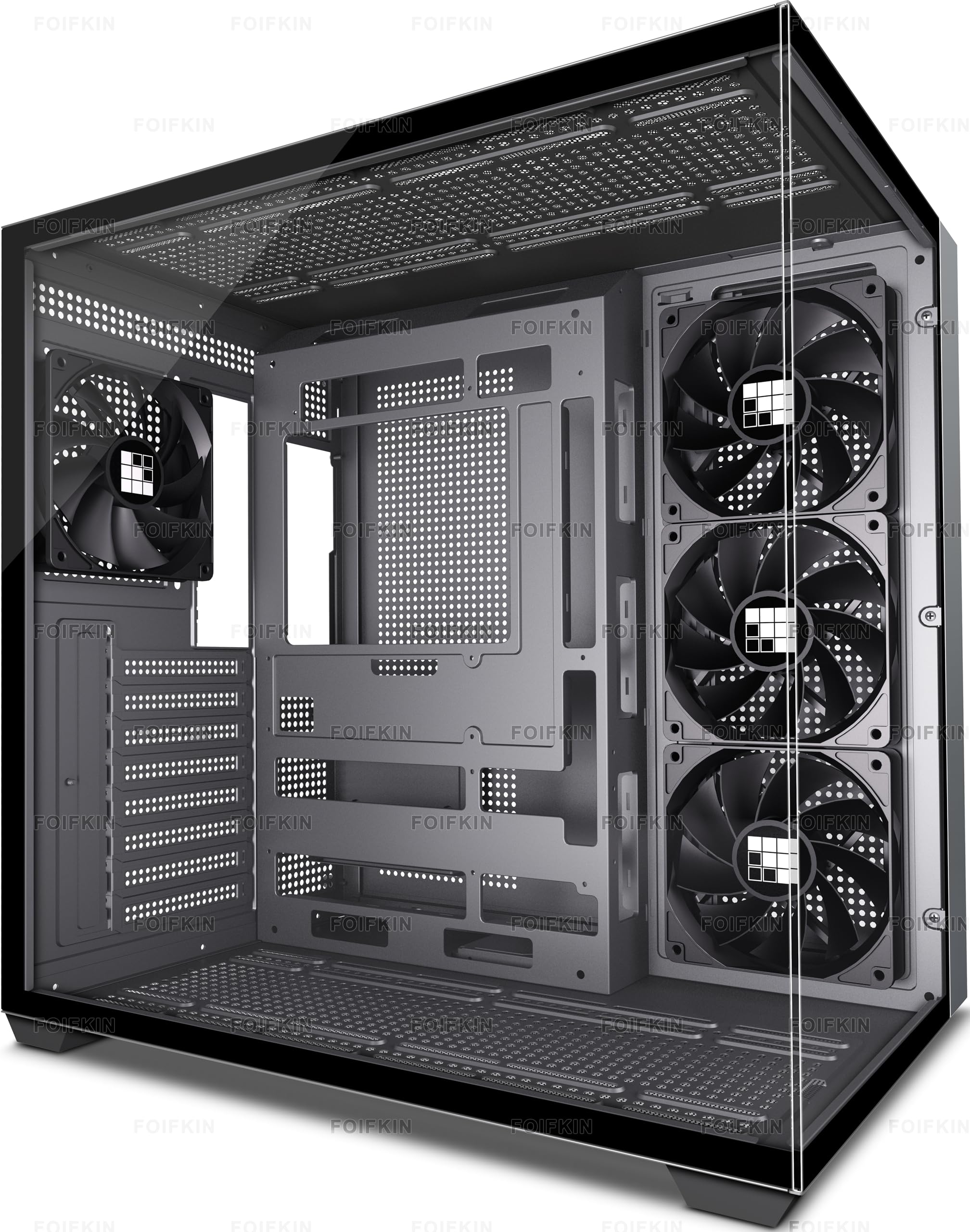
A glass showcase that displays your hardware from a 270° panoramic angle.
The FOIFKIN F300 is for builders who treat their PC like a display piece. Its 270° panoramic tempered glass design wraps around the front and side, giving you an unobstructed view of your components from multiple angles. Four non-LED fans are pre-installed, and the case supports up to ten 120mm fans and three 360mm liquid coolers if you want to max out cooling later.
Capacity is genuinely generous: CPU cooler height up to 170mm, GPU length up to 400mm, and an ATX PSU up to 220mm. The I/O panel includes a Type-C 3.0 port, USB 3.0, USB 2.0, and audio jacks. The dual-cabin design hides the PSU, keeping the main chamber clean and visually focused on your graphics card and cooler.
Customers note this case gets positive marks for its roomy design and easy assembly, with many noting it fits full-size ATX boards and large GPUs with space to spare. The fans are quiet with no vibration, and the case comes pre-assembled for convenience. The trade-offs: the glass panel is hard to remove (easy to reattach, per owners), and some units arrive short on extra fan screws. A few builders noted the fingerprint-prone glass needs regular wiping to stay pristine.
The visual payoff
- 270° panoramic tempered glass display
- Huge 400mm GPU clearance
- Type-C port on the front I/O
Glass care required
- Glass panel removal takes patience
- Lacks extra fan screws in the box
- Fingerprints show easily on glass
Choose this for: a modern showpiece build with a big GPU and a clean interior, where the panoramic view is the whole point.
Pass if: you’d rather have maximum fan support than glass aesthetics — the F300’s glass limits some mounting flexibility.
8. MONTECH XR Panoramic High Airflow ATX PC Case

A high-airflow tower with reverse-blade fans and space for a 420mm GPU.
The MONTECH XR is the case for builders who obsess over thermals. It ships with three pre-installed ARGB fans spinning at up to 1500 RPM, including two reverse-blade fans on the side and one regular-blade at the rear. Reverse-blade fans pull air in without showing their ugly hub frames, keeping the view clean. The case supports up to nine fans total and a 360mm radiator on top, so there’s plenty of room to scale cooling.
GPU support reaches 420mm, handling the biggest high-end cards including the 40 series and beyond. The dual tempered glass panels let you see the entire build, while magnetic dust filters cover the top, bottom, and side panels to keep the interior clean. Despite the compact overall size, the 17.1-inch depth gives you room to work with a full ATX board.
Owners consistently rate this as one of the best mid ATX cases for the price, with the build quality getting high marks for its solid metal construction. The reverse-blade fans produce bright, vibrant RGB, and users note excellent airflow and quiet operation. Builders praise the easy cable management with rubber gaskets. The recurring complaint is that the glass can arrive with smudges or scratches that won’t clean off, and side panel removal requires some pressure. Several owners recommend adding top exhaust fans for the best thermal performance.
Built for airflow
- Reverse-blade ARGB fans for clean looks
- Supports up to 9 fans and a 360mm radiator
- Magnetic dust filters on every panel
Check before you buy
- Glass may arrive with scratches
- Side panel needs firm pressure to close
- Extra top exhaust fans recommended
Best for: gamers who want a performance-focused build with clean aesthetics and room for future cooling upgrades.
Not for: anyone who’d be upset by a cosmetic glass blemish on arrival — some units show scuffs.
9. MUSETEX Y6 ATX Mid Tower Gaming PC Case

Seven Infinity Mirror fans turn this white tower into the centerpiece of a themed build.
You get a full RGB light show from the start with the MUSETEX Y6, because it includes seven 120mm Infinity Mirror ARGB fans (addressable RGB fans that let you control each LED color) — the 9th generation of the brand’s prism fan series. Three reverse fans sit on the side, three on the bottom, and one forward fan on the back, so the rainbow light bands flow smoothly through the 270° dual tempered glass panels (glass that wraps around two sides for a wider view). The effect is far richer than standard ARGB fans, making this a standout for full white builds.
Space is generous: GPU clearance up to 410mm (16.14 inches), CPU cooler height up to 160mm, and PSU support up to 230mm. The top mounts a 360mm liquid cooler, and the I/O panel includes a Type-C port, USB 3.0, and USB 2.0. The case weighs 14.6 pounds, so it’s substantial but manageable, and the anti-vortex fan blades help keep airflow smooth and quiet.
Reviewers rave about the appearance and case quality, with the included fans saving a “whole lot of hassle” versus buying seven separately. Builders note the fans are ribboned with short connectors, limiting individual color control — fine for a uniform look but not for per-fan customization. The cable management earns mixed feedback; a full ATX board can limit bottom cable routing, so owners recommend pre-routing cables before installing the motherboard. It’s bigger than many expect, so measure your desk space first.
The RGB spectacle
- Seven Infinity Mirror ARGB fans included
- 270° dual tempered glass panels
- Huge 410mm GPU clearance
Plan your build
- Short fan connectors limit placement
- Tight cable routing with full ATX boards
- Fans lack individual color control
Reach for this if: you want the most RGB per dollar and are building a white-themed showpiece with a large GPU.
Look elsewhere if: you need per-fan RGB customization — this case works best as a coordinated light show, not a canvas.
Understanding the Specs
GPU length clearance
This number tells you the longest graphics card that fits inside the case. A 300mm limit (about 11.8 inches) suits most mid-range cards, while 340mm or more handles high-end and flagship models. Always measure your actual GPU against this spec before buying — nothing is worse than a card that won’t close.
Pre-installed fans
Count the fans that ship in the box. A case with one rear exhaust fan requires you to buy intakes to achieve proper airflow. Cases with four or more pre-installed fans save you money immediately, since 120mm fans cost anywhere from to each. Fixed RGB fans add lighting without the extra cost of addressable ones.
Internal drive bays
This spec tracks how many drives you can mount. A 2.5″ bay fits SSDs, while a 3.5″ bay fits traditional HDDs. Cases with more bays give you storage flexibility for media libraries or backup drives. A 5.25″ external bay adds support for an optical drive — a rare feature on modern budget cases.
Radiator support
Measured in millimeters, this tells you the largest liquid cooler radiator that fits. A 240mm radiator supports most mid-range AIO coolers, while 360mm accommodates high-performance liquid cooling systems. If you plan to cool a high-end CPU, check this spec carefully — it determines your upgrade path.
FAQ
Will a full-size ATX motherboard fit in all these budget cases?
What is the difference between fixed RGB and ARGB fans?
How many fans do I really need for a gaming PC?
How do I measure my GPU to check it will fit?
Is a tempered glass side panel worth it on a budget case?
What does a 360mm radiator support mean for cooling?
Why is cable management space important in a budget case?
Should I buy a case with pre-installed fans or buy fans separately?
Final Thoughts: The Verdict
For the majority of shoppers, the budget cases for pc winner is the Zalman T6 because it delivers dependable build quality and rare optical drive support at a rock-bottom price. If you want a crisp light show the moment you open the box, grab the MOROVOL 621 with its four RGB fans. And for a future-proof case that handles the longest GPUs, the MONTECH XR is the one to reach for.
How We Picked
We do not accept paid placement. Every pick is matched to a real buyer and a real use-case; we do not hands-on test units.
Sources & Methodology
Specifications: manufacturer listings and product documentation. Review insights: verified customer reviews, as of August 2026. Pricing: not shown on this page (it changes often); check the current price via the retailer link.
As an Amazon Associate, FitlyFast earns from qualifying purchases. This does not affect which products we feature.