
Our readers keep the lights on and the weekend projects moving. As an Amazon Associate, I earn from qualifying purchases.
Specs are compiled from manufacturer listings and verified buyer reviews and can change over time — please confirm the key details on the product page before buying.
The biggest mistake new streamers make is buying a microphone that picks up every mechanical keyboard clack, mouse click, and air conditioner hum in the room. A great budget mic fixes that by focusing on your voice and rejecting the noise around it — so your viewers hear you, not your setup. This guide breaks down the nine best budget microphones for streaming, explaining exactly which pickup pattern, connection type, and extra features matter for your specific setup.
I’m Rikta — the founder and writer behind FitlyFast. This guide is built by comparing the manufacturers’ published specifications and the patterns across verified customer reviews, so you get each pick’s real strengths and trade-offs instead of marketing spin.
Find the right budget microphone for streaming by matching your room noise, PC setup, and need for extras like RGB or boom arms to the right pick below.
Our Picks at a Glance



How To Choose The Best Budget Microphone For Streaming
Streaming audio is the one part of your broadcast where spending a little money transforms the experience. The goal is simple: your voice should sound clear and present, while your keyboard, your chair, and your neighbors stay out of the audio track. Three decisions do most of the work.
Pickup Pattern: The Shape of Your Sound
The pickup pattern is the microphone’s listening direction. A cardioid pattern listens mostly to what’s directly in front of it and ignores the sides and rear — perfect for a desk setup where your keyboard sits to the side. A supercardioid pattern is even tighter, rejecting more noise from the sides. If you stream in a noisy room, a tighter pattern is your best friend. Most mics on this list use one of these two patterns for exactly this reason.
USB vs XLR: How It Connects
USB microphones are the plug-and-play choice. You connect them straight to your PC, and they work with Discord, OBS Studio, and streaming software without any extra gear. XLR microphones connect to an audio interface or mixer, which costs more and adds setup steps, but gives you more control over gain and tone. For a first budget mic, USB is almost always the right call — you can upgrade to XLR later when you’re ready.
Mute, Monitoring, and Mounts: The Daily-Use Details
A tap-to-mute sensor or mute button is a lifesaver when you need to cough, sip water, or talk to someone off-camera without cutting your stream. A headphone jack with zero-latency monitoring lets you hear exactly what your audience hears in real time. And a shock mount or built-in shock absorber stops desk bumps from becoming loud thuds in your broadcast. These features turn a good mic into a genuinely comfortable one.
Quick Comparison
| Model | Best For | Pickup Pattern | Connection | Key Feature | Amazon |
|---|---|---|---|---|---|
| Razer Seiren V3 Mini★ Best Overall | Work calls & clean desk sound | Supercardioid | USB | Tap-to-Mute Sensor | Amazon |
| HyperX SoloCast 2Studio Quality | crisp studio audio | Cardioid | USB-C | 24-bit / 96kHz | Amazon |
| MAONO DGM20SKit Champion | Complete boom arm kits | Cardioid | USB / USB-C | RGB + Boom Arm | Amazon |
| FIFINE T669 | All-in-one starter bundles | Cardioid | USB-A / USB-C | Full Studio Kit | Amazon |
| FDUCE SL40+ | Podcasters on a budget | Cardioid | USB / XLR | Dual Interface | Amazon |
| Razer Seiren V2 X | Flat, accurate voice capture | Supercardioid | USB | Digital Limiter | Amazon |
| FIFINE AM8 | PS5 console streaming | Cardioid | USB / XLR | RGB + Dual Connection | Amazon |
| Logitech G Yeti Orb | Gamers who want RGB | Cardioid | USB | LIGHTSYNC RGB | Amazon |
| Blue Ember | Upgraders with an interface | Cardioid | XLR | Pro XLR Audio | Amazon |
In‑Depth Reviews
1. Razer Seiren V3 Mini
The ultra-compact desk champ that silences your keyboard and keeps your work calls running all day.
You can mute yourself with a quick tap on the Seiren V3 Mini, and an LED light on top shows your mic’s state at a glance—so you never accidentally broadcast a cough or a private comment. At just 8.32 ounces, it is light enough to forget it is on your desk, yet it punches far above its size. The supercardioid pickup pattern (a narrow zone that captures sound mainly from the front) zeroes in on your voice and pushes aside typing and mouse-click sounds, which is exactly what you want when you are live. Buyers report the tap-to-mute sensor is the real star: “It’s a mix, works well and the tap mute is really good if you are on work calls all the time.”
Setup is a true plug-and-play affair — no software or drivers required, and it works from the start with Discord, OBS Studio, and XSplit. The built-in shock absorber dampens accidental knocks and bumps, so your viewers won’t hear your desk thumps. If you want deeper control, Razer Synapse software open up studio-level sample rates and separate volume mixes for playback versus your audience. Its 20 dB audible noise floor is the lowest in this lineup, keeping background hiss out of your stream.
It earns 4.6 stars across 800+ owners, with durability, sound quality, and value dominating the reviews. The one thing to know: noise cancellation gets mixed reviews, meaning it suppresses room tone well but won’t fully erase a loud fan or a chatty roommate. For most streamers, that is a fair trade for the price.
Why It Wins
- Supercardioid pattern blocks side and rear noise
- Tap-to-mute sensor with a clear LED indicator
- Ultra-light 8.32 oz with a built-in shock absorber
- Plug-and-play with Discord, OBS, and XSplit
The Trade-Offs
- Noise cancellation is effective but not absolute
- Synapse software needed for advanced tuning
Reach for it if: you want a featherlight, no-fuss mic that keeps your voice clean and your work calls silent for others.
Look elsewhere if: you need aggressive noise cancellation for a very loud room.
2. HyperX SoloCast 2
The plug-and-play workhorse that records at studio-grade 24-bit/96kHz resolution right from the start.
If you want the cleanest possible USB audio for the money, the SoloCast 2 is the pick to beat. It records at 24-bit depth and 96kHz sampling rate — a studio-grade resolution that captures your voice with more detail and less digital harshness than standard mics. Owners mention it “picks up voice clearly from 25-30 ft away,” which tells you the high-quality condenser capsule is seriously sensitive. The built-in foam pop filter and internal shock mount mean you do not need to buy extras to sound polished.
Its cardioid polar pattern focuses on sound from the front while reducing pickup from the sides and rear, making it ideal for focused vocal recording. The tap-to-mute feature uses a red LED that is on when live and off when muted, so you always know your status. It is one of the lightest options here at 330 g, and the tiltable stand with a weighted base keeps it stable on any desk.
Audio filters are customizable through HyperX NGENUITY software — high-pass, low-pass, and voice enhancement filters let you reduce rumble, soften sharp tones, and boost clarity. The recurring note from owners is the USB-C port on the lower back can come loose with movement; a boom arm with a secured cable solves it. Its 79 dB audible noise is higher than the Seiren V3 Mini but still acceptable for typical streaming rooms.
What Shines
- 24-bit / 96kHz studio-quality recording
- Built-in pop filter and internal shock mount
- Very light at 330 g with a weighted tiltable base
- Customizable filters via NGENUITY
Watch For
- USB-C port can disconnect with movement
- Higher 79 db audible noise than the Seiren V3 Mini
Best if: you value recording detail and want a professional sound without paying for a separate interface.
skip it if: you need a rock-solid cable connection that never wiggles loose.
3. MAONO DGM20S
The full kit that brings an adjustable metal boom arm, shock mount, and pop filter to your stream in one box.
This is the pick for streamers who want everything in one purchase — you get the USB condenser mic, a metal boom arm, a shock mount, a pop filter, and the cables right in the box. The adjustable boom arm saves desk space and positions the mic exactly where you need it, while the shock mount reduces unwanted vibration. Owners who have used it for six months report the arm holds its position with no droop, which is a common failure point in cheaper kits.
The cardioid pickup pattern captures your voice clearly for Discord chat and competitive gaming, and the one-click noise reduction helps cut background distractions. A 3.5mm headphone jack gives you zero-latency monitoring, so you hear exactly what your stream hears without any delay. The gain knob lets you check and adjust your voice level on the fly, and the tap-to-mute handles quick privacy moments.
It works with PC, Mac, laptop, and PS5/PS4, but it is not compatible with Xbox. Controllable RGB lighting lets you match your battle station’s color scheme or turn the lights off entirely for a clean look. One caveat from long-term owners: the tap-to-mute can be finicky and sometimes needs extra taps to register. For a complete kit, though, the value is hard to argue with.
Everything Included
- Metal boom arm, shock mount, and pop filter in the box
- Zero-latency headphone monitoring
- RGB lighting with controllable modes
- Works with PS5 and PS4
Keep In Mind
- Tap-to-mute can need extra taps
- Not compatible with Xbox
Grab it for: a complete, desk-ready setup with a boom arm without buying pieces separately.
Think twice if: you need an absolutely reliable mute button on the first tap.
4. FIFINE T669

The budget bundle that gives you a scissor boom arm, shock mount, and pop filter for less than many bare mics.
This is the classic entry-level recommendation, and the reason is the complete package. You get the condenser mic, a scissor boom arm with a 30″ reach, a studio-grade shock mount, a double pop filter, and a long 8.2ft USB cable. The boom arm offers 180° up-and-down rotation and 135° forward-and-backward extension, so you can position it perfectly without blocking your face or screen. The all-steel scissor arm is sturdy enough to hold position reliably.
Your voice comes through crisp from the front, while background noise stays out, thanks to the cardioid condenser capsule (a mic element that picks up sound mainly from one direction). The wide frequency response handles high sound pressure levels with ease, so you can speak loudly without distortion. Owners who upgraded from a MacBook Pro and Studio Display mics found the T669 noticeably clearer and warmer. It works with PC, laptop, and PS4/PS5, though it is incompatible with Xbox—so if you game on Microsoft’s console, look elsewhere.
The honest trade-offs: there is no dedicated mute button — you twist the volume knob instead, which takes a moment to find. The pop filter attaches a bit loosely and can hang or twist, and the desk grip only fits square tables. Background noise pickup gets mixed reviews; some customers note it picks up ambient sounds, so record in a quiet room for the best results. For the price, the audio quality and kit value remain excellent.
Bundle Value
- Scissor boom arm with 30″ reach
- Complete kit with shock mount and pop filter
- Warm, clear cardioid audio
- Works with PS4 and PS5
Minor Gripes
- No dedicated mute button
- Pop filter attaches loosely
- Can pick up ambient room noise
Choose it when: you want a full studio setup and do not mind using a volume knob as your mute.
Pass if: you need a one-touch mute button for frequent privacy moments.
5. FDUCE SL40+

The dynamic mic that lets you start on USB today and upgrade to XLR later without buying a new microphone.
This is the smart choice for podcasters who want a clear upgrade path. The SL40+ supports both USB and XLR output, so you can plug it into any PC today and connect it to a professional audio interface or mixer down the road — no need to buy a second mic. As a dynamic microphone, it is naturally less sensitive to ambient room noise than condenser mics, which helps if your streaming space has echoes or background chatter.
It delivers up to 96KHz/24bit audio quality, and its cardioid pickup reduces environmental noise to keep your vocals pure. The all-metal construction with a boom stand lets you easily adjust the angle and height for comfortable recording. A one-key mute function works in USB mode, and a long press on the mute button switches between controlling the mic volume and headset volume.
Owners describe it as a solid, entry-level microphone for online chatting and gaming, with one calling it “perfect for my podcast.” The known quirk: there is a popping sound on words with the letter P, suggesting the built-in filtering could be better. Also, the dynamic mic has a lower output level, so you may need to boost gain in software like Audacity. The whole package—mic, boom stand, table mount clamp, and cable ties—arrives ready to assemble, so you can set up in minutes.
Why It Stands Out
- USB and XLR dual connectivity for future upgrades
- Dynamic design rejects ambient room noise
- All-metal construction with included boom stand
- Minimalist one-key mute and volume control
Know Before Buying
- Popping on P-sounds needs better filtering
- Low output may require software gain boost
Best for: podcasters who want one mic that works now with USB and grows into an XLR setup later.
Who it is not for: streamers who want plosive-free audio straight from the start.
6. Razer Seiren V2 X

The desk-savvy upgrade that keeps your voice distortion-free with an integrated digital limiter.
This is the refined version of the Seiren Mini, and it earns its spot with a genuinely useful addition: an integrated digital limiter that automatically prevents clipping and peaking. If you tend to get loud or excited while streaming, the limiter keeps your audio from breaking up or sounding noisy — a real safety net for energetic broadcasts. The 25mm condenser capsule captures voices with high accuracy, especially at higher frequencies, so your voice stays crisp and detailed.
The supercardioid pickup pattern suppresses noise from the back and sides, keeping typing and mouse clicks out of your stream. Built-in mic monitoring lets you plug a headset directly into the mic to hear your own input — invaluable for maintaining optimal audio levels on chaotic voice channels. The built-in shock absorber dampens knocks and bumps so your viewers never hear a loud thud when you bump your desk.
Owners who compared it to the Seiren Mini chose this one specifically for the mute button, and those using it for Twitch or YouTube streams call it easy to set up and high quality. The gain control and mute buttons sit right on the mic for quick adjustments. One caveat: the free-spinning knob feels a bit odd, and the plastic build is light. It also ships with no pop filter, so owners recommend one if you have a fan nearby.
Pro-Level Touches
- Digital limiter prevents clipping and peaking
- Supercardioid pattern blocks side noise
- Headphone monitoring for real-time audio check
- Easy-access gain, mute, and volume buttons
The Fine Print
- No pop filter included
- Free-spinning knob feels unusual
Pick this if: you want protection from audio clipping during loud streams and a physical mute button.
Look elsewhere if: you want a mic that includes a pop filter in the box.
7. FIFINE AM8
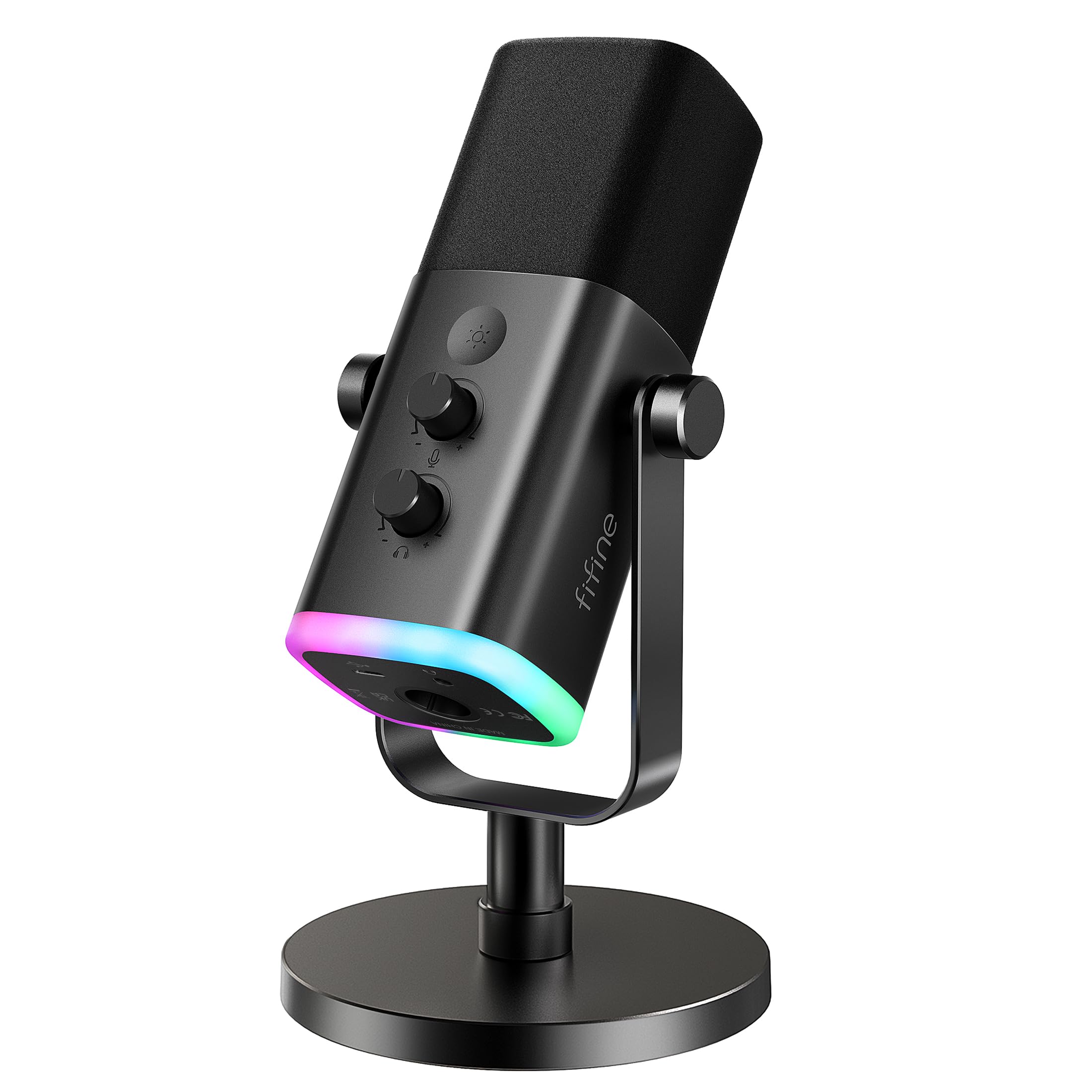
The console-friendly dynamic mic with RGB flair and a USB connection that shines on PS5.
This one is built for gamers who want a bit of visual flair. The RGB ring on the AM8 offers 3 modes and more than 10 light colors, so you can match your PC gear or console setup — and it remembers your color choice after you power off. The dynamic microphone uses a frequency response of 50Hz-16KHz and a directional cardioid pattern that rejects off-axis noise, keeping your voice clear without exaggerating it. The suggested recording range is 2 to 6 inches from the mic, so it rewards a close setup.
It is one of the few mics here that works exceptionally well on PS5 — the manufacturer suggests connecting it to the USB-A port on the back of the console. The tap-to-mute is independent of computer programs, so it works reliably for privacy while live streaming. A built-in headphone jack lets you monitor your voice in real time, and the mic gain knob has resistance to prevent accidental audio jumps.
The XLR connection is a bonus for future upgrades, but note that RGB and the function keys are inactive when using XLR — those only work over USB. Owners praise it as a significant step up from headset quality, especially for beginners who want crisp audio without a complicated setup. The occasional USB-C disconnect requiring a replug is the main gripe, with many finding the XLR route more stable.
Console Ready
- Works well with PS5 via USB-A
- Soothing controllable RGB with memory
- Tap-to-mute independent of software
- Headphone jack with monitoring volume
Console Quirks
- XLR mode disables RGB and function keys
- Occasional USB-C disconnect
Reach for it if: you stream on PS5 or want a dynamic mic with customizable RGB.
Consider another if: you plan to use XLR and want RGB features to stay active.
8. Logitech G Yeti Orb

The featherweight 230 g orb that skips the boom arm and still delivers clear, focused voice capture.
You get clear, focused sound for gaming without buying a single extra accessory—the Yeti Orb weighs just 230 g, so it sits neatly on your desk with no boom arm required. The cardioid condenser capsule (a mic element that picks up sound mainly from one direction) zeroes in on your voice while ignoring key clicks and other noise. Its LIGHTSYNC RGB logo and status light sync with Logitech G HUB, so you can create custom illumination effects that adapt to your gameplay for a more rich setup.
It is genuinely plug and play — connect the USB cable and you are ready to stream. The G HUB software gives you total control not just over the mic but your entire Logitech G ecosystem, including mice, keyboards, and Litra lights. Owners using it for Twitch streaming report clear voice recording with a long USB-A to USB-C cable, and it is highly sensitive to faint sounds.
The honest limitations: there is no mute button, which is a real miss for streamers who need quick privacy. The noise cancellation gets mixed reviews, with remote workers noting it “picks up everything in the background as well,” so a quiet room helps. Its 4.4-star rating trails the top picks, but the compact size and RGB appeal make it a solid starter for gamers who value aesthetics.
Compact Appeal
- Ultra-light 230 g with no boom arm needed
- LIGHTSYNC RGB syncs with G HUB
- Cardioid pattern ignores key clicks
- Long USB-A to USB-C cable included
Missing Pieces
- No mute button on the mic
- Picks up background noise in loud rooms
Choose it for: a minimalist, RGB-lit desk setup where a boom arm feels like overkill.
pass on it if: a physical mute button is non-negotiable for your stream.
9. Blue Ember

The slim XLR powerhouse that beats USB mics in clarity for streamers already running an interface.
This is the pick for streamers who have already stepped up to an audio interface and want a serious microphone upgrade. The Blue Ember connects only via XLR, which means you need an audio interface or mixer — but that purchase pays off in noticeably cleaner, more detailed sound. Owners who upgraded from a Blue Yeti found the Ember “far better than Yeti” thanks to its custom cardioid capsule that captures voice with depth and clarity while minimizing room sound.
Its slim, all-metal build at just 1.5 x 1.26 inches makes it nearly invisible in a camera frame — a real bonus for face-cam streamers who do not want a bulky mic blocking the view. The cardioid pattern rejects ambient noise well when you record 2 to 4 inches from the mouth, and reviewers point out they did not need a shock mount or pop filter. The 40 ohm impedance makes it easy to drive with most interfaces.
The known quirks: it needs a generous amount of gain, so a compressor helps, and some trained ears find the tone slightly dark or muffled. It is extremely light, so you may need counterweight on a boom arm. Also, no cable is included — you must supply your own XLR cable. Owners who have used it for two years say others consistently praise the sound quality, calling it “woah, nice mic.” For the price, it is exceptional value for a pro-grade XLR mic.
Pro Audio
- XLR-only for clean, unprocessed sound
- Slim, all-metal build that disappears on camera
- Cardioid pattern minimizes room noise
- 40 ohm impedance, easy to drive
Pro Setup Needs
- Requires an audio interface or mixer
- No cable included in the box
- Needs gain boost and possibly a compressor
Best for: streamers with an interface who want to leap past USB quality without spending hundreds.
Not the pick if: you want a plug-and-play mic that works straight into your PC.
Understanding the Specs
Pickup Pattern
The pickup pattern is the shape of the mic’s listening zone. A cardioid pattern captures sound mostly from the front and rejects the sides and rear, so your keyboard and mouse clicks stay out of the broadcast. A supercardioid pattern is even tighter, rejecting more noise from the sides — ideal for louder rooms. For streaming, either pattern is a solid choice; the tighter the pattern, the less room noise you will hear.
Audible Noise & Frequency Response
Audible noise is the self-noise the microphone generates — measured in decibels, lower is better because there is less hiss in your audio. Frequency response describes the range of pitches the mic can capture, from deep bass to high treble. A wider range like 20Hz-20kHz captures more audio detail, while a narrower range like 50Hz-16kHz shapes a warmer, voice-focused tone. Both work well for streaming, but the choice affects how your voice sounds.
FAQ
What is the difference between cardioid and supercardioid pickup patterns?
Do I need an XLR microphone or is USB enough for streaming?
Why does my microphone pick up my keyboard and mouse clicks?
What does tap-to-mute do and why do I need it?
How close should I sit to my streaming microphone?
Is a higher frequency response always better for streaming?
Will these microphones work with my PS5 or Xbox for streaming?
What is a shock mount and why does my mic need one?
What does zero-latency monitoring mean for my stream?
Why does my mic need a pop filter?
Final Thoughts: The Verdict
For the majority of shoppers, the budget microphone for streaming winner is the Razer Seiren V3 Mini because it combines a noise-rejecting supercardioid pattern, a tap-to-mute sensor you will use constantly, and a featherlight build that works everywhere. If you want studio-grade USB recording detail, grab the HyperX SoloCast 2 with its 24-bit/96kHz resolution. And for a complete desk-ready kit with a boom arm, the MAONO DGM20S is the one to reach for.
How We Picked
We do not accept paid placement. Every pick is matched to a real buyer and a real use-case; we do not hands-on test units.
Sources & Methodology
Specifications: manufacturer listings and product documentation. Review insights: verified customer reviews, as of August 2026. Pricing: not shown on this page (it changes often); check the current price via the retailer link.
As an Amazon Associate, FitlyFast earns from qualifying purchases. This does not affect which products we feature.