
Our readers keep the lights on and the weekend projects moving. As an Amazon Associate, I earn from qualifying purchases.
Specs are compiled from manufacturer listings and verified buyer reviews and can change over time — please confirm the key details on the product page before buying.
Sim racing demands two things from a VR headset: a sharp enough image to read the apex before you commit, and a refresh rate smooth enough to trust the car’s motion. Most budget headsets fail at one of those. This guide sorts the PC-connected headsets that actually earn a spot on your rig, not just your desk.
I’m Rikta — the founder and writer behind FitlyFast. This guide is built by comparing the manufacturers’ published specifications and the patterns across verified customer reviews, so you get each pick’s real strengths and trade-offs instead of marketing spin.
This guide names the best budget vr headset for sim racing that connects to a PC, with real-world details on display sharpness and refresh rate so you can feel confident before you buy.
Our Picks at a Glance

How To Choose The Best Budget VR Headset For Sim Racing
Sim racing is a punishing test for VR because the camera stays in the cockpit while the world blurs past at speed. A headset that feels fine in a standing game can completely fall apart here. Before you buy, you need to focus on three things that directly affect your lap times and your stomach.
Refresh Rate Is Your First Filter
To keep motion smooth and reduce dizziness when the track whips by, aim for a refresh rate of 90Hz (the number of times per second the screen redraws the image). If a headset dips to 80Hz, you may notice a slight stutter in fast corners, though your brain often adapts with time.
Resolution Determines What You Can Actually See
Resolution is simply how many pixels make up the image — more pixels mean you can read brake markers and corner apexes earlier, which is the whole point of racing. Combined resolutions like 3840 x 1920 (the total across both eyes) are sharper than older 1920 x 1080 panels. Don’t obsess over the highest number alone; pair it with the refresh rate. A slightly softer image at 90Hz is often easier to race than a sharper one at a lower refresh rate.
PC Connection Is Non-Negotiable
Some headsets run on their own built-in processing, but sim racing software is heavy and demands a PC’s graphics card. A true PC VR headset connects to your computer via a cable, like USB, and uses its power to render the game. Make sure the headset you pick is “PC-powered,” not just a standalone unit you plug in occasionally — that distinction changes everything about performance.
Quick Comparison
In‑Depth Reviews
1. HTC Vive XR Elite with Deluxe Pack
The sharpest cockpit view here, ready to strap onto your PC rig the moment it arrives.
You’ll see brake markers and corner entry points well before you reach them, thanks to a 3840 x 1920 combined resolution that is 2.7x sharper than the Oculus Rift S’s 1440 x 1600 panel. That clarity pairs with a 90Hz refresh rate, so the track stays fluid rather than stuttering as you chase down a faster car.
The Deluxe Pack makes this a much easier sell for long racing stints. Buyers report the “Deluxe Pack fixes comfort; no light bleed, balanced strap,” and the counterbalanced battery layout means the weight doesn’t all press onto your face for a 45-minute sprint race. Setup gets a lot of praise, and the base-station-free tracking using four wide field-of-view cameras means you are not mounting sensors around your room just to drive.
There is a real trade-off, though: comfort gets mixed feedback and the visual quality splits owners — some find it impressive, others call the graphics bad. The battery lasts about 2 hours per charge, which is fine for short practice sessions but means you will want to plug in via USB-C for longer endurance events. The stepless IPD and diopter dials let you fine-tune focus without swapping lenses, though strong prescriptions may not fit.
Why you’ll feel it
- Best sharpness of this list — 3840 x 1920 crunch
- 90Hz keeps fast laps smooth
- Balanced strap and reduced light bleed in the Deluxe Pack
Where it stumbles
- Visual quality is a split decision among buyers
- Most glasses don’t fit inside; you may need contacts
- Battery taps out near 2 hours
Grab it for: the sharpest, smoothest PC-connected experience in this list, especially if you want adjustable fit dials without buying extra lenses.
Think twice if: you wear large-frame glasses and hate the idea of contacts, or you want endless battery life without a cable.
2. Oculus Rift
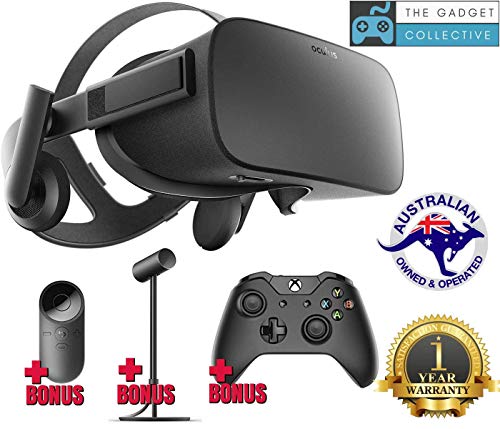
An older classic that still delivers deep, inky immersion for drivers who want atmosphere over pixel count.
Night races and rain-soaked tracks feel genuinely moody thanks to the OLED panel’s rich blacks and strong contrast. The catch is resolution: at 1920 x 1080 it is far softer than the Vive XR Elite above, and owners are honest that “No screen door effect; visible LED grid/pixels like old CRT” — meaning you can see a faint mesh of pixels if you look for it.
What keeps this pick relevant is its 90Hz refresh rate — a 12% notch above the Rift S’s 80Hz — which is the spec that matters most for avoiding motion sickness in fast corners. The field of view hits 110 degrees, giving you a wide window into the cockpit that helps with spatial awareness as traffic closes in. Owners call the quality top-notch and rave about the immersion, though the display itself draws mixed opinions on sharpness.
Be ready for a demanding setup, because this is an older unit. Owners mention the headset needs multiple USB ports — think six USB 2.0 and two USB 3.0 — plus an HDMI connection, and it requires a Facebook account to log in. Glasses wearers report lenses normally fit without touching, which is a nice plus, but the requirement for a beefy PC is real. Reliability gets mixed marks, so treat this as a pick for someone ready to fuss with drivers.
Why it endures: the 90Hz refresh rate and deep OLED colors create a sense of presence that cheap LCD panels often miss — the immersion is the thing owners keep coming back to.
Read the fine print: a softer 1080p image and a messy multi-port setup mean this suits patient builders, not plug-and-play racers.
3. Oculus Rift S

The simplest PC connection of the bunch, built for drivers who want to race tonight, not troubleshoot all week.
The Rift S trades a little sharpness and speed for ease of use. Its 1440 x 1600 LCD panel falls in the middle of this list, and its 80Hz refresh rate is the lowest here — that’s the spec to eyeball if you are prone to motion sickness in fast sims. Owners who came from heavier setups found it restored performance after an older unit “dropped frame rates,” and the improved optics get genuine credit.
Contact is blessedly simple: this is a PC-powered headset over a single USB connection with no external sensors to mount, unlike the original Rift above. That makes it a strong first headset for sim racing if you want to avoid the wall-warts and tripods. The built-in integrated VR audio also means no fiddling with separate headphones before a race.
The honest downsides show up in the details. Tracking earns a mixed reception, with some owners finding certain titles glitchy. A recurring practical gripe is power: motherboard USB ports may not deliver enough juice, and a PCIe USB 3.0 card is often the fix. Controller batteries also drain quickly — about weekly for some — though if you’re mostly racing, you’ll barely touch them. The LCD panel also misses the deep blacks of the OLED Rift.
The winning side
- Single-cable PC connection, no base stations needed
- Integrated audio removes headphone clutter
- Improved optics sharpen up the image
The honest catch
- 80Hz is the lowest refresh rate here
- Tracking can glitch in some titles
- May need a PCIe USB 3.0 card for stable power
Best suited to: newcomers who value a clean, straightforward connection over absolute sharpness and who race in shorter bursts.
Look elsewhere if: smoothness is your priority — the Vive XR Elite’s 90Hz is the safer bet for sprint races.
Understanding the Specs
Refresh Rate (Hz)
Refresh rate is how many times per second the screen redraws the image — essentially the smoothness of motion. In sim racing, a higher refresh rate (like 90Hz vs 80Hz) means the track and other cars move past your eyes more fluidly, which directly cuts down on the dizziness you can get when a corner comes at you fast. Lower refresh rates tend to feel more like a stutter, especially in quick direction changes.
Combined Resolution
VR headsets show one screen per eye, and manufacturers often add both screens together into a single “combined resolution” like 3840 x 1920. This number tells you how many total pixels the headset renders — a big enough number is what lets you spot a braking zone marker or a curb early. Compare this across headsets, not against a flat TV’s resolution, because VR spreads those pixels across your whole field of view.
Field of View (FOV)
Field of view is how wide an angle your eyes can see through the lenses, measured in degrees. A wider FOV, like 110 degrees, lets you see more of the side windows and mirrors in your peripheral vision without turning your head. That matters for racing because you can track a car alongside you before it enters your direct line of sight.
IPD and Diopter Adjustments
IPD stands for interpupillary distance — the space between your pupils. If the headset’s lens spacing doesn’t match yours, the image looks blurry or causes eye strain. Some headsets let you physically adjust this on the fly, and a diopter dial adds focus correction so you can sharpen the image without wearing glasses, though it does not fix astigmatism.
FAQ
Can I use a standalone VR headset for sim racing on PC?
Does the HTC Vive XR Elite work with my PC racing sims?
Is 80Hz refresh rate good enough for racing?
Will my glasses fit inside the HTC Vive XR Elite?
What makes OLED better than LCD for a racing headset?
Do I need extra sensors or base stations for these headsets?
Why does my headset keep disconnecting from the PC?
How long does the battery last on the Vive XR Elite?
Which has better image quality, the Oculus Rift or the Rift S?
Final Thoughts: The Verdict
For the majority of shoppers, the budget vr headset for sim racing winner is the HTC Vive XR Elite because it pairs the sharpest display here — 3840 x 1920 — with a smooth 90Hz refresh rate and a comfortable Deluxe Pack strap. If you want the deepest atmosphere and don’t mind an older setup, grab the Oculus Rift with its OLED panel. And for the simplest plug-and-play connection, the Oculus Rift S is the one to reach for.
How We Picked
We do not accept paid placement. Every pick is matched to a real buyer and a real use-case; we do not hands-on test units.
Sources & Methodology
Specifications: manufacturer listings and product documentation. Review insights: verified customer reviews, as of August 2026. Pricing: not shown on this page (it changes often); check the current price via the retailer link.
As an Amazon Associate, FitlyFast earns from qualifying purchases. This does not affect which products we feature.