
Our readers keep the lights on and the weekend projects moving. As an Amazon Associate, I earn from qualifying purchases.
Specs are compiled from manufacturer listings and verified buyer reviews and can change over time — please confirm the key details on the product page before buying.
You can turn plain polyester mugs, T-shirts, and tumblers into vibrant custom pieces with sublimation printing — but the printer you pick decides if that first project feels like a win or a headache. The good news: you don’t need to spend a fortune to start, because the budget tier now includes super-tank ink systems (printers with large refillable ink reservoirs) and reliable converted Epson models that deliver real results.
I’m Rikta — the founder and writer behind FitlyFast. This guide is built by comparing the manufacturers’ published specifications and the patterns across verified customer reviews, so you get each pick’s real strengths and trade-offs instead of marketing spin.
If you want a machine that gets you from unboxing to your first successful heat press without the headache, this roundup of the best affordable sublimation printer options shows you exactly which models are worth your money and which features actually matter.
Our Picks at a Glance

How To Choose The Best Affordable Sublimation Printer
Sublimation printing is a specific process: the printer lays down special dye on transfer paper, and a heat press then turns that dye into gas that bonds permanently with polyester-coated items. That means you can’t just grab any inkjet — you need a machine designed for, or converted to, sublimation ink.
Look for a super-tank or cartridge-free system
A super-tank printer uses refillable ink reservoirs instead of cartridges. You pour in bottled ink and print hundreds of pages before refilling. For a hobbyist making mugs and shirts on weekends, this keeps the per-print cost dramatically lower than cartridge-based machines.
Check the ink volume that ships in the box
The amount of sublimation ink included matters more than you might think. Some bundles include tiny starter cartridges that run dry quickly, while others ship full 70mL or even 127mL bottles. More ink in the box means more projects before your first reorder day.
Confirm it prints at true sublimation resolution
A printer that prints at up to 5760 x 1440 dpi (dots per inch — a measure of detail sharpness) will produce smooth gradients and crisp edges on your transfers. Lower-resolution machines can show banding or grain, especially on large shirt designs.
Match the paper size to your projects
Most entry-level sublimation printers handle 8.5″ x 11″ letter paper, which covers mugs, coasters, and small shirts. If you plan to print larger designs or long banners, you’ll want a model that supports legal size or a bypass tray for extended lengths.
Quick Comparison
| Model | Best For | Color Speed | Resolution | Ink System | Amazon |
|---|---|---|---|---|---|
| Cartridge-Free Super-Tank★ Best Overall | First projects & high volume | 17.5 ppm | — | 70mL bottles | Amazon |
| Pinckney Super-Tank BundleBest Value | Value with big ink bottles | 5 ppm | 5760 x 1440 dpi | 127mL black | Amazon |
| Pinckney Renewed ET-3850 | Office-style features | 10 ppm | 5760 x 1440 dpi | 127mL black | Amazon |
| Epson SureColor F170 | True dedicated sublimation | 1 ppm | — | OEM ink set | Amazon |
| Brother Sublimation Printer | App-based DIY design | — | — | Genuine ink set | Amazon |
| Brother SP-1 Deluxe Bundle | All-in-one starter kit | 10 ppm | — | 47mL each color | Amazon |
| Sawgrass SG500 | Professional-grade output | 10 ppm | — | 20mL starter set | Amazon |
In-Depth Reviews
1. Cartridge-Free Super-Tank Printer with Sublimation Ink
The super-tank that turns your first mug project into a habit instead of a struggle.
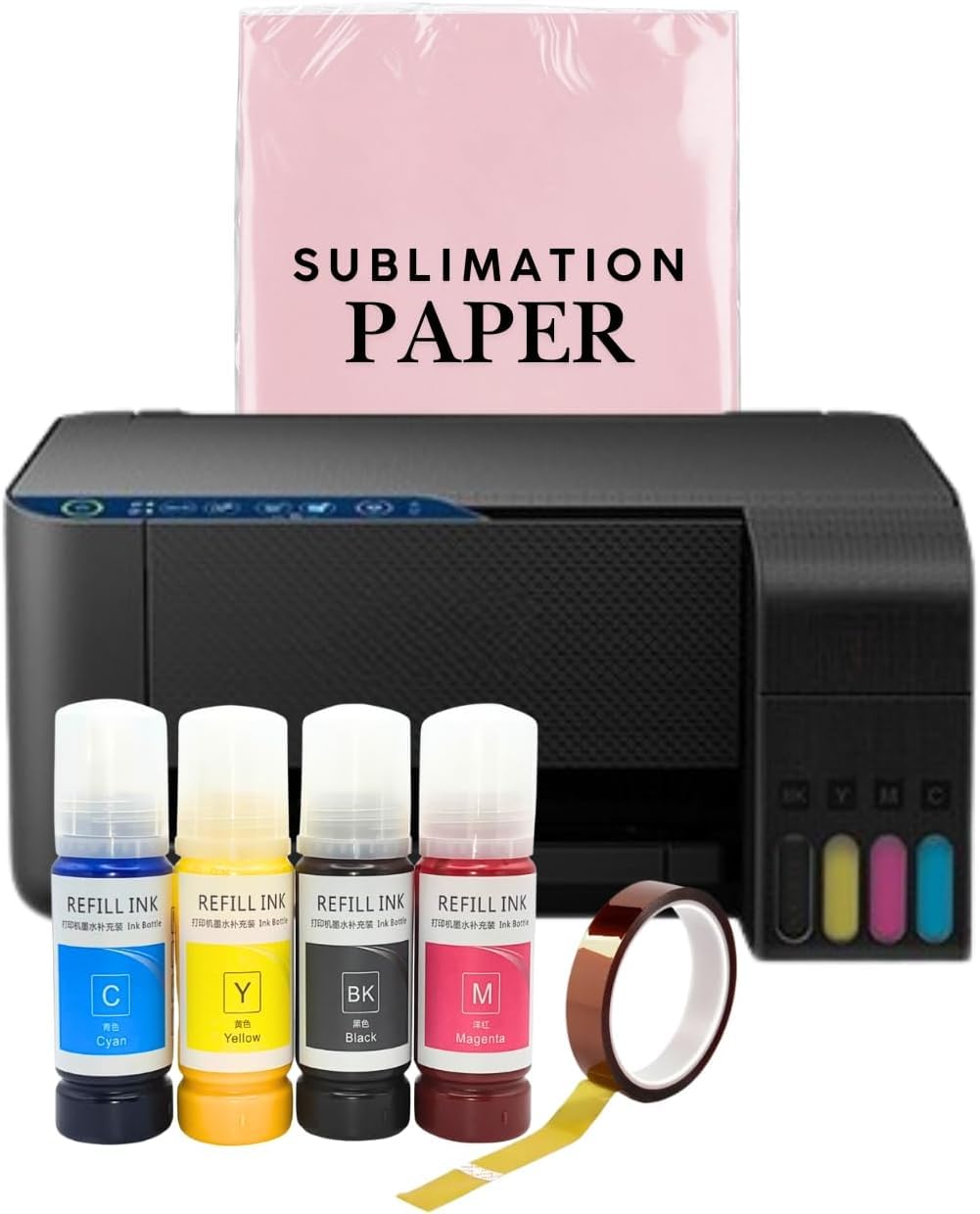
This is the pick for someone who wants speed and simplicity without paying a premium. It’s a wireless all-in-one with a scanner and copier, and the high-capacity ink tanks mean you refill with bottles rather than swapping cartridges. The box ships with Black, Magenta, Cyan, and Yellow 70mL bottles, and the auto-fill nozzle fits the inlet cleanly — no syringe, no squeezing, no ink leakage.
Owners consistently report that setup is genuinely easy even for non-tech-savvy users, and that it “works great” once figured out. The prints look light on paper initially, but they transfer beautifully to mugs once you adjust heat press temperature and time — most find lower and shorter settings than videos suggest work best.
Speed is the standout here: it prints color at 17.5 pages per minute and black-and-white at 20.5 pages per minute. That’s a 75% faster color pace than the Pinckney bundle (10 ppm), so if you’re cranking out multiple designs in a session, this machine keeps up with your workflow.
What wins people over
- Scans, copies, and prints wirelessly in one machine
- 17.5 ppm color speed beats most rivals here
- Easy bottle-fill tanks with no leakage
The trade-offs
- Print head can fail if it sits unused for long stretches
- An occasional unit stops working within a year
the balance: This suits a beginner or small-batch seller who wants a fast, cartridge-free machine that doubles as a scanner and copier.
Think twice if: You will go weeks between prints — the recurring maintenance advice is to print weekly minimum to prevent ink drying and clogging.
2. Pinckney Cartridge-Free Super-Tank Printer with Sublimation Ink Bundle
A converted EcoTank that brings high resolution and huge ink bottles to the budget tier.
This model is built on the Epson ET-2800 platform, converted for sublimation, and it offers the sharpest resolution in the value tier at up to 5760 x 1440 dpi (dots per inch — the finer the dots, the smoother your gradients). The ink bundle is the real draw: Black comes in a 127mL bottle while Magenta, Cyan, and Yellow arrive at 85mL each, so you get far more projects from the start than typical starter packs.
The auto-fill nozzle and push-button controls make refilling painless, and the wireless connection works easily with phones as well as laptops and tablets. Buyers report that colors come out “great” and that the printer is highly compatible with phone printing, which is the workflow most crafters actually use day to day.
Print speed is modest — 5 color pages per minute versus the top pick’s 17.5 ppm — so this is about precision and ink value, not racing through a big batch. It also supports a wide range of paper sizes from 4″ x 6″ postcards up to 8.5″ x 47.2″ banners, which the top pick can’t match.
Why it earns its spot
- 5760 x 1440 dpi resolution for crisp detail
- 127mL black ink bottle is huge for the price
- Easily prints from your phone
Where it stumbles
- Slow color output at 5 ppm
- Reliability is a gamble — a few units fail within a week
Reach for this if: You value sharp, high-resolution transfers and want the biggest ink supply for the smallest upfront cost.
Look elsewhere if: You need to print large orders quickly, or you want the safety of a major-brand warranty — this one’s reliability record is a genuine lottery.
3. Epson SureColor F170 Dye-Sublimation Printer

A true dedicated dye-sublimation machine that skip the conversion gamble entirely.
Unlike the converted EcoTanks above, the SureColor F170 is a purpose-built dye-sublimation printer — it was designed from the ground up for heat transfers, which means no ribbon-style setup risks and no worrying whether the ink is right. It ships with genuine Epson sublimation inks certified ECO PASSPORT by OEKO-TEX, so you’re ready to print on textiles, apparel, mugs, mousepads, and more immediately.
The PrecisionCore printhead with Precision Droplet Control delivers the kind of image clarity that wins people over — the single most-praised aspect among owners is print quality, with 59 buyers singling it out. Setup ranks second at 40 mentions, and owners describe it as easy and reliable without clogging, which is the maintenance headache that plagues cheaper converted machines.
Its compact footprint (13.7″D x 14.8″W x 7.4″H) fits on a small desk, and the 150-sheet auto-feed tray sits in a dust-resistant closed tray to keep prints clean. The catch is connectivity: it doesn’t work with iPads and iPhones, so you’ll be tethered to a PC or Mac via USB.
What owners rave about
- Purpose-built for sublimation with OEM ink included
- ECO PASSPORT certified inks for textile safety
- Dust-resistant 150-sheet tray keeps prints clean
The honest limits
- No iPad or iPhone support — USB and PC only
- Print-only model, so no scanner or copier
The confident choice: If you want the reliability of a dedicated sublimation machine with professional-grade output, this is the safest money you’ll spend in this category.
The catch: You give up phone printing entirely, so this only fits if your workflow lives on a laptop or desktop.
4. Brother Sublimation Printer for Custom Heat Transfer Printing

The app-driven Brother that turns your phone into a full design studio for DIY apparel.
This Brother model is built around the Artspira app, which lets you import and save up to 20 printing images and access over 100 built-in sublimation designs. You create your design on Artspira, transfer it, print, and heat press — the entire workflow is guided, making it among the most beginner-friendly paths into sublimation apparel.
Owner feedback highlights professional-looking results, fast printing, and a self-cleaning feature that keeps maintenance low — buyers land on it after comparing against the Sawgrass SG500 and find it delivers similar results at a lower ink cost. Print quality leads the praise at 44 mentions, with setup at 31 and value for money at 29.
It ships with Brother Genuine Ink in Black, Cyan, Magenta, and Yellow plus a sublimation paper starter pack, and the hardware includes Scan functionality. The mixed note is color accuracy — while some call colors brilliant, others find them less vivid than expected, which points to a learning curve with heat press settings.
Where it shines
- Artspira app with 100+ ready-made designs
- Self-cleaning feature cuts maintenance hassle
- Owners find it cheaper to run than the Sawgrass SG500
Where it frustrates
- Color vibrancy is hit-or-miss until you dial in settings
- App navigation takes time to master
Best for: A crafter who wants guided design tools and a self-cleaning machine that forgives irregular use.
Not for: Anyone who demands exact, vivid color straight from the start — expect a calibration curve before results feel “professional.”
5. Brother SP-1 Sublimation Printer Deluxe Bundle
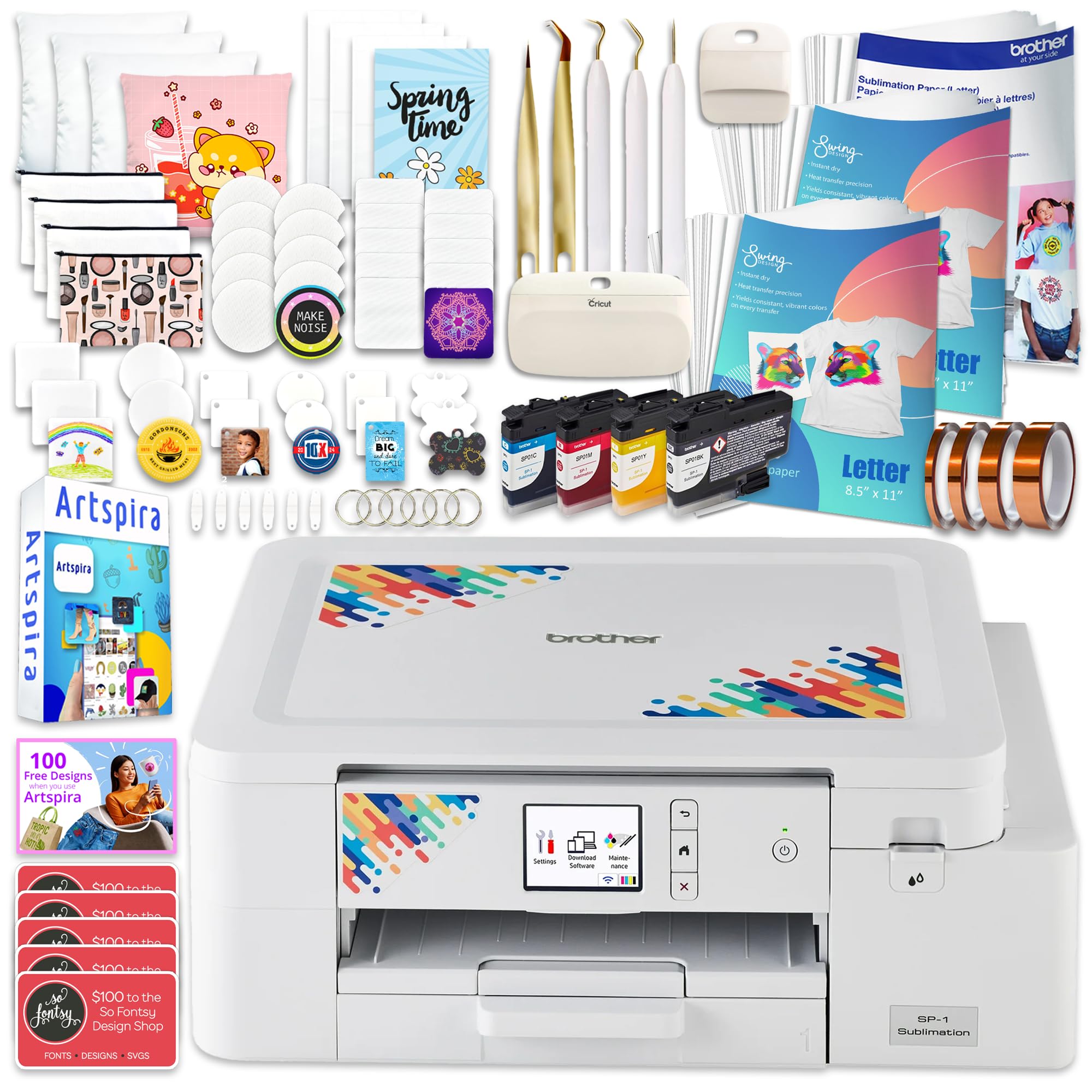
A complete starter workshop in one box — printer, ink, paper, blanks, and tape.
This is the bundle for someone who wants to start printing the day the box arrives. Beyond the Brother SP-1 printer itself, you get a full CMYK ink set (47mL each), 300 sheets of ProSub 8.5″ x 11″ sublimation paper plus 10 Brother sheets, a 50-piece ProSub blank set, four rolls of heat-resistant tape, 500 design cards, and a 7-piece tool set.
Print quality is the most-praised aspect at 6 mentions, with ease of use at 5. Beginners describe excellent prints on key fobs, magnets, and coasters, plus auto head cleaning and auto mirroring that remove the two most common newbie mistakes. The printer self-cleans to stay maintained, which is a huge relief for anyone worried about clogged nozzles.
Speed sits at 10 pages per minute in both color and black-and-white, and the compact 17″D x 13.5″W x 6.3″H footprint fits a modest craft space. The biggest downside is software: there’s no desktop app, so you’re limited to the phone and tablet app — a real limitation for designing on a big screen.
What makes it a great buy
- 50 blanks and 310 paper sheets included
- Auto head cleaning and auto mirroring for beginners
- Compact size fits small craft spaces
The drawbacks
- No desktop app — phone and tablet only
- The 47mL ink bottles run smaller than super-tank rivals
Grab it if: You’re brand new to sublimation and want every consumable included so you can learn without buying extras.
skip it if: You prefer designing on a desktop — the phone-only app will frustrate you quickly.
6. Pinckney Cartridge-Free Super-Tank Printer (Renewed)

A renewed EcoTank with office conveniences — paper tray, ADF, and Ethernet — for sublimation duty.
This renewed ET-3850 brings the most office-friendly feature set in the lineup: a 250-sheet paper tray, an Auto Document Feeder (ADF) for scanning multi-page stacks, and an Ethernet connection for stable wired networking. For a small business that also needs to scan contracts while printing transfers, this one machine handles both roles.
It matches the value pick’s impressive 5760 x 1440 dpi resolution and ships with the same generous ink (127mL black, 85mL for each color). Color speed is a solid 10 pages per minute — double the standard Pinckney bundle — and black-and-white hits 15.5 ppm, beating it by 55%.
The caveat is that this is a renewed unit, and owner opinions split sharply on quality and reliability (6 mentions each, both mixed). Some report the refurbished unit “is working well,” while others deal with Wi-Fi drops and paper that comes out with lines on one end for larger prints. It’s 3.8″D shallower than the standard bundle (19.8″D vs 18″D), so it takes up slightly less desk depth.
What stands out
- Automatic duplex printing saves paper
- ADF and Ethernet make it a true office workhorse
- 250-sheet paper tray handles bigger jobs
The risks
- Renewed unit — quality varies between units
- Some report Wi-Fi instability and printed lines
Pick this if: You need a sublimation printer that also scans multi-page documents and sits reliably on a wired office network.
Pass if: You want the confidence of a brand-new machine — the renewed status is the core gamble here.
7. Sawgrass SG500 Sublimation Printer Starter Bundle

The brand long-trusted by pros, now in a compact desktop form with anti-clog engineering.
For those who already follow the sublimation world, Sawgrass is the name that shows up in serious craft studios. The SG500 prints on media up to 8.5″ x 14″, and the bypass tray extends that to 8.5″ x 51″ for long signage. The anti-clog design plus print head auto-maintenance means this machine is engineered for the irregular usage patterns of a small business.
It ships with a full starter set of 20mL SubliJet UHD ink cartridges and TruePix paper, plus access to the MySawgrass platform with templates and the Sawgrass Print Utility for precise color control. Owners with years of experience call it the best printer they’ve ever had, praising superior sublimation quality that beats standard inkjet output.
The friction points are real: the most-discussed issue is ink level, with 8 mentions flagging that cartridges arrive reading low or empty on setup. The proprietary ink locks the printer if you use unauthorized cartridges, and replacement ink runs expensive — one owner noted the cost climbs to roughly immediately after the starter set. It’s the priciest pick here, and the anti-clog convenience comes with a lock-in trade.
Why pros choose it
- Prints up to 8.5″ x 51″ for long banners
- Anti-clog design built specifically for sublimation
- MySawgrass platform for precise color control
The real costs
- Proprietary ink locks out third-party cartridges
- Starter cartridges sometimes arrive low or empty
- The most expensive pick in this roundup
Choose this if: You’re scaling a business and want the reliability and long-format printing that pros depend on.
Reconsider if: You’re a casual hobbyist — the premium price and expensive proprietary ink are hard to justify for occasional mugs.
Understanding the Specs
Resolution (dpi)
Dots per inch measures how many tiny ink droplets the printhead lays down per square inch. A higher number like 5760 x 1440 dpi means smoother gradients and sharper fine details in your heat transfers. Lower resolution can show visible banding or grain, especially on large shirt designs where the eye scans wide areas.
Color Pages per Minute
This tells you how fast the printer produces color pages. It matters a lot when you’re batch-printing multiple designs for a craft fair or a small business order. A machine printing at 17.5 ppm finishes a batch of ten transfers in roughly the time a 5 ppm model needs for three.
Ink Volume and Type
Sublimation ink volume is measured in milliliters (mL) per bottle or cartridge. A 127mL black bottle will print far more projects than a 20mL starter cartridge before you reorder. The ink type also matters — genuine OEM sublimation ink is formulated specifically for the heat press transfer process, so results stay vibrant.
FAQ
Can I use any regular inkjet printer for sublimation?
Why do my sublimation prints look dull on paper before heat pressing?
How often do I need to use my sublimation printer to prevent clogs?
What’s the difference between a converted EcoTank and a dedicated sublimation printer?
How much ink do I get in the box with these affordable models?
What paper sizes do affordable sublimation printers handle?
Do I need a heat press to use these printers?
Can I print from my phone with these sublimation printers?
Are third-party sublimation inks safe to use in these printers?
What does “renewed” mean for a sublimation printer?
Final Thoughts: The Verdict
For the majority of shoppers, the affordable sublimation printer winner is the Cartridge-Free Super-Tank because it pairs the fastest color speed at 17.5 ppm (pages per minute) with a scanner, copier, and generous 70mL ink bottles — all at a price that respects a beginner’s budget. If you want the sharpest resolution at 5760 x 1440 dpi and the biggest 127mL ink supply, grab the Pinckney Super-Tank Bundle. And for a dedicated machine with the lowest clog risk and professional-grade output, the Epson SureColor F170 is the one to reach for.
How We Picked
We do not accept paid placement. Every pick is matched to a real buyer and a real use-case; we do not hands-on test units.
Sources & Methodology
Specifications: manufacturer listings and product documentation. Review insights: verified customer reviews, as of August 2026. Pricing: not shown on this page (it changes often); check the current price via the retailer link.
As an Amazon Associate, FitlyFast earns from qualifying purchases. This does not affect which products we feature.