
Our readers keep the lights on and the weekend projects moving. As an Amazon Associate, I earn from qualifying purchases.
Specs are compiled from manufacturer listings and verified buyer reviews and can change over time — please confirm the key details on the product page before buying.
If you are hunting for a budget computer keyboard, the first thing to know is that “cheap” no longer means mushy or dim. The biggest buying mistake is ignoring keycap size and backlight quality — because your eyes and fingers will live with that choice every single day. This guide covers seven wired and wireless picks that focus on readable keys, useful lighting, and a typing feel that does not punish you.
I’m Rikta — the founder and writer behind FitlyFast. This guide is built by comparing the manufacturers’ published specifications and the patterns across verified customer reviews, so you get each pick’s real strengths and trade-offs instead of marketing spin.
You will get a clear look at the best large-print, backlit, and mechanical options in the budget computer keyboard space, so you can pick the right one without chasing specs that do not matter.
Our Picks at a Glance

How To Choose The Best Budget Computer Keyboard
You touch your keyboard all day, so picking the right budget one matters. Your three real decisions are key size, lighting, and switch type — and this guide helps you choose without overspending.
Key size and print readability
Large print keys are the single biggest usability feature for anyone with tired eyes or reduced vision. Some models use fonts up to 4 times larger than standard keycaps, which can be a literal eye-saver. If you touch type, you may not need oversized letters — but if you glance down often, this is the feature that counts.
Backlighting choices
Backlit keys are what separate a great budget pick from a basic one. Look at the number of lighting modes and brightness levels, not just whether the keys glow. Seven colors with three or four brightness levels gives you flexibility for dim rooms, late-night work, or a gaming setup that matches your mood.
Switch type and wired reliability
Membrane keys are quiet, soft, and cheap to make — most budget picks use them. Mechanical switches, like Keychron’s Brown, offer a tactile click that some typists love. Wired USB keyboards are generally more reliable than wireless ones, since there are no dead batteries or dropped signals. Wireless options trade that reliability for a cleaner desk.
Quick Comparison
| Model | Best For | Key Count | Backlight | Connectivity | Amazon |
|---|---|---|---|---|---|
| X9 Large Print★ Best Overall | Vision-friendly typing | 107 | 7 Colors, 4 Levels | USB-A Wired | Amazon |
| KOPJIPPOM Large PrintBest Value | Bright, big-key daily use | 104 | 7 Colors, 3 Levels | USB-A Wired | Amazon |
| HeengYanson 7-Color | Ergonomic comfort with wrist rest | 104 | 7 Colors, 3 Levels | USB-A Wired | Amazon |
| Luzarriba Backlit | Quiet, spill-proof office use | — | 7 Colors, 3 Levels | USB-A Wired | Amazon |
| Logitech MK270 | Wireless desk setup | — | None | Wireless Receiver | Amazon |
| SEUNKWANG Pudding | Aesthetic purple desk setups | 104 | White Single Color | USB-A Wired | Amazon |
| Keychron C2 | Tactile mechanical typing | 104 | None | USB-C Wired | Amazon |
In-Depth Reviews
1. X9 Large Print Backlit Keyboard
The big-letter king that turns vision-friendly typing into a plug-and-play reality.
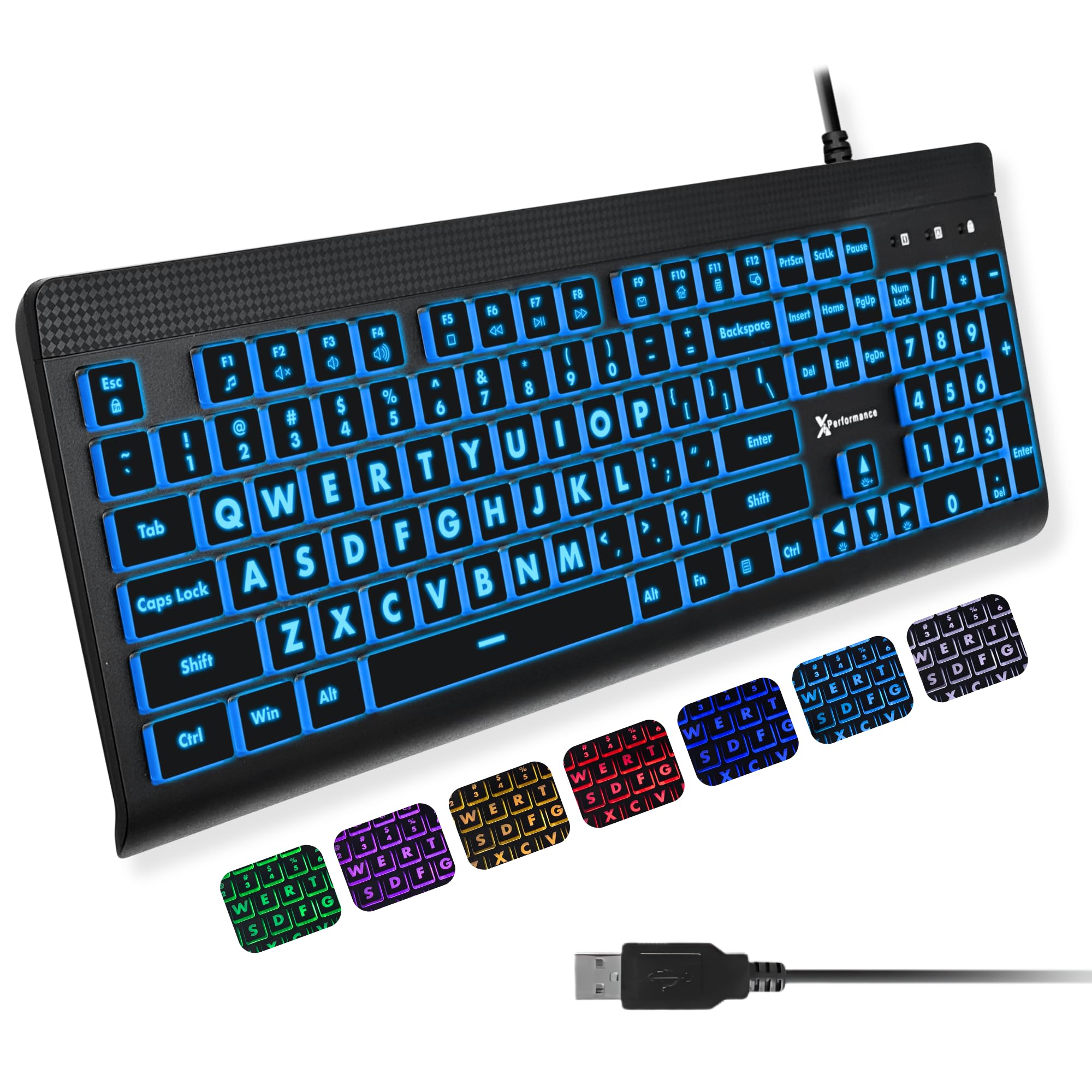
The X9 wins for pairing oversized, bold keycap print with a 7-color backlight that has 4 brightness levels. Its 107-key layout covers the full-size list, including a number pad and 12 shortcut keys, so it slides into office work or late-night study without you hunting for a missing key. The product’s defining feature — large, bold print on every keycap — is the reason it’s the favorite for seniors and anyone with shaky eyesight.
This is also a 7-color backlit keyboard with 4 brightness levels, which is one more level of control than most rivals offer. Buyers report that the keys are “Good solid and big letters that are lighted, perfect for persons with vision issues” — and that’s the consensus across the board. The quality score is the highest-praised aspect, with over 80 owners calling out the build. It’s a mid-weight board with quiet keys, so it won’t rattle your desk or annoy a roommate.
The X9’s main drawback is that some units ship with slightly loose keycaps. One buyer wrote, “keys are a bit lose, but the backlight is nice” — it’s not universal, and it doesn’t dethrone this pick. Setup is dead simple: plug in the USB-A cable, no software needed, and you’re typing. That ease makes it the safest value pick here.
What wins people over
- Extra-large print letters that stay readable in dim light
- 7 backlight colors with 4 brightness levels for control
- Full 107-key layout with 12 shortcut keys
The honest catch
- An occasional unit ships with slightly loose keys
- Wire-only — no Bluetooth option if you want a clean desk
Reach for this if: you need oversized, illuminated letters and want a full-size board that works instantly with any Windows PC or Chromebook.
Look elsewhere if: you want wireless freedom or a clicky mechanical feel — this is a quiet membrane board through and through.
2. KOPJIPPOM Large Print Keyboard
A 4x-larger-font membrane board that punches far above its price class.
The KOPJIPPOM delivers the largest font on this list—4 times bigger than standard—making it the top value for visibility. Its fonts are 4 times larger than standard keyboards — the biggest jump on this list — which makes it a favorite for elderly users, schools, and special-needs departments. The 104-key full QWERTY layout includes a numeric keypad, so you won’t have to relearn typing. It’s also slightly wider than the X9 at 17.7 inches wide versus 17.31 inches on the X9, but the difference is negligible for most desks.
At the heart of its popularity is the 7-color backlighting with 3 brightness levels — blue, green, red, cyan, purple, yellow, or white. Owners mention that “Keys are large to see and touch without hitting more than one key,” which is exactly the experience a vision-impaired typist wants. The most-praised aspect is quality, with over 100 owners calling it out, and lighting runs a close second. It’s a heavy, stable build with soft keys that need only a light touch, so long typing sessions don’t wear you out.
The classic complaint is one of firmware, not feel: the keys flash when your PC sleeps, so you’ll need to unplug it to stop the light show. There’s also no preference memory, so your color choice resets sometimes. Those are minor annoyances relative to the visibility payoff and the spill-resistant design that guards against coffee disasters.
Why it stands out: It’s the only pick here that pushes the font to 4x standard, and that translates directly to less squinting and fewer typos.
Where it slips: The flashing-on-sleep quirk is real, but you can unplug it or live with the glow.
3. HeengYanson 7-Color Backlit Keyboard

Ergonomic wrist support meets oversized letters in a keyboard built for marathon typing.
The HeengYanson stands out for its built-in wrist rest and 7-degree ergonomic tilt, the only pick here with both. The board sits at a 7-degree angle with soft-touch keys that produce no loud clicks, so it works beautifully for late-night office work without waking anyone. The 104-key layout is standard, but the oversized print and backlit keys — 7 colors at 3 brightness levels — make it a strong alternative to the KOPJIPPOM above if comfort is your priority.
What makes this one memorable is its durability under real writing loads. Someone typed 115,000 words on it with minimal key wear and no quality issues, which is a serious endorsement for a budget board. The most-praised aspects are quality and key size, each with 75+ owners mentioning them. It plugs in via USB-A and works in about 10 seconds, which is faster than most rivals can even be unpacked.
The trade-off is the same one that affects many backlit boards: it lacks a truly clicky feel, so if you live for mechanical clack, this won’t scratch that itch. A few shorter typists also wished the rear elevation went higher. But for someone typing for hours, the wrist rest plus quiet keys is a legitimate comfort win over the X9.
Comfort first
- Built-in wrist rest with 7-degree ergonomic tilt
- Silent soft-touch keys for shared spaces
- 7-color backlight with 3 brightness levels
What it gives up
- No clicky mechanical feedback
- Rear elevation too low for some shorter users
Grab this one if: you spend hours typing and want wrist support plus oversized illuminated keys.
skip it if: you’re a mechanical-switch enthusiast who needs that audible click on every keystroke.
4. Luzarriba Backlit Keyboard

A whisper-quiet, spill-resistant workhorse that shrugs off coffee and cat attacks.
The Luzarriba is built for messy environments, with a spill-resistant design that survives kid, cat, and coffee mishaps. It’s a spill-resistant membrane keyboard where the color selection is the most-praised aspect, with 47 owners calling it out. The 7-color backlight runs through 3 low-mid-high brightness levels, and the foldable stand keeps your wrists in a flatter, more natural position. It’s a straightforward USB-A plug-and-play board with no driver installation required.
Quiet typing is its other signature trait. The keys are soft enough that you can type in a library without dirty looks, and the noise level is one of the top mentioned positive aspects. One owner bought it specifically because it is “waterproof (kids/cat/spills)” and it survived a full spill with no damage — proof of the spill-resistant design. A 6-month durability report with no issues backs that up.
The honest caveats are about finish and memory. The paint can wear off certain keys over time, and the board itself is lightweight, so it slides on smooth desks thanks to only two rubber pads. The backlight also resets to green max brightness after a restart, which is a small firmware quirk. If you want the color to stay where you left it, this may frustrate you at boot-up.
Who it fits: Anyone with kids, pets, or a love of open beverages near their desk — the spill-resistance is the headline feature.
Who it doesn’t: Perfectionists who hate resetting their backlight color every time the PC boots.
5. Logitech MK270 Wireless Combo
The wireless legend with a 33-foot range and a battery life measured in years, not weeks.
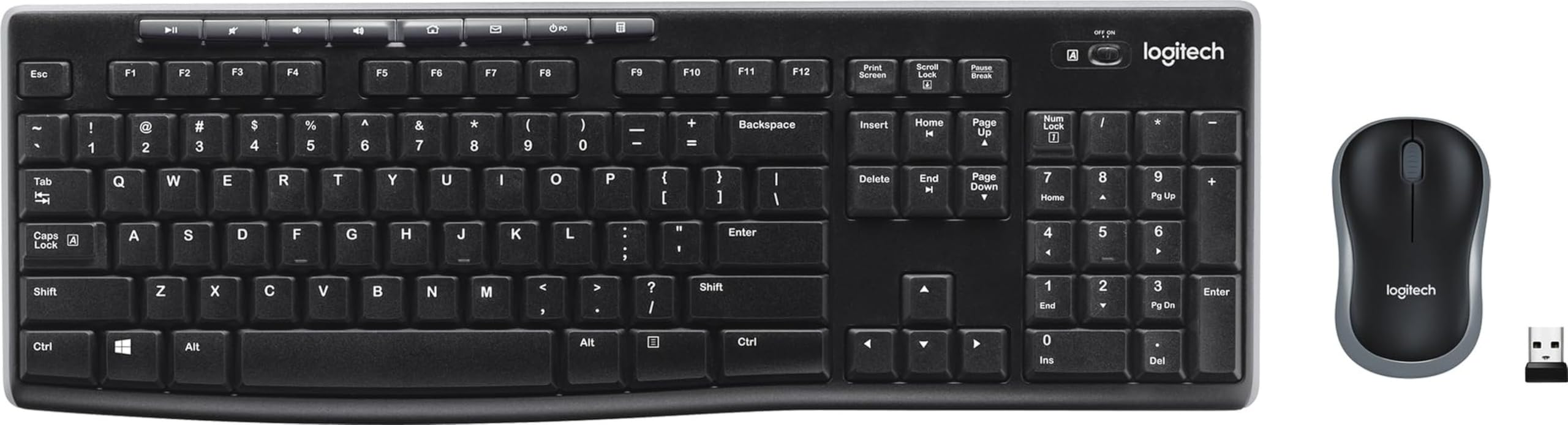
The Logitech MK270 is the sole wireless option here, offering a 33-foot range and a 36-month keyboard battery. The USB receiver connects reliably up to 33 feet away, and the keyboard battery lasts an astonishing 36 months while the mouse runs 12 months on its own battery. That means you set it up once and largely forget about power for years. It even includes 8 multimedia hotkeys for instant access to internet, email, and volume.
The classic appeal of the MK270 is sheer practicality — it’s a full-size layout with standard F-keys, number pad, and arrow keys, plus a spill-resistant design and sturdy tilt legs. The crowd response is massive, with functionality and quality each mentioned thousands of times by owners. It’s a combo deal too, so you get a compact ambidextrous mouse that works on most surfaces — no extra purchase needed. The keyboard’s low-profile, quiet keys are comfortable for long stretches.
The honest downsides are durability and responsiveness. A meaningful number of customers note the keyboard or mouse stops working after a few months, and lag issues do surface occasionally. The mouse also feels small and “cheaply made” to some — one user with average hands found it cramped. And the keys do not light up, which is a dealbreaker if you type in the dark. For a wireless setup, the convenience outweighs the flaws for most buyers, but the other wired picks here are more reliable over the long haul.
Why it’s legendary
- 33-foot wireless range via USB receiver
- 36-month keyboard battery life — set and forget
- Includes a compact ambidextrous mouse
The trade-offs
- Durability concerns — some units fail within months
- No backlighting, so night typing is guesswork
Pick this if: you want a clutter-free wireless desk and a battery that outlasts your patience.
Think again if: you type in dim rooms or want the reliability of a wired connection.
6. SEUNKWANG Wired Backlit Keyboard
A waterfall-glow aluminum panel that makes your desk look expensive without the price tag.
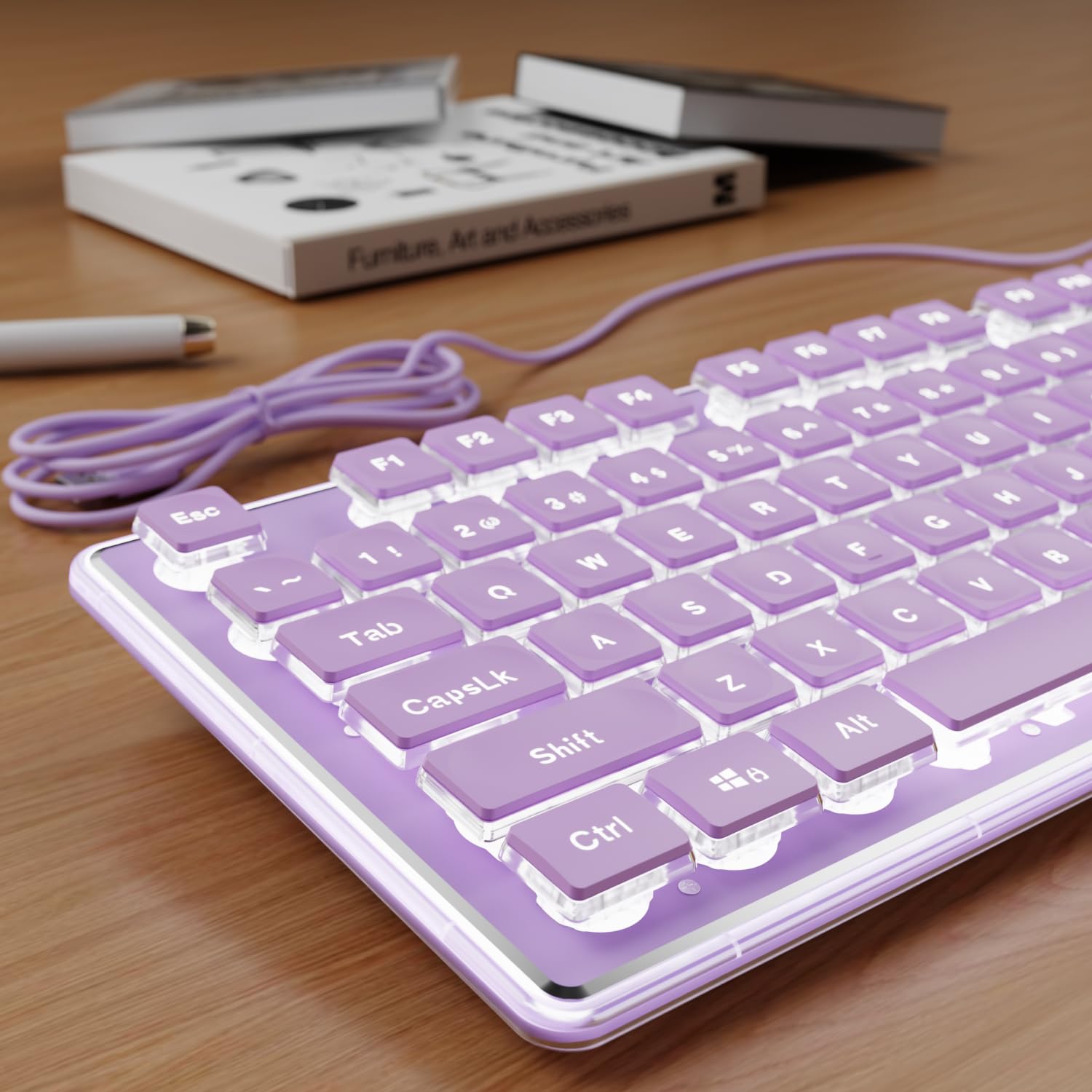
The SEUNKWANG is the aesthetic choice, with water-drop pudding keycaps and an aluminum panel for a purple-themed desk. Its water-drop pudding keycaps boost light transmittance, so the white backlight glows softly and evenly across every key instead of pooling at the edges. The aluminum alloy top panel gives it a premium, scratch-resistant feel that’s rare at this tier. The 104-key layout with a dedicated number pad handles spreadsheet work fast, alongside 26-key anti-ghosting technology so rapid keystrokes all register.
You get a single white backlight with adjustable brightness — no rainbow RGB here, just a clean, subtle glow. Buyers praise the looks (66 mention it) and the quiet (55 praise it), calling the keys “completely silent and smooth.” The double-shot ABS injection molding (a process where the lettering is molded into the keycap, not printed on top) keeps the translucent characters from fading even after years of heavy typing — a common cheap-keyboard failure. It’s a plug-and-play USB-A board that works with Windows, Linux, and Chrome OS right from the start.
The reliability score is genuinely mixed, and it’s the reason this isn’t higher on the list. A few reviewers point out the keyboard freezes 4-5 times and needs a replug to recover. The membrane keys also produce a soft “thud” rather than true silence. And the backlight auto-dims after under 5 minutes of inactivity, which can be annoying mid-thought. It’s a beautiful board — just keep the USB cable easy to reach.
The headline: You get standout looks and fade-proof keycaps — ideal if you’re building a cohesive purple desk setup.
The fine print: The occasional freeze means you’ll want the cable within arm’s reach.
7. Keychron C2 Mechanical Keyboard

The tactile mechanical legend that types like a 90s IBM tank and lasts for 50 million keystrokes.
The Keychron C2 is the only mechanical pick, using tactile Brown switches rated for 50 million keystrokes. It uses pre-installed Keychron Brown switches — a tactile switch that gives a satisfying click on each press without being obnoxiously loud — rated for an up-to-50-million keystroke lifespan. That durability rating is the big differentiator versus the membrane boards above; a mechanical board like this can outlast several cheap membrane replacements. Built with a solid plastic frame that “doesn’t move” on the desk, it weighs 1.5 kg (about 3.3 lbs), giving it a planted, stable typing feel.
What sets the C2 apart is its dual-platform design. The 104-key full-size layout is tune for Mac with dedicated multimedia and function keys — including a Siri or Cortana key — and comes with extra keycaps for both Mac and Windows systems. The 2-level adjustable feet (6 and 9 degrees) let you dial in the tilt you prefer. Owners describe it as “built like an indestructible 90s IBM keyboard,” with quality the most-praised aspect at 93 mentions. It runs over USB-C with a braided cable that ensures constant power, and it works across Windows, Mac, and even Linux flawlessly.
The trade-offs are clear: there’s no backlighting on this version, which is a dealbreaker if you type in the dark, and the retro color scheme is a Polaroid-era aesthetic that isn’t for everyone. The reliability score is mixed, though most shoppers say zero issues over years of use. The brown switches are quieter than blues but still click — so it’s not the silent pick for a shared bedroom. If you want mechanical feel without spending mechanical-tier money, this is the play.
Why mechanical wins
- Up to 50-million-keystroke tactile Brown switches
- Dual Mac and Windows keycaps included
- Solid 1.5 kg frame that won’t slide during intense typing
What you miss
- No backlighting at all on this non-RGB version
- Retro colors won’t match every modern desk
Choose this if: you crave tactile mechanical feedback and want a board that could outlive your next two laptops.
Avoid it if: you need illuminated keys for night work — this board stays unlit, period.
Understanding the Specs
Keycap print size
Large print keys are measured by how much bigger the font is than a standard keyboard. The KOPJIPPOM uses fonts 4 times larger than normal, while others like the X9 just use a bold, oversized print. Bigger print means less squinting and fewer mistakes, but it can look cluttered to some. If you touch-type without looking at the keys, you might not need large print at all.
Backlight brightness levels
Backlight quality is about more than just having lights. The number of colors (7 is common) and brightness levels (3 or 4) determine how usable the keyboard is in different light. Four levels gives finer control than three. A white single-color backlight like the SEUNKWANG is calmer, while RGB-style colors like on the X9 and KOPJIPPOM let you match your mood or room.
Switch type: membrane vs mechanical
Membrane keyboards use rubber domes under the keys, making them quiet, soft, and cheap — that’s most budget picks. Mechanical switches use physical springs and a metal contact, giving a tactile “click” and a distinct feel. The Keychron C2’s Brown switches are the tactile middle ground. Mechanical boards tend to last far longer — up to 50 million keystrokes — but they cost more and make more noise.
Key rollover and anti-ghosting
Anti-ghosting (like the SEUNKWANG’s 26-key version) ensures that pressing several keys at once registers every single one. This matters for gaming — hitting W, A, Shift, and Space together — and for fast spreadsheet shortcuts. Cheaper boards without it might drop keystrokes when you type quickly. For general typing, any modern board handles it fine.
FAQ
Are large print keyboards worth it for people without vision problems?
Will a backlit keyboard bother me in a dark room?
Do these keyboards work with Mac computers?
How do wireless keyboards compare to wired for gaming?
What does spill-proof actually mean on a keyboard?
Is a mechanical keyboard worth the extra cost on a budget?
Why do some keyboards have 104 keys and others have 107?
What is a pudding keycap and why does it matter?
Do I need to install drivers for these keyboards?
Why do keyboard keycaps fade or wear off over time?
Final Thoughts: The Verdict
For the majority of shoppers, the budget computer keyboard winner is the X9 Large Print Backlit because it pairs the clearest oversized letters with the most backlight control (4 brightness levels) at a price that undercuts rivals. If you want wireless freedom and a mouse included, grab the Logitech MK270. And for tactile mechanical feel that outlasts every membrane board here, the Keychron C2 is the one to reach for.
How We Picked
We do not accept paid placement. Every pick is matched to a real buyer and a real use-case; we do not hands-on test units.
Sources & Methodology
Specifications: manufacturer listings and product documentation. Review insights: verified customer reviews, as of August 2026. Pricing: not shown on this page (it changes often); check the current price via the retailer link.
As an Amazon Associate, FitlyFast earns from qualifying purchases. This does not affect which products we feature.