
Our readers keep the lights on and the weekend projects moving. As an Amazon Associate, I earn from qualifying purchases.
Specs are compiled from manufacturer listings and verified buyer reviews and can change over time — please confirm the key details on the product page before buying.
Your first podcast camera is a trap: shop on megapixels and you will end up with gorgeous 8K footage and unusable, echo-chamber audio that you cannot fix without buying a separate recorder. The fix is to shop for cameras that treat sound as a first-class citizen, with the dual XLR inputs or external mic ports that let you plug in real podcast microphones. This guide digs through the budget-to-premium range to find the cameras that get both the picture and the voice right.
I’m Rikta — the founder and writer behind FitlyFast. This guide is built by comparing the manufacturers’ published specifications and the patterns across verified customer reviews, so you get each pick’s real strengths and trade-offs instead of marketing spin.
When you’re starting a podcast on a tight budget, the budget podcast camera you pick must keep your face sharp in indoor light, lock focus reliably, and accept a clean microphone input—so your viewers see and hear you clearly without expensive studio gear.
Our Picks at a Glance

How To Choose The Best Budget Podcast Camera
Podcasting is a listening medium that happens to be filmed. Your audience forgives slightly soft footage, but they will click away the second your voice echoes or your mic crackles. So the buying math changes: a camera with a single 3.5mm mic jack beats a sharper sensor that only uses its tinny built-in microphone.
Audio inputs are the real spec to chase
Look for dual XLR inputs with phantom power if you want studio-grade microphones, like the Zoom Q8n-4K. If you can’t stretch to that, at minimum you want a 3.5mm external mic port so you can plug in a decent podcast microphone instead of relying on the camera’s tiny built-in speaker. A webcam that only records its own mic will leave you fixing bad room echo in post, a job no editing software does well.
Sensor size beats megapixel hype
Most budget vlogging cameras and webcams use small sensors that struggle in dim living rooms. A bigger sensor, like the 1/1.3-inch ones found in the better webcams here, pulls in more light so your face stays clean and sharp under normal indoor lamps. A high megapixel count on a small sensor still looks grainy once the sun goes down.
Quick Comparison
| Model | Best For | Video Res | Mic Input | Sensor | Amazon |
|---|---|---|---|---|---|
| 8K MWIRB Camcorder★ Best Overall | Standalone recording on a budget | 8K @15FPS | 3.5mm Port | 88MP CMOS | Amazon |
| iContact Pro 4KEye-Contact Pick | Eye contact on calls | 4K @30FPS | Dual Mics | 8.3MP | Amazon |
| YOLOLIV S3DSLR Control | DSLR-style control | 4K @30FPS | Built-in | 1/1.3″ | Amazon |
| OBSBOT Tiny 3 Lite | AI tracking on a small desk | 4K @30FPS | Tri-Mic Array | 1/2″ | Amazon |
| Elgato Facecam 4K | Streaming at 60FPS | 4K @60FPS | 49mm Filter | STARVIS 2 | Amazon |
| Insta360 Link 2 Pro | Moving presenters | 4K @30FPS | Dual Beamform | 1/1.3″ | Amazon |
| NearStream VM20 | Large rooms & stages | 4K @30FPS | 8-MEMS Array | 8MP CMOS | Amazon |
| Xtra Muse | Action-style vlogging | 4K @120FPS | Built-in | 1″ CMOS | Amazon |
| Zoom Q8n-4K | Two-mic studio setups | 4K @30FPS | 2x XLR | F2.8 Wide | Amazon |
In‑Depth Reviews
1. 8K Video Camera Camcorder
A do-everything camcorder that bundles the studio extras beginners forget to budget for.
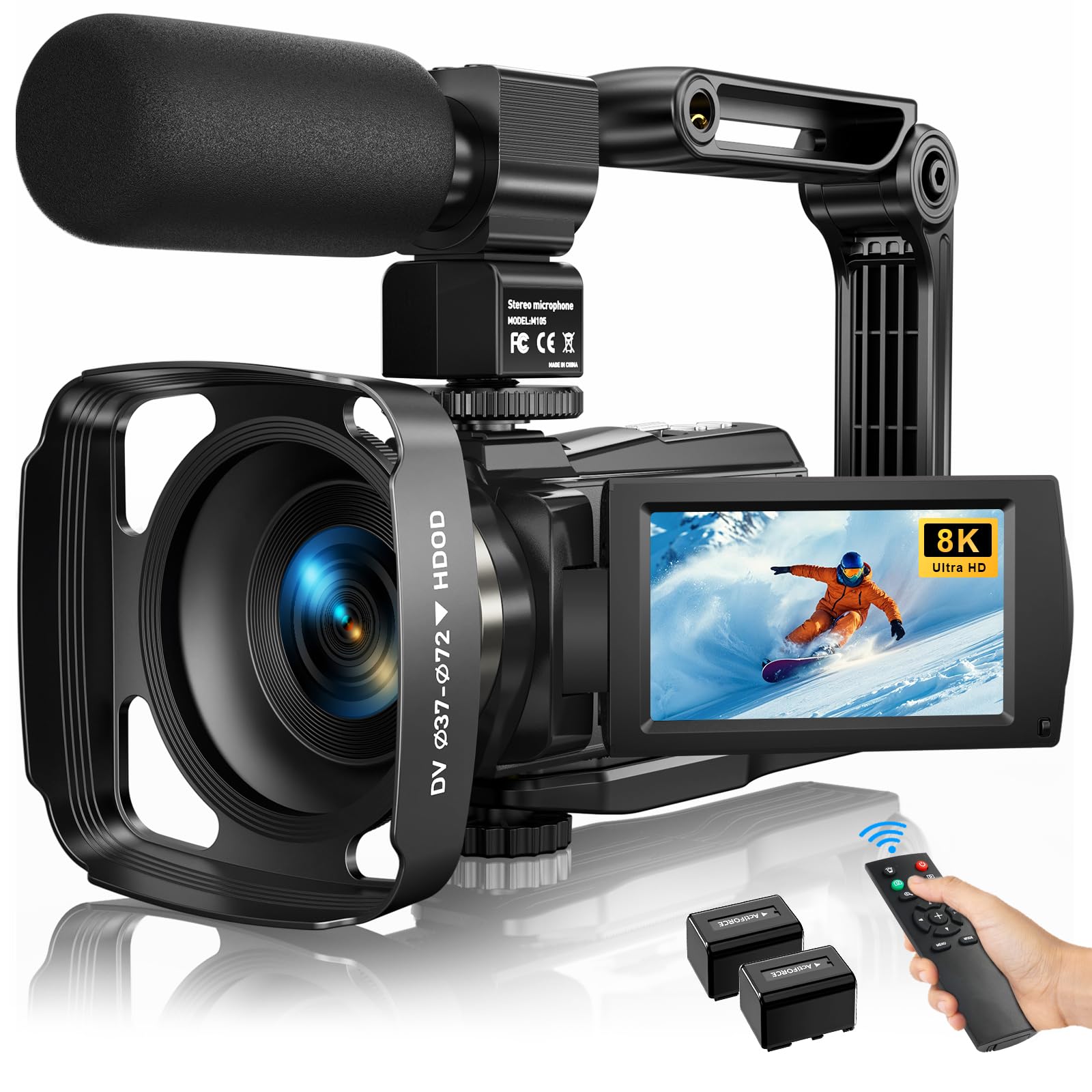
This MWIRB camcorder is the complete podcast-in-a-box starter kit. It records up to 8K at 15FPS, but owners consistently find it works best at 1080p or 4K30, where footage gets genuinely sharp, clear, and beginner-friendly. The 88MP sensor and 18X digital zoom give you reach, while the 6-axis anti-shake keeps handheld shots stable enough for sitting-at-a-desk recording.
The real value lives in the box: an external X-Y stereo microphone, a 3-inch 270-degree rotating touch screen for framing yourself, a handheld stabilizer, a lens hood, a remote control, and two rechargeable batteries. Owners call it well-packaged with extras they would otherwise have to buy separately, and the built-in Wi-Fi with the “iSmart DV2” app lets you ship clips straight to your phone for social posting.
What wins people over is the value: sharp colors, reliable focus, and clear audio from the included mic at a price that undercuts nearly everything else here. The honest trade-off is the 20-minute file limit at 1080p, which forces you to stitch clips together for longer episodes. Battery charges only inside the camera, and the card is sold separately, so factor those into your first purchase.
What the extras do for you
- Rotating touch screen makes solo framing easy
- Dual-battery setup keeps long sessions alive
- USB charging and a mic port add flexibility
Planning around the quirks
- 1080p clips cap at 20 minutes, needing stitching
- Memory card is not included in the box
Reach for it if: you are starting out and want one box that covers camera, mic, tripod aid, and remote without juggling separate purchases.
Look elsewhere if: your episodes run past 20 minutes in a single take and you refuse to stitch clips together in editing.
2. Pro 4K HD Webcam Eye Contact Camera
A desktop webcam built so you finally look at your guest, not past them.
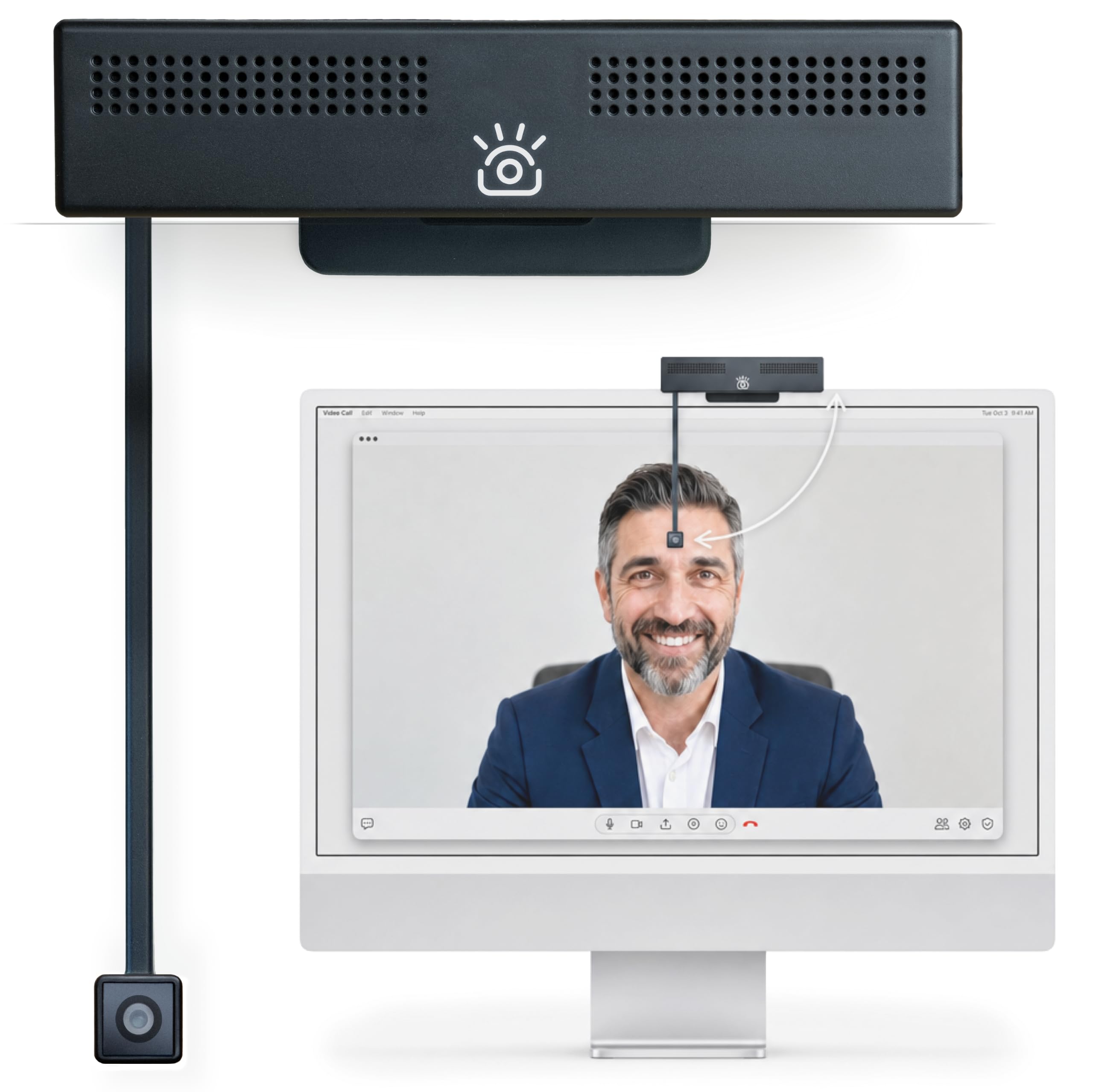
This iContact webcam solves the one thing every other webcam gets wrong: eye contact. Most cameras sit above your screen, so you look like you are staring at your keyboard. This one aligns with your natural line of sight, and buyers report coworkers noticing the difference in live calls. The 13MP sensor shoots 4K at 30FPS with a 78° field of view, and onboard processing auto-adjusts focus, lighting, and color.
The two built-in noise-reducing mics cut room echo and keyboard bleed for clear calls on Zoom, Teams, Meet, and Webex. It is plug-and-play over USB on Mac, Windows, Chrome OS, and Linux, and it fits monitors from 20 to 30 inches. Folding the arm up cuts power to both camera and mics via the Secure Switch, which is an industry-leading privacy move if you worry about spies in the lens.
Owners highlight reliability as the thing they trust most, with the eye-contact feature a close second. The camera quality itself draws mixed feedback — some find it sharp and natural, others call it average for the price. The clip is fussy on thin screens and the arm lacks vertical adjustment, so your face alignment depends entirely on where your monitor sits. An occasional unit fails early, though the exchange process gets praised as excellent.
Why it wins over the rest: no other webcam here can deliver natural eye contact, the single most important non-verbal cue in a video podcast.
Where it stumbles: the camera resolution is only 8.3MP against the competition’s larger sensors, so expect good, not great, image quality.
3. YOLOLIV YoloCam S3
A webcam with a sensor so big it rivals entry mirrorless cameras.
The YoloCam S3’s 1/1.3-inch sensor is the largest in this roundup, delivering DSLR-quality depth of field. It delivers uncompressed 4K at 30FPS or 1080p at 60FPS with DSLR-quality image and cinematic depth of field, which owners call a huge upgrade from the classic Logitech C920x. The phase-detection autofocus locks on instantly with zero lag, keeping close-ups crisp without hunting.
AI-enhanced imaging claims 2.5x clearer faces in low light, with smart exposure, white balance, and HDR handling the heavy lifting. The 82° field of view keeps you framed, and a 4X digital zoom at 1080p stays crisp with no blur or cropping. Its plastic-free aluminum body doubles as a heat sink, so the maker guarantees 24/7 non-stop streaming with no overheating.
You get full manual control through the Compose software — contrast, sharpness, saturation, exposure, and color grading — plus the Picasso Resolve color engine for pro-grade grading on Windows. The magnetic mount and 1/4″-20 tripod thread give flexible placement. Owners mention the one big trade-off is no internal SD card recording, which requires the separate YoloCam Live Box if you want to capture without a computer.
Built like a real camera
- Large sensor delivers clean low-light footage
- Fast phase-detection autofocus tracks movement
- Uncompressed video via USB3.0
Before you hit buy
- No onboard recording without the extra Live Box
- Color grading engine only works on Windows
Who it suits: streamers and podcasters who want a real camera look without buying an actual mirrorless body and capture card.
Who it does not: anyone who needs to record standalone sessions without a laptop in the chain.
4. OBSBOT Tiny 3 Lite

A tiny PTZ webcam that follows you around the room so you never drift out of frame.
The OBSBOT Tiny 3 Lite shrinks the pan-tilt-zoom webcam down to a 48% smaller, 34% lighter frame than its predecessor, yet upgrades to a 1/2-inch CMOS sensor inside. It shoots crisp 4K at 30FPS or smooth 1080p at 120FPS, with precision PDAF autofocus that switches focus modes to match your lighting. Owners love the sharp 4K and HDR for meetings and streaming alike.
AI Tracking 2.0 identifies and locks onto a single person, a whole group, or even 200+ types of objects. Voice and gesture controls let you wake it, zoom, and switch presets without touching a button — though the maker itself suggests turning these off if the gimbal acts erratic. A triple-mic array feeds five specialized audio modes, giving you spatial audio that owners call remarkably clear for a webcam this size.
The OBSBOT Center software bundles Beauty Mode, Background Blur, and a Teleprompter alongside pro calibrations like exposure gamma curves and NVIDIA Maxine Eye Contact. The package includes a USB-C cable and a USB-C to USB-A adapter. The recurring gripe is reliability: some units work flawlessly, while others report a software bug that bricks the camera or a first-wake flip to the ceiling that needs daily manual readjustment.
The magic: smooth, fast AI face tracking that auto-tilts the lens face-down for privacy when you step away.
The catch: the OBSBOT Center software is the weak link, with owners split between flawless use and frustrating bugs.
5. Elgato Facecam 4K

A studio-grade webcam that shoots buttery 4K60 with a real camera lens on the front.
The Elgato Facecam 4K captures ultra-clear 4K at 60FPS, a spec almost no webcam here matches, making motion in your podcast look smooth instead of juddery. A premium Sony STARVIS 2 CMOS sensor paired with Elgato Prime Lens technology delivers sharp detail and vibrant color, and owners call it a clear upgrade over the older Facecam 1080p mk.2. The free Camera Hub software gives you hands-on control over exposure, white balance, and framing just like a DSLR.
You can screw on ND, diffusion, or polarizing filters onto the 49mm lens thread—just like a real DSLR—so you can tame harsh window light without moving your desk. It connects via a detachable 200cm USB-C to USB-C 3.0 cable and mounts cleanly on any monitor. Customers note low-light performance that stays watchable even without a professional lighting rig.
The 20mm wide lens means you frame your shot by moving the camera, not by zooming—digital zoom drops you off 4K resolution. It is picky about USB cables: you need a high-speed one, and it must plug directly into your PC, not a hub. The built-in software is basic, so power users switch to OBS. An occasional unit freezes, though most owners find it flawless.
The pro-grade touches
- 49mm filter threading for real camera filters
- 4K60 smoothness for fast-moving subjects
- Detachable 200cm cable for flexible mounting
The studio demands
- Needs professional lighting to shine
- Refuses to work through USB hubs
Standout spec: the 4K60 capture plus lens filter support is a combination no other webcam in this list offers at the price.
Single caveat: treat it as a well-lit studio tool, because it will not flatter a dark, messy room.
6. Insta360 Link 2 Pro

A motorized camera that physically pans and tilts to keep you centered while you present.
The Insta360 Link 2 Pro is the premium pick for podcasters who move. Its AI tracking physically pans and tilts the gimbal to follow you around the room, keeping you or your whole group perfectly framed without a camera operator. The large 1/1.3-inch sensor delivers clean 4K with excellent low-light performance, and owners highlight how well it handles bright windows behind the subject. The dual-mic beamforming system isolates your voice from background noise in busy rooms.
You can also trigger tracking, zoom, or Whiteboard Mode with hand gestures or from your smartphone, which is a standout for teachers who walk around. The free Link Controller software handles fine-tuning, and Elgato Stream Deck integration lets you switch modes or trigger presets with physical buttons. DeskView, Whiteboard, and 4K Portrait modes cover everything from product demos to vertical reels.
Buyers praise the natural bokeh effect that mimics a DSLR depth of field straight from the software suite, and the audio quality comes in better than expected. The package includes a magnetic mount, USB-C cable, USB-C to USB-A adapter, and four recognition markers. The trade-off is value — opinions split on whether it justifies its premium price, and the AI tracking takes a learning curve to configure just right.
What wins people over: excellent low-light video with smooth PTZ tracking that a teacher described as a standout for following movement.
Be honest about it: tracking can feel slightly eerie at first, and the AI settings demand patience to calibrate.
7. NearStream VM20
A multi-room workhorse that captures a stage from across the hall with hybrid zoom.
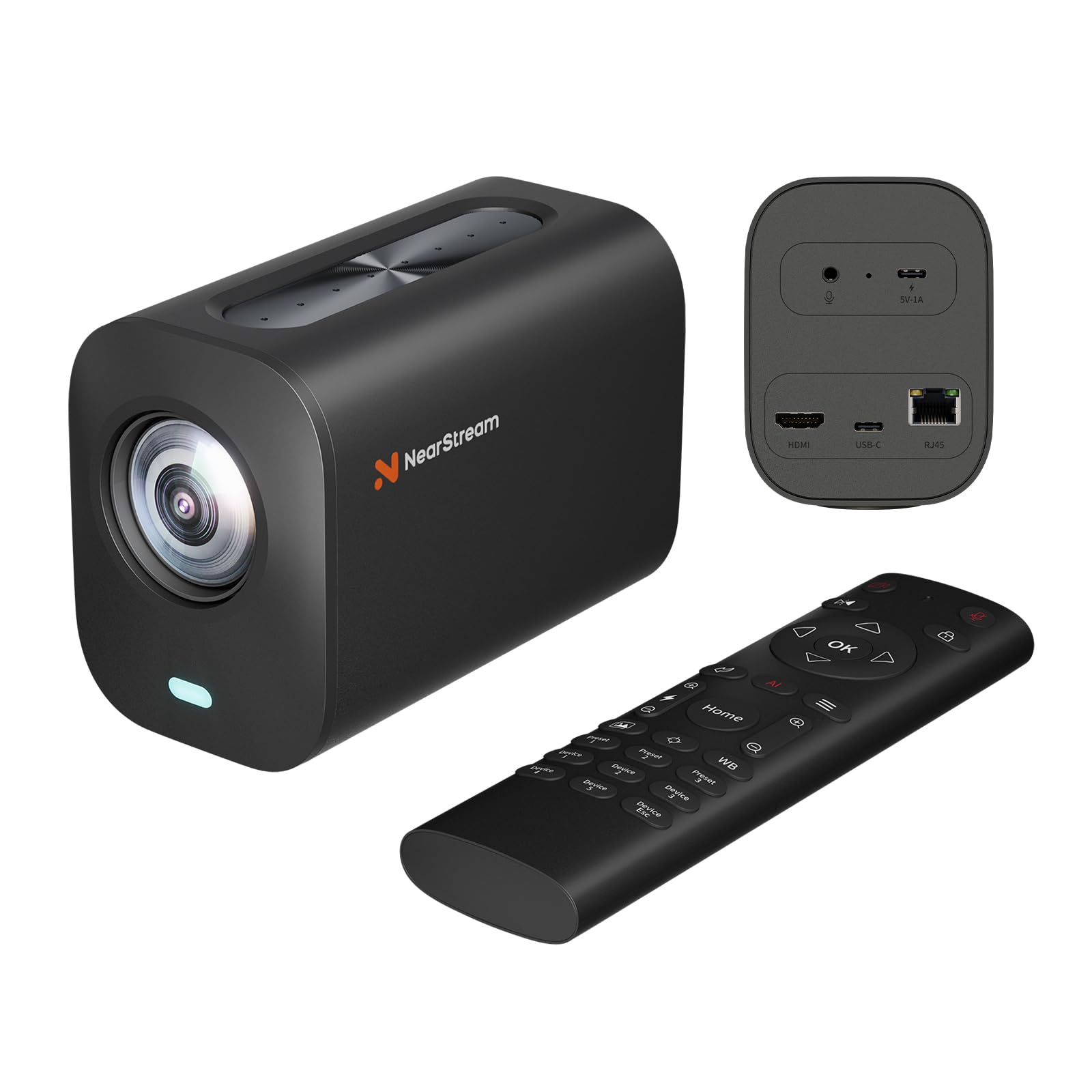
The NearStream VM20 tackles the hardest podcasting venue: the big room. It pairs an 8x optical zoom lens with 5x digital zoom for up to 40x hybrid reach, letting you pull a crisp close-up of a speaker from across a lecture hall or church stage. It shoots 4K at 30FPS over USB-C, plus 1080p over HDMI and RJ45 Ethernet, which makes it a flexible addition to professional production setups.
An 8-MEMS microphone array captures 360° audio within a 16-foot radius, with AI noise-canceling that owners call the best built-in mics on a streaming camera. A 3.5mm audio input lets you wire in your own external microphone when you want tighter stage sound. The included remote control runs pan, tilt, and zoom smoothly, and a single remote can manage multiple VM20 cameras for multi-angle shoots.
Owners praise the technical support as responsive and knowledgeable, and the studio-level sharpness impresses new creators using it with OBS. The catch is software: the NearSync macOS app has issues on newer systems, and some settings like flip, focus, and brightness reset even when locked. The camera needs external power and is built for software-driven workflows, not plug-and-play consumer use.
Its superpower: 40x hybrid zoom plus 8-mic AI noise cancellation in one device sized for worship, teaching, and events.
Its weakness: firmware and software bugs, with menu text reversed on some units, make it a pick for the patient tinkerer.
8. Xtra Muse

A pocket video camera with a built-in gimbal for walking-and-talking podcast segments.
The Xtra Muse brings a 1-inch CMOS sensor to a tiny pocket body, recording cinematic 4K at an impressive 120FPS. That high frame rate is the standout here — it open up silky slow-motion that no other camera on this list approaches. The built-in 3-axis gimbal stabilizer keeps footage smooth while you walk, dance, or hike, which owners describe as near-identical to the DJI Pocket 3 at around half the price.
Fast autofocus and face/object tracking keep you centered even when you spin, and the 2-inch touch screen makes switching between horizontal and vertical easy. True 10-bit X-Log color modes deliver up to one billion colors for serious post-production grading, ideal for golden-hour content. The standard bundle includes a carrying bag, wrist strap, and a handle with a 1/4-inch thread for tripod mounting.
Owners highlight the construction quality and ease of use, with one noting it slips right into a Coach purse. The battery averages 161 minutes, enough for a full shoot. The recurring mixed feedback targets battery life and microphone connectivity — mics needed a software update before they worked properly, and some owners find the battery drains faster than expected under heavy use.
Built for movement
- 4K at 120FPS open up buttery slow motion
- Built-in gimbal beats any digital stabilization
- Pocket size with 161-minute battery average
Know the limits
- External mics need a software update to work
- Battery life reports are evenly split
Reach for it if: your podcast needs B-roll of you walking, cooking, or touring, because no webcam can move like this.
Think twice if: you sit at a desk all day — a fixed webcam will be cheaper and simpler for that setup.
9. Zoom Q8n-4K

The only device here born for podcasting, putting dual XLR studio inputs right on the camera body.
The Zoom Q8n-4K is not really a camera that does audio — it is an audio recorder that happens to film. Two XLR inputs with phantom power let you plug in professional condenser or dynamic microphones directly, no separate audio interface needed. Owners are blunt about the trade-off: “You are not buying this camera for the best video quality, but the sound is fantastic.” It records 4K video at 30FPS with up to four simultaneous audio tracks.
The built-in stereo microphones capture crisp violin audio while eliminating audience noise when stage mics plug in directly. A 150° wide-angle F2.8 lens with five field-of-view settings and scene presets for indoor, outdoor, nighttime, and concert lighting keeps the shot flexible. You can stream live over USB while recording locally to an SD card up to 512GB, with a flip-out screen and remote control app for solo creators.
Owners call it stupendous value next to cameras that cost well into four figures. But the video is the catch: it turns grainy in low light, true 4K only holds at the widest field of view, and one owner saw it overheat and shut down after about 40 minutes handheld in 81°F heat. Battery life sits around an hour at 4K 30FPS, and a 10-minute clip eats roughly 3.5GB of card space—so keep spare cards and a cool room nearby.
Its reason to exist: no other camera on this list lets you run dual XLR studio mics without a separate recorder, which makes it the serious podcaster’s dream.
Its honest limit: video quality is merely acceptable, so pair it with good lighting and frame the widest shot for best results.
Understanding the Specs
Sensor Size
A larger sensor physically captures more light, which directly translates to cleaner, less grainy video in typical dim indoor rooms. The webcams and pocket cameras with 1/1.3-inch or 1-inch sensors here will look dramatically better under normal lamps than a compact sensor with a huge megapixel count. The megapixel number only matters if the sensor behind it can actually gather light.
Frame Rate
The frame rate — like 30FPS or 60FPS — controls how smooth motion looks. At 30FPS, standard for most podcasting, everything looks normal. Bump up to 60FPS and fast movements stay sharp, while the 120FPS found on the Xtra Muse open up smooth slow motion. If you talk with your hands a lot, a higher frame rate keeps those gestures from blurring.
FAQ
Do I need an XLR input on my podcast camera or can I use a USB mic?
Is a higher megapixel count always better for podcast video?
Will a 4K webcam work with my laptop?
What does AI tracking actually do for a podcast?
Should I record to an SD card or straight to my computer?
Is a webcam or a camcorder better for podcasting?
How long do these cameras last on a full charge?
What video quality do I actually need for a podcast?
Do I need a separate microphone if the camera has one built in?
Can I live stream directly from these cameras?
Final Thoughts: The Verdict
For most buyers, the budget podcast camera winner is the 8K MWIRB Camcorder because its boxed bundle of external mic, remote, stabilizer, and dual batteries removes every starter headache for the least money. If you want a true studio audio setup, grab the Zoom Q8n-4K and plug in your XLR mics directly. And for a desk-bound setup with stunning image quality, the YOLOLIV YoloCam S3 is the one to reach for with its class-leading sensor and DSLR-like control.
How We Picked
We do not accept paid placement. Every pick is matched to a real buyer and a real use-case; we do not hands-on test units.
Sources & Methodology
Specifications: manufacturer listings and product documentation. Review insights: verified customer reviews, as of August 2026. Pricing: not shown on this page (it changes often); check the current price via the retailer link.
As an Amazon Associate, FitlyFast earns from qualifying purchases. This does not affect which products we feature.