
Our readers keep the lights on and the weekend projects moving. As an Amazon Associate, I earn from qualifying purchases.
Specs are compiled from manufacturer listings and verified buyer reviews and can change over time — please confirm the key details on the product page before buying.
You don’t need to spend a fortune on a printer that bleeds you dry with ink cartridges every few weeks. A budget-friendly laser printer gives you crisp black-and-white pages for a fraction of the cost per page, and it doesn’t dry out when you ignore it for a month. The real challenge is picking one that sets up without a fight and keeps working without constant Wi-Fi dropouts.
I’m Rikta — the founder and writer behind FitlyFast. This guide is built by comparing the manufacturers’ published specifications and the patterns across verified customer reviews, so you get each pick’s real strengths and trade-offs instead of marketing spin.
After comparing speeds, paper handling, and real owner experiences, these are the budget laser printer picks worth your money.
Our Picks at a Glance


How To Choose The Best Budget Laser Printer
Buying a laser printer is a multi-year decision, so a little homework up front saves you from a frustrating daily driver. The good news is that for black-and-white document printing, most budget models deliver excellent text quality — the differences show up in speed, size, and how they connect to your devices.
Single-function vs all-in-one
Before you spend anything, decide if you need scanning and copying. A print-only model saves money and desk space, but if you regularly scan receipts or copy documents, an all-in-one with a flatbed scanner and an auto document feeder (a tray that feeds multiple pages through the scanner automatically) is worth the extra cost. Once you pick this, roughly half your decision is made.
Wireless vs wired connections
Think honestly about where your router sits relative to your desk. Dual-band Wi-Fi (supporting both 2.4GHz and 5GHz bands) is the most flexible, but owners across many models report occasional dropouts — that’s a technology reality, not a brand flaw. A USB-only printer is rock-solid but locks printing to one computer. Some models include Ethernet, which gives you wired stability and lets everyone on a small network print.
Toner cost and cartridge locks
Laser toner is where the real savings live, but check whether a model blocks third-party cartridges. Some brands use chips or firmware updates to force you into their own toner, which can cost several times more than compatible alternatives. If you print a lot, a printer that accepts cheaper cartridges can save you more over a year than the price difference between models.
Quick Comparison
| Model | Best For | Print Speed | First Page | Functions | Amazon |
|---|---|---|---|---|---|
| HP M207dw★ Best Overall | Small offices wanting wireless | 28 ppm | 7 sec | Print only | Amazon |
| Brother DCP-L2640DWBest All-in-One | Home offices needing scan + copy | 36 ppm | 8.5 sec | Print, Copy, Scan | Amazon |
| HP M209dBest USB Value | Reliable USB-only simplicity | 30 ppm | — | Print only | Amazon |
| Xerox B230 | Apple users wanting wireless | 36 ppm | — | Print only | Amazon |
| Canon LBP172dw | Compact single-function printing | 35 ppm | — | Print only | Amazon |
| HP LaserJet Pro 3001dw | Small teams printing heavy volume | 35 ppm | 6.6 sec | Print only | Amazon |
| HP MFP 3101sdw | Tiny teams wanting all-in-one | 35 ppm | 7 sec | Print, Copy, Scan | Amazon |
| Canon LBP646Cdw | Homes that occasionally print color | 26 ppm | 10.3 sec | Print only | Amazon |
| Brother HL-L2480DW | Work-from-home with touchscreen | 36 ppm | 8.5 sec | Print, Copy, Scan | Amazon |
In‑Depth Reviews
1. HP LaserJet M207dw
A wireless workhorse that fits small offices without demanding premium money.
The HP M207dw is built for offices printing black-and-white brochures and business documents, and it delivers up to 28 pages per minute single-sided — fast enough to clear a 20-page report before you refill your coffee. Its footprint is genuinely compact at 11″D x 13.98″W x 8.07″H, which makes it about 43% less deep than the Brother DCP-L2640DW — a real win if your desk space is tight.
Setup is a strong point, thanks to dual-band Wi-Fi with self-reset that automatically detects and fixes connectivity issues. Buyers report it’s easy to assemble, downloads drivers without fuss, and prints from other rooms in the house. Initial page time is 7 seconds, so it’s snappier out of the gate than the Brother’s 8.5 seconds, even if the Brother then pulls ahead on sustained speed.
The catch worth knowing: a few owners describe a frustrating setup with forced Wi-Fi and random disconnects, though that experience sits against many more who found it painless. Security built-in helps protect it from potential attacks, and it prints from any device — Microsoft, Mac, AirPrint, Android, Chromebook and more.
What wins people over
- Compact enough for a cramped desk
- Fast 28 ppm single-sided output
- Self-resetting Wi-Fi keeps it online
What to weigh up
- Print-only — no scan or copy here
- Some setups hit Wi-Fi snags
Reach for this if: you want a space-saving wireless printer for a 1-5 person office and don’t need scanning.
Look elsewhere if: you need all-in-one functions, since this is strictly print-only.
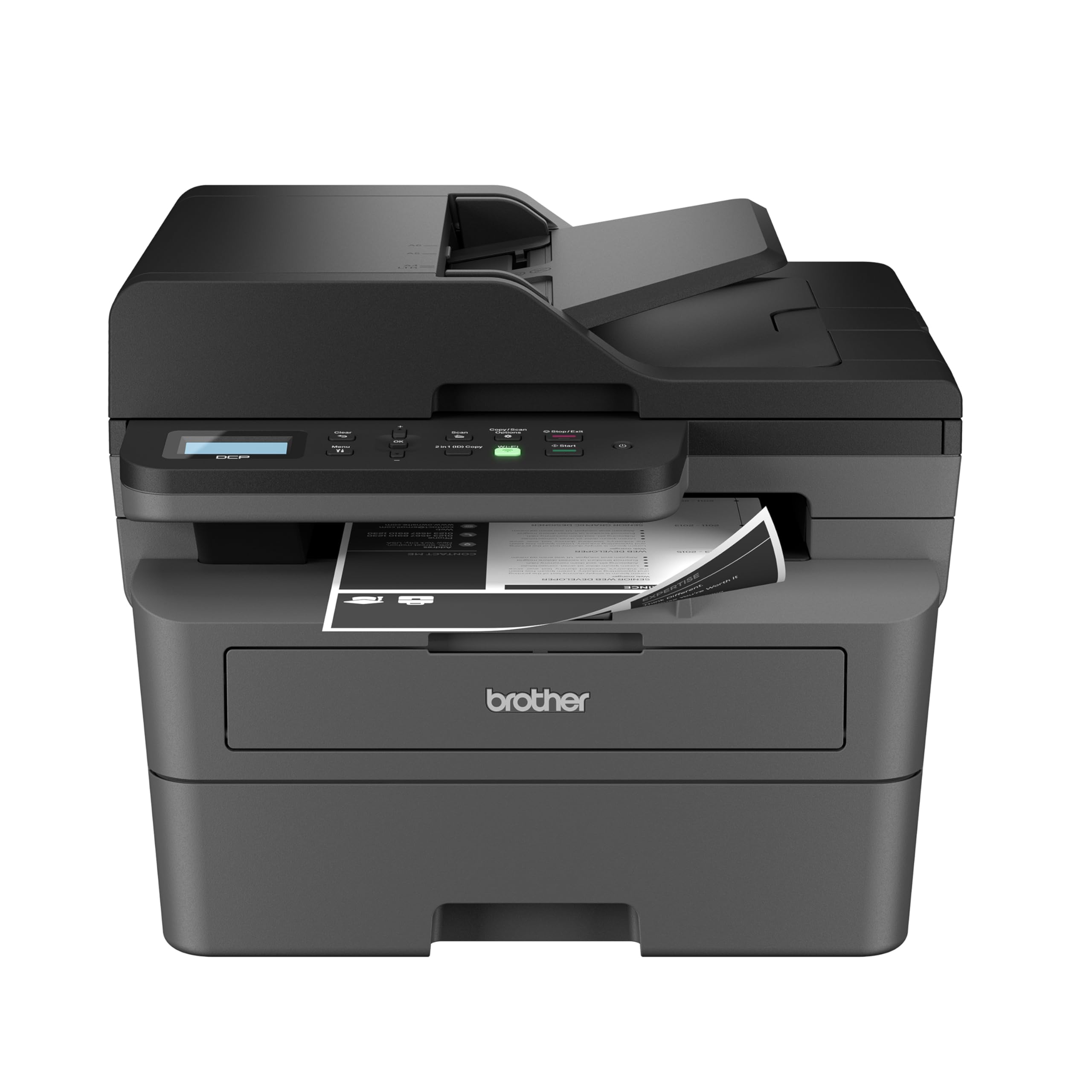
2. Brother DCP-L2640DW
The all-in-one that pairs a blistering 36 ppm engine with genuinely sharp output.
The Brother DCP-L2640DW is a 3-in-1 that combines a laser printer, scanner, and copier in one footprint, and it’s engineered for small businesses that move a lot of paper. Print speeds hit up to 36 pages per minute — 29% faster than the HP M207dw — and a 50-page auto document feeder lets you scan or copy a whole stack without standing over it.
What wins people over is print quality; it’s the most-praised aspect by owners, who say it outperforms inkjet for day-to-day black-and-white needs. Setup is the second most-lauded trait, with buyers calling it the easiest wireless setup they’ve experienced, including native print and duplex working without drivers on Windows 11. Toner life is solid, with one owner noting it was roughly 50% after a month of regular office use.
There are two honest trade-offs. The first is size: at 15.7″D x 16.1″W x 12.5″H, it’s noticeably deeper than the HP M207dw, so it needs a proper desk or stand. The second is that this is a Renewed Premium unit, and while owners say it feels indistinguishable from new, a few hit the usual refurbished lottery with Wi-Fi or error messages.
What owners rave about
- Sharp, reliable black-and-white prints
- 36 ppm speed clears big jobs fast
- 50-page auto document feeder
What to consider
- Takes up more desk space than compacts
- Refurbished unit — check the warranty
Choose this for: a home office that prints, scans, and copies regularly and values speed.
skip it if: you need the smallest possible footprint or prefer a brand-new unit.
3. HP LaserJet M209d
A no-frills USB printer that just works, with zero Wi-Fi headaches.
The HP M209d is the antidote to printer frustration — a wired-only machine that plugs into your computer and prints. It runs up to 30 pages per minute with automatic two-sided printing, and buyers sum it up as “Outstanding printer. It just WORKS.” That simplicity is the whole appeal: no network dropouts, no offline errors, no dried ink.
This is aimed at homes and small offices printing black-and-white documents and reports, and its smart-guided buttons plus a 150-sheet input tray keep the daily routine easy. Owners praise it as easy to use and reliable — the two most-mentioned aspects — and note the USB cable is included, which saves you a trip to the store. It’s also great for occasional printers, since a laser never clogs like an inkjet.
The honest limitation is connectivity: it’s USB-only, meaning you can’t print from your phone or other computers on the network. One owner hit a compatibility wall with Mac OS Sequoia, so if you’re on the latest Apple system, check driver support first. There’s also a note that this model only works with HP chips or circuitry, which locks out cheaper third-party cartridges.
Where it shines
- Rock-solid wired reliability
- USB cable included in the box
- Quiet and fast for a budget model
Where it’s limited
- No wireless printing at all
- Blocks non-HP toner cartridges
Best for: anyone who hates Wi-Fi printer issues and wants a dead-simple machine hooked to one computer.
Not for: multi-device households or buyers on the newest macOS who need verified compatibility.
4. Xerox B230

A compact workhorse that slips into an Apple-heavy home with AirPrint ease.
The Xerox B230 is built for small businesses and home offices that need dependable monochrome printing in tight spaces. It hits 36 pages per minute with automatic two-sided printing, and owners praise crisp black output and fast duplex. For Apple users it’s a standout — it supports AirPrint, Mopria Print Service, and Chromebook printing, and Mac owners mention one of the easiest setups they’ve had, printing straight from iPhone, iPad, and MacBook.
Setup via guided network pairing is designed to work without local IT support, and the included Ethernet port offers a stable fallback if Wi-Fi gives you trouble. Buyers who plugged in via Ethernet got three Windows PCs running within 10 minutes each. Security features protect against rising cyber threats, and automatic N-up printing helps cut paper waste.
The downside is the small LCD screen, which makes entering a long Wi-Fi password a chore — one owner called an 11-character password entry “arduous.” A few report the printer quitting unexpectedly or dropping wireless, though the Ethernet route sidesteps that entirely. If you’re willing to use a cable, this is a very solid, low-running-cost pick.
What makes it worth it
- AirPrint and Mopria for easy mobile printing
- 36 ppm speed handles heavy jobs
- Ethernet port for stable wired use
The trade-offs
- Tiny screen makes Wi-Fi entry painful
- Occasional wireless dropouts reported
Grab this if: you live in the Apple ecosystem and want wireless printing that just works.
Think twice if: you have a complex Wi-Fi network and can’t use Ethernet as a backup.
5. Canon imageCLASS LBP172dw

A speedy single-function Canon that keeps toner costs honest over time.
The Canon LBP172dw is a print-only wireless laser that pushes up to 35 pages per minute, making it one of the faster budget options here. It runs on Toner 072 standard or high-capacity cartridges and loads 250 sheets in its standard cassette, so you aren’t refilling the tray every other day. Owners call the print quality very good, and the auto two-sided printing saves paper without you lifting a finger.
This is a Chromebook-compatible machine, which makes it a smart pick for households with school-age kids printing homework. Mobile printing works through the Canon PRINT app, Apple AirPrint, and Mopria Print Service. It carries ENERGY STAR and EPEAT Silver certifications, plus a 1-year limited warranty.
The setup experience splits opinion — some call it the easiest they’ve done (ink installed in under 4 minutes), while others wrestle with the tiny display and keyboard. Reliability is also mixed in the review data, so it’s not the pick for anyone wanting zero risk. But for the price, the speed and low running costs are hard to argue with.
The strong points
- 35 ppm print speed is class-leading
- 250-sheet cassette reduces refills
- Chromebook compatible for schoolwork
Watch out for
- Setup can be fiddly for some
- Mixed reliability reports
Pick this for: a compact desk where you print often and want a high-capacity paper tray.
Pass on it if: you want guaranteed plug-and-play setup or need scanning and copying.
6. HP LaserJet Pro 3001dw

A fast first page and a 35 ppm engine made for busy small teams.
The HP LaserJet Pro 3001dw is aimed at small teams of up to 7 people printing professional-quality black-and-white documents. It shreds through jobs at up to 35 pages per minute and warms up fast — first page out in about 6.6 seconds, the quickest cold start in this lineup. Owners praise print quality above all else, noting it produces clean, professional output with auto two-sided printing.
Its Intelligent Wi-Fi looks for the best connection to stay online, and wireless printing works from any mobile device, PC, or tablet. Ethernet and Bluetooth are both included, giving you flexible connection options. HP Wolf Pro Security adds customizable protection so your printer and your data stay secure.
The recurring gripe is wireless: some customers note the Wi-Fi stops after a couple of days and needs a long reconnection, though Ethernet or USB sidesteps that entirely. It’s a printer that rewards a light touch with setup guides. For a small office that values speed and crisp output, this is a dependable option.
Why it leads
- 6.6-second first page out
- 35 ppm speed for team workloads
- Print quality praised most by owners
Be aware of
- Wi-Fi can drop for some users
- Blocks non-HP toner cartridges
Ideal for: small teams that print heavy volume and want the fastest first page.
pass on it if: your network is flaky and you refuse to use a cable.
7. HP LaserJet Pro MFP 3101sdw

A reliable all-in-one that teams rate for crisp prints and tireless reliability.
The HP MFP 3101sdw is the all-in-one answer for small teams that print, scan, and copy throughout the day, with print speeds up to 35 ppm in black. It packs a 250-sheet input tray and a 50-sheet auto document feeder, so a full morning’s worth of multi-page scanning runs hands-free. Owners have bought this one three times over — that’s the kind of repeat purchase that speaks louder than any spec.
Quality is the headline: clear, crisp prints at an economical price, with the starter toner yielding around 1000 pages. The HP app works well without constant firmware prompts, unlike the experience many had with other brands. Initial page output takes 7 seconds, which keeps short jobs snappy.
The honest caveats: HP firmware blocks generic cartridges, so you’re tied to HP toner unless you avoid updates — and the auto feeder can jam above about 25 sheets. But one owner’s year-long verdict is that it’s reliable for jobs from 1 to 100+ pages. For a small team that needs print, scan, and copy in one box, this is the strongest all-in-one here.
The core strengths
- All-in-one print, scan, and copy
- 50-sheet auto document feeder
- Owners praise quality and economy
The fair warnings
- Feeder can jam over 25 sheets
- Firmware blocks cheap toner
Best for: a small team that wants one reliable machine for printing, scanning, and copying.
Not for: bargain hunters who insist on third-party toner cartridges.
8. Canon Color imageCLASS LBP646Cdw

The rare budget toner printer that adds color without a rainbow-sized price tag.
The Canon LBP646Cdw is a single-function color laser that prints both color and monochrome at up to 26 pages per minute — the only color option in this lineup. First page out takes about 10.3 seconds, and the 5-line LCD screen makes navigation straightforward. It’s print-only, so there’s no scanning, copying, or faxing, which keeps costs down if color is all you’re after.
Owners are impressed with the clean photo and document prints, fast speed, and good color quality. They report no jams, quick double-sided printing, and a compact footprint that doesn’t dominate the desk. It runs on Canon Genuine Toner 075 with high-capacity 075 cartridges, and a 250-sheet cassette plus a 1-sheet multipurpose tray handle the paper.
The weak spot is Mac setup — owners describe dated software and a frustrating process, with one returning the unit after hours of troubleshooting. If you’re Windows-based, it’s a much smoother ride. It’s also heavier and louder than monochrome rivals, which is the price of color capability. For a home that occasionally prints charts or photos, this is the value color pick.
The payoff
- Color and mono at 26 ppm
- Clean photo and document prints
- No jams reported by owners
The friction points
- Mac setup is genuinely painful
- Loud and heavy on the desk
Reach for it if: you need occasional color prints but refuse to pay premium for a color laser.
Avoid it if: you’re on a Mac and want a painless setup — check the forums first.
9. Brother HL-L2480DW

A touchscreen all-in-one that replaces aging printers with years of quiet life.
The Brother HL-L2480DW is a 3-in-1 monochrome laser with a flatbed scan glass, combining printer, scanner, and copier in one compact footprint. It prints at up to 36 pages per minute with a 2.7-inch touchscreen that makes navigation easy, plus the ability to print from and scan to cloud apps like Google Drive, Dropbox, Evernote, and OneNote. Owners say it’s fast, quiet, and produces clear, crisp output.
This is the printer people buy to replace one that’s given them a decade-plus of service — reviewers point out their previous Brother lasted over 12 years, and they installed this one to Wi-Fi plus two PCs and an iPad in 30 minutes. It works with Alexa for voice-controlled printing, and the 250-sheet paper tray handles high-volume jobs. A manual feed slot prints on envelopes and specialty paper.
The paper path is genuinely versatile, and the touchscreen shows cartridge life so you’re never caught short. Wireless connectivity gets mixed feedback, with some owners reporting occasional connection problems, but the dual-band 2.4GHz/5GHz plus Ethernet and USB give you multiple ways to stay wired when needed. For a work-from-home setup that wants a touchscreen and cloud scanning, this is the premium-feel pick.
What improve it
- 2.7-inch touchscreen for easy control
- Cloud printing and scanning built in
- Quiet, fast 36 ppm operation
The honest notes
- Occasional wireless glitches reported
- Pricier than other monochrome picks
Splurge on this if: you want a touchscreen, cloud scanning, and a machine built to last a decade.
Save your money if: you just need basic printing and don’t care about the screen.
Understanding the Specs
Print Speed (ppm)
Pages per minute tells you how fast a printer runs a long job. Budget lasers range from 26 to 36 ppm, and the difference matters most when you regularly print 20+ page documents. For most homes, 28 ppm is plenty — for a busy office, chasing 36 ppm saves real time over a week.
Duplex Printing
Automatic duplex means the printer flips the page itself to print on both sides. It’s a standard feature on almost every modern budget laser, and it roughly halves your paper use. The newer add-on to check is whether the scanner also auto-feeds pages, which is separate from printing duplex.
FAQ
How much does it cost per page with a budget laser printer?
Will a budget laser printer work with my Mac or Chromebook?
Is a color laser printer worth the extra cost?
Can I use cheaper third-party toner cartridges?
How long does a budget laser printer last?
What is an auto document feeder and do I need it?
Is a USB-only printer a bad choice?
Which is better for a home office, Brother or HP?
What does a 36 ppm print speed actually mean for me?
How do I set up a wireless laser printer without frustration?
Final Thoughts: The Verdict
For most buyers, the budget laser printer winner is the HP LaserJet M207dw because it delivers fast, compact wireless printing at a price that doesn’t punish you later. If you want scanning and copying in the same box, grab the Brother DCP-L2640DW for its 36 ppm speed and sharp output. And for a no-fuss, dead-reliable machine that never fights your Wi-Fi, the HP M209d with its included USB cable is the one to reach for. Whichever you pick, you’re moving away from inkjet ink costs for good.
How We Picked
We do not accept paid placement. Every pick is matched to a real buyer and a real use-case; we do not hands-on test units.
Sources & Methodology
Specifications: manufacturer listings and product documentation. Review insights: verified customer reviews, as of August 2026. Pricing: not shown on this page (it changes often); check the current price via the retailer link.
As an Amazon Associate, FitlyFast earns from qualifying purchases. This does not affect which products we feature.