
Our readers keep the lights on and the weekend projects moving. As an Amazon Associate, I earn from qualifying purchases.
Specs are compiled from manufacturer listings and verified buyer reviews and can change over time — please confirm the key details on the product page before buying.
Hunting for a 144Hz 4K monitor usually means staring at spec sheets until your eyes glaze over. The real question is simpler: you want a screen where competitive shooters feel instant, but single-player worlds still look breathtaking. This guide cuts through the noise to the panels that genuinely nail both—and it includes some 165Hz and 240Hz models, since those stretch your refresh-rate budget further than the search term suggests.
I’m Rikta — the founder and writer behind FitlyFast. This guide is built by comparing the manufacturers’ published specifications and the patterns across verified customer reviews, so you get each pick’s real strengths and trade-offs instead of marketing spin.
From OLED blacks to IPS value, here is how to choose the right 144hz 4k gaming monitor for your rig and your wallet.
Our Picks at a Glance



How To Choose The Best 144Hz 4K Gaming Monitor
To get a 4K high-refresh monitor that actually feels fast, you need to match three things: the panel type, what your graphics card can truly push, and the ports on the back. Nail those, and the marketing hype stops mattering.
Panel Tech: OLED vs IPS
OLED screens light up each pixel individually, so when a pixel is off, it is truly black. That creates the jaw-dropping contrast you see in dark game scenes—think the glowing eyes in a shadowy corridor. IPS panels use a backlight behind the whole screen, which means blacks look more like dark gray in a dark room. But IPS is cheaper, and it has no burn-in risk, so it lasts longer without you worrying about a static HUD etching itself into the panel.
Can Your GPU Handle It?
A 4K 144Hz screen is only as fast as the graphics card feeding it. At 4K resolution, you need a serious GPU—think an RTX 4080 or better—to hit high frame rates in demanding titles. If your card struggles, you will still get a beautiful sharp desktop, but you won’t see the silky smoothness you paid for. Some screens offer a dual mode that drops resolution to 1080p while boosting the refresh rate, which is a smart way to get competitive speed without upgrading your whole PC.
Quick Comparison
| Model | Best For | Refresh Rate | Response Time | Panel / Contrast | Amazon |
|---|---|---|---|---|---|
| ASUS ROG PG32UCDM★ Best Overall | No-compromise peak gaming | 240 Hz | 0.03 ms | QD-OLED / 1500000:1 | Amazon |
| LG 27G810A-BDual-Mode Star | Dual-mode value for hybrids | 180Hz / 360Hz | 1ms | IPS / 1000:1 | Amazon |
| KTC H32P22PBudget Champion | Budget-friendly 32-inch | 165Hz | 1ms (MPRT) | Fast IPS / 3000:1 | Amazon |
| HP OMEN 27k | Work and play hybrid | 144Hz | 1ms (GtG) | IPS / ≥400:1 | Amazon |
| Acer Predator X32 X | Curved OLED immersion | 240Hz | 0.03ms | QD-OLED / Very High | Amazon |
| LG 32GX850A-B | Glossy OLED clarity | 165Hz / 330Hz | 0.03ms | Glossy OLED / 1500000:1 | Amazon |
| Samsung Odyssey G8 (G81SF) | 27-inch QD-OLED detail | 240Hz | 0.03ms | QD-OLED / 1000000:1 | Amazon |
| MSI MPG 321URXW | White design + KVM | 240Hz | 0.03ms | QD-OLED / 1000000:1 | Amazon |
| MSI MPG 322URX | Future-proof DP 2.1a | 240Hz | 0.03ms | QD-OLED / 1500000:1 | Amazon |
| Samsung Odyssey G8 (G80SH) | Premium silver design | 240Hz | 0.03ms | QD-OLED / 1500000:1 | Amazon |
| ASUS ROG PG27UCDM | 27-inch 4K sharpness | 240Hz | 0.03ms | QD-OLED / 1500000:1 | Amazon |
In-Depth Reviews
1. ASUS ROG PG32UCDM
Our pick — over 4.5★ from 550+ verified ratings; the strongest balance of quality and price.
The 32-inch flagship that ends the argument over picture quality versus speed.
Buy this screen when you refuse to compromise on image quality. The 32-inch QD-OLED (a panel type that lights each pixel individually) runs at 240Hz with a 0.03ms response time, so fast motion stays crisp. Its 1500000:1 contrast ratio—three times the LG 27G810A-B’s 1000:1 IPS (a standard LCD panel) rating—means blacks look truly black, not gray. At 1000 candela per square meter (a brightness unit), HDR highlights pop, and the 99% DCI-P3 color gamut (a wide color range) makes scenes look rich.
Burn-in is the standard worry with OLED, and ASUS throws its custom heatsink, graphene film, and a 3-year warranty with burn-in coverage at that fear. Buyers report that “Burn-in risk mitigated by 8-hr pixel refresh; text fringing negligible at normal distance.” The 90W USB-C port also means you can plug in a laptop with a single cable that charges while it displays.
The catch is the price and the power. It draws enough juice that the included power brick is huge, and there’s only one DisplayPort on the back. This is unapologetically a premium desktop centerpiece for someone with a high-end GPU—not a budget pickup.
4K OLED speed
- 240Hz + 0.03ms is top-tier competitive speed
- 1500000:1 contrast delivers real blacks
- 3-year burn-in warranty is rare confidence
- 90W USB-C powers a laptop on one cable
pricey premium
- Premium price that not every rig justifies
- Only one DisplayPort for multiple PC hookups
- Giant power adapter eats desk space
the pick for: the enthusiast with a top-tier GPU who wants the best of both speed and spectacle.
think twice if: your graphics card can’t drive 4K at high refresh, or your budget is better spent elsewhere.
2. LG 27G810A-B
One press of a hotkey flips this LG between story-mode 4K and esports-speed 1080p.
Its headline feature is a dual-mode trick that ends the “4K or speed” trade-off. At 27 inches, it runs native 4K at up to 180Hz for story-driven games, then flips to Full HD at 360Hz for fast shooters. Owners mention: “The 360hz and 180hz dual mode is nice allows me to play nice at 4k for story singleplayers games and fast at 1080p for competitive games that require fast reflexes and also insanely cheap for its specs.”
That versatility makes it a different animal than the pricier ASUS above—where the big ROG is all-in on 4K glory, this LG splits the difference so a mid-range GPU can still enjoy high refresh in esports titles. The 1ms GtG response keeps motion crisp, and the 95% DCI-P3 coverage at 400 nits makes colors punchy for an IPS panel.
The honest limit is its 1000:1 contrast ratio, which means blacks stay a bit gray compared to OLED screens. If you live in dark games like horror or space sims, that matters; if you jump between genres, this is the more practical daily driver.
reach for this if: you play both cinematic story games and competitive shooters on a single monitor.
look elsewhere if: deep, true blacks are non-negotiable for you—OLED is the only cure.
3. KTC H32P22P
The 32-inch 4K giant that brings high refresh to a budget without cutting corners on size.
For the money, this KTC throws a massive 32-inch Fast IPS panel at you with a 165Hz refresh rate—20Hz faster than the LG 27G810A-B’s 4K mode, though on a larger screen. The 3000:1 contrast ratio is unusually high for IPS, deepening dark scenes. It covers 121% sRGB and 1.07 billion colors for vibrant out-of-box color.
Owners love it for dual purposes: it is sharp enough for coding and spreadsheets with crisp text, but smooth enough for fast games. The sturdy, adjustable stand has no wobble, and the HDMI 2.1 ports make it plug-and-play with a PS5 or Xbox. A three-year warranty and 12-hour support response back this budget pick.
The honest caveat shows up at the very top of its range. A few customers note flicker when pushing 144Hz in games, and some artifacts at 160Hz, though it is flawless at 120Hz. If you need the absolute maximum refresh without a single hiccup, you are safer sticking to 120Hz on this one.
who it fits: budget-minded gamers who want a huge 4K screen without OLED prices.
who should skip: anyone planning to run games at a steady 165Hz and expecting perfection—it is happiest at 120Hz.
4. HP OMEN 27k

The 27-inch hybrid that treats your gaming PC and work laptop like equals, not rivals.
This is the pick for the person whose desk does double duty. The 4K IPS panel runs at 144Hz—the exact speed in the search term—with a 1ms GtG response time and Overdrive to keep motion fluid. It covers 99% sRGB and 95% DCI-P3, so it is accurate enough for photo work, and the built-in KVM switch lets you control your PC and a second device with one keyboard and mouse.
Owners praise the high pixel density for text, comparing its crispness to a Mac Retina display, and it plays nicely with a MacBook Pro and PS5 alike. The 100mm height-adjustable stand plus pivot and tilt makes it comfortable for long sessions, and the OMEN Gaming Hub gives you one place to tweak settings.
The known weakness is HDR. It meets VESA DisplayHDR 400, but with edge-lit dimming zones that can show visible stripes in some scenes, most owners prefer running it in SDR. If HDR is your main driver, an OLED is the better spend.
get it for: a balanced 144Hz 4K screen that switches between productivity and games without drama.
pass if: you want convincing HDR—this one is best enjoyed in standard dynamic range.
5. Acer Predator X32 X

A 31.5-inch curved QD-OLED that wraps the action around you while keeping 240Hz speed.
If you want OLED immersion with a curve, this Acer delivers. The 1700R curvature on a 31.5-inch screen pulls the edges toward you, and the 4K QD-OLED panel with true 10-bit color makes games look unreal—owners describe the true blacks as making images feel almost 3D. It runs 240Hz with a 0.03ms response time, so it is as fast as the flagship ASUS above.
The 99% DCI-P3 gamut and VESA DisplayHDR True Black 400 certification deliver cinematic HDR, with a fully adjustable stand. A 3-year warranty backs the panel, and the included DP, HDMI, and USB-C cables cover most setups.
The minor annoyance: periodic on-screen prompts that want intervention every couple of hours, which some owners find irritating during long sessions. It is a small price to pay for the picture quality, but worth knowing before you buy.
perfect for: gamers who want the curve’s wrap-around feel combined with OLED’s contrast.
not for: anyone annoyed by occasional menu pop-ups—this panel nags you now and then.
6. LG 32GX850A-B

A glossy 32-inch OLED that makes colors look painted on while running a dual-mode 165Hz/330Hz.
This LG stands out with a glossy screen instead of matte. Owners say the glossy finish makes colors look more vivid than matte rivals, calling the jump from IPS to OLED “a crazy difference.” The 32-inch WOLED (a white-OLED panel) runs 4K at up to 165Hz, or flips to Full HD at 330Hz via a hotkey—the same dual-mode trick as the cheaper LG 27G810A-B, but on a bigger, higher-contrast screen.
With a 1.5M:1 contrast ratio and VESA DisplayHDR True Black 400 certification, dark scenes have that deep, inky quality OLED is famous for. It holds triple UL certification for anti-glare, flicker-free, and low blue light. The stand adjusts in every direction, including pivot.
The main trade-off is brightness at 275 nits, which is lower than the ASUS ROG’s 1000 nits, so it is not the pick for a very bright room. Owners also note the glossy surface reflects light, so position it away from windows.
choose this for: the most vibrant, saturated colors you can get on a 32-inch OLED at this price.
skip it if: your room is bright or you need higher peak brightness for HDR in daylight.
7. Samsung Odyssey G8 (G81SF)

The 27-inch QD-OLED with 166 PPI pixel density that makes text look razor sharp.
This Samsung stuffs 4K into a 27-inch QD-OLED frame, and the result is an incredible 166 pixels per inch. That density means text looks sharper than on a 32-inch 4K screen, which owners call a big win for mixing gaming with desktop work. It runs 240Hz with a 0.03ms response time, putting it in the same speed class as the priciest picks.
Samsung’s Glare Free coating cuts glare by 54% versus standard anti-reflection film. The Pulsating Heat Pipe cooling system dissipates heat five times faster than graphite sheet to reduce burn-in risk.
Honest concern: durability feedback is mixed, with a few owners reporting panels failing under normal use and one mentioning difficulty getting warranty service. The picture quality wins everyone over, but the reliability chatter means this one deserves careful handling.
best suited to: anyone who wants 4K sharpness on a smaller desk without giving up OLED contrast.
be cautious if: long-term reliability is your top worry—durability feedback here is more mixed than other OLEDs.
8. MSI MPG 321URXW

A white 31.5-inch QD-OLED that pairs 240Hz speed with a 98W USB-C hub for a clean desk.
This MSI is the one for a bright, white-themed setup that still wants serious gaming muscle. The 31.5-inch QD-OLED panel runs 240Hz with a 0.03ms response time, and its 1.07 billion colors at 99% DCI-P3 with Delta E ≤2 accuracy make it a genuine dual-purpose tool for both gaming and content creation. The fanless graphene heatsink keeps it cool and quiet.
Connectivity is the real flex here: DisplayPort 1.4a, HDMI 2.1 with CEC, and a USB-C port that delivers 98W of power—enough to charge a hefty laptop while driving the display. A built-in KVM and PiP/PbP let you run two devices at once, and the four-way adjustable stand includes a 100mm VESA mount option.
Owners upgrading from older VA panels call the jump “massive,” praising the vivid colors and smooth motion. The minor gripes are a subtle purple tint on some panels and a stand that lacks a wide adjustment range, so measure your desk setup before committing.
ideal for: creators and gamers who want one monitor that handles both, plus a clean white aesthetic.
consider otherwise if: you need a stand with a very wide height range—this one is a bit limited.
9. MSI MPG 322URX

The 3rd-gen QD-OLED with DisplayPort 2.1a that future-proofs your next GPU purchase.
This 32-inch MSI is built for the next wave of graphics cards. Its DisplayPort 2.1a connection offers up to 80Gbps of bandwidth, which means native, lossless 4K at 240Hz without compression artifacts—a genuine step ahead of older DP 1.4 ports. The 3rd-gen QD-OLED panel with Delta E ≤2 color accuracy and VESA DisplayHDR True Black 400 makes HDR scenes look amazing, with owners praising the inky blacks and brilliant highlights.
It is also a practical daily driver, not just a gaming toy. The adjustable stand supports portrait mode for coding or document work, and it handles reflections better than a matte IPS screen. Built-in speakers are decent for a monitor, and the VESA mount keeps your desk flexible.
Two honest notes: the glossy screen scratches easily during cleaning, so use a microfiber cloth, and 32 inches is genuinely big—some owners wish they had gone 27-inch for desktop use. Also, you need a serious GPU like an RTX 3090 or better to feed it at high frame rates.
pick this for: future-proofing with DP 2.1a and a panel that impresses for both work and play.
watch out if: your desk is small—32 inches can be more screen than you can take in at once.
10. Samsung Odyssey G8 (G80SH)
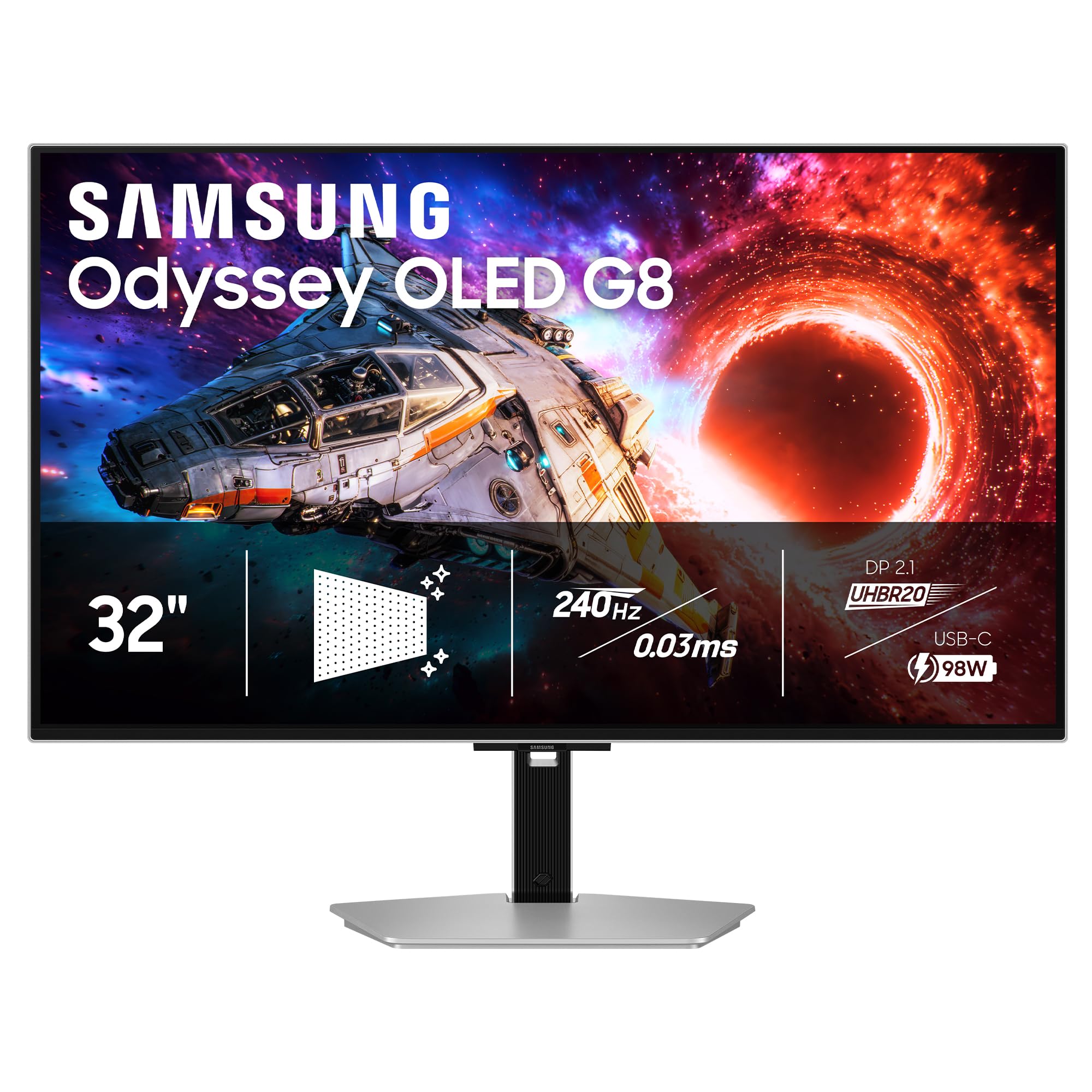
A silver-framed 32-inch QD-OLED that marries professional looks with 240Hz ferocity.
This premium pick suits a dressed-up desk. The 32-inch QD-OLED has a 140 PPI (pixels per inch) density, so text and details look sharp, and the silver stand and shell look high-end—owners call it “a refined, professional looking monitor.” It runs 240Hz with a 0.03ms response time and AMD FreeSync Premium (a variable refresh rate tech), so motion stays smooth on both NVIDIA and AMD graphics cards.
Connectivity is top-tier: DisplayPort 2.1 delivers up to 80Gbps of bandwidth, and the USB-C port powers your laptop with up to 98W. Samsung’s Glare Free coating keeps reflections at bay, and OLED Safeguard+ helps prevent burn-in while the Dynamic Cooling System manages heat. A 3-year warranty wraps the whole package.
Two quirks to note: the monitor runs noticeably hot—it is the trade-off for the brightness and cooling design—and there are no built-in smart features or speakers. For pure picture quality and performance, it delivers; for an all-in-one media hub, look elsewhere.
best for: a premium, professional-looking setup where 240Hz gaming and 98W laptop charging share one screen.
not for: anyone who wants speakers or expects a cool-running panel—this one radiates heat.
11. ASUS ROG PG27UCDM

The 27-inch 4th-gen QD-OLED with a proximity sensor that babysits your burn-in risk.
This ASUS packs 4K into a 26.5-inch frame using 4th-gen QD-OLED tech, which delivers sharper imagery and clearer text than earlier OLEDs—a real fix for the soft-font complaint. It runs 240Hz with a 0.03ms response time and a 1500000:1 contrast ratio, so it is both blindingly fast and deeply contrasty. Owners upgrading from TN panels call it a massive leap, praising the hyper-sharp image and inky blacks.
The standout feature is burn-in protection done right. OLED Care Pro includes a Neo Proximity Sensor that detects when you walk away and switches to a black screen to protect the panel. OLED Anti-Flicker 2.0 cuts flicker by 20% versus previous-gen panels for less eye strain. Connectivity covers DisplayPort 2.1a with full 80Gbps bandwidth, USB-C with 90W power delivery, and HDMI 2.1.
Honest caveats: the triangular subpixel layout can blur Windows fonts for some users, there are no built-in speakers, and you need a powerful GPU—owners suggest an RTX 3080 Ti at minimum, with a 5090 for full effect. This is a specialist’s tool, priced for that buyer.
the top pick for: high-end GPU owners who want the sharpest 27-inch 4K OLED with proactive burn-in protection.
you might pass on it if: your graphics card is mid-range—this screen deserves a flagship to shine.
Understanding the Specs
Refresh Rate (Hz)
This is how many times your screen redraws the image each second. A 144Hz monitor shows 144 frames per second, which feels dramatically smoother than a standard 60Hz screen. Higher numbers like 240Hz are even better for competitive shooters, but only if your graphics card can actually produce those frames—otherwise, you are paying for speed you never see.
Response Time (ms)
This measures how fast a pixel can change color, and it is what prevents ghosting—the blurry trail behind fast-moving objects. OLED panels hit an incredible 0.03ms, while IPS panels sit around 1ms. Lower is better, and the gap between 0.03ms and 1ms is only noticeable in the most demanding fast-paced games.
FAQ
Do I need HDMI 2.1 or DisplayPort 2.1 for 4K 144Hz?
Will my graphics card run 4K at 144Hz?
Is OLED better than IPS for gaming?
What is burn-in and should I worry about it on an OLED monitor?
What does adaptive sync like G-Sync or FreeSync do?
Is a 27-inch or 32-inch 4K monitor better?
Do I need HDR for gaming?
Can I use a 4K 144Hz monitor with a PS5 or Xbox Series X?
Final Thoughts: The Verdict
For most people, the 144hz 4k gaming monitor winner is the ASUS ROG PG32UCDM because it pairs the fastest 240Hz refresh with the deepest OLED contrast, and its 3-year burn-in warranty removes the biggest fear of buying OLED. If you want the flexibility to play both story games and competitive titles on one screen, grab the LG 27G810A-B with its clever dual-mode. And for a budget-friendly 32-inch entry into 4K high refresh, the KTC H32P22P is the one to reach for.
How We Picked
We do not accept paid placement. Every pick is matched to a real buyer and a real use-case; we do not hands-on test units.
Sources & Methodology
Specifications: manufacturer listings and product documentation. Review insights: verified customer reviews, as of August 2026. Pricing: not shown on this page (it changes often); check the current price via the retailer link.
As an Amazon Associate, FitlyFast earns from qualifying purchases. This does not affect which products we feature.