
Our readers keep the lights on and the weekend projects moving. As an Amazon Associate, I earn from qualifying purchases.
Specs are compiled from manufacturer listings and verified buyer reviews and can change over time — please confirm the key details on the product page before buying.
Choosing a budget video card for gaming is about finding the exact line where price meets the frame rates you actually want. The real trick is that the cheapest card isn’t always the best value, and the most expensive one here isn’t the best for every PC. This guide sorts through eight of the most popular entry-level and mid-range cards to show you which ones deliver smooth 1080p gaming and which ones are better left on the shelf.
I’m Rikta — the founder and writer behind FitlyFast. This guide is built by comparing the manufacturers’ published specifications and the patterns across verified customer reviews, so you get each pick’s real strengths and trade-offs instead of marketing spin.
The best budget video card for gaming balances raw performance, memory capacity, and power draw without breaking your build.
Our Picks at a Glance


How To Choose The Best Budget Video Card For Gaming
The biggest mistake new builders make is chasing the highest number on the spec sheet without checking whether their power supply or computer case can even handle it. Before you click buy, you need to think about three things: the memory on the card, the power it needs, and the physical space inside your PC.
Start With Resolution, Then Work Backwards
If you play on a standard 1080p monitor, you do not need a top-tier card. Most of the cards on this list are built specifically for smooth high or ultra settings at 1080p. If you have a 1440p monitor, you need to step up to a card with more memory and faster processing, like the cards with 12GB of VRAM or the newer RTX 50-series models.
Check Your Power Supply Before Anything Else
Every card on this list needs a certain amount of power, and some need a direct cable from your power supply (an 8-pin connector). If you are upgrading an older office PC, look for cards that draw power straight from the motherboard slot itself. Cards with a 70-watt draw or less are the safest choice for these systems, while more powerful cards may need a 650-watt power supply.
Quick Comparison
| Model | Best For | Memory | Max Resolution | Clock Speed | Amazon |
|---|---|---|---|---|---|
| AISURIX RX 5500 XT★ Best Overall | Entry-Level Budget | 8GB GDDR6 | 3840 x 2160 | 1750 MHz | Amazon |
| ASUS RTX 5060Also Great | Best Overall | 8GB GDDR7 | 7680×4320 | 2535 MHz | Amazon |
| MSI RTX 3050Low-Power Pick | Low-Power Builds | 6GB GDDR6 | 7680×4320 | 1492 MHz | Amazon |
| GIGABYTE RTX 3050 | Quiet 1080p | 6GB GDDR6 | 7680×4320 | 1477 MHz | Amazon |
| ASRock Arc B580 | Future-Proof VRAM | 12GB GDDR6 | 7680×4320 | 2740 MHz | Amazon |
| GIGABYTE RTX 5060 | High FPS | 8GB GDDR7 | 7680×4320 | 2512 MHz | Amazon |
| ASRock Arc A580 | Overclocked Value | 8GB GDDR6 | 7680×4320 | 2000 MHz | Amazon |
| ZER-LON GTX 1660 Super | Starter Builds | 6GB GDDR6 | 7680×4320 | 1530 MHz | Amazon |
In‑Depth Reviews
1. AISURIX RX 5500 XT 8GB GDDR6
The absolute entry point that gives you 8GB of VRAM for the lowest cost.
This is the cheapest way into this list, and it makes a specific trade to get there. The RX 5500 XT runs at a 1750 MHz clock speed and tops out at a 3840 x 2160 resolution, which is lower than the 7680 x 4320 the other cards here support.
Owners are happy with it for basic budget gaming. As reviewers point out: “Worked perfectly from the start for my Ubuntu 26.04, Amd rebuild.” Another owner upgraded from an older card specifically to play the RE4 remake and found the extra VRAM made the difference. It runs newer games at decent frames in 1080p and is praised for its value, but the performance is a step behind the other options on this list.
The card draws a modest 130 watts max power from a single 8-pin connector, and its semi-automatic fan system stops the fans entirely at low temperatures for quiet office use. The honest concern here is reliability: a couple of owners reported cards failing after the return period, which makes this a riskier choice than the more established brands. The port quality also draws mixed feedback, with one buyer having trouble with the power cable connector.
Why it gets a look: It packs 8GB of VRAM (video memory that stores textures and graphics data) at the lowest price in this guide, so if your budget is very tight, you still get enough memory for modern games at 1080p.
Why you should be careful: The lesser-known brand carries a higher risk of early failure compared to the big-name cards.
Choose this only if: cost is the absolute deciding factor and you are comfortable with a less established brand.
Spend slightly more for: the confidence that comes with a card from MSI, Gigabyte, or ASRock, which are known for reliable cooling and customer support.
2. ASUS Dual NVIDIA GeForce RTX 5060 8GB
The modern budget king that makes older flagship cards look overpriced.
This card is the pick for anyone who wants to play today’s games at high settings without stretching their budget into the serious enthusiast tier. It uses the newest NVIDIA Blackwell architecture and brings DLSS 4, a smart upscaling tool that boosts frame rates while keeping the picture sharp. Buyers report it runs relatively cool, works cleanly with the latest Windows, and delivers a display that is “sharp and fast.”
Performance heads into the range of older, much more expensive cards. Buyers who upgraded from an RTX 3060 say it is “another world,” and it handles strong 1080p gaming with roughly 80% of titles playable at 1440p. The 8GB of VRAM still does the job at these resolutions, though heavy modern games will ask you to manage settings carefully.
The card is rated for high-end AI work at 623 AI TOPS, which means it can handle more than just gaming. It runs at 2535 MHz in OC mode, boosts memory speed with the new GDDR7 standard, and connects over PCIe 5.0. The dual-fan design keeps it quiet, and the 0dB technology stops the fans spinning entirely under light loads.
Reasons it wins the top spot
- Newest memory technology and architecture in this budget class
- Strong 1080p and capable 1440p performance from real owner reports
- Compact dual-fan build with 0dB silent operation when idle
Fair trade-offs to know
- 8GB VRAM needs settings management in the heaviest titles
- Sits at the higher end of the budget tier
Grab it for: a system you want to keep relevant for years of 1080p and light 1440p gaming.
Think twice if: your power supply or case only fits the smallest, lowest-power cards.
3. MSI Gaming RTX 3050 Ventus 2X 6G OC
The perfect revival kit for older office PCs that only have 70 watts to spare.
If your computer is a pre-built office machine with a weak power supply, this is the card that fits. It draws just 70 watts and needs no power connector at all, meaning it gets its power directly from the motherboard. This makes it a straightforward upgrade for OEM systems that would struggle to feed a hungrier card.
Performance lands in solid entry-level RTX territory. One owner playing Cyberpunk 2077 reported 50-60 FPS on high settings, around 100 on medium, and roughly 120 on low. The card also fixes the bottleneck some smaller cards suffer on older PCIe 3.0 slots. Owners note it is stable, quiet with fans that rarely spin up, and stays around 62°C under load.
The 6GB GDDR6 memory and 1492 MHz boost clock handle modern games at 1080p well. It fits into tight spaces at just 7.4 inches long, and the HDMI 2.1a ports keep it ready for modern displays. The honest catch is that ray tracing, a lighting effect that demands heavy processing, is not really usable at max settings on this class of card; owners describe it as a slideshow.
Why it fits small builds: The 70-watt draw and no external power cable make it the easiest drop-in upgrade for compact or office PCs.
Who it is not for: Anyone chasing maximum effects in the newest AAA titles, since the 6GB memory and entry-level chip have limits.
Reach for this if: your main goal is turning a slow work computer into a capable 1080p gaming machine.
Look elsewhere if: you have a strong power supply and want the headroom of a more powerful GPU.
4. GIGABYTE GeForce RTX 3050 WINDFORCE OC V2 6G

A cool and silent upgrade that fits PCs with no extra power cables.
This GIGABYTE card delivers a very similar experience to the MSI RTX 3050 above, but with its own cooling twist. The dual WINDFORCE fans keep temperatures in check during long gaming sessions, and the whole card draws its power without an external PCI-E power connection. This makes it another excellent option for upgrading a pre-built Dell or HP tower.
Owners describe it as great value for entry-level 1080p gaming, with easy installation and quiet operation. One buyer uses it in a media center PC specifically for Minecraft with ray tracing enabled, proving this budget card can handle lighter RT workloads even if heavy titles are a stretch. Another runs Steam games at around 60 FPS on a 75-watt board-limited Dell.
The card runs at a 1477 MHz boost clock with 6GB of GDDR6 memory on a 96-bit interface. It is nearly identical in size to the MSI option at 7.5 inches long. The main difference is the brand’s cooling design, so your choice between the two RTX 3050s may come down to which one fits your case and your aesthetic preference.
Standout trait: The dual WINDFORCE fan setup keeps this entry-level card cool and whisper-quiet even when you push it.
Honest limit: With only 6GB of VRAM, you will need to dial back textures on the most demanding modern releases.
Choose this one for: a quiet, power-efficient 1080p machine that fits a standard desktop case.
skip it if: you already own a card with a power connector and want a bigger performance jump.
5. ASRock Intel Arc B580 Challenger 12GB OC

The 12GB VRAM champion that looks ahead without emptying your wallet.
This Intel card leads the group on memory with a massive 12GB of GDDR6 VRAM, which is a significant advantage over the 6GB cards and even the 8GB options on this list. That extra memory means modern games can load their largest textures without stuttering. It is built for 1440p gaming, a step above the standard 1080p focus of the other budget cards here.
Performance gets strong praise, with owners running games like God of War and the Witcher at ultra settings. It runs at a high 2740 MHz GPU clock, stays cool to the touch, and is compact enough for small form factor builds at 249 mm long. The 0dB silent technology also means the fans stop completely when you are just browsing.
The card supports Intel XeSS 2, an AI upscaling tool similar to DLSS, and uses a PCIe 4.0 x8 interface with DisplayPort 2.1 outputs. The honest trade-off is that it needs Resizable BAR (a BIOS setting on 10th-gen Intel processors and newer) enabled to perform well. Driver support also gets mixed feedback, with some buyers uncertain about future updates even as the current performance impresses.
What makes it special
- 12GB VRAM beats every other card in this budget class
- Excellent 1440p performance from real owner reports
- Quiet with a compact 2-slot design
What to check first
- Requires Resizable BAR enabled in BIOS to reach full performance
- Driver support receives mixed long-term feedback
The right fit: gamers with a reasonably modern motherboard who want room to grow into 1440p without paying flagship prices.
The wrong fit: anyone on an older system that may not support Resizable BAR, or who prefers a plug-and-play Nvidia experience.
6. GIGABYTE GeForce RTX 5060 WINDFORCE OC 8G

A step-up twin of the top pick, with the same chip and a bigger price tag.
This GIGABYTE card shares the same RTX 5060 chip and 8GB of GDDR7 memory as our Best Overall pick, but it asks for a higher investment. It is built around the NVIDIA Blackwell architecture and DLSS 4, so the core performance is very similar. Owners mention it delivers “twice the performance” of an older RTX 3060, which makes sense for a card that targets high-refresh 1080p and capable 1440p gaming.
The WINDFORCE cooling system earns specific praise for staying quiet while handling demanding games like Marvel Rivals, and the card fits into most mid-tower cases easily. It runs at a 2512 MHz clock speed with an 8GB 128-bit GDDR7 interface over PCIe 5.0. One creative professional uses it to run six screens at once, proving its versatility goes beyond gaming.
The honest catch is its position on this list. Compared to the nearly identical ASUS RTX 5060, this card costs more while delivering the same 8GB of VRAM and similar speeds. Your extra money goes to the GIGABYTE cooling design and brand, not to extra gaming headroom. Owners also note that the 8GB VRAM requires some settings tweaks in the heaviest creative applications.
Where it shines: High refresh 1080p and smooth 1440p gaming with a proven, quiet dual-fan cooler.
Where it stumbles: On pure value, because the ASUS card in this guide gives you the same chip for less money, so you pay extra here for the brand name.
Buy it for: the GIGABYTE cooling pedigree if you run long sessions and want proven thermal performance.
pass on it if: you are strictly budget-focused and want the same performance without the brand premium.
7. ASRock Intel Arc A580 Challenger 8GB OC
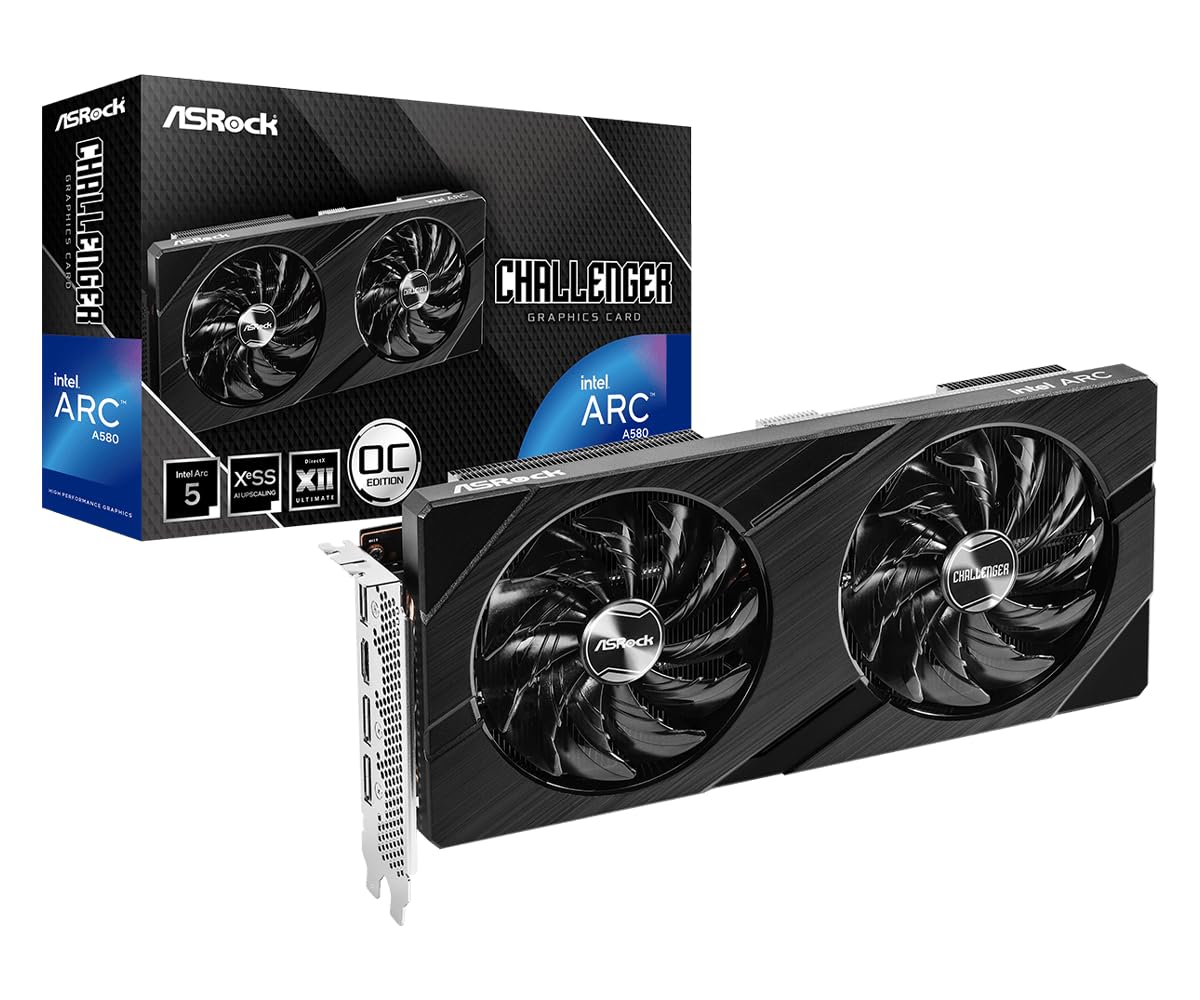
An overclocked 8GB card that crushes 1080p gaming for a fraction of the cost.
If you want one of the best performance-per-dollar deals in this budget class, this ASRock card is a serious contender. It is factory overclocked to a 2000 MHz engine clock, giving it a solid speed advantage right from the start. It also holds 8GB of GDDR6 memory, putting it a step ahead of the 6GB cards on this list for the same kind of money.
Customers note it handles 1080p gaming well. One reviewer notes that after a month, the card “runs smoothly most of the game on 1080p (at least 60 FPS in high/ultra graphics).” While gaming, temperatures stay around 64-68°C (a safe, comfortable range), so you won’t worry about overheating. Reviewers call it an excellent price-to-performance card for a budget upgrade.
The dual-fan design with 0dB Silent Cooling stops the fans completely at low temperatures, so it is silent when doing light work. It supports a massive 7680 x 4320 maximum resolution through DisplayPort 2.0, which beats the AISURIX card’s 3840 x 2160 by a significant 2.0x gap. The trade-off is the card’s size: it uses a 2.4-slot design and requires two 8-pin power connectors plus a recommended 650-watt power supply.
The standout stat: The 2000 MHz clock speed leads the 1530 MHz of the ZER-LON GTX 1660 Super by a 31% margin, with 2GB more VRAM.
The fair warning: It needs a beefier power supply than the entry-level RTX 3050 cards, so check your PSU first.
Reach for it: if you have a proper gaming rig with a strong power supply and want maximum 1080p frames for your dollar.
Pass on it: if you are upgrading a small office PC that lacks the required 8-pin power cables.
8. ZER-LON GeForce GTX 1660 Super 6GB

The proven workhorse for a child’s first gaming PC or a casual starter build.
This card is a veteran for good reason. It is built on the older 12 nm process with 6GB of GDDR6 memory running at 14000 MHz on a 192-bit interface. While it does not have the newest features like ray tracing, it remains a rock-solid performer for casual gaming. Owners describe it as “the best value gaming card” for 1080p, capable of high frame rates in most games.
It has a reputation for reliability that is hard to match. It is particularly praised as a great fit for kids’ machines running games like Roblox, Fortnite, and Minecraft, though it may struggle with the newest AAA titles.
The dual freeze fans keep it cool, and owners note the fans turn off under light load for quiet operation. It supports up to 8K display output and can drive three monitors through its DVI, DisplayPort, and HDMI ports. The honest downsides are that it comes with no accessories and generic packaging, and a few buyers reported durability concerns over the long term compared to the newer cards here.
Why it endures
- Proven reliability for long, constant gaming sessions
- Very quiet with fans that stop under light load
- Cheap enough to be a proper budget champion
Where it shows its age
- No ray tracing support, which newer cards offer
- 6GB memory and older chip limit newer AAA games
Best for: a dependable, low-stress GPU for kids and casual players who know what they are buying.
Not ideal for: gamers who want to play the newest releases with modern visual effects.
Understanding the Specs
VRAM: How Much Memory Matters
VRAM is the memory your graphics card uses to store textures and game data. Cards with 6GB are fine for older or lighter games, but modern AAA titles increasingly want 8GB or more to run smoothly at high settings. The 12GB cards on this list offer the most headroom for future games and for gaming at 1440p, so consider it a long-term investment.
Clock Speed and Resolution
The GPU clock speed, measured in megahertz (MHz), tells you how fast the card’s processor works, but it is only one part of the performance picture. A higher resolution like 7680 x 4320 (often called 8K) means the card can technically output to very high-end monitors. What matters for you is 1080p and 1440p, which are what the vast majority of gamers use and what these cards are designed to handle well.
FAQ
Will a budget graphics card work in my old office computer?
Is 6GB of VRAM enough for gaming in 2026 and beyond?
What does the GPU clock speed number like 2000 MHz actually mean for me?
Do I need a card that supports ray tracing on a budget?
What is the difference between the RTX 3050 and the RTX 5060?
Does the ASRock Arc B580 really need Resizable BAR to work?
Which is better for a child’s first gaming PC, the GTX 1660 Super or the RTX 3050?
What is the maximum resolution these budget cards can output?
Final Thoughts: The Verdict
If you want one dependable pick, the budget video card for gaming winner is the ASUS RTX 5060 because it pairs the newest technology with a price that stays within reach for most builders. If you need a card that fits a weak office power supply, grab the MSI RTX 3050. And for the best memory value that keeps more games playable at higher settings, the ASRock Arc B580 with its 12GB of VRAM is the one to reach for.
How We Picked
We do not accept paid placement. Every pick is matched to a real buyer and a real use-case; we do not hands-on test units.
Sources & Methodology
Specifications: manufacturer listings and product documentation. Review insights: verified customer reviews, as of August 2026. Pricing: not shown on this page (it changes often); check the current price via the retailer link.
As an Amazon Associate, FitlyFast earns from qualifying purchases. This does not affect which products we feature.