
Our readers keep the lights on and the weekend projects moving. As an Amazon Associate, I earn from qualifying purchases.
Specs are compiled from manufacturer listings and verified buyer reviews and can change over time — please confirm the key details on the product page before buying.
You want a Budget Keyboard For Gaming that clicks satisfyingly, lights up without blinding you, and survives a rage quit — without emptying your wallet. Budget boards today offer far better performance than older models, but you still face real trade-offs. Your choice hinges on switch type, layout size, and your available desk space. Competitive shooters need fast response times, while all-day typists and night gamers should prioritize quieter switches.
I’m Rikta — the founder and writer behind FitlyFast. This guide is built by comparing the manufacturers’ published specifications and the patterns across verified customer reviews, so you get each pick’s real strengths and trade-offs instead of marketing spin.
When you shop for a budget keyboard for gaming, focus on the switch type and the rollover capability, since these two specs decide how your fingers feel through a marathon session.
Our Picks at a Glance


How To Choose The Best Budget Keyboard For Gaming
First-time buyers often pick a board for its RGB lighting instead of its switch type, a costly error. A pretty glow won’t save you if the switches feel mushy or keys ghost during intense fights.
Switch Types: Membrane vs. Mechanical vs. Magnetic
Membrane keyboards (like the Corsair K55 CORE) use a rubber dome under each key. They’re quiet, cheap, and most resist spills — a life-saver if you keep a drink on your desk. But they lack the crisp tactile feedback serious gamers want. Mechanical keyboards use individual switches per key, giving you that satisfying click and faster, more precise responses. The new option is the magnetic Hall Effect switch (found in the AULA WIN68 HE), which lets you set exactly how far down you press for the key to register — a real edge in competitive shooters.
Size and Layout: Is Smaller Better?
The classic full-size board has a number pad on the right, giving you both gaming and number-crunching power. If you play FPS games, you probably keep your mouse hand close to your keyboard, so a smaller layout — like a 60% or 75% board — frees up that space and looks much cleaner. Most tiny keyboards keep the arrow keys and main functions accessible via a secondary “FN” layer. If you absolutely need the numpad for spreadsheets or MMO keybinds, stick with a full-size or 96% layout.
The Specs That Actually Matter
Skip the jargon. Focus on three specs: polling rate (Hz), rollover (simultaneous keys), and battery capacity for wireless models. A 1,000Hz polling rate, reporting every millisecond, is standard and fast enough for most gamers. High-end boards now offer 8,000Hz, cutting that lag even further. And hot-swappable switches let you pull out the factory switches and replace them later, so you can upgrade the feel without buying a new keyboard.
Quick Comparison
| Model | Best For | Switch Type | Key Count | Polling Rate | Amazon |
|---|---|---|---|---|---|
| Corsair K55 CORE★ Best Overall | Quiet, spill-proof shared spaces | Membrane | 104 | 1,000Hz | Amazon |
| Redragon K552Best Value | First-time mechanical buyers | Linear Mechanical | 87 | — | Amazon |
| AJAZZ AK820 | Modders and gasket-mount lovers | Linear Mechanical | 82 | — | Amazon |
| AULA WIN68 HE | Competitive FPS players | Hall Effect Magnetic | 68 | 8,000Hz | Amazon |
| DIERYA DK63 | Multi-device setup and travel | Linear Mechanical | 63 | — | Amazon |
| Redragon S101-3 PRO | First-timers needing a full setup | Membrane | — | — | Amazon |
| RK ROYAL KLUDGE R98 Pro | Typists who want creamy sound | Linear Mechanical | 98 | — | Amazon |
In-Depth Reviews
1. Corsair K55 CORE RGB Membrane Wired Gaming Keyboard
The quiet workhorse built to survive desk spills without sacrificing responsive gaming feel.
If you’re looking for a keyboard with a premium feature set at a friendly price, this is the one. It uses membrane switches, which means every keystroke is quieter than a mechanical board — perfect if you’re gaming in a shared room or a dorm late at night. The keys offer a tactile, clicky feel without the loud clatter, and the ten-zone RGB backlighting gives your setup plenty of flair.
Durability is the standout here. Buyers report the K55 CORE resists water spills up to a 300ml capacity, so a knocked-over soda won’t end your session. The build holds up over time; owners mention the board is “still going strong after a year and a half of use.” With 104 keys, a 1,000Hz polling rate, and 12-key rollover (meaning it handles many simultaneous presses without missing one), it checks every box for a full-size gaming board. It also has dedicated media keys and Win Lock buttons, handy for streaming and office work.
The trade-off? The lighting is zone-based, not per-key, so you can’t light up individual keys in different colors. Some owners find the letters on the keycaps a bit dim, and the feel is softer than fully mechanical. But if you value quiet reliability over raw magnetic switch speed, this is the best all-rounder on the list.
What owners rave about
- Near-silent typing that won’t disturb others
- Spill resistance up to 300ml for confidence
- Solid, fast iCUE software with easy macro setup
Consider this first
- Zone-based RGB lighting, not per-key
- Membrane feel is softer than mechanical switches
- A non-detachable cable limits portability
The pick when: you want a quiet, durable full-size board for both office typing and late-night gaming marathons.
The honest catch: if you want vivid per-key backlighting or a crisp mechanical snap, look at a mechanical option instead.
2. Redragon K552 Mechanical Gaming Keyboard
The crowd-favorite tenkeyless that delivers a true mechanical feel on a budget.
This is the keyboard you buy when you want your first mechanical switch without the premium price tag. Huge numbers of buyers pick this up — it’s a legend in the budget space — and most are thrilled. The linear red switches are smooth and consistent, letting you rapidly tap keys for gaming marathons without the tactile bump or extra force of blue or brown switches. The 87-key tenkeyless design frees up significant desk space, so your mouse has plenty of room for low-sensitivity aiming.
What really wins people over, though, is the build. The metal top plate gives it a heavy, sturdy feel that rivals boards costing triple the price. For typists, the upgrade is noticeable — customers note dramatic speed gains, with one owner noting a “+15 WPM” jump versus a wireless Apple keyboard. It’s fully plug-and-play across Windows, macOS, and Linux, so no drivers are needed. The full anti-ghosting and N-key rollover means all 87 keys register correctly even when you’re mashing several of them at once.
The main trade-off is volume. These are loud, clicky switches — buyers describe the sound as “clacky” and caution against using it in open offices or shared spaces. Some note the backlight modes are fixed rainbow patterns with limited software control, and a few units have shown quality-control quirks. But for the price, the mechanical feel is class-leading.
Why it wins: The metal frame and true mechanical switches at this price point overshadow any other budget mechanical keyboard.
Who should pass: If you need near-silent keys for a shared workspace, this loud board isn’t the fit for you.
3. AJAZZ AK820 Mechanical Gaming Keyboard
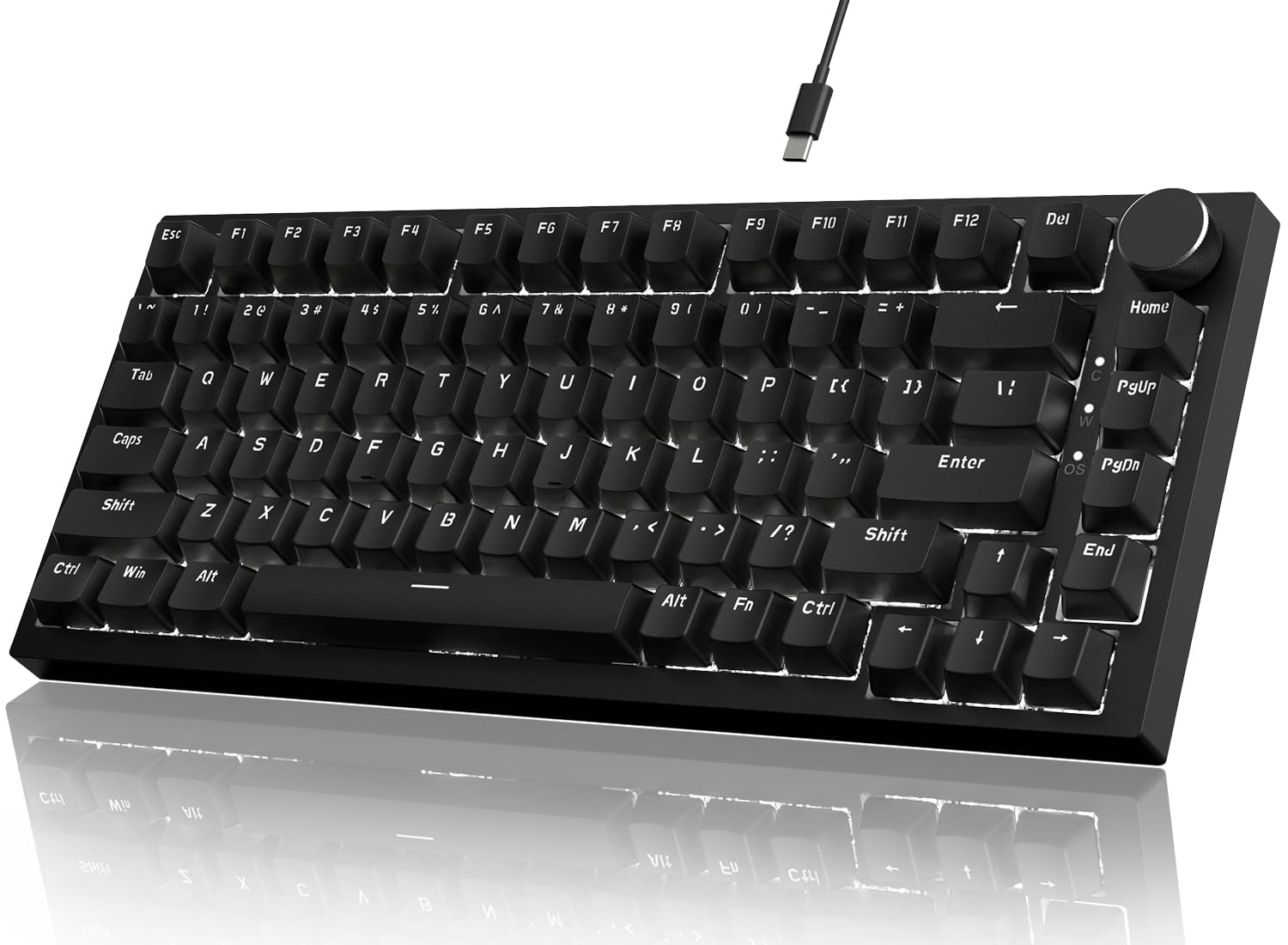
A compact 75% board with a satisfying sound profile and the easiest switch-swapping you’ll find.
This board is a step up for anyone who wants to get into keyboard modding. The AK820 uses a gasket mount structure — basically a cushioned mounting system that gives the keys a soft, bouncy feel — along with a 5-layer sound-absorbing foam stack. The result is a typing sound that owners describe as satisfying and comfortable, without the hollow “ping” you get on cheaper metal boards. It’s fully hot-swappable, so you can pull out the linear red switches and swap in any 3-pin or 5-pin mechanical switch you prefer later, making this a perfect first board for enthusiasts.
With 82 keys, it’s a 75% layout that keeps all the F-keys and arrows without the numpad, saving desk space while retaining full functionality. The CNC-machined aluminum volume knob is a crowd favorite — buyers love the tactile rotation for quick volume changes in-game. The Type-C wired connection is plug-and-play, and the white LED backlight offers 20 effects you can adjust via the AJAZZ software.
The subtle catch is in the details. Some owners note the stock black keycaps feel a bit cheap and light, and the overall plastic body is torsionally rigid but not premium. Others report the sound is more “chattery” than the deep “thock” you might expect from a gasket board. If you’re willing to swap the keycaps later, this is a fantastic modding platform for the money.
the balance: Buyers who want a quiet, soft typing feel with the flexibility to swap in different switches as they learn what they like.
The trade-off: The stock keycaps are the weakest link, so factor in a small upgrade budget down the road.
4. AULA WIN68 HE Mechanical Gaming Keyboard

A 60% keyboard with magnetic switches that let you set your own trigger point for split-second reactions.
This is the deep-cut for competitive players who care about speed above all else. The WIN68 HE ditches traditional mechanical switches for Hall Effect magnetic switches. That means instead of a physical click, magnets measure exactly where your key is pressed. You can set the actuation point — how far you need to press before the key registers — anywhere from 0.02mm to 3.44mm, tuned down to a 0.1mm granularity. It’s a premium feature usually found on boards triple the price, and it gives you true “fast trigger” control for strafing and peeking in shooters.
It’s also incredibly fast. The 8,000Hz polling rate checks for your inputs eight times more often than a standard 1,000Hz board, which translates to a 0.3ms response time. The 68-key 60% layout saves up to 40% desk space, perfect for cramped setups or travel. The 16.8-million-color RGB with south-facing LEDs is bright and vivid, and the 14 preset lighting effects set a great mood. Owners consistently call it “silky smooth” to type on and praise the heavy, durable build.
There’s a learning curve with the software. The web-based driver isn’t immediately intuitive and some buyers noted it initially looks sketchy, though it works fine. It’s also Windows-only — no Mac support. But if you’re chasing every frame of latency, this budget board punches far above its weight.
Built for gamers
- Adjustable actuation down to 0.1mm increments via magnetic switches
- Blazing 8,000Hz polling rate with 0.3ms latency
- Detachable USB-C cable for easy transport
Not for everyone
- Software driver is Windows-only and takes time to learn
- Plastic casing feels lighter than the price suggests
- RGB is dimmer in brightly lit rooms
Reach for this if: you’re a serious FPS player who wants tournament-level adjustable actuation without the tournament-level price.
Look elsewhere if: you need macOS compatibility or prefer a soft, silent typing feel over speed.
5. DIERYA DK63 60% Wireless Mechanical Gaming Keyboard

A wireless 60% board with marathon battery life that switches between your PC, tablet, and phone in a tap.
If you need to game on a desktop and then type on a tablet without swapping wires, this white DIERYA is a great fit. It connects three ways — via 2.4G wireless dongle, Bluetooth 5.0, or a USB-C cable — and lets you switch between devices on the fly. The compact 63-key design keeps directional keys and core functionality, giving you a small footprint that travels well in a bag. The red mechanical switches provide that satisfying gamer click-clack sound that owners say feels “like a keyboard.”
Battery life is a strong suit on paper. The 3,000mAh internal battery is rated for about 8 hours of continuous gaming with full RGB backlighting on, but stretches to roughly 90 hours of typing with the lights off, with standby reaching up to 360 hours. The RGB system offers 18 lighting modes across 16.8 million colors, customizable through control software. It’s a polished package for multi-device users who like to declutter their desk.
The honest caveat is reliability — the review pattern is split. Many owners are overjoyed and report excellent build quality and long battery life with a low-battery spacebar flash warning. But a small number of units have died after about a month of daily use and refused to charge, which is concerning. It’s also heavier than some wireless rivals, and the lack of a number pad means you’ll rely on the FN layer for numbers. It’s a great, portable option, but one to keep your receipt handy for.
What stands out: The 90-hour battery life with backlight off is exceptional for a board in this tier, making it a great travel companion.
Who might skip: If you want a heavily-used daily driver and don’t need wireless, a cheaper wired board offers better reliability value.
6. Redragon S101-3 PRO Gaming Keyboard and Mouse Combo

The full armor kit — a quiet, full-size keyboard with mouse and software macros for a single bargain price.
This is the ultimate starter kit for someone building their first gaming setup on a tight budget. The soft-touch membrane keys are remarkably quiet and comfortable, with a decent amount of travel for a membrane switch. It’s the kind of kit you buy for a student or a first-time gamer, and it comes with an ergonomic wrist rest to keep long sessions comfortable.
Owners have put this combo through real years of use and come away impressed. Buyers share one-year reports of the keys never fading, no connection drops, and the mouse surviving multiple falls. The mouse offers adjustable DPI on-the-fly between 800 and 7200 DPI — handy for shifting from sniping to fast flicks. The membrane keyboard has 5 dedicated macro keys, a rarity at this tier, letting you program complex command sequences without needing expensive peripherals. It’s compatible with Windows, macOS, Linux, and even the PS4, giving it massive reach.
The trade-offs are typical of membrane gear. The keys require slightly more force than mechanical switches, and some owners note the mouse doesn’t have the grippy RGB customizability of premium ones. There are occasional complaints about the keyboard not remembering RGB settings after a restart. But when you look at the value package as a whole — a keyboard, mouse, macro keys, and software in one box — very few products match it.
The full bundle
- Includes both keyboard and a 7,200 DPI gaming mouse
- Extremely quiet keys suitable for shared spaces
- 5 dedicated macro keys for game commands and shortcuts
Know before you buy
- Membrane switches feel softer than mechanical
- The mouse’s RGB color sometimes mismatches the keyboard
- Keyboard wakes from sleep with a slight reconnection delay
The verdict: Buy this if you’re starting from zero and want a dependable keyboard and mouse without hunting for separate deals.
Look past it if: you already own a decent mouse and only want the best possible keyboard feel for the money.
7. RK ROYAL KLUDGE R98 Pro Mechanical Keyboard

A 96% layout with premium PBT keycaps and a creamy, satisfying sound that makes typing addictive.
This is the premium pick on the list, and for good reason — it’s the board that feels more expensive than it is. The R98 Pro squeezes a full 98-key layout, including the number pad, into a space-saving design that’s only slightly wider than a tenkeyless. The pre-lubed linear cream switches offer that coveted “creamy” sound profile — a soft, buttery clack that owners describe as delightful. The gasket mount and five-layer sound-absorbing foam deliver a deep “thocky” feel that keyboard enthusiasts chase for years.
Build quality is what sets this apart. The double-shot PBT keycaps (a dense plastic that resists wear and handles oils well) have a matte, non-fading finish that many budget boards skip. The MDA profile keycaps curve to fit your fingers better, providing a stronger sense of “wrapping” when you type. The detachable aluminum CNC volume knob is a satisfying addition, and the four built-in indicator lights make keyboard state easy to read. It’s fully hot-swappable for 3 or 5-pin switches and offers over 20 RGB modes via an online driver.
The catch? It’s heavier than most boards, and some owners note the backlighting isn’t as bright as other options because the opaque PBT keycaps don’t let as much light through the letters. The online driver takes a little getting used to, and the wired-only connection gets in the way if you want a cable-free desk. But for writers and gamers who spend hours at the keyboard, the feel and sound are hard to top at this tier.
The core strength: The combination of creamy switches, gasket dampening, and premium PBT keycaps makes every keystroke feel intentional and luxurious.
The honesty check: If you need bright, per-key RGB illumination to cut through a sunny room, the dimmer backlight here will frustrate you.
Understanding the Specs
Polling Rate (Hz)
This tells you how often your keyboard reports its status to your PC. Standard gaming boards run at 1,000Hz, which sends a signal every millisecond — fast enough for most players. High-end boards like the AULA WIN68 HE push that to 8,000Hz, meaning it reports eight times more often, cutting input lag to as little as 0.3ms. For casual players, the difference is barely noticeable, but for clicking in a rapid-fire FPS, it does feel snappier.
Hot-Swappable Switches
This is the hidden gem of the budget-spec world. A hot-swappable keyboard lets you physically pull out the mechanical switches (the part under the keycap) without any soldering. You can replace them with different switch types — say, swapping loud clicks for quiet linears — using only a small puller tool. If you want to tinker and customize as you get better at typing, a hot-swappable board like the AJAZZ AK820 or the RK R98 Pro is the better long-term investment than a fixed one.
N-Key Rollover vs. Anti-Ghosting
When you press multiple keys simultaneously, cheaper keyboards “ghost” or ignore some presses. Full N-key rollover (NKRO) means the board can register any number of keys pressed simultaneously. The Redragon K552 supports NKRO across all 87 keys, which is fantastic for complex combos in MMOs. Anti-ghosting is the same protection but usually limited to a set of keys, like WASD and the surrounding ones — enough for most shooters but not all scenarios.
Actuation Point
This is the exact distance a switch must travel before it registers a keystroke. Standard mechanical switches have a fixed actuation distance — you press until you feel the bump or click. Magnetic Hall Effect switches, like those in the AULA WIN68 HE, let you adjust that point anywhere from 0.02mm to 3.44mm. A shorter actuation means you register the key press with a tiny tap, which is faster for rapid tapping in games but might cause accidental inputs during typing.
FAQ
Are membrane keyboards still okay for gaming in a budget build?
What is the difference between a 60%, 75%, and full-size keyboard?
What does a hot-swappable keyboard actually let me do?
Is a wireless gaming keyboard bad for latency?
Why are the Redragon K552 switches so loud?
How long do budget mechanical keyboards typically last?
Can I plug any of these keyboards into my Mac or console?
Is it worth it to get a keyboard with a volume knob?
What does anti-ghosting actually mean in a spec line?
What does a higher polling rate like 8,000Hz do for me?
Final Thoughts: The Verdict
For the majority of shoppers, the budget keyboard for gaming winner is the Corsair K55 CORE because it balances a quiet membrane feel, a full-size layout, and spill resistance at a price that feels painless. If you want the true mechanical click for your first upgrade, grab the Redragon K552 for its metal frame and crisp switches. And for competitive shooters who chase every millisecond, the AULA WIN68 HE is the one to reach for, bringing adjustable magnetic actuation to the budget conversation.
How We Picked
We do not accept paid placement. Every pick is matched to a real buyer and a real use-case; we do not hands-on test units.
Sources & Methodology
Specifications: manufacturer listings and product documentation. Review insights: verified customer reviews, as of August 2026. Pricing: not shown on this page (it changes often); check the current price via the retailer link.
As an Amazon Associate, FitlyFast earns from qualifying purchases. This does not affect which products we feature.