
Our readers keep the lights on and the weekend projects moving. As an Amazon Associate, I earn from qualifying purchases.
Specs are compiled from manufacturer listings and verified buyer reviews and can change over time — please confirm the key details on the product page before buying.
Cable management is the final hurdle in every PC build. You can nail the CPU, GPU, and cooler only to spend an hour wrestling with a rat’s nest of fan headers, power leads, and RGB strands. This guide focuses on cases with routing channels, grommets, shrouds, and rear-chamber depth that turn that struggle into a clean finish.
I’m Rikta — the founder and writer behind FitlyFast. This guide is built by comparing the manufacturers’ published specifications and the patterns across verified customer reviews, so you get each pick’s real strengths and trade-offs instead of marketing spin.
If a tidy build is your goal, these are the pc case for cable management picks that give you the space and tools to hide every wire.
Our Picks at a Glance


How To Choose The Best PC Case For Cable Management
Cable management hinges on rear-chamber depth and routing-hole placement. A case with a deep rear chamber, well-placed routing holes, and a PSU shroud will make your build look professional with minimal effort.
Dual-Chamber Design
Cases with a separate rear compartment give you a dedicated zone to stuff excess cable length. This keeps the main chamber clear and your airflow unobstructed, which is why many of the top picks use this layout.
Quick Comparison
| Model | Best For | Case Type | Internal Bays | Weight | Amazon |
|---|---|---|---|---|---|
| Hyte Y70★ Best Overall | Panoramic showcase builds | Mid Tower | 3 | 24.3 lb | Amazon |
| Lian Li LANCOOL 216Best Value | Airflow + value | Mid Tower | — | 10.5 kg | Amazon |
| NZXT H7 FlowBest for Radiators | Big radiators, clean routing | Mid Tower | 1 | 11.35 kg | Amazon |
| Antec Performance 1 FT | First builds with lots of drives | Full Tower | 4 | 12.55 kg | Amazon |
| Lian Li V100 | Pre-installed fans, easy build | Mid Tower | 4 | 8200 g | Amazon |
| Corsair 5000D RGB | RapidRoute cable management | Mid Tower | 3 | 27.3 lb | Amazon |
| Antec Flux Pro | Massive fan capacity, premium build | Full Tower | 10 | 29 lb | Amazon |
In-Depth Reviews
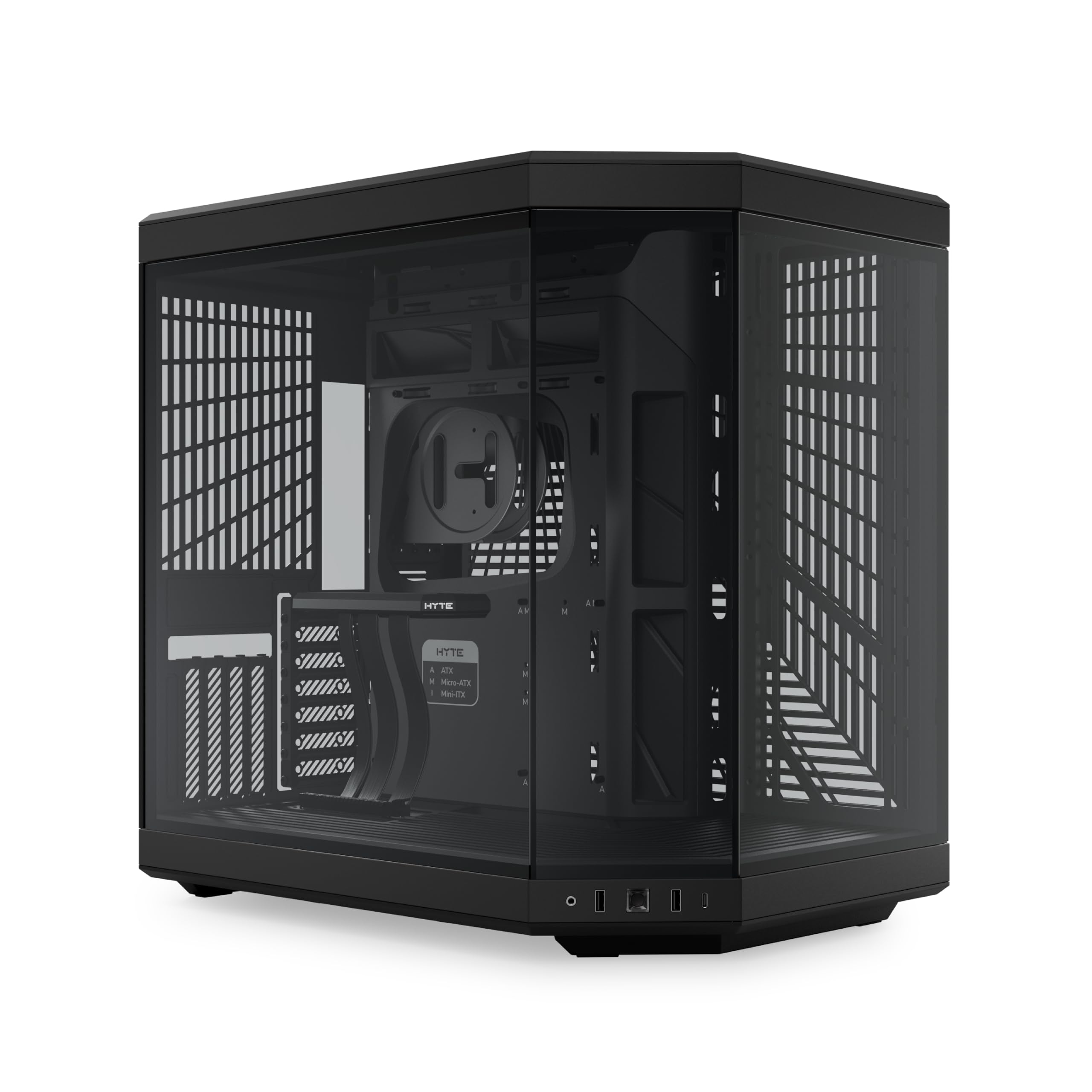
1. Hyte Y70
Our pick — over 4.5★ from 500+ verified ratings; the strongest balance of quality and price.
The panorama showcase that hides a full build’s worth of wiring behind dual chambers.
The dual-chamber layout is the hero here. You get a dedicated rear compartment with extensive cable management space, plus reusable Velcro straps and helpful labels so you know exactly where each lead should go. The result is a main chamber that looks surgical even before you close the glass.
The included luxury PCIe 4.0 x16 riser cable lets you mount your GPU vertically on the massive 4-slot bracket, which not only shows off the card but also keeps its power cables tucked out of the way. Buyers report it “Fits 5070 Ti vertically with room,” and the crowd favorite rating of 4.8 stars reflects that enthusiasm. It supports up to a 360mm radiator on the side (125mm thick) and an adjustable top radiator (68mm thick).
On the rare negative side, some owners find the case slightly too wide for their desks, and the vertical GPU orientation can marginally restrict airflow. It’s also heavy at 24.3 pounds, so plan your desk placement before you fill it with components.
What wins people over
- Case quality is praised more than anything else — over 80 owners single it out
- Spacious dual-chamber cabling makes for a very tidy build
- Tool-less panels and reusable Velcro straps speed up assembly
Who should think twice
- Front power button and ports sit too low for floor placement
- No fans included, so factor that into your total cost
- Vertical GPU may slightly restrict airflow for some setups
The pick for: anyone who wants a museum-piece PC that stays clean inside and out.
Note the size: it’s wider than most mid-towers, so measure your desk before committing.
2. Lian Li LANCOOL 216
The airflow-focused mid-tower that routes cables like a case twice its price.
Design is the most-praised aspect here — over 100 owners call it out — and it’s easy to see why. The LANCOOL 216 pairs a heavy-duty steel frame with a 4.0mm tempered glass side panel, and the front, top, and PSU shroud all use fine mesh for ventilation. It also comes with 2x 160mm ARGB front fans and a 140mm rear fan pre-installed.
For cable neatness, you get a cable grommet bar, Velcro straps, and small clips designed to keep everything tidy. The fan cables pass through easy-passage grooves, and a removable top radiator bracket makes installation simpler. It supports GPUs up to 392mm in length and 180mm in height, so even the largest NVIDIA 4000 series cards fit with room to route wires around them.
Owners consistently describe the cable management as near-perfect, with routing channels that make a clean build straightforward. The only recurring minor gripe is that the flat black power button blends into the front panel, which is a style nitpick, not a functional one.
Design first: the symmetrical layout keeps the second-chamber cable management unaffected even with an E-ATX board installed (up to 280mm wide).
Reach for this if: you want a roomy, cool-running case that makes cable routing easy without spending premium money.
Look elsewhere if: you need lots of internal drive bays — this focuses on airflow and GPU space instead.
3. NZXT H7 Flow
An airflow-first mid-tower with bottom-mount fans that feed the GPU directly.
The H7 Flow’s cable management system uses wide channels, built-in hooks, and included straps, which owners rate right up there with the best. It’s a design-forward approach that keeps the rear of the motherboard tray organized without much fuss. It comes with three front-mounted 120mm fans from the start.
You can mount a massive 420mm radiator (a liquid-cooling unit that spans the front) and a 360mm one on top, so your CPU and GPU stay cool even under heavy loads. Owners mention fitting a 420mm rad with a push/pull fan setup (fans on both sides of the radiator) and still had room for 10 fans total. The high-performance mesh panels let air flow in and out freely while trapping dust, so your components run cooler and stay cleaner.
One honest caveat is that the front fans are 3-pin only, meaning no PWM control, and the side panels can feel like they yank off rather than slide. For a 420mm radiator with such strong airflow and clean routing, it’s a solid value at this tier.
Cooling-first: three bottom-mounted 120mm fan positions direct airflow straight at the GPU, which pairs well with the tidy routing channels.
Best if: you’re planning a serious radiator setup and want wide cable channels to match.
Consider the size: owners note it feels more like a full tower than a mid-tower, so measure your space.
4. Antec Performance 1 FT

The full tower that ships with cover plates and grommeted holes for a tidy first build.
Building your first PC can be intimidating, and the Performance 1 FT smooths that out. It includes 2 cable covers for optimizing cable routing, plus rubber-grommeted holes that protect cables and look clean. Owners describe it as easy for a first-time transfer and appreciate the tool-less panels with thumb screws.
It fits up to 2x 3.5″ HDDs and 3x 2.5″ drives, with generous space for large components. Customers note an RTX 4090 stays under 70°C in this case., and the top-mounted 360mm AIO fits easily. The front panel includes a temperature display, and it’s Type-C 10Gbps ready, though the display requires Antec’s iUnity software.
The dual 4mm tempered glass side panels make it a proper showcase, but note the included fans are non-RGB and quiet. A few owners note the magnetic front grill feels slightly loose, but it’s a minor cosmetic point on an otherwise sturdy chassis.
Great for beginners
- Well-labeled cable routing with rubber grommets
- 2 cable covers hide the messy bottom section
- Tool-less panels make access quick and easy
Keep in mind
- LED panel needs Windows-only Antec software
- No removable motherboard tray
- Lacks a second full GPU slot
Best for: first-time builders who want professional-looking cable organization without a steep learning curve.
A fair warning: the temp display relies on software that Linux users may find troublesome.
5. Lian Li V100

The value pick that packs four ARGB fans, a light strip, and serious cable space.
A “Builder of 900+ PCs” was “highly impressed” with the build quality. The V100 comes with 4x pre-installed PWM-controlled 120mm ARGB fans plus an integrated 26-LED ARGB strip, all controllable through your motherboard software. The fans run at up to 1800 RPM with a max airflow of 61.47 CFM, keeping things cool and colorful.
For cable management, owners praise the ample PSU cable space and the overall ease of routing. Each side panel uses a tool-less mounting mechanism, so you can get inside quickly to adjust wires. It supports ATX, Micro-ATX, Mini-ITX, and even back-connect ATX or Micro-ATX motherboards for especially clean builds.
It fits GPUs up to 420mm and CPU coolers up to 178mm, so high-end hardware slots in with room to spare. The main downside noted is poor sound isolation, and the intake fan wires run inside the body — a minor reroute to the back gives a cleaner look. For the price, the quality and included hardware are exceptional.
Everything included: four fans and an RGB strip arrive pre-installed, so you can spend your whole budget on internals, not extras.
The pick for: budget builders who want RGB, airflow, and easy cable routing without buying extra fans.
skip it if: noise isolation is a top priority for you.
6. Lian Li O11D Mini V2

The RapidRoute system that makes wire management feel almost automatic.
Corsair’s RapidRoute cable management is the headline feature — wide channels and a covered rear compartment make it genuinely easy to route all your wires for a clean look. Owners consistently praise the back panel space, and cable management is the second most-mentioned positive aspect. The case includes an iCUE Lighting Node PRO controller for the three AF120 RGB ELITE PWM fans.
The fans are the star for cooling: they hit up to 2,100 RPM and 65.57 CFM with Corsair AirGuide technology that focuses airflow for better static pressure. The interior fits up to 12x 120mm or 4x 140mm fans, including a 360mm radiator in the front and a 360mm push/pull in the roof. GPUs up to 420mm long fit comfortably.
Front-panel I/O includes a USB 3.2 Gen 2 Type-C port and 2x USB 3.2 Gen 1 Type-A ports. At 27.3 pounds, it’s a heavy, sturdy chassis, and the RGB version collects a fair amount of cable from the controller cards. Owners note it can feel slightly too small for the massive RTX 4090, so check your GPU length.
RapidRoute benefits
- Wide channels and rear cover make routing fast
- Three RGB fans with controller included
- Supports massive radiator configurations
Watch out for
- Too small for the largest 4090 cards
- RGB controller leads add cable clutter
- Front fans run loud at full speed
The pick for: enthusiasts who want Corsair’s ecosystem and a genuinely organized rear chamber.
Check compatibility: verify your GPU length against the 420mm limit before buying.
7. Antec Flux Pro

The full tower with a 90° PSU mount that redefines how cables enter your system.
The iShift PSU 90° mount is the clever bit here — it rotates the power supply so cables exit toward the rear instead of bunching up at the front of the shroud. Owners say this simple change simplifies cable management dramatically, and the included velcro paths mean you rarely need zip ties. The walnut wood front panel adds a genuinely premium texture.
It supports up to 12 fans simultaneously, with 6 pre-installed: 3x Tranquil 140 PWM at the front, 2x P12R PWM reverse fans on the PSU shroud, and 1x Tranquil 140 PWM at the rear. The removable cooling brackets on the top, front, and PSU shroud make installation straightforward. Reviewers point out systems run 10-15°C cooler with this case., and the CPU/GPU dual temperature display is a nice bonus.
It supports simultaneous 420mm radiator and 360mm radiator installation, which is rare even at this level. The case is heavy at 29 pounds, and the temp display requires Antec iUnity software, which some owners dislike. A few note the front panel cables are slightly short, but the build quality is exceptional.
Engineering showcase: every panel is tool-less and magnetic, and the sliding fan tracks let you position cooling exactly where you need it.
Reach for this if: you want a premium, whisper-quiet case with the most flexible cooling layout money can buy.
Be ready for: the size and weight — this is a serious full tower, not a desktop ornament.
Understanding the Specs
Dual-Chamber Design
A dual-chamber case splits the interior into two zones: one for your motherboard and GPU, another behind it for the PSU, drives, and excess cable. This gives you a dedicated area to hide wire bulk, which is why it’s the most effective layout for cable management.
PSU Shroud
A PSU shroud is a metal cover that runs along the bottom of the case, hiding the power supply and its cables from view. It creates a clean horizontal line across the build and often includes cutouts for routing cables up to the motherboard.
FAQ
What makes a case good for cable management?
How much rear chamber space do I actually need?
Is a dual-chamber case worth the extra cost?
Are pre-installed fans worth having?
Will my large GPU fit in a mid-tower case?
What is a PSU shroud and do I need one?
How do I keep cables tidy without using zip ties?
Is a full tower always better for cable management than a mid-tower?
Final Thoughts: The Verdict
If you want one dependable pick, the pc case for cable management winner is the Hyte Y70 because its dual-chamber layout and extensive rear space make a tidy build almost easy while the panoramic glass shows it off. If you want pre-installed fans and unbeatable value, grab the Lian Li V100. And for maximum airflow with a tool-free build, the LANCOOL 216 is the one to reach for.
How We Picked
We do not accept paid placement. Every pick is matched to a real buyer and a real use-case; we do not hands-on test units.
Sources & Methodology
Specifications: manufacturer listings and product documentation. Review insights: verified customer reviews, as of August 2026. Pricing: not shown on this page (it changes often); check the current price via the retailer link.
As an Amazon Associate, FitlyFast earns from qualifying purchases. This does not affect which products we feature.