
Our readers keep the lights on and the weekend projects moving. As an Amazon Associate, I earn from qualifying purchases.
Specs are compiled from manufacturer listings and verified buyer reviews and can change over time — please confirm the key details on the product page before buying.
Every budget printer looks great at the checkout, but the real cost is hidden in the first replacement cartridge you buy months later. The best value balances a low upfront price with affordable replacement ink. This guide breaks down the top budget-friendly printers by real-world running costs, print speed, and the features that actually matter for home and student use.
I’m Rikta — the founder and writer behind FitlyFast. This guide is built by comparing the manufacturers’ published specifications and the patterns across verified customer reviews, so you get each pick’s real strengths and trade-offs instead of marketing spin.
Finding the right budget printer means weighing hidden ink costs against speed and features, and this guide sorts out the best value for your money.
Our Picks at a Glance



How To Choose The Best Budget Printer
Start with what you print most—school assignments, work documents, or the occasional photo—because that one answer decides if you need an inkjet, a laser, or a portable thermal printer, and it points you to the lowest running costs.
Look past the machine price at the ink math
Entry-level printers often use cartridges that cost a surprising amount relative to the machine itself. Check the cartridge yield (how many pages one cartridge prints) and whether high-yield or subscription options exist. A printer with slightly pricier starter cartridges but cheaper refills can save you significantly over a year.
Match speed and features to your real workload
Pages-per-minute (ppm) numbers tell you how fast a machine churns out documents. If you print a few pages a week, a 7.5 ppm printer is fine; if you run a small office, you want 16 ppm or faster. Also check for automatic duplex printing (printing on both sides without flipping pages yourself) — it cuts paper use nearly in half.
Don’t pay for a premium you won’t use
All-in-one machines with scanners and copiers are great for homes, but fax capability or a huge paper tray only matters if you actually need them. Buy only the functions you use weekly, then put the savings toward cheaper ink.
Quick Comparison
| Model | Best For | Print Speed (B&W) | Duplex | Paper Tray | Amazon |
|---|---|---|---|---|---|
| HP DeskJet 2855e★ Best Overall | Light home printing | 7.5 ppm | Manual | 60-sheet | Amazon |
| Canon PIXMA TR7120Best Value | Home office value | 14 ppm | Automatic | Small | Amazon |
| HP Envy 6155Top Performer | Everyday color documents | 10 ppm | Automatic | 100-sheet | Amazon |
| Canon PIXMA TR4720 | Home fax and scanning | — | Automatic | — | Amazon |
| Phomemo M08D | Travel and on-the-go | 7 ppm | No | Single sheet | Amazon |
| Brother Work Smart 1410 | Small office productivity | 16 ppm | Automatic | 150-sheet | Amazon |
| Brother DCP-L2640DW | High-volume B&W laser | 36 ppm | Automatic | — | Amazon |
| Epson WorkForce Pro WF-3823 | Heavy-duty small business | 21 ppm | Automatic | 250-sheet | Amazon |
| HP Envy Photo 7975 | Photos and creative projects | 15 ppm | Automatic | — | Amazon |
In-Depth Reviews
1. HP DeskJet 2855e Wireless All-in-One
The entry-level champion that proves a budget machine can still deliver crisp prints and reliable wireless.
For homes that just need to print to-do lists, letters, and recipes, this HP keeps the essentials dead simple: color printing, copying, and scanning all live in one compact white shell. It churns out black pages at 7.5 pages per minute and color at 5.5 pages per minute — enough for a student or a light home office, and it leans on HP’s AI to strip out unwanted content from web pages so you don’t waste paper on awkward layouts.
Buyers report setup is a genuine 15-minute job for most, with excellent print and scan quality backed by reliable Wi-Fi from phones and laptops. The same reviews note that people who struggle often skip the instructions — follow them and this printer behaves. The catch is the 2.4 GHz-only wireless connection, so it won’t join a 5 GHz network, and the 60-sheet input tray means refills come often if you print a lot.
It ships with a 3-month Instant Ink trial that delivers cartridges before you run out, then a monthly fee applies unless you cancel. Print speeds are no match for the Canon PIXMA TR7120’s 14 ppm black output, but for the price this is a hard value to beat.
What wins people over
- Compact all-in-one design perfect for dorms and small desks
- Reliable wireless printing from phones and laptops
- Strong print and scan quality for everyday docs
What to keep in mind
- Only 2.4 GHz Wi-Fi, so 5 GHz networks won’t connect
- Small 60-sheet tray needs frequent refills
- HP software demands an account and can feel heavy
Reach for this if: you want a cheap, dependable all-in-one for light home printing without paying for speed you won’t use.
Look elsewhere if: you print heavy volumes or need a faster machine — this one tops out at 7.5 ppm black.
2. Canon PIXMA TR7120 Wireless Color Inkjet
The speed demon of the budget aisle, cranking out pages nearly twice as fast as its peers.
If your home office is tired of waiting on slow prints, this Canon is the upgrade that makes sense. It hits 14 pages per minute in black and 9 in color — a solid 87% faster in black than the HP DeskJet 2855e’s 7.5 ppm. A 1.42-inch monochrome OLED screen keeps ink levels and printer status visible at a glance, and the Auto Document Feeder (ADF, which lets you stack multiple pages for hands-free scanning or copying) tackles multi-page jobs without you standing there.
The thing everyone raves about is print quality — owners consistently praise sharp, clear output with vivid colors, and setup is a prompt-driven breeze. It prints on both sides automatically (a feature labeled duplex printing, which the DeskJet only does manually), so you halve your paper use without flipping sheets by hand. Dual-band Wi-Fi (2.4GHz or 5GHz) means it slots into any home network without fuss.
The honest trade-offs: the paper tray is on the small side, and the 2-cartridge system gulps ink faster than some rivals, so it’s best for light-to-moderate use. Reviews note the occasional Wi-Fi drop, usually fixed by assigning a fixed IP address. At roughly half the speed of premium models but a fraction of their price, this is the value pick for hybrid workers.
Why it’s a speed champ
- Fast 14 ppm black printing outpaces most budget rivals
- Automatic 2-sided printing saves paper and time
- Compact footprint fits tight desks and shelves
Know before you buy
- Small paper tray means frequent refills
- Ink consumption runs high with the 2-cartridge hybrid system
- Occasional Wi-Fi drops need a fixed IP fix
The pick for: hybrid workers and students who want quick, sharp prints without paying premium prices.
The catch: light-use households might find the ink appetite a bit much.
3. HP Envy 6155 Wireless All-in-One
A touchscreen-equipped home hero that makes everyday color printing feel easy.
Homes that print homework, borderless photos, and the occasional craft project will appreciate how this HP balances features with simplicity. A 2.4-inch color touchscreen lets you navigate settings and check ink without reaching for your phone, and the 100-sheet input tray holds a solid stack before needing a refill. It prints up to 10 pages per minute in black and 7 in color.
Setup is the aspect that wins the most praise — owners call it easy and economical, noting it pairs up well with routers and slots neatly onto small counters and desks. The auto 2-sided printing (when the printer flips pages for you) is a standout at this price, and HP’s P3 technology helps colors match what you see on screen. It also ships with a 3-month Instant Ink trial and is made with at least 60% recycled plastic.
The recurring gripe is the software: some Windows 11 users lose contact and have to reconnect constantly, and scanning to a computer can be stubborn. It’s a pattern worth knowing, though most owners find the HP app straightforward. It beats the compact HP DeskJet on paper handling and speed, making it the more complete home machine.
The highlights
- Intuitive 2.4″ touchscreen for easy navigation
- Auto 2-sided printing cuts paper use in half
- Vibrant true-to-screen color with HP P3 technology
The drawbacks
- Software can drop connection on Windows 11
- Scan-to-computer issues reported by some owners
- Print speed is mid-pack at 10 ppm
Go with this if: you want a user-friendly all-in-one with a touchscreen and auto duplex for daily family printing.
Think twice if: you’re on Windows 11 and hate troubleshooting connectivity — this one can be finicky.
4. Canon PIXMA TR4720 All-in-One Wireless Printer

The rare budget 4-in-1 that packs fax, print, copy, and scan into one tidy unit.
Most budget printers force you to choose between scanning and faxing, but this Canon gives you everything in one black chassis. It’s a true 4-in-1 — print, copy, scan, and fax — with an Auto Document Feeder (ADF, which feeds multiple pages automatically) for hands-free multi-page jobs. The built-in fax is a lifeline for anyone who still deals with signed contracts and medical forms over phone lines.
Owners consistently call it easy to set up and use, with good value and nice quality for documents and pictures. Remote workers and small therapy practices have found it handles both paperwork and patient documents without complaint. The LCD display and Android-friendly app keep setup painless, and it runs on PG-275 black and CL-276 color cartridges that are easy to install and replace.
The automatic duplex printing (both sides without manual flipping) is a welcome addition at this level, and the 4800 x 1200 dpi color copy resolution (the level of detail the scanner captures) means clear reproductions. This is the pick that refuses to leave out a single function, making it ideal for homes that want one machine to do it all.
The full package
- True 4-in-1 includes built-in fax, a rarity at this price
- Simple setup through the Canon PRINT app
- Easy cartridge installation and replacement
Worth noting
- No print speed spec listed, so heavy users should check real-world tests
- Starter cartridges run out fast for volume printing
Choose this if: you need fax capability or a true all-in-one that handles every office function.
Pass if: speed is your top priority — this machine doesn’t flaunt its pages-per-minute numbers.
5. Phomemo M08D Portable Thermal Printer
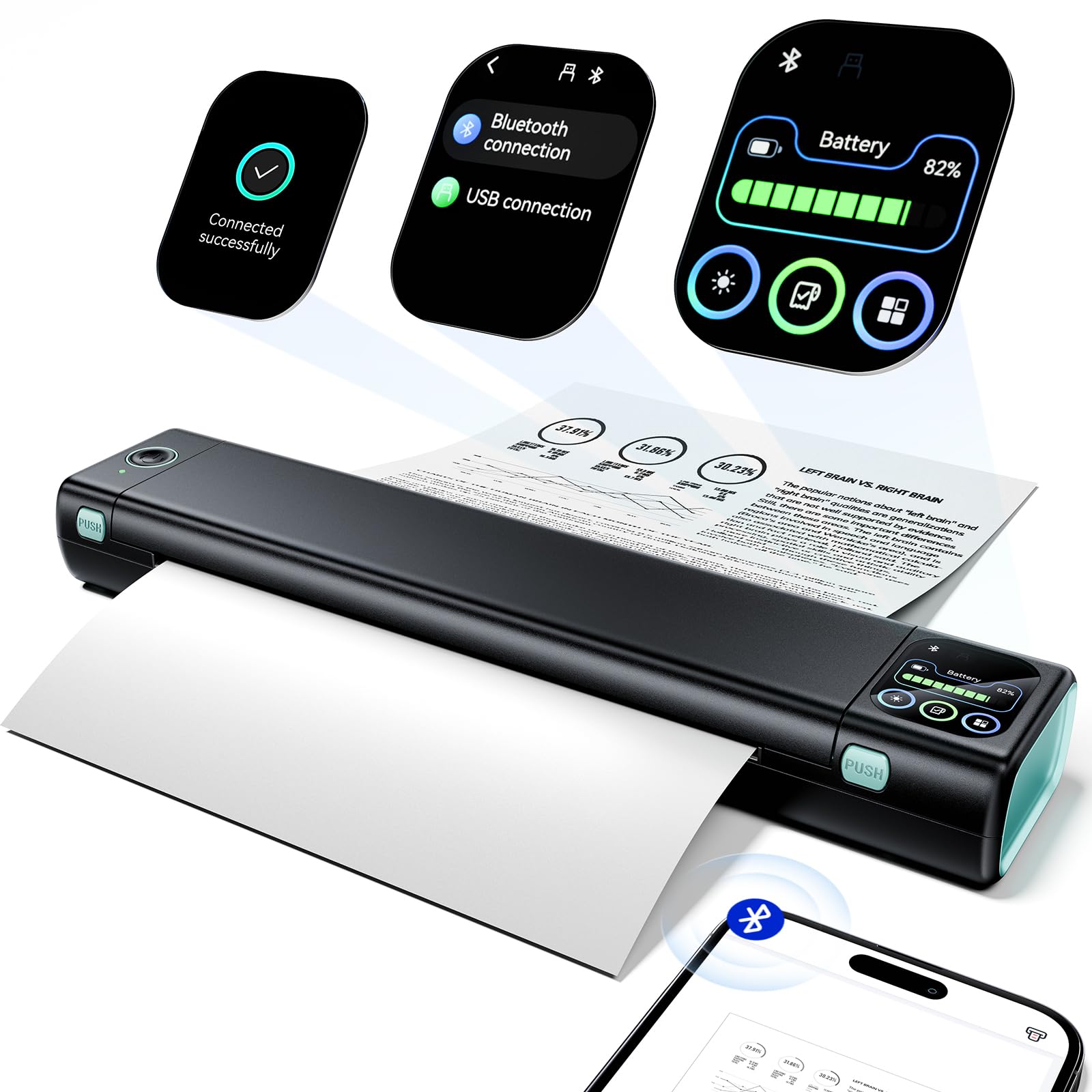
The inkless traveler that slips into a backpack and prints boarding passes anywhere.
For truckers needing permits on the road or travelers printing itineraries in a hotel room, this Phomemo is a different breed of budget printer. It weighs just 1.5 lb and uses thermal technology, which means no ink, toner, or ribbon to buy — ever. A built-in battery powers up to 150 pages of continuous printing on a single charge, and the smart touchscreen shows printer status so you never get caught with a dead battery and no connection.
Owners describe it as handy and surprisingly sharp for documents, labels, and quick notes, with setup taking just a couple of minutes. The upgraded display acts as a step-by-step tutorial for new users, and Bluetooth connects to iOS and Android phones alongside a USB-C option for computers. It prints full 8.5″ x 11″ US Letter pages, which is rare for a portable unit.
The catch: thermal prints are monochrome only and can fade over time, so this isn’t for archival documents or color work. It’s also a single-sheet feeder, not a paper tray machine. But for small offices squeezed into a closet or anyone who prints on the move, the inkless economics are unbeatable — you’ll never pay for a cartridge again.
Why it’s a road warrior
- Zero ink costs with thermal printing technology
- 150 pages per charge for on-the-go work
- Weighs only 1.5 lb for easy backpack carry
Know the limits
- Black-and-white only, no color printing
- Thermal prints can fade over time
- Single-sheet feed, no multi-page tray
Grab this for: travel, trucking, or any scenario where you need a full letter-size print with zero ink costs.
skip it if: you need color, archival quality, or high-volume office printing.
6. Brother Work Smart 1410 Wireless Inkjet All-in-One

The small-office workhorse with a big touchscreen and a paper appetite to match.
When your home office starts feeling like a real office, this Brother steps up with productivity features that budget machines skip. The 2.7-inch color touchscreen pulls up cloud apps like Google Drive and Dropbox, so you can print and scan straight to cloud storage without a computer.
Owners mention fast setup, clear prints with no smudges or streaks, and excellent wireless performance from iPhones and laptops. The Brother Mobile Connect app monitors ink usage so you know when to order replacements, and the 20-sheet Automatic Document Feeder (ADF, which feeds multiple pages automatically) streamlines copying and scanning stacks of paper. It’s compact for all that capability, fitting neatly on a home office desk.
The main trade-off is ink: this model relies on Brother’s LC501 cartridges, and one owner reported difficulty sourcing refills. Most find the ink inexpensive and the machine reliable, though a vocal minority hit reliability issues around the three-month mark. Fast first-page-out times (about 6.2 seconds black) mean you’re not waiting around for the first sheet.
Built for throughput
- Fast 16 ppm black printing for busy home offices
- 150-sheet tray cuts down on refill stops
- Cloud app integration via 2.7″ touchscreen
The trade-offs
- LC501 ink can be hard to source at times
- Wireless reliability gets mixed reports after months of use
- USB setup can be finicky on some PCs
Best suited for: home offices and small offices that print daily and want cloud convenience built in.
Consider another if: you’re wary of ink availability issues and want the widest cartridge selection.
7. Brother DCP-L2640DW Monochrome Laser Printer
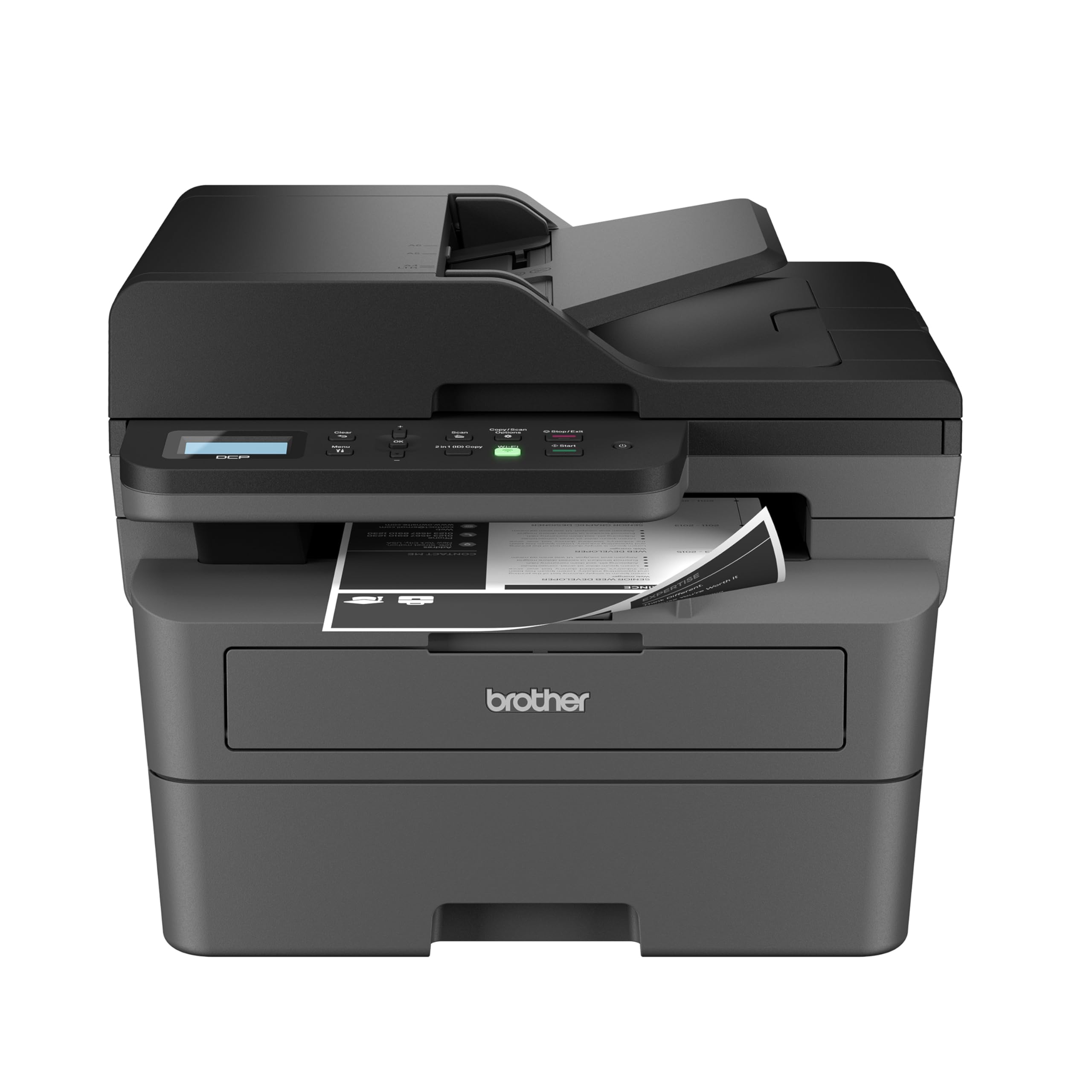
The laser that blazes through black-and-white pages at office-grade speed.
If your printing is mostly text documents, a laser printer changes the economics entirely. This Brother hits 36 pages per minute in black — more than twice the speed of the fastest inkjet on this list — and uses toner that lasts far longer than liquid ink. It’s a 3-in-1 that combines a laser printer, scanner, and copier in one compact footprint, purpose-built for small businesses that churn out paperwork.
Owners rave about the sharp prints and the easiest wireless setup they’ve experienced on Windows 11, with auto-detection that needs no drivers for printing or duplex. The 50-page Automatic Document Feeder (ADF, which feeds multi-page stacks automatically) makes scanning and copying long documents quick, and the toner lasts — one owner ran a month of steady use and still had about half a cartridge left. It runs on Brother Genuine TN830 or TN830XL toner.
The honest trade-offs: this is a black-and-white machine, so color printing is off the table entirely. It’s a renewed (refurbished) unit, and while owners say it feels indistinguishable from new, the silent expectation of used gear applies. It also draws noticeable power on startup, occasionally flickering lights in a home — a dedicated circuit solves that. For pure text output, nothing here matches its speed or running costs.
The laser advantage
- Blazing 36 ppm speed for high-volume text printing
- Long-lasting TN830 toner keeps costs low
- 50-sheet ADF streamlines multi-page scanning
Before you commit
- Black-and-white only — no color output
- Refurbished unit, not brand new
- Startup power draw can flicker house lights
This is your machine if: you print mostly text in volume and want the lowest per-page cost available.
Look elsewhere if: you need color printing or prefer a brand-new unit over a certified refurbished one.
8. Epson WorkForce Pro WF-3823 All-in-One

The high-volume inkjet that prints fast enough to challenge a laser.
This Epson uses PrecisionCore Heat-Free Technology, which prints quickly without the heat that can wear out other inkjets — it hits 21 pages per minute in black and 11 in color. The 250-sheet paper tray is the biggest on this list, and the 35-page Automatic Document Feeder (ADF, which feeds multi-page stacks automatically) keeps long jobs moving. It’s designed for home and small offices with heavy workloads.
Owners describe great print speed and high-quality output for home office use, with crisp black-and-white and color copies that stay accurate and bright. The DURABrite Ultra pigment inks are instant-dry, so pages come out smudge-free and ready to handle. Wireless setup via smartphone with Bluetooth Low Energy is convenient, and the 2.7-inch color touchscreen makes navigation painless.
The strikes against it are real but limited: an occasional unit arrives with ink issues or connectivity hiccups, and the printer is designed to work exclusively with Epson Genuine Cartridges — using off-brand ink risks damage. One frustrated owner blew through the starter ink in 200 pages and found replacement costs steep. For busy offices that print daily, though, the combination of speed, paper capacity, and instant-dry ink is tough to match at this level.
The productivity edge
- Fast 21 ppm black printing for heavy workloads
- 250-sheet tray holds an entire ream of paper
- Instant-dry pigment ink resists smudging
Read this first
- Only works with Epson Genuine Cartridges
- Starter ink runs out quickly under heavy use
- Mixed reports on long-term wireless reliability
Pick this for: small businesses and home offices that print hundreds of pages weekly and need serious speed.
Avoid if: you want cheap third-party ink options — this printer locks you into Epson cartridges.
9. HP Envy Photo 7975 Wireless Inkjet Printer

The photo-loving all-in-one that prints true-to-screen color for creative families.
Families that print homework, craft projects, and borderless photos will find this HP a creative powerhouse. It prints up to 15 pages per minute in black and 10 in color, with a separate photo tray that loads specialty paper without emptying your main tray. The 2.7-inch touchscreen and 35-sheet Automatic Document Feeder (ADF, which feeds multi-page stacks automatically) keep both creative and office jobs moving smoothly.
Owners consistently praise the photo quality, calling it vibrant, fast, and quiet, with colors that look great straight from the phone. The ink doesn’t dry up quickly between uses — a common budget printer annoyance — and the auto 2-sided printing plus borderless photo capability make it genuinely versatile. It’s described as a reliable all-in-one that handles documents, copies, and creative projects with equal ease.
The main complaint is setup: a few owners hit network and cartridge issues that took hours to resolve, and the driver software on Windows 11 demanded reinstalls for some. It’s also heavier than the compact HP Envy 6155 at 17.9 pounds and takes up more desk space, so measure your counter first. This is a printer for households that value photo quality over minimalist footprint.
The creative strengths
- Dedicated photo tray for borderless prints
- Vibrant, true-to-screen color quality
- Ink resists drying between uses
Watch out for
- Setup can be a multi-hour struggle for some users
- Windows 11 driver issues reported
- Heavy footprint at 17.9 pounds
Choose this if: photos and creative color projects are a regular part of your printing life.
pass on it if: you have limited desk space or want a zero-friction setup experience.
Understanding the Specs
Pages Per Minute (ppm)
This number tells you how fast a printer churns out pages. A 7.5 ppm machine is fine for light home use, but a small office printing daily will want 16 ppm or higher. Matching this spec to your real workload prevents you from either overpaying for speed or waiting forever on slow prints.
Automatic Duplex Printing
This feature lets the printer automatically print on both sides of the page without you manually flipping sheets. It roughly halves your paper consumption and is a standard feature on most modern budget printers. If you print long documents, it’s worth prioritizing over other extras.
FAQ
How much does it really cost to run a budget inkjet printer?
Is a laser printer worth it for home use?
What does the Auto Document Feeder (ADF) do?
Will a 2.4 GHz-only printer work with my Wi-Fi network?
Can I print wirelessly from my phone with these printers?
How long do printer ink cartridges last?
What’s the difference between inkjet and thermal printing?
Is a refurbished printer worth buying?
Do I need an all-in-one printer or a print-only model?
Final Thoughts: The Verdict
The budget printer crown goes to the HP DeskJet 2855e because it nails the essentials — print, scan, copy, and reliable wireless — at a price that’s hard to argue with, backed by a huge base of satisfied owners. If you want speed and sharp color for a home office, the Canon PIXMA TR7120 delivers 14 ppm black printing and auto duplex. For high-volume text, the Brother DCP-L2640DW laser is the per-page cost king. The list’s crowd favorite holds 4.6 stars from 200+ owners, so any pick is well-reviewed.
How We Picked
We do not accept paid placement. Every pick is matched to a real buyer and a real use-case; we do not hands-on test units.
Sources & Methodology
Specifications: manufacturer listings and product documentation. Review insights: verified customer reviews, as of August 2026. Pricing: not shown on this page (it changes often); check the current price via the retailer link.
As an Amazon Associate, FitlyFast earns from qualifying purchases. This does not affect which products we feature.