
Our readers keep the lights on and the weekend projects moving. As an Amazon Associate, I earn from qualifying purchases.
Specs are compiled from manufacturer listings and verified buyer reviews and can change over time — please confirm the key details on the product page before buying.
You want a monitor that makes spreadsheets crisp, video calls clear, and your desk feel cleaner — without leaving you squinting or adjusting your neck all day. The right pick balances sharp text, ergonomic comfort, and price for your daily workload. These ten monitors are chosen for their real-world performance in office tasks.
I’m Rikta — the founder and writer behind FitlyFast. This guide is built by comparing the manufacturers’ published specifications and the patterns across verified customer reviews, so you get each pick’s real strengths and trade-offs instead of marketing spin.
Find the right business monitor for your desk setup with honest, real-world comparisons that keep your eyes comfortable and your workflow smooth.
Our Picks at a Glance



How To Choose The Best Business Monitor
Before you click buy, think about what your workday actually looks like. Are you staring at spreadsheets, writing documents, editing photos, or hopping between video calls? Matching your primary tasks to the right specs—resolution, panel type, ergonomics—makes the choice clear.
Resolution: More Pixels, Sharper Text
Resolution controls how much detail fits on screen. A Full HD (1920 x 1080) panel is the everyday workhorse — clear enough for documents and emails at a budget-friendly price. Step up to 4K (3840 x 2160) and you get four times the pixel density, which makes small text razor-sharp and lets you fit more windows side by side without them feeling cramped.
Panel Type: IPS for Consistent Color
The panel technology determines how the picture looks from different angles. IPS panels keep colors accurate and consistent across wide viewing angles, so you can lean back or share your screen with a colleague without colors shifting. This matters most if you edit photos, review designs, or just want a monitor that looks the same from any seat in the room.
Ergonomics and Adjustability
A monitor that only tilts forces you to adapt to it, instead of the other way around. Look for stands with height adjustment, swivel, and pivot options so you can position the screen at eye level. Positioning the screen at eye level prevents the neck and back strain from hunching over a low display.
Quick Comparison
| Model | Best For | Resolution | Refresh Rate | Connectivity | Amazon |
|---|---|---|---|---|---|
| HP Series 3 27″★ Best Overall | Everyday office work | 1920 x 1080 | 100Hz | VGA, HDMI, DisplayPort | Amazon |
| Samsung 32″ FlatBig Screen Value | Large dual-monitor setups | 1920 x 1080 | 75Hz | HDMI, DisplayPort | Amazon |
| Amazon Basics 27″Budget Champion | Budget office setups | 1920 x 1080 | 100Hz | USB, HDMI | Amazon |
| Samsung 27″ S40GD | Vertical portrait workflows | 1920 x 1080 | 100Hz | HDMI, DisplayPort, USB | Amazon |
| LG 27US500-W | Budget-friendly 4K | 3840 x 2160 | 60Hz | HDMI, DisplayPort | Amazon |
| Dell S2725QS | Sharp 4K with speakers | 3840 x 2160 | 120Hz | HDMI, DisplayPort, USB-C | Amazon |
| LG 32UR500K-B | Large 4K entertainment | 3840 x 2160 | 60Hz | HDMI, DisplayPort, Headphone | Amazon |
| Dell S2725QC | Single-cable laptop setups | 3840 x 2160 | 120Hz | USB-C, HDMI, DisplayPort | Amazon |
| ViewSonic VP3256-4K | Color-accurate creation | 3840 x 2160 | 60Hz | USB-C, HDMI, DisplayPort | Amazon |
| INNOCN 40C1U | Ultrawide multitasking | 5120 x 2160 | 100Hz | HDMI, DisplayPort, USB-C | Amazon |
In-Depth Reviews
1. HP Series 3 27 inch FHD Monitor
Our pick — over 4.5★ from 25,000+ verified ratings; the strongest balance of quality and price.
The office standard that makes a 27-inch screen feel easy, with a refresh rate that keeps scrolling smooth.
This HP monitor earns its top spot because it nails the basics that daily work depends on. The 27-inch IPS panel delivers a Full HD 1920 x 1080 picture with a 1300:1 contrast ratio, so text stays sharp and colors stay true whether you’re in a spreadsheet or a video call. What wins people over, though, is the quality at this level — it’s the most-praised feature by a wide margin, with picture quality close behind it.
The HP Eye Ease filter reduces blue light without the yellow tint, a key comfort feature. The HP Eye Ease feature uses an always-on, true-color low-blue light filter with Eyesafe certification, which means you get protection from blue light without the yellow tint that older filters produced. The monitor also runs at 100Hz, a step up from the standard 60Hz, so moving windows and scrolling through long documents feels noticeably smoother on your eyes.
Set it up with the VGA, HDMI 1.4, and DisplayPort 1.2 connections that are ready to go right from the start. The included HDMI cable and a tool-free stand mean you’re up and running in minutes, and the tilt-adjustable screen lets you dial in a comfortable viewing angle. The built-in dual 2W speakers handle voice calls and meetings fine, though you’ll want external speakers for music.
What owners love
- crisp picture quality that makes text and images pop
- Simple tool-free setup with height and tilt adjustability
- Built-in speakers work well as a convenient bonus for calls
- Energy-efficient design uses recycled plastics in the frame
Worth noting
- Built-in speakers are loud enough for voices, not music
- A few owners mention the audio needs boosting in settings
The daily driver: This is the monitor to grab if you want a reliable, sharp, comfortable screen for standard office work without paying premium prices.
Think twice if: You need a 4K resolution for detailed photo editing — this is a Full HD panel, and the premium ultra-sharp options below serve that need better.
2. Samsung 32″ Flat Computer Monitor
A 32-inch canvas with slim bezels that makes a dual-monitor desk look like one giant screen.
The 32-inch screen is 19% larger than a 27-inch model, offering more workspace. This Samsung spans a full 32 inches diagonally — a clear 19% larger screen than the 27-inch HP above — with a three-sided borderless display that lines up nearly gapless in a multi-monitor setup. Buyers report: “I use two of these for dual monitors,” and the slim bezels are exactly why that setup works so well without a distracting seam down the middle.
The picture holds its own too. A 4000:1 contrast ratio gives this panel deep, rich blacks that make text and images stand out — that’s roughly triple the contrast depth of the HP’s 1300:1, though both are at Full HD 1920 x 1080 resolution. The 75Hz refresh rate keeps motion smooth, and AMD FreeSync syncs the monitor with your graphics card to cut down on screen tearing during video playback.
Eye care is baked in with Flicker Free technology and Eye Saver Mode, which cuts blue light emissions during long sessions. The screen is also anti-glare and wall-mountable, giving you flexibility in how you set up your workspace. Just connect through the HDMI or DisplayPort inputs and you’re ready.
Massive and smooth: The 32-inch borderless display is the reason to pick this — it replaces smaller monitors with one commanding screen that fits a clean, modern desk.
Picture depth: With a 4000:1 contrast ratio, blacks look genuinely deep, making this a strong choice for video-heavy workdays.
Reach for this if: You want maximum screen size for the money and a borderless design that makes dual-monitor setups look clean.
Look elsewhere if: You need a higher-than-Full-HD resolution for detailed design work, since this is a 1080p panel.
3. Amazon Basics 27 Inch Monitor
The no-fuss workhorse that proves you don’t need to spend big for a crisp, reliable 27-inch panel.
This Amazon Basics monitor delivers the essentials of office work at a price that’s hard to argue with. The 27-inch IPS screen runs Full HD 1080P at up to 100Hz — matching the HP’s refresh rate for smooth scrolling — and owners consistently call it a solid, budget-friendly option with clear resolution and good color that doesn’t look washed out. Owners mention: “Great for office work; durable over years,” which speaks to the build quality at this price point.
The standout feature here is the connectivity. Four built-in USB ports let you plug your keyboard, mouse, and other peripherals straight into the monitor, which cleans up cable clutter on your desk. It’s VESA compatible too, so you can mount it on an arm if you want to reclaim desk space. The 8.4-pound weight makes it easy to move around.
Setup is genuinely plug-and-play — the included HDMI cable gets you running in minutes, and the matte screen helps cut glare in bright offices. The built-in speakers deliver clean audio, though a few owners note they’re on the weak side and recommend external speakers for better sound. The stand offers tilt but not height adjustment, so plan your desk height accordingly.
Smart budget pick: The rear USB hub is the feature that punches above this monitor’s price class, decluttering your desk by hosting peripherals.
One trade-off: Tilt-only adjustment means you can’t raise or lower the screen height, so pair it with a monitor stand or arm if your desk isn’t at eye level.
Perfect for: Anyone outfitting a home office or small business who wants a dependable 27-inch screen with a USB hub for less.
Not ideal for: Taller setups where you need height adjustment from the stand itself, or audio picky listeners who’ll want external speakers.
4. Samsung 27″ S40GD Borderless Business Monitor
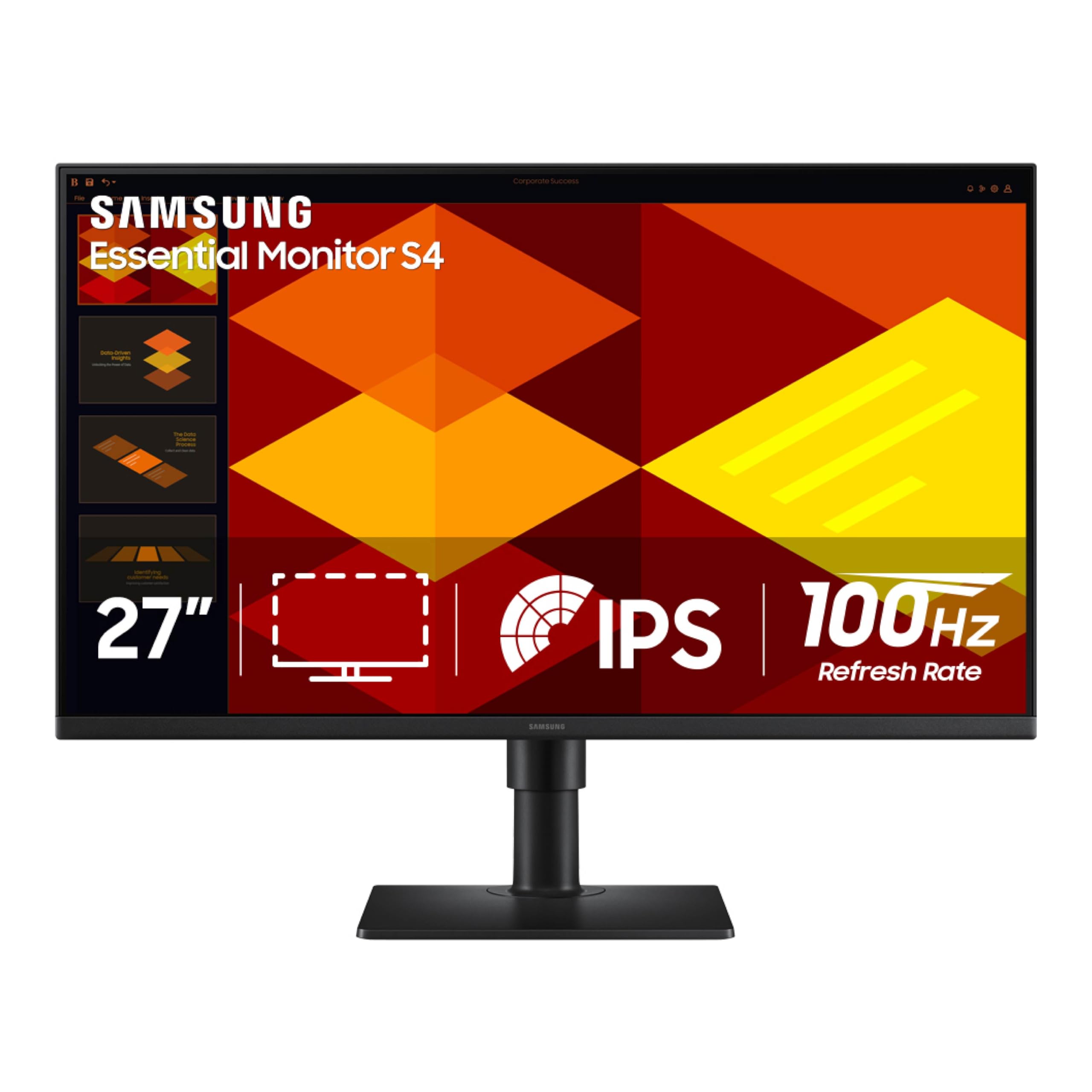
A business monitor that bends to your workflow, with a stand that rotates into portrait mode for long documents.
The stand’s height adjustment and pivot to portrait mode set this Samsung apart. The 27-inch IPS panel runs at 100Hz and delivers excellent color that owners describe as very clear with great color reproduction. But the real draw is the stand — it’s height-adjustable and can pivot the screen into a vertical portrait orientation, which is a standout for anyone who reads long documents, codes, or manages tall spreadsheets.
The slim design with ultra-thin border bezels boost screen space, and the IPS panel keeps colors bright and consistent across wide viewing angles. Eye Saver Mode reduces blue light and flicker for long sessions, and the onboard Game Picture Mode adjusts color and contrast for any content, even if gaming isn’t your focus. A built-in power supply means one less brick on your desk.
Connectivity is generous with 2x HDMI, 1x DisplayPort, a headphone-out, and a USB hub — a rare combination at this price point. A couple of owners note the menu is controlled by a joystick on the power button rather than discrete buttons, which takes a moment to learn. The included 3-year warranty adds confidence for a business purchase.
The flexibility factor
- Height-adjustable stand that also pivots to portrait mode
- Excellent color with easy calibration from the start
- 2x HDMI plus DisplayPort and a USB hub for connectivity
- Ultra-thin bezels with a slim, space-saving design
Minor quirks
- Menu system uses a joystick, which takes some getting used to
- USB and headphone ports sit in a spot that’s a bit hard to reach
Built for: Professionals who read long documents or code and want a monitor that physically rotates to match the task.
Who should skip: Shoppers who rarely adjust their screen and just want the cheapest big panel — you’d pay for ergonomics you won’t use.
5. LG 27US500-W Ultrafine Monitor

Your first step into 4K sharpness, where text finally looks crisp and colors feel rich while staying affordable.
This LG is the gateway to 4K. At 27 inches with a 3840 x 2160 UHD resolution, it packs four times the pixels of a Full HD screen, and the difference in text sharpness is immediately obvious. One owner running a Linux system found 10-point font at 200% scale “perfectly clear” — a level of crispness that helps anyone who reads small type all day. The IPS panel delivers a 1000:1 contrast ratio with wide viewing angles.
Color is a highlight here. The monitor supports HDR10 with up to 90% DCI-P3 color gamut expression, which brings photos and video to life with deeper blacks and more vivid tones. The white, borderless design looks clean on a bright desk, and OnScreen Control software lets you split the display and adjust settings with mouse clicks instead of digging through menus.
Setup is straightforward with HDMI and DisplayPort inputs plus a few screws for the stand. The ergonomic stand handles tilt adjustment, and the panel is VESA mountable if you want more flexibility. One honest caveat: the stand gets mixed feedback for being a bit wobbly, and the power adapter is bulky. But for the sharpness on offer, owners consistently call it good value.
Choose this for: A big jump in sharpness for spreadsheets, reading, and photo viewing, at a price that makes 4K approachable.
Be aware: The stand is the weak link — if you’re hard on your equipment, budget for a VESA arm or a sturdier base.
6. Dell 27 Monitor S2725QS

4K sharpness meets a buttery 120Hz refresh rate, so your work screen feels as fluid as it looks.
This Dell is the full package for demanding work. It combines a 27-inch 4K UHD (3840 x 2160) IPS panel with a 120Hz refresh rate — doubling the smoothness of standard 60Hz monitors — so everything from scrolling code to dragging windows feels instant. Owners describe the 4K resolution and sharp picture quality as the standout, with 99% sRGB color accuracy that makes it a legitimate option for light editing work.
Eye comfort gets serious attention here. The improved ComfortView Plus reduces harmful blue light emissions to ≤35% without sacrificing color accuracy, so you can work all day without the usual eye fatigue. The 1500:1 contrast ratio and HDR readiness add depth and detail to everything on screen. The ultra-thin bezel and ash white finish give it a clean, modern look.
You also get a fully adjustable stand — height, swivel, and pivot — plus built-in speakers that owners praise as incredibly loud for a monitor. Connectivity covers HDMI, DisplayPort, and USB-C, and the anti-glare coating cuts reflections in bright offices. With FreeSync Premium support, it handles light gaming well, though a few owners note slight ghosting in fast-paced games.
Why it leads
- 4K resolution at 120Hz for a sharp, fluid work experience
- ComfortView Plus cuts blue light while keeping colors true
- Surprisingly loud, detailed built-in speakers
- Height, swivel, and pivot adjustment for all-day comfort
The trade-offs
- Slight ghosting in fast-paced games, so it’s not a hardcore gaming screen
- The compact white stand is a touch wobbly for some owners
Best for: Professionals who want premium sharpness and smooth motion — the 120Hz refresh makes this feel faster than any standard office screen.
Consider otherwise if: You’re a competitive gamer; the light ghosting in fast scenes means a dedicated gaming monitor serves you better.
7. LG 32UR500K-B Ultrafine 32-inch 4K Monitor

A 32-inch 4K screen that makes HDR movies look incredible during breaks from the spreadsheets.
This LG’s 32-inch 4K UHD (3840 x 2160) panel with HDR10 and 90% DCI-P3 delivers vibrant, detailed images. Owners rave about the picture quality, with deep blacks and bright whites making HDR content look genuinely vibrant. It’s a monitor that does double duty — sharp enough for serious work, entertaining enough for a movie break.
The sound is a differentiator too. Built-in stereo speakers with Waves MaxxAudio deliver bigger, bolder audio than typical monitor speakers, which owners describe as clean for podcasts and YouTube. You also get OnScreen Control for splitting your workspace, and Dynamic Action Sync reduces input lag for a more responsive feel when you’re moving fast between windows.
Connectivity covers 2x HDMI and a DisplayPort, plus a headphone-out. The borderless design keeps the focus on the screen, and the ergonomic stand handles tilt adjustment. The panel is also VESA mountable — owners say the mount works perfectly. One note: an occasional unit can arrive with a stuck pixel or a quirk with Deep Sleep Mode, but these are the exceptions rather than the rule.
Grab this if: You want a roomy 32-inch 4K screen with genuinely decent built-in speakers for a tidy, all-in-one setup.
Pass if: Your work is strictly SDR documents — some owners find non-HDR content looks washed out until they tune the settings.
8. Dell 27 Monitor S2725QC

One USB-C cable powers your laptop and drives this 4K screen — the cleanest desk setup you’ll find.
This is the monitor for laptop users who hate cable clutter. The single USB-C connection carries video, data, and up to 65W of power delivery to your laptop all at once, so you dock your machine with one cable instead of a mess of adapters. Owners consistently call it an excellent entry-level 4K display that works smoothly with both PC and Mac systems.
The picture is seriously good for the price. It’s a 27-inch 4K UHD (3840 x 2160) IPS panel with 163 PPI — that’s the sharpest pixel density on this list at this size — plus 99% sRGB color coverage and a 1500:1 contrast ratio that delivers deep blacks. The 120Hz refresh rate with AMD FreeSync Premium keeps motion smooth, and the improved ComfortView Plus technology cuts blue light to ≤35% without washing out colors.
The built-in speakers are good enough that some owners skip a soundbar entirely, and the stand offers height, swivel, pivot, and tilt adjustment. Owners note that near-OLED blacks and an easy menu make this a joy to use daily. The one caution: a single owner hit a serious USB-C dock failure down the line, so keep your laptop’s own charger handy as a backup.
The single-cable win
- USB-C with 65W power delivery charges your laptop while it displays
- Sharp 4K at 163 PPI with near-OLED black levels
- Fully adjustable stand for height, tilt, swivel, and pivot
- Built-in speakers strong enough to skip a soundbar
Know before you buy
- No tilt adjustment on the stand, per some owners
- Rare USB-C dock failures reported, so keep a backup charger
Ideal for: Laptop-based professionals who want a clutter-free single-cable dock that also charges their machine.
skip it if: You already have a separate docking station — you’d be paying for USB-C convenience you won’t need.
9. ViewSonic VP3256-4K ColorPro Monitor

Pantone-validated color accuracy for professionals who can’t afford a wrong hue on screen.
This ViewSonic is built for anyone whose income depends on color being right. The 32-inch 4K UHD (3840 x 2160p) IPS panel is Pantone Validated, meaning it’s certified to reproduce Pantone Matching System colors accurately, and it covers 100% sRGB with Delta E<2 accuracy. Owners who color-match to a MacBook for video editing say the results are outstanding — the colors on screen match what they see on their laptop.
Connectivity is where this monitor really simplifies a creative setup. A USB-C port provides fast data, audio, and video transfer plus 65W of charging over a single cable, letting one owner switch cleanly between a MacBook, a handheld gaming PC, and an iPad. A 2-port USB hub works automatically, and the monitor handles HDMI, USB, and DisplayPort inputs for almost any device.
The advanced ergonomic stand adjusts in every direction — tilt, swivel, pivot, and height — so you can position the screen for all-day comfort. Flicker Free technology and a Blue Light Filter round out the eye-care features. It’s heavier than typical monitors and costs more, but owners who do creative work call it worth the extra spend. A few note that rotating to portrait mode doesn’t work with a Mac, despite the “Mac compatible” claim.
The pro’s choice: Pantone validation and Delta E<2 accuracy mean what you see is what you get — critical for editors and designers.
One catch: The 60Hz refresh rate is standard, not high-speed, and portrait rotation reportedly doesn’t work with Mac systems — check your workflow first.
Worth it for: Designers, video editors, and content creators who need verified color accuracy and don’t want a second display that lies.
Not for: General office work where the premium color accuracy goes unused — a standard 4K panel saves you money.
10. INNOCN 40 Inch 5K Ultrawide Monitor

A massive 40-inch 5K ultrawide that replaces a three-monitor setup with one smooth curved-less screen.
If you’ve ever wanted to ditch your multi-monitor tower, this INNOCN is the ultimate consolidation. The 40-inch ultrawide panel runs a rare 5120 x 2160p resolution with a 21:9 aspect ratio — enough horizontal space to keep three windows open side by side without any bezels. Owners who do graphic design and architectural work love that it’s flat, so there’s no curve distortion on straight lines. It delivers 135% sRGB and 106% DCI-P3 color gamut.
Productivity is the theme here. The 100Hz refresh rate keeps everything moving smoothly, and factory pre-calibration to Delta E<2 means colors are accurate from the start. Connectivity is fully loaded with 2x HDMI 2.1, 1x DisplayPort 1.4, a 65W USB Type-C port with power delivery, plus USB-A and USB-B ports. It’ll drive a desktop PC, laptop, or gaming console.
The design is slim with ultra-narrow 3-sided bezels and a metal stand offering height, swivel, and tilt adjustment. It’s VESA wall-mountable at 75x75mm. At 19.30 pounds without the stand, it’s a substantial piece of hardware. Owners praise the value and color accuracy, though they note the black levels are limited and the built-in speakers are average — plan for external audio. A few also mention the 100Hz mode requires a strong connection.
Maximum workspace: The 21:9 aspect ratio gives you more horizontal screen than any dual-monitor setup at similar cost, without the bezel seam.
The honest limits: Black range is limited, the speakers are weak, and this is a productivity tool rather than a media-creation HDR display.
Built for: Researchers, designers, and power users who want documents, tools, and reference material visible all at once.
Reconsider if: You do color-critical HDR media work or need deep blacks — the ViewSonic above or a dedicated HDR display serves that better.
Understanding the Specs
Refresh Rate: The Smoothness Factor
Refresh rate is how many times per second your screen redraws the image, measured in hertz (Hz). A standard monitor runs at 60Hz, but the business picks here run at 100Hz or even 120Hz. The difference is in how smooth scrolling feels — at 100Hz, moving through a long document looks fluid instead of choppy, which is easier on your eyes during an eight-hour workday.
Color Gamut: Seeing True Colors
Color gamut describes the range of colors a monitor can display, often expressed as a percentage of a standard like sRGB or DCI-P3. A 99% sRGB coverage means the monitor shows nearly the full standard color range, which matters for photo editing and design. For general office work, a high color gamut is a bonus rather than a necessity, but it makes everything look richer.
USB-C with Power Delivery: The One-Cable Desk
USB-C with power delivery (PD) lets a single cable carry video, data, and charging power to your laptop. Instead of a power brick plus a display cable plus a hub, you plug in once. Look for the wattage — 60W or 65W is enough to charge most laptops while you work, which turns your monitor into a simple docking station.
IPS Panel: Consistent from Every Angle
IPS (In-Plane Switching) is a screen technology that keeps colors accurate and the picture consistent even when you view it from a sharp angle. Unlike cheaper TN panels that wash out off-center, IPS is the right choice if you share your screen with a colleague, step away and look back, or care about accurate colors.
FAQ
Is a 100Hz refresh rate worth it for office work?
Do I need a 4K monitor for business work?
What is the difference between Full HD and 4K resolution?
Can I use a business monitor for gaming too?
What does IPS panel technology do for a monitor?
How important is height adjustment on a monitor stand?
Will a USB-C monitor charge my laptop?
Should I choose a 27-inch or 32-inch monitor for work?
What does a higher contrast ratio mean for my workday?
Is an ultrawide monitor better than two separate monitors?
Final Thoughts: The Verdict
For most buyers, the business monitor winner is the HP Series 3 27-inch because it delivers reliable sharpness, a smooth 100Hz refresh, and proven eye comfort at a price that makes sense for any office. If you want a bigger canvas, grab the Samsung 32-inch for its massive borderless screen. And for a single-cable laptop desk, the Dell S2725QC is the one to reach for.
How We Picked
We do not accept paid placement. Every pick is matched to a real buyer and a real use-case; we do not hands-on test units.
Sources & Methodology
Specifications: manufacturer listings and product documentation. Review insights: verified customer reviews, as of August 2026. Pricing: not shown on this page (it changes often); check the current price via the retailer link.
As an Amazon Associate, FitlyFast earns from qualifying purchases. This does not affect which products we feature.