
Our readers keep the lights on and the weekend projects moving. As an Amazon Associate, I earn from qualifying purchases.
Specs are compiled from manufacturer listings and verified buyer reviews and can change over time — please confirm the key details on the product page before buying.
You want great voice capture without emptying your wallet. The real battle in this price range is noise — hiss, hum, and keyboard clicks drowning your take. This guide cuts through the spec-sheet noise to find the budget USB mics that genuinely deliver clear, studio-style sound for podcasting, gaming, ASMR, and meetings.
I’m Rikta — the founder and writer behind FitlyFast. This guide is built by comparing the manufacturers’ published specifications and the patterns across verified customer reviews, so you get each pick’s real strengths and trade-offs instead of marketing spin.
Every mic below plugs into your computer and records without extra gear, and the right one for you hinges on pickup pattern, monitoring, and noise handling. Here is the smartest way to pick a budget usb microphone for your exact setup.
Our Picks at a Glance



How To Choose The Best Budget USB Microphone
USB mics are the easiest way to sound clear on calls, streams, and recordings — just plug in and talk. Focus on pickup pattern, monitoring, and noise handling to match your room and use case.
Pickup Pattern: Your First Noise Filter
The pickup pattern is the mic’s listening direction. A cardioid pattern picks up sound mostly from the front and rejects the sides and rear, which kills typing and mouse-click noise. A supercardioid pattern is even tighter. An omni pattern hears everything around it, useful for interviews but rough in noisy rooms.
Monitoring and Controls: The Setup You’ll Actually Use
A 3.5mm headphone jack lets you hear your own voice in real time, which is called zero-latency monitoring. On-mic gain and mute controls keep you from shouting or accidentally broadcasting. On-mic gain and mute controls keep you from shouting or accidentally broadcasting.
Quick Comparison
| Model | Best For | Pickup Pattern | Monitoring | Connectivity | Amazon |
|---|---|---|---|---|---|
| ZealSound K66★ Best Overall | ASMR & delicate takes | Cardioid | 3.5mm jack | USB / USB-C / Lightning | Amazon |
| TONOR TD510Upgrade-Ready | Gaming rigs on a budget | — | 3.5mm jack | USB + XLR | Amazon |
| ZealSound BKD-11Studio Starter Kit | Streamers wanting a boom arm | Cardioid | 3.5mm jack | USB + adapters | Amazon |
| Mackie EM-91CU | Budget-conscious voice work | Cardioid | — | USB-A | Amazon |
| Razer Seiren V3 Mini | Compact desk setups | Supercardioid | — | USB | Amazon |
| AKG Ara | Creative pros on USB-C | Dual-pattern | Headphone output | USB-C | Amazon |
| HyperX SoloCast 2 | Gamers who want simplicity | Cardioid | — | USB-C to USB-A | Amazon |
| Razer Seiren V2 X | Streamers needing a limiter | Supercardioid | Headphone jack | USB | Amazon |
| Blue Yeti | Versatile multi-purpose use | 4 patterns | Headphone jack | USB | Amazon |
In‑Depth Reviews
1. ZealSound K66 Podcast Microphone
A whisper-catcher that turns quiet sounds into clear, natural audio — built for ASMR and delicate voice takes.
The K66 earns its top spot because it targets the hardest budget-mic job: capturing micro-sounds. Its capsule is tuned for studio-style capture with a wide 40Hz–18kHz response that reproduces whispers, tapping, and brushing with natural tone. The –45dB ±3dB sensitivity preserves quiet dynamics without harsh distortion, so your softest content stays present and clean.
It is also the most flexible here on connections. The included USB-C and Lightning adapters let you plug into iPhone or iPad, while the 70.87-inch USB cable reaches across most desks. A one-button Noise Reduction Mode tames keyboard clicks and PC fan hum — just press and hold the mute button to enable it.
On-mic controls include gain, headphone volume, and echo knobs, plus a tap-to-mute with a red LED indicator. The 3.5mm headphone jack gives you zero-latency monitoring, so you hear exactly what’s being recorded. Buyers report being “really really impressed” with how it “picks up every little sound” for ASMR videos.
What Wins Fans Over
- Sound quality is the top praise — dozens of owners single it out
- Easy driver-free setup with broad device support
- Complete starter bundle in the box
Reality Check
- Noise reduction works best in quiet rooms — it is not a total silencer
- A few owners mention durability concerns over time
Start here if: you record ASMR, voiceovers, or podcasts and want a plug-and-play mic that hears every detail.
Think twice if: you need aggressive noise cancellation for a very loud room — this needs some quiet to shine.
2. TONOR TD510 Air S H+
A gaming mic with a future-proof XLR output that you won’t need to replace when you upgrade.
The TD510 stands out because it offers both USB and XLR outputs on one mic. That means you can use it plug-and-play today, and later connect it to an audio interface with XLR cables for better sound — without buying a new microphone. Keep in mind the kit does not include XLR cables, and it is not compatible with XBOX.
Its triple AI noise cancellation is the headline feature for gamers, designed to eliminate distracting background sounds like keyboard clatter. Controllable RGB ambient lighting adds the gaming flair, and the included boom arm gives you flexible positioning. The 3.5mm jack provides real-time monitoring so teammates hear your best audio.
In USB mode it connects directly to computers and PS4/PS5. Owners mention it sounds amazing on both PC and phone, and the clamp is “much more sturdy” than previous mics they’ve owned. Note that the noise cancelling works via USB only, not through the XLR path.
Smart money move: Great value for gaming and voice chat, with an upgrade path that protects your investment.
3. ZealSound BKD-11 PRO
A full studio bundle with a boom arm and tripod, capturing clear 96 kHz voice with built-in noise reduction.
The BKD-11 PRO gives you options most budget mics skip. It includes both a scissor boom arm and a foldable tripod, so you can mount it at mouth level for streaming or set it on the desk for quick recording. The arm extends up to 30.8 in and rotates 360°, while the desk clamp fits surfaces up to 1.8 in thick.
Audio quality comes from a 96 kHz sampling rate and a cardioid pickup pattern, backed by a built-in noise reduction chip. The detachable pop filter reduces plosive bursts from P and B words, and the shock mount absorbs table bumps and typing vibration. RGB lighting with one-button control adds a stream-ready look.
It is plug-and-play across Windows PCs, Mac, Chromebook, PS4/PS5, and mobile devices with the included Lightning and USB-C adapters. Customers note incredibly fast shipping and easy assembly, with friends noting the sound is “so clear.” The whole kit is backed by ZealSound 3-year after-sales support.
What Stands Out
- Quality and sound quality are the top praises — both heavily mentioned
- Complete kit: arm, tripod, shock mount, pop filter, adapters
- Excellent value for the price, according to owners
What to Watch
- A few units arrived with a flimsy build or wobbling base
- Durability is the recurring concern, with some breaking within weeks
Reach for this if: you want a full studio-style setup from the start for streaming or podcasting.
Look elsewhere if: you need a rugged daily driver — treat the hardware gently.
4. Mackie EM-91CU

A no-frills workhorse from a pro-audio name that delivers clean voice at a rock-bottom price.
The EM-91CU comes from Mackie, a brand with deep roots in professional audio gear. It is a simple USB condenser mic that connects via a USB-A cable, running at 16-Bit / 48kHz sample rate. There are no mute buttons or gain knobs here — this is pure plug-and-play simplicity for voiceover, online meetings, and music.
One honest limitation: it needs a USB-A port. For USB-C-only devices like most current phones and tablets, you will need a USB-C adapter or a USB-C to USB-A cable sold separately. That makes it best for desktop computers with traditional ports.
Buyers praise it as an excellent entry-level value, with clear input and minimal hiss. Its stainless steel enclosure gives it rugged, reliable construction. One owner uses it for teaching videos and notes the “dark” tone cuts sibilant S sounds without needing extra processing — a real bonus for voice work.
No-nonsense pick: Perfect for solo voice recording and teaching videos on a strict budget, if you can work with USB-A.
5. Razer Seiren V3 Mini

A tiny desk ornament that sounds big, with a satisfying tap-to-mute for busy work calls.
The Seiren V3 Mini proves small can be serious. It uses a supercardioid pickup pattern that focuses tightly on your voice while suppressing room noise like typing and mouse clicks. Its custom condenser capsule captures detail especially at higher frequencies, giving you clear broadcast-style voice.
You can mute yourself instantly with the tap-to-mute sensor on top, so a single tap prevents audio mishaps, and the LED indicator shows at a glance whether you are live. Built-in shock absorption dampens knocks and bumps, and the stand is tiltable for finding your balance — it can detach for a boom arm setup.
At just over 8 ounces, it is ultra compact and fits any desk. It is plug-and-play with no software required, working with Discord, OBS Studio, and XSplit. Advanced customization is available through Razer Synapse if you want studio-level sample rates.
Desk-friendly gem: Ideal for gamers and remote workers who want clear voice with a fun, functional mute — though noise dampening is less effective and may need software tweaks.
6. AKG Ara USB-C Microphone
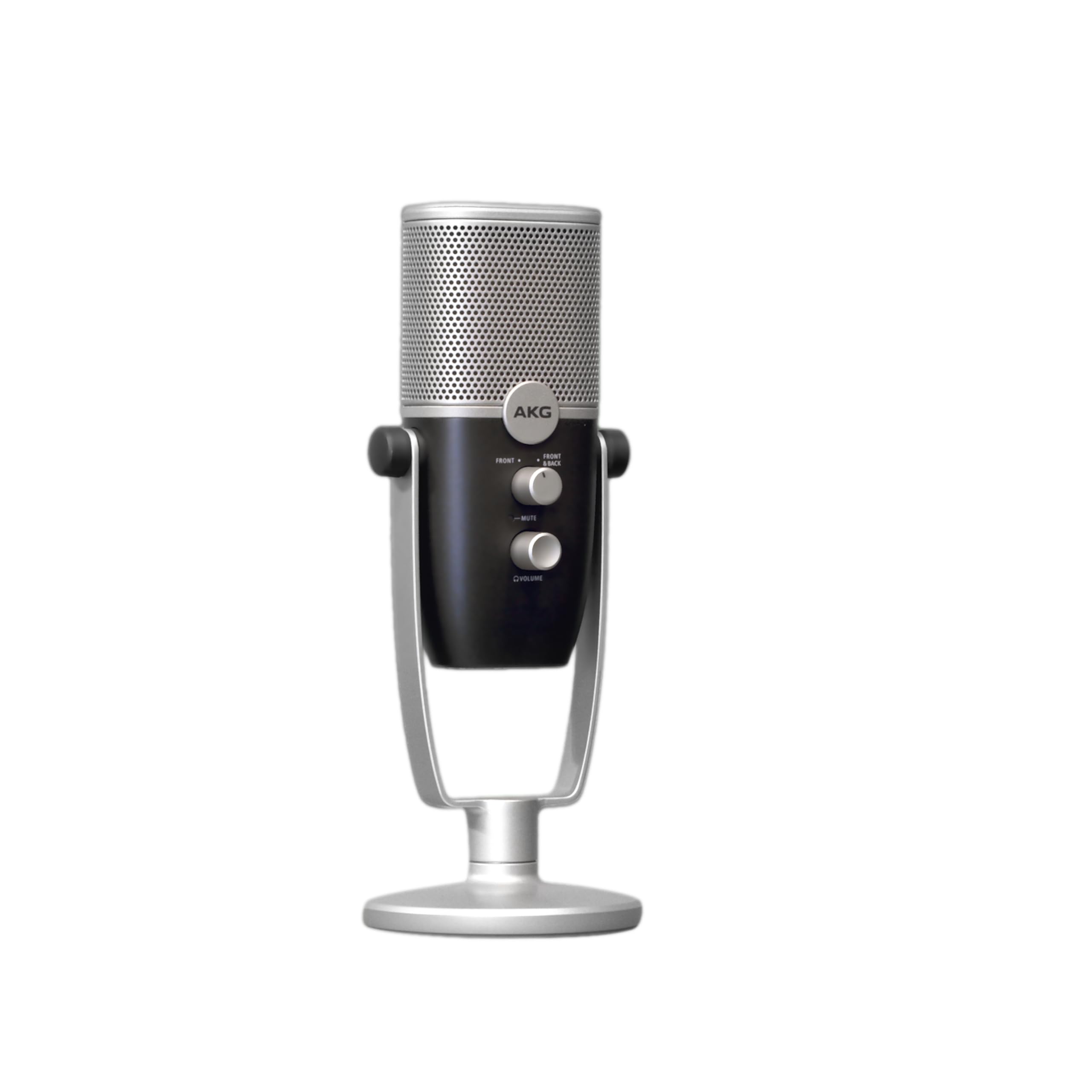
Studio-grade 24-bit/96kHz audio in a compact USB-C mic, trusted by a legendary pro-audio brand.
The AKG Ara brings serious recording pedigree to the budget tier. It captures 24-bit/96kHz high-resolution audio, which means cleaner, more detailed recordings than standard 16-bit mics. A dual-capsule array gives you two user-friendly capture modes to switch between, adding flexibility rarely seen at this price.
It is designed for modern setups with USB-C connectivity, but it still includes a 2-meter USB-C to USB-A cable in the box. Setup is intuitive and plug-and-play across Mac, PC, iOS, and Android devices. The headphone output provides zero-latency monitoring with full control over output volume, mic gain, and mute.
Mounting options are versatile: use the integrated base stand, a desktop boom arm, or a common microphone stand with the included adapter. Buyers describe it as super sensitive, with teammates hearing them “very clearly” with more range, especially in bass tones. One professional voiceover artist calls it a “great basic mic.”
Why It Earns Its Spot
- Sound quality is the top praise among owners
- High-resolution 24-bit/96kHz capture
- Modern USB-C plus versatile mounting
Fit Notes
- Very sensitive — needs calibration to work well with your software
- Best value when it goes on sale
Pick this for: podcasters, YouTubers, and musicians wanting pro-grade sound and USB-C convenience.
Be ready for: some initial tweaking to dial in the sensitive capsule.
7. HyperX SoloCast 2

An all-in-one mic that needs no extras — built-in pop filter, shock mount, and tiltable stand included.
The SoloCast 2 is engineered to capture less unwanted noise from the inside out. A built-in suspension system delivers shock mount benefits without any bulky hardware, and the foam pop filter is already integrated. There are no extras to buy — just clear sound in a smart, compact design.
It records at 24-bit/96kHz studio quality through a cardioid polar pattern that captures sound best from the front. The tilt-adjustable weighted base keeps it stable on your desk, while built-in 3/8″ and 5/8″ threads let you mount it to a compatible mic arm when you want to go off-desk. Tap-to-mute works with an LED indicator.
Plug-and-play USB-C to USB-A connectivity gets you started fast with no setup hassle. Optional HyperX NGENUITY software open up high-pass, low-pass, and voice enhancement filters you can save directly to the mic. Buyers praise its crisp, natural voice and solid build, noting it “rivals pricier mics.”
What Owners Love
- Quality and reliability are the top two praises
- crisp voice with excellent noise reduction
- Compact, solid, and easy to set up
The Trade-Off
- Some note the USB-C port can feel insecure — consider securing the cable
- Very sensitive, so it may pick up background noise in loud rooms
Great for: gamers and streamers who want premium sound without cluttering their desk with gear.
Just know: it shines best with a boom arm in a reasonably quiet room.
8. Razer Seiren V2 X

A powerful tiny mic with an integrated limiter that stops clipping before it ruins your stream.
The Seiren V2 X uses a 25mm condenser capsule that captures voices with high accuracy, especially at higher frequencies. Its supercardioid pattern suppresses noise from the back and sides, so typing and mouse clicks stay out of your stream. Speak directly into the top of the mic for optimal performance.
The standout feature is the integrated digital limiter, which automatically prevents clipping and peaking. That means no worrying about breaking up or sounding noisy when you get excited — the mic handles sudden volume spikes for you. A built-in shock absorber dampens knocks and bumps so your viewers never hear jarring noises.
Mic monitoring works by plugging a headset into the mic to hear your own input, which helps in chaotic voice channels. Easy-access volume, mic gain, and mute buttons sit right on the mic. Reviewers point out it works great on Steam Deck and integrates natively with Mac for dictation, picking up whispers from 18 inches away.
low-maintenance streaming: The digital limiter (a circuit that prevents sudden volume spikes) and shock absorber make it a forgiving, reliable choice for loud and lively creators.
9. Logitech Blue Yeti
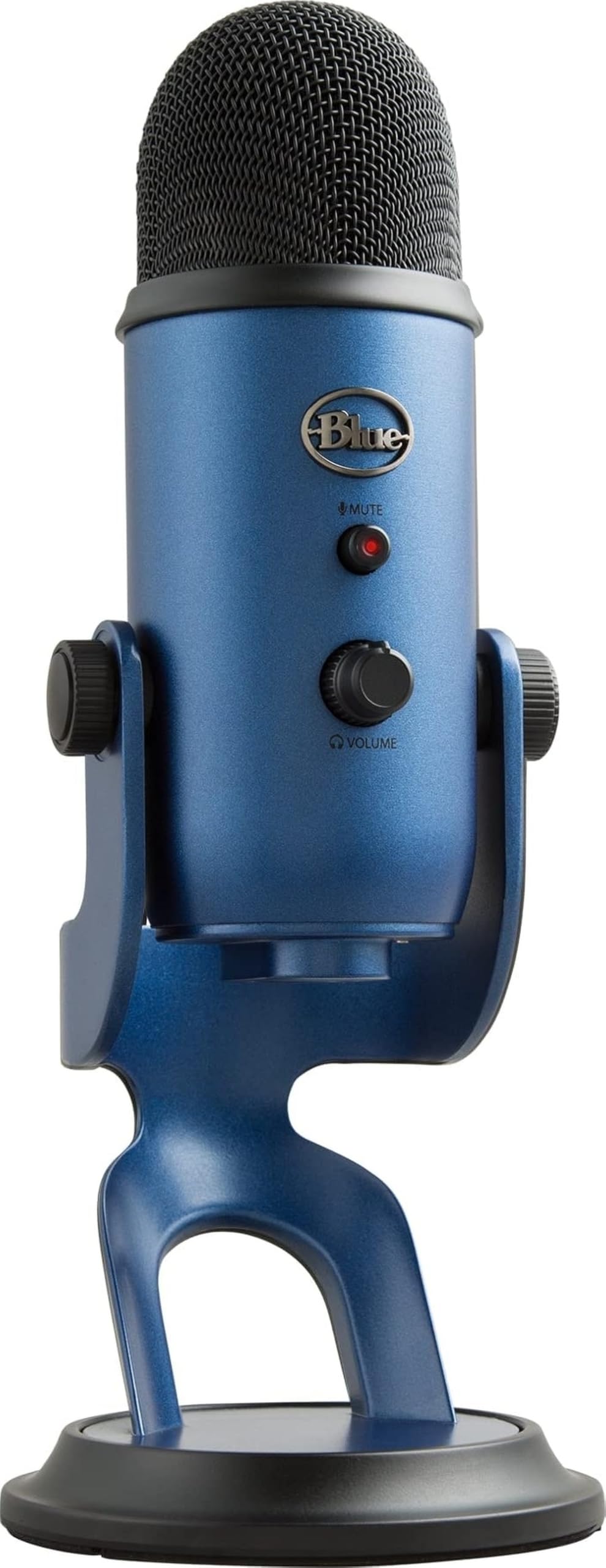
The broadcast classic that adapts to anything — four pickup patterns make it the most versatile budget-adjacent mic.
The Blue Yeti is the crowd favorite for good reason — it is among the most-tested USB mics ever made. Its custom three-capsule array (three internal microphone elements) produces clear, powerful, broadcast-quality sound for YouTube, Twitch, podcasting, Zoom, and music recording. The metal enclosure gives it a solid, premium feel that survives years of daily use.
Its superpower is the four pickup patterns — cardioid, omni, bidirectional, and stereo — which let you record in ways that would normally require multiple mics. Switch to cardioid for solo vocals, omni for a roundtable, or bidirectional for a two-person interview. Onboard controls for headphone volume, pattern selection, instant mute, and mic gain put every level at your fingertips.
Blue VO!CE software adds enhanced effects, advanced modulation, and HD audio samples to improve your streams and recordings. It is plug-and-play on Mac or PC with the included desktop stand or direct mount to a mic stand. Buyers have used it for over 5 years and recorded more than 700 podcasts on a single unit — proof of its reliability.
Why It Endures
- Quality and sound quality are the overwhelming top praises
- Four pickup patterns handle solo and multi-person setups
- Built-in headphone jack with no-latency monitoring
Honest Limits
- Larger and heavier than most budget mics — not very portable
- Some shoppers say static or background noise in certain setups
Pick the Yeti if: you want one mic that grows with you — from solo gaming to multi-person podcasts.
Consider the size: it is a desk fixture, not a travel companion.
Understanding the Specs
Pickup Pattern
This is the mic’s listening direction, and it is your first line of defense against background noise. A cardioid pattern picks up sound from the front while rejecting the sides and rear, which makes it ideal for solo recording at a desk. A supercardioid pattern is even tighter and more focused, great for noisy rooms. An omni pattern hears everything around it, which suits interviews but picks up more room tone.
Sample Rate and Bit Depth
These numbers describe how much audio information the mic captures. A 24-bit / 96kHz mic like the AKG Ara or HyperX SoloCast 2 records more detail and dynamic range than a standard 16-bit / 48kHz mic. In plain terms, higher numbers mean cleaner, more professional-sounding recordings that hold up better when you edit or add effects.
Monitoring and Controls
A 3.5mm headphone jack gives you zero-latency monitoring — you hear your own voice in real time, with no delay, so you can catch plosives or clipping before you hit record. On-mic gain and mute buttons let you adjust levels and kill your audio instantly without opening software. On-mic gain and mute buttons let you adjust levels and kill your audio instantly without opening software.
Noise Handling Features
Different mics fight noise in different ways. A built-in shock mount absorbs vibrations from table bumps and knocks. A pop filter softens the explosive P and B sounds that cause distortion. Some mics add digital features like AI noise cancellation or a limiter that stops clipping. Match the feature to your room — a quiet room needs less than a busy office.
FAQ
What is the difference between condenser and dynamic USB microphones?
Will a cardioid mic block out my keyboard and mouse sounds?
What is the best mic for ASMR on a budget?
Why do I need zero-latency monitoring?
Can I use a USB mic with my iPhone or Android phone?
What is the difference between a USB and XLR microphone?
How long does a budget USB microphone last?
Do I need a boom arm for my USB microphone?
Why does my USB mic pick up background noise?
Final Thoughts: The Verdict
For most buyers, the budget usb microphone winner is the ZealSound K66 because it is the most complete package — studio-tuned sound, mobile adapters, and zero-latency monitoring at a price that undercuts the competition. If you want maximum versatility, grab the Blue Yeti for its four pickup patterns and broadcast-quality voice. And for a quiet, no-fuss desk setup, the HyperX SoloCast 2 is the one to reach for.
How We Picked
We do not accept paid placement. Every pick is matched to a real buyer and a real use-case; we do not hands-on test units.
Sources & Methodology
Specifications: manufacturer listings and product documentation. Review insights: verified customer reviews, as of August 2026. Pricing: not shown on this page (it changes often); check the current price via the retailer link.
As an Amazon Associate, FitlyFast earns from qualifying purchases. This does not affect which products we feature.