
Our readers keep the lights on and the weekend projects moving. As an Amazon Associate, I earn from qualifying purchases.
Specs are compiled from manufacturer listings and verified buyer reviews and can change over time — please confirm the key details on the product page before buying.
Sim racing punishes a weak PC harder than almost any other genre. A stutter mid-corner on the Nürburgring is not a minor annoyance — it costs you the lap. To keep your frame rate pinned and your racing line smooth, you need a desktop that pushes a high frame rate at 1440p, and that means the graphics card matters more than anything else on the spec sheet.
I’m Rikta — the founder and writer behind FitlyFast. This guide is built by comparing the manufacturers’ published specifications and the patterns across verified customer reviews, so you get each pick’s real strengths and trade-offs instead of marketing spin.
Find the best computer for sim racing built for 1440p racing, triple-screen setups, and high FPS that holds a clean racing line.
Our Picks at a Glance



How To Choose The Best Computer For Sim Racing
Racing simulators like iRacing, Assetto Corsa Competizione, and Forza Horizon all lean hard on the graphics card. Your computer’s processor keeps the physics and AI cars running, but the GPU draws every corner, car, and shadow. If the GPU runs out of memory, the frame rate dips right when you need it steady.
Graphics Card Memory Is the Anchor
Sim racing at 1440p with a single screen is comfortable, but triple monitors eat VRAM quickly. A graphics card with 16GB of video memory gives you real headroom for a three-screen setup and high detail settings. An 8GB card can still race fine on one screen, yet it forces you to dial back textures if you add more displays. Look for a card’s total VRAM first, then its speed rating.
Cooling Keeps the Pace Consistent
A long endurance race heats up every component. If the cooling system is weak, the processor slows itself down to avoid overheating — a drop called thermal throttling. A desktop with a liquid cooler, such as a 360mm AIO, keeps temperatures low so you hold the same speed in lap 50 as lap 1. Check the cooling solution before you check the case looks.
Memory and Storage for Loading Grids
You want enough RAM to run the racing sim plus your voice chat and streaming software without stutter. 32GB is the sweet middle ground for modern racing titles and multitasking. Storage speed also matters — a fast NVMe SSD gets you into a session quickly, while a slower drive leaves you staring at loading screens.
Quick Comparison
| Model | Best For | Graphics Card (VRAM) | Memory | Storage | Amazon |
|---|---|---|---|---|---|
| Skytech O11 Vision★ Best Overall | Best Overall | RTX 5070 Ti (16 GB) | 32 GB DDR5 | 2 TB NVMe SSD | Amazon |
| CyberPowerPC Gamer MasterBudget Champion | Entry-level racing | RTX 5060 Ti (8 GB) | 16 GB DDR5 | 1 TB NVMe SSD | Amazon |
| Lenovo Legion Tower 5iExpandable Pick | Sim software variety | RTX 5060 Ti (8 GB) | 16 GB DDR5 | 1 TB SSD | Amazon |
| iBUYPOWER Element | Crowd-backed value | RTX 5070 (12 GB) | 32 GB DDR5 | 1 TB NVMe SSD | Amazon |
| CyberPowerPC Gamer Xtreme | High-core processor | RTX 5070 (12 GB) | 32 GB DDR5 | 2 TB NVMe SSD | Amazon |
| KOTIN Prebuilt | Monitoring on case | RTX 5070 (12 GB) | 32 GB DDR5 | 1 TB NVMe SSD | Amazon |
| Alienware Aurora | On-site support | RTX 5070 | 32 GB DDR5 | 1 TB SSD | Amazon |
| Thermaltake View i570 | i9 processing | RTX 5070 (12 GB) | 32 GB DDR5 | 1 TB NVMe SSD | Amazon |
| ASUS ROG GM700 | Sim titles + AMD GPU | RX 9070 XT | 32 GB DDR5 | 2 TB NVMe SSD | Amazon |
| MSI Aegis R2 | High boost clock | RTX 5070 Ti | 32 GB DDR5 | 2 TB NVMe SSD | Amazon |
| Skytech King 95 | Quiet endurance runs | RTX 5070 Ti (16 GB) | 32 GB DDR5 | 1 TB NVMe SSD | Amazon |
| Horizon Autherium Dragon | Large RAM needs | RTX 5070 OC (12 GB) | 64 GB DDR5 | 5 TB (1 TB SSD + 4 TB HDD) | Amazon |
| GIGABYTE AORUS Supreme | Maximum performance | RTX 5090 (32 GB) | 64 GB DDR5 | 2 TB Gen5 NVMe SSD | Amazon |
In‑Depth Reviews
1. Skytech Gaming O11 Vision Gaming PC
Our pick — 4.5★ from 750+ verified ratings; the strongest balance of quality and price.
The triple-screen rig with double the GPU memory of most prebuilts, ready for 1440p racing.
The standout feature here is 16GB of video memory on the RTX 5070 Ti — twice the 8GB you get on entry cards. That headroom lets you run a triple-monitor racing setup with high-detail textures and still hold a smooth 60+ FPS. It also pairs that GPU with 32GB of DDR5 RAM and a 2TB Gen4 NVMe SSD, so load times stay short and your racing library has room to grow.
The cooling story is equally important for sim racing. A 360mm liquid cooler keeps the AMD Ryzen 7 9850X3D processor (which boosts up to 5.6 GHz) from thermal throttling, so lap times stay consistent. The Lian Li PC-O11 Vision case in white shows off the build. Buyers report it runs games at max settings with streaming software open — zero lag — and call the SSD genuinely fast.
This crowds out the field on value: it holds 16GB of VRAM against the 8GB found on the CyberPowerPC Gamer Master below. The crowd favorite — 4.5 stars across 700+ ratings — and the review pages sum it up: it’s an “Excellent budget streaming PC” that keeps everything lightning fast.
Why it wins the grid
- 16GB VRAM handles triple screens and high textures
- 5.6 GHz peak boost keeps physics smooth
- 2TB SSD doubles entry-level storage
Who should look elsewhere
- A few early units reportedly stopped working within 20 minutes
- Air-cooler loyalists may not need liquid cooling
Grab it for: serious sim racers who want triple-screen 1440p headroom without upgrading parts later.
Think twice if: you want the absolute lowest entry price — this is a premium-tier investment.
2. CyberPowerPC Gamer Master Gaming PC
The entry ticket to smooth 1080p racing on a budget, with a reputation for longevity.
If you race on a single 1080p monitor and want to spend little, this is your starting line. The GeForce RTX 5060 Ti with 8GB of video memory handles one screen at high settings, and owners mention a smooth average of 100+ FPS in 1080p. The AMD Ryzen 7 8700F at 4.1GHz with 16GB of DDR5 RAM keeps the game logic and voice chat running together.
Performance is what owners praise most — it’s the most-mentioned positive by far. Customers note it “plays League of Legends very smooth, zero problem,” and one says a previous CyberPowerPC lasted 6+ years with no issue. That durability matters if you want a sim rig that survives multiple seasons of racing.
The honest trade-offs are the 8GB VRAM — half the 16GB on the Skytech O11 Vision above — and the WiFi, which one buyer says drops to roughly 20 Mb/s even next to the router. If you can run an Ethernet cable to your rig, this is a smart budget pick.
Best for newcomers: nearly plug-and-play, and the value-for-money praise is consistent.
Plan around: the 8GB VRAM limits you to a single monitor, not triple screens.
3. Lenovo Legion Tower 5i
A transparent tool-less case that grows with you, plus 3 months of PC Game Pass included.
This one is for racers who like to upgrade over time. The Legion Tower 5i ships with 16GB of 5600MHz DDR5 memory, but it expands to 128GB, so you can add RAM as your sim setup grows. The transparent, tool-less side panel makes opening the case and swapping parts genuinely easy, which is rare in prebuilts.
Buyers who run niche sim software are happy here — one reports it runs a golf simulator “perfectly, no lag/freezing,” and appreciates that specs are “clearly listed” rather than vague. The RTX 5060 Ti with 8GB handles most racing titles at medium-to-high settings, and the 5.3 GHz boost speed on the Core Ultra 7 265F keeps the physics ticking.
The 8GB of VRAM trails the 16GB on the Skytech O11 Vision, so serious triple-screen racing is off the table. But the 2.5G Ethernet port and WiFi 6E keep your connection stable for online lobbies.
A sensible first rig: modest GPU power with a clear path to grow memory and storage later.
4. iBUYPOWER Element Gaming PC

The RTX 5070 12GB mid-range pick that tens of thousands of owners have stress-tested.
This white tower pairs the AMD Ryzen 9 7900X with an RTX 5070 12GB card and 32GB of DDR5 RAM. That 12GB of VRAM sits between the budget 8GB and the premium 16GB options — enough for a single ultrawide racing monitor with high textures, and solid for most sims at 1440p. The 5.6 GHz boost speed keeps AI cars and weather physics running smoothly.
Buyers praise this PC most for its performance, with far more owners highlighting that than any other feature; value for money is the second most-discussed point. Most report smooth running and easy setup from the start. The honest split is reliability — a smaller group reports crashing after a couple of weeks, so the mixed feedback on longevity is worth knowing.
It lands below the 16GB of the Skytech O11 Vision on VRAM but well above the entry-level 8GB cards for the same race. For a balanced mid-range build with a modern GPU, this is the volume favorite.
What owners applaud
- Performance is the top praise, beating every other feature
- 32GB DDR5 handles sim plus streaming
What to verify
- A minority reports instability after weeks of use
- Water-cooled, so check airflow around the case
Pick this if: you race on one high-end monitor and want proven performance at a mid-range tier.
Look elsewhere if: triple-screen racing is the goal — step up to 16GB VRAM.
5. CyberPowerPC Gamer Xtreme VR Gaming PC
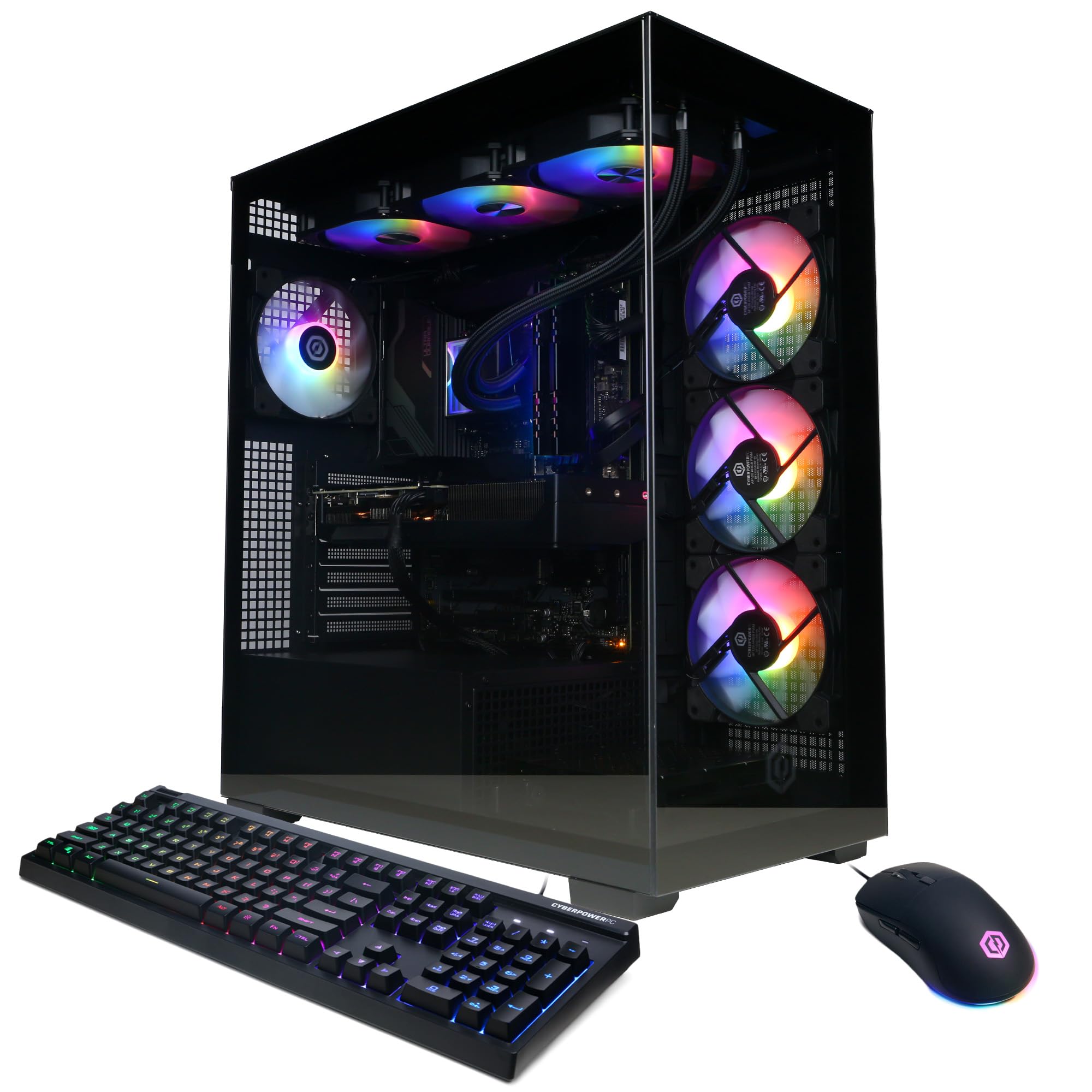
The 24-core i9 processor that chews through racing physics without breaking a sweat.
Heavy sims like iRacing and Assetto Corsa Competizione calculate a lot beyond graphics. The Intel Core i9-14900KF runs 24 cores at a 3.2GHz base clock, which gives you massive headroom for AI traffic, dynamic weather, and telemetry apps running alongside the game. Paired with 32GB of DDR5 and an RTX 5070 12GB, it handles modern racing titles at high settings.
Performance is the aspect owners mention most, and the praise is consistent — reviewers point out running “all current generation games” at Ultra settings. Build quality also gets credit, with magnetic dust filters and customizable RGB. The fans spin audibly under load, but buyers call it steady rather than annoying. The 2TB PCIe 4.0 SSD doubles the storage of the entry-level CyberPowerPC Gamer Master.
For sim racing, the 12GB VRAM is comfortable for one high-res monitor but not the same triple-screen headroom as the 16GB Skytech O11 Vision. The liquid-cooled CPU adds to the case temperature, so give it breathing room in your rig.
The heavy-lifter CPU: 24 cores for dense racing simulations and background software.
Fair warning: expect audible fans, not a silent tower.
6. KOTIN Prebuilt Gaming PC
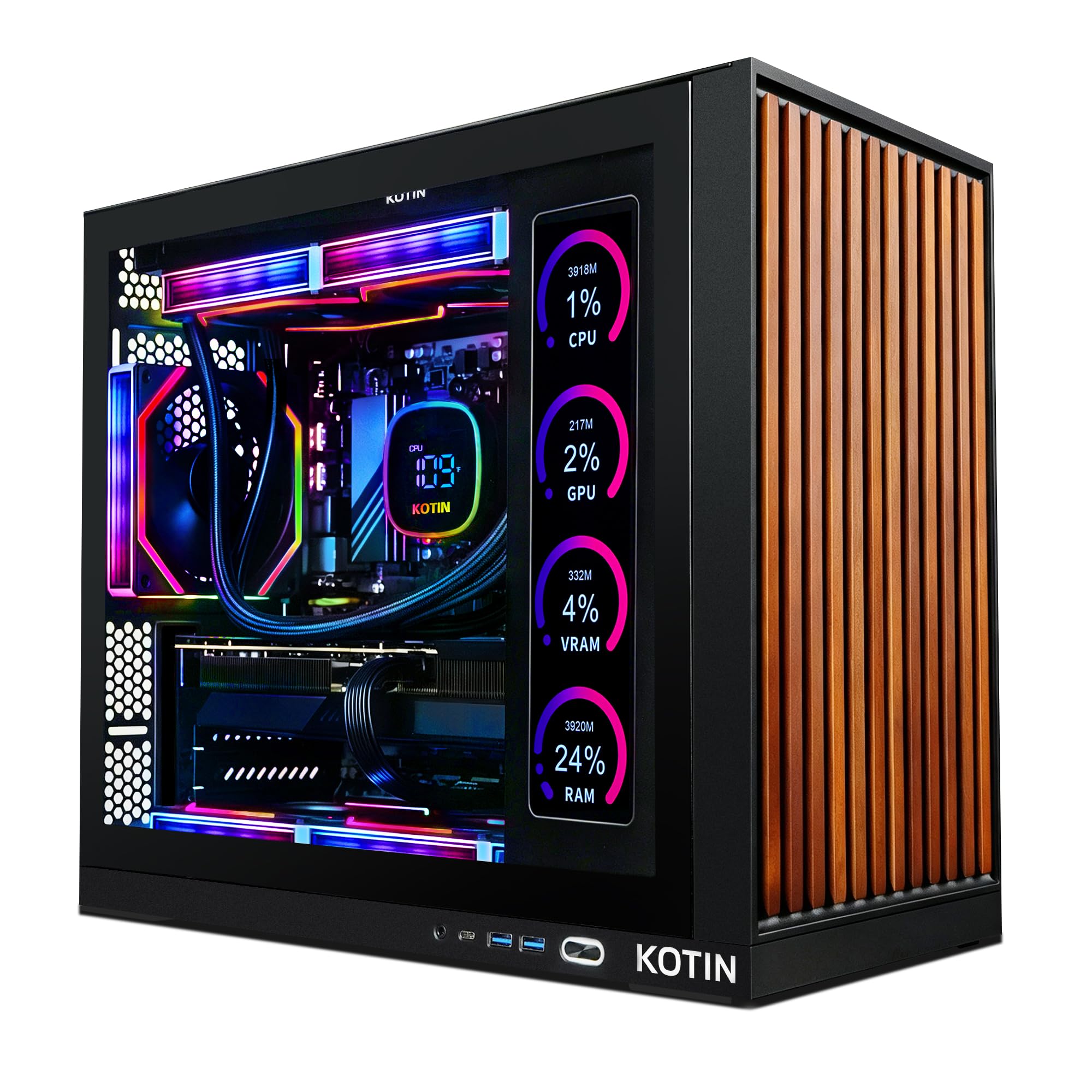
A built-in 11.3-inch screen shows your CPU and GPU temps live while you race.
Monitoring temperatures mid-race is a real win for sim racers doing long endurance stints. This KOTIN build has an integrated 11.3-inch smart display that shows live CPU and GPU temperature and usage, so you can spot thermal issues before they cost you a lap. It pairs the Ryzen 7 9700X, which boosts to 5.5 GHz, with an RTX 5070 12GB for smooth 1440p and 4K play.
Shoppers say it handles all AAA titles and describe it as “underrated” — well-packaged and working from the start. The 850W 80+ Gold power supply leaves headroom for future upgrades, and WiFi 7 keeps your connection current. A 360mm liquid cooler manages the heat through long sessions.
The 12GB of VRAM is a step below the 16GB of the Skytech O11 Vision for heavy triple-screen use. Setup has a learning curve — buyers report the directions aren’t the clearest, and you must plug your monitor into the graphics card ports, not the motherboard ones.
Telemetry built-in: watch your temps on the case instead of alt-tabbing out mid-race.
Know before you buy: check the port note on setup to avoid a blank screen.
7. Alienware Aurora Gaming Desktop

The pick with on-site service — Dell will come to you if something breaks.
If you don’t want to open a case yourself, the Aurora’s 1-Year Onsite Service is a genuine differentiator: if a covered issue can’t be fixed remotely, Dell sends a technician to your home. That confidence is rare in prebuilts. The Intel Core Ultra 7 265F (a processor that boosts to 5.3 GHz) pairs with an RTX 5070 (a graphics card) and 32GB of DDR5 (fast system memory), so your sims run smoothly.
Performance is the aspect owners mention most, and they back it up — owners mention running “max settings” on AAA titles and praise the quiet operation. The case is air-cooled and stays cool, which suits long races, and the easy-to-add drive bays make storage upgrades simple. AlienFX lighting zones let you tune the look.
The honest gripe is spec accuracy — a few customers note receiving different specs than advertised, so check the sticker on arrival. The 12GB VRAM here matches the iBUYPOWER but trails the 16GB Skytech O11 Vision for triple screens.
For the hands-off racer: on-site support and quiet air cooling in a clean black tower.
Verify on arrival: confirm the specs match the box.
8. Thermaltake LCGS View i570-170 Gaming Desktop

A 240mm liquid-cooled i9 build that stays quiet with almost no bloatware.
This Thermaltake build wraps an Intel Core i9-14900KF and RTX 5070 12GB in a case with a filtered, ventilated vertical side mount for the radiator. The 240mm closed-loop liquid cooler keeps the i9 in check during long races. The 32GB of DDR5 at 6000MT/s (a fast memory speed rating) helps smooth frame pacing through dense fields of cars.
Owners are enthusiastic — one calls it “an all around beast,” noting the 5070 “is a monster” with crisp graphics, and another tried Cyberpunk, Rust, BG3, and Helldivers with “no issues.” The fan noise is mentioned as “very slightly” present, not disruptive, and the lack of bloatware earns praise.
It competes directly with the CyberPowerPC Gamer Xtreme on CPU but carries a smaller 1TB SSD. The 12GB VRAM handles one ultrawide racing monitor well, leaving the 16GB cards for triple-screen setups.
Strong and tidy: liquid cooling and fast RAM in a clean black mid-tower.
Minor trade-off: 1TB fills quickly with modern racing games.
9. ASUS ROG GM700 (2025) Gaming Desktop
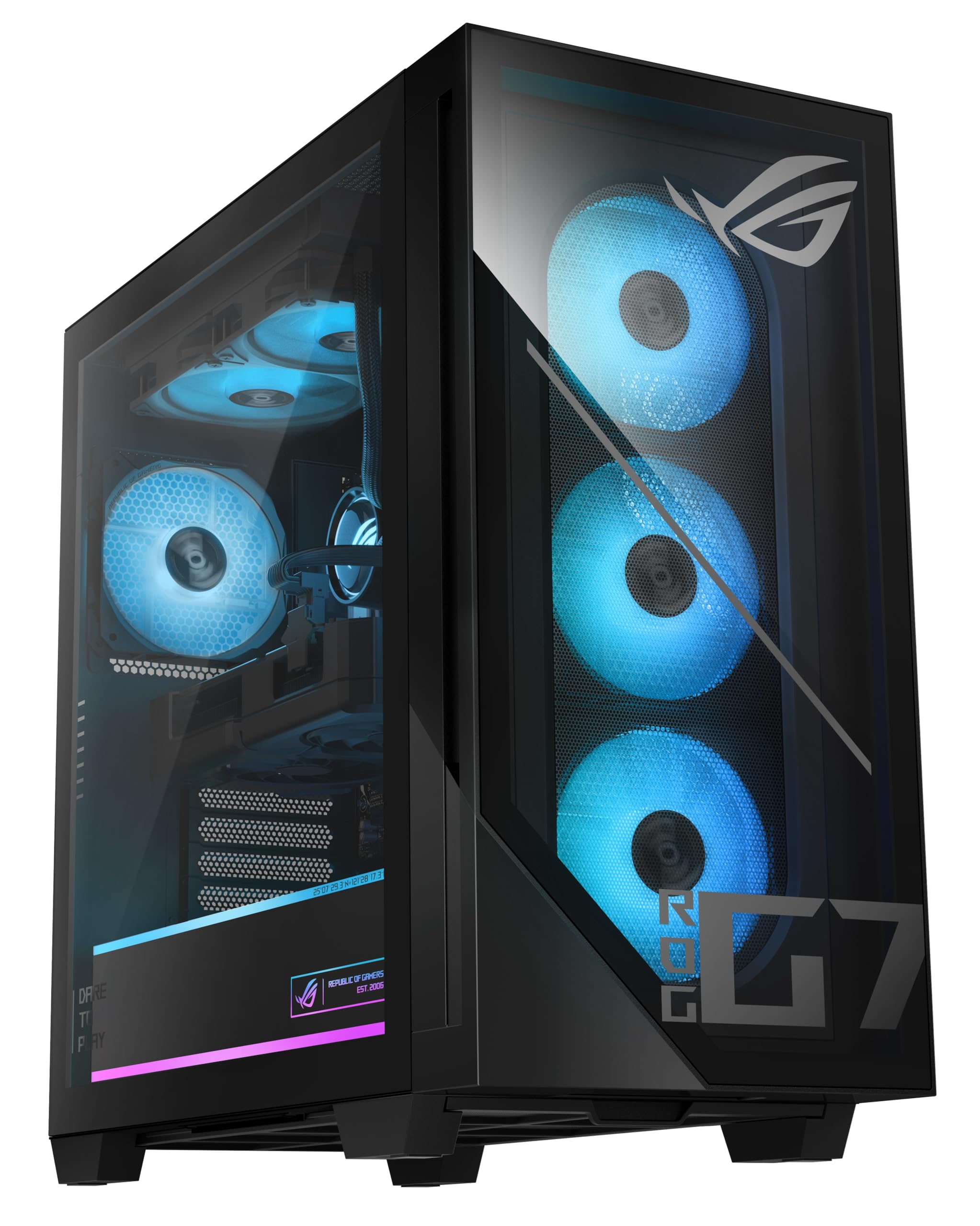
A 3D-V-Cache processor gamers swear by, paired with an AMD card that undercuts rivals.
The Ryzen 7 9800X3D is a legend among sim racers because its 3D V-Cache (extra memory stacked on the chip) noticeably improves game performance. Reviewers point out running iRacing and American Truck Simulator at max settings, one pairing it with a 49-inch 250Hz curved monitor and seeing no stutters. The AMD Radeon RX 9070 XT PRIME OC drives the visuals.
Owners note the 9070 XT runs games the same as the pricier RTX 5070 Ti while costing less. The 32GB of DDR5 and 2TB of PCIe Gen 4.0 SSD storage keep load times short and your sim library deep. One buyer sees 170 FPS in a new title, confirming the 1440p performance.
Setup is the weak spot — there’s no physical manual, and the WiFi antenna must be plugged in (not documented). The 12GB-class card and compact motherboard with only 2 SATA ports mean you’re not building a storage monster. For pure sim performance per dollar on one monitor, this is a smart AMD play.
The sim racer’s CPU: 3D V-Cache gives real frame-rate gains in racing titles.
Set aside time: setup has a learning curve, so read the online guides.
10. MSI Aegis R2 AI Gaming Desktop

The quiet air-cooled tower with a 5.7 GHz boost and an RTX 5070 Ti inside.
This MSI build hits a strong balance for long sim sessions. The Intel Core Ultra 9 285 boosts up to 5.7 GHz — the fastest peak clock in this list — and pairs with an RTX 5070 Ti for high-refresh 1440p racing. The 32GB of DDR5 and 2TB M.2 NVMe SSD round out a rig that owners call “a VR monster.”
Quiet operation is the second most-praised aspect after performance. Shoppers say the air cooling keeps things cool even in long sessions without the drone of liquid pumps, with one noting 100-150 FPS and no latency. The five-fan design and clean cable management earn consistent praise.
The absence of documented PSU specs frustrates some owners, and there’s no printed manual. It holds 16GB-class VRAM comparable to the Skytech O11 Vision, though the latter leads on cooling complexity and storage speed.
Quiet endurance machine: air cooling that holds up for hours without fan noise.
Minor gap: no manual and unidentified spare parts in the box.
11. Skytech Gaming King 95 Gaming PC

The 9800X3D and 16GB of VRAM meet a white case built for quiet 1440p racing.
This Skytech pairs the sim-favorite Ryzen 7 9800X3D with an RTX 5070 Ti 16GB — the same generous VRAM as the O11 Vision. The 5.2 GHz boost keeps physics running smoothly while the 360mm liquid cooler controls temperatures. Owners rate the build quality as the standout feature, with one calling it “quality items used to build a quality machine.”
Quiet operation is a top theme: buyers describe it as “QUIET, FAST to boot,” and one notes silent fans and water cooling even under load. The white King 95 case looks clean, and the RGB memory with heat spreaders adds polish. It handles 4K max settings and high FPS in demanding titles.
The recurring gripe is fan behavior from the start — some units run full speed until you adjust the BIOS, and a couple report a faulty fan needing a controller workaround. The 1TB SSD is also half the storage of the O11 Vision.
The rave list
- Build quality is the top praise from owners
- 16GB VRAM and 360mm cooling for long races
The honest catches
- Fans may need a BIOS tweak to quiet down
- 1TB SSD fills fast with modern sims
Reach for this if: you want the 9800X3D in a white tower and plan to set fan curves yourself.
Look elsewhere if: you want more storage for the money — the O11 Vision gives you 2TB.
12. Horizon Autherium Dragon RGB I9 RTX Gaming PC

64GB of RAM and 5TB of storage for racers who run everything at once.
This is the multitasker’s dream. The 64GB of RAM — double the 32GB found on most builds here — lets you race, stream, run telemetry, and keep a dozen browser tabs open without a stutter. The Core i9 (open up, overclockable) boosts up to 5.3 GHz and pairs with a factory-overclocked RTX 5070 12GB. A 850W 80+ Gold power supply leaves room to grow.
Storage is the other headline: 5TB total, split between a 1TB M.2 NVMe SSD (with up to 7000MB/s speeds, per the maker) and a 4TB 7200RPM HDD. Buyers report it runs Microsoft Flight Simulator Ultra and VR titles, with one rendering a 3-minute video in about 35 seconds. Quiet operation gets consistent praise, and the 11-fan setup with smart speed control keeps things cool.
The 12GB of VRAM trails the 16GB cards for triple-screen use, and the HDD is slower for game installs than the SSD-only builds. This is the pick for sim racers who also edit videos or run complex telemetry software.
For the power user: 64GB RAM and massive storage for racing plus production work.
Keep in mind: 12GB VRAM, not 16GB, for heavy multi-display setups.
13. GIGABYTE AORUS Supreme Gaming Desktop
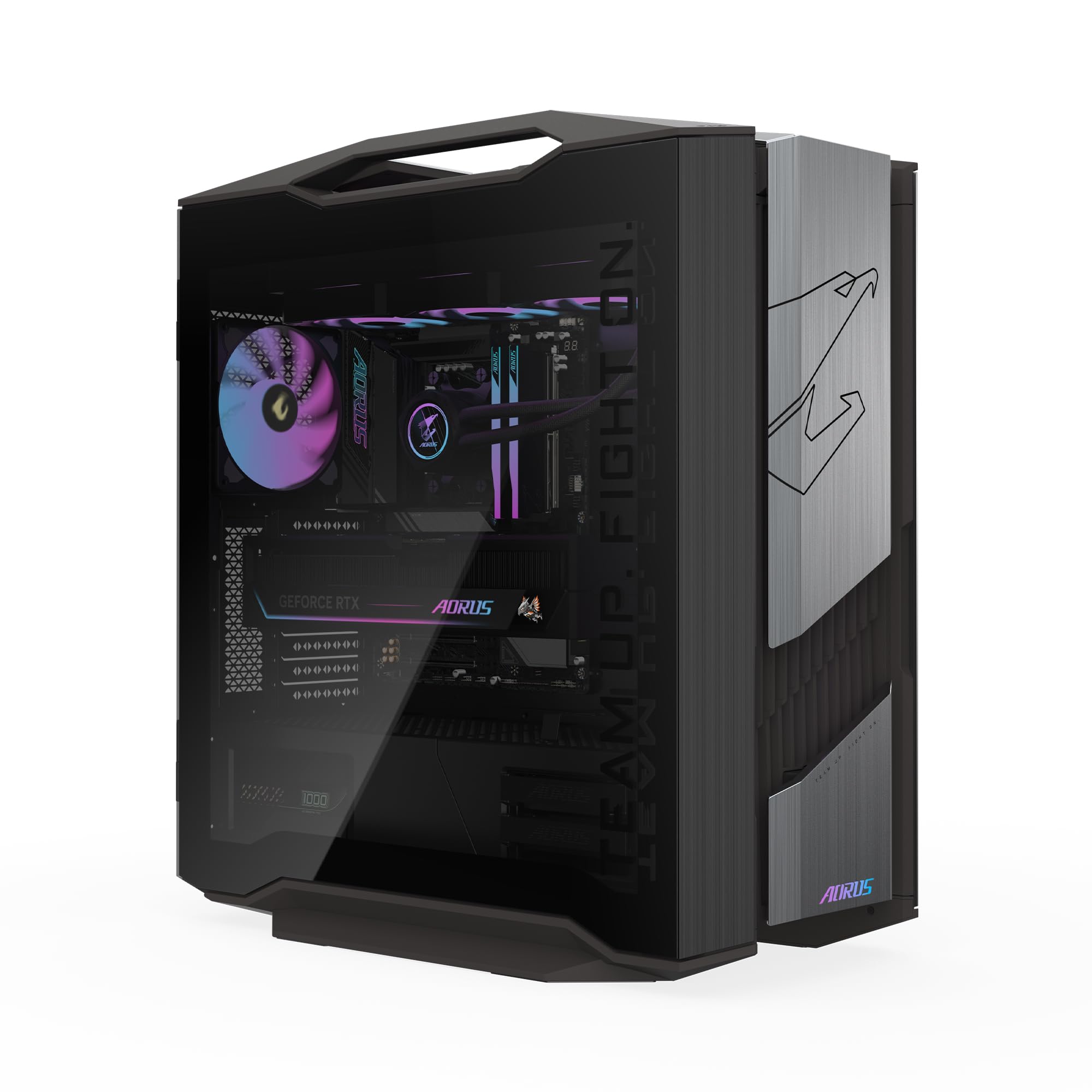
The flagship 32GB RTX 5090 that runs any sim maxed out with zero compromise.
This is the absolute ceiling. The AORUS RTX 5090 carries 32GB of video memory — double even the 16GB cards and four times the 8GB entry level — so triple 4K racing monitors are no problem at all. The Ryzen 7 9800X3D and 64GB of DDR5 handle any sim, and the 2TB Gen5 NVMe SSD is the fastest storage tier available. There is nothing this rig cannot run maxed out.
The AORUS 360mm AIO liquid cooler (a liquid cooling system) and WINDFORCE cooling system with Hawk Fans keep it quiet even under heavy load, which owners confirm — one calls it “quiet even under heavy load.” The RGB Fusion 2.0 software lets you sync the lighting, and the tempered-glass case with easy-access panels makes cleaning simple. Owners consistently call it “a beast” that barely needs to work hard.
Owners consistently rate it 5 stars, with one noting the GIGABYTE build offers better value than comparable DIY setups while keeping a single factory warranty. The obvious catch is the price tier — this is the most expensive rig here by a large margin, so it’s for racers who want zero compromises and no upgrades for years.
The flagship case
- 32GB VRAM quadruples entry-level cards
- 2TB Gen5 SSD is the fastest storage available
- Quiet cooling even in long stints
The only catch
- The premium price tier is a serious investment
- Overkill for a single 1080p monitor
Buy it for: the ultimate triple-4K sim rig that won’t need an upgrade for years.
skip it if: you race on one monitor — you’ll pay for power you won’t use.
Understanding the Specs
Graphics Card VRAM
Video memory (VRAM) is the buffer your graphics card uses to hold textures and frames. Racing sims at 1440p use a lot of it, and triple monitors use even more. An 8GB card handles one 1080p screen; a 16GB card gives you real room for three screens or a 4K display with high detail. More VRAM means fewer frame drops when the track gets crowded.
CPU Boost Clock and Cores
The processor runs the game’s physics, AI cars, and weather simulation. The boost clock (measured in GHz) tells you its peak speed, and more cores help when you also run streaming software. For sim racing, a strong processor prevents the CPU from becoming the bottleneck that drags your frame rate down.
Cooling: Air vs. Liquid
A long race heats your processor, and heat makes it slow down to protect itself — that’s thermal throttling. A 240mm or 360mm liquid cooler moves heat away more effectively than a basic air cooler, keeping lap times consistent. Some air-cooled builds run quiet too, so check the specific design rather than assuming.
RAM and Storage
Memory (RAM) holds what your PC is actively working on. 16GB is the baseline for modern racing, 32GB is comfortable with streaming and voice chat, and 64GB is for heavy multitaskers. Storage speed matters for loading tracks — an NVMe SSD gets you into a session much faster than a traditional hard drive.
FAQ
How much VRAM do I need for triple-monitor sim racing?
Is a liquid cooler necessary for sim racing?
Will a budget prebuilt run iRacing smoothly?
Should I plug my monitor into the graphics card or motherboard?
Is 32GB of RAM enough for racing plus streaming?
Does the RTX 5070 Ti beat the RX 9070 XT for sim racing?
Why does my prebuilt’s fan get loud under load?
How fast does storage need to be for racing games?
Is the Intel Core i9-14900KF better than the Ryzen 7 9800X3D for sims?
Final Thoughts: The Verdict
For most sim racers, the best computer for sim racing winner is the Skytech Gaming O11 Vision because it pairs 16GB of VRAM (video memory) with 32GB of RAM and a 2TB SSD (storage) — the balance for serious 1440p racing. If you want the sim-favorite 3D V-Cache processor at a lower cost, grab the ASUS ROG GM700. And if you race on a tight budget with a single 1080p monitor, the CyberPowerPC Gamer Master is the one to reach for.
How We Picked
We do not accept paid placement. Every pick is matched to a real buyer and a real use-case; we do not hands-on test units.
Sources & Methodology
Specifications: manufacturer listings and product documentation. Review insights: verified customer reviews, as of August 2026. Pricing: not shown on this page (it changes often); check the current price via the retailer link.
As an Amazon Associate, FitlyFast earns from qualifying purchases. This does not affect which products we feature.