
Our readers keep the lights on and the weekend projects moving. As an Amazon Associate, I earn from qualifying purchases.
Specs are compiled from manufacturer listings and verified buyer reviews and can change over time — please confirm the key details on the product page before buying.
The biggest question for PC fighting game players isn’t budget—it’s whether your hands prefer a joystick’s lever or a leverless pad’s buttons. A joystick gives you the arcade authenticity and lever clicks, but an all-button “leverless” pad can make precise inputs like wavedashes and backdashes feel easy. This guide breaks down 9 real options, from premium tournament sticks to budget-friendly wired pads, and matches each to a specific playstyle.
I’m Rikta — the founder and writer behind FitlyFast. This guide is built by comparing the manufacturers’ published specifications and the patterns across verified customer reviews, so you get each pick’s real strengths and trade-offs instead of marketing spin.
You want a controller for fighting games pc that responds instantly and feels right in your hands, whether you are grinding ranked in Tekken 8 or mastering charge characters. The key specs to weigh are button feel, input lag, and PC compatibility.
Our Picks at a Glance


How To Choose The Best Controller For Fighting Games PC
Before you buy, pick a control scheme: a traditional joystick with a lever, or a leverless all-button layout. Each demands different muscle memory, and switching isn’t instant—so commit to the right one from day one.
Stick vs Leverless: The Core Decision
A joystick gives you that tactile lever throw and the satisfying click of a microswitch. A leverless pad replaces the lever with four direction buttons, which lets you buffer inputs by pressing rather than moving — the reason so many Tekken players report faster wavedashes and backdashes within an hour of practice.
Latency and Input Speed
For fighting games, input lag is everything. A wired USB connection is effectively lag-free and the safest bet, while some premium units feature 2.4GHz wireless with no noticeable delay. On the budget end, look for sub-2ms response times to nail combos and whiff punishes.
Quick Comparison
| Model | Best For | Button Count | Form Factor | Connectivity | Amazon |
|---|---|---|---|---|---|
| HORI Alpha★ Best Overall | Mod-friendly arcade stick | 17 | Arcade Stick | Wired USB | Amazon |
| 8Bitdo M30Best Value Pad | Classic 6-button D-pad | 6 | Gamepad | Wired USB-C | Amazon |
| Sehawei Haute42 S16Compact Leverless | Budget leverless entry | 16 | Leverless | Wired USB | Amazon |
| Mayflash F500 Flat | Heavy multi-platform lap use | 14 | Leverless | Wired USB | Amazon |
| Qanba Drone 2 | Entry-level arcade stick | 8 | Arcade Stick | Wired USB | Amazon |
| Mayflash F300 Elite | Sanwa parts on a budget | 9 | Arcade Stick | Wired USB | Amazon |
| 8BitDo Arcade Stick | Low-latency wireless play | 8 | Arcade Stick | 2.4GHz Wireless / USB-C | Amazon |
| Qanba Obsidian 2 | Tournament-grade weight | 16 | Arcade Stick | Wired USB | Amazon |
| Razer Kitsune | Slim premium leverless | 16 | Leverless | Wired USB-C | Amazon |
In-Depth Reviews
1. HORI Fighting Stick Alpha
Our pick — over 4.5★ from 850+ verified ratings; the strongest balance of quality and price.
The modder’s dream stick that holds its own against pricier fight sticks in any collection.
This is the stick players reach for when they want professional-level gear for the PC without the fuss of console-locked features. It brings a full 17-button layout with Hayabusa buttons and joystick, which feel satisfyingly responsive right from the start for games like Street Fighter V. Officially licensed by Sony, it works on PS5 and PS4, but the PC connection is what makes it a versatile pick for your home setup.
The real standout is the internal design. It opens in a clamshell style for easy access, letting you swap artwork on the top panel or change components without any soldering. Owners consistently call it the easiest stick to mod in their collection. The Hayabusa lever measures 35mm handle-to-plate and 35mm plate-to-base — so if you plan to replace it, keep that 41mm clearance in mind, since some larger levers won’t fit.
The case is a lightweight plexi body that keeps it portable, and the top extra buttons sit ergonomically for your index fingers — better than pricier competitors like the Daija, according to owners. The plastic body feels fine, and the shallow divot handles help you carry it, though a few note the artwork swap requires removing the buttons first. If you want a workhorse fight stick that’s simple to open up and personalize, this is it.
Modder’s paradise: the clamshell access and swappable top panel make this the easiest stick to customize, and the Hayabusa lever and buttons deliver a satisfying feel for the PC.
One watch-out: the lever clearance sits under 41mm, so some aftermarket levers won’t drop in without extra work.
Reach for it if: you want a lightweight, easy-to-mod fight stick with a genuine arcade feel and confident performance on PC.
Look elsewhere if: you need a leverless all-button layout to eliminate stick movement errors.
2. 8Bitdo M30 Wired Controller
The Genesis-style D-pad purist’s pick that keeps your inputs snappy and lag-free.
If you prefer a classic pad over a fight stick, this 8Bitdo M30 is built for one thing: precise D-pad fighting inputs. It features a 6-button layout with 2 bumpers and 2 triggers, plus a button layout switch for different fighting game setups. The wired USB-C connection means virtually lag-free play, which is exactly what you need for frame-perfect moves.
Owners are unanimous about the D-pad — it earns the most praise by far, described as excellent and Genesis-like, with snappy responsive face buttons. The controller quality is what wins people over, followed by ergonomics. It also packs a 3.5mm audio jack and volume control, so you can plug in a headset directly without cluttering your desk. The included 9ft cable gives you plenty of reach on a big PC setup.
There’s a catch: the controller is compact, and multiple owners note it’s simply too small for larger hands, with the top row of buttons sporting a concave surface that can cause missed simultaneous presses. The button responsiveness and cord length get mixed feedback, so it’s not flawless. But for retro and 2D fighting games on a budget, the D-pad quality here is hard to top at this size.
What the crowd loves
- Legendary D-pad for fighting games
- Full remap support with 3 profiles
- 9ft cable and headphone jack built in
Where it trips
- Too small for big hands
- Concave top buttons can miss multi-inputs
- Triggers feel stiff
Best for pad players: the M30 is the pick if you trust a D-pad over a lever and want responsive, lag-free inputs for under half the price of a stick.
skip it if: you have larger hands that get cramped by compact controller bodies.
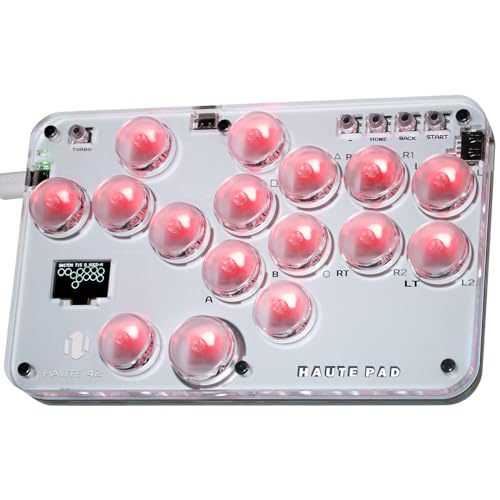
3. Sehawei Haute42 Arcade Stick S16
The pocket-sized leverless that open up faster wavedashes than a pad or stick.
This is the entry point into leverless play that won’t break the bank. The S16 packs 16 hot-swappable buttons into a compact transparent acrylic frame with custom RGB lighting, and it runs on a 40nm process node for an ultra-low 1ms delay with no frame leakage above 95%. In plain terms: your inputs register nearly instantly, which is the whole game for fighters.
It’s a genuinely versatile unit with 5 controller modes — X-input, Switch, PS3, D-input, PS4, and Keyboard — so it pairs with PC, Steam Deck, and even Raspberry Pi setups. The hot-swappable switches mean you can change mechanical keys without any soldering. Owners call it the best leverless for the price, with one Tekken player reporting faster backdash and wavedash inputs after just one hour of practice than they ever got on pad or stick.
The functionality is the biggest praise, with responsive buttons close behind. It’s so small you can take it anywhere — a few owners even brought it to local FGC events and got compliments. The trade-offs are the sharp corners that some sand down for comfort, and the setup effort to get the right input mode. At 0.51 kg, it’s noticeably heavier than a standard gamepad but still very portable.
Bang-for-buck leverless: the 1ms delay and hot-swappable switches make this the smartest budget entry into all-button play.
Note the setup: you must set the correct input mode for your device or you risk crashes — plan for a few minutes of configuration.
Grab this if: you want to try leverless inputs without spending over on a premium unit.
Think twice if: you hate sharp edges and want a rounded, desk-ready design from the start.
4. MAYFLASH F500 Flat

The weighty, lap-stable leverless that works across nearly every console you own.
The F500 Flat is a leverless controller with serious physical presence. It’s heavy — a stabilizing factor that keeps it planted on your lap during intense sessions, with smooth edges that make it comfortable to hold. The 14-button layout with standard arcade buttons eases the transition from a traditional fight stick, and the whole unit runs on 1ms input lag for responsive play on PC.
Compatibility is its superpower. It supports PS4, PS3, Xbox Series S/X, Xbox One, Xbox 360, Switch/Switch 2, PC Windows, macOS, Android, Raspberry Pi, Steam, Steam Deck, NEOGEO mini, and more. Note that PS4 and Xbox consoles need a wired controller plugged into its USB slot to authenticate. It also has Turbo functions with different speed settings and supports headsets for audio and chat on the major consoles.
Owners praise the build quality and the swappable art under the clear acrylic top plate. It’s ideal for big hands and comfortable on the lap. The honest knock is the stock buttons — several owners describe them as sandy or coarse, suggesting a swap to better arcade buttons, which is easy with just 6 screws. The non-detachable USB cable and fragile cable door are the other minor gripes.
The strengths
- Weighty and stable on the lap
- Huge multi-platform compatibility
- Removable clear acrylic top for custom art
The trade-offs
- Stock buttons feel sandy — swap recommended
- No detachable USB cable
- Consoles require a plugged-in controller to work
Best suited for: the player who owns several consoles and wants one leverless that works across all of them without buying multiple sticks.
Not for: anyone who wants premium Sanwa buttons straight from the start.
5. Qanba N3 Drone 2
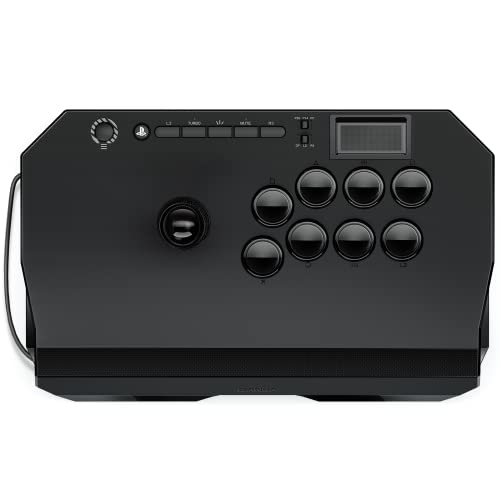
A budget-friendly first stick that’s perfect for learning Mishima wavedashes in Tekken.
The Drone 2 is the classic gateway into arcade sticks. It’s an officially licensed Sony peripheral, so it plugs straight into PS5, PS4, and PC with zero driver headaches. It ships with authentic Qanba 30-mm B30 buttons and a Qanba OV7 OMRON switch joystick, delivering responsive inputs for your first few months of learning. Owners specifically call it great for Mishima wavedash and Korean backdash practice thanks to the lever’s click audio cues.
It’s light at 3.9 pounds, which makes it a portable alternative to a heavy tournament stick, but it doesn’t feel cheap. The panel has a grippy texture, and the quick-release screw makes customization easy if you want to swap parts later. Compatibility with PS5, PS4, and PC is the biggest praise, with owner enjoyment close behind — one player reported flawless daily use on PC with no software needed.
The honest caveats are that the lever is loud — owners describe it as very accurate but with loud clanks — and the cable is not detachable. The stability gets mixed feedback, with a few noting it can slip if you’re heavy-handed. The value for money also splits owners, but for someone learning while staying affordable, it’s a solid entry point.
Learn-the-ropes pick: the plug-and-play simplicity and responsive stock parts make this the ideal first stick for PC players.
Fair warning: that loud lever and non-detachable cable mean it’s not built for silent, tournament-ready travel.
Choose this if: you’re new to fight sticks and want an affordable, responsive unit with console compatibility.
pass on it if: you need a quiet, lightweight stick for a shared space or long travel.
6. MAYFLASH Arcade Stick F300 Elite

The modder-approved stick that ships with the Sanwa parts you’d otherwise buy separately.
This is the stick that comes ready for customization while already featuring the parts many players upgrade to. The F300 Elite includes Sanwa buttons and a Sanwa joystick straight from the factory, which is the gold standard for arcade feel. It’s compatible with a huge range of platforms — Switch/Switch 2, PS4, PS3, Xbox Series X, Xbox One/S, Xbox 360, PC Windows, macOS, Steam Deck, and Android — and it’s PS5-ready with a MAYFLASH Magic-S Ultimate Adapter.
Build quality is where this one wins. Owners describe it as heavy-duty with an even weight that feels substantial, and the matte finish prevents the sweaty-hand stickiness that plagues other sticks. The internals are a modder’s playground: open the 6 screws and you can switch the joystick and buttons to suit your playstyle. It supports XINPUT and DINPUT on PC, which means broad compatibility with Steam and older titles.
The stock 0.9lb spring is the common complaint — several owners found it too loose and swapped in a 4lb spring for a stiffer feel. The square gate causes inconsistent movement for some, but the included octagon gate fixes it. If you’re willing to do minor mods, this transforms into an arcade-authentic stick. For players who just want a quality multi-platform stick, the Elite version is worth the extra cost for the Sanwa parts over the standard F300.
Modder-ready value: Sanwa parts included, easy 6-screw access, and a matte finish that handles sweaty hands better than pricier sticks.
Expect some setup: the loose stock spring and square gate will feel off for precise play until you mod them.
Ideal for: players who want a quality multi-platform stick and plan to tweak the lever feel with simple spring and gate swaps.
Not ideal for: anyone who wants a perfectly tuned lever right from the start with zero setup.
7. 8BitDo Wireless Arcade Stick

The first Xbox-licensed wireless arcade stick, cutting the cable without cutting responsiveness.
This is the stick for players who want the freedom of wireless play with the reliability of a wired connection. It’s the first Xbox-licensed wireless arcade stick in the world, connecting via 2.4GHz wireless or wired USB for a low-latency experience. Buyers report no noticeable lag in Street Fighter 6 over the wireless dongle, which is the highest praise a fight stick can get. It also includes a 3.5mm audio jack and volume control.
The battery life is a standout — 30 play hours max on a single charge, and owners say it lasts weeks of regular play. The steel plating inside gives it a nice heft that prevents it from sliding around during intense matches. The buttons are near-Sanwa quality, and the whole unit works flawlessly with Xbox Series X|S and Windows 10 from the start after the dongle is connected.
Customization is a mixed bag. It supports 8BitDo Ultimate Software for customizable button mapping and profiles, but it lacks macros or turbo functions. The all-black buttons have small text, making it hard to tell them apart in the heat of a match. Owners recommend swapping them for color-coded Sanwa OBSF-30 buttons for better usability. If you want wireless convenience without latency, this is the pick.
Wireless done right: the 2.4GHz connection with no noticeable latency and a 30-hour battery makes this the most freeing fighting stick for PC.
The downside: minimal software features and all-black buttons that are hard to read in fast play.
Reach for it if: you hate cable management and want a truly wireless stick that performs like a wired one.
Look elsewhere if: you need turbo functions or extensive macro customization built in.
8. Qanba Q7 Obsidian 2
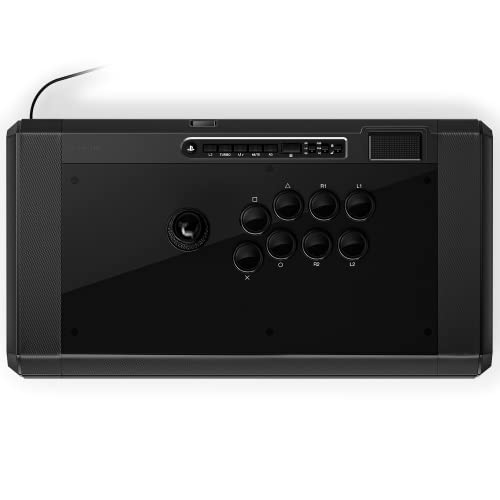
The hefty tournament stick with Qanba OBSF buttons that need almost no pressure to press.
This is the stick for the player who treats fighting games seriously. The Obsidian 2 is a full-size wired joystick for PS5, PS4, and PC with a switch to change between them — no adapters needed. It ships with Qanba 30-mm OBSF buttons that require very little pressure to activate, and the swappable Sanwa JLF joystick tops let you customize the feel. A 3.5-mm microphone input with mute button handles voice chat.
At 7.4 pounds, this is a substantial stick that stays put on your lap, with a large footprint that owners say is great for arm rest during long sessions. The buttons are the standout, praised for being smooth and responsive. The square-to-octagon gate swap is easy with no soldering, which improves diagonal inputs for many players. It’s a reliable workhorse for Tekken 8, with owners noting no more dropped combos compared to a PS controller.
The honest caveats are size and weight — it’s bulky, and while some owners love the heft, others find it too large. The value for money splits owners, with some calling it expensive. A few received units with broken internal plastic pieces, which is a quality-control concern at this price. If you want a stick that feels like an immovable tournament machine, this delivers, but you’re paying a premium for the weight and size.
Why owners stay
- Very little pressure needed on buttons
- Easy gate swap without soldering
- Hefty weight keeps it stable
Why some leave
- Bulky and heavy to move around
- Mixed opinions on value
- Occasional quality-control issues with internal parts
Best for: the committed player who wants a premium, stable stick with buttery-smooth buttons for long tournament grind sessions.
Not for: the budget-conscious or anyone who needs a portable stick for travel.
9. Razer Kitsune

The ultra-slim premium leverless with optical switches for lightning-fast, quiet inputs.
This is the leverless controller that redefines what a fight pad can look like. The Kitsune is impossibly slim at 0.76 inches thick, easily sliding into a backpack with its detachable USB Type-C cable. Instead of a joystick, it uses a precise quad movement button layout with low-profile linear optical switches — a shorter actuation height for greater response. That means instant buffering and flawless complex motions without the lever travel of a traditional stick.
Owners consistently praise the quality and ergonomics, noting it works from the start with ample wrist and hand space. It’s great for PS5 fighting games and PC, with the Razer Chroma RGB lighting adding a suite of effects you can customize via pre-loaded shortcuts. The removable aluminum top plate lets you apply vinyl wraps or a downloadable template for a unique look. The travel-friendly form factor is a major win.
The switches are near-silent and responsive, though a few owners note they can cause fatigue during long sessions because they’re heavier than expected. The matte finish attracts oil and dust. Button layout gets mixed feedback, and it’s not hot-swappable, so aftermarket switch fit can be an issue. This is a premium, mass-produced leverless that feels higher quality than 3D-printed alternatives, but the price and the fixed Capcom SOCD cleaning are worth knowing before you commit.
Slim-line excellence: the 0.76-inch profile and optical switches deliver a level of portability and speed that most leverless sticks can’t match.
Costly refinement: the premium price, matte finish that collects oils, and heavier-than-expected switches are the trade-offs.
Pick this if: you want the sleekest, most portable leverless with premium optical switches and don’t mind the premium price.
Look elsewhere if: you want hot-swappable switches for easy DIY customization on a budget.
Understanding the Specs
Input Latency
In fighting games, latency is measured in milliseconds, and even a few ms can change whether you land a punish or whiff. A wired connection is effectively lag-free, while wireless units like the 8BitDo use 2.4GHz to keep latency low. Budget leverless units like the S16 advertise 1ms delay, which is excellent for precise timing.
Button Count and Layout
Traditional fight sticks have 8 action buttons, but leverless controllers range from 14 to 17 buttons because they add 4 direction buttons to replace the lever. More buttons mean more customization and easier multi-button inputs, but also a bigger learning curve. Consider how many inputs you need for your main game.
Lever vs Leverless
A lever gives you the tactile throw of an arcade machine, with a physical joystick that clicks into place. A leverless layout replaces the lever with 4 directional buttons, letting you buffer inputs by pressing rather than moving. Many Tekken players find leverless speeds up wavedashes and backdashes significantly after a short learning period.
Switch Types
Button feel comes from the mechanical switches inside each button. Hayabusa buttons are sensitive and satisfying, while Sanwa OBSF buttons require very little pressure. Optical switches, as in the Razer Kitsune, use light to register inputs with a shorter actuation height (the distance you press before it registers) for faster response. Your preference depends on how much travel and pressure you want.
FAQ
Is a leverless controller better than a fight stick for PC?
What does SOCD cleaning mean on a leverless controller?
Can I use a PS5 fight stick on my PC?
How many buttons do I really need for fighting games?
Does wireless latency matter for competitive play?
Are Sanwa buttons worth the upgrade?
How do I choose between a D-pad controller and a fight stick?
What is a removable top plate used for?
Final Thoughts: The Verdict
For most people, the best controller for fighting games pc is the HORI Fighting Stick Alpha because it blends professional-grade Hayabusa parts with the easiest modding experience available. If you want precise, lag-free pad play on a budget, go with the 8Bitdo M30. And if you’re ready to explore the advantages of leverless play, the Razer Kitsune is the premium way to do it.
How We Picked
We do not accept paid placement. Every pick is matched to a real buyer and a real use-case; we do not hands-on test units.
Sources & Methodology
Specifications: manufacturer listings and product documentation. Review insights: verified customer reviews, as of August 2026. Pricing: not shown on this page (it changes often); check the current price via the retailer link.
As an Amazon Associate, FitlyFast earns from qualifying purchases. This does not affect which products we feature.