
Our readers keep the lights on and the weekend projects moving. As an Amazon Associate, I earn from qualifying purchases.
Specs are compiled from manufacturer listings and verified buyer reviews and can change over time — please confirm the key details on the product page before buying.
If you have large hands, the standard mouse is a daily compromise: your palm drapes off the back, your pinky drags on the desk, and your wrist bends into an awkward angle by lunch. This guide cuts through the noise to find the mice that genuinely fit a bigger grip — measured by real owners, not just marketing specs.
I’m Rikta — the founder and writer behind FitlyFast. This guide is built by comparing the manufacturers’ published specifications and the patterns across verified customer reviews, so you get each pick’s real strengths and trade-offs instead of marketing spin.
From vertical designs that ease wrist strain to trackballs that free up your desk, here is the honest breakdown of the computer mouse for large hands worth your attention.
Our Picks at a Glance

How To Choose The Best Computer Mouse For Large Hands
Finding a mouse for large hands is less about brand and more about three core measurements: the length and width of the shell, the weight, and the shape’s angle. A mouse that is too short forces a fingertip grip, while one that is too narrow makes your ring and pinky fingers curl under, causing that familiar drag and strain.
Size, Shape, and Your Grip Style
The first step is honestly measuring your hand from the wrist crease to the tip of your middle finger. If that spans roughly 7 inches or more, you are in the “large” territory. Look for mice that explicitly state a recommended hand size — for instance, one popular vertical pick is built for hands between 7.5″ and 8.5″ — rather than guessing from a photo.
Your grip style matters just as much. A palm grip, where your whole hand rests on the shell, needs a long, tall mouse. A claw grip, where your fingers arch, needs a shorter body with a high hump. If you prefer a palm grip and have XXL hands, an asymmetric shape designed specifically for that grip will feel far more natural than a symmetrical one.
Vertical vs. Standard vs. Trackball: Which Angle Suits You?
Your wrist angle decides your comfort. A standard mouse keeps your palm flat on the desk, which twists your forearm. A vertical mouse rotates your hand into a “handshake” position — usually at a 70° or 90° angle — which significantly reduces wrist and forearm strain, but it takes a few days to a couple of weeks to get used to.
If your desk space is tight or your wrist pain is severe, a trackball is a different answer: your hand stays still and your fingers roll the ball, removing the need to move your arm at all. Each style has its devotees, and the “best” one is simply the one you can use for eight hours without discomfort.
Quick Comparison
| Model | Best For | Weight | Connectivity | Adjustable DPI | Amazon |
|---|---|---|---|---|---|
| Logitech Signature M650 L★ Best Overall | Quiet office work & large hands | 111.2 g | Bluetooth / USB receiver | Fixed | Amazon |
| DELUX M618Plus VerticalValue Vertical | Wrist pain relief on a budget | 210 g | Wired USB | Up to 12800 | Amazon |
| E-YOOSO X45Most Versatile | Versatile rechargeable vertical | 0.18 kg | Bluetooth / 2.4G / USB-C | Up to 4800 | Amazon |
| SANWA Ergonomic | Large hands wanting wrist rest | 112 g | Bluetooth | 4 levels | Amazon |
| PORLEI Trackball | Tight desks & precision work | 0.27 kg | Wired USB | 5 levels | Amazon |
| Logitech M750 L | Multi-device productivity | — | Bluetooth / USB receiver | Adjustable | Amazon |
| ProtoArc EM11 Pro | Spreadsheet scroll & large grip | 125 g | Bluetooth / 2.4G | Up to 7200 | Amazon |
| Corsair IRONCLAW SE | Gaming with marathon battery | — | Bluetooth / 2.4G / USB | 26K sensor | Amazon |
| Evoluent VMDLW | The original vertical ergonomics | — | USB Wireless Receiver | 4 speeds | Amazon |
In-Depth Reviews
1. Logitech Signature M650 L
Our pick — 4.5★ from 7,000+ verified ratings; the strongest balance of quality and price.
The everyday pick that pairs 90 percent quieter clicks with a genuinely generous shell for bigger hands.
This is the mouse that most often ends the search for a large-hand daily driver. The crowd favorite in this space — 4.5 stars across 7,000+ ratings — is celebrated first for its build quality, with owners specifically praising the quiet operation that uses SilentTouch technology to cut click noise by 90 percent. That means late-night work sessions won’t echo through the house.
Its defining feature is the SmartWheel: a flick switches from line-by-line precision for documents to super-fast free-spinning for long web pages. The shape is a high arch with a soft thumb area and rubber side grips that keep your hand snug, and it tips the scales at just 111.2 g — noticeably lighter than the chunky DELUX vertical at 210 g, making it easier to glide around all day. You get up to 2 years of use from the single included AA battery, and it pairs instantly via Bluetooth Low Energy or the Logi Bolt USB receiver.
There is one honest catch: size feedback is genuinely mixed. Some owners with large hands call it top-tier comfort, while others find it runs closer to medium. If your hands are at the very top of the size range, this might feel a touch snug — but for the majority, it is the most balanced all-rounder on this list. It also works across Windows, macOS, Linux, ChromeOS, iPadOS, and Android, and is Works with Chromebook certified.
The Comfort Checklist
- Bluetooth and Logi Bolt receiver for instant pairing
- Rubber side grips and high arch suit palm grip
- Plug-and-play, no driver install needed
The Trade-Offs
- Runs smaller than expected for some large-hand owners
- Lacks the free-spinning magspeed wheel of premium MX models
- Left click can fail after heavy years of use, though it’s repairable
Grab it if: you want a quiet, lightweight, dependable wireless mouse for daily office and home work without learning a vertical grip.
Think twice if: your hands are at the extreme XL end — the shell may feel more medium than large.
2. DELUX M618Plus Vertical Mouse
A wired vertical workhorse that tackles wrist pain head-on without demanding a premium budget.
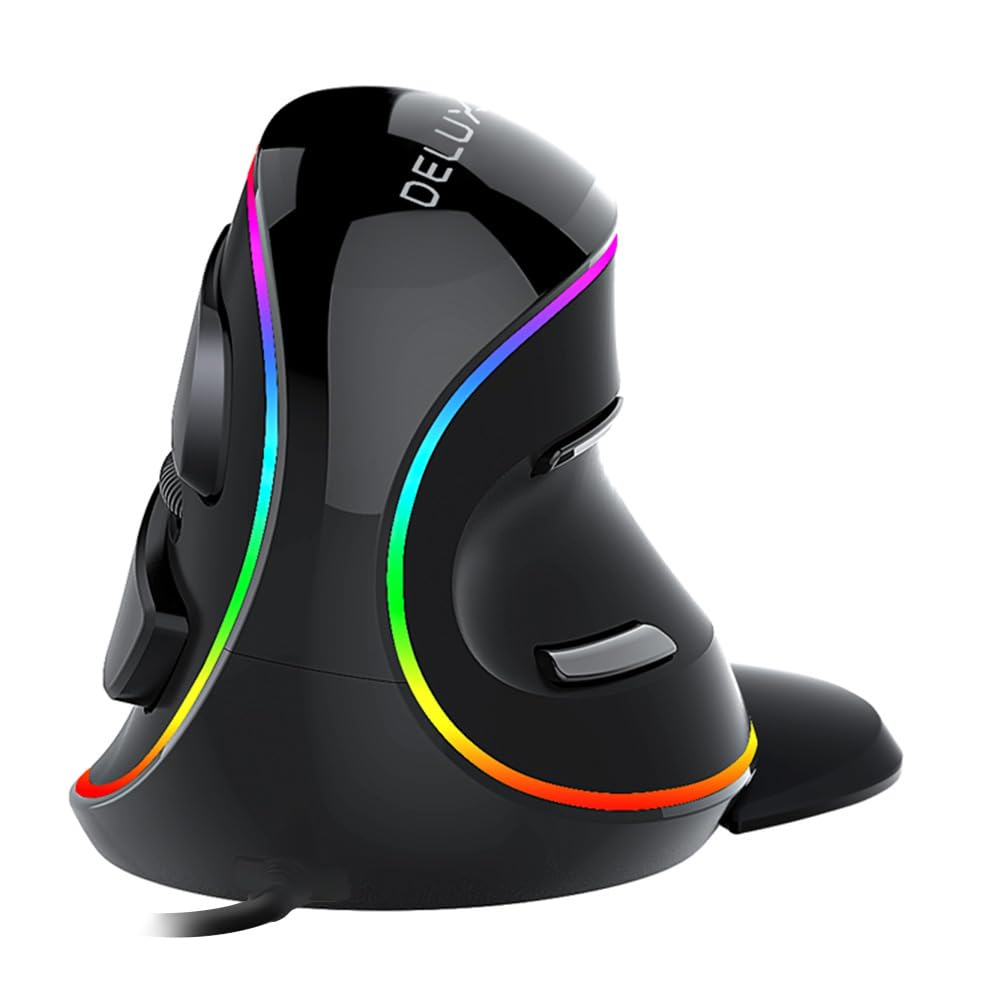
If your wrist aches by the end of the day, this vertical design is the budget-friendly intervention to consider. It’s specifically tailored for large hands — the manufacturer recommends it for hand lengths of 6.7″ to 7.5″ (170-190mm) from fingertip to wrist crease — so it’s not a universal shape but a deliberately sized one. It weighs a substantial 210 g, which grounds it on the desk and gives a solid, planted feel that lighter mice lack.
The vertical “volute bionic” design rotates your hand to reduce forearm twist, and buyers report genuine wrist pain relief, with one doctor recommends it for carpal tunnel prevention. There’s a removable wrist rest that improve your wrist from the table for a cushioned platform. You get 6 programmable buttons, silent clicks that cut sound by more than 90 percent, and a 1.6-meter PVC cable that offers decent reach without requiring a battery. The DPI button on the bottom lets you shift through 400-800-1200-1600-2400-4000 settings, with the driver open up up to 12800.
The trade-off is the learning curve and the grip. Owners note it takes a few days to adapt to the vertical hold, and some find it transfers more heat, causing sweaty hands during long sessions. It’s also strictly right-handed, and the side buttons and driver don’t work on Mac or iOS. Despite that, owners mention it survived heavy use until hot wax damage — and they’re repurchasing, which is the strongest endorsement a -class mouse can earn. It’s not ideal for FPS gaming due to cursor accuracy quirks, but for office work and wrist relief, it delivers.
Why Owners Stick With It
- Genuine wrist and forearm strain relief
- Adjustable DPI up to 12800 with driver
- Removable wrist rest for extra support
The Adjustment Cost
- Vertical grip needs several days to get used to
- Can transfer heat and cause sweaty hands
- Right-handed only, no Mac side-button support
Reach for this if: wrist pain is your priority and you want a no-battery, plug-and-play vertical that fits a true large hand.
Look elsewhere if: you need precise cursor control for fast-paced gaming or you prefer a cooler, lighter grip.
3. E-YOOSO X45 Vertical Mouse
A rechargeable vertical that refuses to pick just one connection — Bluetooth, 2.4G, or wired USB-C.
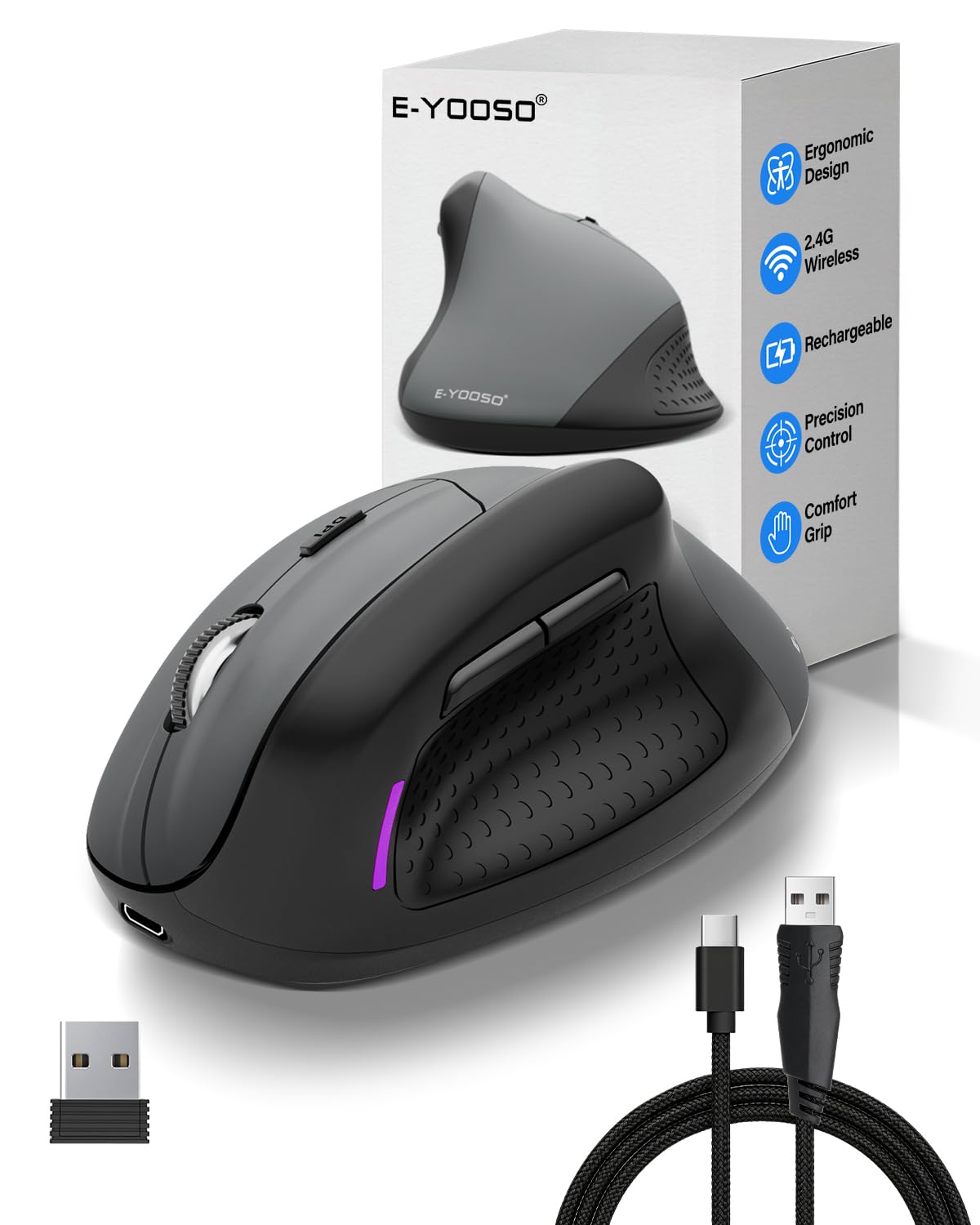
This is the mouse for the person who juggles a PC, a laptop, and maybe a tablet in the same workday. The X45 is a 70° vertical ergonomic shape that promotes a natural neutral wrist posture, and while it’s sized for medium to large hands, owners with large hands confirm it fits just fine — even if it runs a touch smaller than other verticals they’ve owned. It weighs just 0.18 kg, making it noticeably lighter than the beefy DELUX, so it’s easier to reposition.
Its a neat extra is the tri-mode connectivity: you can connect instantly via Bluetooth, plug in the 2.4GHz USB dongle, or go fully wired with the included USB-C cable. That USB-C cable has a voltage regulator to help maintain precision, and you can charge while you use it — owners love that it “stays charged for a long time and charges up quickly.” The rated battery life is 100 hours, and it switches smoothly between devices. You also get 5 adjustable DPI levels up to a maximum of 4800, plus whisper-quiet clicks that measure under 25 decibels.
The honest caveat is that it’s not built for the very largest hands. If you wear XXL gloves or measure near the top of the large range, the shorter shell might feel cramped, and it’s a right-handed design only. But for the broad middle of the large-hand spectrum, it’s a feature-dense, budget-friendly pick that handles work and casual gaming alike.
The Flexibility Win: With Bluetooth, 2.4G, and USB-C wired options in one body, this is the easiest mouse to move between a desktop, laptop, and even a smartphone or tablet.
The Size Fine Print: It fits large hands comfortably per owners, but the tallest of the tall should measure before committing.
4. SANWA Ergonomic Wireless Mouse
A true large-size wireless mouse with a magnetic palm perch that snaps on or off in a second.
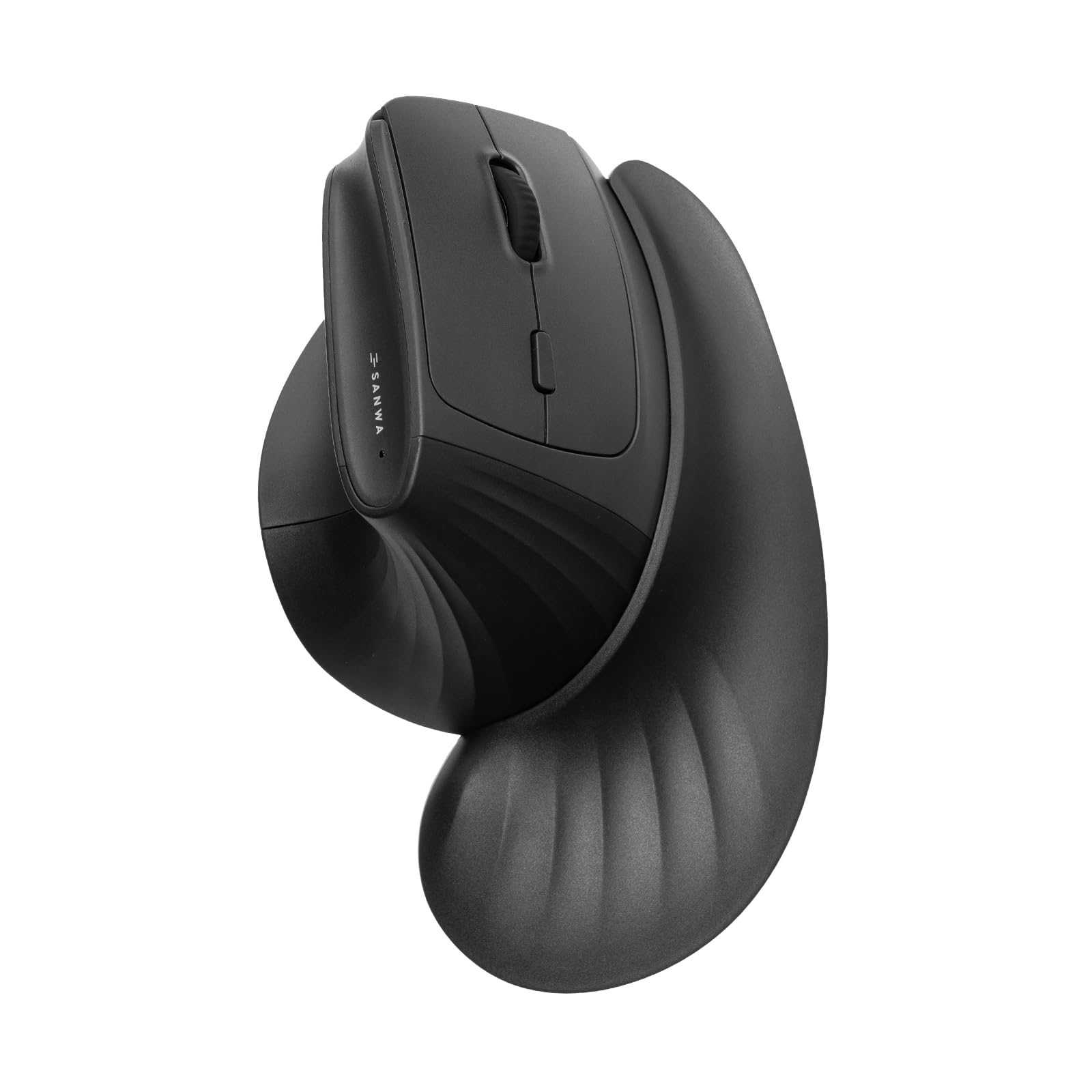
Hands that measure big need a shell that admits it, and this SANWA is explicitly “built specifically for big hands” with an extended body design meant to prevent fatigue over long hours. The defining twist is the magnetic detachable wrist rest — it includes a finger rest and arm pad for extra support, and it pops off easily when you need quick, unencumbered movement for gaming. Owners say it supports the pinky and wrist well, and one notes it helps avoid gripping too hard, which matters if arthritis is a concern.
The 46° tilt is a gentler angle than the 70-90° verticals, making it an easier adjustment for people who find full verticals too extreme. It has silent left and right clicks, forward and backward side buttons for web browsing, and 4 adjustable DPI levels at 1000/1600/2000/4000. At 112 g, it’s light enough for all-day use, and compatibility spans Windows, macOS, iPadOS, iOS, Chrome OS, and Android.
The trade-offs are modest but real. Owners note the button feedback is low haptic — they work, but you don’t feel a crisp click — and there’s no settings software for remapping. The dongle can disconnect on restart, requiring a manual reconnect, and the AA battery (2000mAh) lasts about a month of heavy use. For the buyer who wants a dedicated large-hand shape with an adjustable wrist rest at a mid-range price, this is a solid, comfortable option.
The Standout Feature: The magnetic wrist rest can be detached for gaming or attached for long typing sessions — a rare level of flexibility in a large-hand wireless mouse.
The Slight Compromise: No remapping software and low-tactility buttons mean it’s a comfort-first tool, not a customization platform.
5. PORLEI Wired Trackball Mouse

The fix for cramped desks — your hand stays still while a 44mm ball does all the moving.
It has 5 customizable DPI levels for precise cursor control, and the high-performance optical sensor with 3-point positioning delivers exact placement with minimal hand movement — ideal for designers and office work. The 1.8m USB cable plugs into any USB-A port with no drivers needed, and it’s easy to clean: pop the ball out and wipe it. Owners repeatedly call the ball movement smooth with no stiction, and it’s an excellent value replacement for discontinued trackball classics.
The honest limits: the maker states it’s not recommended for gaming due to its tracking profile, and the forward and backward buttons don’t work on Mac systems. Some owners with smaller hands find this one too large — but for a large hand, that’s the point. It weighs 0.27 kg, giving it a solid, planted presence. After a year and a half, some customers note the scroll wheel becomes inconsistent and the left click grows weak, though they still order another — proof of how well it fits the daily workflow.
The Ergonomics Payoff
- Hand stays stationary, eliminating arm fatigue
- easy plug-and-play on Windows and Mac
- Smooth, easy-to-clean 44mm ball
The Reality Check
- Not recommended for gaming
- Forward and back buttons unsupported on Mac
- Scroll wheel can degrade after long use
Choose this if: you want zero-desk-space precision for design or office work and your wrist needs a break from mouse movement.
skip it if: fast-paced gaming or Mac side-button support is non-negotiable.
6. Logitech Signature Plus M750 L

The productivity upgrade that pairs three Bluetooth devices and transfers files between Windows and Mac.
For the person who lives across a desktop and a laptop, this is the M650 L’s smarter sibling. The M750 L keeps the same comfortable large-hand shape with a soft thumb area and rubber side grips, but adds Easy-Switch and Flow: pair and switch between up to three Bluetooth devices, and transfer text, images, and files between Windows and macOS operating systems. Owners describe it as accurate, responsive, and comfortable for design work.
It has the same SmartWheel as the M650 L — flick to switch from line-by-line precision to super-fast free-scrolling — and the same SilentTouch technology that cuts click noise by 90 percent. Customizable side buttons can be mapped to shortcuts like copy and paste via Logitech Options+. It runs up to 2 years on the single AA battery included, and works across Windows, macOS, Linux, ChromeOS, iPadOS, and Android. It’s fully compatible with Windows 11 from the start.
The catch is sizing perception. While the listing targets large hands, some owners with very large hands find it feels smaller than expected due to pinched sides and a lack of angulation — a sign that ergonomics is personal and this shape leans toward the medium-large blur. If you’re on the boundary, the M750 L is a premium-feeling, multi-device workhorse; if you’re at the extreme XL end, a vertical design may serve you better. Its soft-touch finish and silent clicks earn consistent praise.
The Flow Advantage: smooth file transfer between Windows and Mac machines makes this the clear pick for dual-OS households.
The Fit Warning: The pinched sides can make it feel more medium than large for the biggest hands.
7. ProtoArc EM11 Pro Ergonomic Mouse

The vertical mouse with a side-mounted scroll wheel that flies through wide spreadsheets and design canvases.
Spreadsheet warriors and design pros, this one is for you. The EM11 Pro’s signature feature is a side-mounted scroll wheel that lets you pan left and right with a gentle flick — instant horizontal movement across wide tables, long web pages, and expansive design canvases. It’s a niche superpower that saves real time when you’re wrangling data. The maker recommends it for hand sizes of 19.0–21.5 cm (7.5–8.5″), placing it firmly in large-hand territory.
It connects to up to 3 devices via dual Bluetooth and a 2.4G USB-A receiver, and it’s compatible with Windows 8/10 or higher, Mac OS X 10.12 or higher, and Android 4.3 or higher. The built-in 500mAh Li-Ion battery recharges via the included Type-C cable, and the silent left and right clicks help you stay focused. Up to 7200 DPI levels let you match your preferred speed, and there’s no software to download — you configure all 6 buttons and DPI levels from your browser.
The honest feedback is mixed on a few points. Owners praise the comfortable grip and the fact it’s larger than the standard EM11, but some note it’s too light and needs extra weight, and a few report the USB dongle can interfere with normal PC operations like waking from sleep. The horizontal scroller is loved by some, but one owner found it locked to native functions and unusable until software catches up. Still, for the right buyer, the side scroll and large-hand fit are enough to make it a daily driver.
The Productivity Boost
- Side scroll wheel for easy horizontal panning
- Browser-based customization, no software install
- Connect up to 3 devices simultaneously
The Fine Print
- USB dongle can cause PC wake interference for some
- Some owners find it too light and wish for more weight
- Side scroll wheel isn’t fully customizable
Buy it for: spreadsheet-heavy work or design canvases where horizontal scrolling saves hours, plus a true large-hand vertical fit.
Hold back if: you’re sensitive to dongle-related PC quirks or want a heavier, more planted feel.
8. Corsair IRONCLAW Wireless SE

The gamer’s answer for XXL palms — a 10-button asymmetric beast with a 285-hour wireless battery.
Gamers with XXL hands have a reputation for struggling to find a mouse that doesn’t cramp their grip, and the IRONCLAW Wireless SE was built specifically to solve that. Its ergonomic asymmetric shape is designed for larger hands and right-handed players who prefer a palm grip, so you don’t strain your wrist conforming to a shape that’s wrong for you. Owners of size XXL gloves confirm it fits well and is comfortable for long sessions.
At its heart is the 26K DPI CORSAIR MARKSMAN sensor, with surface calibration that adapts to any setup. Battery life is the headline: up to 285 hours over 2.4GHz and up to 532 hours using Bluetooth — enough for marathon gaming without constant charging. There are 10 programmable buttons for macros and keybinds, configured through the iCUE software, and customizable RGB lighting on the scroll wheel, logo, and front grill. It works while charging, which owners appreciate.
The recurring theme in owner feedback is iCUE software dependence. Some find the software fails to recognize the mouse unless it’s wired, making reprogramming difficult, and others note it’s not ideal for locked-down work PCs. The build quality draws mixed opinions — some call it sturdy and durable, others find it cheaper-feeling than expected. It’s also a bulkier, heavier presence than a typical office mouse. For the large-hand gamer who wants a wireless powerhouse with huge battery life, this is a compelling pick despite the software quirks.
The Gaming Highlights
- Massive battery: 285 hours on 2.4GHz, 532 on Bluetooth
- 10 programmable buttons with onboard memory profiles
- 26K DPI MARKSMAN sensor with surface calibration
The Software Snag
- iCUE dependency can complicate reprogramming
- Build quality perception varies between owners
- Bulky and heavier than office-grade mice
Reach for this if: gaming is the priority and you want XXL-hand comfort with top-tier wireless battery life.
Look elsewhere if: you need a plug-and-play mouse for a locked-down work PC with no software installs allowed.
9. Evoluent VMDLW Vertical Mouse

The original vertical mouse, still setting the standard for handshake-grip wrist relief after two decades.
This is the mouse that started the vertical category. The inventor, Jack Lo, founded Evoluent and introduced the world’s first vertical mouse product in 2002, and this large right-hand version carries that legacy. It supports your hand in a neutral handshake position that reduces forearm twisting and wrist strain — reviewers point out it eliminates wrist and elbow pain, with one long-time user noting drastic relief from carpal syndrome pain. The 90° handshake grip is the most extreme vertical angle on this list.
It offers 4 levels of pointer speeds adjustable with top-mounted buttons and indicator lights, and 6 customizable buttons in Windows via the optional Evoluent Mouse Manager software. The pinky support prevents your finger from rubbing the desk — a small but crucial detail for large hands. It runs on one included AA alkaline battery via a USB-A wireless receiver, and owners say the battery lasts months even with heavy use. The build quality is praised as higher than earlier models, with smoother scrolling and button finger carve-outs.
The honest caveats: it’s not great for CAD or precision work, as owners note the top button can be hit accidentally and the wireless latency is noticeable — one critical review calls it “incredibly laggy” compared to premium options like the G903 or MX Master Vertical. It also uses AA batteries instead of being rechargeable, which feels dated at this premium tier. For the buyer seeking the original, proven vertical design with decades of user feedback, this is the reference point — but the premium price demands you’re committed to the handshake grip.
The Proven Pedigree: 20+ years of vertical-mouse expertise with validated user feedback on wrist pain relief.
The Premium Cost: You pay a significant premium for the legacy design, and wireless latency plus AA batteries are the trade-offs.
Understanding the Specs
DPI — Cursor Sensitivity
DPI (dots per inch) measures how far the cursor moves for each inch you move the mouse. A higher DPI (like 12800 or 7200) means the cursor flies across the screen with a tiny wrist movement. For large hands, higher DPI can be a standout because you can keep your hand in a comfortable, stationary spot rather than sweeping your whole arm. But more isn’t always better — if the DPI is too high, the cursor can overshoot, and you’ll fight it to land on small buttons. Look for a mouse with adjustable DPI levels so you can dial it to your comfort.
Weight and the “Planted” Feel
Weight changes how a mouse feels hour after hour. A lightweight mouse (around 100-125 g) glides easily and reduces fatigue, but can feel insubstantial. A heavier mouse (200 g+) feels planted and stable, which some large-hand owners prefer because it fills the palm and resists accidental nudges. There’s no right answer — it’s about what your hand likes. The DELUX weighs 210 g while the Logitech M650 L is 111.2 g; try to gauge your preference by thinking about whether you like a firm, grounded tool or an airy, quick one.
Vertical Angle and Learning Curve
Vertical mice rotate your hand toward a handshake position — typically 46°, 70°, or 90° depending on the design. The more vertical, the more wrist relief, but also the steeper the learning curve. Owners consistently report it takes a few days to a couple of weeks to adapt, and some never go back. If you’re new to verticals, a gentler angle like the SANWA’s 46° is an easier entry point than the Evoluent’s 90°. Consider whether you’re willing to power through the awkward phase for the long-term wrist payoff.
Connectivity: Wired, Bluetooth, or Receiver
Your connection choice shapes your daily experience. Wired mice (like the DELUX and PORLEI) offer zero latency and no charging, but tether you to the desk. Bluetooth is cleanest for multi-device setups — the Logitech M650 L and M750 L pair instantly and run for up to 24 months on one AA battery. Some mice like the E-YOOSO X45 offer all three: Bluetooth, a 2.4GHz dongle, and wired USB-C, giving you maximum flexibility. The trade-off is usually battery management or the risk of dongle interference, which a few owners reported.
FAQ
How do I know if I have large hands for a mouse?
Will a vertical mouse really help my wrist pain?
Is a trackball a good choice for large hands?
What DPI should I look for in a large-hand mouse?
How long does a wireless mouse battery last for large-hand models?
Is the Corsair IRONCLAW worth it for non-gamers with large hands?
What’s the difference between the Logitech M650 L and M750 L?
These mice are right-handed only — are there options for left-handed large hands?
How long does it take to get used to a vertical mouse?
Why does the Logitech M650 L feel smaller than expected for large hands?
Final Thoughts: The Verdict
The winner for most people is the Logitech Signature M650 L because it pairs quiet, 90-percent-reduced clicks with a comfortable large-hand shell, a 24-month battery, and a crowd favorite status across 7,000+ ratings. If your wrist pain is the driver, the DELUX M618Plus is the budget-friendly vertical that genuinely relieves strain, and the PORLEI Trackball is the answer for tight desks and zero arm movement. The consistent theme across every pick is simple: a mouse that fits your hand changes your whole workday, and the right one is worth the search.
How We Picked
We do not accept paid placement. Every pick is matched to a real buyer and a real use-case; we do not hands-on test units.
Sources & Methodology
Specifications: manufacturer listings and product documentation. Review insights: verified customer reviews, as of August 2026. Pricing: not shown on this page (it changes often); check the current price via the retailer link.
As an Amazon Associate, FitlyFast earns from qualifying purchases. This does not affect which products we feature.