
Our readers keep the lights on and the weekend projects moving. As an Amazon Associate, I earn from qualifying purchases.
Specs are compiled from manufacturer listings and verified buyer reviews and can change over time — please confirm the key details on the product page before buying.
You don’t need a 3-year-old to type a single line of code — the best coding toys turn logic into something physical, like snapping a colored tile onto a track or sliding a card under a robot. The real question is which one matches your child’s attention span and your patience for setup, and the answer usually depends on how much screen-free, hands-on play each toy actually delivers.
I’m Rikta — the founder and writer behind FitlyFast. This guide is built by comparing the manufacturers’ published specifications and the patterns across verified customer reviews, so you get each pick’s real strengths and trade-offs instead of marketing spin.
Here are the best coding toys for preschoolers: screen-free robots, magnetic block sets, and smart trains that turn playtime into real STEAM learning at home.
Our Picks at a Glance

How To Choose The Best Coding Toys For Preschoolers
At ages 3 to 5, children learn cause and effect through touch, not through abstract logic. The best coding toy for this stage is one that hides the programming inside a physical action — pressing a button, sliding a block, or laying a track.
Match the Toy to Fine Motor Skills
A 3-year-old’s hands are still developing. Magnetic blocks and chunky buttons are easier to manage than tiny snap-together parts. Look for toys that let your child succeed on the first try, so frustration doesn’t kill the curiosity.
Screen-Free vs. App-Based Play
Many parents want to limit screen time, and the best screen-free coding toys use color cards, tiles, or physical buttons to teach sequencing. Some toys pair screen-free play with an optional app for older siblings — a flexible middle ground worth considering.
Think About Longevity
A toy that entertains a 3-year-old today should still challenge a 5-year-old next year. Check whether the toy has expandable accessories, multiple code modes, or programmable features that grow with your child’s understanding.
Quick Comparison
| Model | Best For | Code Mode | Screen-Free | Age Range | Amazon |
|---|---|---|---|---|---|
| intelino Smart Train★ Best Overall | Serious STEM growth | Tiles, Scratch, Python | Yes | 3+ | Amazon |
| QIBOX Drawing RobotBest Value | Art-loving beginners | Cards, no app | Yes | 3-8 | Amazon |
| WhalesBot A1Most Versatile | Hands-on builders | Magnetic blocks | Yes | 3-6 | Amazon |
| Sphero indi Kit | Maze-building explorers | Color cards | Yes | 4+ | Amazon |
| Learning Resources Rumble & Bumble | Story-based play | Buttons | Yes | 4+ | Amazon |
| Learning Resources Robot Mouse | Trial-and-error coding | Buttons | Yes | 4+ | Amazon |
| great dachong RC Robot | Entertainment first | Remote control | — | 3-12 | Amazon |
| LEXiBOOK Powerman Jr | Animal-loving kids | 40-action program | — | 3+ | Amazon |
In‑Depth Reviews
1. intelino Smart Train Starter Set
Our pick — over 4.5★ from 650+ verified ratings; the strongest balance of quality and price.
The smart train that turns a classic wooden railway into a screen-free programming lab your child will actually outgrow into.
You get more coding depth from the little J-1 engine (3.75 x 1.57 x 1.57 inches) than from anything else here — four distinct code modes that start with snapping 40 color snaps onto the track for toddlers and scale all the way to Python for a school-age kid. A 3-year-old sees a train that stops, starts, and reverses when colors appear; you see pattern recognition being built without a single screen.
The engine runs on a USB rechargeable battery that buyers report takes about 20 minutes to charge. Owners clock the setup at five minutes, and the app controls speed, stop, reverse, LED color, and sound — but the app is limited to one device at a time, so plan around that if you have siblings. The track system is modular and extendable with intelino kits, and you can connect it to most traditional wooden train systems from BRIO, IKEA, Thomas & Friends and other brands using universal track adapters sold separately.
Build quality is the most-repeated praise by far, with playability close behind. The honest trade-off is the track: a chunk of reviews rate the track quality negatively, noting the included 20 tracks feel limited and the box ships with just one engine and one wagon. This set is the price anchor of this list, and some owners say it’s not worth the outlay if your child only wants a standard train; others call it the ideal middle step between wooden rails and serious hobby systems.
What Earns the Top Spot
- Four code modes — color snaps, app editor, Scratch, and Python
- 20-minute USB charge keeps play flowing
- Compatible with BRIO, IKEA, and Thomas & Friends tracks via adapters
- Appeals to adults too — buy extra cars, families say
Know Before You Buy
- Included track is short — one engine, one wagon in the box
- Track quality draws the most complaints in the data
- App connects to one device at a time
Reach for this if: you want one toy that grows from toddler tiles to real Python coding over years of play.
Look elsewhere if: your child needs open-ended free play right now and you aren’t ready to invest in the priciest option here.
2. QIBOX Drawing Robot
A 4-in-1 drawing robot that teaches step-by-step sequencing through art, not buttons and commands.
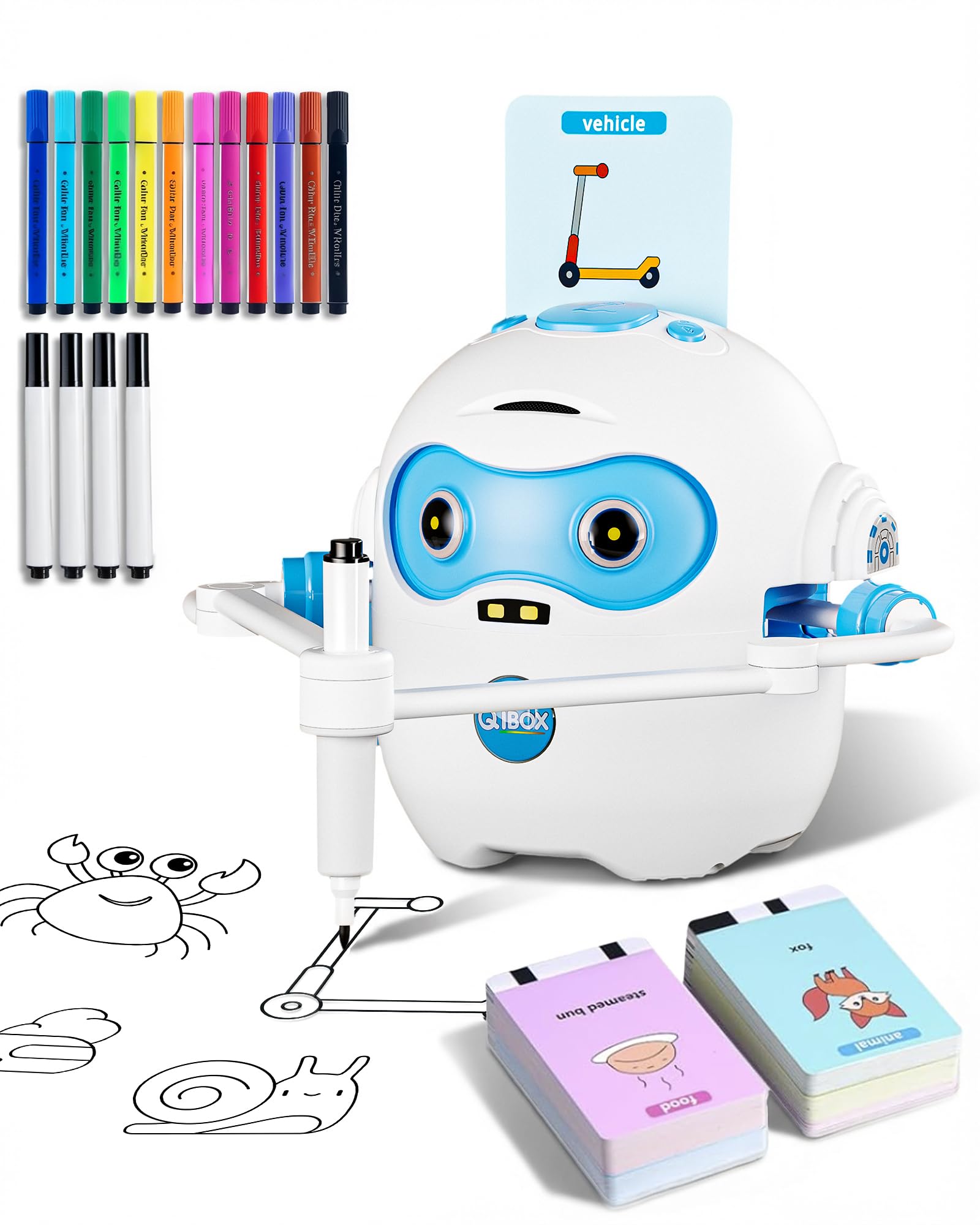
This one flips the coding concept: instead of programming movement, your child inserts one of 100 illustrated cards — animals, plants, food, vehicles — and the robot guides them from simple lines to a finished picture. It’s coding as pattern-following, which is exactly the right entry point for a 3-year-old who loves coloring but isn’t ready for directional commands.
The compact unit (5.3 x 4.1 x 5 inches) runs on a rechargeable lithium-ion battery with Type-C charging, and there’s no app and no setup — insert a card and start. It draws, teaches phonics word pronunciation, and plays children’s songs, which makes it a quiet, screen-free companion that keeps kids independently engaged. The magnetic arms and card recognition get the most love from parents who say it holds a 4-year-old’s attention for long stretches and even works well for children with special needs who benefit from structured creative activities.
The engagement is the standout — it’s the clear top praise in the reviews. The trade-off shows up in the details: the English phrases can sound awkward and the songs include an out-of-place Christmas tune, which some parents find charming and others find odd. Heavy use eats through paper and markers, and the robot works best with its specific markers, so budget for refills.
Why it wins: you get drawing, spelling, music, and sequencing in one rechargeable toy at an entry-level price — the rare gift that arrives ready to play with nothing else to buy.
The honest catch: the voice recordings are clearly non-native production, and children who draw daily will need extra paper and markers.
3. WhalesBot A1 Building Block Robot
The magnetic-block robot that teaches cause and effect to 3-year-olds who can’t hold a crayon steady yet.
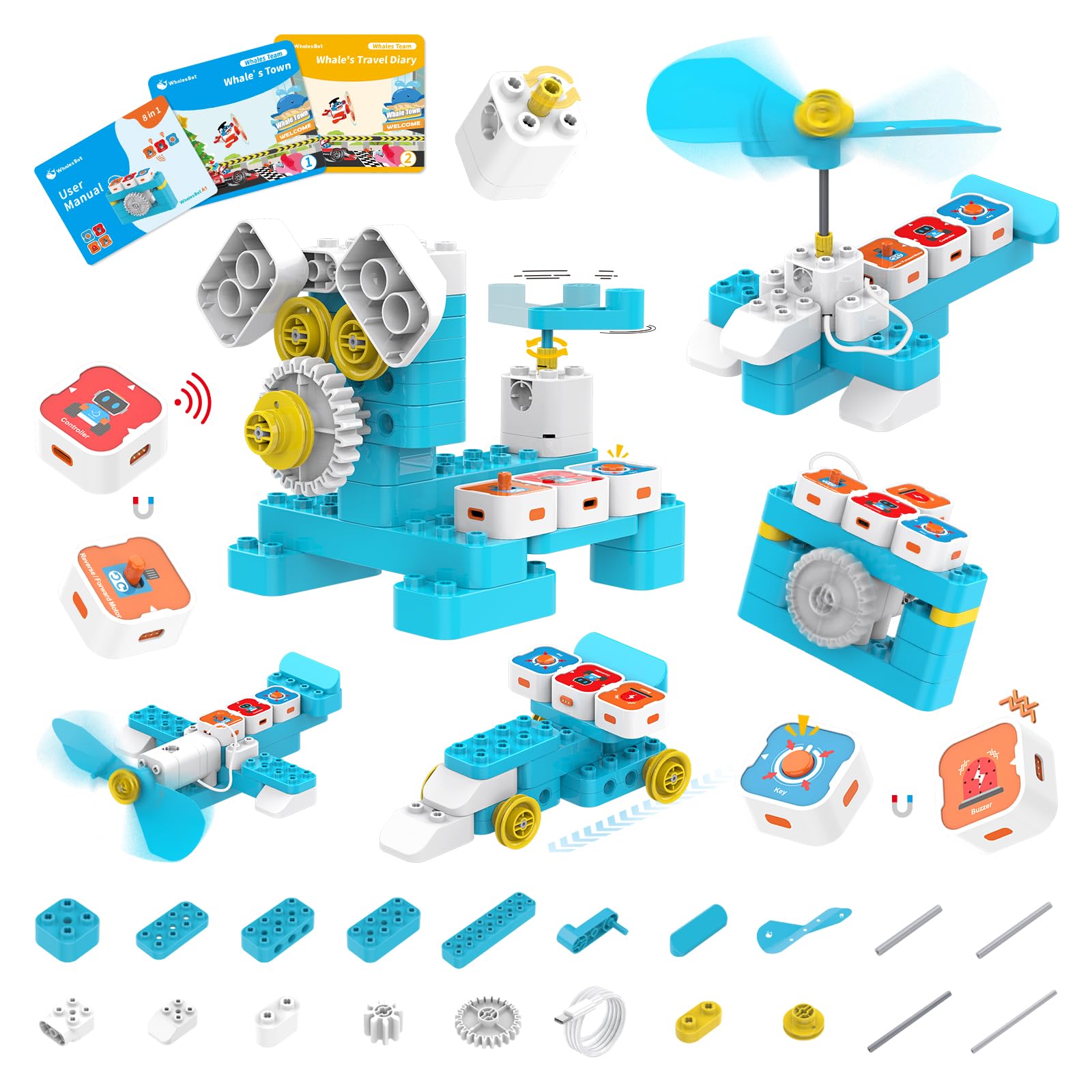
WhalesBot A1 swaps buttons and cards for magnetic coding modules — toddlers snap together a controller, actuator, and sensor blocks to make their creation move. It’s an 8-in-1 STEM robot, meaning one box builds eight different shapes, which stretches the play value well past the first afternoon.
Inside the box you get 37 structural components, 4 electronic components, 2 storybooks, and a user guide. The three-step quick start is designed for tiny hands, and the rounded-corner blocks are made from high-quality plastic with safety built in. The storybook format keeps a 3-year-old engaged while the construction quietly builds logical thinking — parents note it’s fun for adults and kids to play together, and even a 9-year-old and a 3-year-old can play it side by side.
This pick shines for the tactile, build-first crowd, and families report pulling kids away from video games for hours of combined building and play. The recurring gripe is the buzzer — it sounds continuously until the button or sensor is released, which gets annoying fast. The price also sits at the premium edge of this list for what is functionally lights and a buzzer, and the limited connection points mean some kids may lose interest once they’ve built all eight forms.
Built for Little Builders
- Magnetic modules need no dexterity — snap and go
- 8-in-1 design offers eight build projects
- 37 structural parts give real construction depth
- Storybooks guide play without a screen
Two Things to Weigh
- Buzzer runs until released — loud in a quiet room
- Limited connections may bore faster than pricier kits
Best for: the 3-to-4-year-old who would rather snap blocks together than watch anything move on its own.
Think twice if: you want a toy with audio variety — this one leans hard on its buzzer.
4. Sphero indi At-Home Learning Kit

The color-card robot that lets kids design their own mazes before they can even read.
Sphero indi reads colored cards with an on-board color sensor — place a purple card and it turns, a green card and it goes — so a 4-year-old learns cause and effect and pattern recognition with zero reading skills required. The open-ended format lets kids build custom mazes and watch indi navigate them, which is why families report 3-plus hours of independent play on the very first day.
The known weak point is the color cards themselves: they tend to bend easily, which some parents flag as a baby hazard around younger siblings, and kids need trial-and-error to figure out the right card spacing. The movement can also get stuck on carpet, so a hard floor works best. It’s a more expensive entry than the button-based options, but the open-ended maze design gives it far more replay value than a single programmed path.
Standout feature: the on-board color sensor teaches direction and sequencing purely through physical cards — the closest thing to real programming logic a pre-reader can grasp.
Who it’s not for: families with a baby sibling who mouths everything, given the bendable card edges.
5. Learning Resources Coding Critters Rumble & Bumble

Adorable dinosaur robots that hide programming lessons inside a storybook adventure kids actually want to finish.
Rumble and Bumble are two interactive dinosaurs that follow button-press commands — a 4-year-old “programs” Rumble to navigate obstacle courses built from the 23-piece pet playset, complete with a coding storybook that frames each challenge as a dino rescue. It’s the gentlest possible introduction to sequencing and directional thinking, disguised entirely as imaginative pet play.
Playability is the thing everyone raves about — kids set up obstacle courses and then program Rumble to follow directions, and the directional buttons double as a dance and pet-play mode that keeps younger toddlers entertained even before they grasp the coding concept. Families report it’s still in rotation years after the initial purchase, and the simple buttons make it easy enough for a 4-year-old to use independently while staying challenging enough to hold a 5-year-old’s interest.
One grandson’s grandmother summed it up: she loves watching his mind work while he has fun. The mixed reviews land on quality and ease of use — some families find it simple, others say it’s tough to figure out how to play without the guide, and the small pieces can get lost easily. It works from the start with batteries included, and the storybook format makes it a strong choice for teachers or homeschool families.
What Kids Love
- Dinosaur theme beats generic robots for this age
- Storybook turns coding into a narrative mission
- Dance mode entertains even before coding clicks
- Encourages teamwork and turn-taking
What Grownups Notice
- Small pieces are easy to lose
- Instructions could be clearer for first-time play
Pick this if: your child is dino-obsessed and responds to stories more than screens or blocks.
The limitation: it’s a gentler, younger-feeling entry than the train or Sphero options — less room to grow.
6. Learning Resources Code & Go Robot Mouse

The tiny mouse that teaches real sequencing logic with nothing but arrow buttons and 30 double-sided cards.
Code & Go Robot Mouse strips coding down to its purest form: press forward, turn, and go buttons to program the mouse along a path, using the 30 double-sided coding cards to plan your route first. It’s the most literal “write a program, then run it” experience on this list, and it works entirely screen-free — a strength for families who want zero app attachments.
The rechargeable lithium-ion battery means no hunting for AAAs, and the included USB charging cord plus Activity Guide make it classroom-friendly. Parents call it very beginner-friendly — one 5-year-old who wants to be an engineer loved it as a gift. Suitable for beginners is the top praise in the data, and it doubles as a replacement or add-on for existing Code & Go activity sets in classrooms or homeschool settings.
Where it stumbles is depth and durability. Some kids report boredom after a few minutes because the functions are limited, and one family found the battery only lasted about an hour of use. The card set is also short for building longer obstacle courses — though parents solved that by making extra cards from index cards. It’s a true entry-level toy, not a toy that grows with your child for years.
The strength: the most direct introduction to sequencing logic available — plan, press, watch, and debug.
The ceiling: limited functions and short battery life mean it’s best as a first coding toy, not a long-term companion.
7. great dachong RC Robot
The chatty, dancing robot that delivers coding basics wrapped in a light show kids can’t resist.
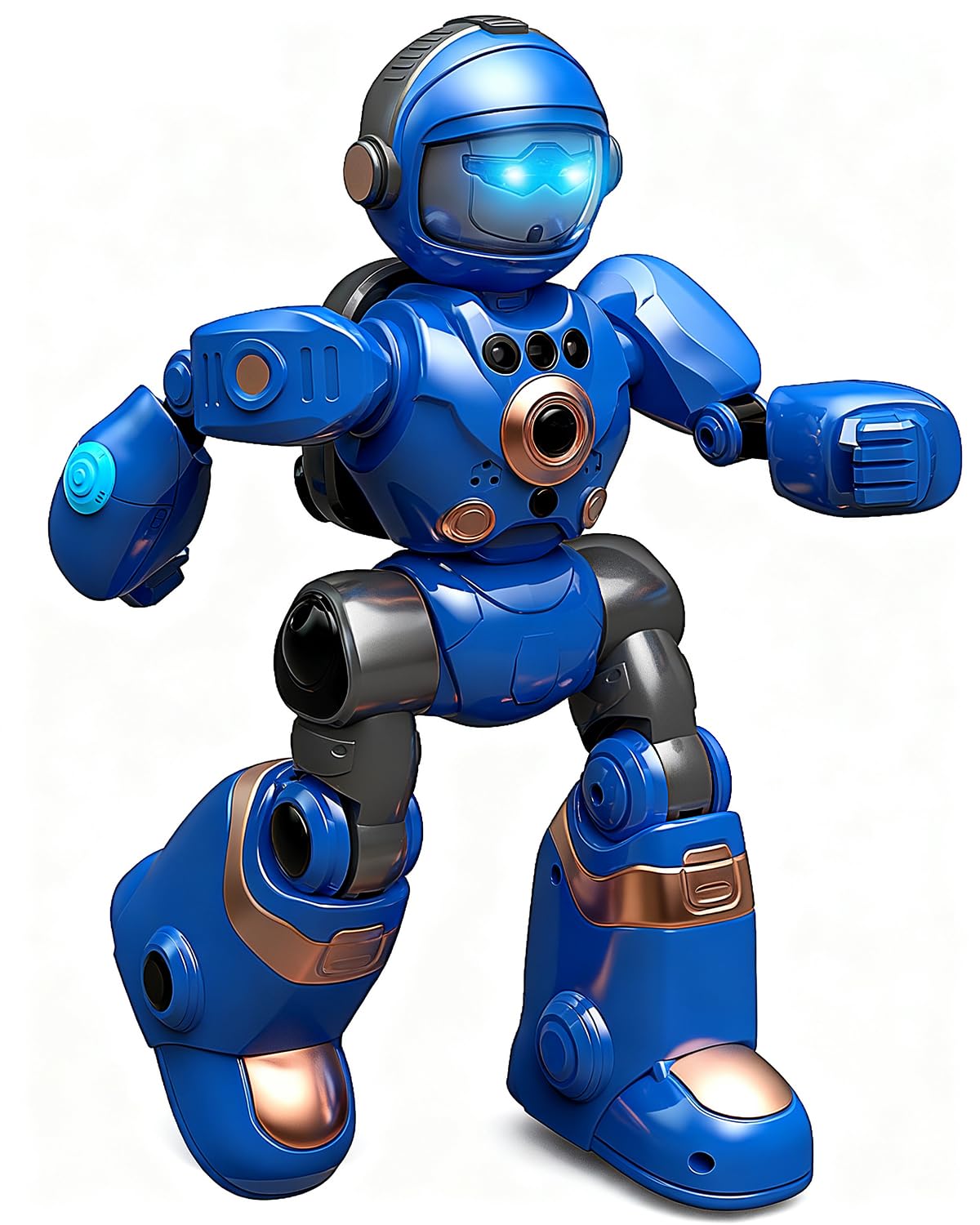
This robot (6 x 3 x 10 inches) is less about formal programming and more about playful interaction — it talks, records and repeats voices with 4 hilarious voice-changing effects, sings, dances with flashing LED lights, and responds to gesture control alongside the remote. For a 3-year-old, the cause-and-effect lesson comes from watching their hand-wave or button-press trigger immediate movement, sound, and light.
The 60-minute runtime per charge with auto-sleep and low-battery protection makes it safe for unsupervised play, and the built-for-kids plastic is sturdy enough that owners mention it survives drops. It’s a space-warrior design that works as a birthday or holiday gift, and the entertainment value is the clear highlight — kids get pulled off screens and stay engaged for long periods. The remote control is easy enough for small hands to master.
The honest caveat is the voice control: it’s unreliable with a child’s voice, so don’t buy this expecting the voice-command feature to work consistently. And it charges only with the original cable, not a standard Type-C, which is a minor annoyance if that cable gets lost. It’s the purest entertainment option here — the coding is incidental, the fun is the point.
Party in a Robot
- Voice recording with 4 funny effects sparks imagination
- 60-minute runtime with auto-sleep protection
- Sturdy enough to survive toddler drops
- Gesture control adds a second way to play
Manage Expectations
- Voice control struggles with high-pitched kid voices
- Only charges with the included cable
Choose this if: you want maximum giggle factor and screen-free entertainment over structured learning.
skip it if: you specifically want sequenced programming logic — this is a toy first, coding lesson second.
8. LEXiBOOK Powerman Jr Smart Robot
The speaking robot that plays 20 Questions with animals and records your child’s voice for instant replay.
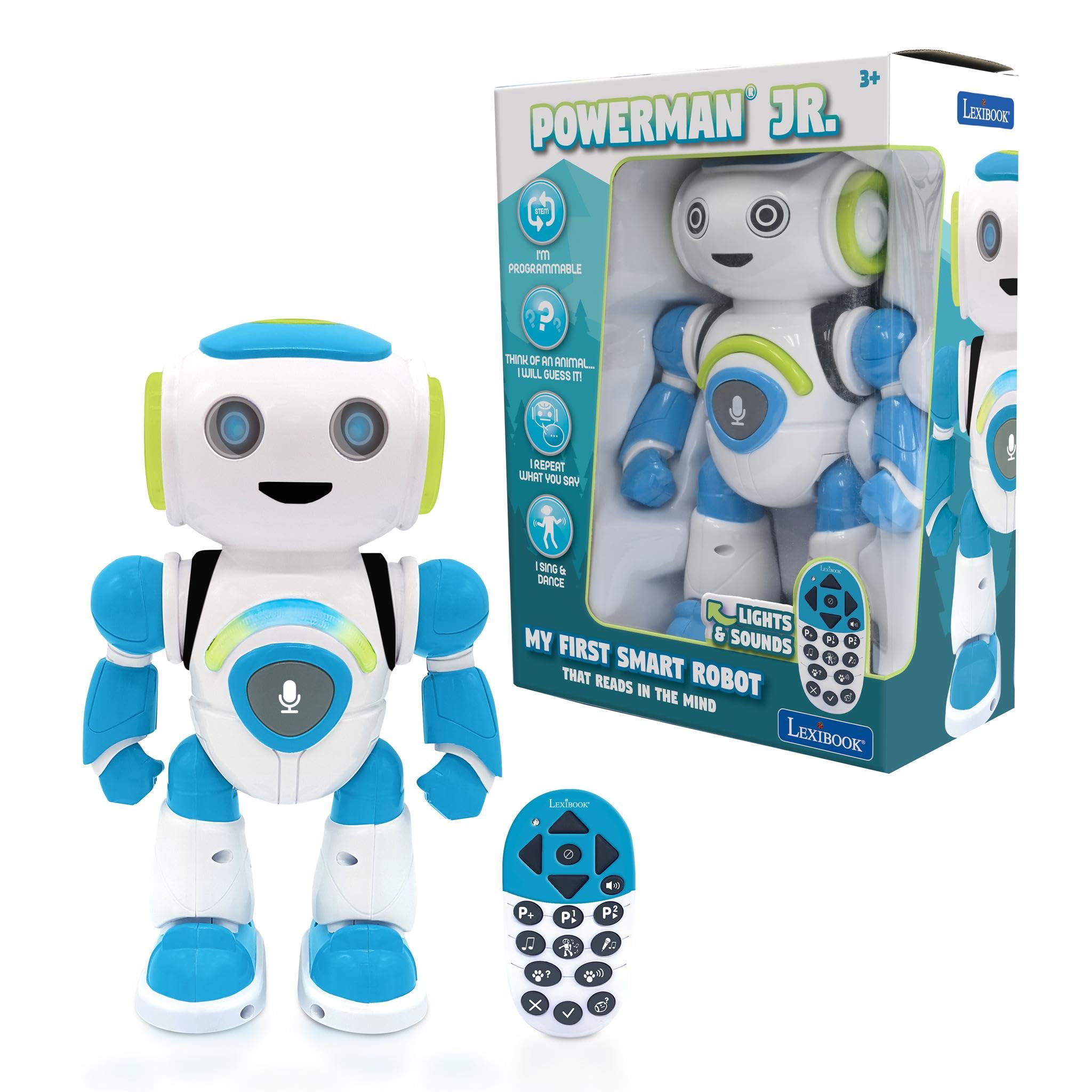
Powerman Jr (6.26 x 3.39 x 9.65 inches, 14.08 ounces) puts a different kind of thinking to work: an animal-guessing mode where your child thinks of a unicorn, llama, or sloth, answers Yes/No/I don’t know, and Powerman tries to guess it. It’s deductive reasoning — a real pre-coding skill — wrapped in a game that 3-year-olds actually understand.
The programmable mode lets kids program up to 40 actions with added music to create dances and choreographies the robot memorizes, and the playback and recording function repeats whatever your child says in a funny robot voice, including a karaoke feature. The remote control handles forward, backward, and side-to-side movement. It teaches animals, programming, language development, and natural world knowledge, all in one.
Quality and cuteness are the twin standouts — the robot is sturdy enough that a 3-year-old still plays with it months later, and kids love the voice recorder button on the chest. The catch: responses are a little slow, and the singing and dancing don’t happen simultaneously as some buyers expected. One family found the 20 Questions feature limited and returned it, so the guessing game is best treated as a fun extra, not the main event.
What stands out: the 40-action programmable chaining is real coding practice — sequence steps, add music, and watch the robot perform your routine.
Who might pass: families who want instant, snappy response times — this robot thinks before it answers.
Understanding the Specs
Sequencing vs. Cause and Effect
Sequencing means arranging steps in order — press forward, turn, go — which is the core of programming. Some toys teach this directly (the robot mouse, the smart train), while others teach simpler cause-and-effect — if I put a color card down, the robot turns. Both are valuable; sequencing is the more advanced skill.
Screen-Free Coding Modes
Screen-free coding uses physical objects — colored tiles, magnetic blocks, or button presses — instead of a tablet or computer. This matters for preschoolers because it builds motor skills alongside logic, and it keeps them off screens. Some toys add an optional app for older kids, which extends the toy’s life without forcing screen time on a 3-year-old.
FAQ
At what age can a child start using coding toys?
Should I choose a screen-free toy or an app-based one for my preschooler?
Will the intelino Smart Train work with my child’s existing wooden tracks?
How long does the battery last on these coding toys?
What is the difference between the Learning Resources Robot Mouse and the Coding Critters dinosaurs?
Is the Sphero indi really screen-free, or does it need an app?
Which toy offers the most room to grow as my child gets older?
Can these coding toys be used in a classroom or homeschool setting?
Final Thoughts: The Verdict
For the majority of shoppers, the coding toys for preschoolers winner is the intelino Smart Train because it’s the only option that grows from color-tile simplicity for a 3-year-old all the way to Python for a school-age child. If you want creative, art-based sequencing on a budget, grab the QIBOX Drawing Robot. And for hands-on builders who learn by snapping blocks together, the WhalesBot A1 is the one to reach for.
How We Picked
We do not accept paid placement. Every pick is matched to a real buyer and a real use-case; we do not hands-on test units.
Sources & Methodology
Specifications: manufacturer listings and product documentation. Review insights: verified customer reviews, as of August 2026. Pricing: not shown on this page (it changes often); check the current price via the retailer link.
As an Amazon Associate, FitlyFast earns from qualifying purchases. This does not affect which products we feature.