
Our readers keep the lights on and the weekend projects moving. As an Amazon Associate, I earn from qualifying purchases.
Specs are compiled from manufacturer listings and verified buyer reviews and can change over time — please confirm the key details on the product page before buying.
Before you buy RAM, you need to know one thing: will the stick fit and run in your machine? A 32GB kit looks tempting, but if your motherboard only supports DDR4, a shiny new DDR5 won’t even slot in. You’ll learn the real differences between memory generations, speeds, and form factors, then see top picks so you can upgrade with confidence.
I’m Rikta — the founder and writer behind FitlyFast. This guide is built by comparing the manufacturers’ published specifications and the patterns across verified customer reviews, so you get each pick’s real strengths and trade-offs instead of marketing spin.
Whether you’re building fresh or reviving an older PC, finding the best computer ram for your needs starts with matching the right generation, speed, and physical size to your specific motherboard.
Our Picks at a Glance


How To Choose The Best Computer RAM
Picking the right memory starts with your motherboard, not the shopping page. The single most common mistake is buying the newest generation without checking if your board’s memory slots and chipset can even use it.
Match the Generation First
Your motherboard only accepts one generation of memory — DDR3, DDR4, or DDR5. They are physically notched differently, so a DDR4 stick will not fit into a DDR5 slot, and vice versa. Check your motherboard or laptop model online to confirm which one it takes before you spend a cent.
Desktop Stick or Laptop Stick?
Desktop boards use long DIMM sticks, while laptops and small-form-factor machines use shorter SODIMM sticks. They are not cross-compatible, so a laptop upgrade demands a SODIMM module regardless of the brand or speed.
Speed and Latency Are a Pair
A higher speed number like 3200MHz sounds better, but your system may only run it at a slower supported speed. Latency (the CL number) matters for responsiveness too, and lower CL is generally faster at the same speed — it’s a balance, not a single number.
Quick Comparison
| Model | Best For | Capacity | Speed | Form Factor | Amazon |
|---|---|---|---|---|---|
| CORSAIR Vengeance LPX★ Best Overall | High-speed desktop build | 32GB (2x16GB) | 3200 MHz | DIMM | Amazon |
| Silicon Power DDR4 16GBBudget Champion | Budget desktop upgrade | 16GB (2x8GB) | 3200 MHz | DIMM | Amazon |
| Timetec 32GB DDR3Compact Pick | Reviving old DDR3 builds | 32GB (4x8GB) | 1600 MHz | DIMM | Amazon |
| A-Tech 8GB DDR4 | Cheap single-stick fix | 8GB | 2400 MHz | DIMM | Amazon |
| Crucial 16GB DDR4 | Laptop RAM upgrade | 16GB | 3200 MHz | SODIMM | Amazon |
| Samsung 16GB DDR4 | Reliable laptop upgrade | 16GB | 3200 MHz | SODIMM | Amazon |
| Timetec 32GB DDR4 | High-capacity DDR4 desktop | 32GB (2x16GB) | 2666 MHz | DIMM | Amazon |
| G.SKILL RipjawsV 32GB | Enthusiast DDR4 build | 32GB (2x16GB) | 3600 MHz | DIMM | Amazon |
| G.SKILL Flare X5 32GB | Latest DDR5 platform | 32GB (2x16GB) | 6000 MHz | DIMM | Amazon |
In‑Depth Reviews
1. CORSAIR Vengeance LPX DDR4 RAM 32GB (2x16GB)
Our pick — over 4.5★ from 20,000+ verified ratings; the strongest balance of quality and price.
The crowd favorite that clears even the bulkiest CPU coolers while running fast enough to feel instant.
The defining trait here is the low-profile design — at just 34mm tall, this kit slips under large tower coolers that would block taller memory. That clearance matters for a clean build, and it pairs with a solid aluminum heatspreader that keeps each module cool at high clock speeds.
Performance is where this kit wins owners over: it’s rated for 3200 MHz at a tight CL16-20-20-38 timing, and buyers report it works at that speed with XMP (a one-click BIOS setting) and even overclocks beyond it. The hand-sorted chips give it generous headroom, and the quality earns the most praise of any aspect by a wide margin — far more owners single out the build quality than anything else.
Compatibility is broad across Intel and AMD DDR4 boards, and install is genuinely plug-and-play. Owners mention the kit solved BSOD errors on prebuilt rigs, dropping RAM usage from 99% to 42% under load on a 2018 system. The catch: it’s a plain black kit with no RGB, so if flashy lighting matters, look elsewhere.
Why owners stick with it
- Low 34mm height clears large coolers
- CL16 timing for snappy response at 3200 MHz
- Easy install and stable once seated properly
- Hand-sorted chips for overclocking headroom
The trade-offs
- No RGB lighting for showy builds
- Max speed needs XMP enabled in BIOS
- Sticks need a firm press to click fully in
Reach for this if: you want a reliable, fast 32GB desktop kit that fits under big coolers and works on Intel and AMD boards alike.
Look elsewhere if: you need flashy RGB aesthetics, or your system is an older DDR3 platform that won’t accept DDR4 at all.
2. Silicon Power 16GB Kit (2x8GB) DDR4 3200MHz
A no-fuss 16GB kit that hits its rated speed without you touching a single BIOS setting.
The standout practical feature here is that this memory runs at its full 3200 MT/s by default, with buyers noting it works straight from the start at that speed without enabling XMP. That’s rare for value-tier memory, and it makes this kit a genuine set-and-forget upgrade.
It runs on a low 1.2V for less power draw and carries a lifetime warranty, which explains why performance and build quality are the two aspects owners praise most. One buyer compared it directly to a pricier rival, noting that cheaper option fixed what multiple orders of the other brand couldn’t — a broken stick on arrival.
Real-world use holds up: customers note it revived an older build for gaming, and one used it to generate Minecraft servers without system lag. The honest caveat is that it’s not built for overclocking beyond its rating, and one owner saw a stick fail after about a month — though the lifetime warranty RMA was straightforward.
Best for value hunters: this is the budget-friendly pick for a 16GB desktop upgrade where you want the advertised speed without BIOS fiddling. The warranty backs it, and the occasional faulty stick is covered by a simple replacement process.
3. Timetec 32GB Kit (4x8GB) DDR3L / DDR3 1600MHz
The only real way to pump an aging DDR3 desktop to a full 32GB without swapping the whole platform.
This kit is for older Intel and AMD boards that only accept DDR3 memory, and it’s a dual-voltage module that runs at either 1.35V or 1.5V, so it works in most DDR3 desktops. At 1600 MHz with CL11 timing, it’s not chasing speed records, but that’s not the point — the point is capacity.
Reviewers point out it passed memtest at 100% on an aging board and recognized the full 32GB instantly, handling four displays, virtual machines, Android coding, games, and streaming all at once without hanging. That’s a workload that would choke an 8GB DDR3 system. The functionality and memory quality are what owners praise most, and the lifetime warranty gives some safety net.
The trade-off is honest: DDR3 is three generations old, so it runs at 1600 MHz — half the speed of the 3200 MHz DDR4 kits in this list. A buyer report noted the PCB color varies between black and green by production batch, which is cosmetic only. And the memory-life feedback is mixed, so the occasional dead unit does appear, though support responds quickly.
For DDR3 owners only: this is the sensible high-capacity upgrade for a desktop you want to keep running for a few more years, not a speed play.
Not for you if: your board takes DDR4, since this physically won’t fit — check your slot type before ordering.
4. Crucial 16GB DDR4 3200MHz SODIMM Laptop Memory

The laptop stick that turns a sluggish older notebook into a snappy daily driver for under a fraction of a new machine.
This 16GB SODIMM is the go-to for laptop owners who want a meaningful upgrade without buying a new computer. It’s a 260-pin module running at 3200 MHz, and it’s compatible with 13th Gen Intel Core and AMD Ryzen 7000 laptops, plus older DDR4 machines that support the speed.
Shoppers say installs taking about five minutes with immediate system recognition and no crashes. One upgraded a laptop from 8GB to 24GB using the extra slot and called it plug-and-play with an old Dell, and another noted applications booting quickly after the swap. The reliability and memory quality are the two aspects that earn the most praise.
The smart angle here is the Crucial System Scanner — a free tool that tells you exactly which module fits your specific laptop, removing the guesswork. Compared to the Samsung SODIMM below, this one carries the same 3200 MHz speed but adds that compatibility checker. The honest catch: it’s not flashy, and performance depends on your laptop’s maximum supported speed.
The dependable choice: for laptop owners who want an easy, guaranteed-fit upgrade, this is the one to reach for — the scanner alone saves you from buying the wrong stick.
5. Samsung 16GB DDR4 3200MHz SODIMM Laptop RAM

OEM-grade reliability in a 16GB laptop stick that owners say matches the original RAM in their machines.
This is a 16GB SODIMM running at 3200 MHz with a CL22 latency, built as a dual-rank (2Rx8) module at the standard 1.2V DDR4 voltage. For laptops that shipped with Samsung OEM memory — which is a huge share of the market — this is effectively a drop-in match for what’s already inside.
Owners confirmed that compatibility directly, noting their OEM 8GB RAM was made by Samsung as well, and the upgrade to 24GB by adding this stick started up with no problems. Another called it a perfect fit for an HP Pavilion Gaming Laptop. Reliability is the aspect owners praise most by a wide margin, which is exactly what you want from a component that stays on 24/7.
At 3200 MHz it matches the Crucial SODIMM above for speed, but the trust factor is the differentiator — Samsung is the memory manufacturer behind many laptops, so compatibility rarely surprises. The catch is it’s a single 16GB module, so if your laptop has one slot, that’s your ceiling.
Grab this if: you want an OEM-grade 16GB laptop upgrade from the memory maker many laptops already use.
Think twice if: your laptop’s max supported speed is lower than 3200 MHz, since it will just run at the slower speed.
6. Timetec 32GB Kit (2x16GB) DDR4 2666MHz Desktop RAM
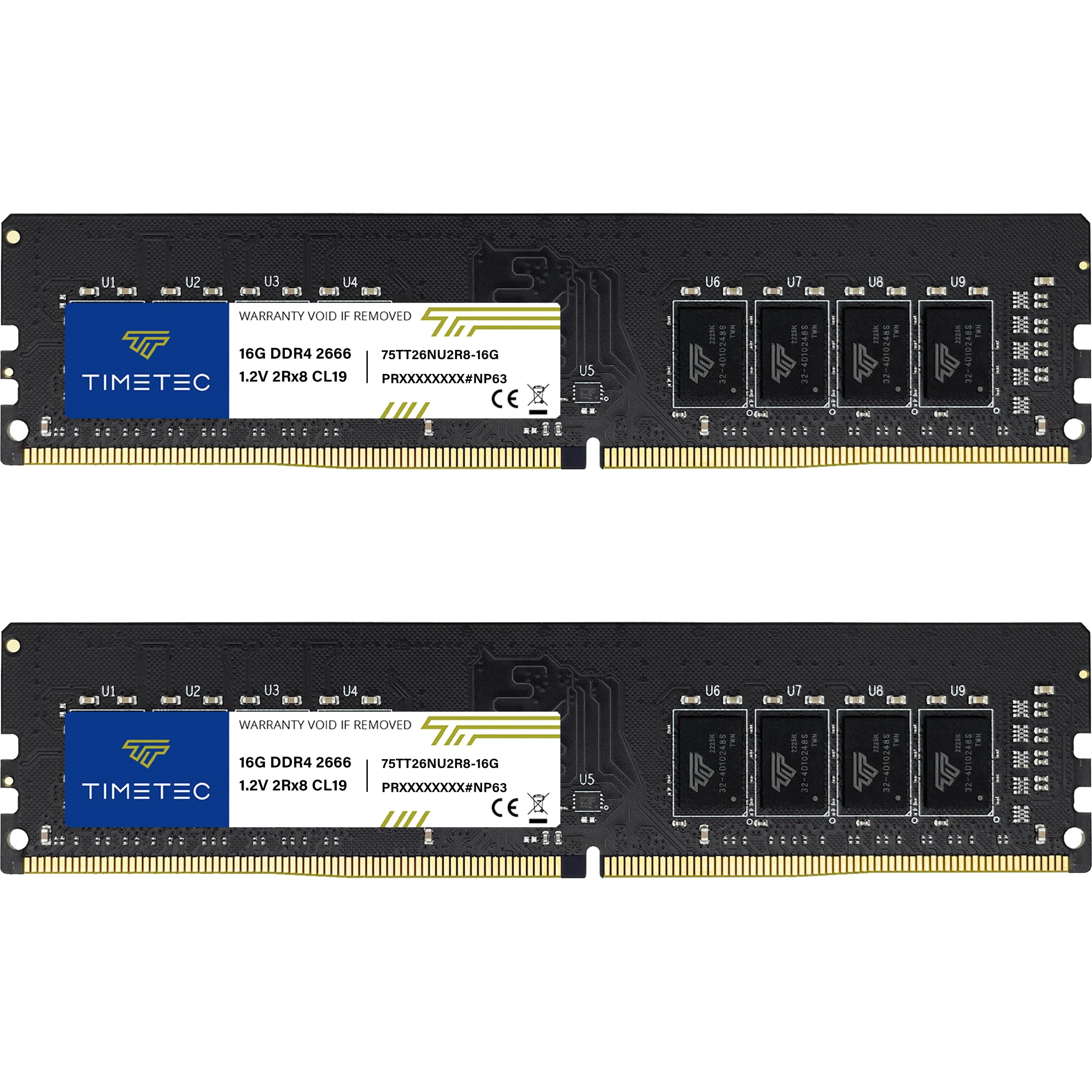
A 32GB desktop kit that plugs in, boots, and runs at its rated 2666 MHz with zero configuration fuss.
This is the high-capacity DDR4 option for desktops and workstations that support 288-pin UDIMM memory. It’s a 32GB kit made of two 16GB modules, dual-rank (2Rx8) at 1.2V, and it’s explicitly not compatible with laptop SODIMM slots — a clear warning that saves beginners from a bad purchase.
Buyers report it works great in a Dell 3070 i5 9500 running Windows 11 Pro, and the same user noted it should work across most Dell models using DDR4 2666. Another called it an immediate performance boost with lag-free gaming and instant BIOS recognition in under a minute of install time. Memory quality and value for money are the two aspects owners praise most, with installation close behind.
Compared to the CORSAIR kit at the top, this runs at 2666 MHz rather than 3200 MHz — a real speed gap, but one that matches what many office and prebuilt systems support anyway. The reliability feedback is mixed, with some owners experiencing crashes, so it’s worth a memory test after install. The black PCB looks clean, and the lifetime warranty is a solid safety net.
What earns the praise
- Plug-and-play with instant BIOS recognition
- Dual-rank modules for better performance
- Good value for a full 32GB desktop kit
- Clear compatibility warning for laptop users
Honest limitations
- Slower 2666 MHz ceiling than 3200 MHz kits
- Mixed reliability reports — test after install
- Not for laptops or SODIMM slots
Pick this for: a spacious DDR4 desktop upgrade where the motherboard’s max speed is 2666 MHz anyway.
Skip if: you want the fastest possible DDR4, since the CORSAIR kit at 3200 MHz beats it on raw speed.
7. G.SKILL RipjawsV 32GB (2x16GB) DDR4 3600MT/s

For enthusiasts on DDR4, this kit hits 3600 MT/s (megatransfers per second, a speed measure) — the balance most AMD and Intel gaming boards love.
This 32GB kit runs at 3600 MT/s with CL18-22-22-42 timings at 1.35V, which is the performance tier that gaming builds tend to favor. It’s a black, no-RGB kit with a heat spreader, fitting AM4 boards perfectly according to owners, and carrying both a JEDEC default profile and an Intel XMP overclock profile.
The memory quality and speed are what owners praise most, and the install is easy. Note that reaching 3600 MT/s requires enabling XMP in BIOS — it boots at a slower default speed otherwise.
Compared to the CORSAIR kit at the top, this runs faster at 3600 MT/s versus 3200 MHz, but the CORSAIR carries the lower CL16 latency. The honest warning from the maker is clear: don’t mix memory kits, as that causes stability issues. And one owner saw a stick die after about a year, though the warranty covers it.
For the performance-first builder: this is the DDR4 kit to grab when you want the higher 3600 MT/s speed and are comfortable enabling XMP to get it. A tall heat spreader means checking case clearance with very large coolers.
8. G.SKILL Flare X5 32GB (2x16GB) DDR5 6000MT/s

The only DDR5 pick here, built for the newest AMD and Intel platforms at a blistering 6000 MT/s.
This is the current-generation memory, running at 6000 MT/s with CL36-36-36-96 timings at 1.35V, and it’s designed specifically for modern platforms like Intel Z790/Z690 and AMD X670/B650. It’s a 32GB kit of two 16GB modules, non-ECC, in the standard 288-pin U-DIMM size for desktops.
Owners mention it works flawlessly with an MSI B650 and Ryzen 7800X3D build, and pairs well with a Ryzen 5 9600X. The memory quality is the aspect owners praise most by far. A crucial setup note: you must enable EXPO in BIOS for AMD or XMP 3.0 for Intel to hit the full 6000 MT/s — with XMP only, one owner noted it caps at 4200 MT/s.
The honest complexity: some new builds needed a BIOS update before the system would even power on properly, showing a red light until updated. The value feedback is mixed too — owners love the performance but note DDR5 pricing is premium. If your board is a few generations old, it won’t accept DDR5 at all, so this is strictly for new platforms.
Why it leads the pack
- Fastest speed here at 6000 MT/s
- Supports both AMD EXPO and Intel XMP 3.0
- Solid build with no cooling issues reported
- Matte black finish for clean builds
The setup reality
- May need a BIOS update on new builds
- Requires EXPO or XMP enabled for full speed
- Premium DDR5 pricing draws mixed value feedback
Go here if: you’re building on a modern DDR5 platform and want the fastest, most future-proof memory in this list. The performance is exceptional.
Hold off if: your board is DDR4-only, or you’re not comfortable changing BIOS settings like EXPO — this stick needs that step to shine.
9. A-Tech 8GB DDR4 2400 MHz UDIMM Desktop RAM

The cheapest way to give an older DDR4 desktop a second wind, one 8GB stick at a time.
This is an entry-level single 8GB DDR4 module at 2400 MHz with CL17 latency, built on the standard 288-pin UDIMM for desktops and workstations. It’s non-ECC and unbuffered, running at the JEDEC standard 1.2V, which means it works in nearly any DDR4 desktop that supports the speed.
Customers note it was easy to install in a son’s gaming PC with no problems. One described going from a single 4GB DIMM (a memory module) to 16GB total — a fourfold jump in capacity, a 4.0x gap over the original 4GB stick. That upgrade transforms a machine that struggled to open a browser. Memory quality and performance are the two aspects owners praise most.
A-Tech backs it with a lifetime warranty and a tech support team available before and after purchase. The honest limits: at 2400 MHz it’s slower than the 3200 MHz kits here, and the install isn’t universal — one owner noted it depends on the internal layout of the computer. For a budget-friendly single-stick fix, it does exactly what it promises.
For the tinkerer on a budget: this 8GB stick is a low-risk way to double or quadruple an old desktop’s memory without overspending. Just confirm your motherboard supports 2400 MHz DDR4 first.
Understanding the Specs
DDR3 vs DDR4 vs DDR5
These are the generations of memory, and they are not cross-compatible. DDR3 is the oldest here, running at 1600 MHz. DDR4 is the current mainstream standard at 2400–3600 MHz. DDR5 is the newest, hitting 6000 MT/s. Check your motherboard’s spec sheet to know which one it takes.
CAS Latency (CL)
This is the delay in clock cycles before the memory responds to a request. Lower CL means faster response at the same speed. A 3200 MHz kit with CL16 is snappier than one with CL22, which is why the CORSAIR kit pairs its speed with a tighter CL16.
FAQ
Will DDR5 RAM fit in a DDR4 motherboard slot?
What is the difference between a DIMM and a SODIMM stick?
Does a higher MHz speed always mean faster performance?
What does enabling XMP or EXPO actually do?
How much RAM do I really need in a new computer?
Can I mix different brands or speeds of RAM in one system?
Is RAM with a heat spreader necessary for a normal desktop build?
How do I check what RAM my laptop or desktop supports?
What does dual rank (2Rx8) mean for performance?
Is it worth upgrading an old DDR3 system with more RAM?
Final Thoughts: The Verdict
Across the board, the computer ram winner is the CORSAIR Vengeance LPX 32GB because it pairs strong 3200 MHz speed with a low-profile design that fits any build. If you want the fastest DDR4, grab the G.SKILL RipjawsV at 3600 MT/s. And for a modern DDR5 platform, the G.SKILL Flare X5 at 6000 MT/s is the one to reach for — just be ready to enable EXPO in BIOS to open up its full speed.
How We Picked
We do not accept paid placement. Every pick is matched to a real buyer and a real use-case; we do not hands-on test units.
Sources & Methodology
Specifications: manufacturer listings and product documentation. Review insights: verified customer reviews, as of August 2026. Pricing: not shown on this page (it changes often); check the current price via the retailer link.
As an Amazon Associate, FitlyFast earns from qualifying purchases. This does not affect which products we feature.