
Our readers keep the lights on and the weekend projects moving. As an Amazon Associate, I earn from qualifying purchases.
Specs are compiled from manufacturer listings and verified buyer reviews and can change over time — please confirm the key details on the product page before buying.
VTubing boils down to one make-or-break job: keeping your real face perfectly synced to your animated avatar so the character feels alive. This guide compares 9 of the strongest options specifically for that use, from pro mirrorless bodies to AI-tracking webcams built for streamers.
I’m Rikta — the founder and writer behind FitlyFast. This guide is built by comparing the manufacturers’ published specifications and the patterns across verified customer reviews, so you get each pick’s real strengths and trade-offs instead of marketing spin.
Whether you’re starting out or upgrading, this breakdown covers the best cameras for VTubing performance and value.
Our Picks at a Glance


How To Choose The Best Camera For VTubing
Your avatar can only be as expressive as the video feed feeding it. If the camera loses your face, drops frames, or looks grainy, your character stutters and blurs. Focus on four things first: tracking, frame rate, light sensitivity, and how the camera connects to your streaming software.
Tracking: The Core of the Hobby
VTuber software like VSeeFace or Warudo maps your facial landmarks onto a 3D model. A camera with reliable autofocus and face detection keeps those landmarks locked so your avatar’s mouth and eyes move naturally. Some AI webcams physically pan and tilt to keep you centered if you lean or stand — handy if you want to move while streaming.
Frame Rate and Resolution Together
Your avatar moves as smoothly as your camera’s frame rate allows. Aim for 60fps (frames per second) at 1080p resolution — that’s the balance that captures subtle head tilts and blinks without choppiness. Even if a camera advertises 4K, most streaming software compresses the feed anyway, so a clean 1080p signal often performs better than a heavy 4K one.
Low-Light Performance
Most streamers don’t run a full studio light rig right away. A larger sensor lets in more light, which means less digital noise (grain) on your face and a cleaner tracking signal. If you stream at night in a dim room, a webcam with a big sensor or a camera with a wide ISO range will save your stream quality.
Quick Comparison
| Model | Best For | Resolution | Max Frame Rate | Key Tracking Feature | Amazon |
|---|---|---|---|---|---|
| Canon EOS R6 Mark II★ Best Overall | Pro quality with face/eye AF | 24.2MP Full-Frame | 180 fps (Full HD) | Head, Face, Eye Detection | Amazon |
| OBSBOT Meet 2Budget Champion | Budget AI framing | 4K UHD | 60 fps (1080p) | AI Framing & Gesture Control | Amazon |
| EMEET PIXYMost Versatile | Full-body movement tracking | 4K UHD | 60 fps (1080p) | 3-chip AI Tracking (310° pan) | Amazon |
| Elgato Facecam 4K | Sharp, true 4K60 image | 4K UHD | 60 fps (4K) | DSLR-like manual control | Amazon |
| YOLOLIV YoloCam S3 | Large-sensor low light | 4K UHD | 60 fps (1080p) | PDAF Autofocus | Amazon |
| Insta360 Link 2 Pro | Physical pan/tilt tracking | 4K UHD | 60 fps | AI Tracking PTZ Gimbal | Amazon |
| OBSBOT Tiny 3 | Versatile AI + spatial audio | 4K UHD | 120 fps (1080p) | AI Tracking 2.0 + Voice Control | Amazon |
| Sony ZV-E10 | Compact mirrorless versatility | 24.2MP APS-C | 4K 30 fps | Real-time Eye AF | Amazon |
| Canon EOS R7 | Hybrid photo/video creators | 32.5MP APS-C | 30 fps (Electronic) | Dual Pixel CMOS AF (651 zones) | Amazon |
In-Depth Reviews
1. Canon EOS R6 Mark II Mirrorless Camera (Body Only)
Our pick — over 4.5★ from 600+ verified ratings; the strongest balance of quality and price.
Unrivaled eye-lock precision that keeps your avatar expressive even in near-darkness.
This is the gold standard if you want the absolute best facial capture for your VTuber model. The advanced head, face, and eye detection can lock onto your left or right eye individually, which gives tracking software a rock-solid reference point — your avatar’s gaze will feel alive. It uses a 24.2 effective megapixel full-frame CMOS sensor, so it captures sharp detail even in dark rooms where lesser cameras turn to static.
The crowd favorite — 4.7 stars across 600+ owners — wins people over with its insane low-light ability and far superior autofocus compared to typical streaming gear. Owners say it pulls images out of darkness “like sunset” and that its AF is the best they’ve used for keeping subjects crisp. For VTubing, that translates to clean, grain-free face tracking on a budget-friendly lighting setup.
The trade-off is battery life, which buyers describe as poor — a few hundred shots means you’ll want spares or a dummy battery for long streams. It also records 6K oversampled uncropped 4K movies up to 60 fps, so you have plenty of resolution headroom. The 8-stop image stabilization (IBIS, which steadies the sensor itself) means you can stream handheld without shakiness.
Why It Leads for VTubing
- Head, face, and eye detection tracks your expressions precisely
- Excels in low light, so your avatar stays clean without a big studio light rig
- Records up to 180 fps Full-HD slow motion for content beyond live streams
What to Budget Around
- Battery life is short — buy spares or a dummy battery for long streams
- No built-in flash, so you’ll need continuous lighting for consistent color
- Body-only means investing in an RF lens or an adapter for EF lenses
Choose this if: you’re building a serious VTuber studio and want bulletproof low-light and eye-tracking performance.
Think twice if: you want a plug-and-play camera — this needs a lens and a capture card setup to run through OBS.
2. OBSBOT Meet 2-4K Webcam
A featherweight that slips into your pocket yet delivers sharp 4K for your avatar.
The Meet 2 proves you don’t need a mirrorless camera to start VTubing well. Its AI framing dynamically adjusts the composition to keep you centered whether you’re alone or with a guest, which is a huge convenience when you’re new and still figuring out your desk layout. It weighs just 40.5 grams — about as big as a pair of earbuds — so it’s a travel-friendly sidekick for streaming away from home.
Quality is the thing everyone raves about, with well over 190 owners singling out the sharp picture and professional-standard look. It records 4K at 30fps or 1080p at 60fps, and the 60fps option is what matters for smooth avatar motion in OBS. The bigger 1/2″ CMOS sensor boosts light capture for brighter, cleaner frames, and the magnetic privacy cover is a nice touch for when you step away.
The catch is reliability over time — some people report it stops working after about 8 months, and there are compatibility quirks with Mac Studio. The magnetic stand is also a bit weak, and buyers report the included USB-C cable is short. Still, for the price it offers beginner-friendly AI features that make your first avatar streams look polished.
Why It’s a Great Start
- AI framing keeps you centered in the frame automatically
- 60fps at 1080p gives smooth motion for tracking software
- Premium metal build with a magnetic base for easy mounting
Know the Limits
- Magnetic stand is flimsy — some buyers replace the mounting clip
- Long-term reliability is mixed, with some units failing after months
- Short cable means placement near your PC port is necessary
Reach for this if: you’re on a tight budget but want genuine 4K quality and AI framing to make your first streams look pro.
Look elsewhere if: you need guaranteed long-run reliability for daily streaming marathons.
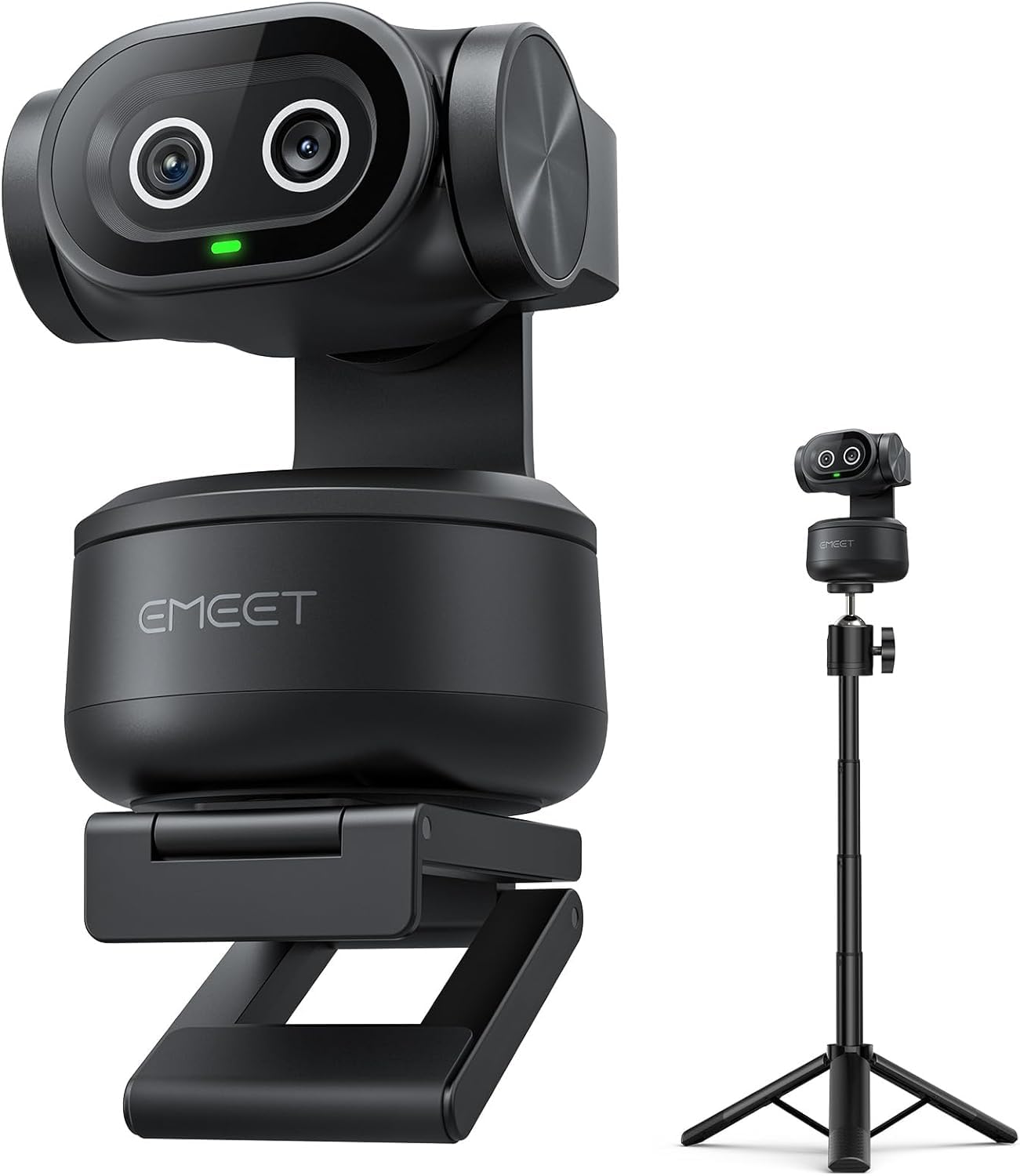
3. EMEET PIXY Dual-Camera AI-Powered PTZ Camera 4K
The world’s first dual-camera PTZ webcam, made to follow you across the room.
If you want to move around while streaming — standing, dancing, or doing full-body fitness — this camera’s physical tracking is the answer. It combines a 4K main camera with a second auxiliary AI camera that detects your face position for flawless skin tones under any light. The 3-chip AI system handles imaging, motion prediction, and a PTZ gimbal that gives you 310° pan and 180° tilt so it can follow you around the room.
Quality is what wins people over here, with 33 owners calling it out, and the AI tracking earns its own praise for following speakers smoothly. It focuses in 0.2 seconds compared to the 1.1 seconds of some rivals, so you won’t lose your face mid-motion. Gesture control lets you open your palm to toggle tracking on and off — handy when you need to step away without breaking character.
There are a few rough edges. Autofocus gets mixed feedback, with some owners noticing it locks onto background objects instead of the face. Settings also don’t always persist after the app restarts, so you may re-enable tracking each session. The included tripod adjusts from 6.7–18.5 inches, which is good but too short for some desk setups.
Built for Movement
- Dual-camera system tune focus and exposure on your face
- Blink-speed 0.2s focusing keeps you sharp in motion
- 3-mic array has modes for filtering steady fan noise or sudden clicks
What Needs Patience
- Autofocus can grab background objects instead of your face
- Tracking settings may reset after a software restart
- Included tripod is too short for many standing setups
Best for: performers who stand, dance, or run multi-angle streams and need the camera to physically follow them.
skip it if: you’re a stationary desk VTuber — the pan/tilt hardware is more than you’ll use.
4. Elgato Facecam 4K

True 4K at 60fps with DSLR-like manual control and a lens you can filter.
The Facecam 4K stands out because it delivers genuinely sharp 4K resolution at 60 FPS, which is the exact recipe for smooth, detailed avatar tracking. It pairs a premium Sony STARVIS 2 CMOS sensor with Elgato’s Prime Lens technology, giving you that clean, vibrant color that makes your model look polished. Owners describe the image as “crisp” and “DSLR clarity,” and it handles lower resolutions well too.
Elgato’s Camera Hub software gives you the kind of control you’d expect from a real camera — exposure, white balance, and sharpness all adjustable to dial in your exact look. It also accepts any standard 49mm lens filter, so you can screw on a diffusion filter to soften harsh light on your face. And because it works natively with OBS and other Elgato gear, setup is genuinely plug-and-play for streamers.
There’s no autofocus here, which buyers are quick to note — you’ll set the focus manually with the lens ring. Some also find the software lacking compared to rivals, and it tends to want more lighting than AI webcams. If you keep your face at a fixed distance, manual focus is a non-issue and the sharpness reward is real.
Picture-Pure Strengths
- True 4K60 output for buttery-smooth avatar motion
- Sony STARVIS 2 sensor delivers clean, vibrant color
- 49mm filter thread lets you shape light like a pro
Fixed-Focus Trade-Offs
- No autofocus — you adjust a manual lens ring instead
- Wants decent lighting to look its best
- Some owners find Camera Hub software limiting on Mac
Pick this if: you sit still, want true 4K60, and appreciate full manual control over your image.
Move on if: you lean in and out of frame and need autofocus to keep up with you.
5. YOLOLIV YoloCam S3

A massive sensor at this price point, delivering DSLR-like low-light video.
This webcam’s claim to fame is its 1/1.3″ sensor — likely the largest ever in a webcam — which dramatically improves low-light capture for your face tracking. It delivers uncompressed 4K/30fps or 1080p/60fps, so you get that smooth 60fps signal VTuber software loves. Its AI-enhanced imaging claims 2.5x clearer faces in low light, keeping your avatar’s tracking clean in dim rooms.
Owners praise the natural background blur (bokeh), which mimics a DSLR look that makes your VTuber frame feel more professional. The fast PDAF autofocus (phase detection, the same tech in real cameras) keeps you crisp for blur-free close-ups. It runs cool thanks to the all-aluminum body that acts as a heat sink, so you can stream 24/7 without overheating.
The biggest caveat is accessory compatibility: owners mention it lacks a 1/4-inch tripod mount, relying instead on its foldable magnetic mount. Some also want SD card recording, but this model requires a separate YoloBox for that. If you’re fine with webcam-only capture into OBS, this is one of the best low-light values on the list.
Why the Sensor Wins
- 1/1.3″ sensor excels in low light for clean avatar tracking
- Uncompressed 1080p/60fps output for smooth motion
- All-aluminum heat sink prevents overheating on long streams
Before You Buy
- No 1/4-inch tripod thread — magnetic mount only
- No built-in SD card recording
- Professional color grading tool is Windows-only for now
Reach for this if: you want DSLR-like low-light quality and natural bokeh without mirrorless-camera complexity.
Look elsewhere if: you need standard tripod mounting or plan to multi-cam with SD recording.
6. Insta360 Link 2 Pro

A motorized gimbal that physically follows you, with flagship 4K image quality.
The Link 2 Pro takes tracking to another level by physically panning and tilting to keep you framed as you move around the room. It uses a large 1/1.3″ sensor for cleaner video and excellent low-light performance, so your avatar’s facial features stay defined even in dim conditions. Owners say it handles bright windows behind the desk really well, which is a common headache for streamers.
The dual-mic beamforming system isolates your voice from background noise, keeping your audio clean when you narrate or sing. It produces natural bokeh (background blur) for a DSLR-like look, straight from the software suite. For creators with an Elgato Stream Deck, this integrates directly so you can switch modes and trigger presets with a single button.
Compatibility is the one real sting: it’s not currently compatible with ARM-based Windows systems or Windows Hello face recognition. Some owners also report unreliable USB-C connections on specific laptops. But for pure tracking hardware and image quality, this rivals the best in the webcam class.
Tracking That Moves With You
- Physical PTZ gimbal follows you and your group around the room
- Large 1/1.3″ sensor shines in low light and against bright windows
- Native Stream Deck integration for instant mode switching
Compatibility Checks
- Not compatible with ARM-based Windows PCs
- Some owners hit USB-C connection drops on certain laptops
- AI settings have a learning curve to master
Choose this if: you move around while streaming and want a motorized camera that keeps you in frame automatically.
Think twice if: you’re on an ARM Windows device — check compatibility before you commit.
7. OBSBOT Tiny 3

A tiny titan that’s 48% smaller than its predecessor, yet tracks 200+ object types.
The Tiny 3 is 48% smaller and 34% lighter than the older model, so it’s among the most discreet AI trackers you can mount on a monitor. It outputs 4K at 30fps or a blazing 1080p at 120fps — the high frame rate is a real treat for capturing ultra-smooth head turns and expressions. The Wide ISO Domain (0-12800) and HDR (high dynamic range, which balances bright and dark areas) keep your face detailed even in dim room light.
Beyond tracking, the triple-mic array captures spatial audio with one omnidirectional mic and two directional MEMS mics, so your voice stays clear without a separate microphone. The AI Tracking 2.0 locks onto over 200 types of targets, and voice or gesture controls let you zoom and switch presets without touching a button. Customers note it has fewer crashes than the Insta360 Link 2 Pro and call it the best non-DSLR option they’ve used.
No webcam is flawless, and the Tiny 3 has a couple quirks. Some owners note it runs hot to the touch (normal for the sensor, but worth knowing) and that gesture control can activate even when disabled. Mounting on wide monitors can also be tricky, with some using Velcro to secure it. Budget for some tweak time to get it perfect.
Small Body, Big Features
- 1080p at 120fps for exceptionally smooth avatar motion
- Wide ISO range (0-12800) delivers strong low-light performance
- Triple-mic array captures directional spatial audio
Tiny Tweaks Needed
- Runs warm during extended use
- Gesture recognition may trigger randomly on some units
- Mount can struggle on very wide monitors
Best for: streamers who want premium AI tracking plus bonus audio quality in a tiny package.
pass on it if: you don’t need 120fps and prefer a simpler, cooler-running unit.
8. Sony ZV-E10 APS-C Mirrorless Camera with 16-50mm Lens
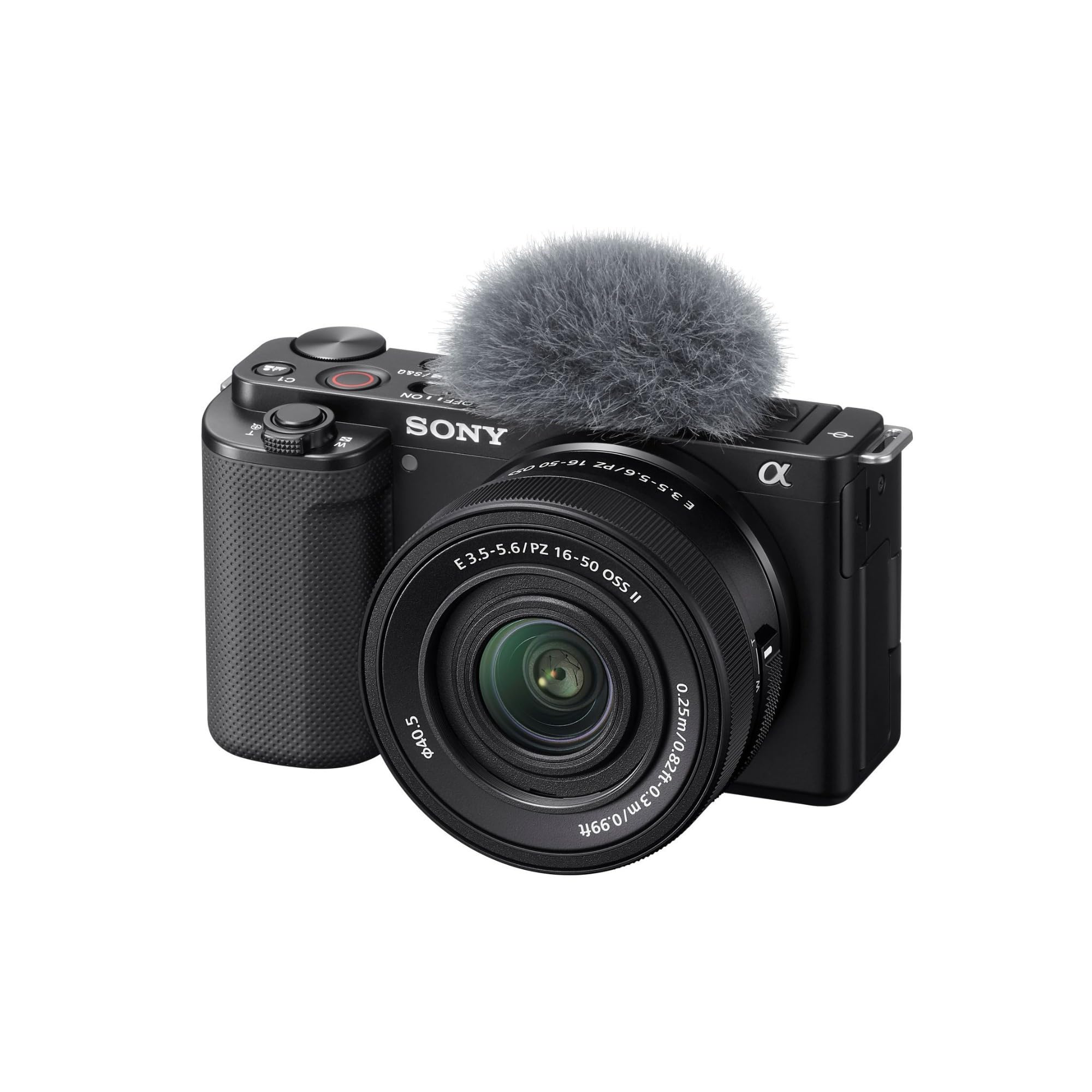
A compact creator camera with Real-time Eye AF that streams over a single USB cable.
The ZV-E10 is built specifically for people who make video, which makes it a natural fit for VTubing. Its 24.2MP APS-C Exmor CMOS sensor and fast BIONZ X processor deliver excellent video quality — 4K Movie oversampled from 6K with full pixel readout, meaning rich, detailed frames for your tracker to lock onto. Real-time Eye AF keeps your eye in crisp focus as you lean into the camera.
Two features here are pure VTuber gold. First, the Product Showcase Setting transitions focus from your face to an object you hold up — brilliant for showing off emotes or merch mid-stream. Second, it streams easily over a single USB cable with no extra hardware or software, so it plugs straight into OBS. Owners call it a versatile beast for the price and a great step up for YouTube beginners.
Unlike the Canon options, this camera offers lens flexibility — the included 16-50mm F3.5-5.6 lens gets you started, but serious streamers will want an OSS (optical stabilization) lens or an external stabilizer for professional results. There’s no built-in flash, and the companion app gets plenty of criticism. For clean 4K face video at a mid-range price, though, this is tough to top.
Video-First Strengths
- 4K oversampled from 6K for exceptional image detail
- Streams via a single USB cable with no extra capture hardware
- Real-time Eye AF keeps your face tack-sharp for tracking
Kit-Lens Caveats
- Stock lens needs OSS or a stabilizer for pro-level shake-free video
- No built-in flash — attach one for consistent lighting
- Mobile app is clunky, say owners
Pick this if: you want a real camera’s image quality with the simplicity of USB webcam streaming.
Move on if: you want interchangeable lenses only at the pro tier — you’ll want to budget for glass upgrades.
9. Canon EOS R7 Mirrorless Camera (Body Only)

A 32.5MP autofocus beast with 651 AF zones and in-body stabilization for hybrid creators.
The R7 is Canon’s answer for creators who shoot both video and stills, and its autofocus is its superpower. Dual Pixel CMOS AF II uses up to 651 AF zones across 100% of the frame, so it nails your face even when you move around. The 32.5-megapixel APS-C CMOS sensor gives you sharp, detailed frames that make your avatar tracking clean and precise.
For VTubers who also make content, the 5-Axis In-body Image Stabilization (IBIS) keeps handheld video shake-free, and the 30 fps electronic shutter captures every split-second expression change. The 4K video with Movie Servo AF includes subject detection and tracking, so your face stays locked even as you turn your head. Owners call it a beast with flawless low-light operation and battery life that beats the rating.
The main consideration is versatility — the body-only form means choosing an RF lens for streaming, which adds cost to an already premium price. It’s also heavier than a webcam, so you’ll mount it on a proper tripod or arm. If you want one camera that handles professional streams and gorgeous stills, this is the one.
Why It’s a Hybrid Star
- 651 AF zones give near-perfect face coverage for tracking
- In-body stabilization keeps handheld streams smooth
- 30 fps electronic shutter catches every micro-expression
Setup Investments
- Body-only requires an RF lens purchase for streaming
- Heavier than webcams — needs a real mount or tripod
- Premium price reflects its hybrid photo/video power
Choose this if: you’re a serious creator who streams and also cares about high-end photography.
Think twice if: your budget is webcam-level or you rarely pick up a real camera for stills.
Understanding the Specs
Sensor Size
This is the physical light-gathering chip inside the camera. A bigger sensor (like full-frame or 1/1.3″) lets in more light, which means less grain in dark rooms. For VTubing, a larger sensor means your face tracking gets a cleaner image to map, so your avatar won’t glitch or blur in low light.
Autofocus (AF) & Face Detection
Autofocus is the camera’s ability to keep you sharp as you move. Face detection technology goes further by locking onto your eyes. Dual Pixel CMOS AF (in Canons) uses every pixel on the sensor to detect focus, while PDAF (phase detection) is the fast, accurate system found in real cameras — all of which keep your avatar’s face locked.
Frame Rate (fps)
Frames per second measures how many distinct images the camera captures each second. Higher fps means smoother motion for your avatar — 60fps is the standard for fluid tracking, and 120fps is ultra-smooth. A camera that only outputs 30fps can make head movements look choppy.
AI Tracking PTZ
This stands for Pan, Tilt, and Zoom. An AI tracking PTZ webcam has a motorized gimbal that physically moves the camera to follow you around the room. These cameras use AI algorithms to detect your face and body position, keeping you centered even as you stand or walk mid-stream.
FAQ
What camera specs actually matter most for VTubing?
Can I use a standard webcam for VTubing or do I need a mirrorless camera?
Does 60fps really make a difference for my avatar?
Is a webcam with AI tracking the same as a face-tracking webcam?
Is 4K resolution necessary for a VTuber setup?
How do I connect a mirrorless camera to OBS for VTubing?
What’s the difference between 140-degree wide-angle and 82-degree field of view for streaming?
Do I need a green screen for VTubing?
Is a camera with a good built-in microphone enough for streaming?
What does IBIS mean and why would a VTuber care?
Final Thoughts: The Verdict
For most streamers building a serious VTubing setup, the standout is the Canon EOS R6 Mark II because its eye-level precision and low-light mastery give your avatar the most lifelike tracking available. If you want a motorized camera that follows you around the room with less setup, the Insta360 Link 2 Pro is the smarter pick. And if you’re starting out on a budget, the OBSBOT Meet 2 gives you 4K quality and AI framing without the mirrorless price tag.
How We Picked
We do not accept paid placement. Every pick is matched to a real buyer and a real use-case; we do not hands-on test units.
Sources & Methodology
Specifications: manufacturer listings and product documentation. Review insights: verified customer reviews, as of August 2026. Pricing: not shown on this page (it changes often); check the current price via the retailer link.
As an Amazon Associate, FitlyFast earns from qualifying purchases. This does not affect which products we feature.