
Our readers keep the lights on and the weekend projects moving. As an Amazon Associate, I earn from qualifying purchases.
Choosing a 1 TB external hard drive comes down to one question: do you need a rugged, go-anywhere companion or a fast, pocket-sized solid-state drive for daily transfers? The market splits hard between HDDs for bulk storage and SSDs for speed, and picking wrong means either carrying a fragile device on adventures or paying too much for storage you don’t need. This guide cuts through the noise to find the drive that matches your real-world use.
I’m Rikta — the co-founder and writer behind FitlyFast. I’ve spent thousands of hours analyzing storage hardware specifications, comparing transfer rates, shock resistance, and build quality across hundreds of models to help you buy with confidence.
After evaluating over a dozen 1 TB portable drives based on durability, data transfer speeds, cable management, and real customer feedback, I’ve narrowed the field to the seven drives that actually deliver. Here are the best options for finding the right 1 tb external hard drive for your workflow.
How To Choose The Best 1 TB External Hard Drive
1 TB is the sweet spot for portable storage — enough for thousands of photos, dozens of games, or a full backup of a laptop, but small enough to slip into a bag. The challenge is that not all 1 TB drives are built the same. HDDs offer more storage per dollar but are sensitive to drops, while SSDs cost more but deliver speeds up to ten times faster and survive falls that would shatter a spinning disk.
Rugged vs. Standard Build
If your drive will live on a desk or in a laptop bag, a standard plastic enclosure with a simple USB cable works fine. But if you travel frequently, work outdoors, or have clumsy hands, look for an IP68 waterproof rating and military-grade shock resistance. Drives like the ADATA HD710 Pro or LaCie Rugged Mini add rubber bumpers and sealed ports that protect against dust, rain, and drops up to 4 feet. A drop-rated drive can mean the difference between a quick recovery and a lost year of data.
Transfer Speed: HDD vs. SSD
Most 1 TB external HDDs cap out around 120-140 MB/s sequential read speed over USB 3.0. That’s fine for backups, media streaming, and archive storage. But if you edit video directly from the drive, run applications, or transfer large files regularly, an external SSD like the Samsung T7 pushes speeds over 1,000 MB/s — roughly eight times faster. The trade-off is price: SSDs cost roughly twice as much per terabyte. Ask yourself how often you’ll move big files before deciding.
Cable Management and Port Type
A short, integrated cable is convenient for travel but becomes a headache if it frays or gets lost. Some rugged drives store the cable around the enclosure, while others rely on a removable 18-inch USB cable. Also check the connector: micro-USB is still common on budget HDDs, while newer SSDs and premium drives use USB-C for faster charging and reversible plugging. If you own a modern laptop, a USB-C drive saves you from carrying an adapter.
Quick Comparison
On smaller screens, swipe sideways to see the full table.
| Model | Category | Best For | Key Spec | Amazon |
|---|---|---|---|---|
| Samsung T7 Portable SSD | SSD | Speed & Portability | Read speed 1,050 MB/s | Amazon |
| LaCie Rugged Mini | Rugged HDD | Field Work & Travel | 4-ft drop rated | Amazon |
| ADATA HD710 Pro | Rugged HDD | All-Weather Durability | IP68 waterproof / dustproof | Amazon |
| Seagate Portable 1TB | Standard HDD | Everyday Backup | 1-Year Rescue Service | Amazon |
| WD 1TB Elements | Standard HDD | Reliable Plug-and-Play | USB 3.0, compact design | Amazon |
| Maxone 1TB Ultra Slim | Value HDD | Budget Slim Storage | Aluminum build, 0.4″ thin | Amazon |
| Avolusion X1 1TB | Console HDD | PS4 Game Storage | Pre-formatted for PS4 | Amazon |
In‑Depth Reviews
1. Samsung T7 Portable SSD

The Samsung T7 is not an HDD — it’s a solid-state drive that obliterates traditional external hard drives in speed. PCIe NVMe technology pushes read speeds to 1,050 MB/s and writes to 1,000 MB/s, making file transfers feel instant compared to any spinning drive. In real-world testing, a 50 GB dataset transfers in under a minute over USB-C. That’s eight to ten times faster than a typical 1 TB HDD.
The aluminum unibody design doubles as a heatsink, keeping temperatures around 42°C even during sustained writes — well below the 70°C throttling threshold. It’s shock-resistant up to 6 feet and weighs barely 2 ounces, fitting easily into a pocket. The inclusion of both USB-C and USB-A cables means it works with modern laptops and older desktops right out of the box. Note that it ships formatted in MBR; for optimal performance on modern Windows or Mac systems, reformatting to GPT or APFS is recommended.
Hardware AES 256-bit encryption is built in, protecting your data without slowing down transfers. The T7 is compatible with PCs, Macs, gaming consoles, and even Android phones, making it the most versatile drive in this lineup. The only compromise is the short 6-inch USB-C cable — you’ll want a longer cable for desktop use.
Why it’s great
- Extreme transfer speeds 10x faster than HDDs
- Pocket-sized aluminum body surviving 6-ft drops
- Hardware encryption and dual USB-C/A cables included
Good to know
- Costs roughly double a comparable 1 TB HDD
- Included cable is too short for desktop setups
- Requires reformatting for Mac or optimal Windows performance
2. LaCie Rugged Mini 1TB
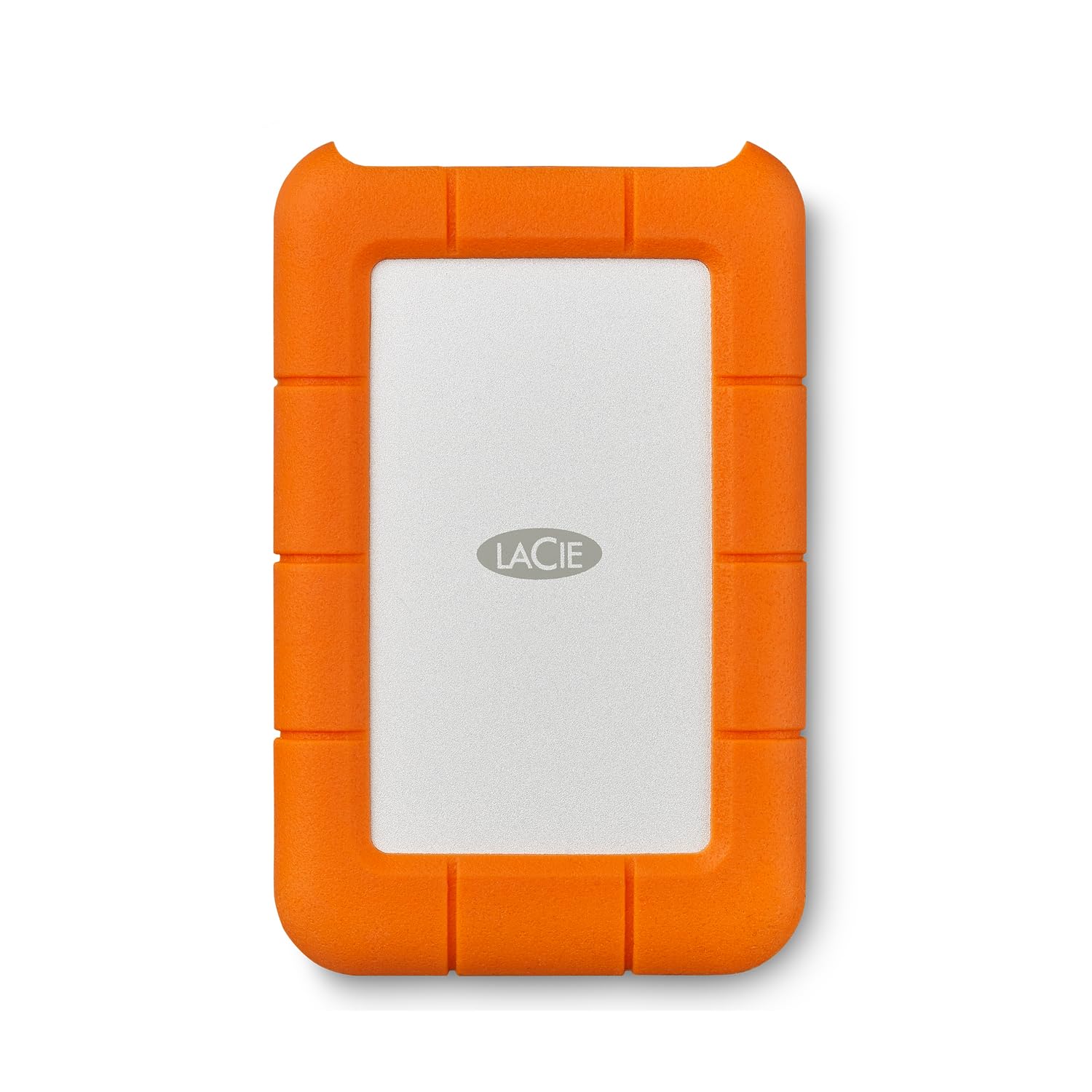
Its bright orange silicone bumper absorbs shock from drops up to 4 feet, and the casing resists dust and water splashes. Unlike many rugged drives that feel bulky, this one remains compact enough to slide into a camera bag or backpack pocket without adding noticeable weight.
Transfer speeds over USB 3.0 hover around 120 MB/s sequential — typical for a 2.5-inch HDD, but perfectly adequate for backing up photo libraries, video projects, and documents in the field. It ships pre-formatted in exFAT, which works with both Windows and Mac without reformatting. The password protection built into the drive adds a layer of security for sensitive work files. Owners who have used these drives for years report quiet operation and low vibration, even during extended use.
The main drawback is the micro-USB connector, which feels dated compared to USB-C alternatives. Some users report intermittent mounting issues on newer Macs, typically resolved by reformatting to APFS. The 1-month Adobe Creative Cloud trial is a minor bonus for creative professionals, though the redemption window has long passed.
Why it’s great
- Proven rugged design surviving 4-ft drops
- Pre-formatted exFAT for cross-platform use
- Quiet, cool operation even during long backups
Good to know
- Micro-USB port instead of USB-C
- Intermittent mounting issues on some Mac systems
- Slower than modern SSDs at 120 MB/s
3. ADATA HD710 Pro 1TB

The ADATA HD710 Pro is the most rugged HDD in this roundup, carrying both IP68 waterproof certification and MIL-STD-810G 516.6 shock resistance. That means it can survive submersion in up to 1.5 meters of water for 60 minutes and withstand drops from over 4 feet. The triple-layered construction wraps the drive in a thick rubber sleeve that also houses the USB cable, keeping everything tidy during transport.
Transfer speeds reach about 120 MB/s over USB 3.1, which is competitive for a mechanical drive at this price. The cable management system is a standout feature — the USB cable wraps around the drive and plugs into itself, making it nearly impossible to lose. Owners report that the drive has survived years of being tossed into backpacks, dropped on concrete, and exposed to light rain without any data loss.
The trade-off for all that protection is size and weight: the HD710 Pro is noticeably thicker and heavier than slim drives like the Maxone or Seagate Portable. It’s also slower for frequent large file transfers — best for one-time fill-and-store scenarios rather than daily editing. The rubberized texture attracts dust and lint, though it cleans easily with a damp cloth.
Why it’s great
- IP68 waterproof and dustproof certification
- MIL-STD-810G drop rated for real abuse
- Integrated cable management prevents loss
Good to know
- Bulky compared to slim portable drives
- Slow for frequent large file transfers
- Rubber casing attracts dust and lint
4. Seagate Portable 1TB

The Seagate Portable 1TB is the no-frills standard for everyday backup. It connects via USB 3.0 and is automatically recognized by Windows without any software installation — plug it in and it appears as a drive ready for drag-and-drop file transfers. Included is Seagate’s 1-Year Rescue Service, which attempts data recovery from a failed drive, a valuable safety net that few competitors offer at this level.
Performance is typical for a 2.5-inch HDD: around 120 MB/s sequential read speed. It runs quiet and stays cool even during extended transfers, making it suitable for overnight backups. The drive is compact and lightweight, fitting easily into a laptop bag or backpack pocket. It’s compatible with Windows, Mac (after reformatting), PlayStation, and Xbox consoles, giving it broad utility beyond just PC storage.
The main limitation is that it uses SMR (Shingled Magnetic Recording) technology, which means write speeds can slow dramatically — down to around 25 MB/s — after transferring about 100 GB of data in a single session. For typical daily use, this isn’t an issue. But if you plan to move hundreds of gigabytes at once, you’ll want an SSD or a drive with CMR technology. The included 18-inch cable is adequate but short for desktop setups.
Why it’s great
- 1-Year Rescue Service for data recovery
- Quiet operation and stays cool
- Works across Windows, Mac, and consoles
Good to know
- SMR technology slows dramatically after 100 GB writes
- Reformatting required for Mac without exFAT
- Cable is only 18 inches long
5. WD 1TB Elements Portable

The WD Elements is the quintessential “buy it and forget it” external hard drive. For years, this has been the go-to recommendation for anyone needing reliable plug-and-play storage without unnecessary software or flashy design. It works with Windows 8, 7, Vista, and XP out of the box, and can be reformatted for macOS in minutes. The matte black plastic enclosure is minimalist and durable, surviving daily commutes and desk shuffles without issue.
Transfer speeds hover around 110 MB/s, consistent with other 5400 RPM 2.5-inch drives in this class. It runs quiet and stays barely warm even during extended backup sessions. The drive is powered entirely through the USB cable, requiring no external power adapter. Long-term owners report years of trouble-free service, with the most common failure point being the USB cable rather than the drive itself — easily replaceable for a few dollars.
The downside is that the Elements lacks any shock protection or water resistance. It’s a desk-bound drive, not a field tool. The enclosure material is listed as cotton, which is unusual for a hard drive, but in practice it feels like a standard textured plastic. Some users note that the drive can be slightly slower than advertised when transferring many small files. For archival storage and routine backups, it remains one of the most dependable options available.
Why it’s great
- Years of proven reliability from a top brand
- Quiet, cool operation during extended use
- Simple plug-and-play with no bloatware
Good to know
- No shock or water protection
- Slower with many small files
- Cable is the most common failure point
6. Maxone 1TB Ultra Slim

The Maxone 1TB Ultra Slim stands out for its aluminum unibody construction that measures just 0.4 inches thick. That makes it one of the slimmest 1 TB hard drives on the market, rivaling the thickness of many SSDs while keeping HDD-level pricing. The charcoal grey brushed aluminum not only looks premium but also helps dissipate heat, keeping the drive cool during extended use. It’s compatible with Windows, Mac, and game consoles, though it requires reformatting for macOS.
Performance is in line with other USB 3.0 HDDs, offering around 100-120 MB/s sequential transfers. For storing documents, photos, and media files, it’s more than adequate. The drive is light enough to slip into a shirt pocket or thin laptop sleeve without adding noticeable bulk. Owners have reported it working well for storing Steam game libraries, though load times are naturally slower than an internal SSD.
The build quality has drawn mixed feedback. While the aluminum body feels sturdy, some users have reported the internal USB connector detaching after being carried in a bag for a few weeks — suggesting the port isn’t reinforced as well as pricier drives. The 18-inch cable is also on the short side. For the price, it offers excellent aesthetics and slimness, but you’re trading some long-term durability for that ultra-slim profile.
Why it’s great
- Ultra-slim 0.4-inch aluminum design
- Good thermal performance from metal body
- Budget-friendly entry point for 1 TB storage
Good to know
- USB port can detach after repeated carrying
- Short 18-inch cable included
- Plastic internal components despite aluminum exterior
7. Avolusion X1 1TB for PS4

The Avolusion X1 is purpose-built for PlayStation 4 users who need extra game storage without the hassle of formatting or compatibility checks. It comes pre-formatted to work with PS4 Original, PS4 Slim, and PS4 Pro out of the box — just plug it into a USB port and the console will recognize it immediately. The drive uses a standard 2.5-inch mechanical hard disk with USB 3.0 connectivity, offering the same 5 Gbps interface as most portable drives.
Performance is adequate for game storage: load times are comparable to the internal PS4 drive, meaning games will load at the same speed as the console’s native 5400 RPM HDD. For storing game installs and saves, that’s perfectly fine. The ultra-slim design makes it easy to tuck next to the console without taking up much space, and it operates quietly during gameplay. The 2-year warranty is generous for a drive in this price segment, offering more peace of mind than most budget options.
The downside is that it’s locked into the PS4 ecosystem by default — using it with a PC or other device requires reformatting, which erases all data. It also lacks the rugged protection of drives like the ADATA HD710 Pro or LaCie Rugged Mini, so it should stay on a desk or entertainment center. For PS4 owners simply wanting a dedicated game storage drive, this is the most straightforward option available.
Why it’s great
- Pre-formatted for instant PS4 compatibility
- Compact and quiet design for console setups
- 2-year warranty for added peace of mind
Good to know
- Requires reformatting for PC or Mac use
- No drop or water protection
- Speeds are PS4-native 5400 RPM performance
FAQ
Can I use a 1 TB external hard drive for gaming on PS5 or Xbox Series X?
Why do some 1 TB drives show less than 1 TB of usable space?
Do I need to reformat a new 1 TB external drive for Mac?
Final Thoughts: The Verdict
For most users, the winner for the best 1 tb external hard drive is the LaCie Rugged Mini because it delivers proven drop protection, reliable HDD performance, and cross-platform compatibility at a fair price point for the durability it offers. If you need blistering speed for video editing or heavy file transfers, grab the Samsung T7 Portable SSD — it’s ten times faster and fits in your pocket. And if you need maximum ruggedness for outdoor work or travel where water and dust are real threats, nothing beats the ADATA HD710 Pro with its IP68 certification and MIL-STD-810G drop rating.