
Our readers keep the lights on and the weekend projects moving. As an Amazon Associate, I earn from qualifying purchases.
The mechanical keyboard market under a hundred dollars is a minefield of rattly stabilizers, hollow plastic cases, and marketing buzzwords that mean nothing when you actually sit down to type. The difference between a cheap, noisy board and a genuinely satisfying daily driver comes down to the internal structure — gasket mounts, switch lubrication, and sound-dampening foam layers — not the RGB count or brand logo on the front.
I’m Rikta — the co-founder and writer behind FitlyFast. I’ve spent dozens of hours dissecting switch actuation depths, foam layer configurations, and polling rate specs to separate the keyboards that actually deliver creamy, thocky acoustics and responsive performance from the ones that just look good in product photos.
Whether you need a full-size workhorse with a numpad or a compact 60% board with Hall Effect magnetic switches for competitive gaming, this guide breaks down the seven best options on the market right now. Each pick has been vetted for build quality, switch feel, and acoustic character so you can confidently choose the $100 keyboard that fits your exact setup and typing style.
How To Choose The Best $100 Keyboard
A great mechanical keyboard in this price range is defined by three core elements: the internal construction that shapes the sound and feel, the switch type that determines your typing experience, and the extra features that make daily use more convenient. Ignoring any of these will leave you with a board that looks good but frustrates you every time you hit a key.
Gasket Mount vs. Tray Mount: The Sound Dictator
The mounting style is the single biggest factor in how a keyboard sounds and feels. Tray-mounted boards bolt the PCB directly to the plastic case with screws, producing a hard, hollow bottom-out sound. Gasket-mounted keyboards suspend the PCB between silicone or foam strips, creating a softer, bouncier feel and a deeper, creamier acoustic profile. Every product on this list uses some form of gasket or dampened mounting because that structure is the only way to get true “thock” without aftermarket modification.
Switch Choice: Linear vs. Tactile vs. Hall Effect
Linear switches move straight down with no bump and are favored by gamers and typists who want smooth, uninterrupted keystrokes. Tactile switches provide a physical feedback bump at the actuation point, which some typists prefer for accuracy. Hall Effect magnetic switches, found on competitive gaming boards, allow you to adjust the actuation point in 0.1mm increments — a huge advantage for rapid-trigger scenarios like strafing in shooters. Pre-lubed switches (factory-lubricated) eliminate scratchiness and produce that coveted creamy feel without extra work on your end.
Layout and Connectivity: Full-Size, 96%, 75%, or 60%
A full-size (100%) keyboard includes a number pad, making it ideal for data entry and spreadsheet work. The 96% layout squeezes the numpad into a more compact footprint, saving desk space without losing functionality. 75% boards drop the numpad but keep the function row and arrow keys, offering a balanced middle ground. 60% boards eliminate everything except the alphanumeric block, saving maximum space but requiring FN-layer combos for navigation keys. If you need to connect to multiple devices, look for tri-mode boards that offer Bluetooth, 2.4GHz wireless, and wired USB-C — but watch for latency on wireless connections.
Quick Comparison
On smaller screens, swipe sideways to see the full table.
| Model | Category | Best For | Key Spec | Amazon |
|---|---|---|---|---|
| ASUS ROG Strix Scope II X | Full-Size Premium | Enthusiast Build Quality | ROG NX Snow V2 Linear | Amazon |
| RK ROYAL KLUDGE R98 Pro | 96% Creamy | Compact Work & Gaming | 5-Layer Sound Foam | Amazon |
| AULA S75 PRO | 75% Wireless | Custom Screen & Tri-Mode | LCD Screen + Knob | Amazon |
| LOFREE Flow Lite | Low-Profile | Ergonomic Office Typing | Specter POM 40gf Switch | Amazon |
| Redragon K745 | Full-Size Budget | Quiet Thock Workhorse | Dragon Chant Switch | Amazon |
| HUO JI E-Yooso Z-99 | 96% Entry-Level | First Mechanical Board | 99 Keys 96% Layout | Amazon |
| AULA WIN68 HE | 60% Gaming | Ultra-Low Latency | Hall Effect Magnetic | Amazon |
In‑Depth Reviews
1. ASUS ROG Strix Scope II X

It uses an aluminum top plate for rigidity, PBT doubleshot keycaps that won’t develop shine over time, and hot-swappable ROG NX Snow V2 linear switches that come pre-lubed from the factory. The result is a board that feels sturdy without being overly heavy and delivers smooth, thocky keystrokes with minimal pinging thanks to the internal sound-dampening foam and switch-dampening pads.
The pre-lubed switches are noticeably quieter than standard Cherry MX Reds, and the included detachable wrist rest makes long typing sessions far more comfortable. The multi-function wheel on the top edge controls media and lighting without needing to reach for software, and the F1-F5 keys are pre-programmed for Xbox Game Bar and recording — useful for streamers. The board supports three tilt angles, so you can dial in the perfect typing angle for your desk setup.
User reviews consistently praise the responsive feel and high build quality, with several people noting it outperforms more expensive Razer and Corsair boards they’ve owned. The only minor complaint is that the Asus Armoury Crate software can be clunky for advanced lighting customization, but the onboard controls handle brightness and effect cycling just fine. For a premium full-size package that needs no modifications out of the box, this is the one to beat.
Why it’s great
- Aluminum top plate with PBT keycaps for long-term durability
- Pre-lubed NX Snow V2 switches offer smooth, thocky feel
- Detachable wrist rest and multi-function media wheel
Good to know
- Software-based lighting customization requires Asus Armoury Crate
- Some users report slight stickiness on the space bar initially
2. RK ROYAL KLUDGE R98 Pro

The RK ROYAL KLUDGE R98 Pro hits the sweet spot between a full-size numpad and a compact footprint, using a 98-key layout that trims the width without sacrificing the number pad or arrow keys. The gasket mount construction is paired with five layers of sound-absorbing foam — PO, IXPE, PET, bottom socket, and silicone — which produces one of the creamiest, most satisfying typing sounds in this price tier. The pre-lubed linear cream switches are smooth from the first keystroke and require zero breaking in.
The MDA profile PBT keycaps are a standout feature: their curved surface cradles your fingers more naturally than OEM or Cherry profile caps, giving a wrapped, substantial feel with every press. The detachable aluminum volume knob is a tactile pleasure, and the four indicator lights for Num Lock, Caps Lock, Win Lock, and Mac Mode keep you informed at a glance. The online driver supports full key remapping and macro creation for both Windows and Mac, making it genuinely cross-platform.
Reviewers describe the sound as “chunky, buttery ASMR” and note that the board outperforms modified, foam-added keyboards they previously owned. The only caveat is that the backlighting is slightly dimmer than some competitors, and the key legends are not fully transparent, so the RGB shines around the caps rather than through them. If creamy acoustics and a premium typing feel are your priorities, this board delivers them in spades.
Why it’s great
- Five-layer sound foam delivers exceptional creamy acoustics
- MDA profile PBT keycaps are more ergonomic than standard profiles
- Detachable volume knob and online driver support
Good to know
- RGB lighting is less bright than some full-size competitors
- Key legends are not transparent, affecting shine-through visibility
3. AULA S75 PRO
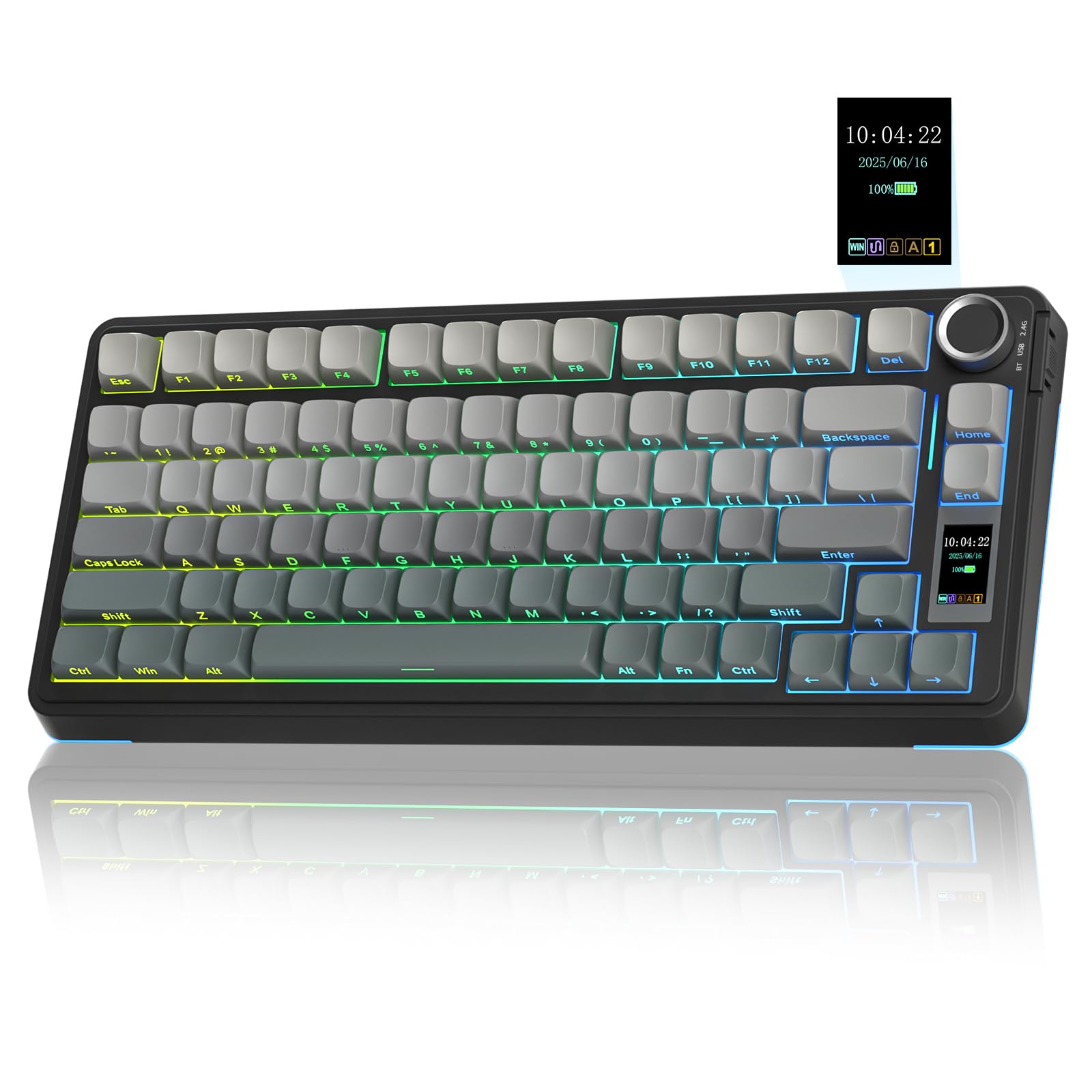
The AULA S75 PRO is the most feature-dense keyboard in this roundup, packing an LCD screen, a multi-function knob, and tri-mode wireless connectivity into a compact 75% layout. The screen displays battery level, date and time, connection status, and even a custom GIF — a touch that feels genuinely premium rather than gimmicky. The knob lets you cycle through RGB effects, adjust volume, and switch between operating systems without diving into software.
The typing experience is anchored by an advanced gasket structure with an extended integrated silicone pad and PCB single-key slotting, which gives each keystroke a soft, elastic rebound. Five layers of filling silencer eliminate cavity noise, and the pre-lubed switches produce a smooth, creamy sound out of the box. The side-printed PBT keycaps use a double-injection and heat sublimation process, so the legends will never fade, and the south-facing LEDs ensure the backlight shines through the font clearly even in dark rooms.
Users consistently call the S75 PRO a “perfect thocky keyboard at the perfect price,” noting the GIF display is clear and responsive. The 2.4GHz wireless mode delivers latency-free gaming performance, while Bluetooth has a slight delay that makes it better suited for office work. Battery life sits around 20 hours with full RGB on, and auto-idle helps extend it. The software is Windows-only for screen configuration, but once set, the screen works independently across all connection modes.
Why it’s great
- LCD screen with custom GIF and real-time status display
- Tri-mode wireless (BT/2.4GHz/USB-C) with low-latency 2.4GHz
- Durable side-printed PBT keycaps with south-facing RGB
Good to know
- Screen configuration requires Windows software in wired mode
- Bluetooth latency is noticeable for competitive gaming
4. LOFREE Flow Lite

The LOFREE Flow Lite is built for people who spend eight hours a day typing and need a keyboard that won’t fatigue their wrists or fingers. Its low-profile design sits much closer to the desk surface than standard mechanical keyboards, promoting a more natural wrist angle without requiring a wrist rest. The Specter full POM linear switches, co-developed with Kailh, use a 40gf operating force — significantly lighter than the 50gf found in most mechanical boards — which reduces finger joint strain during marathon typing sessions.
The PBT doubleshot keycaps have a matte texture that resists fingerprints and shine, and the gasket mount sound-dampening layer gives each keystroke a rich, satisfying tone without being loud enough to annoy coworkers. The built-in adjustable kickstand and aluminum volume roller make it easy to dial in your preferred typing angle and media control without hunting for accessories. The 3000mAh battery delivers up to 100 hours of use with the backlight off, and the 1000Hz polling rate over 2.4GHz keeps performance responsive.
User reviews highlight the creamy sound profile and the comfortable typing feel even with long nails, though some note that the backspace key is slightly stiffer than the rest. The software has been described as glitchy, and the included cable feels a bit flimsy for a premium-priced board. The backlight is soft white rather than RGB, which keeps it office-appropriate but may disappoint gamers seeking colorful lighting effects. For pure ergonomic typing comfort, this is the best option on the list.
Why it’s great
- Low-profile design with 40gf switches reduces wrist fatigue
- PBT keycaps with matte finish resist wear and fingerprints
- 1000Hz polling rate over 2.4GHz for responsive wireless typing
Good to know
- Software can be glitchy and the included cable feels cheap
- Backlight is single-color white, not RGB
5. Redragon K745
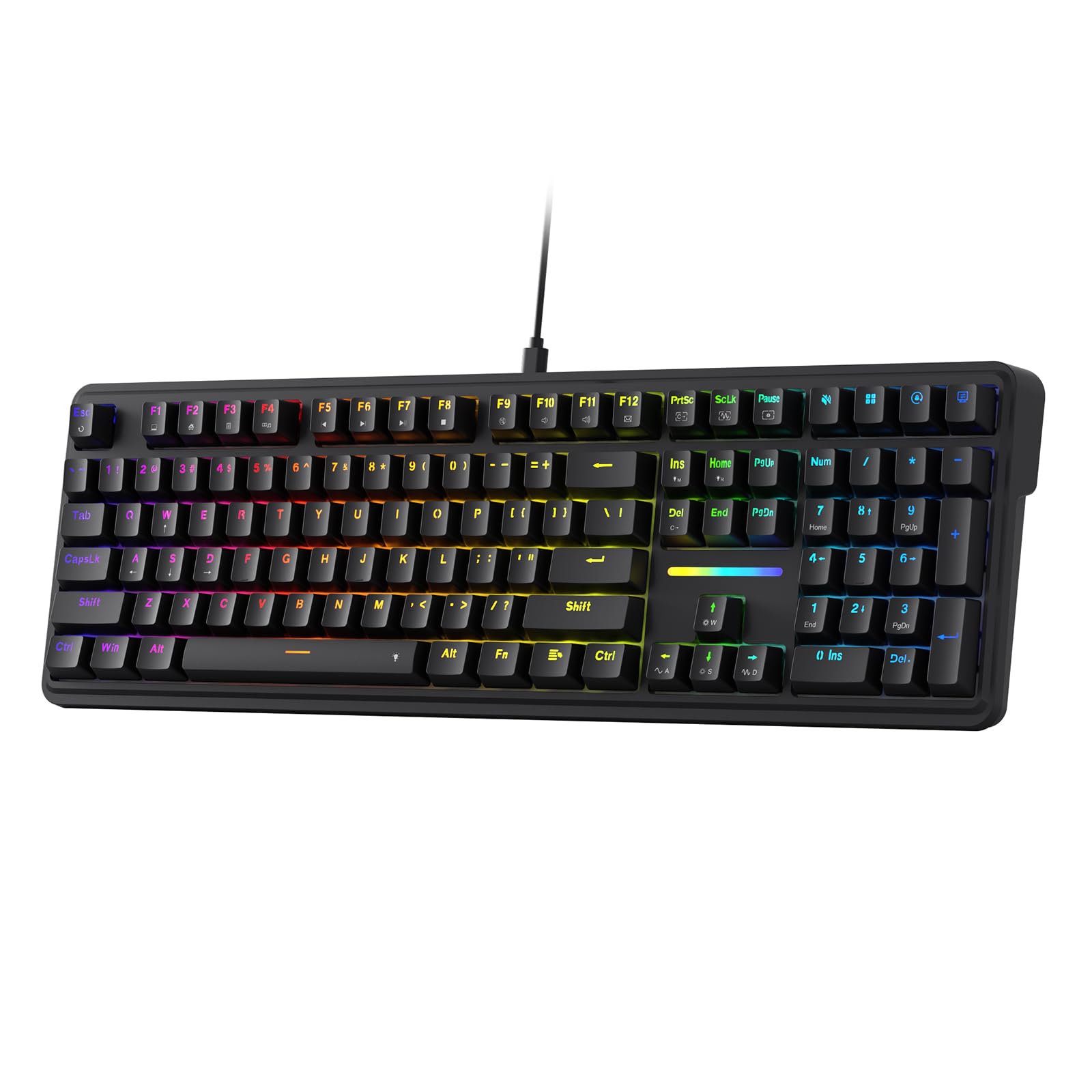
The Redragon K745 delivers a full-size 108-key layout with a gasket mount and five-layer noise dampening at a price that undercuts almost every other full-size option on this list. The custom Dragon Chant linear switches are thickly lubricated from the factory, producing a muted, thocky sound that reviewers consistently call “quiet and creamy.” The 3.5mm PO foam, IXPE switch foam, PET sound pad, bottom socket foam, and silicone bottom pad work together to eliminate hollow resonance and echo.
The ergonomic design includes two-stage adjustable feet for different typing angles, and the three-color mixed keycaps add visual interest to the otherwise understated Essential Black finish. The hot-swappable PCB accepts 3-pin or 5-pin switches, so you can swap in different switches later if you want to experiment with different feels. The Redragon software supports full macro programming and key remapping, though it’s not the most polished driver on the market.
Users report that the stock sound quality rivals modified boards they’ve built themselves, with one reviewer calling it a “genuine enthusiast board” from a brand they didn’t expect this level of refinement from. The tri-mode wireless version includes 2.4GHz with no noticeable drops, and the battery lasts roughly 40 hours with the backlight off. The keycaps are not fully see-through, so the RGB shine-through is subtle, but the zone differentiation and color quality are excellent for the price point.
Why it’s great
- Full 108-key layout with gasket mount and five-layer dampening
- Pre-lubed Dragon Chant switches deliver quiet thocky sound
- Two-stage adjustable feet and hot-swappable PCB
Good to know
- Keycaps are not transparent, so RGB shine-through is limited
- Software driver is functional but not as polished as competitors
6. HUO JI E-Yooso Z-99

The HUO JI E-Yooso Z-99 is the most affordable way to get into a mechanical keyboard with a gasket mount, hot-swappable switches, and five-layer sound-dampening foam. It uses a 99-key 96% layout that shrinks the footprint compared to a full-size board while retaining every key you actually need, including the numpad. The pre-lubed linear switches are surprisingly smooth for this price tier, and the PBT keycaps resist shine far better than the ABS caps found on even more expensive boards.
The gasket structure combined with sound-absorbing foams and a silicone dampener pad reduces noise by roughly 40% and eliminates the hollow echo that plagues cheap keyboards. The RGB backlight offers 15 effects and 8 solid color options, with adjustable speed and brightness. The 100% anti-ghosting and N-key rollover ensure every keystroke registers accurately, even during high-speed gaming moments where multiple keys are pressed simultaneously.
Customer reviews are overwhelmingly positive, with users calling it “the best keyboard I have ever purchased” and praising the creamy, dreamy sound. The detachable USB-C cable and compact dimensions make it easy to pack into a bag for travel or LAN setups. The keycaps could be brighter at maximum backlight setting, and there is no wireless option, but for a wired mechanical board at this price point, the build quality and acoustic performance are genuinely impressive.
Why it’s great
- Most budget-friendly gasket mount with PBT keycaps available
- Five-layer sound foam eliminates hollow cavity noise effectively
- Hot-swappable PCB accepts 3-pin or 5-pin switches
Good to know
- RGB backlight could be brighter at maximum setting
- Wired-only connectivity with no wireless option
7. AULA WIN68 HE

The AULA WIN68 HE brings Hall Effect magnetic switch technology to a very accessible price point, offering features that were previously reserved for boards costing three to four times as much. The magnetic switches allow you to adjust the actuation point for every single key between 0.02mm and 3.44mm in 0.1mm increments — a level of customization that competitive gamers exploit for rapid-trigger actions like counter-strafing and bunny-hopping in shooters. The 8000Hz polling rate and 0.3ms latency mean your inputs are registered before you even finish pressing the key.
The 60% layout saves 40% of desktop space while retaining the arrow keys, making it functional for both gaming and typing. The customizable web driver lets you adjust RT/SOCD/DKS/MT/TGL functions, key mapping, macro editing, and RGB lighting without downloading software — though it only works on Windows. The RGB is powered by 16.8 million colors with south-facing LEDs and 14 preset effects that look genuinely high-end.
Users praise the silky smooth feel and the surprisingly good stock sound for a Hall Effect board, with several noting it outperforms much more expensive magnetic switch keyboards. The software driver can be slightly tricky to find initially, but once running, it gives you full control over actuation curves and macros. The plastic enclosure is sturdy with no flex, and the detachable USB-C cable makes travel easy. For competitive gamers who want magnetic switch advantages without spending premium money, this is the clear winner.
Why it’s great
- Hall Effect magnetic switches with adjustable actuation down to 0.1mm
- 8000Hz polling rate and 0.3ms latency for competitive gaming
- Compact 60% layout still retains arrow keys
Good to know
- Web driver only works on Windows, not Mac
- Plastic case is sturdy but not as premium as aluminum options
FAQ
Is a gasket mount keyboard worth paying extra for?
What is the difference between linear and tactile switches?
How does a Hall Effect magnetic switch differ from a mechanical switch?
Should I get a 60% or a full-size keyboard for gaming?
Can I use a tri-mode wireless keyboard for competitive gaming?
Final Thoughts: The Verdict
For most users, the $100 keyboard winner is the ASUS ROG Strix Scope II X because it combines a full-size aluminum-reinforced build, pre-lubed NX Snow V2 switches, and excellent out-of-box acoustics with no need for modifications. If you want a compact board with a built-in LCD screen and tri-mode wireless, grab the AULA S75 PRO. And for competitive gamers needing Hall Effect magnetic switches with adjustable actuation, nothing beats the AULA WIN68 HE.