
Our readers keep the lights on and the weekend projects moving. As an Amazon Associate, I earn from qualifying purchases.
Moving a 4K video project or a high-res photo library across your network shouldn’t mean waiting for a progress bar. The jump from gigabit to 10 gigabit Ethernet changes how you work with large files, letting a NAS feed a workstation or a media server handle multiple simultaneous streams without stuttering. The challenge is finding a switch that delivers that speed without a rack full of noisy fans or complex configuration.
I’m Rikta — the co-founder and writer behind FitlyFast. I’ve spent hundreds of hours analyzing network hardware specifications, testing switching capacities, and sifting through user reports on thermal performance and real-world throughput to compile this guide.
Whether you are setting up a home lab, upgrading a small office, or wiring a creative workstation, this guide breaks down the best options available for your specific needs and helps you find the perfect 10gb switch.
How To Choose The Best 10Gb Switch
Stepping up to a 10Gb network is a significant upgrade, and the switch at the center of that network has to match your hardware, your skill level, and your environment. Before you buy, focus on three key decisions that define the entire experience of owning a 10Gb switch.
Port Type: Copper vs. SFP+
The most fundamental choice is whether you need RJ45 (copper) ports or SFP+ cages. Copper 10GBase-T ports work over standard Cat6a (or even Cat5e at shorter distances) and are plug-and-play for any device with a 10G NIC. SFP+ ports require a transceiver module — either a fiber optic module for long runs, a Direct Attach Copper (DAC) cable for short runs inside a rack, or an RJ45 module that converts to copper. If you already have a house wired with Cat6a, a copper switch is the simplest path. If you are building a new fiber backbone or want maximum flexibility for future media types, SFP+ gives you that freedom at the cost of buying modules separately.
Managed vs. Unmanaged
An unmanaged switch is true plug-and-play: you plug in the cables, it works, and you never think about it again. This is perfect for a simple home network or a direct NAS connection. A managed switch gives you VLANs (segments your network into separate broadcast domains), QoS (prioritizes traffic like video streams or backups), and link aggregation (combines multiple ports for higher throughput). If you run a home lab, want to isolate IoT traffic from your main network, or need to monitor bandwidth usage, a Layer 2 or Layer 3 managed switch is worth the extra effort.
Thermal Design and Noise
10Gb ports generate significant heat — more than gigabit ports by a wide margin. A fanless switch relies on a metal chassis and passive airflow to dissipate that heat, making it silent. This is ideal for a home office, a living room media cabinet, or any noise-sensitive space. The trade-off is that fanless switches usually have a lower maximum operating temperature and can become very warm to the touch under sustained load. A switch with a smart fan (speed-adjusting) can handle higher ambient temperatures inside a rack or an attic but introduces noise you should account for during placement.
Quick Comparison
On smaller screens, swipe sideways to see the full table.
| Model | Category | Best For | Key Spec | Amazon |
|---|---|---|---|---|
| TP-Link TL-SX1008 | Unmanaged | Pure 10G copper backbone | 160 Gbps switching capacity | Amazon |
| MikroTik CRS309-1G-8S+in | Managed | Fiber-rich home lab | 8 SFP+ ports, 1G RJ45 | Amazon |
| Davuaz DZ-W0602WS | Unmanaged | Mixed copper & fiber home | 6x 10G RJ45 + 2x SFP+ | Amazon |
| MikroTik CRS304-4XG-IN | Managed | Compact managed 10G copper | 4x 10G RJ45, PoE input | Amazon |
| NETGEAR GS108MX | Unmanaged | Simple 10G uplink to 8 clients | 1x multi-gig + 8x gigabit | Amazon |
| MokerLink 8 Port SFP+ | Unmanaged | Pure fiber aggregation | 160 Gbps, fan-cooled | Amazon |
| SODOLA 8 Port SFP+ | Managed L3 | Advanced VLANs & routing | L3 routing, 8x SFP+ | Amazon |
| TRENDnet TEG-S762 | Unmanaged | Entry-level 2.5G with 10G uplink | 60 Gbps, metal chassis | Amazon |
| VunLink 6-Port | Unmanaged | Budget-friendly 10G starter | 60 Gbps, fanless metal | Amazon |
In‑Depth Reviews
1. TP-Link TL-SX1008

The TP-Link TL-SX1008 delivers exactly what a 10Gb backbone demands: eight pure 10GBase-T ports with a 160 Gbps switching capacity that keeps every link running at wire speed. Its metal chassis does an impressive job of passive cooling, and the smart fan only spins up under sustained load, keeping noise to a minimum for a rack-mountable unit. This is the no-compromise copper switch for anyone who wants all ports at full 10G without managing a single setting.
Auto-negotiation handles the full range from 100Mb through 5G and 10G, so you can plug in older gigabit devices alongside a 10G NAS without fiddling with configuration. The sturdy metal casing and included rack-mount ears make it easy to fit into a structured wiring cabinet or a small floor-standing rack. Users consistently report zero added latency and flawless operation for years, making it a true set-and-forget workhorse.
The only real consideration is that all eight ports are copper RJ45, so if your network depends on fiber runs or SFP+ direct-attach cables, you will need external media converters. The wall-mounting cutouts are also the same design as the wider TP-Link line and can be awkward if you try to use them. For a straightforward, high-capacity 10G copper backbone, this switch is the most reliable choice on the market.
Why it’s great
- Full 10G on all eight ports with zero configuration
- Smart fan stays quiet during normal use
- Solid metal casing with rack-mount hardware included
Good to know
- No SFP+ cages for fiber or DAC connections
- Wall-mount cutouts are poorly placed
2. MikroTik CRS309-1G-8S+in

For anyone building a fiber-based network backbone, the MikroTik CRS309-1G-8S+in is the definitive entry point for eight 10G SFP+ ports at a price that undercuts most competitors. Running RouterOS or the simpler SwitchOS, this unit gives you Layer 3 capabilities including VLANs, routing, and link aggregation, all packed into a compact metal chassis that runs passively cooled and silent after the initial power-on squeal. The single gigabit management port on the side is a nice bonus for out-of-band access.
The flexibility of SFP+ means you can use cheap 10GBase-SR modules for short multimode fiber runs, single-mode modules for longer distances, or SFP+ to RJ45 modules if you need to connect a copper device. Users report excellent iperf3 throughput reaching the full 9.8 Gbps line rate across all ports and significant power savings compared to older 10G switches. The dual-boot capability lets you switch between RouterOS (full managed feature set) and SwOS (simpler web interface) depending on your comfort level.
Be prepared for a learning curve. The initial setup requires a console cable or a direct Ethernet connection to set the IP address, and the recent RouterOS update introduces security changes that can trip up newcomers. The included rack ears feel flimsy, and the management port may cause confusion since it is not a dedicated out-of-band port by default. For the network enthusiast willing to invest a few hours of setup time, this switch delivers enterprise-grade fiber switching at a fraction of the cost.
Why it’s great
- Eight 10G SFP+ ports at a premium price
- Dual-boot RouterOS and SwitchOS for flexibility
- Passively cooled and silent in operation
Good to know
- Steep learning curve for RouterOS configuration
- Included rack ears are not very sturdy
3. Davuaz DZ-W0602WS
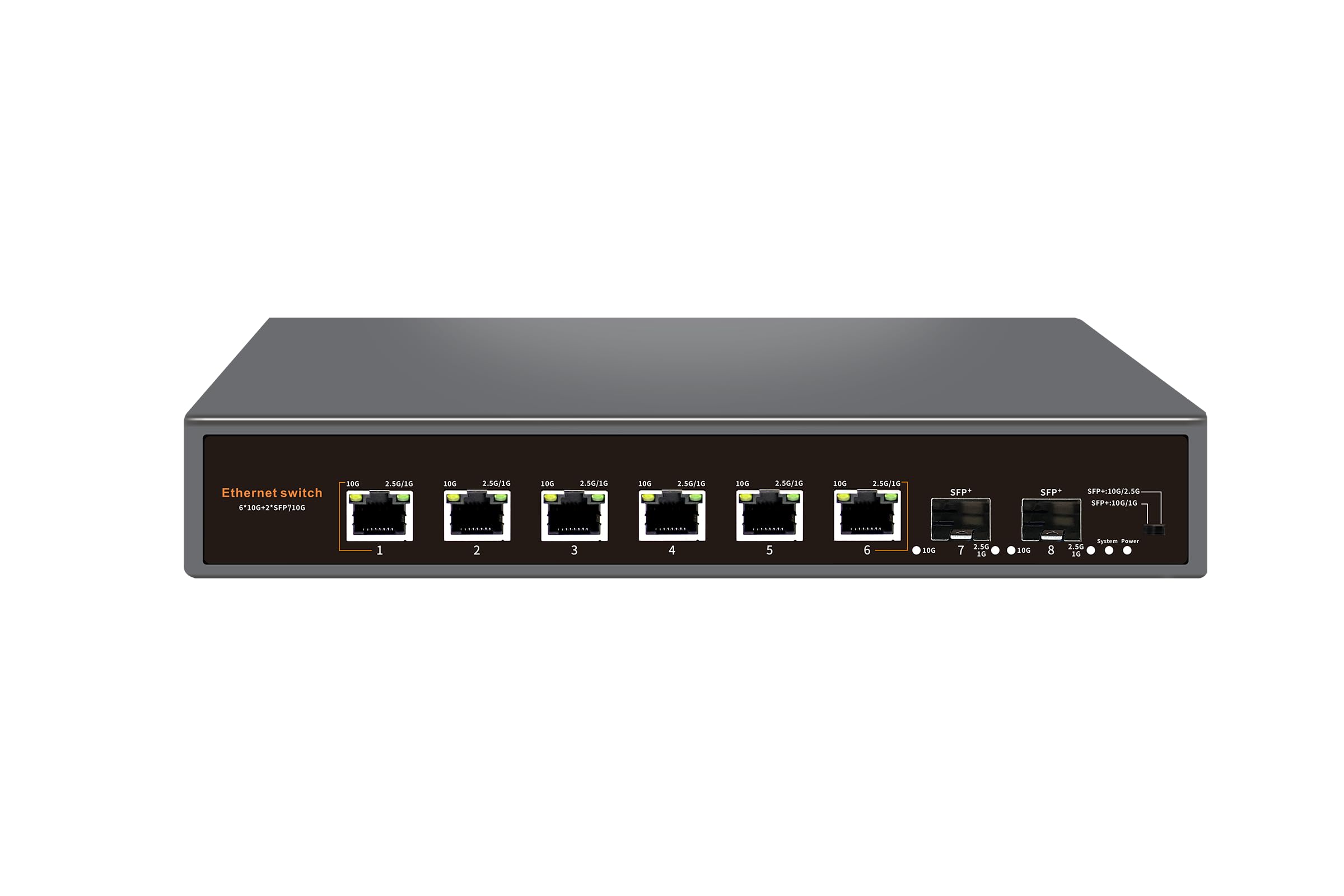
The Davuaz DZ-W0602WS fills a critical gap for anyone who needs both copper and fiber connectivity without the cost of an all-10G unit. Six 10GBase-T ports handle your NAS, workstation, and gaming PC, while two 10G SFP+ uplinks give you the option to connect a distant building via fiber or a core switch via a DAC cable. The fanless metal chassis and 6KV lightning protection make it suitable for home office environments where reliability is paramount but noise cannot be tolerated.
Users who have deployed this switch in unconditioned spaces like attics — where summer temperatures can exceed 50°C — report zero failures over months of use, a testament to the thermal headroom built into the design. The copper ports support auto-negotiation from 1G up to 10G, so you can connect a mix of 2.5G Wi-Fi access points, 5G media servers, and 10G workstations without compatibility issues. The SFP+ ports run at full 10G line rate using standard modules.
A few users have noted that the LED behavior is unusual: the indicator light for speed is reversed, showing yellow for 2.5G and green for 10G, which can confuse troubleshooting. More critically, a small number of units have exhibited random disconnects where all lights go solid and traffic drops. The 6-port copper base is also limited compared to the 8-port full-copper or full-SFP+ options on this list. For the price, the flexibility of having both port types in a fanless, durable package is hard to beat.
Why it’s great
- Six copper 10G ports plus two SFP+ uplinks
- Fanless, compact metal chassis runs silent
- Good thermal tolerance for challenging environments
Good to know
- LED speed indicators are non-intuitive (yellow for 2.5G)
- Some units have reported intermittent disconnects
4. MikroTik CRS304-4XG-IN
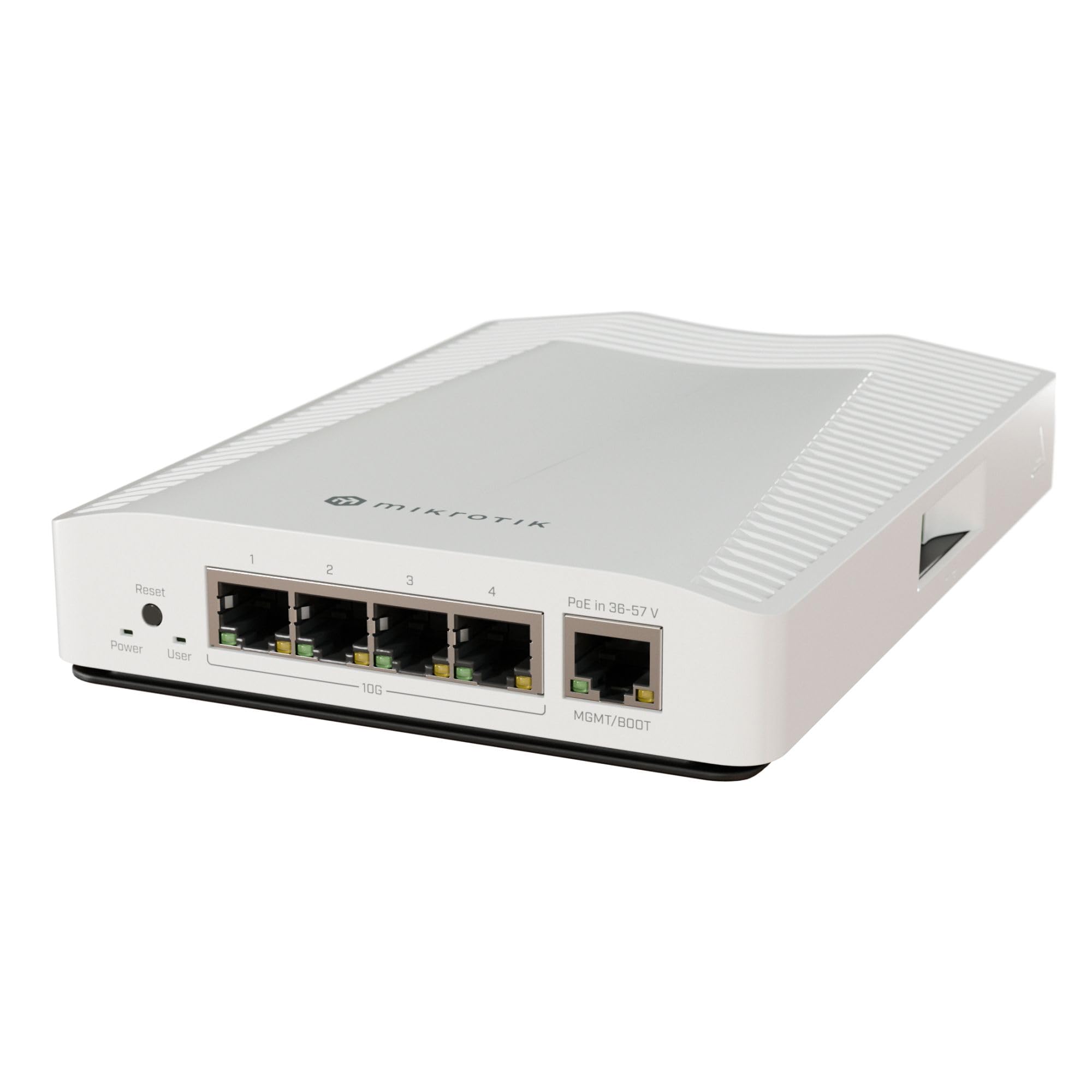
When space and silence are the top priorities, the MikroTik CRS304-4XG-IN delivers four 10GBase-T ports in a fanless, passively cooled package that fits in the palm of your hand. Despite its tiny footprint, this switch runs the full RouterOS Layer 2+ management suite, giving you VLANs, spanning tree, and link aggregation via the dual-core ARM CPU. The PoE input on the 1G management port is a clever feature for backup power scenarios, ensuring the switch stays online during a power flicker.
Users consistently praise the rock-solid build quality and the absence of coil whine — a common issue with smaller 10G switches. The heavy metal chassis acts as a heatsink, staying warm but never hot even under sustained throughput. It works out of the box for basic port density, but the real power comes from configuring VLANs to segment traffic, which is where the RouterOS learning curve reappears.
The main limitation is the port count: four 10G ports fill up fast if you are connecting a NAS, a workstation, a server, and a router. The PoE input port is gigabit only, which means you cannot use it as a fifth 10G port. Setup is not trivial — expect to spend time with the CLI or web interface to unlock features like VLAN tagging. For a compact, silent, managed 10G switch that can handle a small but demanding network, this is a brilliant piece of kit.
Why it’s great
- Four 10G RJ45 ports in an ultra-compact silent chassis
- Full RouterOS for advanced network management
- PoE input allows backup power flexibility
Good to know
- Only four 10G ports; the PoE port is 1G
- Requires significant effort to configure advanced features
5. NETGEAR GS108MX
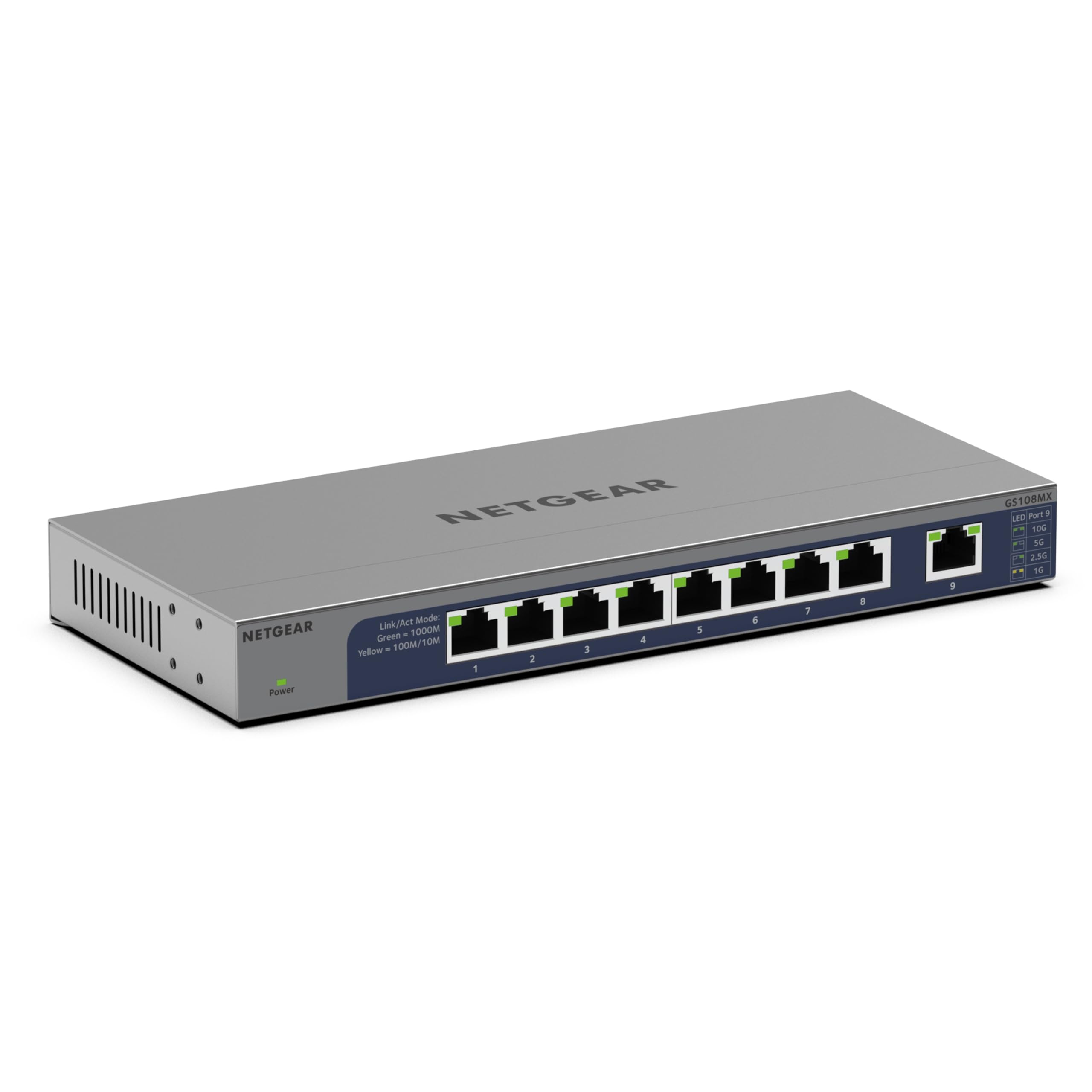
The NETGEAR GS108MX takes a different approach to 10G: instead of eight 10G ports, it gives you one multi-gig (100M to 10G) uplink port and eight gigabit downstream ports. This design is ideal for a home where a 10G router or ONT feeds a switch that distributes to wired clients like TVs, game consoles, and streaming boxes. The fanless, plastic chassis keeps noise to zero, and the lifetime hardware warranty from NETGEAR adds peace of mind.
Setup is effortless — plug the 10G uplink into your router, plug your eight gigabit devices into the switch, and you are done. The LED indicators clearly show connection status and activity, and the energy-efficient Ethernet mode automatically reduces power when ports are idle. For users who want to offload Wi-Fi bandwidth to wired connections without fully upgrading their entire network to 10G, this switch is a cost-effective bridge.
The obvious limitation is that only one device gets 10G speeds: the uplink. Your eight wired clients are still limited to gigabit, so this switch does not create a full 10G local network. The plastic case feels less premium than the all-metal alternatives on this list, and some users report difficulty registering for the lifetime warranty. This is a targeted solution for a specific need, and for that need, it performs flawlessly.
Why it’s great
- Extremely simple plug-and-play with a single 10G uplink
- Fanless and silent operation
- Lifetime warranty from a trusted brand
Good to know
- Only one 10G port; all client ports are gigabit
- Plastic casing feels less durable than metal chassis
6. MokerLink 8 Port SFP+
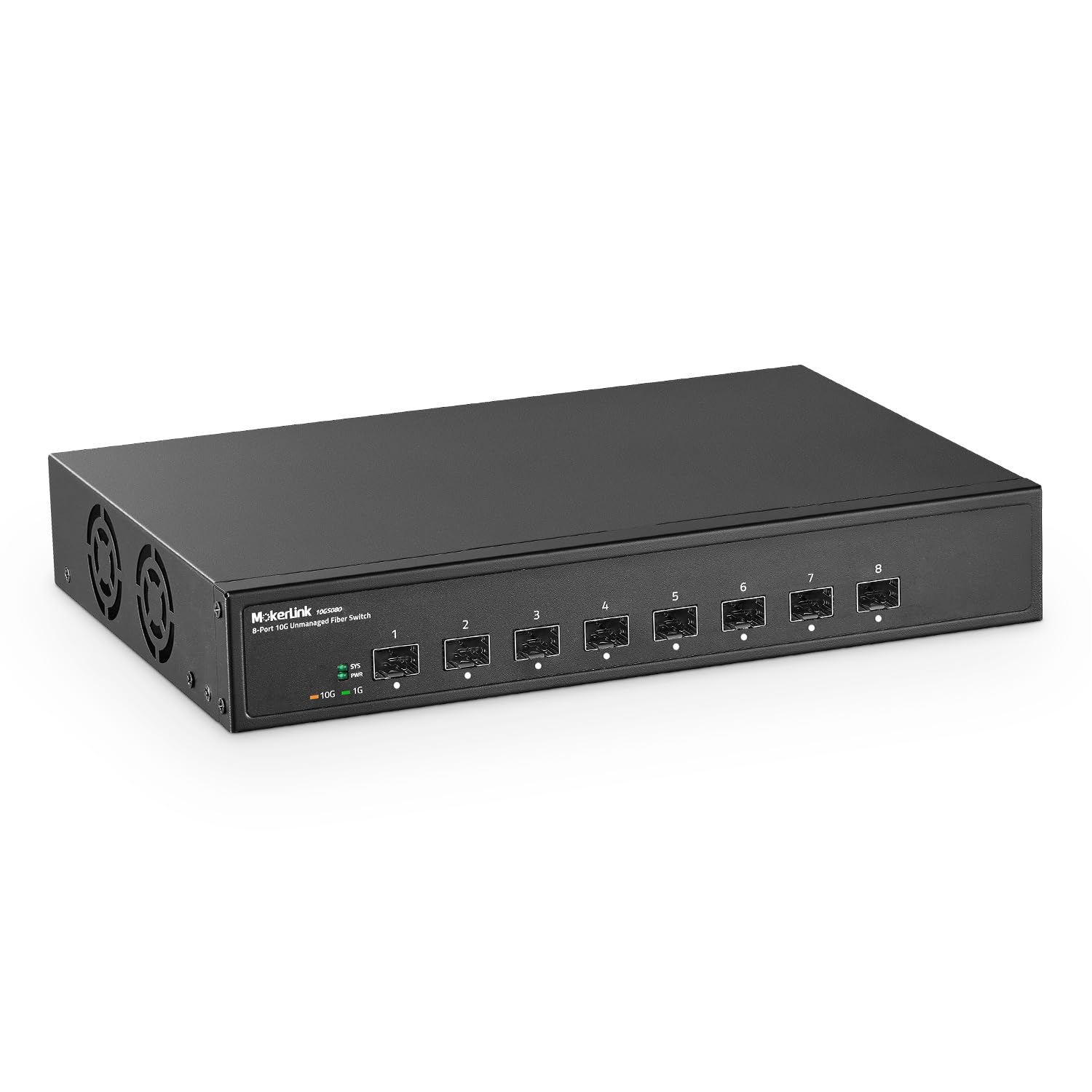
If your network is built entirely on fiber, the MokerLink 8 Port SFP+ switch provides eight 10G SFP+ slots in a plug-and-play unmanaged format at a very accessible price. The 160 Gbps backplane ensures no port blocks another, and the fan-cooled design handles the thermal load of eight transceivers without complaint. The metal case supports both desktop and wall-mount installation.
Because it is unmanaged, there is no configuration to worry about: insert your SFP+ modules, connect the fiber cables, and the switch immediately passes traffic at line rate. Jumbo frames up to 10K bytes are supported, which is useful for storage traffic like NFS or iSCSI. The industrial-grade fan is effective but audible, so be mindful of placement in a quiet room.
The fan noise is the primary trade-off for the price and port count. This switch is better suited for a basement, garage, or equipment closet where fan hum is acceptable. Some reviews on the listing page appear to confuse this 10G SFP+ model with a PoE switch, but this unit is strictly for fiber connections. For a pure fiber aggregation point that demands no manual configuration, this is the most affordable eight-port 10G SFP+ switch available.
Why it’s great
- Eight 10G SFP+ ports at a low cost per port
- 160 Gbps switching capacity handles full line rate
- Simple unmanaged operation, jumbo frame support
Good to know
- Fan is audible; not suitable for quiet spaces
- No copper ports; requires SFP+ modules sold separately
7. SODOLA 8 Port SFP+ L3 Managed
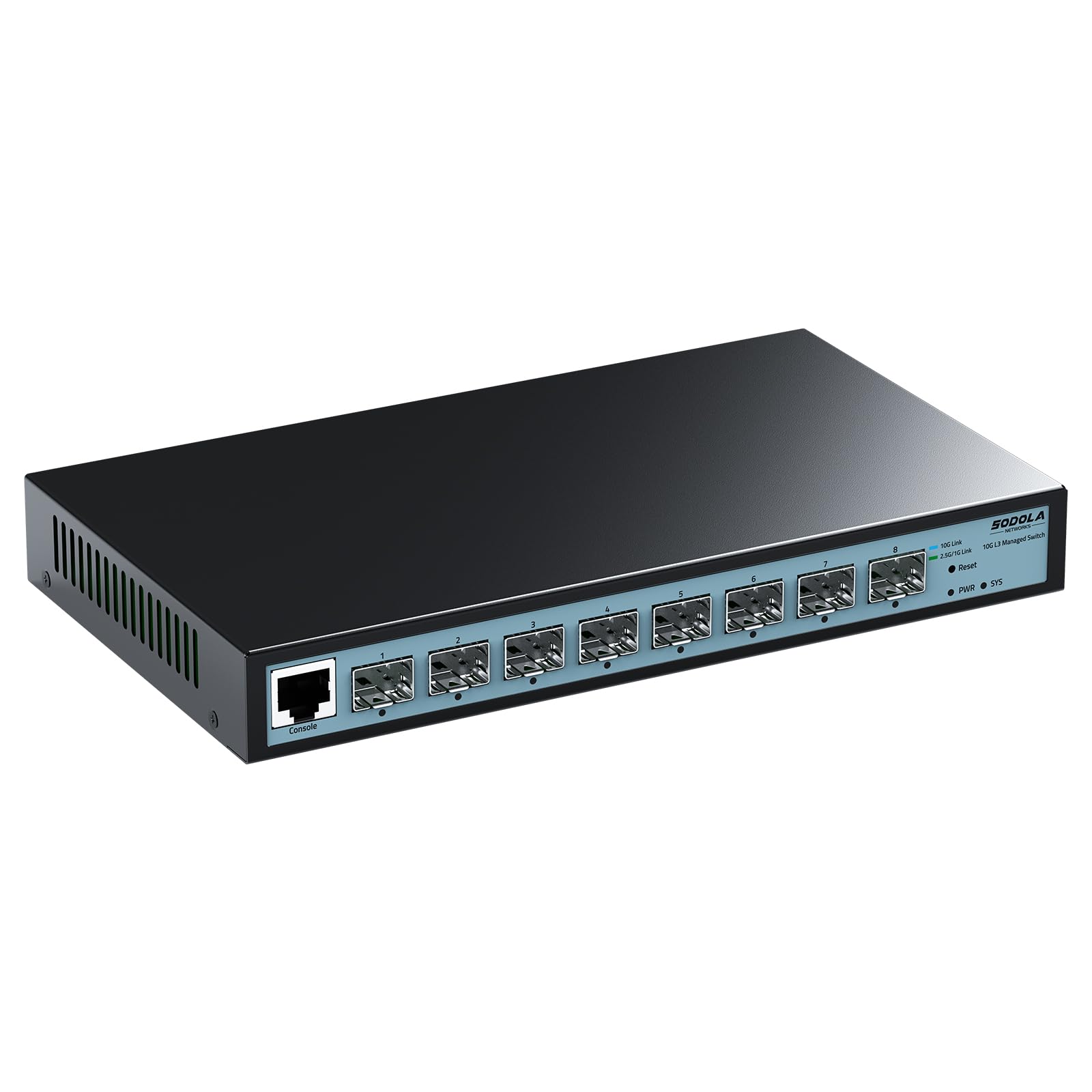
The SODOLA 8 Port SFP+ Managed Switch brings Layer 3 routing capabilities to the budget-friendly SFP+ space, offering static routing, VLAN segmentation, QoS prioritization, and IGMP snooping through an intuitive web interface. The eight 10G SFP+ slots give you the port density for a small data center or a demanding home lab, and the fanless metal casing keeps the unit silent while the bilateral cooling design prevents overheating.
Performance in real-world use is excellent: users report connecting multiple switches via 10G SFP+ LR modules and achieving 8-9 Gbit iperf3 throughput with 9000 MTU jumbo frames. The management interface, once configured, provides full control over traffic shaping and VLANs. The default port rate is 10G/2.5G adaptive, so you must manually set SFP+ slots to 10G/1G if you need to connect 1G devices.
The catch is the lack of technical support. Multiple users have reported that email inquiries to the manufacturer go completely unanswered, which is a risk if you encounter configuration problems or a hardware defect. The switch also seems to require manual config-saving after changes, mirroring enterprise behavior that may surprise newcomers. For the experienced network admin who can troubleshoot independently, the feature set at this price is remarkable.
Why it’s great
- Layer 3 managed features (VLANs, routing, QoS)
- Eight 10G SFP+ slots in a fanless metal chassis
- Excellent real-world throughput with jumbo frames
Good to know
- Manufacturer support is essentially non-existent
- Configuration requires manual saving, not automatic
8. TRENDnet TEG-S762

The TRENDnet TEG-S762 is a well-built entry point into multi-gig networking, offering four 2.5G ports for newer Wi-Fi access points and workstations, plus two 10G ports for connecting a NAS and a core router. The all-metal housing provides good passive heat dissipation, and the wall-mountable design is convenient for structured wiring closets. TRENDnet includes a lifetime warranty for US and Canadian buyers, which adds long-term value.
Users consistently report that the switch delivers full line-rate throughput to connected devices and has proven reliable over months of continuous operation. The 2.5G ports are particularly useful for taking full advantage of 2.5G fiber internet connections without overspending on a full 10G switch. The 10G ports use SFP+ cages, so you will need to purchase SFP+ to RJ45 modules if your NAS and router use copper connections.
The switch runs noticeably warm during operation. Many users have found that turning the unit on its side improves airflow and reduces temperature by a significant margin. The power adapter input is located on the front panel, which some users find awkward for cable management. If you need a cost-effective way to add a multi-gig segment to your network with a reliable upgrade path to 10G, this TRENDnet model is a solid choice.
Why it’s great
- Four 2.5G ports for modern Wi-Fi and workstations
- Two SFP+ cages for 10G uplinks
- All-metal case with lifetime warranty (US/Canada)
Good to know
- Runs warm; may require side mounting for optimal temps
- Power adapter input is located on the front panel
9. VunLink 6-Port 10G/2.5G
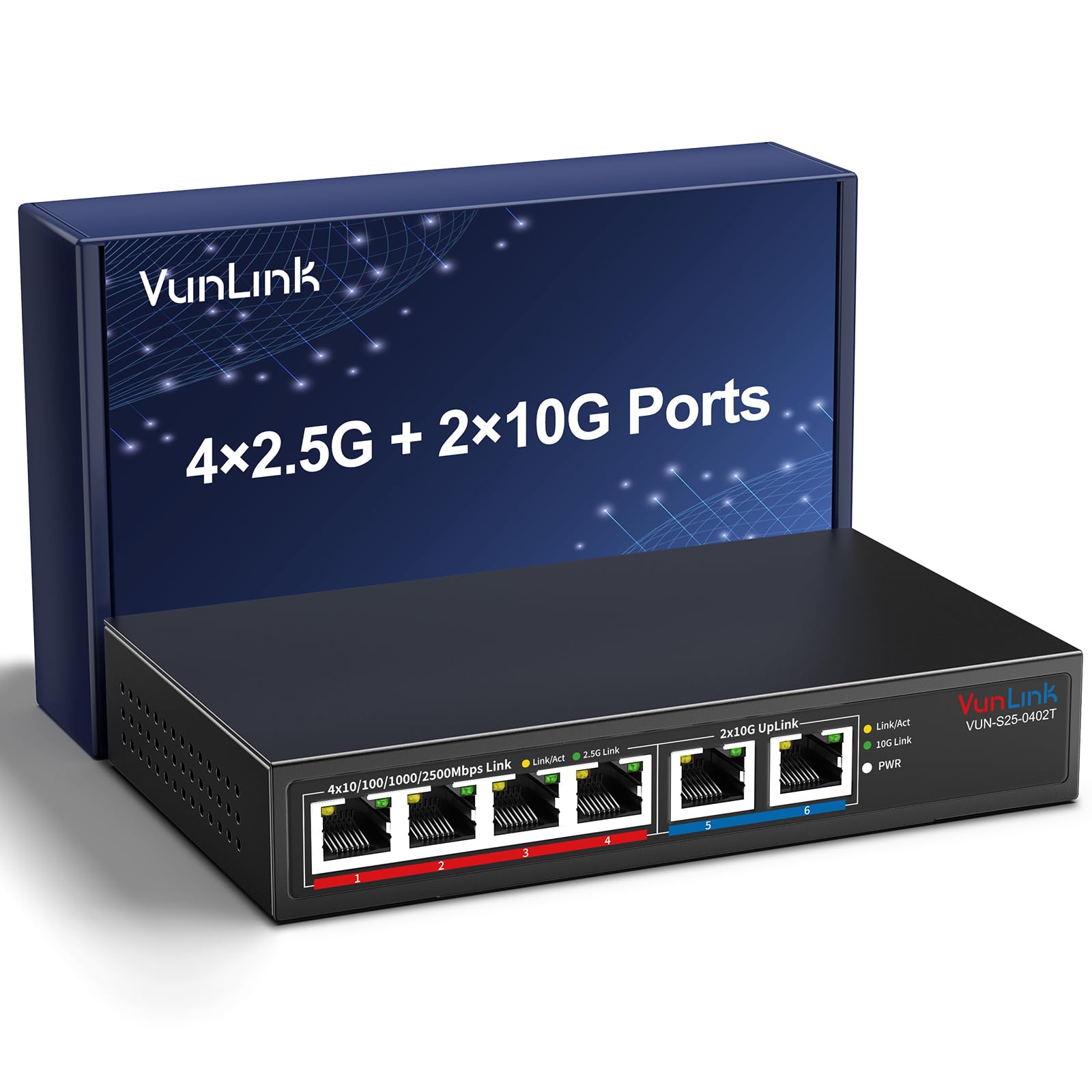
The VunLink 6-Port Switch is the most affordable way to get a 10G port into your network, pairing two dedicated 10G RJ45 ports with four 2.5G ports for modern Wi-Fi gear and clients. The fanless metal housing keeps operation silent, and the plug-and-play design means anyone can add it to their network in seconds. The 60 Gbps switching capacity is sufficient for the six ports, ensuring no bottlenecks under heavy multi-device traffic.
Users with 10G NAS devices report full line-rate throughput and reliable connectivity, with the switch automatically negotiating speeds across all connected devices. The LED indicators clearly display port activity, and the compact size allows flexible placement on a desk, shelf, or mounted on a wall. For a prosumer looking to connect a single 10G NAS and a few 2.5G PCs without spending heavily, this is a practical and effective solution.
The main downsides are limited port expansion and the build materials. The housing is metal, but some user feedback suggests it is lighter than premium alternatives, and the power draw is very low (under 0.5W with two active ports). The warranty is only one year, which is shorter than the lifetime coverage offered by TRENDnet or NETGEAR. As a no-frills, affordable bridge into the 10G world, the VunLink switch delivers exactly what it promises at an entry-level cost.
Why it’s great
- Two 10G RJ45 ports at the lowest price in this guide
- Fanless and silent operation
- True plug-and-play with auto-negotiation
Good to know
- Limited to six total ports; no SFP+ options
- 1-year warranty is shorter than many competitors
FAQ
Can I use a 10Gb switch with my existing Cat5e cables?
What is the difference between a managed and an unmanaged 10Gb switch?
Do I need SFP+ modules, or do they come with the switch?
Final Thoughts: The Verdict
For most users, the 10gb switch winner is the TP-Link TL-SX1008 because it delivers eight full 10G copper ports in a reliable, rack-mountable package with no configuration and minimal noise. If you want a fiber-based managed backbone for a home lab, grab the MikroTik CRS309-1G-8S+in. And for a budget-friendly entry point that combines both copper and SFP+ connectivity, nothing beats the Davuaz DZ-W0602WS.