
Our readers keep the lights on and the weekend projects moving. As an Amazon Associate, I earn from qualifying purchases.
Printing architectural blueprints, large spreadsheets, or full-size sewing patterns requires a machine that can handle tabloid or ledger paper without choking. Most standard letter-size printers simply cannot fit an 11×17 sheet through their paper path, leaving you stuck with expensive print shops or reduced-size documents that lose critical details.
I’m Rikta — the co-founder and writer behind FitlyFast. I have spent years analyzing wide-format printer specs, ink economics, and real-world reliability data to help buyers avoid the common pitfalls of cheap consumer-grade units that cannot handle sustained tabloid workloads.
Whether you run a small architecture firm, teach art classes, or need large invoices and plans printed in-house, finding a reliable 11×17 printer means balancing print speed, paper handling, and long-term ink or toner costs without sacrificing build quality.
How To Choose The Best 11×17 Printer
Wide-format printers are not one-size-fits-all. A model that excels for a graphic designer may frustrate an accountant printing spreadsheets every day. Focus on paper path, ink or toner type, and total cost of ownership rather than just the upfront sticker.
Paper Path & Tray Configuration
Not all 11×17 printers feed tabloid from the same tray. Some require you to use a rear specialty feed, which is fine for occasional prints but breaks workflow if you print large pages all day. Units with a dedicated 250-sheet or 500-sheet cassette that holds ledger paper will save you from constantly reloading. Also check if the paper extends beyond the output tray — many units have an extended flap that you must pull out to prevent curled prints.
Ink vs. Laser for Tabloid Workloads
Inkjet printers like the Canon MegaTank and Epson WorkForce Pro offer lower upfront cost and superb color for photos and presentations, but they require regular use to prevent nozzle clogs — a real pain in a home office that only prints once a week. Laser printers, like the Brother MFC-L3720CDW, use toner that does not dry out, making them ideal for sporadic use, but the initial purchase price is significantly higher. For heavy daily color output exceeding 500 pages per month, a mid-range inkjet with high-yield ink bottles often wins on cost per page.
Duplex Printing (Auto 2-Sided) on Large Media
Automatic duplex printing on 11×17 paper is not guaranteed even on many wide-format models. Some printers only duplex on letter-size paper, forcing you to manually feed tabloid sheets for a second pass. If you frequently print double-sided architectural sheets or instructional manuals, look for explicit “automatic duplex up to 11×17” in the spec sheet. The Epson WF-7840 and Brother MFC-J6960DW are two strong contenders here.
Long-Term Ink Security & Firmware Lock-Ins
A growing frustration among buyers is manufacturer firmware updates that block third-party ink cartridges. Epson and HP have faced lawsuits over this practice. If you intend to refill or use generic cartridges, research whether the printer has a history of forced updates. Brother and Canon have generally been more lenient, though Brother’s newer chip-locked toner cartridges on some laser models are now drawing similar complaints. Always factor the cost of a full set of official cartridges or toner into your budget before buying.
Quick Comparison
On smaller screens, swipe sideways to see the full table.
| Model | Category | Best For | Key Spec | Amazon |
|---|---|---|---|---|
| Epson WF-7840 | All-in-One | Office multitasking | 13″x19″ max; 500-sheet capacity | Amazon |
| Brother MFC-J6960DW | All-in-One | High-volume tabloid duplex | 500-sheet + multipurpose tray | Amazon |
| HP OfficeJet Pro 9730 | All-in-One | Fast color with large touchscreen | 22 ppm black; 2x 250-sheet trays | Amazon |
| Canon MAXIFY GX2020 | MegaTank | Ultra-low ink cost per page | 3000-page black bottles included | Amazon |
| Epson WF-7310 | Print Only | Simple tabloid printing | 13″x19″ max; auto duplex | Amazon |
| Brother INKvestment 6560 | All-in-One | Fast color + ADF scanning | 31 ppm black; 50-sheet ADF | Amazon |
| Canon imageCLASS MF665Cdw | Laser All-in-One | Reliable laser with 3-year warranty | 26 ppm color; 5″ touchscreen | Amazon |
| Brother MFC-L3720CDW | Color Laser | Business laser with cloud apps | 19 ppm; 3.5″ color touchscreen | Amazon |
| Brother MFC-L8610CDW | High-Speed Laser | Heavy enterprise tabloid workload | 33 ppm; 61.1 lbs durable chassis | Amazon |
In‑Depth Reviews
1. Epson WorkForce Pro WF-7840

The Epson WF-7840 is the most versatile all-in-one in this tier, offering print, copy, scan, and fax functions with a 50-page ADF and a roomy 500-sheet paper capacity. It prints up to 13×19 inches, meaning it handles tabloid extra with no issue, and the 4.3-inch touchscreen makes navigation straightforward. PrecisionCore Heat-Free technology delivers 25 ppm black and 12 ppm color, which is competitive for a wide-format inkjet in this range.
DURABrite Ultra pigment inks produce smudge-resistant prints on plain paper and perform reasonably well on glossy photo paper. Users who have run over 12,000 pages report consistent quality on AutoCAD drawings and heavy stock. The auto-duplex for 11×17 works reliably, a feature often missing on lower-end tabloid printers. Ethernet and dual-band Wi-Fi ensure stable connectivity in shared office environments.
The main drawbacks are size — this machine is bulky and needs dedicated floor or desk space — and Epson’s aggressive firmware update prompts that some users find annoying. A small percentage report paper feed errors requiring disassembly, but the majority of long-term owners highlight its durability and print-shop-quality output as justifying the larger footprint.
Why it’s great
- True 13×19 printing with 500-sheet capacity
- Proven longevity beyond 12,000 pages
Good to know
- Very large and heavy desk footprint
- Frequent firmware update prompts irritate some
2. Brother INKvestment MFC-J6960DW

The Brother MFC-J6960DW is a direct competitor to the Epson WF-7840, with a strong emphasis on paper handling. It includes two 250-sheet paper trays plus a 100-sheet multipurpose tray, giving you 600 sheets of total capacity — ideal for offices that keep letter and tabloid loaded simultaneously. Print speeds reach 31 ppm black and 30 ppm color, some of the fastest inkjet numbers in this category.
MAXIDRIVE Technology and the PerfectPrint Auto Detection System help maintain consistency across a variety of media. The 3.5-inch color touchscreen provides access to cloud apps, and the up to 50-page single-pass duplex ADF scanning is a huge time saver. Users transitioning from Canon or Epson report far fewer network dropouts and a more reliable print-to-press experience.
However, the MFC-J6960DW is not immune to criticism. A minority of owners have experienced faint copies from the ADF and occasional ink head clogging that required deep cleaning cycles. The paper tray design can be finicky — paper must be fanned well and the tray holds closer to 200 sheets in practice than the 250 claimed. If you run a heavy remote work setup, the manual tray switching adds friction over time.
Why it’s great
- Fastest inkjet speeds at 31 ppm black
- 600-sheet combined capacity for multi-size jobs
Good to know
- Some users report ink head clogs after light use
- Paper tray holds 200 sheets in practice
3. HP OfficeJet Pro 9730

The HP OfficeJet Pro 9730 targets professional offices that demand accurate color reproduction. It is the first wide-format printer with P3 color gamut support, meaning screen-to-print color matching is noticeably better than standard sRGB machines. Print speeds hit 22 ppm black and 18 ppm color, and the dual 250-sheet trays give you 500-sheet capacity without reloading mid-job.
The 4.3-inch color touchscreen uses a phone-like interface that feels intuitive, and HP’s dual-band Wi-Fi automatically detects and resolves connection drops — a thoughtful feature for busy workspaces. Auto-duplex printing and single-pass 2-sided scanning via the ADF round out the productivity features. HP Wolf Pro Security also adds basic endpoint protection for those handling sensitive client documents.
The biggest trade-off is sheer physical size — this printer is massive at nearly 23 inches deep and requires a dedicated stand or large desk. The included Instant Ink trial is convenient but ties you into HP’s subscription ecosystem if you continue. Some users also report that the HP Smart app can be unintuitive for certain tasks like scan-to-email, requiring a few extra taps compared to dedicated buttons on the screen.
Why it’s great
- Industry-first P3 color gamut for accurate matching
- Dual 250-sheet trays with auto-duplex scan
Good to know
- Extremely large footprint — measure your space
- Instant Ink trial can auto-convert to paid subscription
4. Canon MegaTank MAXIFY GX2020

If you print hundreds of pages per month and want to minimize recurring ink costs, the Canon MAXIFY GX2020 is the clear winner. The refillable MegaTank system ships with enough ink for up to 3,000 black and 3,000 color pages out of the box, and replacement GI-25 bottles cost a fraction of cartridge-based systems. This makes it the most economical option for high-volume tabloid printing over a 12-month period.
The GX2020 prints up to 15 ppm black and 10 ppm color, which is slower than the Epson or Brother units but acceptable for most small offices. The 2.7-inch color touchscreen is responsive, and the 35-sheet ADF handles multi-page scanning well. Auto-duplex printing works reliably on plain paper, and Wi-Fi setup via the Canon PRINT app is quick on both iOS and Android.
The downsides are real though. Print quality on cardstock and glossy photo paper is subpar — users report pronounced curl and streaking when using high-quality settings. The printer is also louder than the Epson WF-7840 during operation. A handful of users experienced total color failure after deep cleaning cycles wasted the entire ink supply. It is best suited for document-heavy offices, not graphic design studios.
- Extremely low per-page cost with MegaTank
- Easy refill bottles — no messy cartridges
- Poor photo and cardstock print quality
- Noisy operation during high-speed jobs
5. Epson WorkForce Pro WF-7310
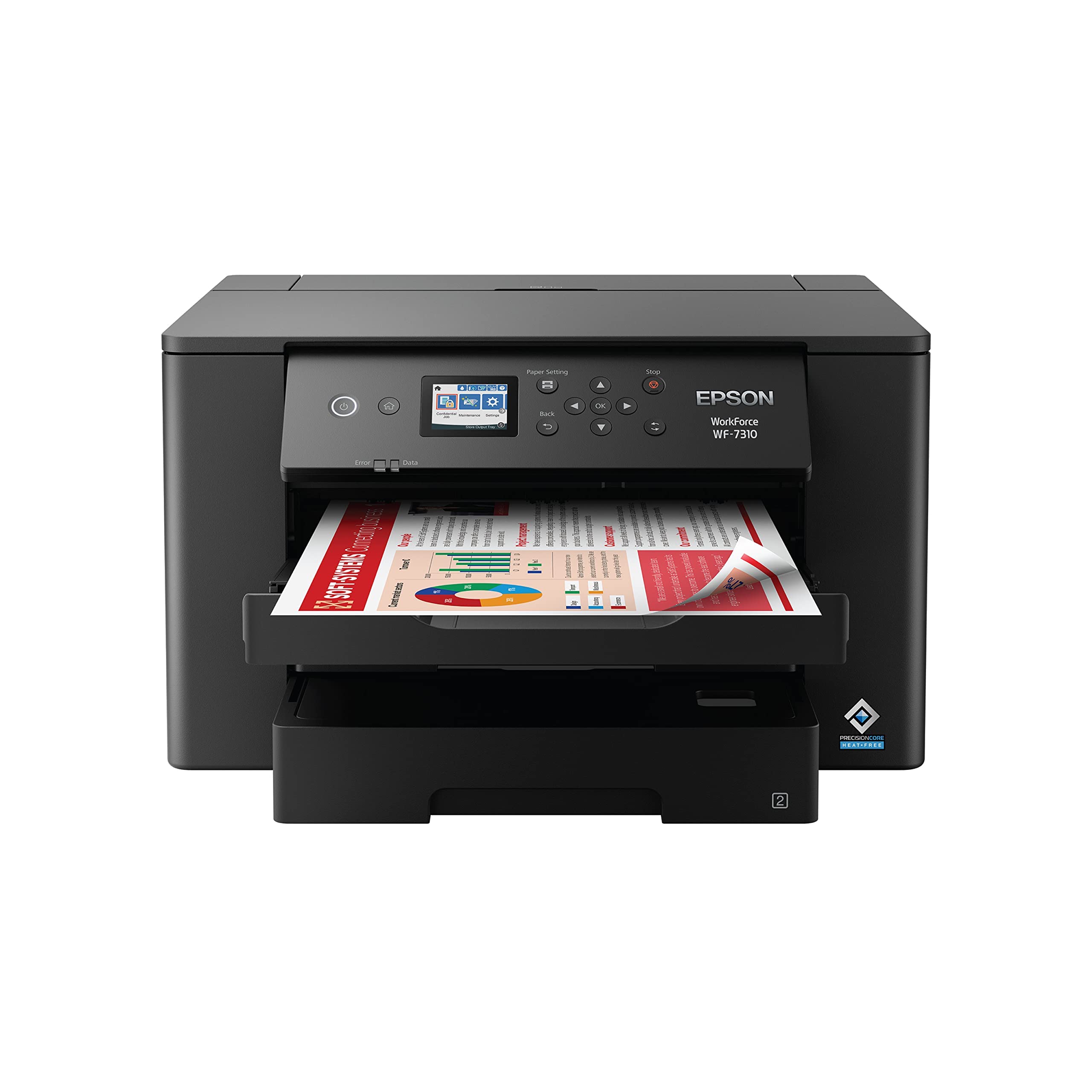
The Epson WF-7310 strips away scanning and faxing to deliver a dedicated tabloid printing powerhouse at a lower entry point. It prints up to 13×19 inches with PrecisionCore Heat-Free technology, hitting 25 ppm black and 12 ppm color. That makes it faster than many all-in-ones and ideal for offices that already have a separate scanner or MFP for other tasks.
The 500-sheet capacity is split across two 250-sheet trays, and the rear feed handles thick media like watercolor paper without jamming — artists have praised its ability to run heavy stock consistently. Auto-duplex works on tabloid paper, and the 2.4-inch color display is sufficient for basic job control. Wireless connectivity is strong, supporting both Wi-Fi 5 and Wi-Fi Direct for cable-free operation.
On the downside, this is strictly a printer — no scan, copy, or fax functions, which may be a dealbreaker if you need all-in-one functionality. Some users experienced frustrating issues with firmware updates blocking third-party ink cartridges, mirroring complaints seen on other Epson models. The paper output tray also extends significantly, so measure your desk depth before purchasing.
Why it’s great
- Affordable entry to tabloid printing
- Excellent thick-media handling via rear feed
Good to know
- No scanning, copying, or faxing
- Firmware updates may block third-party ink
6. Brother INKvestment MFC-J6560DW

The Brother INKvestment MFC-J6560DW is a fast, feature-rich inkjet that prioritizes speed without sacrificing paper handling. At 31 ppm black and 30 ppm color, it is among the quickest tabloid inkjets available. It comes with an 1,800-page black cartridge and 750-page color cartridges in the box, giving you a substantial starting yield that lowers immediate replenishment costs.
Paper handling includes a 250-sheet tray and a 50-page single-sided ADF. The 2.7-inch color touchscreen gives access to cloud printing services like Google Drive and OneDrive, and the Brother Mobile Connect app makes scanning and management from a phone straightforward. Users highlight the crisp text and vivid color output on standard office paper, and the auto-duplex function works smoothly for both letter and tabloid.
The catch is that the included starter cartridges are standard yield, meaning you will need to upgrade to XL or XXL soon if volume is high. Some reviews also note that the MFC-J6560DW does not auto-duplex on tabloid as expected, despite the marketing claims — requiring manual feed reinsertion for double-sided 11×17. A few buyers have encountered aggressive customer service policies when seeking support for connectivity issues.
Why it’s great
- Extremely fast print speeds for the category
- Generous starter cartridges included
Good to know
- May not auto-duplex on tabloid as expected
- Starter cartridges are standard, not high-yield
7. Canon Color imageCLASS MF665Cdw

The Canon imageCLASS MF665Cdw brings laser reliability to the tabloid-capable market with 26 ppm in both color and monochrome. It uses Canon Genuine Toner 075 cartridges and comes with a 3-year limited warranty that adds peace of mind for small businesses. The 5-inch color touchscreen is the largest in this roundup, making navigation through the Application Library simple and fast.
The unit prints, scans, copies, and faxes, with a 50-sheet duplex ADF that can scan both sides in a single pass. Automatic 2-sided printing is standard, and the laser engine ensures consistent color output without the nozzle-clogging concerns of inkjets. Setup is reasonably straightforward — though some Mac users found the initial driver installation troublesome, requiring manual intervention.
On the negative side, the standard paper cassette holds only 250 sheets with a 1-sheet multipurpose tray, which may be limiting for high-volume tabloid jobs. The color image quality, while solid for business documents, is less vivid than high-end inkjets when printing photographs. The touchscreen UI is also slower than some competitors, with noticeable lag when scrolling through menus. Overall, it is a durable laser choice if your priority is reliability over photography-grade color.
Why it’s great
- 3-year limited warranty provides business security
- Fast 26 ppm color laser with duplex ADF
Good to know
- Only 250-sheet paper tray standard
- Photo color less vivid than inkjets
8. Brother MFC-L3720CDW

The Brother MFC-L3720CDW is a business-grade color laser that focuses on connectivity and workflow efficiency. It supports dual-band 2.4GHz/5GHz Wi-Fi, Wi-Fi Direct, and USB 2.0, allowing multiple users to queue jobs seamlessly. The 3.5-inch color touchscreen offers 48 customizable shortcuts, and the printer directly integrates with Google Drive, Dropbox, and OneNote for scanning to the cloud without a computer.
Print speeds of 19 ppm in both black and color are adequate for a small office, and the 250-sheet tray plus a 50-sheet ADF handle moderate workloads. Automatic duplex printing works reliably, and the toner comes in standard, high-yield, and extra-high-yield options, giving you flexibility on per-page cost. Users consistently describe the print quality as sharp and vibrant, especially for text and business graphics.
The downsides include a lack of true tabloid support — this is a letter-size laser printer, so it cannot handle 11×17 paper directly. If your sole need is for an 11×17 printer, this unit is not suitable. Additionally, some owners report that the printer stops printing when it detects a toner cartridge as low, even if the cartridge still has visible toner left. This forced early replacement can inflate operating costs if you stick with official Brother cartridges.
Why it’s great
- Excellent cloud integration with customizable shortcuts
- Sharp text and graphics for professional documents
Good to know
- Letter-size only — cannot print 11×17
- May force early toner replacement based on page count
9. Brother MFC-L8610CDW

The Brother MFC-L8610CDW is a heavy-duty color laser built for sustained enterprise-level use. It produces up to 33 pages per minute in both black and color — the fastest print speed in this guide — and weighs 61.1 pounds, signaling an industrial-grade chassis. It supports multiple scan-to destinations including email, USB, SharePoint, and cloud services, and the security features allow controls like restricting color printing to reduce costs.
This model is Dash Replenishment enabled, meaning it can automatically order replacement toner when supplies run low, which can be a convenience for busy offices. Users consistently praise the high build quality, reliable networking, and the fact that it still receives firmware support years after release. The drum unit yields 30,000 pages, and standard toner cartridges deliver 3,000 pages black and 1,800 pages color, reducing maintenance frequency.
The main catch is size and weight — this is not a printer you move around casually, and proper desk or stand preparation is mandatory. The toner cartridges are also tied to chips that prevent third-party alternatives, forcing you to buy Brother-branded supplies at a premium. A few long-term owners noted that recent firmware updates removed the ability to continue printing when toner is marked as low, adding pressure to replace cartridges early.
Why it’s great
- Fastest print speed at 33 ppm color
- Enterprise-grade build with advanced security
Good to know
- Extremely heavy — requires two people to install
- Chip-locked toner prevents third-party refills
FAQ
Can I print on 11×17 paper with a standard letter-size printer?
Is an inkjet or laser printer better for 11×17 color documents?
What does a 500-sheet paper capacity mean for tabloid printing?
Why do some 11×17 printers require a rear feed for large paper?
Can I use third-party ink or toner in an 11×17 printer?
Final Thoughts: The Verdict
For most users, the 11×17 printer winner is the Epson WorkForce Pro WF-7840 because it packs a true all-in-one feature set with 13×19 capability, 500-sheet paper capacity, and proven long-term reliability at a mid-range price. If you want the lowest per-page ink cost and do not need to print photos on glossy stock, grab the Canon MegaTank MAXIFY GX2020. And for a laser that will run 30+ pages per minute without clogging, nothing beats the Canon imageCLASS MF665Cdw with its 3-year warranty.