
Our readers keep the lights on and the weekend projects moving. As an Amazon Associate, I earn from qualifying purchases.
A spotty 2.4 GHz signal that drops in the backyard or fails to reach the garage isn’t just an annoyance—it’s a breakdown in your home’s connectivity. For smart home hubs, security cameras, and IoT devices, the 2.4 GHz band remains the backbone of reliable, long-range coverage. Choosing the wrong router means constant buffering and dropped connections, not the robust network you need.
I’m Rikta — the co-founder and writer behind FitlyFast. I’ve spent hundreds of hours researching router specifications, analyzing real user feedback on performance across different home layouts, and comparing the concrete specs that determine whether a 2.4 GHz router actually delivers stable, wide-ranging coverage.
This guide cuts through the marketing noise to help you find the best 2.4 GHz WiFi router for your home, focusing on signal strength, device capacity, and the real-world specs that matter for a rock-solid network.
How To Choose The Best 2.4 GHz WiFi Router
Selecting a 2.4 GHz router is about prioritizing range and device compatibility over raw speed. The 2.4 GHz band offers superior penetration through walls, floors, and obstacles, making it ideal for smart home sensors, security cameras, and covering larger homes. Your choice should hinge on a few critical factors.
Antenna Configuration and Gain
The number and gain of antennas directly impact signal reach. External, high-gain antennas (typically 5 dBi or higher) provide significantly better coverage than internal antennas or lower-gain options. For maximizing 2.4 GHz range, look for routers with at least four external antennas. A higher antenna count also supports better spatial streaming (MU-MIMO), allowing the router to serve multiple devices simultaneously without slowing down.
WiFi Generation: WiFi 6 vs. WiFi 5 vs. WiFi 7
While WiFi 6 (802.11ax) and WiFi 7 (802.11be) offer faster speeds on the 5 GHz and 6 GHz bands, they also bring crucial improvements to the 2.4 GHz band. Technologies like OFDMA and MU-MIMO from WiFi 6 dramatically reduce latency and improve network efficiency when many 2.4 GHz-only smart home devices are active. For a robust, future-proofed 2.4 GHz experience, prioritize a WiFi 6 router. WiFi 5 (802.11ac) routers are still functional but will struggle with congested networks.
Processing Power and Device Load
A powerful processor is essential for handling the data demands of multiple connected devices. A dual-core or quad-core processor ensures the router can efficiently manage traffic from dozens of smart home devices, security cameras, and streaming gadgets without bottlenecking. Check the router’s listed device capacity, but remember that a better processor often means better real-world performance under load.
Quick Comparison
On smaller screens, swipe sideways to see the full table.
| Model | Category | Best For | Key Spec | Amazon |
|---|---|---|---|---|
| MSI Radix AXE6600 | Premium | Gaming & Heavy Smart Home | Tri-band 6.6 Gbps, Quad-Core CPU | Amazon |
| Tenda RX12Pro | Mid-Range | Value & Whole-Home Coverage | 6 dBi External Antennas | Amazon |
| TP-Link Archer AX21 V5 | Mid-Range | Reliable & Certified for Humans | OFDMA, 4 External Antennas | Amazon |
| NETGEAR R6700AX | Mid-Range | Small-Medium Home Simplicity | AX1800, Nighthawk App | Amazon |
| NETGEAR RAX30 (Renewed) | Mid-Range | Budget-Conscious Power | AX2400, 2000 sq.ft. | Amazon |
| TP-Link Archer A8 | Value | VR & Dedicated 5G Setup | MU-MIMO, 3 Streams | Amazon |
| WAVLINK BE5100 Outdoor | Specialty | Extreme Outdoor Range | IP67, 300m Range, 8dBi Antennas | Amazon |
In‑Depth Reviews
1. MSI Radix AXE6600 WiFi 6E Tri-Band Gaming Router

The MSI Radix AXE6600 is a powerhouse that redefines what a 2.4 GHz router can do, thanks to its tri-band design and a 1.8 GHz quad-core processor. This isn’t just about raw speed; the processor ensures that the 2.4 GHz band remains stable and responsive even when dozens of IoT devices, security cameras, and guests are connected. The AI QoS feature intelligently prioritizes traffic, guaranteeing that latency-sensitive applications like gaming or video calls don’t suffer when a smart home device streams an update.
The real-world performance is staggering, with users reporting excellent coverage over 2,400 square feet, delivering strong signals to far corners where other routers fail. The 2.4 GHz band in this router is uniquely capable of handling heavy congestion without the usual slowdowns, making it an ideal choice for a fully connected smart home. The customizable RGB lighting is a bonus for those who want their networking gear to look as good as it performs.
Setup can be slightly more involved than plug-and-play routers, and its gaming-oriented design might feel like overkill for a simple two-device household. However, for anyone with a large home and a growing collection of 2.4 GHz-dependent devices, the MSI Radix AXE6600 is the most future-proof and capable choice on this list, offering a stable, low-latency foundation for years to come.
Why it’s great
- Quad-core processor handles massive device loads effortlessly on 2.4 GHz band.
- Tri-band setup separates traffic, ensuring 2.4 GHz devices have dedicated airtime.
- AI QoS intelligently prioritizes time-sensitive traffic for a lag-free experience.
Good to know
- Setup instructions are not the clearest and may require some technical know-how.
- The premium feature set and RGB may be unnecessary for basic networking needs.
2. Tenda WiFi 6 Router RX12Pro (AX3000)
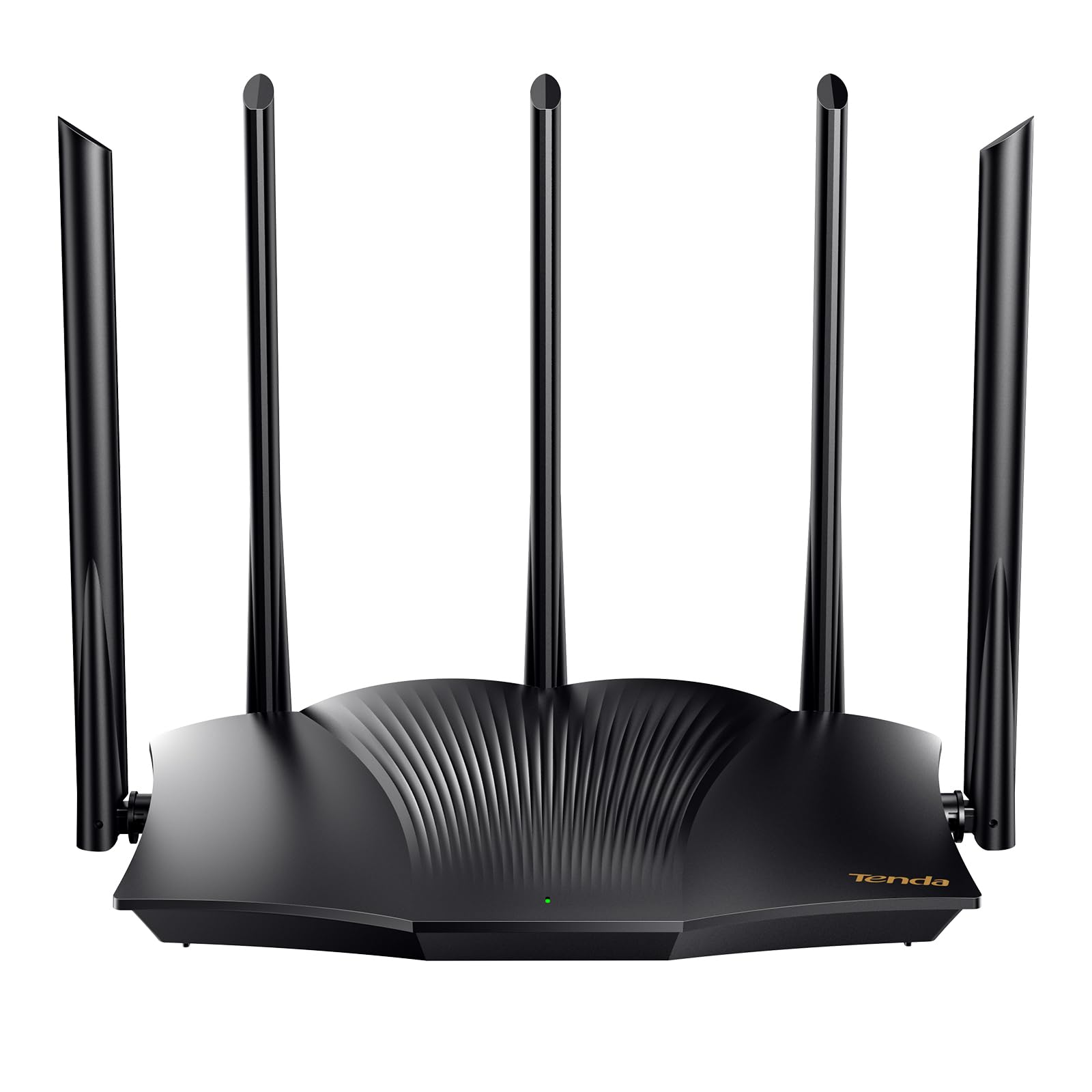
The Tenda RX12Pro delivers exceptional value by pairing WiFi 6 technology with five external 6 dBi high-gain antennas designed specifically to maximize range and signal stability on the 2.4 GHz band. This combination ensures that your smart home devices, which often rely solely on 2.4 GHz, maintain a rock-solid connection even if they are placed in a detached garage or a far corner of the basement. The MU-MIMO and OFDMA technologies from WiFi 6 mean the router can handle multiple 2.4 GHz devices simultaneously with lower latency, preventing the common problem of one smart bulb hogging the network.
Users praise its easy setup, often using it as an access point to dramatically improve the speed and reliability of their existing network. The one-click intelligent diagnosis feature is a practical tool for quickly troubleshooting network freezes or dropped connections, saving you from the usual modem reboot dance. Its AX3000 speed rating provides plenty of headroom for 4K streaming on the 5 GHz band while your 2.4 GHz devices stay happy and connected.
Some users have reported inconsistent range in certain setups, and it’s crucial to remember that this is a router, not a modem. It requires a separate modem from your internet service provider. For the price, however, the combination of WiFi 6 features, high-gain antennas, and stable performance makes the Tenda RX12Pro a fantastic mid-range choice for optimizing your 2.4 GHz smart home network.
Why it’s great
- Five external 6 dBi antennas provide exceptional 2.4 GHz range and penetration.
- WiFi 6 OFDMA and MU-MIMO efficiently handle many 2.4 GHz smart devices.
- Excellent value for a feature-rich WiFi 6 router.
Good to know
- Range can be inconsistent in some home layouts or with interference.
- It is a standalone router and requires a separate modem for internet access.
3. TP-Link AX1800 WiFi 6 Router (Archer AX21 V5)

The TP-Link Archer AX21 V5 is the epitome of a no-hassle, high-performance router, making it a top contender for users who want a reliable 2.4 GHz experience without deep technical configuration. Its WiFi 6 technology brings OFDMA to the 2.4 GHz band, which is crucial for homes with many low-bandwidth IoT devices like plugs, bulbs, and sensors. This technology prevents network congestion, ensuring that a firmware update from a smart plug doesn’t cause your 2.4 GHz security camera feed to stutter.
The four high-gain external antennas and advanced front-end module (FEM) chipset work together to deliver extensive, reliable coverage. Users consistently report strong, stable signals throughout their homes, and the ability to split the 2.4 GHz and 5 GHz bands is a major plus for troubleshooting older smart home devices that require a dedicated 2.4 GHz connection. The “Certified for Humans” designation is accurate, as the setup via the Tether app (or web interface) is straightforward.
A common piece of advice from users is to skip the Tether app and use the web-based setup for a flawless experience. It also lacks a USB port for network storage. For its mid-range price, the Archer AX21 delivers a powerful, stable, and user-friendly 2.4 GHz network that is perfectly suited for the modern, connected home, making it a strong, reliable choice.
Why it’s great
- OFDMA efficiently manages 2.4 GHz IoT traffic, preventing network congestion.
- Excellent range and stability thanks to the FEM chipset and four antennas.
- Very easy setup, especially when using the web-based interface.
Good to know
- The Tether app can have login issues; web-based setup is recommended instead.
- Lacks a USB port for connecting shared storage or a printer to the network.
4. NETGEAR WiFi 6 Router 4-Stream (R6700AX)

The NETGEAR R6700AX is a compact, no-fuss WiFi 6 router that delivers solid 2.4 GHz performance for small to medium homes, covering up to 1,500 square feet. Its AX1800 speed rating provides more than enough bandwidth for typical 2.4 GHz devices like security cameras and smart speakers. The setup via the Nighthawk app is praised for its simplicity, making it a great option for users who want to quickly replace a rental router from their ISP.
While it uses internal antennas, the signal is strong enough to comfortably handle up to 20 connected devices simultaneously without significant slowdowns. Users report that it works seamlessly as a replacement for Spectrum or Xfinity routers, often providing better coverage and speed. The WPA3 security and automatic firmware updates offer peace of mind without requiring any ongoing subscriptions.
The coverage is its primary limit; it’s not designed for large, multi-story homes or for users with exceptionally high device counts. Some users have reported long-term reliability concerns with NETGEAR hardware. For users in apartments, condos, or smaller houses who need a reliable, easy-to-manage 2.4 GHz network, the R6700AX is a solid, cost-effective solution.
Why it’s great
- Very easy setup via the simple Nighthawk app with helpful troubleshooting.
- Strong, stable 2.4 GHz signal for up to 1,500 square feet.
- Excellent value for replacing a monthly ISP router rental.
Good to know
- Coverage tops out at 1,500 square feet; not for large homes.
- Some reports of hardware failure and difficulties with customer support.
5. NETGEAR Nighthawk WiFi 6 Router (RAX30) – Renewed

The NETGEAR Nighthawk RAX30 offers a compelling combination of premium specs like AX2400 speed and a 2,000 square foot coverage range at a more accessible price point. As a renewed unit, it provides a significant discount over a brand-new model while still delivering the robust 2.4 GHz performance that the Nighthawk line is known for. Its 5-stream design helps improve efficiency when handling multiple 2.4 GHz devices.
Users who have upgraded from older routers report immediately noticeable improvements in both range and stability, especially on the 2.4 GHz band for older devices that don’t support WiFi 6. The four external antennas provide a tangible boost in signal strength to far corners of the house. The renewed condition is often described as like-new, with no cosmetic or performance issues, though it usually comes in a plain box with minimal documentation.
The biggest caveat is the renewed nature of the product, which comes with a reduced warranty compared to a new unit. Some users have also reported issues with customer support. For the technically savvy buyer who wants strong AX2400 performance at a budget-friendly price, the RAX30 is a fantastic way to get premium Nighthawk 2.4 GHz performance without the premium cost.
Why it’s great
- Excellent AX2400 speed and 2000 sq. ft. coverage at a value-oriented price.
- Renewed units are often in like-new condition with no signs of use.
- Significant performance upgrade over older WiFi 5 routers.
Good to know
- Comes as a renewed product with limited documentation and a plain box.
- Customer support can be difficult to reach and resolve issues.
6. TP-Link AC1900 Smart WiFi Router (Archer A8)

The TP-Link Archer A8 is a WiFi 5 (AC1900) router that finds its perfect niche as a dedicated, high-performance 5 GHz access point for a specific task, such as powering a VR headset. Many users buy this specifically to create a secondary, low-latency 5 GHz network for PC VR headsets like the Meta Quest 2 and 3, freeing up the main router for other devices. While it’s not the best choice as a primary 2.4 GHz router for a large smart home, its performance in this dedicated role is phenomenal.
For its primary task, users report pulling 800-900 Mbps over a gigabit connection on the 5 GHz band, resulting in a flawless, high-quality VR streaming experience. The MU-MIMO technology helps, even with WiFi 5, by allowing the router to communicate with up to three devices at once. It also covers a solid 1,200 square feet and runs very cool, which is a plus for reliability in a compact space.
As a primary router for general use, it lacks WiFi 6 features like OFDMA which are crucial for managing many 2.4 GHz IoT devices. It also has limited range compared to newer models. For a user looking for a powerful, dedicated 5 GHz router for a demanding application like PC VR, the Archer A8 is an unbeatable value. For a general smart home, a WiFi 6 model would be a better pick.
Why it’s great
- Exceptional dedicated 5 GHz performance for PC VR headsets (800-900 Mbps).
- Runs cool and is very stable when used for a specific, high-bandwidth task.
- Excellent value for a high-performance, task-specific router.
Good to know
- WiFi 5, so it lacks OFDMA for efficient 2.4 GHz IoT device management.
- Limited range of 1,200 square feet compared to newer WiFi 6 routers.
7. WAVLINK WiFi 7 BE5100 Outdoor WiFi Extender
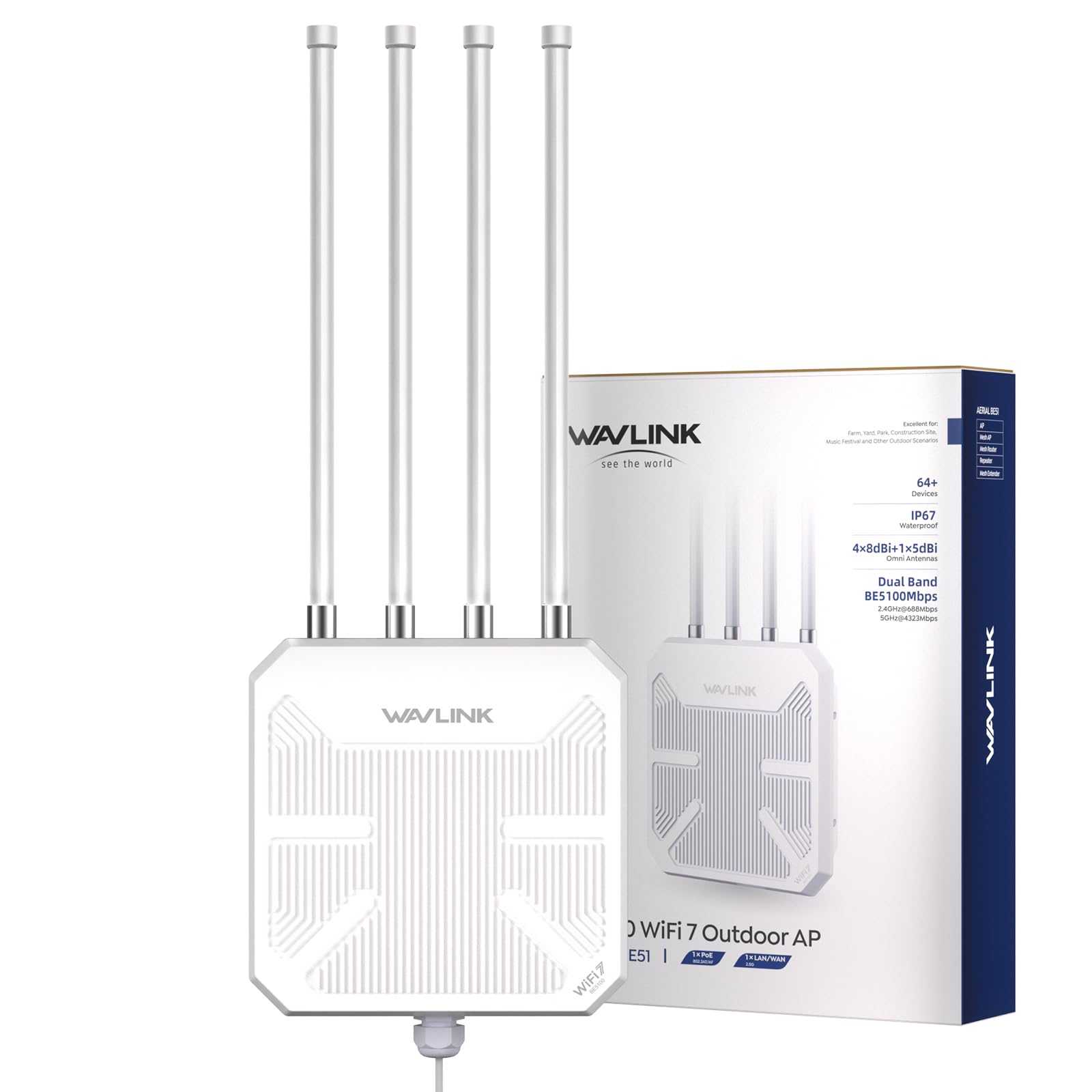
The WAVLINK BE5100 is not a typical home router; it is a heavy-duty outdoor extender and access point designed to push a 2.4 GHz signal over vast distances. With its IP67 waterproof housing, four detachable 8 dBi fiberglass antennas, and support for both active and passive PoE, it is built to survive harsh weather and provide coverage to areas a standard router cannot reach. For scenarios like covering a farm, a large workshop, or a sprawling backyard, this is the ultimate solution.
Users report impressive real-world performance, with signals traveling over 100 yards through trees and bushes. It can be set up as a mesh node, an access point, or a repeater, giving you flexibility based on your specific outdoor networking needs. The PoE support simplifies installation, as you only need to run a single Ethernet cable to the unit, providing both power and data, and can be mounted high on a pole or tree for optimal coverage.
The high price reflects its specialized outdoor capabilities and support for the latest WiFi 7 standard. It is not a solution for a typical home. The setup is more involved than a standard router, and its performance in mesh mode is limited to WAVLINK’s own ecosystem. For users who need to extend reliable 2.4 GHz connectivity to a remote barn, a large property, or across a campsite, the WAVLINK BE5100 is in a class of its own.
Why it’s great
- Extreme 300m outdoor range with powerful 8 dBi fiberglass antennas.
- Rugged IP67 waterproof build with lightning protection for harsh weather.
- Versatile setup modes (AP, Repeater, Mesh) with PoE support for easy installation.
Good to know
- A specialized outdoor extender, not a general-purpose home router.
- Mesh mode is only compatible with other WAVLINK series products.
FAQ
Why does my 2.4 GHz router need a separate 5 GHz band?
How many 2.4 GHz devices can a WiFi 6 router handle?
Is a WiFi 7 router overkill for a 2.4 GHz smart home?
Final Thoughts: The Verdict
For most users, the 2.4 ghz wifi router winner is the MSI Radix AXE6600 because its powerful quad-core processor and tri-band design offer unmatched stability and capacity for a modern, device-heavy home. If you want the best value for money, grab the Tenda RX12Pro for its incredible range and WiFi 6 features at a budget-friendly price. And for extreme remote coverage or outdoor use, nothing beats the specialized WAVLINK BE5100.