
Our readers keep the lights on and the weekend projects moving. As an Amazon Associate, I earn from qualifying purchases.
A dead laptop, an old SSD gathering dust, a cluttered desktop full of bare drives — the real pain of handling internal storage isn’t the data itself; it’s the lack of a fast, reliable shell that turns that drive into a portable workhorse. Finding the right enclosure means the difference between plug-and-play speed and a bottleneck that throttles your entire workflow.
I’m Rikta — the co-founder and writer behind FitlyFast. I’ve spent hours parsing SATA interface specs, UASP protocol support, bridge chipset differences, and real-world thermal behavior across dozens of 2.5″ drive caddies to deliver this focused guide.
Whether you need to recover data from an old machine, expand console storage, or run a portable OS, this analysis of the best 2.5 hard drive enclosure options will help you match the right shell to your specific drive and use case.
How To Choose The Best 2.5 Hard Drive Enclosure
A good enclosure is a silent partner — you notice it most when it’s missing or failing. Focus on these three factors to avoid data transfer bottlenecks and drive damage.
Interface and Chipset
USB 3.1 Gen 2 (10Gbps) is the ceiling, but SATA III caps actual throughput at 6Gbps. The bridge chipset — ASM235CM is the gold standard, JMicron is functional — determines UASP support, which increases read/write efficiency 70% over traditional USB 3.0 by queuing commands in parallel. A Gen 2 port with a weak chipset still throttles your SSD.
Material and Thermal Management
Aluminum enclosures act as passive heatsinks, drawing heat away from the drive during sustained writes — a 1TB enterprise SSD can hit 65°C without it. Plastic shells insulate heat, causing SLC caching slowdowns and, in extreme cases, drive failure. For daily OS use or large file transfers, aluminum is non-negotiable.
Form Factor Flexibility
Not all 2.5″ enclosures fit both SSD thinness (7mm) and traditional HDD height (9.5mm). A quality unit includes a foam spacer or adjustable rail to secure the thinner drive without rattling. Multi-bay solutions (3-5 drives) share a single power adapter and USB connection, ideal for backup arrays but introduce heat and noise trade-offs.
Quick Comparison
On smaller screens, swipe sideways to see the full table.
| Model | Category | Best For | Key Spec | Amazon |
|---|---|---|---|---|
| UGREEN 2.5″ (Aluminum) | SATA III | High-performance aluminum cooling | ASM235CM chipset, 6Gbps | Amazon |
| UGREEN 2.5″ (Plastic) | SATA III | Budget-friendly daily backup | 6Gbps UASP, 20-in cable | Amazon |
| ORICO 2.5″ USB-C | Gen 2 | Transparent visual monitoring | 10Gbps Gen 2, auto sleep | Amazon |
| CENMATE 3-Bay | Multi-Bay | Mixed 2.5/3.5 drive access | 3 bays, hot-swap, 5Gbps | Amazon |
| ORICO 5-Bay | Multi-Bay | High-capacity home backup array | 110TB max, 60mm fan | Amazon |
| Syba 5-Bay RAID | RAID Enclosure | Hardware RAID 5/10 storage | RAID 0/1/3/5/10, 150W PSU | Amazon |
In‑Depth Reviews
1. UGREEN 2.5″ USB C Hard Drive Enclosure (Aluminum)

This aluminum shell is built around the ASM235CM bridge chipset, the most efficient SATA-to-USB controller currently on the market. Real-world benchmarks with a Samsung 850 EVO show 536 MB/s write and 509 MB/s read over UASP — within spitting distance of the SATA III ceiling. The USB-C port runs USB 3.1 Gen 2 (10Gbps), but the drive topology maxes at 6Gbps, so you get zero throttling.
Thermal handling is where this shell separates from the plastic crowd. During a 910GB continuous transfer from a 1TB enterprise SSD, the chassis stayed warm — not hot — and never triggered SLC cache drops. The rubber base prevents desk sliding, and the tool-free slide mechanism accepts both 7mm and 9.5mm drives without a spacer.
The USB-C to USB-C cable is included, which is essential for hitting Gen 2 speeds. Some users report needing a Thunderbolt 3 cable for maximum throughput, but the stock cable satisfies most workflows. It ships without a USB-A cable, so legacy port users must supply their own.
Why it’s great
- Aluminum passive heatsink prevents thermal throttling
- ASM235CM chipset delivers max SATA III bandwidth
- Tool-free design fits both 7mm and 9.5mm drives
Good to know
- No USB-A cable included in the box
- Sliding mechanism can feel stiff initially
2. ORICO 2.5″ Hard Drive Enclosure Type-C USB 3.1 Gen2

The clear polycarbonate build is a double-edged sword: it gives you a full view of the drive inside — perfect for visual status monitoring — but the plastic material does trap more heat than aluminum. CrystalDiskMark results over USB 3.1 Gen 2 hit 477-507 MB/s read and 498-507 MB/s write, putting it in the upper tier of 2.5″ enclosures.
A 10-minute auto-sleep function kicks in during idle, reducing power draw and extending drive lifespan. The unit includes both a USB-C to C cable and a USB-A to C cable (50cm each), covering legacy and modern ports out of the box. A spacer is included for 7mm SSDs, so thinner drives don’t rattle inside the cavity.
Some users note the SATA connector can shift slightly during transport, so this is best suited for stationary desktop use rather than daily bag carry. The latch snaps securely but feels thinner than the aluminum competition, and the clear shell scratches more visibly than opaque options.
Why it’s great
- Transparent design for instant drive identification
- Dual cables (USB-C and USB-A) included
- 10-minute auto-sleep saves power
Good to know
- Plastic material retains more heat
- Not shock-dampened for frequent travel
3. UGREEN 2.5″ Hard Drive Enclosure (Plastic)

UGREEN’s entry-level shell pairs a plastic chassis with internal EVA foam padding that absorbs shock and prevents drive wobble. Transfer speeds hit the expected ~420 MB/s write and ~430 MB/s read with the supplied USB-A to USB-C cable — upgrading to a Thunderbolt 3 cable pushes reads to 525 MB/s. No drivers required; plug-and-play across Windows, macOS, and Linux.
The 20-inch detachable cable is short enough to stay tidy on a desk but long enough for backpack use. An LED indicator shows read/write activity. The slide-in mechanism is tool-free and accepts both 7mm and 9.5mm drives without additional spacers, though the plastic lid hides the LED when left open for ventilation.
Heat buildup is the main trade-off at this build tier. A few users note the plastic chassis feels warm during sustained writes, though the foam padding provides the best physical protection of any single-drive enclosure reviewed here. The listed 6TB maximum capacity covers most consumer SSDs and HDDs.
Why it’s great
- EVA foam padding protects drive from physical shock
- Plug-and-play, no driver setup required
- Compact design with 20-inch cable for desk use
Good to know
- Plastic shell traps more heat than aluminum
- USB-A to USB-C cable only; C-to-C cable sold separately
4. CENMATE 3 Bay Hard Drive Enclosure
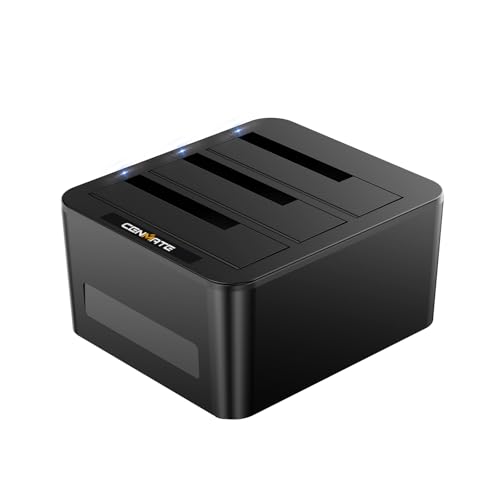
This 3-bay enclosure breaks out of the single-drive mold by accepting both 2.5″ and 3.5″ SATA drives in the same chassis — each bay supports up to 20TB for a total of 60TB. The USB 3.0 interface caps individual transfers at 5Gbps, suitable for HDD backup arrays where raw speed is secondary to capacity.
Hot-swap capability means you can swap drives without rebooting or disconnecting power. The tool-free sleds click in securely, and the unit ships with a USB-A/C combo cable and a power adapter. Users report immediate recognition under Windows 11 and macOS without driver hunting.
Passive cooling is adequate for spin-down idle, but sustained multi-drive writes generate noticeable heat. A few buyers added a small USB fan to the top for heavy use. The plastic build is functional, not rugged — treat this as a stationary desktop backup station rather than a portable caddy.
Why it’s great
- Supports both 2.5″ and 3.5″ drives in one unit
- Hot-swap functionality for quick drive changes
- Up to 60TB total capacity for archive storage
Good to know
- Plastic body heats up under sustained multi-drive load
- USB 3.0 limits throughput to 5Gbps per bay
5. ORICO 5 Bay 3.5 Inch Hard Drive Enclosure

ORICO’s 5-bay tower supports up to 110TB across five SATA drives (single drive max 22TB), making it a viable NAS alternative for home media servers or archival backups. The USB 3.1 Gen 1 Type-C port delivers 5Gbps, and a 60mm double-ball bearing fan actively cools the stack — a critical upgrade over passive multi-bay units.
The magnetic cover snaps on without screws, and the 12V/6.5A power adapter supplies enough current to spin up five 3.5″ HDDs simultaneously without voltage drop. Indicator lights per bay show drive activity. Users repurposing retired drives praise the plug-and-play recognition; one user recovered three old computer drives in minutes.
Heat management is a genuine concern: some reviews report internal temperatures exceeding 60°C within an hour under full load, and the included fan is not always sufficient for dense arrays of high-RPM drives. The plastic chassis also allows slight drive shifting. This is a budget-friendly multi-bay builder’s option, not a drop-in enterprise replacement.
Why it’s great
- Massive 110TB maximum capacity for deep archives
- Active 60mm fan provides forced-air cooling
- Magnetic tool-free cover for quick drive swaps
Good to know
- Can run hot under full multi-drive load
- Plastic chassis allows minor drive shifting
6. Syba 5 Bay Tool Less Tray Hot Swappable SATA III RAID Enclosure

The Syba SY-ENC50118 is the only enclosure in this roundup to offer full hardware RAID modes — RAID 0, 1, 3, 5, 10, span, and JBOD — controlled via DIP switches on the rear panel. The aluminum chassis houses five tool-less hot-swap trays, each supporting up to 24TB for a theoretical 120TB total. A 150W internal power supply keeps high-RPM drives fed.
Real-world RAID5 throughput over eSATA hits around 200 MB/s, enough to stream Blu-ray content to multiple Android boxes without stuttering, as confirmed by a user running a 10Gb fiber network bridge. The unit includes eSATA and USB 3.0 cables; the eSATA interface requires a port multiplier with FIS-based switching to access all drives simultaneously.
The RAID configuration software is dated and fails to launch reliably on modern macOS and Windows 10 systems, requiring a manual workaround. A handful of users report random disconnections after reboot, and one unit suffered top-bay failure within days, though Syba support issued an RMA. This is a powerful but finicky RAID appliance best suited for experienced builders who can troubleshoot quirks.
Why it’s great
- Full hardware RAID 0/1/3/5/10 support on DIP switches
- Aluminum chassis with 150W PSU handles high loads
- Hot-swap tool-less trays for all 5 bays
Good to know
- RAID software is unreliable and dated
- Some units experience bay failure or disconnection issues
FAQ
Do I need UASP support in my enclosure?
Will any 2.5″ enclosure work with a 15mm thick hard drive?
Final Thoughts: The Verdict
For most users, the best 2.5 hard drive enclosure winner is the UGREEN Aluminum USB-C Enclosure because its ASM235CM chipset and passive aluminum cooling deliver the fastest sustained SATA III speeds without thermal throttling. If you want a clear view of your drive and dual cables out of the box, grab the ORICO Transparent Enclosure. And for budget-friendly daily backups, nothing beats the travel-ready shock protection of the UGREEN Plastic Enclosure.