
Our readers keep the lights on and the weekend projects moving. As an Amazon Associate, I earn from qualifying purchases.
A home office monitor lives or dies by the details you can see crisply at 3 a.m. and the eye strain you don’t feel until week three. The wrong panel turns spreadsheets into a squint-fest and video calls into a blurry gamble. This guide cuts through the spec noise to find the screen that keeps you sharp, comfortable, and productive through the longest workdays.
I’m Rikta — the co-founder and writer behind FitlyFast. I have spent hundreds of hours cross-referencing panel technologies, color accuracy reports, connectivity standards, and ergonomic data to isolate the monitors that actually deliver on their promises for serious remote work.
Whether you are editing photos, coding in a vertical layout, or juggling a dozen browser tabs, the right 27 inch monitor for home office must balance resolution, color fidelity, and eye-care features without breaking your desk budget.
How To Choose The Best 27 Inch Monitor For Home Office
Most buyers fixate on size and price while ignoring the three pillars that define daily usability: resolution scaling, panel uniformity, and connectivity that matches your laptop. A 27-inch panel is large enough to multitask but small enough to fit standard desks. The decisions happen below the bezel.
Resolution — When 4K Beats 1440p
On a 27-inch screen, 1080p looks blocky for text-heavy work. 1440p (2560×1440) offers a strong balance of sharpness and GPU load, but 4K (3840×2160) provides pixel density near 163 PPI — the sweet spot for crisp fonts, detailed spreadsheets, and photo editing without scaling artifacts. If your workflow involves multiple windows side by side, 4K makes a genuine difference in perceived clarity.
Connectivity — The One-Cable Dream
USB-C with Power Delivery is the single most practical upgrade a monitor can offer a laptop user. A 65W cable handles most ultrabooks; 90W or 96W supports larger MacBook Pros and high-performance workstations. Without it, you are juggling a power brick, a video cable, and a hub. Daisy-chaining via DisplayPort is a bonus for multi-monitor setups.
Ergonomics — More Than Tilt
Cheap stands only tilt. A proper home office monitor offers height adjustment (at least 130mm of travel), a swivel range of 45 degrees or more, and pivot for portrait-mode coding or document review. These features directly reduce the likelihood of desk-related neck strain over an eight-hour session.
Quick Comparison
On smaller screens, swipe sideways to see the full table.
| Model | Category | Best For | Key Spec | Amazon |
|---|---|---|---|---|
| ASUS ProArt PA279CRV | 4K Creative | Color-critical editing and design | 99% DCI-P3 / ΔE < 2 | Amazon |
| LG 27UP850K-W | 4K All-Rounder | Mac users needing 90W USB-C | 95% DCI-P3 / 90W PD | Amazon |
| BenQ MA270UP | Mac Optimized | MacBook Pro/Air seamless pairing | P3 / 90W PD / Mac Controls | Amazon |
| Dell S2725QS | 4K 120Hz | Fluid work and light gaming | 4K / 120Hz / 99% sRGB | Amazon |
| ViewSonic VP2756-4K | Pantone Validated | Professional color matching | 100% sRGB / ΔE < 2 | Amazon |
| ASUS ProArt PA278CV | 1440p Pro | Photo editing at a lower resolution | 1440p / ΔE < 2 / 65W PD | Amazon |
| ViewSonic VG2748A | 1080p Ergo | Budget-friendly ergonomic setup | 1080p / 40° Tilt | Amazon |
| Dell S3425DW | Ultrawide Curve | Multitasking on a wide canvas | 3440×1440 / 120Hz / VA | Amazon |
| Samsung Odyssey G7 G75F | Ultrawide Gaming | Gaming-first, office-second users | 5120×2160 / 180Hz / HDR600 | Amazon |
In‑Depth Reviews
1. ASUS ProArt Display PA279CRV

The PA279CRV delivers factory-calibrated Delta E < 2 accuracy across 99% DCI-P3 and 99% Adobe RGB — a true creative-grade panel that rivals monitors costing twice as much. The 4K IPS screen reaches 400 nits peak brightness and includes a DisplayPort daisy-chain output, making it a serious hub for multi-monitor color work.
Connectivity is this monitor’s standout trait. The USB-C port supplies 96W Power Delivery, enough to charge a 16-inch MacBook Pro at full load. Two HDMI inputs, a DisplayPort, and a four-port USB hub turn the PA279CRV into the center of a clean, minimal desk. The ergonomic stand supports height, tilt, swivel, and pivot adjustments.
At 60Hz, it is not built for competitive gaming, and the on-screen menu buttons feel slightly dated. However, for any professional who values color truth and single-cable laptop integration, this is the most balanced 27-inch 4K monitor available today for the home office.
Why it’s great
- Factory-calibrated Delta E < 2 out of the box
- 96W USB-C Power Delivery handles large laptops
- Daisy-chain support for multi-monitor setups
Good to know
- Limited to 60Hz refresh rate
- Buttons feel less premium than the display
2. LG 27UP850K-W

The LG 27UP850K-W packs 4K resolution, a 95% DCI-P3 color gamut, and VESA DisplayHDR 400 certification into a package that undercuts most competitors on price without cutting corners on image quality. The IPS panel delivers sharp text and consistent viewing angles across the 27-inch frame, making it a reliable choice for document work and video editing alike.
Its best feature is the USB-C port delivering 90W of power — enough to charge a MacBook Pro or a premium Windows ultrabook through a single cable. The stand provides full height, tilt, swivel, and pivot adjustment. Built-in stereo speakers with Waves MaxxAudio are usable for video calls, saving desk space.
The 60Hz refresh rate limits gaming potential, and some users report a slight yellow tint that varies between units. For anyone building a productivity-focused desk on a budget, the 27UP850K-W offers an impressive feature-per-dollar ratio with strong color performance.
Why it’s great
- Excellent 4K image quality at a competitive price
- 90W USB-C Power Delivery for laptop charging
- Fully adjustable ergonomic stand included
Good to know
- 60Hz panel limits fluid motion in games
- Minor color tint variations reported across units
3. BenQ MA270UP

The BenQ MA270UP is purpose-built for MacBook users. Its exclusive color tuning matches the P3 wide color gamut of Apple displays, so photos and designs look identical between your laptop screen and the monitor. The 27-inch 4K IPS panel reaches 400 nits, delivering a bright, consistent image that scales perfectly with macOS HiDPI settings.
A single USB-C cable delivers 90W of power and carries video. A second USB-C port provides 15W for charging accessories like an iPad or iPhone. The monitor integrates with Mac keyboard controls for brightness and volume, a convenience that other monitors in this category lack. The stand enables height, tilt, swivel, and pivot adjustments.
The trade-off is the lack of built-in speakers and a webcam, and the stand aesthetics feel less premium than the display quality. For dedicated MacBook users who want a seamless, color-accurate second screen without paying Apple Studio Display prices, the MA270UP is the strongest option available.
Why it’s great
- Mac-native P3 color matching and brightness control
- Dual USB-C with 90W PD and 15W accessory charge
- Excellent 4K scaling with macOS HiDPI
Good to know
- No built-in speakers or webcam
- Stand design feels slightly cheaper than the panel
4. Dell S2725QS

The Dell S2725QS breaks the 60Hz barrier for productivity monitors by offering a 120Hz refresh rate with AMD FreeSync Premium on a 4K IPS panel. This makes scrolling through long documents and spreadsheets noticeably smoother, while the 99% sRGB color coverage and 1500:1 contrast ratio keep static content sharp and vibrant. The ComfortView Plus feature reduces blue light below 35% without a yellow tint.
It includes integrated speakers with improved frequency response over the previous Dell generation, and the ultra-thin bezels in an ash white finish give the desk a modern, clean look. The stand handles height, tilt, pivot, and swivel adjustments. 4K at 120Hz on a 27-inch panel gives you the clarity of a productivity monitor with the fluidity of a casual gaming display.
Some units exhibit minor light vignetting on the right edge, and the matte coating has a slight grain that is visible on white backgrounds. For home office users who spend hours scrolling and occasionally game, this Dell delivers a uniquely smooth experience.
Why it’s great
- 120Hz refresh rate for silky-smooth scrolling
- ComfortView Plus with low blue light
- Good built-in speakers for a productivity monitor
Good to know
- Some units show light vignetting on the right side
- Matte coating can appear slightly grainy up close
5. ViewSonic VP2756-4K

The ViewSonic VP2756-4K is Pantone Validated and covers 100% sRGB with a Delta E < 2 out of the box, making it a reliable choice for print designers, photographers, and anyone who needs predictable color reproduction. The 27-inch 4K IPS panel is bright at 350 nits and maintains consistent color across wide viewing angles.
USB-C support delivers 60W of Power Delivery — enough for most ultrabooks — and the monitor includes HDMI, DisplayPort, and a four-port USB hub. The stand provides height, tilt, swivel, and 90-degree pivot rotation, though Mac users should note that the pivot orientation is optimized for Windows. The included USB-C cable connects the monitor to a laptop without needing adapters.
Speakers are adequate for system sounds but not pleasant for music or long meetings. The on-screen display is controlled by clunky buttons, though ViewSonic provides PC software for adjustments. For creative professionals who need certified color accuracy on a 4K panel, the VP2756-4K is a dependable tool.
Why it’s great
- Pantone Validated with 100% sRGB coverage
- Delta E < 2 factory calibration
- Full ergonomic stand with pivot
Good to know
- 60W USB-C does not charge large laptops at full load
- Pivot does not function correctly on macOS
6. ASUS ProArt Display PA278CV

The ASUS ProArt PA278CV brings Calman Verified Delta E < 2 accuracy and 100% sRGB coverage to a 1440p IPS panel at a price that undercuts most 4K monitors. For photo editors and graphic designers working in a dedicated color space, this monitor delivers reliable color reproduction without the GPU overhead of 4K. The 75Hz refresh rate with Adaptive-Sync makes scrolling smoother than a standard 60Hz office monitor.
USB-C provides 65W of Power Delivery — sufficient for most mid-range laptops. DisplayPort daisy-chaining lets you connect up to four monitors for a multi-screen workflow. The ergonomic stand supports height, tilt, swivel, and 90-degree pivot, making it easy to switch to portrait mode for coding or document review.
At 1440p, text is slightly less sharp than on a 4K panel, and the 350-nit brightness is adequate but not remarkable. This is a smart pick for creative professionals who prioritize color accuracy over pixel density and prefer a lower price point.
Why it’s great
- Calman Verified color accuracy with Delta E < 2
- 65W USB-C PD and DisplayPort daisy-chaining
- 75Hz refresh rate for fluid scrolling
Good to know
- 1440p resolution is not as sharp as 4K for text
- Brightness is average at 350 cd/m²
7. ViewSonic VG2748A
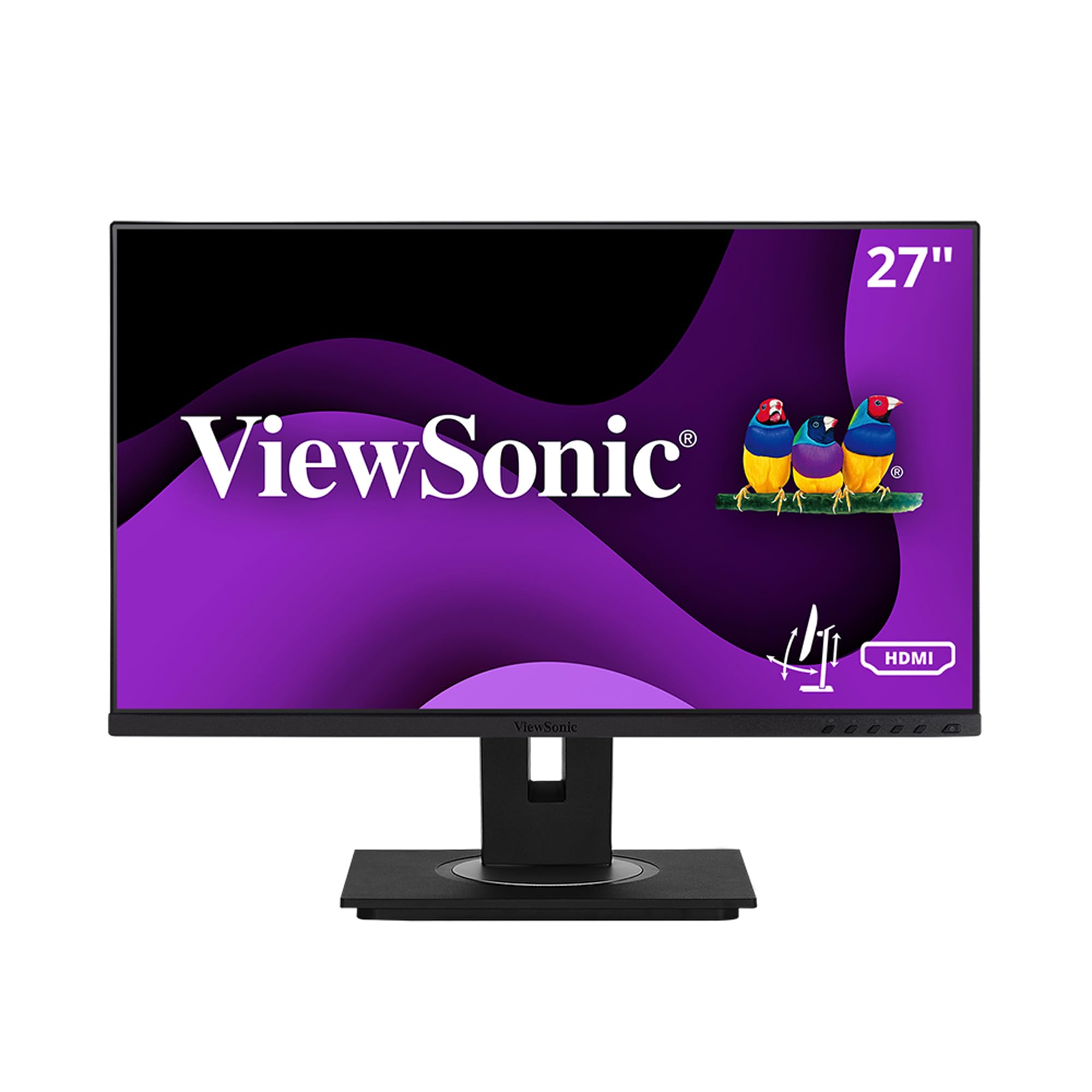
The ViewSonic VG2748A provides a 27-inch IPS panel at 1080p resolution, making it an accessible entry point for home office users who need a large screen for basic tasks like email, video calls, and document editing. The thin bezels and flexible stand — with 40 degrees of tilt, plus swivel, rotate, and height adjustment — deliver ergonomic adjustability that is rare at this tier.
Connectivity includes HDMI, DisplayPort, VGA, and USB ports, offering broad compatibility with older and newer computers. Flicker-Free technology and a Blue Light Filter help reduce eye strain during long sessions. The quick-release stand includes a carrying handle, which is useful for reconfiguring a desk layout.
The 1080p resolution on a 27-inch panel results in a pixel density of roughly 82 PPI, making text and icons visibly less sharp than on 1440p or 4K alternatives. This monitor works best as a secondary display or for users with straightforward computing needs who prioritize adjustability over resolution.
Why it’s great
- Excellent ergonomic stand with 40-degree tilt
- Broad port selection including VGA
- Flicker-Free and Blue Light Filter for eye comfort
Good to know
- 1080p on 27 inches looks noticeably less sharp
- 250-nit brightness is modest for bright rooms
8. Dell S3425DW

The Dell S3425DW stretches to 34 inches with a 3440×1440 VA panel and a 120Hz refresh rate, offering ultrawide multitasking without jumping to a 27-inch standard form factor. The 3000:1 contrast ratio delivers deeper blacks than IPS panels, and the 99% sRGB and 95% DCI-P3 coverage provide rich, vibrant colors for design work. ComfortView Plus keeps blue light below 35%.
A single USB-C cable supplies up to 65W of power and carries video, keeping the desk clean. The integrated speakers are noticeably better than the built-in audio on most monitors, with deeper frequency response and higher output. The stand provides height and tilt adjustment but does not include pivot or swivel, which is less common for a curved display.
The VA panel has slightly slower pixel response than IPS, and the limited port selection — only HDMI and USB-C — eliminates DisplayPort connections. For professionals who value an immersive wide workspace for multiple side-by-side windows, the S3425DW is a strong all-rounder.
Why it’s great
- Excellent 3000:1 contrast ratio for deep blacks
- 120Hz refresh rate on an ultrawide panel
- Good built-in speakers with wide frequency range
Good to know
- No swivel or pivot for the stand
- Limited to HDMI and USB-C, no DisplayPort
9. Samsung Odyssey G7 G75F

The Samsung Odyssey G7 G75F is a 40-inch ultrawide VA monitor with a 5120×2160 WUHD resolution and a 180Hz refresh rate, blurring the line between high-end gaming and professional productivity. The 1000R curvature wraps around the field of vision, and the VESA DisplayHDR 600 certification delivers strong contrast for HDR content. The 3000:1 VA contrast ratio exceeds typical IPS panels.
With a 1ms response time and FreeSync Premium Pro, the G75F excels in fast-paced gaming while providing enough horizontal resolution (5120) to replace a dual-monitor setup for productivity. The stand offers height and swivel adjustment. Text clarity benefits from the high pixel density of the 5K2K panel, making this a viable option for users who work from home and game on the same machine.
The VA panel can show slight black smearing in dark scenes, and the base design is large and awkward for small desks. For the home office user who prioritizes frame rates and a wide immersive field over maximum color accuracy, this Samsung delivers both space and speed in one package.
Why it’s great
- 5120×2160 WUHD resolution for massive workspace
- 180Hz refresh rate with 1ms response
- VESA DisplayHDR 600 for HDR content
Good to know
- VA panel may exhibit black smearing in dark scenes
- Large stand footprint occupies significant desk space
FAQ
Is 4K necessary on a 27 inch monitor for office work?
Can I use a 27 inch office monitor for console gaming?
What does Delta E < 2 mean for a home office monitor?
Final Thoughts: The Verdict
For most users, the 27 inch monitor for home office winner is the ASUS ProArt PA279CRV because it combines 4K clarity, factory-calibrated Delta E < 2 color accuracy, and 96W USB-C Power Delivery at a price that undercuts dedicated creative monitors. If you want a monitor that charges a 16-inch MacBook while delivering faithful colors, grab the LG 27UP850K-W for its 90W PD and strong value. And for seamless MacBook integration with native keyboard controls, nothing beats the BenQ MA270UP.