
Our readers keep the lights on and the weekend projects moving. As an Amazon Associate, I earn from qualifying purchases.
Finding a monitor that balances sharp QHD detail with high frame rates without breaking your budget or sacrificing color accuracy is the central challenge for anyone building a serious workstation or gaming setup today. The market is flooded with options that promise the world but deliver washed-out colors, ghosting in fast scenes, or a stand that feels like an afterthought.
I’m Rikta — the co-founder and writer behind FitlyFast. I’ve spent many hours analyzing panel technologies, refresh rate specs, response times, color gamut coverage, and adaptive sync compatibility across dozens of 27-inch 1440p displays to separate the true performers from the marketing hype.
Whether you are looking for competitive frame rates, vibrant HDR content creation, or a versatile daily driver, this guide to the best 2k monitor will walk you through the specs that actually matter and nine of the top models available today.
How To Choose The Best 2K Monitor
Selecting your next 1440p display means understanding three core pillars: the panel type driving image quality, the refresh rate and response time that define motion handling, and the connectivity that ensures compatibility with your PC or console. Getting these right for your specific use case prevents buyer’s remorse down the line.
Panel Technology: IPS vs. QD-OLED vs. OLED
IPS panels remain the most common choice for their wide viewing angles, reliable color reproduction, and burn-in resistance, making them ideal for mixed-use desks combining gaming with productivity. Their contrast ratio is typically limited to around 1000:1, meaning blacks appear more gray in dark rooms. QD-OLED and OLED panels offer infinite contrast with true black levels and vastly superior HDR performance, but require more careful usage habits to prevent static image retention and generally have a higher upfront cost per spec. For a pure gaming setup in a controlled lighting environment, the transition to OLED is transformative; for an all-day work-and-play monitor, a high-quality IPS still wins on practicality.
Refresh Rate and Response Time
Refresh rate dictates how many times per second the screen updates, directly translating to perceived smoothness. A standard 60Hz is fine for office tasks, but gamers benefit from 120Hz, 144Hz, 165Hz, or the enthusiast-level 240Hz and 300Hz panels available in the 1440p category. The 500Hz MSI option targets the absolute top-tier competitive crowd. Pair this with the response time (measured in GtG or MPRT) — faster numbers like 1ms on IPS or 0.03ms on OLED reduce ghosting and motion blur. Do not overspend on extreme refresh rates if your graphics card cannot reliably drive those frame rates at 1440p.
Adaptive Sync: G-Sync Compatible and FreeSync Premium
Adaptive sync technologies eliminate screen tearing by synchronizing the monitor’s refresh rate to the GPU’s frame output. G-Sync Compatible and FreeSync Premium (or Premium Pro) are the two standards. Most modern monitors support both, and the quality of the implementation matters more than the sticker. A monitor with a narrow variable refresh rate window or that requires a constant minimum frame rate will still stutter. Look for VESA AdaptiveSync certification or explicit manufacturer listing for your GPU brand. HDMI 2.1 also brings variable refresh rate support to consoles like the PS5 and Xbox Series X for compatible 1440p panels.
Quick Comparison
On smaller screens, swipe sideways to see the full table.
| Model | Category | Best For | Key Spec | Amazon |
|---|---|---|---|---|
| LG 27GR83Q-B | Premium IPS | High-FPS Competitive & Console | 240Hz, HDMI 2.1 Inputs | Amazon |
| MSI MPG 271QR QD-OLED X50 | Elite OLED | Top-Tier Competitive & HDR | 500Hz, DP 2.1a, True Black 500 | Amazon |
| ASUS TUF Gaming VG27AQM5A | High-Speed IPS | Fast Competitive Gaming | 300Hz, 0.3ms, 95% DCI-P3 | Amazon |
| Acer Predator X27U | QD-OLED | Color-Critical & Cinematic Gaming | 240Hz, 0.03ms, DCI-P3 99% | Amazon |
| Samsung Odyssey OLED G5 | QD-OLED | Value OLED Upgrade & Media | 180Hz, 0.03ms, Pantone Validated | Amazon |
| AOC Q27GAZDV | QD-OLED | Budget OLED Entry | 240Hz, HDMI 2.1, Ergo Stand | Amazon |
| Alienware AW2725DM | Mid-Range IPS | Solid All-Rounder | 180Hz, VESA DisplayHDR 400 | Amazon |
| ASUS TUF Gaming VG27AQ | Value IPS | Budget Gaming & Work Combo | 165Hz, ELMB Sync, Ergo Stand | Amazon |
| Samsung Odyssey G5 G53F | Budget IPS | Entry-Level 1440p Budget Build | 200Hz, 1ms, FreeSync Premium | Amazon |
In‑Depth Reviews
1. LG 27GR83Q-B Ultragear

The LG 27GR83Q-B strikes the hardest-to-find balance in the 1440p market: it delivers a full 240Hz refresh rate over both its HDMI 2.1 and DisplayPort 1.4 connections, meaning PS5 and Xbox Series X owners get the full high-refresh experience without compromise. The 1ms GtG IPS panel produces vivid, consistent colors with DCI-P3 coverage around 95%, and the HDR400 certification adds meaningful dynamic range for supported titles. The stand offers height, tilt, pivot, and swivel adjustments, which is a rarity among monitors at this performance tier.
LG’s Gaming GUI provides dedicated FPS, RTS, and Gamer profiles alongside advanced tools like Dynamic Action Sync for input lag reduction and the Black Stabilizer for visibility in dark scenes. The 4-pole headphone jack with DTS Headphone:X spatial audio is a thoughtful inclusion for late-night sessions, delivering 3D positional audio directly to wired headsets without needing a separate DAC. The on-screen control knob makes menu navigation quick compared to fiddly button arrays.
Quality control reports occasional stuck pixels across units, which is a frustration in an otherwise well-engineered display. HDR400 brightness is adequate for desktop use but does not match the luminance of premium OLED panels or high-end HDR1000 monitors. For users seeking a single monitor that handles competitive PC gaming, modern console titles, and daily productivity with an adjustable stand, the performance per dollar here is hard to beat.
Why it’s great
- Native 240Hz over HDMI 2.1 for console and PC freedom
- Fully adjustable stand with pivot and swivel
- Fast IPS delivers excellent color and low motion blur
Good to know
- Reports of stuck pixels out of the box exist
- HDR400 brightness is modest, not transformative
2. MSI MPG 271QR QD-OLED X50
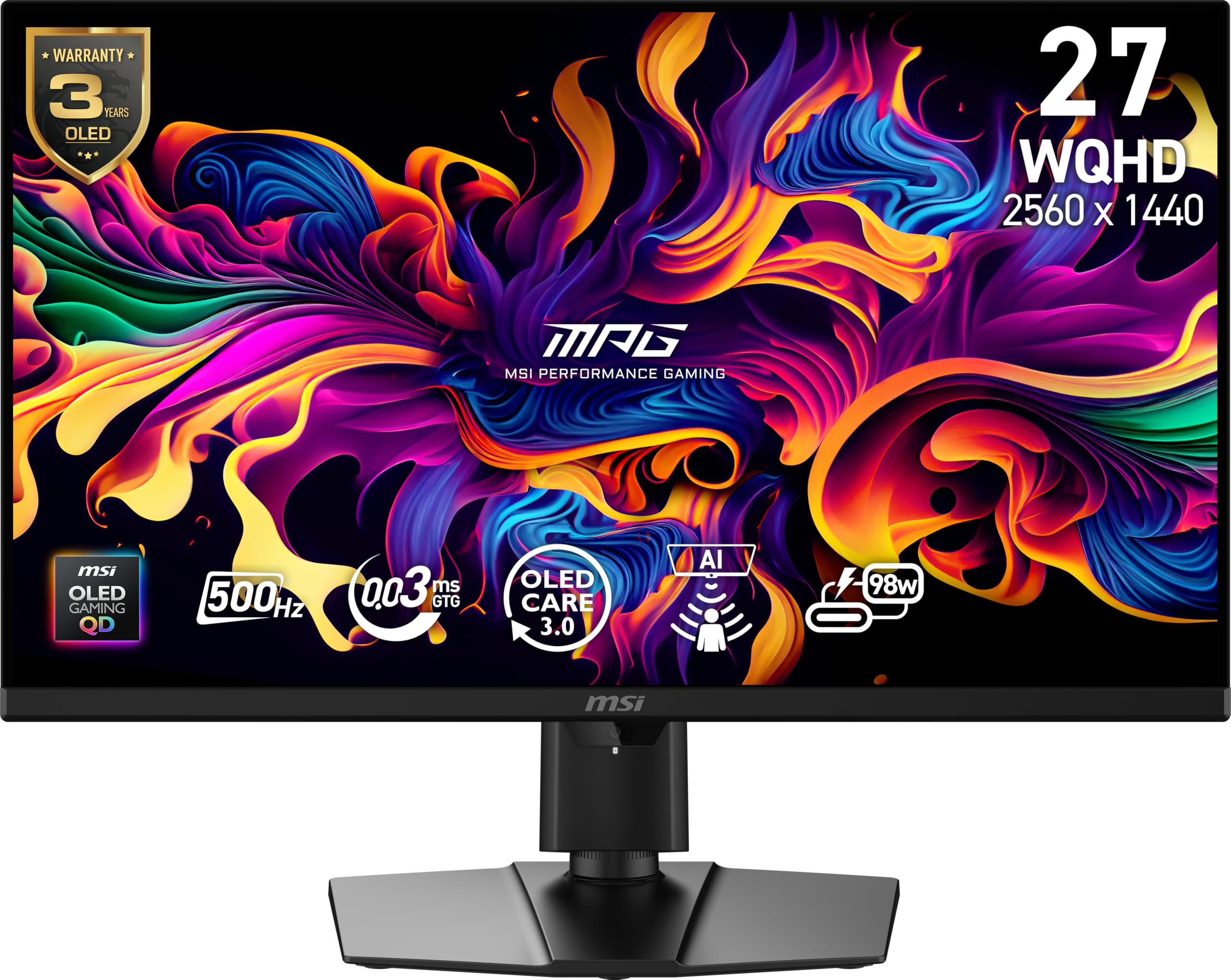
The MSI MPG 271QR QD-OLED X50 is the definitive statement monitor for the highest tier of competitive gaming. Its 500Hz refresh rate, combined with a 0.03ms GtG response time on a Quantum Dot OLED panel, delivers motion clarity that is effectively indistinguishable from CRT levels of fluidity. The 10-bit color depth covers 99% DCI-P3 with a Delta E ≤ 2, and the VESA DisplayHDR True Black 500 certification ensures that deep blacks and bright highlights coexist without blooming. The graphene heatsink improves panel longevity without requiring a fan, keeping the chassis silent.
Connectivity is future-proofed with DisplayPort 2.1a supporting the full 500Hz refresh rate at 1440p without needing Display Stream Compression, plus an HDMI 2.1 port and a USB-C port delivering 98W Power Delivery for laptop charging. The integrated AI Care Sensor uses a CMOS camera and NPU to detect human presence, automatically dimming or locking the display when you step away to prevent burn-in. The included color report confirms factory calibration, and the 3-year burn-in warranty provides peace of mind.
The price positions it firmly at the top of the market, making it overkill for anyone not chasing the absolute highest frame rates in esports titles. The AI sensor is sensitive and may occasionally activate when you are still seated but not facing the camera. Text clarity on the QD-OLED subpixel layout is not as sharp as a high-end IPS for prolonged productivity work, and the lack of a built-in speaker is notable at this tier. For the esports competitor or enthusiast who wants zero compromises on speed and image quality, this is the endgame 1440p monitor.
Why it’s great
- 500Hz refresh rate with 0.03ms response blurs next to nothing
- DP 2.1a enables full bandwidth without DSC
- AI burn-in prevention and 3-year warranty provide confidence
Good to know
- Premium price is reserved for top-tier competitive users only
- AI presence sensor can be too sensitive in practice
3. ASUS TUF Gaming VG27AQM5A

The ASUS TUF Gaming VG27AQM5A bridges the gap between mid-range and high-end with a native 300Hz refresh rate on a Fast IPS panel featuring a 0.3ms GtG response time. This combination makes it a natural pairing for high-end graphics cards like the RTX 5080, providing the headroom to push frame rates well above 240Hz in competitive shooters. The panel covers 95% DCI-P3 with a 1300:1 contrast ratio, which is slightly better than typical 1000:1 IPS implementations, resulting in deeper-looking blacks and more pop in colorful esports titles.
ASUS includes Extreme Low Motion Blur Sync (ELMB Sync), which can be enabled alongside variable refresh rate to simultaneously reduce ghosting and tearing — a feature set not all high-refresh monitors can claim. The DisplayWidget Center software allows for mouse-based adjustments to monitor settings, bypassing the OSD joystick entirely. Shadow Boost lifts dark areas without blowing out highlights, aiding visibility in shadow-heavy game environments. The stand provides tilt, swivel, pivot, and height adjustments, and the included 3-year warranty is a strong assurance.
Some units have arrived with a single dead pixel, and occasional reports mention a faint cracking noise from the chassis during temperature changes. The built-in speakers are adequate for system sounds but not for primary audio consumption. Brightness is moderate relative to the fastest IPS competitors, and contrast remains limited to the IPS ceiling. For competitive gamers who prioritize motion clarity and refresh rate headroom over the absolute black levels of OLED, this is a well-priced high-speed IPS option.
Why it’s great
- 300Hz Fast IPS with top-tier 0.3ms response for clear motion
- ELMB Sync works simultaneously with variable refresh
- Full ergonomic stand and 3-year warranty included
Good to know
- Minor quality control issues with dead pixels reported
- Built-in speakers are weak for any serious use
4. Acer Predator X27U W1bmiipprx

The Acer Predator X27U brings Quantum Dot OLED technology to a 26.5-inch 1440p format, delivering 99% DCI-P3 color gamut coverage with a Delta E under 2 for factory-accurate color. The 240Hz refresh rate and 0.03ms response time provide silky-smooth motion, while the true 10-bit panel ensures no banding in gradients. HDR10 support combined with the infinite contrast ratio of QD-OLED makes supported games and movies look deeply immersive, with specular highlights that pop against absolute black backgrounds.
The stand supports height, tilt, swivel, and pivot adjustments, and the ZeroFrame design minimizes bezel distraction for multi-monitor setups. The monitor includes AMD FreeSync Premium certification, and user reports confirm that G-Sync works flawlessly over DP. The matte coating on the QD-OLED panel reduces reflections without introducing the purple hue that sometimes affects coated OLED panels. The dual DisplayPort 1.4 and dual HDMI 2.1 inputs offer generous connectivity, supporting simultaneous PC and console connections.
The OSD menu system is dense and slightly unintuitive to navigate, with some settings like sharpness or overdrive tucked away in confusing submenus. Peak brightness is adequate for a moderately lit room but does not reach the level of high-end WOLED or mini-LED panels for serious HDR impact. The build quality feels solid but the plastic chassis does not convey the same premium heft as more expensive models. For the price, this is the most accessible QD-OLED monitor for users who want color-critical performance and buttery fluidity.
Why it’s great
- QD-OLED delivers elite color accuracy with 99% DCI-P3
- 0.03ms response with 240Hz provides flawless motion
- Dual HDMI 2.1 and DP 1.4 inputs for multi-device setups
Good to know
- OSD menu is complex and less intuitive than competitors
- Matte coating reduces glare but slightly softens highlights
5. Samsung Odyssey OLED G5 G50SF

The Samsung Odyssey OLED G5 is the most affordable entry point into QD-OLED 1440p gaming, offering the transformative image quality of self-emissive pixels — infinite contrast, perfect blacks, and vibrant Pantone Validated colors — at a price that undercuts most OLED competition. The 180Hz refresh rate and 0.03ms GtG response time are perfectly suited for immersive single-player titles, open-world exploration, and media consumption, where the black levels and color saturation elevate the experience far beyond any IPS panel at a similar price.
Samsung includes its OLED Safeguard with a Thermal Modulation System designed to actively reduce burn-in risk by managing panel temperature, plus a Glare Free matte finish that keeps reflections to a minimum without washing out color. Auto Source Switch+ automatically detects and switches to the active input, simplifying setups with multiple devices. The QD-OLED panel reproduces over 2100 Pantone colors, making it a capable second screen for creative work that demands color accuracy.
The stand offers only tilt adjustment, lacking height or swivel control, which forces an aftermarket arm purchase for proper ergonomic positioning. Input selection is limited to a single HDMI 2.1 and a single DisplayPort 1.4, with no USB-C or built-in speakers. The brightness peaks around 280 nits, which is dim for brightly lit rooms and underwhelming for HDR impact compared to higher-end OLED panels. For users who prioritize cinematic immersion and deep blacks over ergonomic flexibility and maximum brightness, this is the smart budget-friendly OLED choice.
Why it’s great
- Best value QD-OLED for true black levels and vibrant color
- Pantone Validated ensures accurate color reproduction
- OLED Safeguard helps mitigate burn-in over long use
Good to know
- Stand is tilt-only, requiring an arm for proper adjustment
- Limited to one HDMI and one DP input; no USB-C or speakers
6. AOC Q27GAZDV

The AOC Q27GAZDV delivers QD-OLED performance at a price that rivals premium IPS monitors, making it the most accessible 240Hz OLED option for gamers who want the low response times and infinite contrast of the technology without the highest-tier expense. The 240Hz refresh rate and 0.03ms response time provide exceptionally smooth motion, and the HDMI 2.1 connectivity ensures full-bandwidth support for modern consoles. The included stand offers height, tilt, swivel, and pivot adjustments — a welcome feature that many budget monitors omit.
The QD-OLED panel covers 110% DCI-P3 and 147% sRGB, delivering oversaturated yet vivid colors that are especially striking in HDR content. The VESA AdaptiveSync support works to eliminate tearing, and the USB 3.2 hub adds convenient connectivity for peripherals. The monitor includes both HDMI 2.1 (certified cable included) and DisplayPort 1.4 inputs, allowing simultaneous connection to a PC and console. The true black performance eliminates any backlight bleed or clouding visible on IPS panels.
The stock color calibration leans warm, and users report a noticeable brown or purple hue that requires switching to the Gamer 2 preset for a neutral image. Brightness is limited to around 200 nits, making HDR impact modest despite the wide color gamut. The bezels are thicker than typical modern monitors, and the pixel refresh function must be triggered manually via the OSD rather than running automatically. For the budget-conscious buyer who wants OLED magic and is willing to recalibrate the display and live with lower brightness, it offers tremendous value.
Why it’s great
- 240Hz QD-OLED at the most accessible price point
- Full ergonomic stand with height and swivel adjustment
- HDMI 2.1 and DP 1.4 inputs support high-refresh console gaming
Good to know
- Color calibration requires user adjustment out of the box
- Low brightness limits HDR impact and visibility in bright rooms
7. Alienware AW2725DM

The Alienware AW2725DM positions itself as a solid mid-range all-rounder, delivering a 180Hz IPS panel with DCI-P3 95% color coverage and VESA DisplayHDR 400 certification. The 1ms gray-to-gray response time ensures clear motion in fast-paced games, and the combination of G-Sync Compatible and FreeSync support means smooth operation with almost any GPU. The build quality is above average for the price bracket, with a sturdy stand that provides height, tilt, swivel, and pivot adjustments.
The monitor includes a dedicated console mode that simplifies configuration when connected to a PS5 or Xbox, and the hardware-based low blue light solution reduces eye strain without washing the image in yellow, which is an advantage over software-based blue light filters. The anti-glare screen coating is effective at managing reflections, and the 400-nit peak brightness gives HDR content enough headroom to look punchy in a controlled lighting environment. The four-sided bezel design gives the monitor a clean, modern appearance on the desk.
Users note that the full 180Hz refresh rate is only available over DisplayPort; the HDMI input is limited to 144Hz. The lack of USB-C connectivity is a missed opportunity for laptop users who want single-cable video and charging. Some users report minor IPS glow in the corners, which is typical for the panel technology at this price. For a balanced daily driver that does not demand the absolute highest frame rates but delivers a polished experience across work and play, the Alienware is a reliable choice.
Why it’s great
- Hardware low blue light preserves color accuracy
- Full ergonomic stand and solid build quality
- DCI-P3 95% and HDR400 deliver vibrant, punchy visuals
Good to know
- HDMI limited to 144Hz; full 180Hz requires DisplayPort
- No USB-C connectivity for modern laptop setups
8. ASUS TUF Gaming VG27AQ

The ASUS TUF Gaming VG27AQ is a long-standing benchmark for the value 1440p IPS segment, combining a 165Hz (overclocked) refresh rate with a 1ms MPRT response and G-Sync Compatible certification. The 27-inch WQHD IPS panel delivers sharp, vibrant colors out of the box with minimal calibration, and the 350-nit brightness provides solid SDR performance. The stand is a major selling point at this price, offering height, tilt, swivel, and pivot adjustments along with cable management.
ASUS includes Extreme Low Motion Blur Sync (ELMB Sync), which reduces motion blur without the brightness penalty typical of older strobbing implementations, and it works simultaneously with adaptive sync to cover both tearing and ghosting. Shadow Boost improves visibility in dark game areas without washing out brighter sections, and the flexible connectivity includes DisplayPort 1.2, HDMI 2.0, and a headphone jack. The 3-month Adobe Creative Cloud subscription adds value for creative professionals moving to a new display.
The built-in 2W speakers are notably weak and tinny, making them useful only for system beeps or emergency desk audio. The HDR10 support is largely gimmicky in practice — the monitor lacks the brightness and local dimming for a convincing HDR experience. The external power brick is an inconvenience for cable management compared to integrated power supplies. For users who want a versatile, well-built IPS monitor with a premium ergonomic stand at a budget-friendly price, the VG27AQ remains a proven option.
Why it’s great
- Excellent ergonomic stand with full adjustments
- ELMB Sync reduces blur without major brightness loss
- Reliable G-Sync Compatible performance at a fair price
Good to know
- Internal speakers are very weak for any media use
- External power brick and limited HDR performance
9. Samsung Odyssey G5 G53F

The Samsung Odyssey G5 G53F is the most entry-level 1440p monitor on this list, but it delivers a surprising feature set for its tier: a 200Hz refresh rate on an IPS panel with a 1ms MPRT response time and AMD FreeSync Premium. For users building a first-time 1440p gaming rig on a strict budget, this monitor provides a sharp image, smooth motion in all but the fastest competitive scenarios, and HDR10 support that adds a touch of dynamic range to compatible content.
The IPS panel offers wide 178-degree viewing angles and vibrant color reproduction, and Samsung’s Black Equalizer lifts shadow detail to spot enemies hiding in dark corners. The Virtual Aim Point overlay provides a customizable crosshair for games that lack one, and Auto Source Switch+ automatically identifies and switches to an active input, reducing cable fumbling. The display is easy to set up and produces a clean, clear picture that punches above its price point for general gaming and media consumption.
The stand is the weakest element — it offers only slight tilt adjustment, with cheap-feeling plastic construction and a broken cable management loop reported by multiple users. The brightness is a modest 300 nits, which is fine for dim environments but struggles against direct window light. There is no built-in speaker, no USB hub, and the pixel response at 200Hz is not as crisp as monitors with faster 1ms GtG implementations. For the budget-conscious gamer who needs a solid 1440p panel first and can add an aftermarket stand later, this is a strong starting point.
Why it’s great
- 200Hz IPS with FreeSync Premium at a very low cost
- Clear, vibrant image quality for the price
- Black Equalizer and Virtual Aim Point aid competitive play
Good to know
- Stand is poorly built with limited adjustment
- No built-in speakers, USB hub, or high HDR brightness
FAQ
Is 1440p noticeably sharper than 1080p on a 27-inch monitor?
What refresh rate do I actually need for a 1440p gaming monitor?
Will a 1440p monitor work with my PS5 or Xbox Series X?
What does G-Sync Compatible mean compared to standard G-Sync?
Final Thoughts: The Verdict
For most users, the best 2k monitor winner is the LG 27GR83Q-B because it combines a blistering 240Hz refresh rate with dual HDMI 2.1 inputs and a fully adjustable stand, covering competitive PC gaming and modern console needs in one package. If you want uncompromising speed and elite motion clarity, grab the MSI MPG 271QR QD-OLED X50 with its 500Hz QD-OLED panel. And for the best value entry into true OLED image quality, nothing beats the Samsung Odyssey OLED G5.