
Our readers keep the lights on and the weekend projects moving. As an Amazon Associate, I earn from qualifying purchases.
Single-color prints leave your ideas looking flat, but juggling filament swaps mid-project turns a creative session into a frustrating chore. A true 3-in-1 3D printer solves this by merging multi-color capability, high-speed motion systems, and automated calibration into one machine that lets you focus on design rather than troubleshooting. The difference between a print that pops and one that falls flat often comes down to the printer’s ability to handle complex color changes without clogging or stringing.
I’m Rikta — the co-founder and writer behind FitlyFast. I’ve spent hundreds of hours dissecting hardware specifications, reading through user test results, and comparing the real-world performance of multi-material systems to find the machines that actually deliver on their promises.
Whether you are prototyping functional parts with dissolvable supports or crafting detailed cosplay pieces in vivid gradients, finding the best 3-in-1 3d printer means balancing print speed, material compatibility, and color switching reliability within your budget.
How To Choose The Best 3-in-1 3D Printer
Multi-color 3D printers blend speed, material flexibility, and automated features into one package. Understanding the key specifications helps you pick a machine that fits your workflow without paying for extras you won’t use. Focus on the motion system, hotend temperature limits, and how the printer handles color transitions.
Motion System and Print Speed
CoreXY frames dominate this category because they move the print head using two stationary motors, reducing moving mass and allowing accelerations above 10,000 mm/s². A higher maximum speed in mm/s is less important than the acceleration value and vibration compensation — those two specs determine whether fast prints come out sharp or covered in ringing artifacts. Look for printers with linear rails and input shaping for clean results at speed. Printers that list a max speed of 500-600 mm/s are the current sweet spot, but real-world speed depends on layer height and material flow rate.
Multi-Color System Design
There are two main approaches to multi-color printing: single-nozzle purge systems like Bambu Lab’s AMS or ELEGOO’s Canvas, and independent toolhead systems like the Prusa XL. Single-nozzle units switch filaments by retracting one color, purging the previous color into a waste tower, then loading the next — this creates more waste but keeps the hardware simpler and cheaper. Independent toolheads avoid purge waste by having a dedicated nozzle per color, but the printer costs significantly more. The purge waste volume (measured in grams per color change) matters if you print large multi-color objects regularly. Independent toolheads also enable multi-material printing with dissolvable supports, which single-nozzle systems cannot do without complex post-processing.
Hotend Temperature and Material Support
The maximum nozzle temperature determines which filaments the printer can melt consistently. Standard hotends top out around 260°C, which handles PLA, PETG, and ABS. All-metal hotends that reach 300-350°C unlock polycarbonate, nylon, and carbon-fiber reinforced materials. If your projects involve functional parts that need heat resistance or mechanical strength, target a printer with at least a 300°C all-metal hotend. For purely decorative or low-stress prints, the standard 260°C limit is sufficient. Full-metal hotends also enable faster retraction tuning for stringing reduction during color switches.
Heated Chamber and Enclosure
An enclosed printer with an actively heated chamber (typically 55-65°C) prevents warping when printing ABS, polycarbonate, or nylon by keeping the ambient temperature stable throughout the print. Open-frame printers struggle with these materials because drafts cause uneven cooling and layer separation. If your material list stays within PLA and PETG, an open-frame machine with good part cooling fans works fine. Printers with enclosure doors also reduce noise and contain fumes when printing higher-temperature materials. The chamber temperature stability directly impacts first-layer adhesion for large flat parts — heated beds alone cannot compensate for cold air circulating above the print surface.
Quick Comparison
On smaller screens, swipe sideways to see the full table.
| Model | Category | Best For | Key Spec | Amazon |
|---|---|---|---|---|
| Bambu Lab A1 Combo | Multi-Color | Beginner-friendly 4-color prints | 10,000 mm/s² acceleration | Amazon |
| Flashforge AD5X | High-Speed | Fast single-color prototyping | 600 mm/s print speed | Amazon |
| ELEGOO Centauri Carbon 2 | 4-Color | Reliable auto-leveling multi-color | 350°C all-metal nozzle | Amazon |
| Bambu Lab P1S Combo | Enclosed | 16-color enclosed printing | 20,000 mm/s² acceleration | Amazon |
| Anycubic Kobra 3 V2 Combo | Value | Active filament drying during print | 600 mm/s with active drying | Amazon |
| Creality K2 Combo | 16-Color | Expanding to 16-color setups | 260 x 260 x 260 mm build volume | Amazon |
| QIDI Q2 Combo | Enclosed | Engineering-grade materials | 65°C heated chamber | Amazon |
| Prusa MK4S | Open-Source | Reliable daily driver | Input shaping + open firmware | Amazon |
| QIDI Max4 Combo | Large Volume | Oversized engineering prints | 390 x 390 x 340 mm build | Amazon |
| Snapmaker Artisan | 3-in-1 | Printing + laser + CNC | 400 mm³ build volume | Amazon |
| Prusa XL 5-Tool | Pro | 5-tool industrial prototyping | 5 independent toolheads | Amazon |
In-Depth Reviews
1. Bambu Lab A1 Combo + LED Lamp Kit

The Bambu Lab A1 Combo delivers the most refined out-of-box multi-color experience in the mid-range tier, pairing a fully automatic calibration system with a 4-color AMS Lite unit that handles filament switching without manual intervention. The 10,000 mm/s² acceleration rating translates to rapid prints that maintain dimensional accuracy thanks to active flow rate compensation. Users report printing continuously for days with zero adjustments, and the LED Lamp Kit expands functionality into decorative lighting projects.
The 1-Clip quick swap nozzle design makes maintenance accessible even for first-time owners, and the active motor noise canceling keeps operation below the threshold where it becomes distracting in a home office. PLA, PETG, and TPU all print reliably using the default profiles, and the phone app with camera streaming allows remote monitoring and time-lapse recording.
Setting up the AMS Lite requires attention to spool size compatibility — larger spools may need adapter prints or a separate spool holder. The included starter filament is minimal, so ordering additional spools before the printer arrives prevents downtime. Overall, this is the most balanced entry point for multi-color printing without requiring deep technical knowledge.
Why it’s great
- Full auto-calibration eliminates manual leveling
- Active noise canceling keeps operation quiet
- AMS Lite enables smooth 4-color transitions
Good to know
- AMS Lite may not fit oversized filament spools without adapters
- Setup instructions are sparse beyond physical assembly
2. Flashforge AD5X Multicolor 3D Printer

The Flashforge AD5X targets users who prioritize raw speed without sacrificing multi-color capability, using a CoreXY frame and vibration compensation to maintain 0.1 mm layer resolution even at its maximum 600 mm/s print speed. The IFS system handles four-color direct printing by auto-swapping between PLA, PETG, TPU, and metal-fill filaments, which makes it versatile for both functional prototypes and artistic gradient models.
The all-metal 300°C hotend unlocks ABS, nylon, and carbon-fiber composites when paired with the optional enclosed chamber kit, while the 30-second nozzle swap design reduces downtime when switching between materials with different temperature requirements. Auto bed leveling with the magnetic PEI spring steel plate ensures consistent first-layer adhesion across repeated prints.
Some users note that the spool holders may not accommodate smaller filament spools without an alternate feeding method, and the stock firmware update process can stall over Wi-Fi — the USB-based recovery method is reliable but extra steps. Dual-band Wi-Fi and the Flashforge app provide remote monitoring, and the HD camera port is ready for real-time streaming.
Why it’s great
- True 600 mm/s printing with vibration compensation
- All-metal 300°C hotend for engineering materials
- Quick nozzle swap in under 30 seconds
Good to know
- Spool holders struggle with smaller diameter spools
- Wi-Fi firmware updates may fail and require USB recovery
3. ELEGOO Centauri Carbon 2 Combo

The ELEGOO Centauri Carbon 2 Combo combines a 350°C all-metal nozzle with the Canvas 4-color system that uses smart filament detection and auto-refill to maintain smooth color transitions without user monitoring. The CoreXY frame with 20,000 mm/s² acceleration and active vibration compensation delivers crisp details even at the stated 500 mm/s speed, making it suitable for both detailed miniatures and larger functional parts.
The fully enclosed design with automated calibration means you can load filament, tap print, and walk away — the AI camera and 31 sensors monitor print progress and detect anomalies like spaghetti failures. Users report near-zero failed prints outside of user error, and the LAN-only mode bypasses potential cloud binding issues. The 256 mm³ build volume is slightly smaller than some competitors but sufficient for most hobbyist projects.
Some users point out that the closed ecosystem means the supplied slicer is the primary option, with no native Klipper or Orca support, which limits advanced tuning. The bundled PLA lacks RFID tags, so manual profiles are needed for third-party spools. TPU printing requires extra steps due to the direct-drive setup adjustments needed for flexible filaments.
Why it’s great
- 350°C hotend for advanced composites
- AI camera with 31 sensors for failure detection
- Fully automated calibration and monitoring
Good to know
- Closed slicer ecosystem limits customization
- TPU printing needs extra preparation steps
4. Bambu Lab P1S Combo

The Bambu Lab P1S Combo steps up from the A1 with a fully enclosed CoreXY frame that supports up to 16 colors when connecting multiple AMS units, making it a strong candidate for users who want vibrant gradient prints or multi-material functional parts. The 500 mm/s print speed with 20,000 mm/s² acceleration is backed by auto bed leveling and a 15-minute assembly time that appeals to both beginners and experienced makers.
The enclosed design improves print reliability for ABS, ASA, and PETG by blocking drafts and stabilizing chamber temperature, while the AMS handles automatic filament switching with minimal purge waste compared to earlier Bambu Lab systems. Users report a roughly 95% success rate over hundreds of prints, with most failures traced back to adhesion issues from dirty build plates or incorrect material profiles rather than hardware defects.
The P1S does not support the hottest engineering materials — carbon-fiber reinforced polymers are not recommended — but it handles the most common filaments exceptionally well. The combination of speed, enclosure, and multi-color expansion makes it a versatile choice for those who plan to grow their material library over time without replacing the printer.
Why it’s great
- Up to 16 colors via multiple AMS units
- Enclosed frame improves ABS and ASA reliability
- 15-minute assembly with auto bed leveling
Good to know
- Not recommended for carbon-fiber reinforced materials
- Some users report moderate noise levels during fast prints
5. Anycubic Kobra 3 V2 Combo
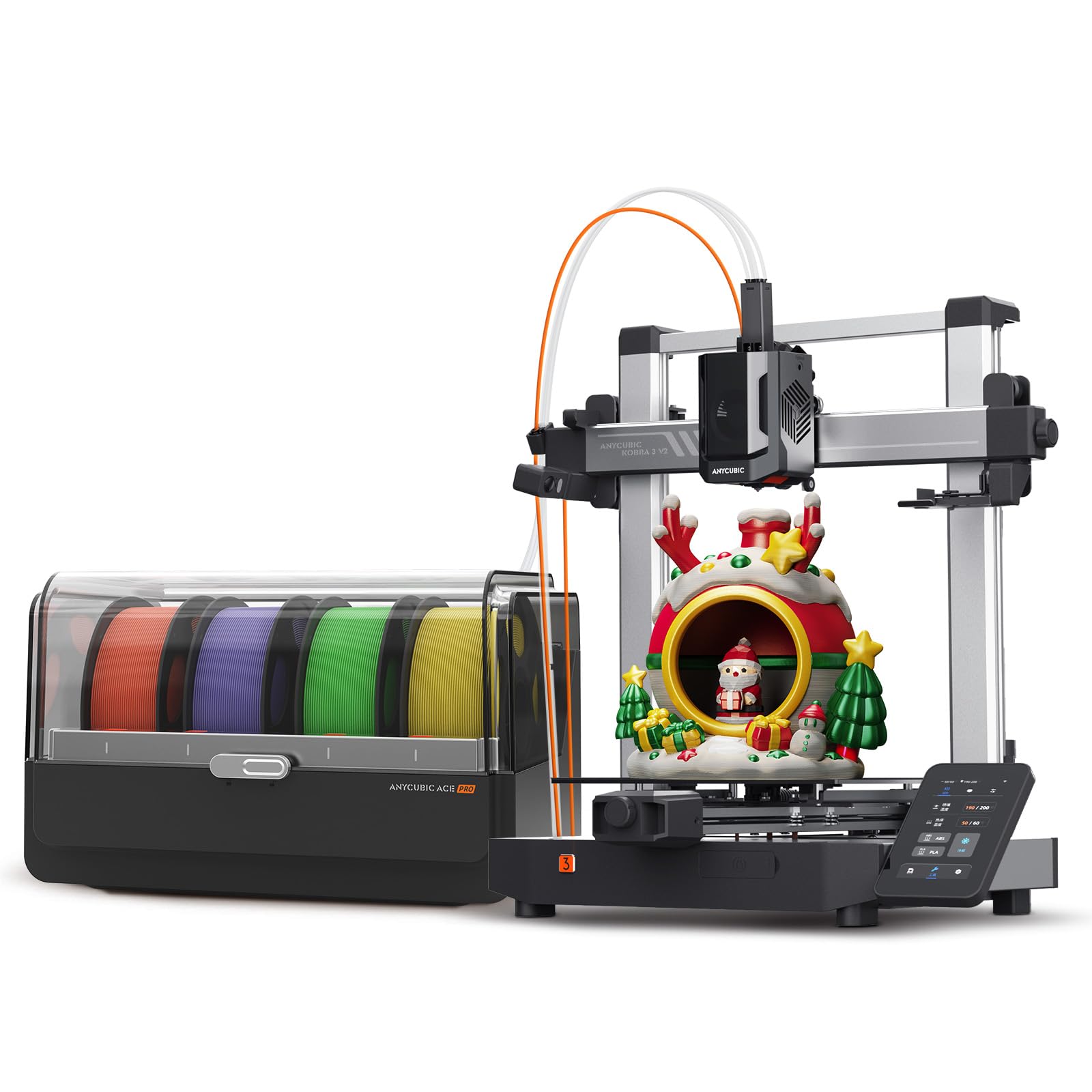
The Anycubic Kobra 3 V2 Combo differentiates itself with the ACE Pro unit that actively dries filament during printing — adjustable between 35-55°C for up to 24 hours of continuous operation — which directly addresses stringing and layer adhesion issues caused by moisture absorption. The 600 mm/s print speed with 20,000 mm/s² acceleration keeps project times short, and the same advanced nozzle technology from the Kobra S1 reduces material leakage for smoother surface finishes.
The system supports 4-color printing with one ACE Pro and expands to 8 colors with the separate Filament Hub and a second unit. The 720p camera enables real-time monitoring and time-lapse sharing, while the enhanced auto-leveling system improves success rates for first layers. Users report excellent out-of-box prints with no calibration needed, and the default profiles cover PLA, PETG, and other common filaments.
A small portion of users reported that the included USB drive contained malware, and Amazon or the seller did not immediately resolve the issue — formatting or discarding the drive before use is a simple preventive step. The camera quality is adequate for monitoring but not sharp enough for detailed inspection. Cardboard spools may need adapter rings to fit the ACE Pro feeder smoothly.
Why it’s great
- Active filament drying prevents moisture-related defects
- Expands to 8-color printing with additional hub
- Minimal setup required for excellent first prints
Good to know
- Included USB drive may carry malware
- Camera resolution is lower than some competitors
6. Creality K2 Combo (A)

The Creality K2 Combo brings up to 16-color printing through four CFS units, each acting as a dry box and auto-feeder that maintains filament quality during long multi-color prints. The step-servo motors on X, Y, and the extruder dynamically adjust torque in sub-millisecond increments, balancing speed, extrusion consistency, and noise control — users describe the sound level as comparable to typing on a laptop.
The 260 mm³ build volume covers most hobbyist scenarios, and the AI camera watches for spaghetti failures and idle conditions. Auto leveling probes only the print area rather than the entire bed, speeding up the calibration process significantly. The machine ships 95% pre-assembled, requiring only the screen installation to get started.
Some users note that the CFS does not fit standard spools without printing adapters, which takes several hours per adapter. The Wi-Fi radio operates only on the 2.4 GHz band, so homes with mesh networks on 5 GHz may need a separate access point for the camera and app features. The AI spaghetti detection occasionally misses adhesion failures, so occasional visual checks are still recommended.
Why it’s great
- Expands to 16 colors with multiple CFS units
- Step-servo motors deliver quiet, precise operation
- Fast zone-based auto leveling
Good to know
- CFS needs printed adapters for most spools
- Wi-Fi limited to 2.4 GHz only
7. QIDI Q2 Combo

The QIDI Q2 Combo is built for users who need to print engineering-grade filaments like ABS, polycarbonate, and carbon-fiber nylon, thanks to its dual PTC heated chamber that maintains a stable 65°C environment to eliminate warping. The QIDI BOX handles up to 16 colors with dry-while-print technology, keeping hygroscopic materials like nylon and PETG in optimal condition throughout long jobs. The nozzle acts as the leveling sensor for precise first-layer detection regardless of bed surface texture.
The 1.5GT synchronous belt and linear rails reduce vibration artifacts for ultra-smooth surfaces, and the triple filtration system — G3 pre-filter, H12 HEPA, and activated carbon — effectively scrubs odors and harmful particles from the air. Users appreciate the open Klipper compatibility and Orca slicer support, which contrasts with more closed ecosystems. The 370°C all-metal hotend handles the full gamut of engineering materials without compromise.
Setup requires more hands-on attention than the Bambu Lab or ELEGOO machines — the quick-start guide is vague about the BOX connection, and the initial firmware update may need a reload. The printer is heavier and larger than open-frame alternatives, so allocate dedicated bench space. The phone integration is less polished, but the local Wi-Fi and USB printing workflow is reliable once configured.
Why it’s great
- 65°C actively heated chamber for high-temp materials
- HEPA + carbon filtration for safe indoor use
- Open ecosystem with Klipper and Orca support
Good to know
- Setup requires more technical attention than plug-and-play models
- Large footprint needs dedicated workspace
8. Original Prusa MK4S High-Speed

The Original Prusa MK4S represents the gold standard for reliability in the open-source ecosystem, using input shaping motion compensation to deliver clean prints at higher speeds without the ringing artifacts common on cheaper frames. As a single-toolhead printer, it does not natively support multi-color switching, but its reputation for consistent day-to-day operation makes it a top choice for users who prioritize part quality over color variety.
The fully assembled unit ships with a spool of Prusament PLA Galaxy Black, and the 9.84 x 8.3 x 8.6 inch build volume handles most functional prototypes. The Prusa Connect platform and EasyPrint mobile app enable remote monitoring and file management. Users transitioning from low-cost printers report immediate improvement in first-layer adhesion and surface finish, with many noting that the MK4S runs for weeks without a single failed print when using the default profiles.
At 15.4 pounds, the MK4S is lighter than most enclosed CoreXY machines, but the open-frame design means it is best suited for PLA and PETG — printing ABS or other high-temperature materials requires an aftermarket enclosure. The price is notably higher than comparable-speed machines from Bambu Lab and Creality, but the lifetime technical support and long firmware update commitment justify the premium for production environments.
Why it’s great
- Exceptional reliability with near-zero failed prints
- Open-source firmware with long-term support
- Input shaping for clean high-speed results
Good to know
- No native multi-color support
- Open-frame design requires enclosure for ABS printing
9. QIDI Max4 Combo

The QIDI Max4 Combo targets users who need large industrial parts without splitting models, offering a 390 x 390 x 340 mm build volume that is 55% larger than its predecessor. Closed-loop motors on the X and Y axes combined with 30,000 mm/s² acceleration achieve up to 800 mm/s print speed, making it one of the fastest large-format printers available. The 65°C active heated chamber and Polar Cooler system create stable conditions for ABS-CF, PC, and PPS-CF materials.
The AI camera detects common failures like spaghetti clogs and pauses the print automatically, saving material and time on long jobs. The QIDI BOX supports up to 16 colors with intelligent filament management that monitors levels and pauses when a spool runs out. Users report outstanding print quality with carbon-fiber reinforced filaments, and the right-to-repair approach means replacement parts are accessible without vendor lock-in.
At 120 pounds, the Max4 requires a sturdy table and careful positioning — moving it after setup is not practical. The initial power draw is high due to the heated bed and chamber reaching temperature, so a dedicated circuit is recommended. The user interface is functional but choppier than competitors, and the purge waste on multi-color prints is higher than smaller machines due to the longer hotend path.
Why it’s great
- Massive 390mm³ build for oversized parts
- Closed-loop motors deliver precision at high speed
- Handles advanced composites like PPA-CF
Good to know
- Very heavy at 120 pounds
- High initial power draw may need dedicated circuit
10. Snapmaker Artisan 3D Printer

The Snapmaker Artisan stands alone in this list as a true 3-in-1 machine that swaps between 3D printing, laser engraving, and CNC carving via modular toolheads, making it suitable for makers who want a single platform for multiple fabrication methods. The dual-extrusion 3D printing module uses a 7:5:1 planetary gear system for consistent extrusion, and the 400 mm³ build volume accommodates large projects that other printers cannot fit in one piece.
The all-metal construction with CNC-ground steel guide rails and a die-cast base plate provides the rigidity needed for precise laser and CNC work, while the 7-inch touchscreen offers live status views and G-code previews without requiring a computer. The printer supports over 600 materials across its three functions, from PLA and nylon to wood, leather, and acrylic for laser applications.
Users report that the 3D printing module delivers reliable prints at average speed — not as fast as dedicated CoreXY machines — and the laser module at 40W is exceptional for engraving. The steep learning curve for the software and the lack of a physical lock on the enclosure are common points of feedback. The price is high for a printer alone, but the multi-function capability may justify the investment for users who need all three tools.
Why it’s great
- True 3-in-1 with laser and CNC capabilities
- 400 mm³ build volume for large projects
- Industrial-grade linear rails for rigidity
Good to know
- 3D printing speed is average compared to dedicated printers
- Software has a steep learning curve
11. Original Prusa XL 5 Independent Toolhead

The Original Prusa XL 5 Independent Toolhead is the most advanced printer in this list, designed for professional environments that demand maximum flexibility in material and color combinations. Five independent toolheads each have their own nozzle, extruder, and heater, which means zero purge waste when switching materials — a critical advantage for expensive filaments like PVA supports or filled composites. The 360 mm³ CoreXY frame maintains precision even during frequent tool changes.
The segmented heated bed system heats only the zones under the active print area, reducing energy consumption and preventing warping on large parts. The printer integrates deeply with the Prusa software ecosystem and Printables.com, and the open firmware philosophy means no forced updates or mandatory logins. Users who need dissolvable supports for complex geometries or multi-material functional prototypes find the independent toolhead approach indispensable.
Assembly requires significant effort despite the “assembled” label — the extruders, LCD, and other fragile parts ship separately to prevent damage, and setup can take half a day. The machine is not suitable for beginners; advanced troubleshooting skills are expected. The cost is an order of magnitude higher than the other printers on this list, but for production environments where reliability and material efficiency are paramount, the XL delivers unmatched capability.
Why it’s great
- Five independent toolheads eliminate purge waste
- Segmented heated bed saves energy and reduces warping
- Fully open-source with lifetime support
Good to know
- Setup takes half a day despite being labeled assembled
- Pro-level price limits accessibility for hobbyists
FAQ
How much filament waste does multi-color printing create?
What is the difference between 4-color and 16-color support in practical use?
Can I print ABS and nylon in an open-frame printer?
How important is the nozzle temperature range for material compatibility?
What causes stringing between color changes and how can I reduce it?
Final Thoughts: The Verdict
For most users, the best 3-in-1 3d printer winner is the Bambu Lab A1 Combo because it combines the most beginner-friendly auto-calibration system with reliable 4-color printing at a price that does not require a second mortgage. If you want enclosed printing for ABS and other high-temperature materials, grab the Bambu Lab P1S Combo. And for users who need the absolute best surface finish and material efficiency for production-level multi-color work, nothing beats the Original Prusa XL 5 Independent Toolhead.