
Choosing a three-in-one printer used to mean deciding whether you wanted decent prints or affordable ink. That trade-off no longer exists — but the sheer number of options now makes the real challenge finding the one that matches your actual page count, connection habits, and workspace size without bleeding you dry on supplies.
I’m Rikta — the co-founder and writer behind FitlyFast. I’ve spent the last several months analyzing the build quality, page yields, connectivity reliability, and real-world long-term costs across the most popular all-in-one models to separate the genuinely efficient machines from the ones that just look good on paper.
This guide cuts through the spec sheet noise to help you find the best 3 in 1 printer for your home or small office, whether you prioritize blazing-fast monochrome output or the lowest per-page color cost on the market.
How To Choose The Best 3 In 1 Printer
Every all-in-one printer performs the same three core jobs, but the technology inside — laser, standard inkjet, or refillable tank — completely changes how much you spend, how fast you print, and how reliable the machine stays after six months. Start by understanding the engine, then match the specs to your volume.
Print Technology: Laser vs. Inkjet vs. Tank
Laser printers use toner powder fused by heat, which makes them unmatched for crisp black text and high-speed output. Consumables cost more up front but last far longer, making laser the logical choice for offices or heavy home use. Standard inkjet printers offer lower initial cost and decent color, but the cartridges run out fast and the cost per page is brutal. Refillable tank printers, like Canon’s MegaTank and Epson’s EcoTank, fall between the two — they deliver lower long-term consumable costs than standard inkjet and produce strong color output, though the initial purchase price is higher and print speeds lag behind laser.
Paper Handling and Tray Capacity
Most home models ship with a 100- to 150-sheet tray, which forces constant refills for any moderate workload. Look for a 250-sheet tray if you print more than fifty pages a week. An automatic document feeder (ADF) is a separate consideration — it lets you scan or copy a stack of pages unattended, and a 35- to 50-sheet ADF is a serious productivity booster for anyone processing multi-page documents regularly.
Connectivity and Display
Dual-band Wi-Fi (2.4GHz and 5GHz) prevents the interference headaches that plague single-band printers in crowded homes. A dedicated touchscreen — ideally 2.7 inches or larger — simplifies everyday tasks like copying and scanning without needing a phone app. If you print from mobile devices, confirm AirPrint and Mopria compatibility. Direct USB or Ethernet connections remain the most stable option for users who don’t want to troubleshoot network dropouts.
Quick Comparison
On smaller screens, swipe sideways to see the full table.
| Model | Category | Best For | Key Spec | Amazon |
|---|---|---|---|---|
| Brother HL-L2480DW | Mono Laser | Small Office Speed | 36 ppm B&W | Amazon |
| Canon MAXIFY GX2020 | Color Tank | Low-Cost Color | 6000 page ink yield | Amazon |
| HP LaserJet 3101sdw | Mono Laser | Business Reliability | 35 ppm, 50-sheet ADF | Amazon |
| Brother MFC-L2820DW | Mono Laser | All-in-One W/ Fax | 36 ppm, 50-sheet ADF | Amazon |
| Canon MegaTank GX1020 | Color Tank | Budget Color Volume | 3000 page ink yield | Amazon |
| HP LaserJet 3101fdw | Mono Laser | Office Speed + Fax | 35 ppm, Ethernet | Amazon |
| Canon PIXMA TS7720 | Color Inkjet | Casual Home Use | 15/10 ppm, 2.7″ touch | Amazon |
| Epson EcoTank ET-4950 | Color Tank | High-Volume Color | 6600 page black yield | Amazon |
| Brother MFC-L3720CDW | Color Laser | Color Fast + Crisp | 19 ppm color, 3.5″ touch | Amazon |
In‑Depth Reviews
1. Brother HL-L2480DW

The Brother HL-L2480DW is the perfect monochrome laser all-in-one for small offices and home workspaces that prioritize speed and simplicity. It prints up to 36 pages per minute, supports automatic duplex, and includes a 2.7-inch touchscreen for easy navigation. The flatbed scanner handles books and single documents, and the 250-sheet paper tray reduces the need for constant refills — even during moderate weekly usage.
Wireless connectivity is dual-band, letting you choose between 2.4GHz and 5GHz networks to avoid congestion. Users consistently report seamless setup with Apple and Android devices. The machine also supports printing from cloud services like Google Drive and Dropbox directly from the touchscreen, eliminating the need to involve a computer for many tasks.
Customer feedback over a full year of use highlights reliable printing with crisp black text and no paper jams. The starter toner lasts roughly six months for a typical home office, and replacement Brother Genuine TN830 or TN830XL cartridges keep the cost per page low. For anyone needing fast, dependable black-and-white output without color complexity, this is the machine to beat.
Why it’s great
- Fast 36 ppm print speed cuts through bulk jobs
- Compact footprint with a roomy 250-sheet tray
- Touchscreen makes copying and scanning effortless
Good to know
- Monochrome only — lacks color output entirely
- Setup instructions can be sparse for non-technical users
2. Canon MegaTank MAXIFY GX2020

The MAXIFY GX2020 uses Canon’s refillable MegaTank system, cutting the cost per color page to a fraction of what cartridge-based inkjets charge. A single set of GI-25 pigment ink bottles yields up to 3,000 black and 3,000 color pages — enough to keep a busy home office running for a year or more without buying supplies. The printer also includes a 35-sheet automatic document feeder and fax capability, which is rare among refillable tank models at this level.
Print quality is strong for both text documents and graphics, with pigment-based inks that resist smudging on plain paper. The 2.7-inch color touchscreen is responsive and makes operation feel streamlined. Auto duplex printing works reliably, and the printer connects via dual-band Wi-Fi, Ethernet, or USB, giving you multiple stable options if wireless proves inconsistent.
Users report easy setup on both Mac and iPhone, and the machine stays quiet during operation. The main drawback is difficulty printing on heavy cardstock, which may curl or show streaks at high-quality settings. But for general office printing, copying, and scanning, the GX2020 delivers exceptional long-term value in color.
Why it’s great
- Ultra-low ink cost thanks to the MegaTank refillable system
- Includes a 35-sheet ADF and fax for serious document handling
- Pigment ink resists smudging on standard office paper
Good to know
- Cardstock and thick media can curl during duplex printing
- Print speed (15 ppm B&W) is slower than laser alternatives
3. HP LaserJet Pro MFP 3101sdw

The HP LaserJet Pro MFP 3101sdw is built for small teams that need fast, professional monochrome output and reliable scanning. It prints at up to 35 pages per minute with a first-page-out time of just 7 seconds, and the 50-sheet automatic document feeder makes multi-page copying and scanning a hands-off task. The 250-sheet input tray supports high-volume runs without constant reloading.
Connectivity is robust: dual-band Wi-Fi, Ethernet, and USB are all on board, and HP’s Smart App lets you manage print jobs and monitor toner from a phone. The printer uses an introductory toner cartridge rated for roughly 1,000 pages, which is typical for this class. Users report that the printer reconnects reliably after power outages and maintains a stable connection across multiple floors of a home or office.
HP uses cartridge authentication that blocks non-HP chips, so refilling with third-party toner requires declining firmware updates. Customer reviews over a year note crisp print quality, reasonable noise levels, and consistent performance. If your team prints dozens of black-and-white documents daily and needs a scanner that keeps pace, the 3101sdw is a strong mid-range contender.
Why it’s great
- Fast 35 ppm speed with a 7-second first-page-out time
- 50-sheet ADF handles bulk scanning without babysitting
- Stable Wi-Fi that reconnects after power dips
Good to know
- HP blocks third-party toner via firmware updates
- Starter toner yields only about 1,000 pages
4. Brother MFC-L2820DW

The Brother MFC-L2820DW is the monochrome laser all-in-one that adds fax to the print-copy-scan trio, making it a full communications hub for a small office. It prints at up to 36 pages per minute and includes a 50-page auto document feeder for unattended multi-page jobs. The 2.7-inch touchscreen is intuitive, and the interface supports printing from cloud services like Google Drive and Dropbox without involving a computer.
Dual-band Wi-Fi, Ethernet, and USB provide connection flexibility. Users who have owned previous Brother laser printers note that the MFC-L2820DW improves on earlier models with better wireless range and a quieter footprint. The TN830 toner series keeps the cost per page low, and Brother’s Refresh subscription service offers discounted genuine toner delivery if you prefer automatic supply management.
Customer feedback over extended use praises the machine’s reliability — one user’s previous Brother unit lasted 11 years. Setup can be a little confusing if you follow the sparse quick-start guide, but manual network configuration resolves it quickly. For offices that fax regularly and need a compact, durable laser workhorse, this is the logical pick.
Why it’s great
- Includes fax functionality for legacy office workflows
- 50-sheet ADF streamlines bulk scanning and copying
- Proven Brother reliability with a long ownership track record
Good to know
- Setup instructions are sparse and may require manual Wi-Fi configuration
- Monochrome only — no color output available
5. Canon MegaTank GX1020
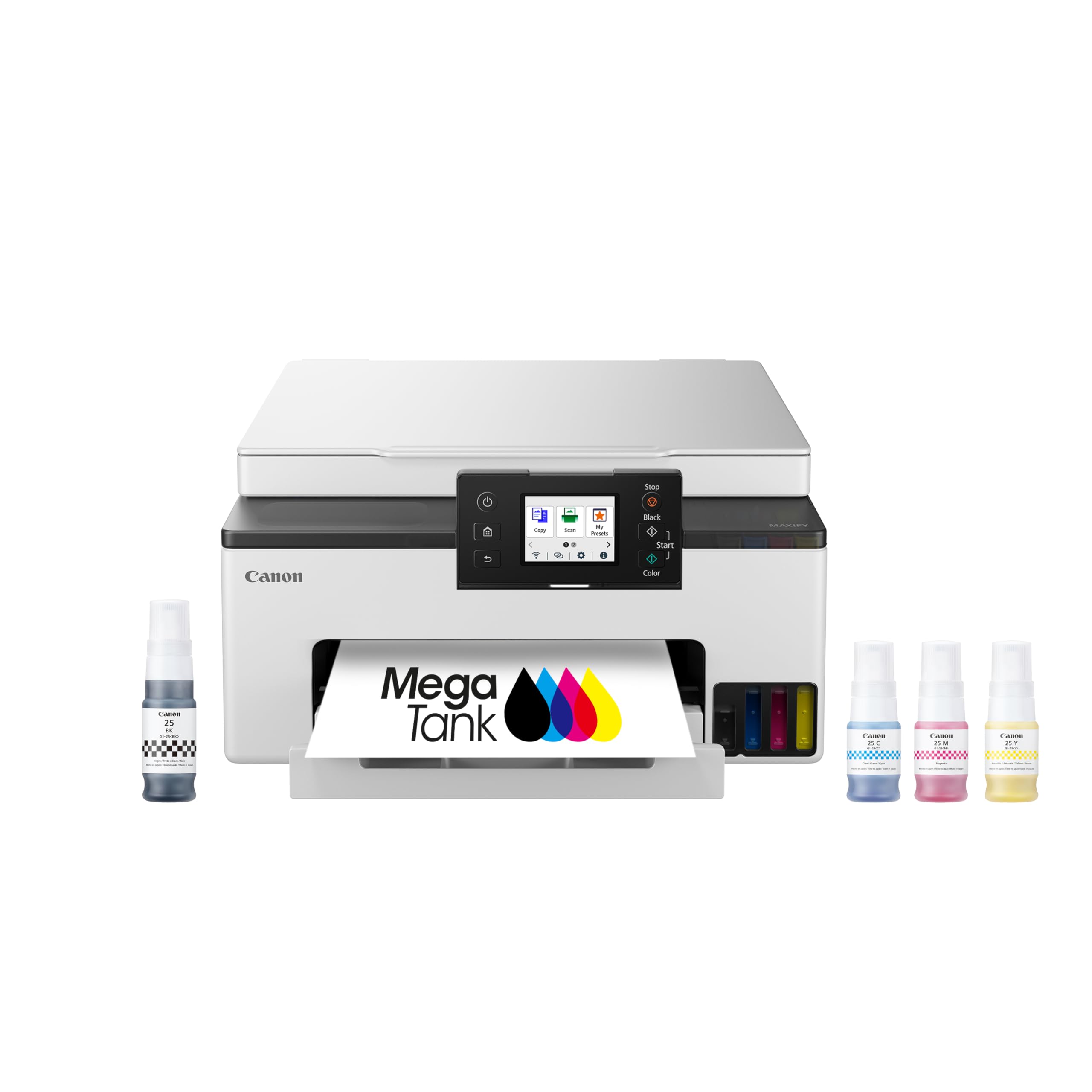
The Canon MegaTank GX1020 offers the same refillable ink tank concept as the MAXIFY GX2020 but at a lower entry point, making it the go-to option for households or freelancers who want color printing without the cartridge markup. It prints up to 3,000 black and 3,000 color pages from the included ink bottles, and the pigment-based ink produces sharp text that resists smearing on plain paper. The 2.7-inch color touchscreen makes operation straightforward.
Auto duplex printing works well, and print quality for documents and graphics is excellent for this class. Users have reported that copy output is virtually indistinguishable from the original. The refill system is clean and easy, with keyed bottles that prevent accidental mixing. However, the printer lacks an automatic document feeder, so multi-page scanning requires manual page-by-page feeding on the flatbed.
Real-world feedback highlights wireless connection quirks — some users needed to manually configure the 5GHz band when the 2.4GHz connection was unreliable at range. AirPrint from iPad has been problematic for a few users, though the Canon Print app works as a fallback. If you need a cartridge-free color printer for moderate home use and can live without an ADF, the GX1020 delivers unbeatable ink economics.
Why it’s great
- Refillable ink system slashes color printing costs dramatically
- Pigment-based ink produces smudge-resistant text
- Excellent print and copy quality on plain paper
Good to know
- No automatic document feeder — multi-page scanning is manual
- Wireless connectivity can be inconsistent, especially on 2.4GHz networks
6. HP LaserJet Pro MFP 3101fdw

The HP LaserJet Pro MFP 3101fdw is the full-featured sibling of the 3101sdw, adding fax and an auto document feeder to the same fast monochrome laser platform. At 35 pages per minute with automatic duplex, it handles high-volume document workflows comfortably. The ADF makes copying or scanning a 20-page contract a single-press operation, and the Ethernet port ensures stable network printing for teams.
HP Wolf Pro Security adds a layer of protection for sensitive data, which matters in shared office environments. The intelligent Wi-Fi scans for the best available connection and holds it reliably, even after network interruptions. Users have reported printing over 20,000 pages in nine months with no jams, and using Economode effectively doubles the toner cartridge’s life without noticeable quality loss for internal documents.
As with other HP laser printers, the 3101fdw uses cartridge authentication to block non-HP chips. Some users experienced complete failure within weeks, though most report trouble-free operation. For teams that need fast, secure black-and-white printing plus fax capability in a single machine, this is the premium choice.
Why it’s great
- Fast 35 ppm output with a reliable ADF for bulk jobs
- HP Wolf Security protects data in shared offices
- Economode doubles toner life for internal drafts
Good to know
- HP’s cartridge authentication blocks inexpensive third-party toner
- Quality control can vary — a small number of units fail early
7. Canon PIXMA TS7720

The Canon PIXMA TS7720 is a compact color inkjet designed for light home use: homework, occasional photos, and the odd document. It prints at up to 15 pages per minute in black and 10 in color, includes a 2.7-inch touchscreen, and supports automatic duplex printing. The two-cartridge system (one black, one color) keeps installation simple, though the combined color cartridge means that running out of one color forces a full replacement.
Setup is straightforward for most users, though the wireless connection process may require a brief read of the manual rather than being fully automatic. Print quality for text is crisp, and color photos look good at standard sizes, though some users report that colors appear less vibrant than on Canon’s five-ink models. The scanner works well for single pages, and the flatbed is adequate for occasional use.
Customer feedback is mixed on long-term reliability. Several users praise the TS7720 as dependable and easy to maintain, while others report persistent Wi-Fi disconnects and high ink consumption. The default auto power-off setting after four hours can be frustrating — you must manually enable Auto Power On in the settings. It’s a functional entry-level machine for users who print infrequently and want to keep the upfront cost minimal.
Why it’s great
- Very low initial purchase cost for a color all-in-one
- Compact footprint fits small desks and shelves
- Auto duplex saves paper on double-sided documents
Good to know
- Two-cartridge system wastes ink when one color runs out first
- Wi-Fi can drop connection; some users report frequent disconnects
8. Epson EcoTank ET-4950

The Epson EcoTank ET-4950 is a seventh-generation supertank printer designed for households or small offices with heavy color needs. The included ink bottles yield up to 6,600 black pages and 5,500 color pages, which Epson says equates to roughly 80 cartridges worth of ink. It prints at 18 pages per minute in black and 9 in color, includes an auto document feeder, fax, and a 250-sheet paper tray, plus automatic duplex for all functions.
The refill system uses unique keyed bottles that prevent accidental mixing, and the tank design is easy to fill without mess. Print quality is good for general office documents and presentations, with particularly strong results for borderless photo prints on appropriate paper. The 2.4-inch color display provides clear navigation, and the printer supports both Ethernet and dual-band Wi-Fi. Users consistently praise the long-term ink savings and reliable wireless performance.
Setup can be time-consuming — the initial ink charging and alignment process takes around 45 minutes, and some users report paper jams during the first run. The build quality is functional rather than premium, with some plastic panels that flex under pressure. But for anyone who prints hundreds of color pages per month and wants to stop buying cartridges, the ET-4950 delivers the lowest sustained cost-per-page in this roundup.
Why it’s great
- Massive ink yield — up to 6,600 pages from a single bottle set
- Cartridge-free design eliminates the most common printer frustration
- Excellent borderless photo output for a supertank printer
Good to know
- Initial setup is slow and can involve a paper jam during charging
- Build quality feels somewhat flimsy for the price tier
9. Brother MFC-L3720CDW

The Brother MFC-L3720CDW is a color laser all-in-one that brings professional-grade print speed and color output to a mid-size office. It prints at 19 pages per minute in both black and color, with a 50-sheet auto document feeder and a generous 250-sheet adjustable paper tray. The 3.5-inch color touchscreen supports up to 48 customizable shortcuts, giving frequent tasks a one-tap solution. It also includes fax capability, making it a true four-in-one hub.
Print quality is sharp, with vibrant color graphics that make presentations and marketing materials stand out. The TN229 toner series offers multiple capacity levels, including high-yield and extra-high-yield options that extend the time between replacements. Dual-band Wi-Fi, Wi-Fi Direct, and USB are all on board, and the Brother Mobile Connect app lets you monitor toner and manage jobs from a phone. User reviews highlight quiet operation and reliable jam-free performance over extended use.
Color laser printers are not designed for photo printing — the fused toner process struggles with photographic smoothness, so glossy photo paper output will look noticeably grainier than from a dedicated inkjet. A few users have reported that the printer stops functioning when it estimates toner is empty, even if there is visible toner remaining, and that replacing cartridges is the only workaround. For offices that need fast, vibrant color documents and can accept the higher per-page cost of laser toner, the MFC-L3720CDW is the top performer.
Why it’s great
- Fast 19 ppm color output for professional documents
- Large 3.5-inch touchscreen with customizable shortcuts
- Quiet, reliable operation with minimal jams
Good to know
- Laser photo quality is inferior to inkjet — not for photo printing
- Some units stop printing early based on estimated toner level
FAQ
Should I choose a laser or inkjet 3-in-1 printer?
What does auto document feeder mean and do I need it?
Final Thoughts: The Verdict
For most users, the best 3 in 1 printer overall is the Brother HL-L2480DW because it combines blazing 36 ppm speed, automatic duplex, and a generous 250-sheet paper tray in a compact monochrome package that keeps long-term costs predictable. If you want a low-cost color printer, grab the Canon MAXIFY GX2020 — its refillable MegaTank delivers thousands of color pages without cartridge markups. And if your office demands fast color laser output, nothing beats the Brother MFC-L3720CDW for professional document quality with a large touchscreen interface.