
Our readers keep the lights on and the weekend projects moving. As an Amazon Associate, I earn from qualifying purchases.
Connecting three external monitors to a laptop should be a one-cable affair, yet most users end up wrestling with adapter nests, flickering screens, and ports that refuse to cooperate. The right dock eliminates that clutter, turning a cramped laptop into a true workstation with three independent 4K displays.
I’m Rikta — the co-founder and writer behind FitlyFast. My research into this category focuses on parsing DisplayLink vs. native MST support, power delivery headroom, and real-world multi-monitor stability across Mac and Windows ecosystems.
After analyzing dozens of models across a wide price spectrum, I’ve identified the docks that consistently deliver reliable triple-screen performance without the headaches. This guide breaks down the 3 monitor docking station options that actually work for demanding workflows.
How To Choose The Best 3 Monitor Docking Station
Not every dock labeled “triple display” can actually drive three monitors at usable resolutions. The key is understanding how the dock connects to your laptop and what software it relies on.
DisplayLink vs. Native MST Support
Windows laptops with USB-C that supports DisplayPort Alt Mode can natively run multiple monitors via MST (Multi-Stream Transport). Macs with Apple Silicon are limited to one external display natively, so they require a DisplayLink dock that uses a driver to add extra video outputs. If you use a Mac, a DisplayLink dock is non-negotiable for triple screens.
Power Delivery and Total System Power
A dock that outputs 100W to your laptop is useless if its power adapter can’t supply enough juice to simultaneously charge the laptop and power all connected peripherals and monitors. Look for docks that ship with a power adapter rated for at least 130W, or in the case of high-end Thunderbolt docks, a 330W supply ensures no port ever gets starved.
Port Selection and Data Speeds
Beyond the video ports, count the high-speed USB ports (10Gbps USB 3.2 Gen 2) for external SSDs and fast peripherals. A dock with a 2.5Gbps or 10GbE Ethernet port future-proofs your wired network. SD card readers at UHS-II speeds are valuable for photographers and video editors.
Quick Comparison
On smaller screens, swipe sideways to see the full table.
| Model | Category | Best For | Key Spec | Amazon |
|---|---|---|---|---|
| CalDigit TS5 Plus | Premium Thunderbolt 5 | Dual 8K / Pro Creators | Dual 8K 60Hz / 10GbE | Amazon |
| Plugable UD-6950PDZ | DisplayLink | Mac / Triple 4K 60Hz | 3x HDMI + 3x DP | Amazon |
| Anker Prime DL7400 | DisplayLink | Windows / Smart Display | 140W PD / 2.5GbE | Amazon |
| TobenONE UDS033 | DisplayLink | Quad 4K / Max Port Count | 18 ports / 3x HDMI + 3x DP | Amazon |
| WAVLINK RC-UG39PD8 | DisplayLink Quad | Quad 5K / Heavy Data | Quad HDMI / 2.5GbE | Amazon |
| StarTech DK31C2DHSPD | Native MST | Windows / DP 1.4 DSC | DP 1.4 w/ DSC / Triple 4K 30Hz | Amazon |
| WAVLINK WL-UG63PD13 | DisplayLink | Mac / Budget Triple | 3x HDMI / 130W PSU | Amazon |
| Dell D6000S | Universal Dock | Dell Laptops / Simplicity | USB-C & USB-A Host | Amazon |
| Baseus Spacemate | Compact Mid-Range | Windows / Desk Space | Vertical / 2x HDMI + 2x DP | Amazon |
In‑Depth Reviews
1. CalDigit TS5 Plus

The CalDigit TS5 Plus is the most capable dock money can buy right now, leveraging Thunderbolt 5’s 80Gb/s bandwidth (120Gb/s boost mode for displays) to drive dual 8K 60Hz or dual 6K 60Hz screens on macOS, and triple 4K 144Hz on supported Windows Thunderbolt 5 hosts. Its 140W dedicated host charging matches the maximum draw of a 16-inch MacBook Pro, so your laptop never loses battery under full load. The 330W power supply ensures every downstream port — including two 36W Thunderbolt 5 ports and ten 10Gb/s USB ports across two separate controllers — gets full power simultaneously.
The dual USB controller architecture is a rare feature that prevents bandwidth bottlenecks when multiple high-speed drives are transferring data at once. The built-in 10GbE Ethernet port is ten times faster than standard gigabit, making large NAS transfers feel local. The all-aluminum chassis acts as a heatsink, and while it runs warm under load, it never throttles. For creative pros who need uncompressed 8K timelines and simultaneous SSD workflows, this is the dock that disappears into your setup and just works.
The main limitation is its Thunderbolt-only requirement: it does not work with non-Thunderbolt USB-C laptops. The 1-meter braided cable is adequate but short for some desk configurations. Windows users must install a separate 10GbE driver. Despite the premium investment, the build quality and future-proofing justify the cost for anyone who pushes their machine to its limits daily.
Why it’s great
- Dual 8K 60Hz and triple 4K 144Hz capability
- 140W dedicated host charging with 330W PSU
- 10GbE Ethernet and dual USB controllers
- All-aluminum heatsink chassis
Good to know
- Thunderbolt 5 hosts only — no USB-C only laptops
- Very expensive investment
- 1m cable may be too short for some setups
2. Plugable UD-6950PDZ

The Plugable UD-6950PDZ is purpose-built for Mac users who need triple 4K 60Hz from a single cable. It packs three HDMI and three DisplayPort outputs, giving you total flexibility in monitor cabling. The built-in DisplayLink chipset allows even M1/M2/M3 Macs — which natively cap at one external display — to drive three screens at full 4K 60Hz after a driver install. The included 100W power delivery keeps most 13 and 14-inch laptops charged through a full workday.
Reliability is where Plugable earns its reputation. The dock supports six USB 3.0 ports (all 5Gbps), gigabit Ethernet, and a 3.5mm combo audio jack. The rear-panel layout is clean, and the dock runs relatively cool under sustained load. Early adopters reported Ethernet compatibility quirks after macOS updates, but Plugable’s North American-based support team responds quickly with firmware patches or replacements. The two-year warranty and lifetime support add peace of mind for long-term use.
One nuance: the 100W PD output is sufficient for most ultrabooks, but if you use a 240W power-hungry workstation laptop, the dock won’t charge it at full speed. The DisplayLink driver also means paid streaming services like Netflix may show a black screen on extended monitors — a common limitation across all DisplayLink docks. For productivity work, spreadsheet analysis, and creative apps, this dock is a proven workhorse.
Why it’s great
- Triple 4K 60Hz on Mac with DisplayLink
- Six USB 3.0 ports for peripherals
- Excellent customer support and 2-year warranty
- Flexible HDMI and DisplayPort selection
Good to know
- DisplayLink required for Mac triple setup
- 100W PD may not fully charge high-power laptops
- No 10Gbps USB ports
3. Anker Prime Docking Station DL7400
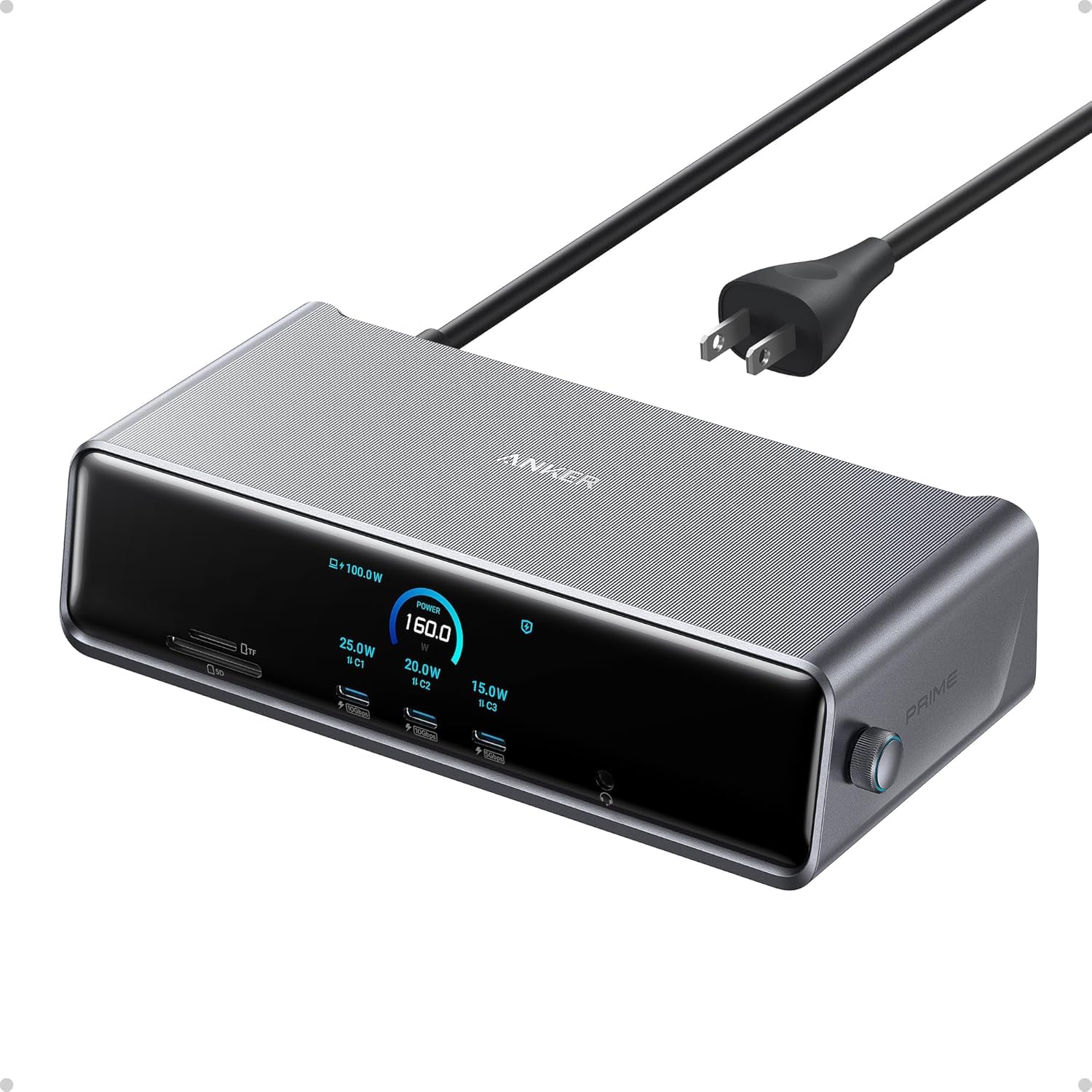
Anker’s Prime DL7400 brings premium build and smart features to the triple-monitor docking station market. It delivers 140W upstream PD to your laptop via a 10Gbps USB-C upstream port, while two front USB-C ports each provide 100W for fast accessory charging. The smart display on the front panel shows real-time charging power, display performance, and fan cooling mode — a unique touch that helps you monitor system health at a glance.
The dock supports triple 4K 60Hz via DisplayLink and includes two HDMI ports plus one DisplayPort, along with a 2.5Gbps Ethernet port for faster wired networking. The cooling fan with ActiveShield 3.0 keeps the dock stable under heavy loads, though it’s not completely silent. The aluminum construction feels dense and premium, and the compact footprint saves desk space compared to bulkier docks.
Setup requires installing the latest DisplayLink driver, and like all DisplayLink docks, DRM-protected streams may show a black screen on extended monitors (fixable by disabling hardware acceleration in browser settings). Some users report intermittent monitor disconnects, but Anker’s firmware updates have addressed many early issues. For Windows users who want a refined experience with live system monitoring, the DL7400 is a strong contender.
Why it’s great
- 140W upstream PD for fast laptop charging
- Smart display for real-time monitoring
- 2.5Gbps Ethernet for faster networking
- Premium build with cooling fan
Good to know
- DisplayLink driver required
- DRM streaming limitations on extended displays
- Fan produces audible noise under load
4. TobenONE UDS033

The TobenONE UDS033 is an 18-port powerhouse that offers triple or quad 4K 60Hz on Windows and triple 4K 60Hz on Mac, thanks to its DisplayLink chipset. It features three HDMI and three DisplayPort outputs, plus two USB-C 10Gbps ports, four USB 3.1 ports, SD/TF card slots, and gigabit Ethernet. The included 120W power adapter delivers up to 100W (96W certified) to your laptop, with an additional 18W from a dedicated front USB-C port for fast phone charging.
The primary advantage here is display output flexibility: you can mix HDMI and DisplayPort connections however you like, which is valuable for non-standard monitor setups. The dock supports Thunderbolt 4, Thunderbolt 3, USB4, and full-featured USB-C laptops. TobenONE offers lifetime support with direct access to product engineers, which is reassuring given the occasional glitch reported with lid-closed MacBook Pro operation and HDMI port signal loss after months of use.
The downside is that the dock does not support DRM-protected streaming services due to DisplayLink’s screen recording architecture. The physical footprint is compact — 4.3 x 4.26 x 1.5 inches — but the non-retractable front USB-C port placement can be awkward with thick cables. For power users who need maximum port count and flexible display options, and who prioritize support responsiveness, the TobenONE is a top-tier choice.
Why it’s great
- 18 ports for maximum connectivity
- 3x HDMI + 3x DP flexible outputs
- 100W PD with dedicated phone charging
- Lifetime support with engineer access
Good to know
- No DRM streaming on extended displays
- Some reliability quirks with signal after months
- Not ideal for lid-closed Mac setups
5. WAVLINK RC-UG39PD8

The WAVLINK RC-UG39PD8 is a quad-monitor docking station that pushes beyond triple displays, supporting four outputs at 5K or 4K 60Hz via four HDMI and four DisplayPort ports. It uses a DisplayLink chipset, making it compatible with Macs (M1-M5 and Intel), Windows, and Chrome OS. The dock includes a powerful 180W power adapter, delivering 100W to the host laptop while keeping all ports fully powered.
Data connectivity is generous: you get a 2.5Gbps Ethernet port, an SD 4.0 UHS-II card reader for fast media transfers, and three USB ports. The included 2-in-1 USB-C to USB-A/C cable adds flexibility for older peripherals. The form factor is best used vertically so the rear ports are accessible. For content creators working with multiple camera feeds or stock traders monitoring several data streams, this dock offers the highest display count in this list.
Long-term reliability is the main concern — some users report monitor flickering, Ethernet drops, and charging failures after several months. The driver installation requires downloading from a provided link rather than plug-and-play, which may be inconvenient. The 180W power adapter adds bulk to the travel bag. If you need four displays and understand the potential driver quirks, the value proposition is strong, but it may not be the best choice for mission-critical daily use.
Why it’s great
- Quad 5K/4K 60Hz display support
- 180W power adapter with 100W PD
- 2.5Gbps Ethernet and SD 4.0 reader
- Works with Mac, Windows, and Chrome OS
Good to know
- Long-term reliability concerns reported
- Requires driver download for setup
- Bulky 180W power supply
6. StarTech DK31C2DHSPD

The StarTech DK31C2DHSPD is a native MST docking station for Windows and Chrome OS, using DisplayPort 1.4 with DSC to deliver dual 4K 60Hz or triple 4K 30Hz without any DisplayLink driver. It features two DisplayPort 1.4 outputs and one HDMI 2.0 port, a six-port USB hub (including two 10Gbps USB-C ports), gigabit Ethernet, SD 3.0 card reader, and 100W power delivery. The dock includes a physical on/off button and two K-slot security locks, making it enterprise-ready.
The advantage of native MST support is that there is no driver overhead, no DisplayLink input lag, and no issues with DRM-protected streaming. Video performance is crisp and responsive, ideal for users who need smooth cursor movement and video playback across all monitors. The dock supports high refresh rates — triple 1080p 240Hz or dual 1440p 144Hz — which is rare for a non-Thunderbolt dock. StarTech’s build quality is professional-grade, with a metal chassis and robust cable management.
The main catch is that it only supports Windows and Chrome OS natively. Mac users cannot use this dock for multiple displays. Some users report choppy audio from the headphone jack and random monitor disconnections. The 100W PD is adequate for most business laptops, but power users with 130W+ laptops may see battery drain under load. For Windows professionals who prioritize low-latency video and zero software hassle, this is a excellent option.
Why it’s great
- Native MST — no DisplayLink driver needed
- DP 1.4 with DSC for high resolutions
- Supports high refresh rates (240Hz)
- On/off button and security lock slots
Good to know
- Windows/Chrome only — no Mac support
- Some audio and reliability issues reported
- 100W PD may not fully charge high-power laptops
7. WAVLINK WL-UG63PD13

The WAVLINK WL-UG63PD13 is a compact 15-in-1 DisplayLink dock that delivers triple display capability at a very accessible price point. It includes three HDMI ports, two DisplayPorts, two USB-C 10Gbps ports, three USB-A 5Gbps ports, gigabit Ethernet, SD/TF card slots, and a headphone/mic combo jack. The bundled 130W power adapter provides 100W charging to the host laptop, which is generous for the price range.
The dock uses the DisplayLink DL-6350 chipset, enabling triple 4K 60Hz on the HDMI Alt Mode port, while the other two display ports run at dual 2K 60Hz. For Mac users with M-series chips, this is one of the most affordable ways to get three external monitors running. The setup is straightforward: install the DisplayLink driver, connect via the included USB-C cable, and configure display arrangement in system settings. Users report no flickering and stable performance on Windows 11 and macOS.
The downsides are typical of budget DisplayLink docks: it requires a driver download and is not plug-and-play. The HDMI Alt Mode port only works if your laptop’s USB-C port supports video output natively. The build quality is plastic with a silver finish that looks decent but lacks the heft of premium docks. For users on a tighter budget who need triple displays on Mac, this is an excellent entry point without sacrificing core functionality.
Why it’s great
- Triple 4K 60Hz via DisplayLink on Mac
- 130W power adapter with 100W PD
- 15 ports including USB-C 10Gbps
- Very affordable for Mac users
Good to know
- DisplayLink driver required for Mac triple
- Plastic build quality
- Only one HDMI supports 4K 60Hz
8. Dell D6000S

The Dell D6000S Universal Dock is a corporate stalwart, designed to work with both USB-C and USB-A laptops. It supports up to three 4K displays via DisplayPort and HDMI, though the resolution and refresh rate depend on the host laptop’s capabilities. The dock includes an LED power indicator, six total ports (HDMI, 2x DP, 2x USB-A, Ethernet), and powershare functionality for charging accessories even when the laptop is off.
For Dell laptop users in enterprise environments, this dock integrates seamlessly with Dell’s driver ecosystem and firmware update tools. It sits flat on the desk with a small footprint, and the universal compatibility means it can be shared across different laptop models in an office. The dock is bus-powered with an external power adapter, ensuring stable performance without siphoning power from the laptop battery.
The biggest drawbacks are the limited port selection — only three downstream USB ports, no USB-C data ports, no SD card reader, and no audio jack. The build quality is plastic, and the dock lacks the premium feel of higher-end options. Some users report DOA units with non-functional USB ports or power cords. For a simple, no-frills triple display solution in a corporate Dell environment, it works, but you can get far more connectivity for a similar investment elsewhere.
Why it’s great
- Works with USB-C and USB-A laptops
- Seamless Dell ecosystem integration
- Compact and unobtrusive design
- Powershare for accessory charging
Good to know
- Limited ports — no USB-C data, no SD card
- Plastic build with quality control issues
- No DisplayLink for advanced Mac multi-display
9. Baseus Spacemate
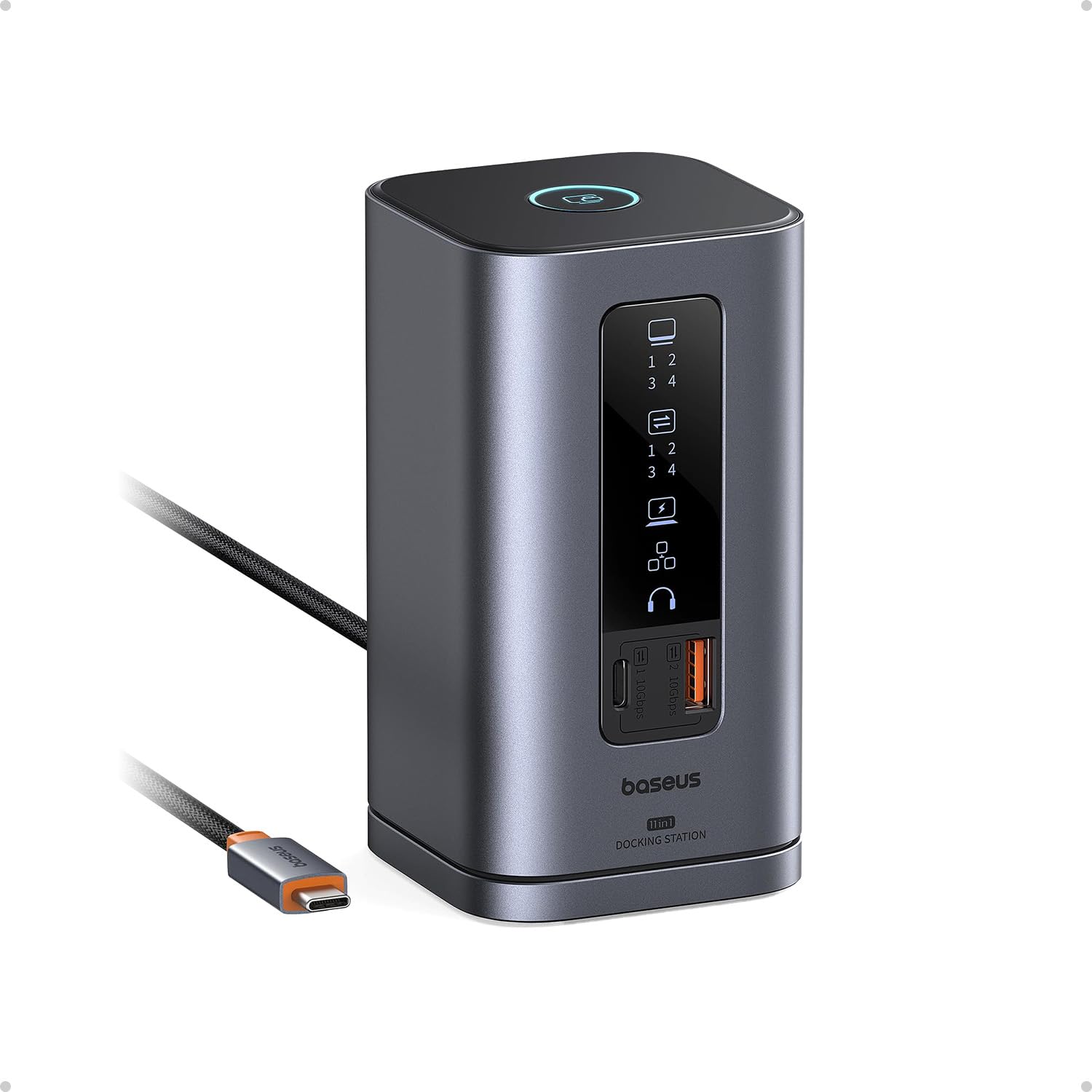
The Baseus Spacemate is an 11-in-1 USB-C docking station that stands vertically to save desk space, featuring a sleek aluminum finish and a magnetic base. It supports triple 4K displays on Windows via two HDMI and two DisplayPort ports, offering flexibility for mixed monitor setups. The dock includes a USB-C 10Gbps port, two USB-A 10Gbps ports, a USB-A 2.0 legacy port, gigabit Ethernet, and a 3.5mm audio jack. The built-in LED digital screen displays connection status of each port, and there’s a screen-lock button for quick privacy.
The Spacemate delivers up to 100W PD input with 85W output to the laptop, though a power adapter is not included in the box. The upright form factor is a genuine space-saver, leaving more room for peripheral cables. The 10Gbps USB ports allow fast file transfers — 20GB in about 20 seconds. It has received recommendations from Forbes, ZDNet, and Tom’s Guide, indicating broad recognition for its design and value.
On macOS, this dock only supports extended one display, not triple screens — a critical limitation if you use a Mac. Some users report the need to keep DisplayLink Manager running after reboot to maintain external monitor connectivity. The non-replaceable built-in cable is inconvenient if it gets damaged. The included social media buzz doesn’t always match the real-world reliability. For Windows users on a budget who value desk aesthetics and speed, it’s a neat package with some quirks.
Why it’s great
- Space-saving vertical aluminum design
- 10Gbps USB 3.2 Gen 2 ports
- LED status screen with screen-lock button
- Triple 4K on Windows with 100W PD
Good to know
- MacOS only supports one extended display
- Power adapter not included
- Non-replaceable built-in USB-C cable
FAQ
Can a MacBook Air with M3 drive three external monitors from a USB-C dock?
Why does my triple monitor dock show a black screen on Netflix and other streaming services?
Will any USB-C dock support triple monitors, or do I need a specific type?
Final Thoughts: The Verdict
For most users, the 3 monitor docking station winner is the Anker Prime DL7400 because it balances premium build, smart display features, and reliable DisplayLink triple 4K performance across Windows and Mac. If you prioritize native zero-latency video on Windows, grab the StarTech DK31C2DHSPD with DP 1.4 DSC support. And for maximum port count and display flexibility at a reasonable price, nothing beats the TobenONE UDS033.