
Our readers keep the lights on and the weekend projects moving. As an Amazon Associate, I earn from qualifying purchases.
The grainy texture, the specific color cast of a Kodak Gold 200 roll, the family snapshots that smell faintly of old cardboard — a dedicated 35mm negative film scanner is the only tool that faithfully captures these analog fingerprints. Unlike flatbed scanners that scatter light across the emulsion, these purpose-built devices use precision optics and backlighting to resolve the dye clouds and silver grains that define film photography. Choosing the wrong one delivers flat, lifeless JPEGs that feel like a betrayal of the original negative.
I’m Rikta — the founder and writer behind FitlyFast. I track the optical resolution, dynamic range specs, and infrared dust-removal performance of every dedicated 35mm film scanner on the market, analyzing how well each unit translates the physical density of a negative into a digital file.
This guide breaks down nine models that span from simple one-button digitizers to prosumer units with 7200 dpi output, so you can confidently pick the best 35mm negative film scanner for your archive project.
How To Choose The Best 35mm Negative Film Scanner
Not all film scanners resolve the same level of detail. Before you buy, you need to understand how optical resolution, sensor type, and software support determine whether your scans look like the original negative or a washed-out approximation. Here are the three specs that separate a keeper from a regret.
Optical Resolution vs. Interpolated Megapixels
Many standalone scanners advertise “22MP” or “25MP” output — that number is almost always interpolated from a 13MP or 14MP CMOS sensor. True optical resolution is measured in dpi (dots per inch). A scanner at 1800 dpi captures the visible grain of a 35mm frame at a modest size. At 3600 dpi, you resolve individual silver particles in black-and-white film. At 7200 dpi, as seen on the Plustek OpticFilm 8200i SE, you extract the full tonal information the film stock recorded. For critical archiving, ignore interpolated numbers and look for the native sensor resolution.
Dynamic Range (Dmax) and Bit Depth
Film records a much wider brightness range than a typical LCD screen can display. Dynamic range, often expressed as Dmax, indicates how well a scanner differentiates between the deepest shadows and brightest highlights. Entry-level models with Dmax of 2.8–3.0 will clip shadow detail and blow out highlights on contrasty slides like Kodachrome. A scanner with 3.6 Dmax, like the Plustek, preserves the full gradient. Pair that with 48-bit color depth (16 bits per channel) to avoid posterization in smooth tonal areas like skies and skin tones.
Infrared Dust and Scratch Removal
Dust on a negative appears as white specks on the final scan — and manually cloning those out over a thousand frames is soul-crushing. Scanners that include an infrared channel (like the Plustek 8200i with iSRD) detect dust particles by their different infrared reflectance and automatically remove them without softening image detail. This feature only works on color film because the dyes are transparent to infrared light; black-and-white silver negatives block infrared, making dust removal ineffective. If you scan primarily color negatives, iSRD is a workflow game-changer.
Quick Comparison
On smaller screens, swipe sideways to see the full table.
| Model | Category | Best For | Key Spec | Amazon |
|---|---|---|---|---|
| Plustek OpticFilm 8200i SE | Prosumer | High-res archiving | 7200 dpi / 48-bit / iSRD | Amazon |
| HP Touch Screen 7″ (HPFS700) | Premium | Large screen preview | 7″ touch LCD / 13MP sensor | Amazon |
| HP Touch Screen (HPFS500) | Premium | Touchscreen ease | 5″ touch LCD / 2889 dpi | Amazon |
| KODAK Slide N SCAN | Mid-Range | Brand trust / family use | 22MP interpolated / 5″ LCD | Amazon |
| ClearClick Virtuoso 2.0 | Mid-Range | 2-year warranty / support | 22MP / 5″ LCD / HDMI out | Amazon |
| Magnasonic FS70 | Mid-Range | CCD sensor at this price | 25MP / CCD sensor / 5″ LCD | Amazon |
| KEDOK 4-in-1 | Value | Extra media (photos/name cards) | 22MP / includes 8GB SD | Amazon |
| DigitPro C190 | Budget | Simplest one-touch operation | 1080P sensor / 5″ display | Amazon |
| BEONEGLOBAL ClearScan S5 | Budget | Ergonomic front controls | 24MP / 5″ LCD / 1/2.3″ CMOS | Amazon |
In‑Depth Reviews
1. Plustek OpticFilm 8200i SE

The Plustek 8200i SE is the only scanner on this list that delivers true 7200 dpi optical resolution — enough to resolve the individual dye clouds on a Velvia 50 slide. Its CCD sensor and 48-bit color depth capture tonal gradations that standalone units with CMOS sensors simply miss. The integrated infrared channel (iSRD) detects and removes dust on color negatives without softening grain, saving hours of manual retouching per batch.
Bundled with SilverFast SE Plus 9, the software offers professional-level controls including multi-exposure and HDRi for challenging contrast. The scanner connects via USB 2.0 (non-C, so an adapter is needed for modern laptops) and works with Mac and Windows. Scan speed is deliberate — expect about 90 seconds per frame at 3600 dpi with dust removal enabled — but throughput is high enough for dedicated archiving sessions.
Where the 8200i pulls ahead of every other product here is in dynamic range. With a Dmax of 3.6, shadow detail that drops to black on the standalone scanners remains visible and recoverable. The film carrier system is manual (no auto-feed), and the learning curve with SilverFast is real, but the output justifies the investment for anyone serious about preserving original film quality.
Why it’s great
- True 7200 dpi optical resolution extracts full grain detail.
- Infrared iSRD dust removal works flawlessly on color negatives.
- 3.6 Dmax preserves shadow and highlight information.
Good to know
- USB-B connector requires adapter for USB-C laptops.
- SilverFast has a steep learning curve for new users.
- No standalone operation — requires a computer.
2. HP Touch Screen 7″ (HPFS700)
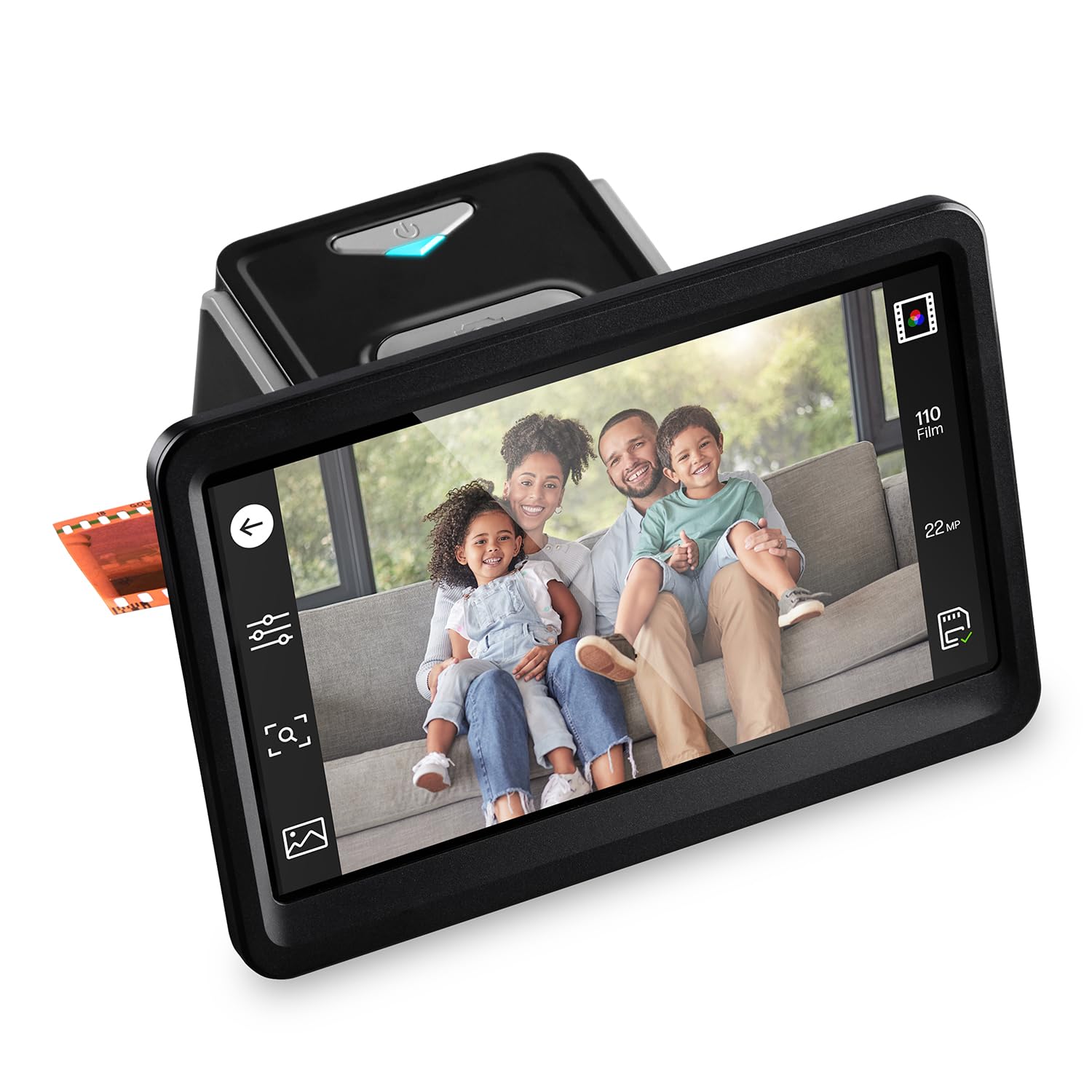
The HPFS700 is the largest-screen standalone scanner available at this tier, featuring a 7-inch color LCD touch display that tilts for comfortable viewing. This form factor eliminates the need to hunch over a small screen — you can see focus, dust spots, and color balance clearly before saving. The 13MP CMOS sensor captures native detail from 35mm, 126, and 110 negatives and slides, with software interpolation to 22MP for output files.
The quick-feed tray system accepts 50mm slides and film strips, and the onboard editing tools let you crop, adjust brightness, and tweak color balance without a computer. HDMI output means you can display scans on a TV in real time, turning a digitization session into a family activity. The unit is USB-C powered, which simplifies cable management with modern devices, and scans save directly to an SD card (not included).
Image quality is consistent with other 13MP-sensor standalone scanners — sufficient for 8×10 prints and social sharing, but without the deep shadow retention of a dedicated computer-tethered unit. The plastic film adapters feel a bit fragile, and the 22MP interpolation is what it is: digital upscaling. For volume digitization where ease and screen size matter more than archival resolution, this is the standout choice.
Why it’s great
- 7-inch tilting touchscreen is the largest in this comparison.
- HDMI output for live slideshow viewing on a TV.
- USB-C powered with standalone operation, no computer needed.
Good to know
- 13MP native sensor; 22MP is interpolated, not optical.
- Plastic film adapters feel somewhat fragile.
- No infrared dust removal — expect to clean negatives manually.
3. HP Touch Screen (HPFS500)

The HPFS500 brings touchscreen navigation to the mid-premium segment with a crisp 5-inch all-angle LCD that makes framing and editing intuitive. The 13MP CMOS sensor paired with 22MP interpolation delivers files that hold up well for prints up to 8×10. What sets this model apart is the gallery mode — you can flip through scanned images on the device itself, turning it into a digital picture frame between sessions.
Format support covers 135, 126, and 110 negatives and positive slides, loaded via quick-feed trays. The scanner is powered entirely through USB-C, so you can run it from a laptop or an external 5V adapter. Onboard editing includes brightness and color adjustments, though more precise corrections are best handled on a computer after transfer via the SD card.
Users report reliable performance after digitizing thousands of slides, with image quality consistent for family archiving. The minor complaint is that red saturation can run a touch high — easily corrected in post-processing. Unlike the larger 7-inch HP model, this one lacks HDMI output, so you are limited to the built-in screen for preview. For the balance of touch control and compact size, the HPFS500 is a solid middle-ground pick.
Why it’s great
- Intuitive touchscreen interface with gallery mode.
- USB-C powered, works standalone or tethered to a PC.
- Reliable build quality after thousands of scans.
Good to know
- No HDMI output — preview is limited to the 5-inch screen.
- Red saturation may need post-processing correction.
- Requires own SD card (not included).
4. KODAK Slide N SCAN

KODAK’s Slide N SCAN has become a staple in the consumer film scanner category for good reason: it combines a recognizable brand name with genuinely easy operation. The 5-inch LCD provides real-time preview as you scan, and the advanced capture software handles color inversion, resizing, and conversion with a single button press. It handles 135, 126, and 110 film formats plus 50mm slides via dedicated quick-load adapters.
The unit saves directly to an SD card (up to 32GB SDHC — note that it does not support SDXC), and connectivity includes USB-C for computer transfer and HDMI for TV output. Users consistently report scanning hundreds of slides in an afternoon with minimal frustration. The main tradeoff is that this is technically a “screen grab” capture — it takes a digital photo of the backlit film rather than scanning it with a moving sensor — which limits effective resolution and dynamic range compared to a true optical scanner.
Output from the KODAK is best suited for family sharing, 4×6 prints, and digital albums. The dust management is entirely manual — there is no infrared cleaning — so you will want to blast negatives with compressed air before loading. A known quirk: the screen can freeze after transferring photos via USB, requiring a power cycle. Overall, it is the most accessible pick for the casual digitizer who values speed over archival precision.
Why it’s great
- Very easy one-button operation for rapid batch scanning.
- HDMI output for live viewing on a TV.
- Includes dedicated adapters for multiple film formats.
Good to know
- Not a true moving-sensor scanner; uses digital capture.
- No infrared dust removal — requires manual cleaning.
- Screen may freeze after USB transfer; power cycle needed.
5. ClearClick Virtuoso 2.0

The ClearClick Virtuoso 2.0 stands apart from the crowd with a full 2-year warranty that is extendable to 3 years with product registration — a meaningful commitment from a US-based company. The scanner outputs 22MP interpolated JPEGs from 35mm, 110, and 126 negatives and 50mm slides, all previewed on the extra-large 5-inch screen. The interface is button-driven (no touchscreen) but intuitive enough that most users are scanning within minutes of unboxing.
Mini HDMI output lets you display scans on a TV in real time (cable not included), making it another strong candidate for group digitization projects. The quick-feed trays load smoothly, and the scanner operates entirely without a computer — just plug in power, load film, and save to an SD card. Users report that the saturation can be overly aggressive out of the box, so plan to dial it back using the onboard brightness and RGB controls or in post-processing.
Performance is fast: roughly five minutes for 35 slides, per user reports. The unit struggles with high-exposure-range slides — highlights may blow out — but evenly exposed negatives scan well. The clear advantage here is the warranty and free US-based tech support, which provides peace of mind that the cheaper import models cannot match.
Why it’s great
- 2-year warranty (extendable to 3) with US-based support.
- Fast batch scanning — about 5 minutes per 35 slides.
- Standalone operation with large preview screen.
Good to know
- Does not handle high-contrast slides well — highlights clip.
- Saturation runs high; needs adjustment via onboard controls.
- Mini HDMI cable not included.
6. Magnasonic FS70

The Magnasonic FS70 is a mid-range standout because it uses a CCD sensor rather than the CMOS sensors found in most competitors at this price point. CCD sensors traditionally produce lower noise and more accurate color reproduction for film scanning, and the FS70’s 25MP interpolated output benefits from this cleaner base signal. The 5-inch TFT LCD is bright and provides a wide viewing angle for previewing scans before saving.
Format support is comprehensive: 35mm, 110, 126, Super 8, and 8mm film, plus 135/126/110 slides. The fast-loading trays allow scanning in under five seconds per frame, making it one of the quicker options for batch processing. The scanner has 64MB of internal memory — just enough to keep a few scans before needing to offload to an SD card (up to 128GB supported). No software or driver installation is needed; it is truly plug-and-play.
Some users question whether the 25MP interpolation delivers true resolution gains over the 13MP native capture, and reports of quality variance suggest the optical system is the limiting factor rather than the sensor. The FS70 is best suited for users who want the theoretical benefits of a CCD sensor without jumping to the Plustek price tier. It includes HDMI output (cable not included) and a full 1-year manufacturer’s warranty.
Why it’s great
- CCD sensor provides cleaner base image with lower noise.
- Fast scan cycle — under 5 seconds per frame.
- Supports Super 8 and 8mm film alongside standard formats.
Good to know
- 25MP is interpolated; 13MP native sensor is the real spec.
- Image quality reports vary — optical system may be the bottleneck.
- No infrared dust removal for color negatives.
7. KEDOK 4-in-1 Scanner

The KEDOK 4-in-1 scanner adds versatility by handling not only 35mm, 110 negatives, and slides, but also printed photos up to 5R and business name cards. This makes it a practical choice if your archiving project includes a mix of media types. The 5-inch LCD provides real-time preview, and the unit includes an 8GB SD card out of the box — a rare convenience that means you can start scanning immediately without a separate purchase.
Editing is handled with a single touch: select film type, adjust color and brightness, assign date and time, and scan. No computer or software installation is required. The scanner uses a CMOS sensor with 4800 resolution rating, outputting 22MP interpolated JPEGs. The included holders cover 135 negative, 135 positive (slide), and 110 film, plus separate frames for 3R, 4R, and 5R photos.
Build quality is a mixed bag — the glass platen scratches relatively easily, which can affect scan quality over time. KEDOK backs the unit with a 3-year warranty and 24-hour technical support, which is generous for this price tier. For users who need a one-device solution for digitizing negatives, prints, and business cards, the KEDOK delivers good value despite the cosmetic fragility.
Why it’s great
- Handles negatives, slides, printed photos, and name cards.
- Includes 8GB SD card — scan right out of the box.
- 3-year warranty with 24-hour support.
Good to know
- Glass platen scratches easily, affecting future scans.
- Plastic build feels less robust than mid-range alternatives.
- No HDMI output; preview limited to the 5-inch LCD.
8. DigitPro C190
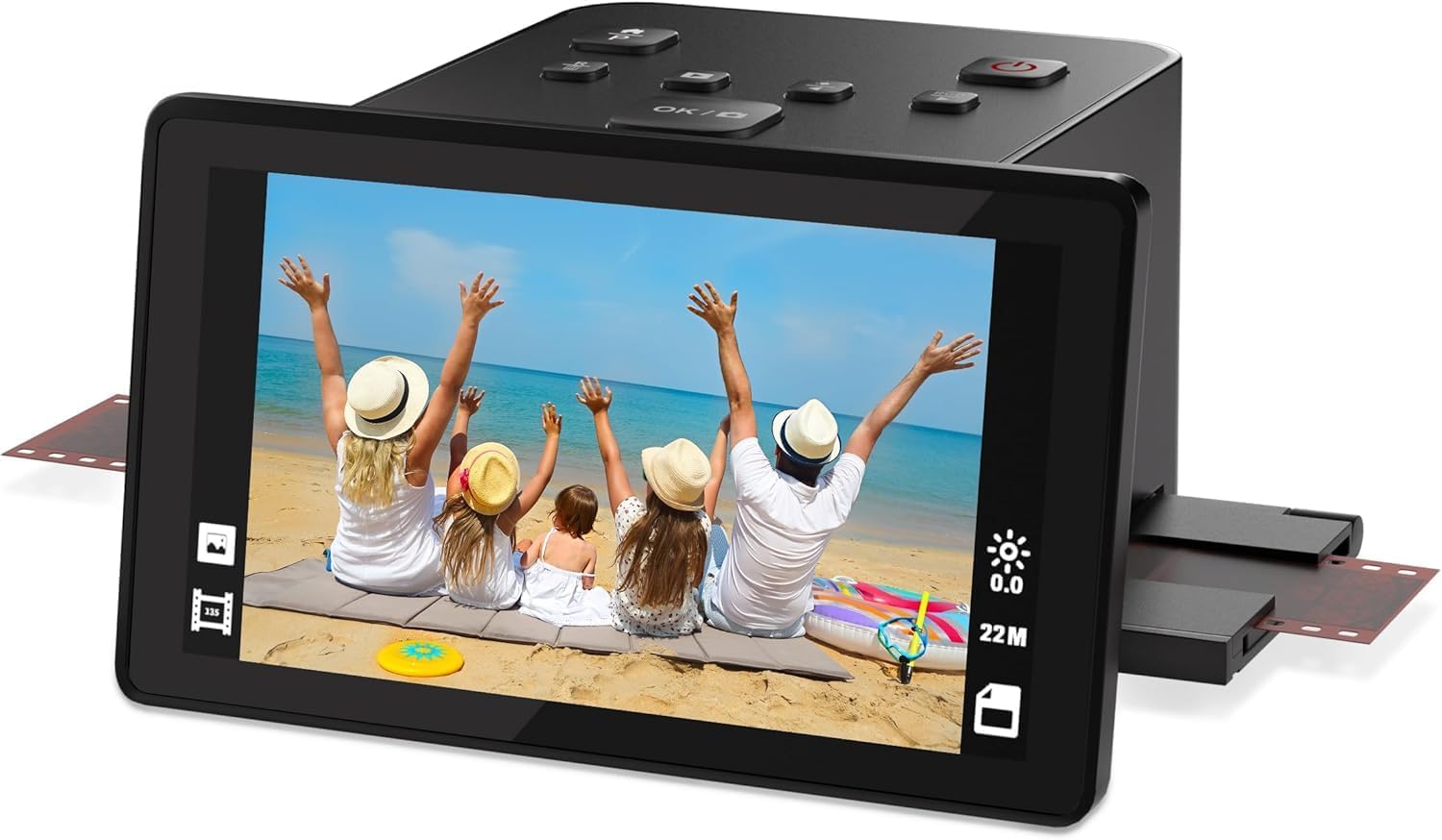
The DigitPro C190 is an entry-level film scanner that prioritizes simplicity above all else. With a 1080P sensor and a 5-inch LCD preview screen, it covers the basics: convert 35mm, 126, 110 negatives, 50mm slides, and Super 8 film to digital JPEGs with one-touch operation. The interface is stripped down to the essentials — load film, press scan, and save to the built-in 128MB memory or an external SD card (up to 64GB).
This model includes HDMI and USB-C output for transferring scans to a TV or computer, and the accessory kit is generous: USB cable, HDMI cable, power adapter, film holders for all supported formats, and a cleaning brush. The 12-month warranty adds a basic safety net. Users praise the lack of a learning curve — many report scanning their first slide within two minutes of unboxing.
The tradeoffs are substantial: 1080P resolution produces small files suitable for social sharing and screen viewing but not for prints larger than 4×6. The sensor struggles with underexposed negatives, and there is no infrared dust removal. Scans require manual alignment of the film strip, which slows throughput. For someone with a small box of family slides who just wants digital copies to email around, the C190 is perfectly adequate — just do not expect archive-grade output.
Why it’s great
- Extremely simple one-touch operation — no learning curve.
- Includes HDMI and USB-C cables in the box.
- Supports Super 8 film alongside standard formats.
Good to know
- 1080P sensor limits output to small prints and social sharing.
- No infrared dust removal — expect to clean manually.
- Manual film alignment slows batch scanning.
9. BEONEGLOBAL ClearScan S5
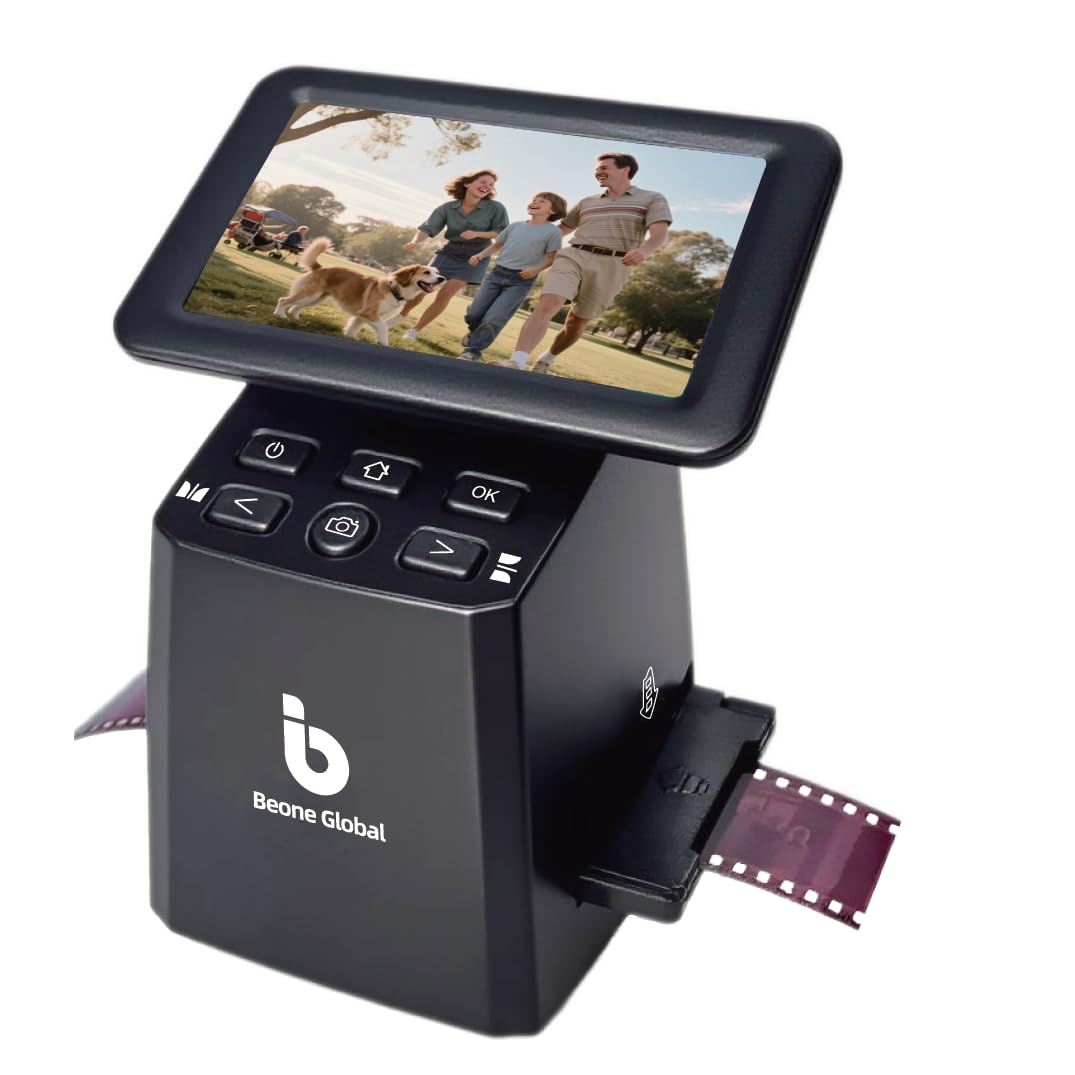
The BEONEGLOBAL ClearScan S5 distinguishes itself in the budget tier with ergonomic front-panel controls. The buttons are placed directly below the 5-inch LCD screen so you can operate the scanner without reaching around the sides — a small detail that matters when you are processing hundreds of slides in one sitting. The 1/2.3-inch CMOS sensor captures up to 24MP interpolated output from 135, 126, 110, and Super 8 film formats.
One-touch operation covers scanning, editing, and color enhancement. The unit includes 128MB of built-in memory as a buffer, with files saved to an SD card (up to 32GB, not included). USB connectivity handles transfers to a computer. The build quality feels solid for the price point, and users report reliable performance with high-volume projects — one reviewer scanned over 800 family slides without hiccups.
The limitations mirror other budget models: no infrared dust removal, interpolated resolution capped at 24MP, and no HDMI output. Some units have reported SD card slot issues, so testing with your card immediately after purchase is wise. For the price, the ClearScan S5 offers the best ergonomics in the value category and good enough image quality for digital sharing and standard prints.
Why it’s great
- Ergonomic front-panel controls reduce fatigue during long sessions.
- Good build quality for the price tier.
- Reliable for high-volume scanning (tested up to 800 slides).
Good to know
- No HDMI output for live TV preview.
- No infrared dust removal — manual cleaning required.
- Some units may have SD card slot defects — test immediately.
FAQ
What is the realistic print size from a 22MP interpolated scanner?
Can I scan black and white film with infrared dust removal?
Why does my standalone scanner output look different from my lab scans?
Final Thoughts: The Verdict
For most users, the 35mm negative film scanner winner is the HP Touch Screen Film Scanner (HPFS500) because it combines an intuitive touchscreen interface with standalone operation and solid 13MP native image quality at a reasonable price. If you want the highest possible resolution for archival prints, grab the Plustek OpticFilm 8200i SE. And for the easiest family digitization experience with the largest screen, nothing beats the HP Touch Screen 7″ (HPFS700).