
Our readers keep the lights on and the weekend projects moving. As an Amazon Associate, I earn from qualifying purchases.
A stack of dusty slide boxes sits in your closet, holding decades of family history locked inside a format your kids can’t view. The question isn’t whether to digitize them — it’s which scanner will pull out the true color and detail without costing a fortune or requiring a computer science degree to operate.
I’m Rikta — the founder and writer behind FitlyFast. I’ve spent years digging into the hardware specifications and real-world performance of dedicated film and slide scanners, separating the novelty toys from the tools that actually deliver archival-quality results.
This guide walks through nine models that cover the full spectrum, from budget-friendly home digitizers to pro-grade units that rival lab scans. Finding the right 35mm slide scanner means knowing where resolution, dynamic range, and software support matter most for your specific batch of memories.
How To Choose The Best 35mm Slide Scanner
Choosing a slide scanner is about matching the device’s strengths to your specific slide collection. A unit that excels at high-contrast Kodachrome might struggle with faded, low-contrast negatives, and a lightning-fast toy with interpolated specs won’t produce a print-worthy file. Three factors separate a useful digitizer from a frustrating one.
Optical Resolution vs. Interpolated Resolution
The first spec a buyer sees is “22MP” or “25MP,” but those numbers almost always come from interpolation — software guesswork that stretches a lower native resolution. True optical resolution is measured in DPI (dots per inch). For 35mm slides, anything below 1800 DPI is adequate only for social media sharing. For 8×10-inch prints, you want at least 3600 DPI. The Plustek units hit 7200 DPI optically, which is the gold standard for archival work. Always verify optical resolution, not the marketing megapixel count.
Sensor Technology: CCD vs. CMOS
Virtually all dedicated slide scanners under use CMOS sensors, which are cheaper and consume less power. That’s fine for casual digitization — you get clean, usable JPEG files. CCD sensors, found on higher-end units like the Plustek line, offer superior dynamic range, meaning they retain detail in the bright highlights and deep shadows of a slide. If your collection includes dense Kodachrome slides or high-contrast black-and-white negatives, the extra dynamic range of a CCD sensor is worth the premium.
Standalone Operation vs. Computer-Dependent Workflow
Standalone scanners with built-in LCD screens let you preview and save directly to an SD card — no computer required. This is ideal for non-technical users or scanning sessions in front of the TV. The trade-off is limited editing (brightness, color tint, and rotation at best). For real control over dust removal, color profiling, and batch processing, a computer-tethered scanner with professional software like SilverFast or VueScan is essential. If you plan to scan hundreds of slides, software-based batch tools save massive time over one-at-a-time SD card transfers.
Quick Comparison
On smaller screens, swipe sideways to see the full table.
| Model | Category | Best For | Key Spec | Amazon |
|---|---|---|---|---|
| Plustek OpticFilm 8200i SE | Premium | Archival-quality scans with dust removal | 7200 DPI CCD, IR dust removal | Amazon |
| Plustek OpticFilm 8100 | Premium | High-resolution scans at a lower entry point | 7200 DPI CCD, SilverFast SE Plus | Amazon |
| HP Touch Screen (HPFS500) | Mid-Range | Touchscreen convenience, family sharing | 13MP CMOS, 22MP interpolation | Amazon |
| KODAK Slide N SCAN | Mid-Range | Quick digitization with easy-load trays | 22MP interpolation, 5″ LCD | Amazon |
| BEONEGLOBAL ClearScan P7 | Mid-Range | Large 7″ preview, CMOS clarity | 24MP interpolation, 7″ LCD | Amazon |
| ClearClick Virtuoso 2.0 | Mid-Range | Standalone scanning with 5″ screen | 22MP interpolation, HDMI output | Amazon |
| PORTTA NS10 | Mid-Range | Budget-friendly multi-format scanning | 22MP interpolation, 5″ LCD | Amazon |
| Magnasonic FS70 | Mid-Range | Value pick with CCD sensor | 25MP interpolation, 5″ LCD | Amazon |
| KEDOK 4-in-1 | Budget | Versatile scanning of slides, photos, and cards | 22MP interpolation, 8GB card | Amazon |
In‑Depth Reviews
1. Plustek OpticFilm 8200i SE

The 8200i SE sits at the top of the consumer film scanner food chain, and for good reason. Its true 7200 DPI optical resolution on a CCD sensor captures every grain of the original film, producing 69-megapixel-equivalent files that rival dedicated lab scans from a Noritsu. The integrated infrared channel (iSRD) detects and removes dust and scratches automatically — a feature that saves hours of manual retouching in Photoshop. It ships with SilverFast SE Plus 9, which gives you professional-grade color profiling, multi-exposure, and 48-bit output depth. Scanning is slow — expect 2 to 3 minutes per frame at maximum resolution — but the output is genuinely archival, suitable for prints up to 20 by 24 inches.
Setup requires downloading the latest driver from Plustek’s website and registering for a SilverFast license. The software has a steep learning curve, with separate beginner and expert modes. Most experienced users stick to SilverFast for scanning and export to Lightroom or Capture One for final editing. The included carrier for mounted slides and negative strips feels a bit stiff out of the box, but it loosens with use. A minor but notable limitation is the USB-A connection — a USB-C adapter is required for modern laptops lacking Type-A ports.
Dust removal is about 75 percent effective on tough scratches and works only within SilverFast. The Multi-Exposure function, which merges two passes for extended dynamic range, shows marginal improvement with modern film stocks. Still, for anyone serious about preserving a slide collection with maximum fidelity — especially high-contrast Kodachrome — the 8200i SE is the benchmark that every other model in this guide is measured against.
Why it’s great
- True 7200 DPI CCD sensor delivers lab-quality resolution
- Infrared dust removal cuts post-processing time dramatically
- SilverFast SE Plus provides professional 48-bit color depth
Good to know
- Slow scan time — 2 to 3 minutes per frame at max resolution
- No USB-C cable included; requires adapter for modern laptops
- SilverFast has a steep learning curve for beginners
2. Plustek OpticFilm 8100

The OpticFilm 8100 is essentially the same hardware as the 8200i SE minus the infrared dust removal channel. You still get the same outstanding 7200 DPI CCD sensor, 48-bit color depth, and SilverFast SE Plus software. That means you can produce 69-megapixel scans from 35mm slides and negatives that are indistinguishable from the 8200i in resolution and dynamic range. The difference is purely in workflow — without iSRD, you will need to manually clone out dust and scratches in post-processing, which adds time if your slides are heavily soiled.
Real-world effective resolution lands closer to 3600 DPI for most users, which still produces sharp 11-by-7.5-inch prints at 300 DPI. Scanning at the full 7200 DPI yields enormous TIFF files — around 20 MB per frame — and can slow the system to a crawl. Most shooters settle on 3600 DPI for a balance of detail and speed. The included carry case is a nice touch for dust-free storage, and the unit itself is compact enough to live on a desk without dominating the space.
The negative carrier design can be frustrating. The hinged insert does not always align perfectly, and the auto-crop function in SilverFast sometimes resets the filename counter, which creates duplicate file names during batch scans. Users switching from a flatbed scanner will find the single-frame workflow tedious — the 8100 processes one slide at a time, not a strip of four. But for the price, this is the most affordable route to truly professional-grade optical resolution from 35mm film.
Why it’s great
- Same 7200 DPI CCD as the 8200i at a lower cost
- Includes dedicated carry bag and SilverFast SE Plus
- Produces true archival files for 20×24-inch prints
Good to know
- No infrared dust removal — manual retouching required
- Single-frame scanning is slow for large collections
- Carrier alignment and auto-crop can be fiddly
3. HP Touch Screen Film Scanner (HPFS500)

HP brings a modern twist to the category with a 5-inch all-angle touchscreen that makes navigating menus and previewing slides feel natural. The 13MP CMOS sensor captures a clean base image, and the 22MP interpolation mode sharpens output for 8×10-inch sharing prints. The quick-load tray accepts 135, 126, and 110 film strips as well as mounted slides, and the standalone workflow — preview, adjust, save to SD card — requires no computer. The gallery mode lets you use the scanner as a digital picture frame, which is a clever way to share results with family during a scanning session.
USB-C power is a practical upgrade over older micro-USB designs. The unit runs from a standard 5V adapter or a laptop USB port, so you can set up anywhere without hunting for a proprietary power brick. Color accuracy out of the box is solid, though some users note a slight red saturation bias that is easy to correct in Lightroom. The cropping adjustment is useful — you can set it to capture the full frame or trim the black borders on mounted slides.
Dust accumulation on the sensor window is the most common complaint. With 2000-plus slides scanned, dust specks become visible in the same position on every frame, requiring periodic cleaning with compressed air or a microfiber swab. The build feels light, but the top-loading design holds up well during extended use. For users who want a quick, comfortable scanning experience with a modern interface and a trusted brand label, the HPFS500 is a strong mid-range contender.
Why it’s great
- Intuitive touchscreen interface speeds up navigation
- USB-C power simplifies desk setup
- Gallery mode doubles as a digital picture frame
Good to know
- Red saturation bias may need desktop correction
- Dust specks on sensor window require periodic cleaning
- SD card sold separately
4. KODAK Slide N SCAN

Kodak’s brand recognition gives this unit instant credibility, and the quick-feeding tray technology lives up to the promise. The Slide N SCAN accepts 50mm mounted slides as well as 135, 110, and 126 film strips, and the tray design lets you load the next slide while the current one is processing — continuous scanning that drastically cuts total session time. Many users report digitizing over 500 slides in a single afternoon. The 5-inch LCD is bright and clear, with a gallery mode that turns the scanner into a picture frame when not in use.
The hardware uses a CMOS sensor with 22MP interpolation. At the native level, the 5-megapixel sensor captures enough detail for 8×10-inch prints and social media sharing, but fine grain and subtle shadow transitions are visibly less resolved than a true 7200 DPI CCD scan. The editing controls on the unit itself are limited to brightness and basic color tint — you cannot adjust saturation or contrast. For most family archiving purposes, the out-of-camera JPEGs are perfectly acceptable, especially since original slide quality from the 1960s and 70s is often the limiting factor.
A well-documented bug: the screen freezes after transferring files to a computer via USB, requiring a power cycle to restore function. The unit also requires a 32GB SD card or smaller (SDHC format — SDXC cards do not work), which is an extra purchase since none is included. The lightweight plastic build feels a bit flimsy in the hand, but the scanner holds up to heavy use. For speed and simplicity in a familiar brand package, the Kodak Slide N SCAN is a reliable choice.
Why it’s great
- Quick-feeding tray enables continuous fast scanning
- Bright 5-inch LCD with gallery mode is family-friendly
- Trusted Kodak branding gives confidence in color reproduction
Good to know
- Screen may freeze after USB transfer; power cycle needed
- Only supports SDHC cards up to 32GB, not SDXC
- Limited in-unit editing — no saturation or contrast control
5. BEONEGLOBAL ClearScan P7
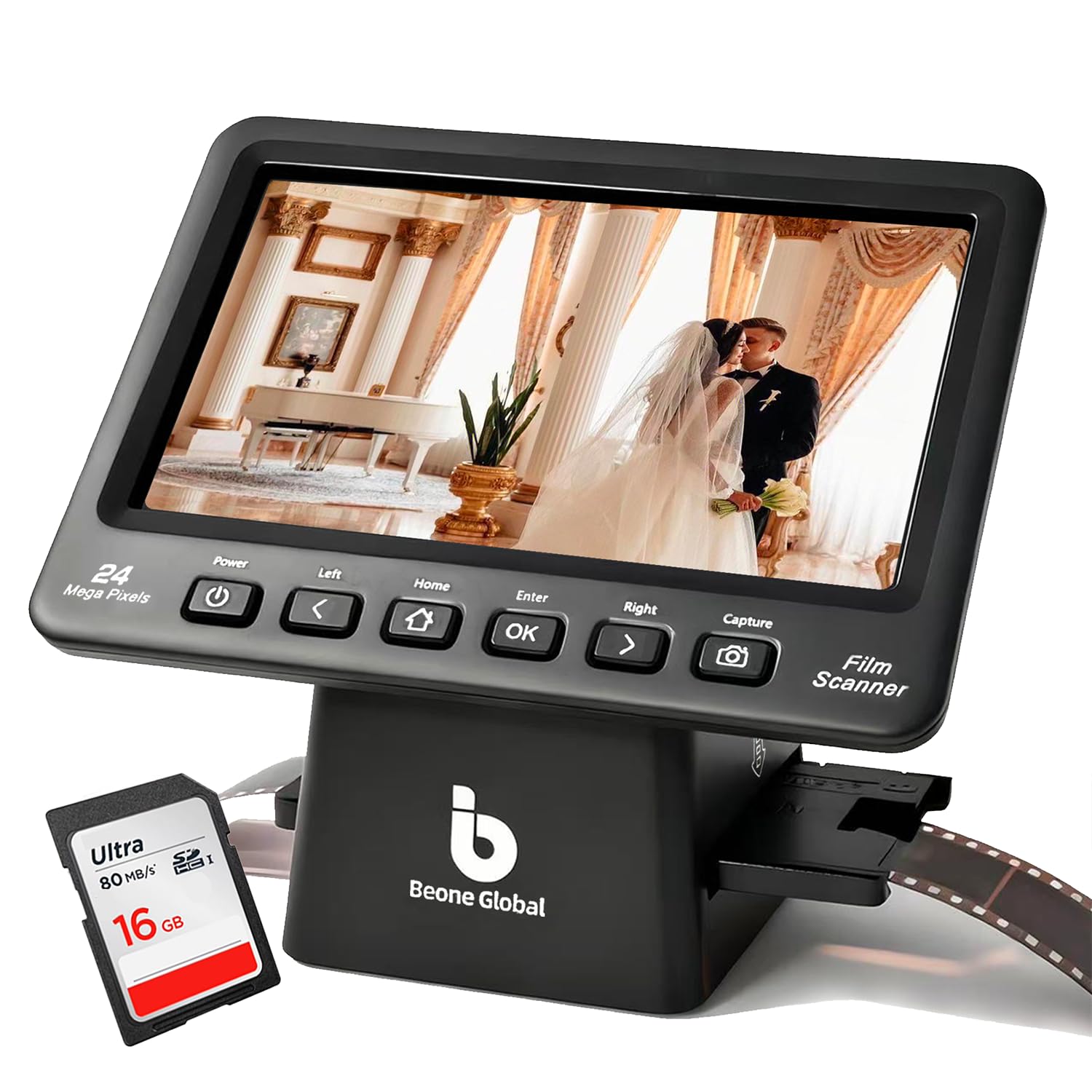
The P7’s defining feature is its 7-inch LCD screen — the largest display on any dedicated slide scanner in this roundup. That extra viewing real estate makes a real difference when reviewing fine detail, checking focus, and comparing frames before saving. The scanner uses a premium 1/2.3-inch CMOS sensor that outputs up to 24MP interpolated files. The image adjustment tools — brightness, color, and a new frame-size customization — give you more control than most standalone units, though the exposure and color correction steps remain fairly coarse.
Ergonomics are a clear priority. The control buttons sit below the screen in a natural hand position, reducing the awkward reaching common with top-button designs. An included SanDisk SD card lets you start scanning immediately — no extra purchase needed. The unit supports 35mm, 126, 110, and Super 8 film formats, covering nearly all the common home-movie and slide formats from the mid-20th century.
The mounted slide holder is the biggest pain point. Users report that it is difficult to load — the holder is too thick for some slide mounts and requires a small screwdriver to pry open. The single-slide workflow is slow, and without a stack-loading option, large collections become tedious. The 24MP interpolation does not resolve fine grain as well as a CCD-based scanner, but for general family viewing and sharing, the P7’s large screen and all-in-one convenience make it a compelling choice.
Why it’s great
- 7-inch screen is the largest for comfortable previewing
- Included SD card means out-of-box operation
- Ergonomic button layout reduces hand strain
Good to know
- Mounted slide holder is difficult to load and remove
- Single-slide scanning is slow for large collections
- 24MP is interpolated, not optical resolution
6. ClearClick Virtuoso 2.0

ClearClick’s Virtuoso 2.0 has been a consistent performer in the mid-range category for several years, and the Second Generation model refines the formula without overhauling it. The 22MP interpolation delivers JPEG files suitable for online sharing and small prints, and the 5-inch LCD provides an accurate real-time preview. The unit handles 35mm, 110, and 126 negatives plus 50mm mounted slides, and the standalone design means you can scan without a computer. Mini HDMI output lets you display scans on a TV in real time, which is a social centerpiece during family digitization sessions.
Scan speed is respectable — roughly 5 minutes for a batch of 35 slides. The brightness and RGB color adjustments are functional but lack fine granularity. Users who want accurate color will need to transfer the JPEGs to a computer for levels and saturation correction. The saturation out of the box is a touch high, and the auto-brightness feature can blow out highlights on contrasty slides. Slower than a DSLR copy setup, but fast enough for casual family archiving.
The button feel is the weakest element — reviewers consistently describe them as cheap and stiff. Removing the SD card while the unit is powered on can corrupt the file system, so always power down before swapping cards. The included HDMI cable would be a welcome addition, but ClearClick omits it to keep the price down. For the most part, the Virtuoso 2.0 does exactly what it promises: quickly convert slides into shareable digital files with no computer required.
Why it’s great
- Fast batch scanning — about 5 minutes for 35 slides
- HDMI output allows real-time TV viewing
- Standalone operation, no computer needed
Good to know
- Button quality feels stiff and low-end
- Color saturation is high and auto-brightness can clip highlights
- SD card must be removed only when power is off
7. PORTTA NS10

The PORTTA NS10 targets the same value-conscious buyer as the Magnasonic FS70 but with a slightly higher starting resolution. It supports 35mm, 126, 110, and Super 8 film formats, converting color and black-and-white negatives and slides into 22MP JPEG files. The 5-inch LCD gives you a live preview before saving, and the on-board image adjustment tools let you tweak brightness, color, and orientation. No computer is needed — all files are saved directly to an SD card.
Standalone convenience is this unit’s core strength. The compact body takes up minimal desk space, and the workflow is straightforward: insert slide, preview on screen, adjust if needed, press scan. Reviewers consistently note that the color quality is faithful to the original film, though the 22MP interpolation does not add meaningful detail beyond the sensor’s native 5MP capture. For images destined for social media, smartphone sharing, or small prints, the output is clean and usable.
A notable limitation is storage: the included internal memory is tiny, so an SD card is effectively mandatory. One user saw only 14 high-res scans fit on an 8GB card before filling up, which suggests large file sizes in the 22MP mode. The file naming system uses a duplicate sequence for different batches, which can create naming conflicts on a single card. For a simple, low-fuss introduction to slide digitization at an entry-friendly price, the NS10 gets the job done.
Why it’s great
- Compact size fits easily into any workspace
- No computer required for full operation
- Color quality is faithful to original film
Good to know
- Internal memory is very small — SD card is essential
- File naming can duplicate across batches on the same card
- 22MP is interpolated, not true optical resolution
8. Magnasonic All-in-One FS70

The Magnasonic FS70 is an outlier in the value segment because it uses a CCD optical sensor — the same technology found in the premium Plustek units — rather than the CMOS sensors common at this price point. That CCD sensor gives the FS70 noticeably better dynamic range and shadow detail than similarly priced competitors. The 25MP interpolation and 5-inch LCD round out the package, with HDMI output for TV viewing and a 1-year manufacturer’s warranty that covers defects directly.
Scan speed is genuinely fast — one reviewer reported scanning about 100 slides in an hour. The brightness and RGB color correction tools work well for quick fixes, and the flip/mirror control saves rotation edits at scan time. The included set of film inserts covers 35mm, 126, 110, and Super 8, making this one of the most flexible all-in-one kits available. The internal 64MB memory can hold a handful of scans, but an SD card (up to 128GB) is essential for real use.
Not all users are happy with the output. Some report that the 13MP and 25MP settings produce nearly identical results, which suggests the native sensor resolution is closer to 5MP and that the interpolation does not add real detail. For prints larger than 8×10, the lack of native resolution becomes apparent. The build quality is decent for the tier, though the plastic chassis feels light. For users who want a CCD sensor without jumping to the high-end bracket, the FS70 is the smartest value play.
Why it’s great
- CCD sensor delivers superior dynamic range at this price
- Fast scanning — roughly 100 slides per hour
- Includes inserts for 35mm, 126, 110, and Super 8
Good to know
- 13MP and 25MP modes look near-identical
- Interpolation does not add real detail for large prints
- Plastic build feels lightweight
9. KEDOK 4-in-1

The KEDOK 4-in-1 stands out by expanding beyond slides and negatives. In addition to scanning 35mm and 110 film, it also digitizes standard photo prints up to 5×7 inches and business cards, making it the most versatile scanner in the roundup. The bundle includes an 8GB SD card, a cleaning cloth, a brush, and dedicated holders for each media type. The 5-inch LCD preview is crisp, and the one-touch editing lets you select film type, adjust color, and assign date stamps without navigating complex menus.
Scan quality for slides and negatives is consistent with other 22MP interpolation units in this tier. The CMOS sensor captures clean JPEGs that look good on screen and in small prints, but the detail does not hold up to close scrutiny at larger sizes. The photo-scanning feature is a genuine bonus — it uses a flatbed-style plate that lets you digitize 3R, 4R, and 5R prints with the same standalone workflow. For users with mixed media collections (slides, negatives, prints, and business cards), this all-in-one approach saves buying separate devices.
The glass on the scanning plate is prone to scratching, and a scratched plate will leave permanent lines across every scanned photo. Several users reported receiving units with pre-existing scratches and had to request replacements. The micro USB-C power connection can feel loose, and a few units arrived without power. The 3-year warranty and 24-hour online support are generous for this price class, but the quality-control variability makes it a calculated risk. If you get a good unit, it is a flexible, cost-effective tool for home archiving.
Why it’s great
- Scans slides, negatives, photos, and business cards
- Includes 8GB SD card out of the box
- 3-year warranty is generous for the price tier
Good to know
- Scanning glass scratches easily and leaves permanent lines
- Power connection via micro USB-C can be loose
- Quality control is inconsistent across units
FAQ
What does interpolated megapixels mean for a slide scanner?
Is a standalone scanner better than a flatbed for 35mm slides?
Can I scan Kodachrome slides with these scanners?
How long does it take to scan a collection of 500 slides?
Do I need SilverFast or VueScan for a Plustek scanner?
Final Thoughts: The Verdict
For most users, the 35mm slide scanner winner is the Plustek OpticFilm 8200i SE because it combines true 7200 DPI optical resolution with infrared dust removal and professional SilverFast software, producing files that are indistinguishable from a dedicated lab scan. If you want standalone convenience without a computer, grab the KODAK Slide N SCAN for its fast continuous-loading tray and family-friendly screen. And for the best value without sacrificing too much quality, nothing beats the Magnasonic FS70, which packs a CCD sensor into an affordable, fast standalone chassis.