
Our readers keep the lights on and the weekend projects moving. As an Amazon Associate, I earn from qualifying purchases.
Specs are compiled from manufacturer listings and verified buyer reviews and can change over time — please confirm the key details on the product page before buying.
You want three octaves of playable range without giving up your whole desk, and the right 37-key MIDI controller gives you exactly that. Unlike a cramped 25-key unit, you can actually use two hands here, but it stays light enough to pack up or slide into a laptop bag. The trick is finding one with keys that respond to your touch and controls that speed up your workflow instead of forcing you into menus. This guide helps you pick if you need premium feel, deep sequencing, or tight DAW control.
I’m Rikta, the writer behind FitlyFast. This guide compares the published specs and patterns in real customer reviews so you see each controller’s real strengths and trade-offs — just the facts.
These six controllers cover the full range, from DAW-focused all-in-ones to budget basics. Compare key feel, pad quality, and extras like built-in sequencers to find the right 37 key midi controller for your setup.
Quick Picks
- Novation Launchkey 37 MK4 — Best Overall
- Arturia KeyStep 37 — Top Performer
- Akai Professional MPK Mini Plus — Top Performer
- Arturia MiniLab 37 — Premium Pick
- IK Multimedia iRig Keys 2 — Compact Pick
- Senfot 37-Key USB MIDI Keyboard Controller — Budget Champion
How To Choose The Best 37 Key MIDI Controller
You get about three octaves from a 37-note keyboard. That’s enough room to play bass lines with your left hand and melodies with your right. Your real choice depends on key feel, the quality of the built-in controls, and whether the controller connects to the gear you already own.
Key Feel and Action
Most 37-key controllers use synth-action (plastic, spring-loaded keys) or semi-weighted keys. Synth-action feels light and fast — good for quick synth leads. Semi-weighted has more resistance, closer to a real piano. Some models use mini keys, which saves space but changes your hand position; fine for chords, noticeably different for big interval stretches.
Pads, Knobs, and Faders
Rubber velocity-sensitive pads let you tap out drum sounds without a mouse. But not all pads are equal — some are stiff and need a hard hit. Rotary encoders (knobs that spin endlessly) and faders (sliders) let you tweak virtual controls in your DAW (digital audio workstation, the software you record in). That’s a big workflow upgrade if you mix or shape synth sounds often.
Connectivity and Extra Features
Standard USB-MIDI connects to any computer or iPad. A 5-pin MIDI output lets you control hardware synths without a computer. CV/Gate outputs (control voltage and gate signals) connect to modular synthesizers and analog gear. Built-in arpeggiators, chord modes, and sequencers create patterns and harmonies — you don’t have to record every single note yourself.
Quick Comparison
| Model | Best For | Key Feel | Pads | Extras | Amazon |
|---|---|---|---|---|---|
| Novation Launchkey 37 MK4 | Best overall DAW control | Synth-action | 8 FSR pads with polyphonic aftertouch | Scale Mode, Chord Mode, Arpeggiator | Amazon |
| Arturia KeyStep 37 | Sequencing & hardware synth control | Slim synth-action | None | 64-step sequencer, 8 arp modes, CV/Gate out | Amazon |
| Akai Professional MPK Mini Plus | Finger drumming & portability | Mini keys | 8 RGB MPC pads with aftertouch | 64-step sequencer, CV/Gate & MIDI I/O | Amazon |
| Arturia MiniLab 37 | Key feel & portable design | Slim synth-action | 8 pads (2×4 layout) | 4 faders, 8 endless encoders, touch strips | Amazon |
| IK Multimedia iRig Keys 2 | iOS & mobile music making | Synth-action mini keys | None | Audio I/O via headphone jack, assignable knobs | Amazon |
| Senfot 37-Key USB MIDI Keyboard | Budget entry-level | Standard-size keys | None | OLED display, sustain port, ARP mode | Amazon |
In‑Depth Reviews
1. Novation Launchkey 37 MK4
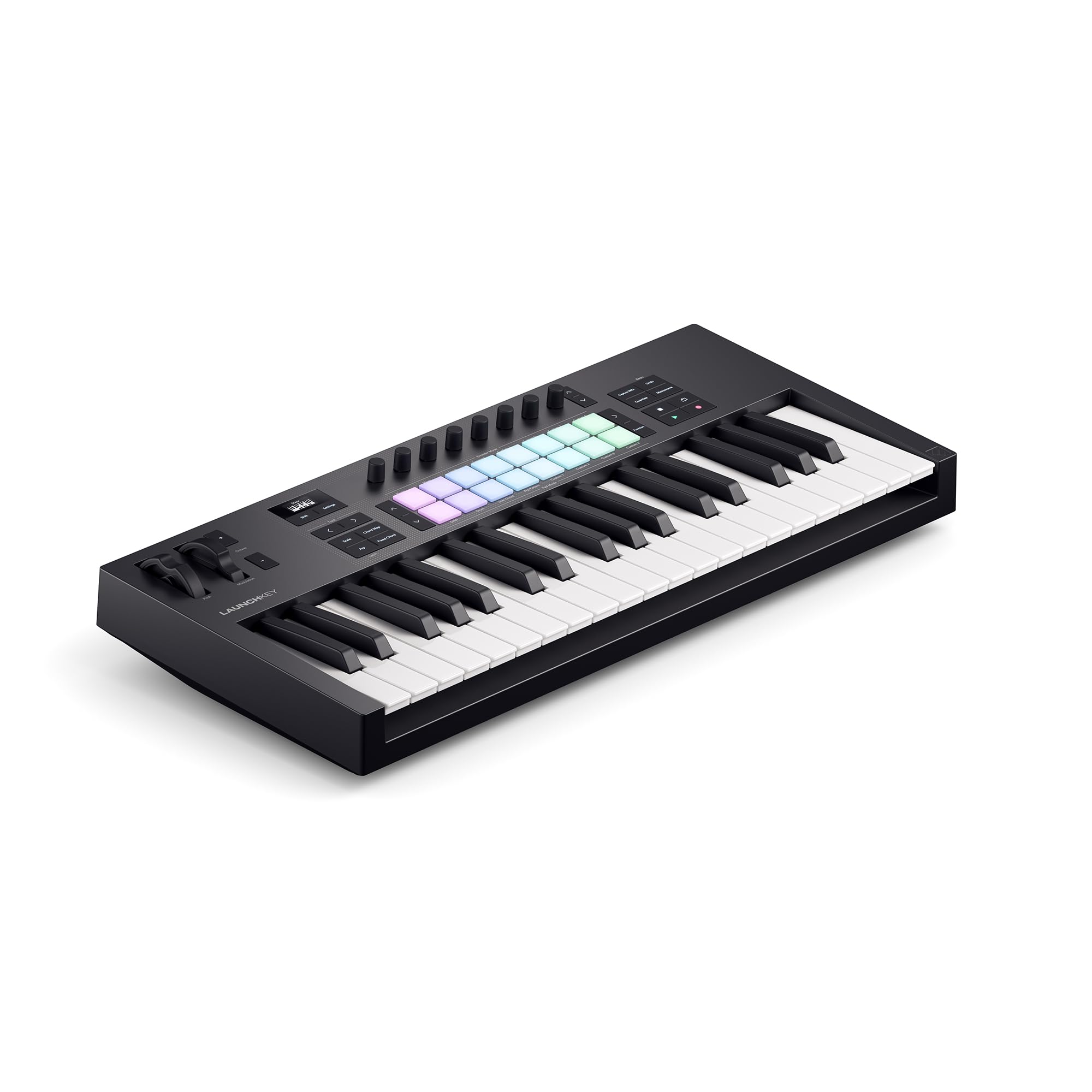
The DAW control center that makes your software feel like hardware.
You save time because the Launchkey 37 MK4 maps transport, mixer faders, and device controls automatically to Ableton, Logic, Cubase, Reason, Reaper, FL Studio, and Ardour. That means you change tracks and adjust levels without touching your mouse. It comes with Ableton Live Lite, Cubase LE, and sounds from GForce, Klevgrand, and Native Instruments. Buyers report the 37 keys feel usable and the velocity response is great for a compact keyboard, so softer and harder hits sound distinct.
The eight FSR (Force Sensing Resistor) pads support polyphonic aftertouch (each pad senses pressure independently for deeper expression), so they work as step sequencers, clip launchers, or chord triggers — not just drums. Unlike the KeyStep 37, which has no pads at all, the Launchkey gives you both keys and pads for playing and drumming. On the downside, Reason 13 requires manual mapping, and owners mention that knobs and faders may work intermittently without firmware updates.
If you work in a DAW and want one controller that handles playing, mixing, and clip launching without looking at the screen, this is your pick. skip it if you need hardware-synth connectivity (no 5-pin MIDI or CV/Gate here) or if you use Reason and want plug-and-play mapping.
Standout Features
- DAW auto-mapping for Ableton, Logic, Cubase, FL Studio, and more
- FSR pads double as sequencers and clip launchers
- Includes Ableton Live Lite, Cubase LE, and Melodics lessons
Watch For
- Reason DAW integration requires manual mapping; intermittent knob response reported
- Pitch/mod ribbons not as precise as physical wheels or joysticks
2. Arturia KeyStep 37

The sequencer-first brain for hybrid studios with hardware synths.
You get USB-MIDI, 5-pin MIDI in/out, analog sync in/out, and CV pitch, gate, and modulation outputs. That means the KeyStep 37 drives modular gear, vintage synths, and drum machines without a computer at all. The built-in 64-step sequencer holds 8-note polyphony per step and up to 8 saved sequences you switch on the fly — you build patterns and switch between them in a live set without recording MIDI into a DAW. Customers note the keybed feels “like a real piano” because of thick plastic and a steel bottom plate.
The arpeggiator has eight modes including three random modes, and the Chord mode adds multiple voicings and strum effects. Compared to the Launchkey 37 MK4, which focuses on DAW integration, the KeyStep 37 lives for real-time sequencing and hardware control. One catch: the pitch and modulation touch strips can be accidentally brushed by your left hand during play. And there are no velocity-sensitive pads for drumming.
If sequencing, arpeggiation, and hardware-synth control are your priorities, this is the one. It is not for producers who need pads for finger drumming or deep DAW auto-mapping — the Launchkey 37 MK4 or MiniLab 37 work better as desktop companions.
Why It Stands Out
- CV/Gate outputs for modular and analog synthesizers
- 64-step sequencer with 8-note polyphony per step
- Eight arpeggiator modes with random and strum variations
Consider Before Buying
- No drum pads — all control is via keys, knobs, and sequencer
- Pitch/mod touch strips can be triggered accidentally by hand placement
3. Akai Professional MPK Mini Plus

The beat-maker’s companion with legendary pads and a sequencer.
You get eight RGB, velocity-sensitive MPC pads with aftertouch — the same pad technology from Akai’s classic MPC drum machines. That means you can finger-drum beats with accurate response, from light taps to hard hits, without touching a mouse. A built-in 64-step sequencer handles one drum track and one melody track (up to 8 notes each), so you can lay down a beat and a bass line in one session. Buyers specifically note “great pads with aftertouch” and the joystick and 5-pin MIDI connectivity.
It also offers CV/Gate and MIDI I/O for modular gear and hardware synths, similar to the KeyStep 37, but with the bonus of those MPC pads. Reviewers point out the 37 mini keys feel thinner than Arturia’s slim keys — the MPK Mini Plus is clearly a pad-first, key-second controller. It includes Native Instruments Komplete 15 Select (choose from Beats, Band, or Electronic bundles) and two months of Splice Creator plan. One real trade-off: no faders, just eight endless rotary knobs, so mixing on the unit is less tactile than the MiniLab 37.
This is the best controller for finger drummers and beat-makers who want the MPC pad workflow in a compact, portable package. Pass on it if key feel matters most — the MiniLab 37 or KeyStep 37 are better for keyboard-centric play.
What Makes It Great
- Premium MPC pads with aftertouch — best in class for finger drumming
- 64-step sequencer with separate drum and melody tracks
- CV/Gate and 5-pin MIDI I/O for hardware synth control
Keep In Mind
- Mini keys feel thinner and more plasticky than Arturia’s slim keys
- No faders — only eight endless encoders for parameter control
4. Arturia MiniLab 37
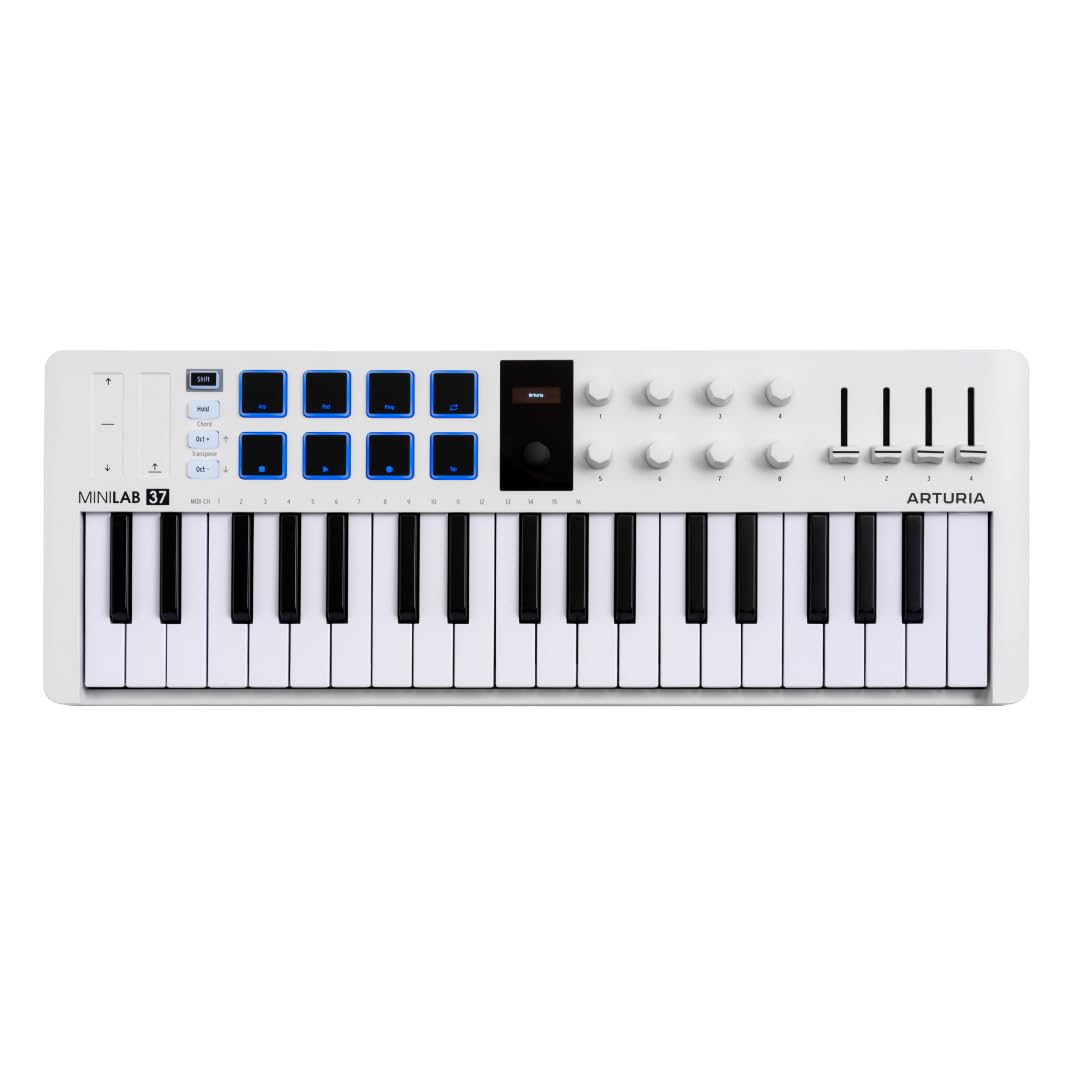
The desktop controller with the best key feel in its compact class.
You get slim synth-action keys that buyers consistently praise for being responsive and solid with good velocity sensitivity (how hard you hit a key shapes the sound). That makes the MiniLab 37 the best-playing controller here for keyboardists. It also packs four faders, eight endless rotary encoders, and two capacitive touch strips for pitch bend and modulation — significantly more tactile control than the MPK Mini Plus, which has no faders at all. Shoppers say excellent build quality and a compact footprint that fits small studio setups or travel bags easily.
The 2×4 pad layout is meant for finger drumming and clip launching, but several buyers report the pads feel stiff and wobbly, needing a hard hit to trigger reliably. That is a clear weakness compared to the MPK Mini Plus’s MPC pads. The MiniLab 37 includes Analog Lab Intro, giving you hundreds of synth and keyboard sounds. One buyer summed it up: “excellent key feel and build quality; 4 faders, 8 endless encoders, touch strips for pitch/mod.”
This is the pick for keyboardists and producers who want a premium key feel and faders for hands-on DAW mixing in a small space. pass on it if finger drumming is a core part of your workflow — the MPK Mini Plus or Launchkey 37 MK4 have significantly better pads.
What Shines
- Best key feel among compact 37-key controllers per buyer consensus
- Four faders plus eight endless encoders — more tactile mixing than most competitors
- Lightweight and shallow design for portable or cramped setups
Trade-Offs
- Pads are stiff and wobbly — not suitable for serious finger drumming
- Touch strips for pitch/mod less precise than physical wheels or joystick
5. IK Multimedia iRig Keys 2

The mobile musician’s gateway that also works as an audio interface.
You plug the iRig Keys 2 into an iPhone or iPad, and it works immediately with GarageBand, Simply Piano, Flowkey, and Cubasis. The headphone output doubles as a stereo audio I/O interface — you monitor your device’s audio and keyboard playing through one jack, skipping the need for a separate audio interface on the go. At 30.7 ounces and measuring 20.4 by 5.5 inches, it is the lightest controller here. Buyers confirm it fits in an NI Komplete case and works smoothly with iPad Pro and iPhone.
The 37 mini keys are velocity-sensitive with a realistic piano feel in a compact size. But unlike the KeyStep 37 or MPK Mini Plus, the iRig Keys 2 has no 5-pin MIDI output, no CV/Gate, and no built-in sequencer. It is strictly a USB controller with two programmable knobs and a push encoder. A repeated caution from buyers: test every key right away, because one buyer received a unit with a defective top C key.
This is the controller for mobile producers, iPad piano learners, or travelers who want keyboard input and audio monitoring from one small box. Do not buy this if you own hardware synths or need 5-pin MIDI, pads, or a sequencer — the KeyStep 37 or MPK Mini Plus offer far more connectivity.
Key Strengths
- Headphone output serves as audio I/O — no separate interface needed for mobile rigs
- Plug-and-play with GarageBand, Simply Piano, Cubasis on iOS
- Lightest controller in this list at 30.7 oz
Heads Up
- No 5-pin MIDI, CV/Gate, or built-in sequencer
- Proprietary MIDI ports require extra adapters; QC issues reported with defective keys
6. Senfot 37-Key USB MIDI Keyboard Controller
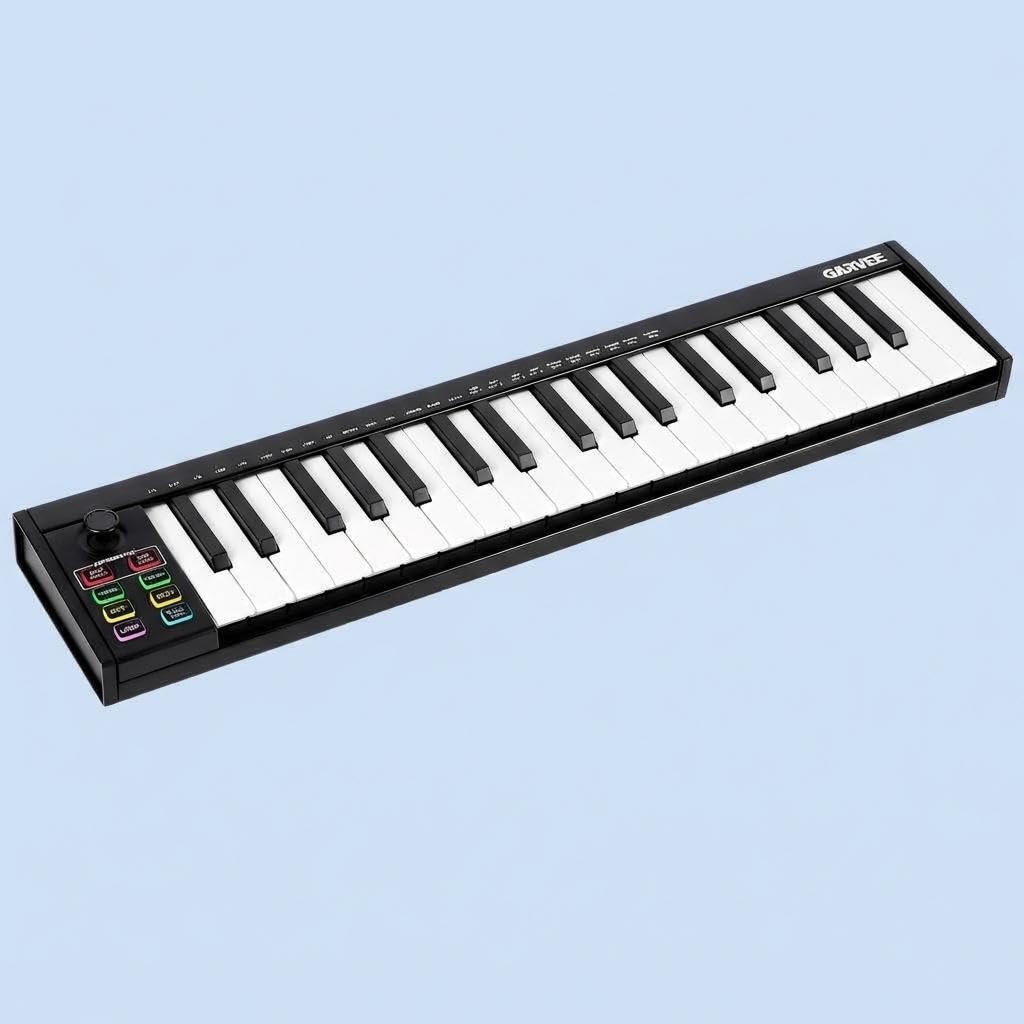
The no-frills entry point with an OLED screen and a sustain pedal jack.
You get 37 standard-size velocity-sensitive keys, semitone transpose, an ARP (arpeggiator) accompaniment mode, velocity control, and DAW transport controls. A clear OLED display shows real-time parameter feedback — a feature you do not find on some pricier controllers. The sustain pedal port lets you connect a standard sustain pedal, and your computer recognizes it. At 3 pounds and 20.87 inches wide, it is almost as wide as the MiniLab 37 (20.98 inches) but slimmer at 1.38 inches deep versus 3.11 inches.
Owners mention the build quality is very good for the cost. One called it “well worth the price” and noted it arrived on time with all items included. It is plug-and-play with Mac (OSX 10.7+), Windows (7/8+), and iOS devices, and works with major DAWs. The catch: no drum pads, no faders, no endless encoders, no pitch/mod wheels — just basic transport controls and a simple ARP mode. Unlike the MiniLab 37 or Launchkey 37 MK4, you will not be tweaking synth parameters or finger-drumming on this unit.
This is a solid entry-level controller for a beginner, a child, or classroom use. Choose it if you need a functional, affordable keyboard with standard-size keys and basic DAW control. Pass on it if you plan to finger-drum, control hardware synths, or need tactile knobs and faders — the MiniLab 37 or Launchkey 37 MK4 are worth the step up.
What You Get
- OLED display for real-time parameter feedback
- Sustain pedal port — rare at this tier
- Plug-and-play USB connectivity with Mac, Windows, and iOS
What’s Missing
- No drum pads, faders, encoders, or pitch/mod wheels
- No 5-pin MIDI output — limited to USB connectivity only
Understanding the Specs
Key Feel & Action
The feel of the keys controls how expressive your playing sounds. Synth-action keys are spring-loaded and lightweight — fast for leads and bass lines but with less resistance than a piano. Semi-weighted keys have a small weight at the bottom of each key, giving more resistance and a feel closer to an acoustic piano. Mini keys are narrower and shallower, saving space but changing your hand position for wide chords. If you play piano-style parts most of the time, prioritize full-size semi-weighted or quality synth-action keys (the MiniLab 37 and KeyStep 37 excel here). If you are triggering one-note bass lines or synth pads on a cramped desk, mini keys like on the MPK Mini Plus will work fine.
Pads vs. Knobs vs. Faders
Velocity-sensitive pads let you trigger drum sounds by tapping or hitting them; a good pad (like the MPC pads on the Akai MPK Mini Plus) responds to both light and hard hits equally. Rotary encoders (knobs) control virtual knobs in your DAW or synth — endless encoders keep spinning without a physical stop, good for parameters that change value continuously. Faders (sliders) give you tactile control over mixer volumes or macro parameters. You rarely get all three on a 37-key controller: the MiniLab 37 has faders and encoders but average pads, while the MPK Mini Plus has great pads and encoders but no faders. Pick the set that matches your main workflow — mixing favors faders, finger drumming favors pads, synth tweaking favors encoders.
FAQ
Will a 37-key MIDI controller work with GarageBand on my iPad?
Can I use a 37-key MIDI controller without a computer?
What is the difference between synth-action and semi-weighted keys?
Do I need a controller with aftertouch?
What is the difference between USB-MIDI and 5-pin MIDI?
What does CV/Gate output do on a MIDI controller?
How many notes can I play at once on a 37-key MIDI controller?
Can I connect a sustain pedal to a 37-key MIDI controller?
Is a 37-key MIDI controller good for beginners learning piano?
How do I map the knobs and pads on my MIDI controller to my DAW?
Final Thoughts: The Verdict
For most buyers, the 37 key midi controller winner is the Novation Launchkey 37 MK4 because it combines deep DAW integration, responsive pads with aftertouch, and useful creative tools like Scale Mode and Chord Mode in a compact package. If you need a sequencer and CV/Gate to control hardware synths and modular gear, grab the Arturia KeyStep 37. And for beat-makers who want legendary MPC pads and a built-in sequencer in a portable form factor, the Akai MPK Mini Plus delivers the best pad experience in this category.
How We Picked
We do not accept paid placement. Every pick is matched to a real buyer and a real use-case; we do not hands-on test units.
Sources & Methodology
Specifications: manufacturer listings and product documentation. Review insights: verified customer reviews, as of July 2026. Pricing: not shown on this page (it changes often); check the current price via the retailer link.
As an Amazon Associate, FitlyFast earns from qualifying purchases. This does not affect which products we feature.