
Our readers keep the lights on and the weekend projects moving. As an Amazon Associate, I earn from qualifying purchases.
Capturing a moment or an object in three dimensions—whether for a VR headset, a 3D print, or a digital twin—requires a tool that translates depth, texture, and volume into a usable digital file. The wrong choice yields flat, distorted results that waste hours of post-processing time.
I’m Rikta — the founder and writer behind FitlyFast. I’ve spent years analyzing the hardware specifications, real-world accuracy claims, and software ecosystems of the entire 3D capture market, from consumer instant-display cameras to industrial-grade LiDAR rigs.
The challenge is that each technology — structured light, laser, photogrammetry, and integrated motion capture — serves a different purpose. This guide breaks down the best 3d camera for your specific workflow, whether you need sub-millimeter precision or instant stereoscopic playback.
How To Choose The Best 3D Camera
Not all 3D cameras are built alike. The technology that captures a perfect scan of a human bust will fail on a shiny chrome car part. Before you buy, match the device’s core capture method to your primary subject and end goal.
Scanning Technology: Structured Light vs. Laser vs. LiDAR vs. Photogrammetry
Structured light projectors (infrared or blue) work best on matte, medium-colored objects indoors. Multi-line laser scanners, like the Revopoint MetroY Pro, handle reflective and dark surfaces without spray. LiDAR (used in the Matterport Pro3) is built for large architectural spaces at distances up to 100m. Passive photogrammetry—using a standard camera or smartphone—requires no special hardware but demands excellent lighting and significant post-processing time. Choose the method that matches your object’s material and scale.
Resolution and Accuracy: What the Numbers Actually Mean
Manufacturers advertise two separate specs: point distance (resolution, often 0.1mm) and single-shot accuracy (often 0.05mm or 0.01mm). For 3D printing of small parts, sub-0.05mm accuracy is critical. For VR content viewed on a headset, 0.1mm point distance is more than sufficient. Also check volumetric accuracy—a cheaper scanner that drifts over longer scans will produce twisted models of larger objects. A scanner like the Einstar trades some single-shot resolution for stable tracking across a full body scan.
Software Ecosystem and Subscription Traps
The hardware is only half the equation. Some scanners, like the Matterport Pro2 and Pro3, require a paid monthly subscription to process and export your own scans. Others, like the Creality Ferret Pro and Revopoint INSPIRE 2, include free software for basic editing but charge for advanced CAD workflows. The Sony mocopi system locks full motion recording behind a monthly fee for its PC app. Factor these ongoing costs into your total budget before committing to a platform.
Quick Comparison
On smaller screens, swipe sideways to see the full table.
| Model | Category | Best For | Key Spec | Amazon |
|---|---|---|---|---|
| Revopoint MetroY Pro | Industrial Blue Laser | Reverse engineering & precision metrology | 0.01mm single-shot precision | Amazon |
| Shining 3D Einstar | Handheld IR Structured Light | Full-body & organic shape scanning | 0.1mm point distance, 14 FPS | Amazon |
| Revopoint INSPIRE 2 | Hybrid Laser/Structured Light | Versatile indoor/outdoor mobile scanning | 0.03mm precision, Wi-Fi 6 | Amazon |
| EINSTAR Pro | Handheld VCSEL Structured Light | Detail-rich color capture for design | 0.1mm resolution, full-color RGB | Amazon |
| EinScan SE Desktop | Desktop Turntable Scanner | Small object digitization for printing | <0.1mm accuracy, dual-mode | Amazon |
| Creality Ferret Pro | Entry-Level Handheld Scanner | Beginners learning 3D scanning workflows | 0.1mm accuracy, 24-bit color | Amazon |
| KanDao QooCam EGO | Instant-View Stereoscopic Camera | VR content creation & instant 3D memories | 8K photo, 4K 60FPS video | Amazon |
| Sony mocopi | Wearable Motion Capture | Full-body VR avatar animation | 6 sensors, 10hr battery | Amazon |
| Matterport Pro2 | Professional 3D Camera Kit | Real estate & architectural digital twins | 134 MP 4K, 30 sec/scan | Amazon |
| Creality K2 Plus Combo | Multi-Color 3D Printer | High-speed color printing with CFS | 600mm/s, 16-color system | Amazon |
| Matterport Pro3 | LiDAR Scanner | Large-scale outdoor/indoor surveying | 100m range, <20 sec sweep | Amazon |
In‑Depth Reviews
1. Revopoint MetroY Pro
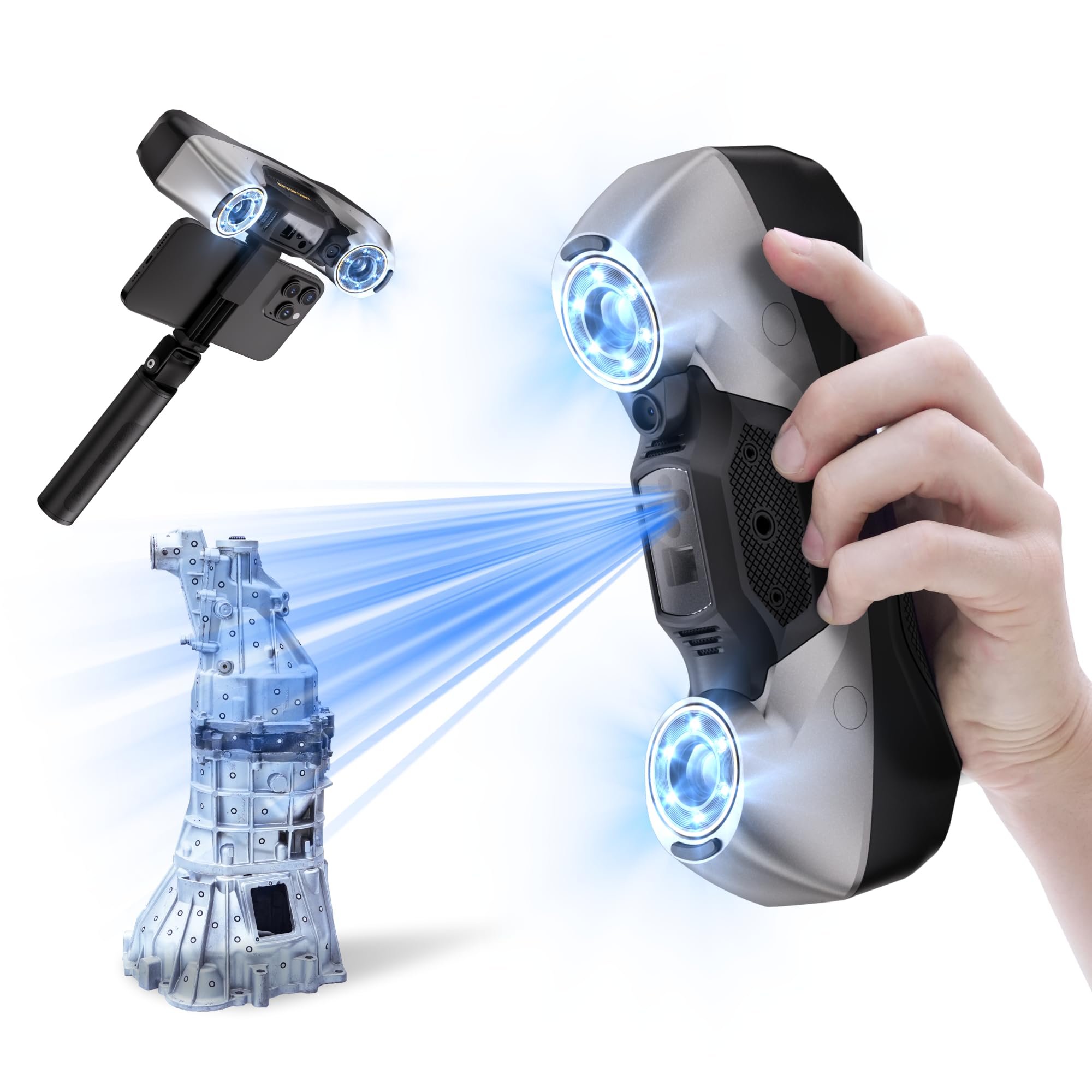
The MetroY Pro sits near the top of the consumer-to-industrial bridge, offering 0.01mm single-shot precision via its 34+15+1 blue laser array. It handles shiny and dark surfaces without any spray, which is a huge time-saver when scanning metallic automotive parts or glossy consumer goods. The 62-line full-field structured light mode pushes throughput to 2 million points per second while skipping markers entirely on feature-rich objects.
Real-world tests show its accuracy landing within 0.0005–0.003 inches—close to proper industrial metrology. The built-in Wi-Fi 6 enables a cable-free connection to a PC, though it disables your internet during scanning, which can be a workflow annoyance. The software (Revo Metro) is serviceable but still carries some bugs, and advanced CAD workflows require the separate paid Revo Design package.
You will want a powerful PC for this scanner. The minimum spec calls for an Intel i7 13th Gen or AMD Ryzen 7 5800, 32GB RAM, and an RTX 3060-class GPU. Users report smoother performance with 64GB. Autoturntable mode syncs beautifully for hands-free capture, making it ideal for reverse engineering small-to-medium parts.
Why it’s great
- Industry-best sub-0.02mm accuracy in this price bracket
- Five scanning modes including deep-hole single-line capture
- Real-time temperature monitoring prevents drift during long sessions
Good to know
- Requires a high-end PC (32GB+ RAM, dedicated GPU) for stable operation
- Software still has occasional firmware and connection bugs
- Loses internet access when connected via Wi-Fi
2. Shining 3D Einstar

The Einstar is widely considered the benchmark consumer-grade handheld 3D scanner for organic shapes, especially full-body human scans. Its three infrared VCSEL projectors and two stereo depth cameras allow it to track reliably on surfaces that trip up structured-light-only scanners. The dedicated “Hair Mode” actually captures hair data—a notorious problem area—improving overall head-model completeness for VR avatars.
Users consistently report that the Einstar’s tracking is robust enough to scan a dark gray shiny car bumper in poor lighting without losing alignment, producing results comparable to professional units that cost thirty times as much. The trade-off is a non-trivial learning curve: you must learn the optimal distance, sweep speed, and technique to avoid artifacts. The software (EXstar) includes a data quality indicator that helps guide beginners, but there is no built-in tutorial.
It runs well on a mid-range gaming PC (Ryzen 5, 1660 GPU, 32GB RAM). The single USB cable handles both data and power, which keeps the setup simple but limits range. For the price, it delivers professional-grade scan quality for hobbyist reverse engineering, custom automotive parts, and character creation.
Why it’s great
- Best-in-class tracking stability for medium-to-large objects
- Hair Mode genuinely improves full-body scan completeness
- Produces results comparable to pro scanners at a fraction of the cost
Good to know
- Significant learning curve—not a point-and-shoot device
- Struggles with very small or highly detailed objects
- Defective fan reported by some units (no performance impact noted)
3. Revopoint INSPIRE 2

The INSPIRE 2 bridges the gap between consumer and prosumer scanning with a dual-module system: infrared structured light for fast general capture and multi-line laser for challenging reflective or dark surfaces. This makes it one of the most versatile handheld options in its tier. The 11 infrared laser lines let you scan glossy plastic or black metal without reaching for spray, saving significant prep time.
Its accuracy is rated at 0.05mm single-shot with a fused point distance of 0.1mm—sufficient for applications like product design, heritage preservation, and 3D printing of medium-sized objects. The full-color RGB camera syncs texture data automatically with geometry, producing models that look finished straight out of the software. The calibration board is a highlight: it boosts point cloud accuracy by 75% over prior iterations.
Wireless scanning via Wi-Fi 6 works smoothly, and the unit weighs just 190g, making it easy to hold steady during long sessions. The included mini turntable, markers, and outdoor filters make this a truly all-in-one kit. Some users report that the sticky dots for calibration don’t stay put well, so keep extras handy. The PC-side software (Revo Metro) is intuitive but advanced features require the paid Revo Design package.
Why it’s great
- Dual structured light and laser modes handle nearly any surface
- Lightweight 190g design ideal for long handheld sessions
- Comprehensive kit with turntable, calibration board, and filters included
Good to know
- Marker dots included in the kit have poor adhesion
- Full CAD workflow requires paid Revo Design software
- Demands a strong PC (i7 13th Gen + RTX 3060) for smooth operation
4. EINSTAR Pro

The EINSTAR Pro is a polished evolution of Shining 3D’s handheld line, using infrared VCSEL structured light to capture consistent geometry on textured, dark, and even reflective surfaces. Its 0.1mm point distance is ideal for 3D printing and design workflows, and the built-in RGB camera adds full-color texture mapping that is automatically synced with the geometry—a major time-saver for digital archiving.
User experiences are polarized. Some call it the first sub- scanner that is “actually legit,” praising its polished software and ease of use compared to earlier competitors like the POP2. Others report never getting a usable scan despite extensive troubleshooting on a top-tier PC (64GB RAM, RTX 4090). The common thread is that the scanner works excellently for medium-to-large objects but struggles with small, simple shapes that lack distinct geometric features for tracking.
Ergonomics are a mixed bag—the handheld design is comfortable, but the cable management can be messy in practice. Export flexibility is strong, with OBJ, STL, PLY, ASC, and 3MF support that integrates directly with most slicers and CAD tools. Like its sibling the original Einstar, it demands patience and practice to unlock its full potential.
Why it’s great
- Excellent price-to-performance ratio for detailed medium-to-large scans
- Full-color RGB capture with auto-synced texture
- Broad export format support for direct 3D printing workflow
Good to know
- Not plug-and-play; requires practice and technique refinement
- Struggles with small, featureless objects
- Demanding system requirements—confirmed failures on high-end PCs
5. EinScan SE Desktop

The EinScan SE v2 is the gold standard for desktop turntable scanning of smaller objects—figurines, mechanical parts, miniatures—where controlled, repeatable capture is more important than portability. Its dual-mode system lets you switch between Auto Scan (fast, turntable-driven) and Fixed Scan (single-shot alignment for complex geometry). Single-shot accuracy is rated at <0.1mm, with a point distance of 0.17–0.2mm.
Users who succeed with this scanner love it for its ease of setup and excellent integration with 3D printers. One user reproduced 30 feet of carved crown molding in one week—a job that would have taken weeks manually. The ExScan software includes automatic calibration, one-click scanning, and post-processing tools like hole-filling and mesh sharpening. It exports directly to Sketchfab and most slicers.
The downsides are real, though. The scanner is extremely sensitive to lighting conditions—shiny, glass, or highly reflective objects produce poor results without spray. Quality control has been inconsistent: some units arrive with packaging issues (hair inside), and customer support responsiveness varies. For objects under 300mm, however, this is one of the most reliable and accurate options.
Why it’s great
- Excellent accuracy for small objects under 300mm
- Dual Auto/Fixed scan modes for flexibility
- Streamlined one-click scanning with automatic calibration
Good to know
- Very sensitive to lighting—struggles with shiny/glass surfaces
- Inconsistent quality control and support responsiveness
- Not portable; requires a dedicated desktop setup
6. Creality Ferret Pro

The Ferret Pro is Creality’s answer to the entry-level 3D scanning market, designed for beginners, DIY creators, and 3D printing enthusiasts who need a simple path from object to mesh. It uses structured light with anti-shake tracking and captures 24-bit full-color data at 0.1mm accuracy. The Wi-Fi 6 wireless connection to a phone or PC is smooth, and the 105g weight makes it genuinely pocketable.
First-time users report that after some practice, the Ferret Pro produces dimensionally accurate scans of small toys and household objects. The included kit—Wi-Fi box, tripod, power bank, phone holder, and carrying case—means you have everything to start scanning out of the box. The recommended object size range is 20mm to 2000mm, though it struggles at both extremes.
The software is where the compromises appear. It only exports STL, and the app is not particularly user-friendly. The calibration process can be finicky, and the scanner does not handle white, red, or black items well. Reflective and transparent surfaces are also problematic. For the price, it is a capable starter unit, but experienced users will quickly want more control and higher fidelity.
Why it’s great
- Extremely lightweight (105g) and portable
- All-in-one kit includes everything needed to begin
- Wi-Fi 6 wireless scanning works smoothly with phones and PCs
Good to know
- Software is limited—STL only, no advanced editing features
- Struggles with white, red, black, and reflective surfaces
- Requires patience and practice for consistent results
7. KanDao QooCam EGO

The QooCam EGO is a different beast from the scanners above—it is a stereoscopic 3D camera with an integrated magnetic viewer, designed for immediate playback of 3D photos and videos without a VR headset. Its dual lenses are spaced 65mm apart (average human IPD), capturing 3840×1080 video at 60FPS and 8000×3000 photos. The snap-on viewer turns the camera body into a standalone 3D display.
For VR content creators and families wanting to capture lifelike memories, the EGO is a unique and fun device. Landscapes and medium-distance subjects produce excellent stereo depth. Recent firmware updates added autofocus, fixing the original unit’s main limitation. The included charging kit with a spare battery and SD card makes it a complete travel companion.
There are notable compromises. The startup time is 15–20 seconds, causing missed spontaneous moments. Battery life is short—a few hours of active use—requiring multiple spare batteries for a full day out. Close subjects under 3–4 feet produce a “Pinocchio nose” distortion effect. The camera lacks a lens cover, and its small size makes it easy to accidentally cover the lenses. It is a fun, functional device within its niche, not a general-purpose 3D capture tool.
Why it’s great
- Instant 3D playback with magnetic viewer—no headset needed
- Good stereo quality for landscapes and medium subjects
- Includes spare battery and SD card for extended shooting
Good to know
- Long startup time (15–20 sec) causes missed shots
- Poor battery life requires multiple spare batteries
- Distortion on subjects closer than 3–4 feet
8. Sony mocopi

Sony’s mocopi system brings full-body motion capture to the consumer market through six lightweight sensors (8g each) that strap onto your head, wrists, ankles, and waist. It requires no base stations, no studio—just a compatible smartphone and the free mocopi app. Calibration is a simple step-forward gesture, and tracking starts immediately. The 10-hour battery life supports long recording sessions without recharging.
The hardware itself is well-regarded: the sensors are comfortable, the included bands accommodate different body sizes, and the charging case keeps everything organized. For VR content creators and VRChat users, mocopi enables natural full-body avatar animation that was previously only possible with expensive optical systems. The system works indoors and outdoors thanks to its dustproof and water-resistant design.
The software situation is the dealbreaker for many. The free mocopi app works fine for basic use, but the PC app that unlocks live streaming, timeline editing, and advanced motion recording requires a monthly subscription. The official Steam VR app is reportedly buggy, locking at 30Hz in some setups. There is no SDK for direct Unity/Unreal integration, limiting its use for serious game development. Some users report tracking drift and pose inconsistency in VR applications.
Why it’s great
- No base stations or studio required—works in any room
- Lightweight sensors (8g each) with 10-hour battery life
- Quick and simple setup for full-body VR tracking
Good to know
- PC app requires monthly subscription for full features
- Tracking drift and inconsistency reported in VR
- No Unity/Unreal SDK support limits development use
9. Matterport Pro2

The Matterport Pro2 is the industry standard for real estate and architectural digital twins. It captures 134 megapixel 4K imagery with 1.5 million depth points per scan, completing each sweep in under 30 seconds. The professional kit includes a rugged hard rolling case, tripod, and quick-release clamp—everything needed for a mobile surveying workflow. The 8-hour battery life supports a full day of on-site scanning.
Users in property management and hospitality report that the Pro2 generates trust with remote buyers and renters through immersive, high-resolution walkthroughs. The camera is sturdy and dependable, delivering consistent results across a variety of indoor spaces like houses, apartments, and commercial buildings. The scanning process is simple enough that a single operator can capture a typical home in under an hour.
The critical catch is the subscription. The Pro2 is not compatible with free or starter Matterport plans—you must purchase a professional or business subscription to process, host, and share your scans. This recurring cost can add up to thousands of dollars per year. Some users also received units with battery issues that would not charge fully, and Matterport support would only offer refunds rather than replacements, which is problematic when prices increase between purchases.
Why it’s great
- Fast capture—30 seconds per scan for efficient site work
- Stunning 134 MP 4K imagery for immersive digital twins
- Professional kit with hard case, tripod, and clamp included
Good to know
- Requires a paid Matterport subscription to use
- Some units arrive with battery charging defects
- Customer support only offers refunds, not replacements
10. Creality K2 Plus Combo

The K2 Plus Combo is not a camera, but a multi-color 3D printer. It earns a spot here because it is the ideal downstream device for virtually every scanner on this list, turning captured meshes into physical objects. With a massive 350mm³ build volume and the Creality Filament System supporting up to 16 colors, it can print full-color prototypes, miniatures, and mechanical parts directly from your scan data.
The step-servo motor system delivers 30,000mm/s² acceleration and a top speed of 600mm/s, making it one of the fastest large-format printers available. Dual AI cameras monitor for spaghetti failures and foreign objects, sending alerts to your phone and supporting time-lapse filming. The actively heated chamber expands material compatibility to ABS, PETG, PA-CF, and even PPA-CF.
Early adopters report that the K2 Plus produces perfect prints out of the box with minimal setup—a huge upgrade from Creality’s older Ender series. The CFS keeps filament dry and enables automatic spool switching during multi-color prints. However, quality control issues exist: some units ship with extruder motor direction problems or Y-axis communication failures that require firmware fixes and part replacements. The printer is also very heavy (27.5 lbs) and loud at times.
Why it’s great
- Massive 350mm³ build volume for large prints
- Up to 16-color printing with the CFS system
- Fast 600mm/s with step-servo motor precision
Good to know
- Quality control issues reported on early units
- Very heavy (27.5 lbs) and loud during operation
- Creality support is slow, replacement parts take ~2 weeks
11. Matterport Pro3

The Matterport Pro3 is a dedicated LiDAR scanner designed for large-scale professional surveying of indoor and outdoor spaces. Its 100m extended scanning range captures entire buildings and landmarks in a single setup, with a LiDAR sensor that takes millions of measurements per sweep at 20mm accuracy at 10m. Each scan completes in under 20 seconds, making it one of the fastest large-area scanners available.
The Performance Kit includes two removable batteries, a charging kit, tripod, wheeled dolly, backpack, and hard case—everything a mobile surveyor needs. The 20.3 MP effective still resolution produces JPEG and RAW files, and the colorized point clouds are detailed enough for construction documentation and facade measurement. Professionals praise its speed and range for capturing large spaces efficiently.
Despite the premium hardware, the Pro3 has significant drawbacks. The most serious is the mandatory Matterport subscription: you must pay ongoing fees to process and export your own scans. Multiple users report that scan quality is low compared to competitors (FARO, Leica) that cost similar amounts. Quality control is concerning—some kits ship with defective dollies that cause the scanner to topple and damage itself, with warranty claims being rejected. The company’s support is described as scripted and unhelpful. For the price, these issues are hard to justify.
Why it’s great
- Fast large-area scanning—<20 sec per sweep, 100m range
- LiDAR works in direct sunlight and challenging lighting
- Complete performance kit with batteries, dolly, and backpack
Good to know
- Mandatory Matterport subscription for scan processing
- Scan quality criticized versus peer LiDAR solutions
- Quality control and support issues reported at this price level
FAQ
Can I use a 3D camera to capture objects for 3D printing without a separate scanner?
What is the difference between structured light and LiDAR for 3D scanning?
Does the Revopoint MetroY Pro really achieve 0.01mm precision on real-world objects?
Final Thoughts: The Verdict
For most users who need the best 3d camera for precision engineering and reverse engineering, the winner is the Revopoint MetroY Pro because its 0.01mm precision and five scanning modes cover nearly every industrial use case. If you want stable full-body scanning for VR avatars and characters, grab the Shining 3D Einstar. And for instant stereoscopic playback that you can share with friends and family, nothing beats the KanDao QooCam EGO.