
Our readers keep the lights on and the weekend projects moving. As an Amazon Associate, I earn from qualifying purchases.
Every hour you spend orbiting a complex 3D model is an hour your forearm muscles are contracted, your wrist is bent, and your shoulder is reaching forward. The wrong mouse doesn’t just slow your workflow — it actively degrades the fine motor control you need for edge loops and bevels. The distinction between a tool that enables hours of focused modeling and one that forces a break every twenty minutes comes down to sensor precision, ergonomic architecture, and software integration.
I’m Rikta — the co-founder and writer behind FitlyFast. I’ve spent hundreds of hours analyzing sensor DPI ranges, ergonomic tilt angles, programmable button layouts, and wireless latency figures to build this guide around the specific demands of 3D modeling professionals.
Whether you’re sculpting organic forms in Blender or snapping constraints in SolidWorks, the right device keeps your hand relaxed and your cursor exactly where you intend it to be — this review of the best 3d modeling mouse breaks down which models deliver on that promise.
How To Choose The Best 3D Modeling Mouse
A mouse for 3D modeling must satisfy a contradictory set of demands: high precision for fine edge work, smooth tracking for rapid viewport orbits, and a shape that doesn’t punish your wrist during a five-hour sculpting session. Understanding a few key specs will guide you straight to the model that fits your specific workflow.
Ergonomic Architecture: Tilt, Trackball, or Centered Bar
The most important decision is the physical form. A vertical mouse rotates your forearm to a handshake position, reducing pronation strain. A trackball keeps your hand stationary while your thumb or finger moves the cursor. A centered rollerbar eliminates reaching entirely by placing the controller directly in front of your keyboard. For 3D modeling, where you frequently switch between mouse and keyboard shortcuts, a centered design minimizes the wasted motion of moving your arm back and forth.
Sensor Precision and DPI Range
A 4000 DPI sensor lets you cover multiple monitors with minimal wrist movement, while the ability to drop to 800 DPI on demand gives you pixel-level control for precise edge selection. Look for a dedicated DPI switch button — you will use it constantly when switching between broad viewport navigation and tight polygon editing. Optical sensors with a high polling rate (1000 Hz) deliver the most responsive feel for rapid camera movements.
Programmable Buttons for Modeling Workflows
The number of programmable buttons directly impacts your modeling speed. Assigning the middle mouse button orbit, view cube rotation, and snap toggle to dedicated physical buttons eliminates the most common hand gymnastics in CAD software. Six programmable buttons is the practical minimum for a productive modeling setup, and eight or more allows you to map your most-used Blender or SolidWorks commands without ever touching the keyboard.
Quick Comparison
On smaller screens, swipe sideways to see the full table.
| Model | Category | Best For | Key Spec | Amazon |
|---|---|---|---|---|
| Logitech MX Master 4 for Mac | Premium | Mac-focused workflow with haptic feedback | MagSpeed scroll: 1,000 lines/sec | Amazon |
| 3Dconnexion SpaceMouse Wireless | Premium | Dedicated 3D navigation controller | 1 month battery life | Amazon |
| Contour RollerMouse Pro3 | Premium | RSI prevention with centered design | 800-2400 DPI adjustable | Amazon |
| Contour RollerMouse Red | Premium | Wireless centered ergonomic solution | 3 month rechargeable battery | Amazon |
| Logitech MX Ergo S | Mid-Range | Thumb-operated trackball precision | 20-degree tilt angle | Amazon |
| Contour Unimouse | Mid-Range | Adjustable tilt angle 35°-70° | 6 programmable buttons | Amazon |
| Logitech MX Vertical | Mid-Range | Entry-level ergonomic vertical mouse | 4000 DPI high-precision sensor | Amazon |
In‑Depth Reviews
1. Logitech MX Master 4 for Mac
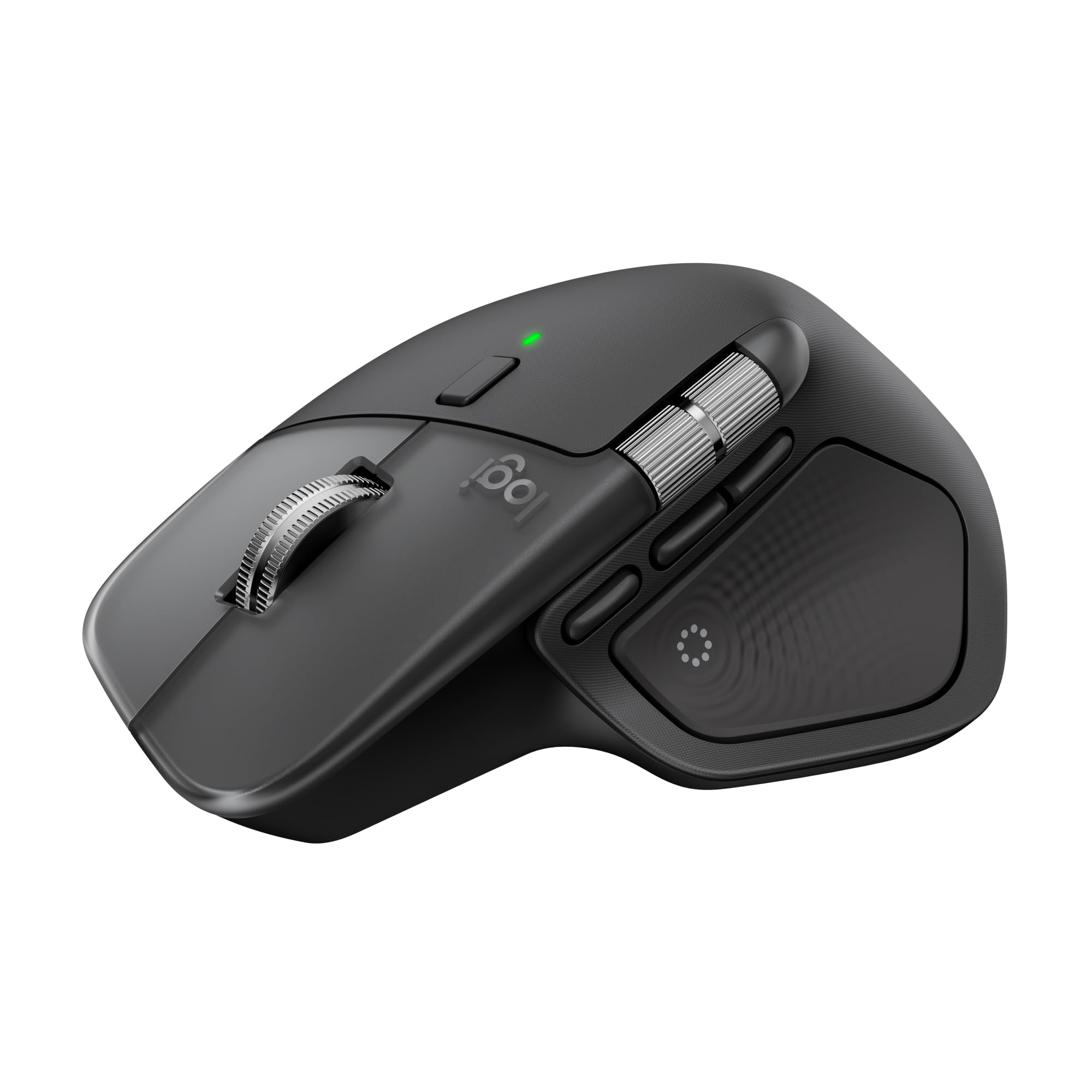
The MX Master 4 for Mac integrates haptic feedback on the Sense Panel, which lets you assign tactile confirmation to specific modeling actions — orbit activation, snap toggle, or layer switch — so your eyes never leave the viewport. The MagSpeed scroll wheel can free-spin through 1,000 lines per second for rapid timeline scrubbing or ratchet to a pixel-stop for precise edge loop selection, adapting seamlessly to your modeling rhythm.
The Action Ring overlay is particularly valuable for 3D software: it places a radial menu of your most-used tools (extrude, bevel, knife, loop cut) directly at your cursor, activated by the dedicated thumb button. This eliminates the need to memorize keyboard shortcuts for your top six modeling commands. The ergonomic contour with a natural tilt keeps your hand in a relaxed position during long rendering or sculpting sessions.
Battery life is excellent, and USB-C charging means you can top up during a coffee break. The non-rubberized plastic finish resists the wear and dust buildup that plagued earlier models. The primary downside is that this version lacks a 2.4 GHz dongle, relying solely on Bluetooth, which could introduce latency on some systems. Despite this, the combination of haptic workflow cues and app-specific customization makes it the most versatile single-device option for modeling.
Why it’s great
- Haptic feedback for app-specific modeling shortcuts
- MagSpeed wheel handles both fast timeline scroll and pixel-precise stops
- Action Ring places modeling tools at your cursor
Good to know
- Bluetooth-only connection; no included USB receiver for low-latency setups
- Heavier and slightly slippery when lifting compared to rubberized models
2. 3Dconnexion SpaceMouse Wireless

The SpaceMouse is not a conventional mouse — it is a dedicated 6-degree-of-freedom controller designed exclusively for 3D viewport navigation. You hold the cap and push, pull, or twist to orbit, pan, and zoom simultaneously, freeing your primary hand to use a standard mouse for selection and modeling commands. This division of labor dramatically reduces the mental overhead of camera manipulation.
The build quality is exceptional: a heavy, grippy base ensures the unit stays planted during aggressive navigation. The rechargeable battery lasts up to a month under constant daily use, and the included carry case makes it portable for studio-to-home transitions. The two programmable side buttons can be assigned to common view commands like front, top, or perspective toggle.
Software integration with major CAD platforms (SolidWorks, Fusion 360, Blender, Rhino) is plug-and-play, and sensitivity is finely adjustable per application. The primary limitation is that Bluetooth connectivity on macOS still has occasional stability gaps compared to the wired version, and there is no onboard storage for the USB dongle. For full-time CAD users who orbit models hundreds of times per day, this device is transformative for both speed and wrist relief.
Why it’s great
- Frees primary mouse hand for selection while the other hand navigates the viewport
- Precise 6-DOF control with heavy, stable base
- Long battery life and premium travel case included
Good to know
- Bluetooth connectivity can be less reliable on macOS
- Best as a secondary device alongside a standard mouse
3. Contour RollerMouse Pro3

The RollerMouse Pro3 places a horizontal rollerbar directly in front of your keyboard, so you never reach sideways for a mouse. You slide the bar left and right, roll it forward and backward, and tap to click — all while keeping both arms within shoulder width. This centered position eliminates the shoulder abduction and forearm twisting that causes the majority of modeling-related RSI.
Built-in Copy and Paste buttons, plus five programmable buttons, streamline data-intensive modeling tasks. The 10-speed cursor adjustment (800 to 2400 DPI) lets you switch between fast viewport navigation and fine detail work. The memory foam wrist rest provides solid support and is easy to disinfect, which matters in shared studio environments. The wired connection guarantees zero latency, critical for real-time sculpting and vertex manipulation.
User reports confirm this device has resolved severe shoulder, wrist, and forearm pain that persisted through conventional and vertical mice. The learning curve is short — most users adapt within a day. The drawbacks are that it is incompatible with split ergonomic keyboards and the built-in wrist pads are initially stiff. Given that many users report their unit lasting over a decade, the upfront investment is low per year of use.
Why it’s great
- Eliminates sideways reaching and keeps hands centered over the keyboard
- Zero-latency wired connection for precise modeling work
- Decades-long lifespan reported by long-term users
Good to know
- Does not pair well with curved ergonomic keyboards
- Memory foam wrist rest can feel stiff initially
4. Contour RollerMouse Red
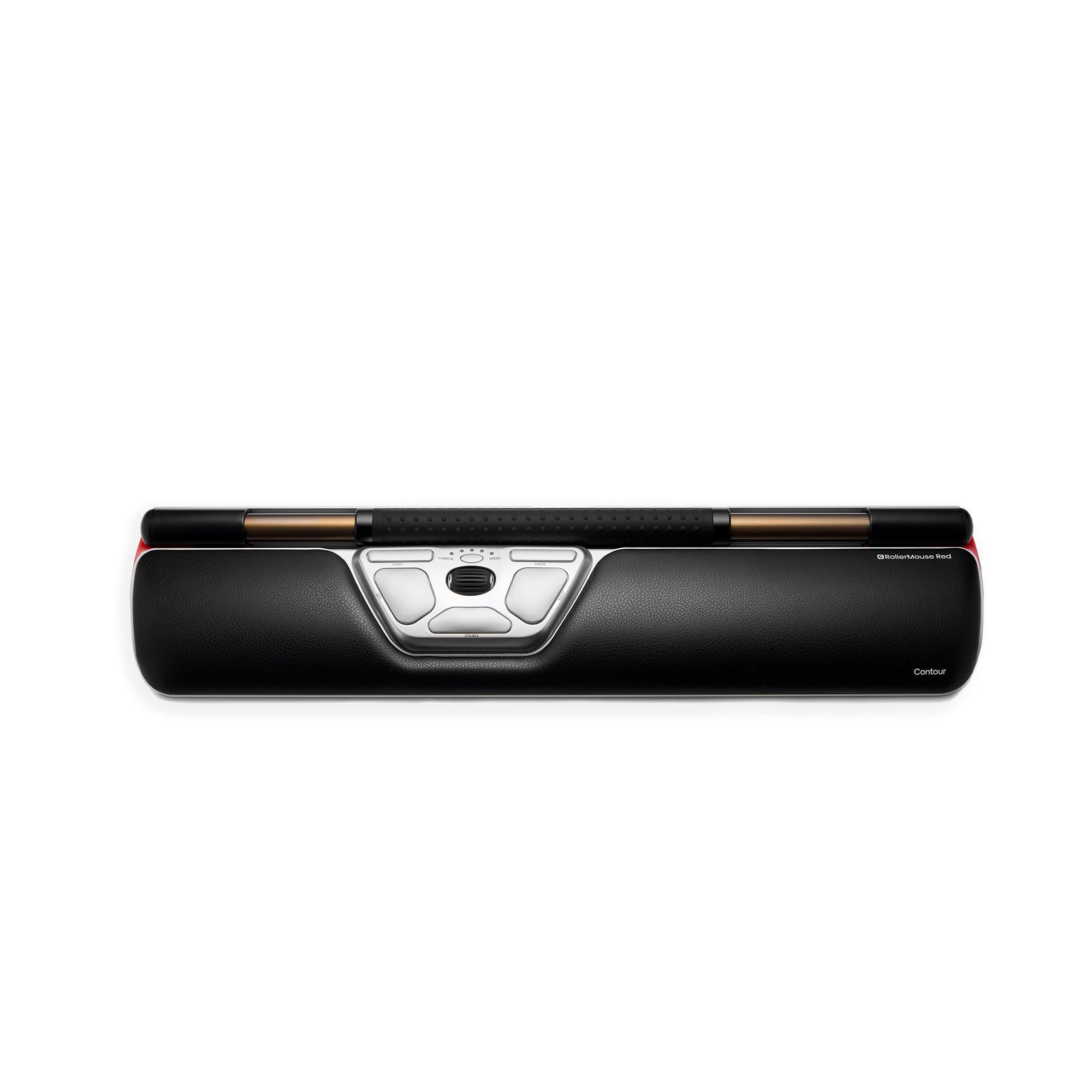
The RollerMouse Red brings the centered rollerbar concept into the wireless realm, using a robust aluminum build and a rechargeable battery that lasts up to three months. Its detachable memory foam wrist support is designed for average to small hands, making it a better fit for compact workstations or keyboard trays where the full-size Pro3 might not fit.
Six pre-programmed buttons (Left Click, Right Click, Double Click, Copy, Paste, and DPI speed) are accessible without lifting your fingers from the rollerbar, and they can be reprogrammed through the Contour driver for modeling-specific commands. The 10-speed DPI range remains a strong feature for transitioning between broad viewport orbits and precise edge adjustments. The plug-and-play compatibility with both Windows and macOS means zero driver hassle.
The wireless connection provides clean desk aesthetics and portability, though some users with existing RSI report that the rollerbar angle does not always align with their forearm resting posture. The memory foam wrist rest has also been noted to show wear and dimpling over extended use. For modelers who already know a centered design works for them but need a wireless, smaller-footprint option, this is the premium choice.
Why it’s great
- Wireless freedom with three-month battery life
- Compact design fits smaller workstations and keyboard trays
- Aluminum build with replaceable components for longevity
Good to know
- Rollerbar angle may not suit all forearm postures
- Wrist rest can dimple and show wear over time
5. Logitech MX Ergo S

The MX Ergo S is a thumb-operated trackball mouse with a 20-degree tilt that reduces muscle strain by an estimated 27% compared to a standard flat mouse. The trackball design means your hand never moves — only your thumb rolls the ball to control the cursor. This is particularly beneficial for modelers who work in tight desk spaces or want to minimize arm and shoulder movement.
Six programmable buttons allow mapping to common CAD functions like orbit, pan, and snap. The precision mode button instantly slows cursor speed for detailed work, and the smooth tracking ball is easy to remove and clean when dust accumulates. The USB-C charging provides 24 hours of use from a one-minute charge, with a full charge lasting up to 120 days. The clicks are 80% quieter than the previous generation, which is a real benefit in open-plan studios.
The primary limitation is hand sizing: the MX Ergo S favors medium to large hands. Users with smaller hands report that the wide shape keeps the hand too open, causing fatigue rather than relieving it. The thumb trackball also requires a short learning curve for coordinate input. For modelers with larger hands who want to eliminate arm movement entirely, this trackball delivers excellent control with minimal physical strain.
Why it’s great
- Hand remains stationary; only thumb moves for cursor control
- 20-degree tilt reduces forearm muscle strain significantly
- Excellent battery life with rapid USB-C charging
Good to know
- Best suited for medium to large hands
- Requires a short adjustment period for thumb-controlled cursor movement
6. Contour Unimouse

The Unimouse stands out with its adjustable tilt angle, ranging from 35 to 70 degrees via a sturdy friction hinge. This means you can change the vertical orientation throughout the day to shift which forearm muscles bear the load — a valuable feature for modelers recovering from tennis elbow or tendonitis. The thumb support also slides, pivots, and rotates to fit different hand sizes and grip preferences.
Six programmable buttons give you enough customization for viewport controls, and the smooth scroll wheel handles timeline navigation. The wireless connection via a 2.4 GHz USB dongle is responsive and reliable, with a battery life of up to 12 weeks per charge. The included receiver range extender is a thoughtful addition for desktop towers placed under the desk.
Some users report a low buzzing noise from the sensor during movement, which can be distracting in quiet studios. The plastic build feels durable but not premium compared to metal-framed alternatives. For modelers who haven’t found their ideal tilt angle or who need to alternate between sitting and standing desks, the adjustability of the Unimouse provides a level of customization that fixed-angle mice cannot match.
Why it’s great
- Wide tilt range from 35° to 70° for personalized ergonomic adjustment
- Fully adjustable thumb support accommodates various hand sizes
- Responsive wireless connection with good battery life
Good to know
- Some units emit a low buzzing noise during movement
- Plastic construction feels less durable than premium aluminum options
7. Logitech MX Vertical

The MX Vertical is the most accessible entry point into vertical ergonomic mice, with a fixed 57-degree angle that places your hand in a natural handshake position. Logitech claims this reduces muscular activity by 10% compared to a standard mouse, and user feedback confirms significant wrist and forearm strain relief, particularly for those transitioning from a flat mouse for the first time.
The 4000 DPI high-precision sensor reduces the physical hand movement needed to traverse multiple monitors by an estimated 4x compared to a 1000 DPI standard mouse. The dedicated DPI switch button lets you toggle between fast navigation and precise selection instantly. The textured rubber surface ensures a secure grip, and the battery lasts up to four months per charge on a full charge cycle.
Where the MX Vertical falls short for modeling is in button count — only four programmable buttons, which is minimal for efficient CAD workflows. The vertical design also requires a short adaptation period, as the reduced wrist mobility can cause initial overshooting of cursor targets. For modelers who want to test ergonomic benefits without a large investment, this is the most straightforward and reliable choice.
Why it’s great
- Lowest barrier to entry for vertical ergonomic relief
- High-DPI sensor reduces arm movement across multi-monitor setups
- Extended battery life of up to four months
Good to know
- Only four programmable buttons limit modeling workflow efficiency
- Requires adaptation period; initial cursor overshooting is common
FAQ
Do I need a high DPI mouse for 3D modeling?
What does a 6-degree-of-freedom controller do for CAD work?
How many programmable buttons are enough for 3D modeling?
Can a trackball mouse work well for 3D modeling?
Is a wired or wireless mouse better for 3D modeling?
Final Thoughts: The Verdict
For most users, the 3d modeling mouse winner is the Logitech MX Master 4 for Mac because it combines haptic workflow integration with a MagSpeed scroll wheel and ergonomic contour that handles both rapid timeline navigation and pixel-precise selection. If you want dedicated 6-DOF viewport control that offloads camera work from your primary hand, grab the 3Dconnexion SpaceMouse Wireless. And for eliminating arm and shoulder strain entirely through a centered design, nothing beats the Contour RollerMouse Pro3.