
Our readers keep the lights on and the weekend projects moving. As an Amazon Associate, I earn from qualifying purchases.
ABS demands an enclosed printer with a stable chamber temperature, a hot end that reaches at least 260°C, and a build plate that stays hot enough to prevent the corners from curling up mid-print. Without these three things, you will fight layer separation and warping on every single model.
I’m Rikta — the co-founder and writer behind FitlyFast. After many hours of research comparing hot end limits, chamber heating systems, motion platforms, and real-world user reports, I’ve narrowed down which machines actually handle ABS without constant tinkering.
This guide ranks the models that can reliably print ABS right out of the box, from entry-level enclosures to production-grade workhorses, so you can find the 3d printer for abs that matches your workflow.
How To Choose The Best 3D Printer For ABS
Printing ABS successfully is not just about buying an enclosed printer. The enclosure is table stakes. The real differentiators are active chamber heating, a hot end that can sustain high temperatures, and a motion system that keeps vibration low. Here is what to look for.
Active Heated Chamber vs. Passive Enclosure
A passive enclosure (a box around the printer) helps, but it does not guarantee an even internal temperature. Drafts and temperature swings cause ABS layers to contract unevenly, leading to corner lifting. An active heated chamber — one that uses a heater to maintain a specific temperature, typically 50–65°C — virtually eliminates these swings. If you print large ABS parts, an active chamber is a must.
Hot End Temperature Ceiling
ABS requires a nozzle temperature of 230–260°C, but the hot end should be rated for higher to avoid thermal bottlenecks. Look for all-metal hot ends rated to at least 300°C. Bimetal heat breaks prevent heat creep, which is a common cause of jams when printing ABS at higher speeds. A hardened steel or brass-hardened steel nozzle handles the abrasive additives in some ABS blends without degrading.
Build Plate Adhesion and Bed Temperature
An 80–110°C heated bed is standard for ABS, but the surface material matters. PEI spring steel sheets provide excellent adhesion when hot and release easily once cool. Textured glass or Garolite also work. Avoid bare glass without adhesive; ABS tends to stick too well and can chip the glass during removal. A strain gauge or inductive probe for consistent first-layer height is non-negotiable for avoiding warping.
Filtration and Fumes
ABS emits styrene fumes during printing. If you print in a living space, a printer with a carbon filter or HEPA filter reduces airborne particles. Some machines include an optional activated carbon box; others rely on the enclosure to direct fumes to an external vent. For shared spaces, look for printers that explicitly mention fume filtration or offer an add-on filter kit.
Quick Comparison
On smaller screens, swipe sideways to see the full table.
| Model | Category | Best For | Key Spec | Amazon |
|---|---|---|---|---|
| Bambu Lab P1S | Mid-Range | Reliable enclosed ABS printing | 300°C nozzle, enclosed chamber | Amazon |
| QIDI Q1 Pro | Mid-Range | Active 60°C chamber heat | 60°C active heated chamber | Amazon |
| ELEGOO Centauri Carbon | Mid-Range | Value enclosed CoreXY | 320°C nozzle, CoreXY | Amazon |
| Flashforge AD5M Pro | Mid-Range | Beginner-friendly enclosed unit | 280°C nozzle, dual filters | Amazon |
| Anycubic Kobra S1C | Premium | Active drying + ABS ready | Built-in filament dryer | Amazon |
| Flashforge AD5X | Mid-Range | Multicolor ABS prototypes | 300°C nozzle, 4-color IFS | Amazon |
| Creality K2 SE | Budget | Entry-level enclosed printing | 300°C nozzle, enclosed | Amazon |
| SUNLU Filament Dryer E2 | Accessory | Drying/annealing ABS | 110°C, 500W PTC heater | Amazon |
| Creality K2 Plus Combo | Premium | Large ABS parts, multicolor | 350mm³ build, active chamber | Amazon |
| QIDI Max4 Combo | Premium | Industrial ABS production | 65°C chamber, 390mm³ volume | Amazon |
| Original Prusa CORE One | Premium | Reliability and support | 55°C active chamber, CoreXY | Amazon |
In‑Depth Reviews
1. Bambu Lab P1S

The Bambu Lab P1S is the gold standard in the mid-range for ABS printing. Its fully enclosed body creates a stable thermal environment, and the 300°C all-metal hot end handles ABS without hesitation. The CoreXY motion system hits 500 mm/s, but speed is secondary here — the auto bed leveling and vibration compensation ensure consistent first layers even on tall ABS parts.
Users report that the P1S prints ABS and ASA reliably out of the box with no modifications. The chamber stays warm enough to prevent warping on most parts up to the 256mm³ build volume. Connecting the optional AMS enables multi-color ABS prints, though the standard single-spool setup is sufficient for functional prototypes.
Setup takes about 15 minutes, and Bambu Studio slicer includes pre-tuned profiles for ABS. The only limitation is that carbon fiber and glass fiber reinforced filaments are not recommended for the standard nozzle, but standard ABS and ASA run flawlessly. For a no-compromise mid-range enclosed machine, the P1S delivers consistent results.
Why it’s great
- Fully enclosed with stable chamber temps for ABS
- 300°C all-metal hot end handles high-temp materials
- Auto leveling before every print eliminates guesswork
Good to know
- Vent top and front for ABS; door open for PLA to avoid heat creep
- Not recommended for carbon/glass fiber filaments
2. QIDI Q1 Pro

The QIDI Q1 Pro stands out because it actively heats the chamber, not just encloses it. The active chamber heating maintains a steady 60°C, which is exactly what ABS needs to avoid differential cooling and warping on large flat surfaces. The 350°C bimetal nozzle handles ABS, polycarbonate, and carbon fiber nylon without heat creep.
Printers in this price range rarely offer active chamber heat. The Q1 Pro hits 600 mm/s on a CoreXY platform with independent dual Z-axis motors for stability. The included 1080p camera provides real-time monitoring. Klipper firmware is fully open source, allowing advanced users to fine-tune profiles.
Note that the Q1 Pro does not include a carbon filter — you will need to print the optional filter box from the official wiki. The spool mount on the side is functional but feels wobbly. Despite these minor quirks, the Q1 Pro is the best value for anyone serious about printing ABS and other high-temp materials without major upgrades.
Why it’s great
- Active 60°C chamber heating prevents ABS warping
- 350°C bimetal nozzle handles all engineering filaments
- Full Klipper support for custom tuning
Good to know
- No built-in carbon filter; needs DIY solution for ABS fumes
- Side spool mount is wobbly; consider a separate rack
3. ELEGOO Centauri Carbon

The ELEGOO Centauri Carbon brings CoreXY speed and an enclosed chamber to a very aggressive price point. The 320°C brass-hardened steel nozzle is ready for ABS and carbon fiber reinforced filaments right away. The 256mm³ build volume is generous for the price, and the die-cast aluminum frame keeps vibration low even at 500 mm/s.
Users highlight the one-click auto leveling and the preset ABS slicer profiles that work accurately from the first print. The built-in camera with dual LED lighting allows remote monitoring, and the dual-sided build plate offers a PLA-specific surface for excellent adhesion without glue on most materials.
The chamber is enclosed but not actively heated, which means ABS warping can still occur on very large or thin-walled parts. Heated bed stability is good, but for consistent large-format ABS, an active chamber is better. That said, for the price, the Centauri Carbon offers exceptional value for hobbyists printing smaller ABS parts.
Why it’s great
- 320°C hardened nozzle handles ABS and carbon fiber blends
- Rigid die-cast frame minimizes vibration at speed
- Pre-tuned ABS profiles deliver good first-layer adhesion
Good to know
- Passive enclosure, not actively heated chamber
- Some users report cable routing issues with USB-C connector
4. Flashforge AD5M Pro

The Flashforge AD5M Pro is designed for users who want a quiet, enclosed machine with minimal setup. The fully enclosed body and dual-layer carbon filter reduce ABS fumes, making it suitable for classrooms or home offices. The 280°C quick-swap nozzle handles ABS, PETG, and TPU, and the 220mm³ build volume is adequate for smaller functional parts.
One-click bed leveling and a 10-minute quick start make this one of the easiest machines to get running. The CoreXY motion system reaches 600 mm/s, and built-in vibration compensation keeps layer quality high even at speed. The built-in camera enables remote monitoring via the Maker app.
The AD5M Pro lacks active chamber heating, so large ABS prints may still warp. Some users experienced nozzle clogs with low-quality filament, but the quick-swap nozzle makes cleaning or replacing the hot end simple. For beginners dipping into ABS, this is a forgiving platform with good filtration.
Why it’s great
- Dual-layer filtration reduces ABS fumes in shared spaces
- 3-second quick-swap nozzle for easy maintenance
- Quiet operation and simple 10-minute setup
Good to know
- No active chamber heating; large ABS parts may warp
- Packaging and instructions could be more robust
5. Anycubic Kobra S1C

The Anycubic Kobra S1C integrates an active filament drying system, which is a huge advantage for ABS. Even new ABS spools absorb ambient moisture that causes bubbles and poor layer adhesion. The S1C’s built-in drying parameters keep the filament in peak condition throughout long prints. The fully enclosed chamber stabilizes temperature for complex materials like ABS and ASA.
The CoreXY system reaches 600 mm/s with full-auto calibration — one-click leveling, vibration compensation, and flow rate calibration happen automatically. The machine supports multicolor printing with the ACE Pro unit (up to 8 colors), making it a versatile choice for cosplay parts or multi-material prototypes. The quick-swap nozzle design simplifies material changes.
The camera is low-resolution, suitable only for basic monitoring rather than detailed inspection. The ACE Pro unit can be finicky with matte PLA and some ABS blends, but prints come out reliably once the material is dialed in. For anyone frustrated by wet filament failures, the built-in drying is a genuine relief.
Why it’s great
- Integrated active filament dryer prevents moisture-related ABS failures
- Fully enclosed chamber with stable temps for ABS/ASA
- Full-auto calibration eliminates manual leveling
Good to know
- Camera is low-res and useful only for monitoring
- ACE Pro can struggle with matte or certain ABS blends
6. Flashforge AD5X

The Flashforge AD5X offers 4-color direct printing via its independent filament system, making it one of the few mid-range machines that can print ABS in multiple colors without an external multi-material unit. The 300°C all-metal hotend reaches ABS temperatures comfortably, and the 30-second nozzle swap makes switching between materials fast.
The CoreXY platform achieves 600 mm/s with linear rails and vibration compensation. The magnetic PEI spring steel plate provides excellent first-layer adhesion for ABS when the bed is at 100°C. Users report reliable prints right out of the box, with the machine handling ABS, PLA, PETG, and TPU without manual profiles.
One limitation is that carbon fiber filament requires the optional enclosed chamber kit — the AD5X ships with an open frame for multi-color access. The 220mm³ build volume is standard for this tier. For users who want multicolor ABS prototypes or artistic models, the AD5X is the most direct path without buying a separate AMS system.
Why it’s great
- Built-in 4-color printing for multicolor ABS parts
- 300°C hotend and 30-second nozzle swap
- Reliable out-of-box performance with ABS
Good to know
- Enclosed chamber kit required for carbon fiber ABS
- Spool holder may need adjustment for smaller spools
7. Creality K2 SE
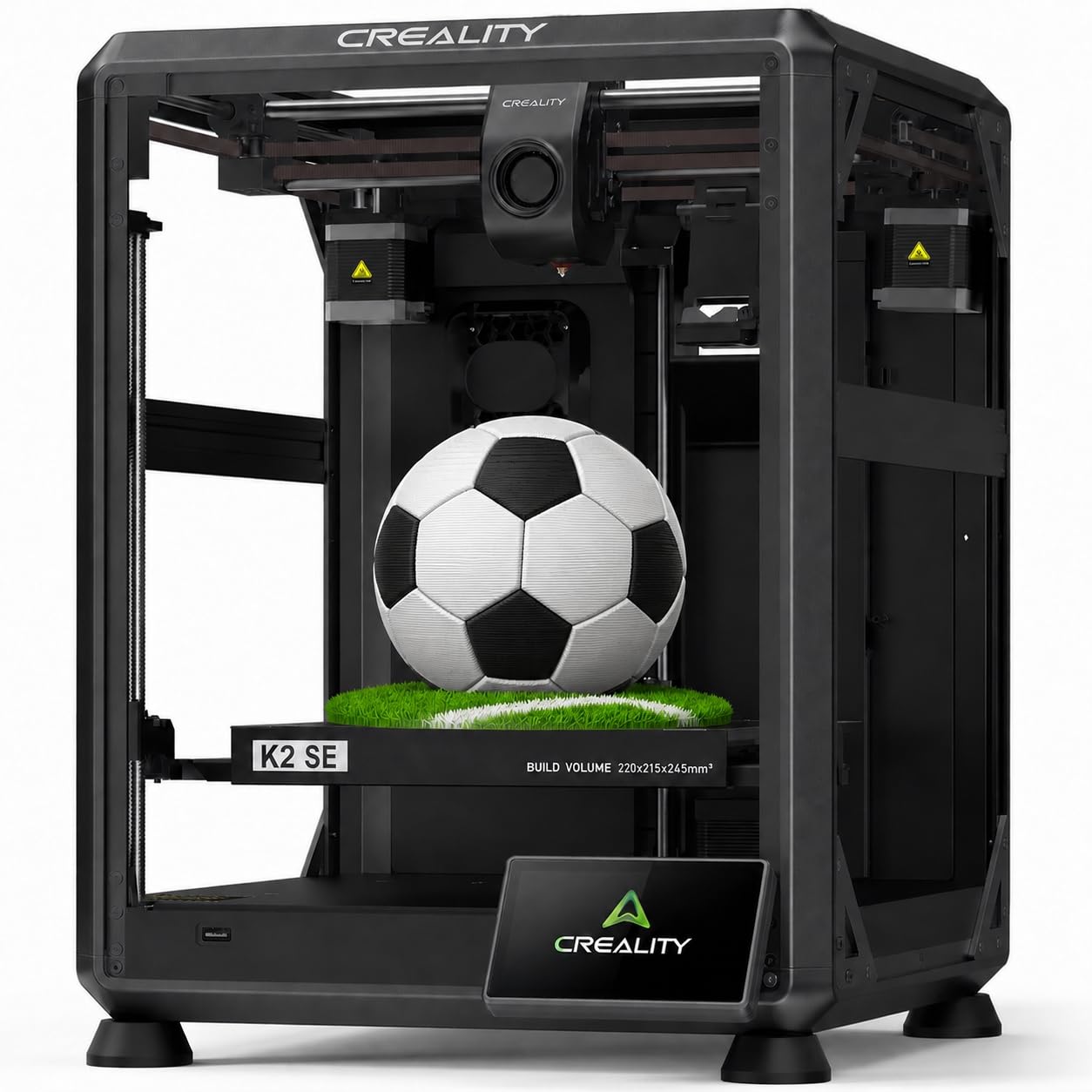
The Creality K2 SE is the most affordable fully enclosed CoreXY printer that supports ABS printing. The 300°C dual-gear direct drive extruder comes with multiple nozzle sizes (0.4, 0.6, 0.8mm) and can melt ABS, PLA, PETG, and TPU. The enclosed body and pre-installed damping pads reduce vibration for stable prints.
This printer is clearly aimed at beginners and kids, with auto calibration and a 3-minute start time. The 220×215×245mm build volume is smaller than some competitors but adequate for hobby projects. Users note that a glue stick is required as a release agent, and bypassing the calibration after power-off can cause issues.
The K2 SE does not have active chamber heating, so large ABS parts may warp. Some units arrive with blank touchscreens, but overall reliability after initial setup is good. For the price, this is an accessible entry point into enclosed ABS printing, especially for smaller models.
Why it’s great
- Low-cost fully enclosed CoreXY for ABS
- 300°C hotend with multiple nozzle sizes
- Auto calibration makes it beginner-friendly
Good to know
- No active chamber heat; ABS warping on large prints
- Glue stick needed as release agent
8. SUNLU Filament Dryer E2
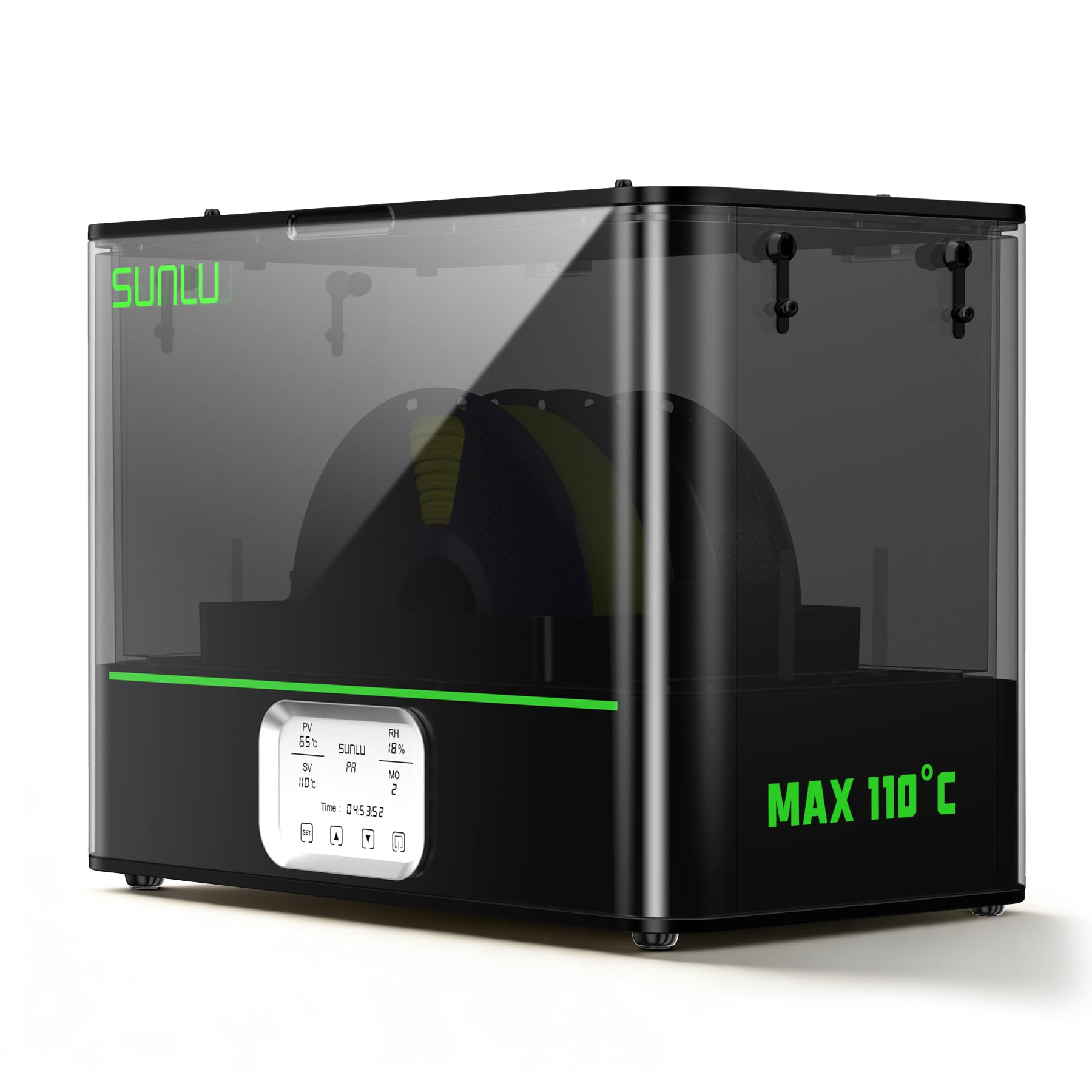
The SUNLU Filament Dryer E2 is not a 3D printer, but it belongs on this list because dry ABS filament is the difference between a perfect print and a bubbling failure. This unit reaches 110°C, well above the 70°C needed to dry ABS, and its 500W PTC heater gets to 70°C in about 30 minutes. The dual-chamber design holds two 1kg spools simultaneously.
Beyond drying, the E2 can anneal finished prints — heating them to relax internal stresses, improving strength and dimensional stability. This is critical for ABS parts that bear load. The smart control and triple-safe protection (PTC, dual temp, software) make it safe to run unattended.
Users report it is essential for engineering filaments like carbon fiber nylon and ABS, but overkill for PLA. The blower fan is loud, and the unit is heavy and large. Some units arrive with warped lids that prevent a proper seal. Still, for anyone printing ABS, this dryer pays for itself in reduced waste.
Why it’s great
- 110°C drying temp dries ABS and engineering filaments fast
- Annealing function improves ABS part strength
- Dual-chamber holds two large spools at once
Good to know
- Loud blower fan may be disruptive in quiet spaces
- Large and heavy; needs dedicated workspace
9. Creality K2 Plus Combo

The Creality K2 Plus Combo is a large-format machine designed for industrial-grade ABS production. The 350mm³ build volume allows printing large drone frames, tooling, or prototypes in one piece. The actively heated chamber maintains stable temperatures, and the 40mm³/s high-flow hotend with hardened steel tip handles ABS, PA-CF, and PPA-CF at 600 mm/s.
The combo includes the Creality CFS for multi-color printing — up to 16 colors with four CFS units. The step-servo motor system provides 30000mm/s² acceleration with quiet operation. Dual AI cameras monitor for spaghetti failures, foreign objects, and idling, pausing automatically if something goes wrong.
The K2 Plus is heavy and requires two people to unbox. Some users experienced extruder motor issues that required firmware adjustments. Support can be slow, but the hardware quality is solid once set up. This is a serious machine for users who need large ABS parts with multi-color capability.
Why it’s great
- 350mm³ build volume for large ABS parts
- Active heated chamber and 600°C-capable hotend
- Multi-color via CFS with up to 16 colors
Good to know
- Very heavy; requires two people to set up
- Initial setup can have firmware/mechanical snags
10. QIDI Max4 Combo

The QIDI Max4 Combo is a production-grade machine for users who print ABS and other engineering filaments at scale. The 390×390×340mm build volume is 55% larger than the previous Max3, with a 65°C actively heated chamber and Polar Cooler system (sold separately) that create ideal conditions for ABS-CF, PC, and PPS-CF.
Closed-loop motors on the X/Y axes deliver 800 mm/s print speed and 30000mm/s² acceleration. The 2mm lead screw with anti-backlash nut on the Z-axis minimizes vertical gaps, producing smooth surface finishes. The AI camera detects spaghetti failures and pauses prints instantly. The QIDI BOX enables 16-color multi-material printing with intelligent filament management.
At 120 pounds, this printer needs a dedicated floor space. The UI is functional but not as polished as some competitors. Some users report false toolhead sensor triggers if the printer is not perfectly level. QIDI’s right-to-repair support is excellent, and the machine is nearly fully open source for advanced tuning.
Why it’s great
- 65°C active chamber for demanding ABS/PC filaments
- 390mm³ build volume fits large industrial parts
- Closed-loop motors for high precision at speed
Good to know
- Very heavy at 120 pounds; needs strong floor
- Polar Cooler must be purchased separately
11. Original Prusa CORE One

The Original Prusa CORE One is the printer you buy when you want to never buy another printer. It features an enclosed chamber with active temperature control that reaches 55°C — deliberately lower than some competitors to accommodate PLA printing with the door closed. The CoreXY design provides a 250×220×270mm build area, and the all-steel exoskeleton frame is exceptionally rigid.
Prusa’s reputation for reliability is well earned. The CORE One works out of the box with PLA, PETG, ABS, ASA, PC, and Nylon. The 1kg spool of Prusament PLA included is a nice touch. The software ecosystem — PrusaSlicer and PrusaConnect — is mature and well-documented. Lifetime technical assistance and 24-hour customer service are included.
The downsides are the premium price, the tedious assembly for the kit version, and the fact that the MMU3 multi-material upgrade is expensive and has limited plastic capacity. A new multi-color system is reportedly coming next year. For users who prioritize reliability and support above all else, the CORE One is the reference standard.
Why it’s great
- Active 55°C chamber and robust all-steel frame
- Compatible with nearly all filaments out of box
- Lifetime support and open-source design philosophy
Good to know
- Premium price; kit assembly takes 25+ hours
- Multi-material add-on is expensive and cumbersome
FAQ
Why does my ABS print keep lifting at the corners?
Can I print ABS on a printer without an enclosure?
What is the ideal chamber temperature for ABS?
Do I need a separate filament dryer for ABS?
Is the Bambu Lab P1S good for ABS without modifications?
How do I reduce ABS fumes in my workspace?
Final Thoughts: The Verdict
For most users, the 3d printer for abs winner is the QIDI Q1 Pro because its active 60°C heated chamber and 350°C nozzle handle ABS consistently without the premium price of larger machines. If you want a proven, enclosed mid-range machine with excellent software support, grab the Bambu Lab P1S. And for large-format ABS production with multi-color capability, nothing beats the Creality K2 Plus Combo or the QIDI Max4 Combo depending on your build volume needs.