
Warping, cracking, and failed prints are the hallmarks of trying to print ASA on a machine without an actively heated chamber. Unlike PLA, ASA requires a stable thermal environment to maintain interlayer adhesion and dimensional accuracy, which directly dictates the hardware choices you need to make.
I’m Rikta — the co-founder and writer behind FitlyFast. My analysis here focuses on comparing chamber heating capabilities, maximum nozzle temperatures, enclosed frame rigidity, and multi-material support across a range of machines, specifically targeting the demands of ASA printing.
From a reliable workhorse to a massive build machine, this guide breaks down the critical specs to help you find the best 3d printer for asa to match your budget and application, ensuring every layer sticks without a fight.
How To Choose The Best 3D Printer For ASA
Printing ASA successfully is less about the printer’s maximum speed and more about its thermal management. Without a stable environment between 45°C and 60°C, even the most expensive machine will produce warped parts. You need to prioritize a few specific features.
Active Chamber Heating Vs. Passive Enclosure
A passive enclosure simply holds in residual heat from the heated bed, which is often insufficient for large or complex ASA prints. An active heated chamber uses a dedicated heater and fan to maintain a uniform temperature, drastically reducing the risk of delamination and corner lifting. Look for printers that specify a capable chamber temperature, ideally 55°C to 65°C.
Nozzle Temperature and Hotend Flow
ASA prints well at nozzle temperatures between 250°C and 270°C, but a machine that tops out at 300°C offers a crucial safety margin for dealing with different brands and blends. A high-flow hotend, measured in mm³/s, ensures the molten plastic is extruded consistently at higher speeds, preventing under-extrusion in detailed areas.
CoreXY Structure for Stability
An open bedslinger design introduces inertia that causes ghosting and ringing at higher speeds. A CoreXY frame moves the heavy gantry, keeping the build plate stable and allowing for tighter tolerances. For ASA, where layer adhesion and dimensional accuracy are paramount, an enclosed CoreXY printer is the standard for reliable results.
Quick Comparison
On smaller screens, swipe sideways to see the full table.
| Model | Category | Best For | Key Spec | Amazon |
|---|---|---|---|---|
| Bambu Lab P1S | Mid-Range | Out-of-box ASA reliability | Active chamber heating | Amazon |
| Anycubic Kobra X | Mid-Range | Multi-color ASA on a budget | 300°C nozzle temp | Amazon |
| FLASHFORGE AD5X | Mid-Range | Easy multi-color system | 600mm/s print speed | Amazon |
| ELEGOO Centauri Carbon | Mid-Range | ASA with carbon fiber fill | 320°C hardened nozzle | Amazon |
| QIDI PLUS4 | Mid-Range | Professional engineering materials | 65°C active chamber heat | Amazon |
| Creality K2 Pro Combo | Premium | Large-scale ASA production | 300mm³ build volume | Amazon |
| Official Creality K2 Pro Combo | Premium | High-flow, multi-material ASA | 40mm³/s flow rate | Amazon |
| ELEGOO Jupiter 2 | Premium | Large resin prototypes | 302mm tall build height | Amazon |
| Phrozen Sonic Mega 8K S | Premium | Massive resin production runs | 43µm XY resolution | Amazon |
| QIDI Max4 Combo | Premium | Industrial-grade large parts | 390mm³ build volume | Amazon |
| Original Prusa CORE One | Premium | Open-source reliability | 55°C active chamber | Amazon |
In‑Depth Reviews
1. Bambu Lab P1S

The P1S is the benchmark for an enclosed, fully integrated system that handles ASA without tinkering. Its active chamber heating keeps the environment stable, while the closed-loop control system ensures consistent extrusion and motion. Setup is under 30 minutes, and you are printing complex ASA parts immediately, without having to fight with bed leveling or filament detection quirks.
This printer has a fully enclosed body that drastically improves print performance for advanced filaments like ASA. It automates everything from bed leveling to filament runout handling, so you can focus on design rather than hardware babysitting. Users consistently report sharp details and minimal layer lines right out of the box, a testament to its mechanical precision and software tuning.
The real edge here is the reliability for engineering materials. You can print ASA, ABS, and PETG confidently, and the optional AMS unit expands to up to 16 colors. For any professional or serious hobbyist who wants a “plug and print” experience for ASA without cutting corners, the P1S is the standard.
Why it’s great
- True active chamber heating for warp-free ASA.
- Fast, reliable, and fully automated bed leveling.
- Bambu Studio software streamlines the entire workflow.
Good to know
- Not recommended for carbon/glass fiber reinforced polymers.
- TPU can cause jams in the stock Bowden setup.
2. Anycubic Kobra X

This printer punches above its weight for multi-color ASA work. The Kobra X arrives with four built-in colors and can expand to 19 using multiple ACE units, letting you create functional parts with embedded color labels or aesthetic logos without post-processing. The LeviQ 3.0 auto-leveling ensures the first layer has consistent adhesion across the bed, a critical variable for ASA.
The hardened steel nozzle is rated to 300°C, giving you the headroom needed for consistent ASA flow. An integrated AI camera provides spaghetti detection, and the top-mount spool holder frees up precious desk space. Users report that after a quick 15-minute setup, they are pulling high-quality prints with crisp details, and the machine runs reliably without constant maintenance.
For those dipping their toes into both ASA and multi-color, the Kobra X offers the most accessible entry point. The additional purging waste is a factor to consider, but the material savings from the shortened filament path help offset that. It is a smart, long-term platform for makers building a color-printing workflow.
Why it’s great
- Native multicolor capability at a budget-friendly price point.
- 300°C nozzle and vibration compensation for smooth ASA.
- Very quiet 45dB operation suits shared workspaces.
Good to know
- ACE units require specific compatibility (ACE 2 Pro).
- Some users report occasional quality control issues.
3. FLASHFORGE AD5X
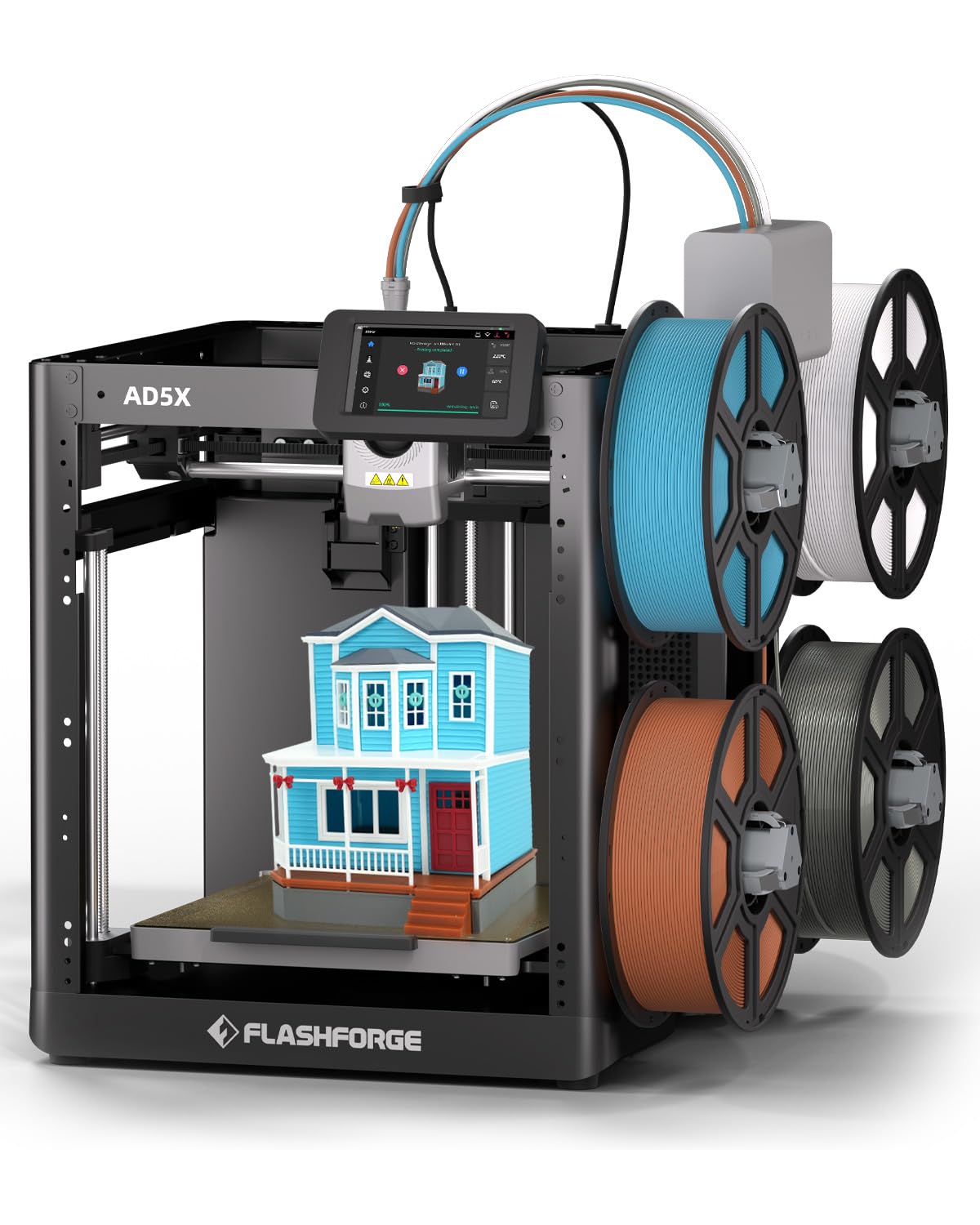
The AD5X uses an Intelligent Filament System (IFS) that automatically detects and refills a spool when it runs out, which is a lifesaver for long ASA prints. The all-metal CoreXY structure provides the stiffness needed for high-speed printing without introducing artifacts, and the 300°C nozzle handles ASA comfortably. Setup is straightforward, and it comes with a full enclosure kit available for managing ambient drafts.
For users who want reliable multicolor without a complex purging mechanism, the AD5X connects four spools directly, cutting down on wasted filament. The Flashforge Orca slicer is easy to use, and the printer handles both PLA and Silk PLA beautifully out of the box. Avid users have run over 12 kg of filament with no mid-print runouts, a testament to the system’s reliability.
The 220mm³ build volume is on the smaller side, but it is adequate for most functional prototypes. If Flashforge were to release a 300mm version, many enthusiasts would upgrade immediately. For beginners and intermediate users wanting a fuss-free multicolor experience, this is a great pick.
Why it’s great
- IFS prevents failures from empty spools during long prints.
- CoreXY frame ensures stable, vibration-free printing.
- Easy setup with pre-leveled bed.
Good to know
- Build volume limited to 220mm³.
- Warranty support can be slow in case of failure.
4. ELEGOO Centauri Carbon

For users printing carbon fiber reinforced ASA, the Centauri Carbon is a top contender. The die-cast aluminum frame is the stiffest in its class, reducing vibrations even at 500mm/s. The 320°C brass-hardened steel nozzle handles abrasive composites without wear, and the enclosed chamber with dual cooling fans creates the ideal environment for high-temp materials.
Setup is genuinely unbox and print. The auto bed leveling and intuitive touchscreen get you to a first layer in minutes. The built-in camera and dual LEDs allow for time-lapse recording and remote monitoring. Users have reported excellent bed adhesion with the dual-sided plate, and the machine runs reliably for hundreds of hours on engineering materials like PETG and PLA+.
The main consideration is that while the hardware is robust, some users have experienced early failures due to a poorly routed USB-C connector on the moving print head. The US tech support, while responsive, can take time to process replacements. If you get a unit without defects, the performance per dollar is outstanding.
Why it’s great
- 320°C nozzle for high-temp and abrasive materials.
- Die-cast frame provides exceptional stability for fast printing.
- Fully assembled right out of the box.
Good to know
- USB-C connector on moving gantry is a design weak point.
- Vibration transfer to the table can be significant.
5. QIDI PLUS4

The PLUS4 is the go-to machine for those who need to print high-temperature materials like PPS-CF, PPA-CF, and long-duration ASA. The second-generation active chamber heating system uses 400W to maintain a stable 65°C, and the dual-layer insulation prevents heat loss, drastically reducing warping. The 370°C hotend with a multi-metal integrated nozzle handles the most demanding composites without clogging.
Assembly is quick, unbox to print in about ten minutes. It has a robust independent dual Z-axis and 10mm lead screws for high precision. The HD camera allows remote monitoring, and the filament break detection prevents waste. Users with over 4,000 hours have reported that this machine outshines competitors for pure material compatibility and reliability with engineering-grade thermoplastics.
The open-source design with Klipper firmware gives advanced users full control. Some units have shipped with a factory-jammed hotend or require a manual firmware update for Wi-Fi stability. It is best suited for users who are comfortable with occasional tweaking rather than absolute beginners.
Why it’s great
- Superior active chamber heating at 65°C.
- 370°C hotend for ultra-high-temp engineering materials.
- Large 12″x12″x11″ build volume.
Good to know
- Quality control can be inconsistent on arrival.
- Wi-Fi and OTA updates sometimes require manual intervention.
6. Creality K2 Pro Combo (A)

If you need to produce large ASA parts or batch print multiple components, the K2 Pro Combo delivers a massive 300mm³ build volume and an active chamber that holds 60°C. The dual AI cameras—one for nozzle flow monitoring and one for print failure detection—mean you can walk away from long 24-hour prints with confidence.
The CFS (Creality Filament System) enables up to 16 colors, making this a powerhouse for multi-material functional parts. Hardened steel gears in the extruder handle abrasive filaments like ASA-CF without wear. The FOC step-servo motors and linear rails ensure smooth, precise motion, with the printer hitting 600mm/s and 20,000mm/s² acceleration without ringing.
The main caveat is the software. The Creality Print slicer and CFS integration can be finicky, with confusing error codes and unexplained cancellations. Experienced users can work through these issues, but beginners may find the troubleshooting frustrating. Once dialed in, it prints reliably and quickly, warranting its premium price.
Why it’s great
- 300mm³ build volume for large-scale ASA parts.
- 60°C active chamber prevents corner warping.
- Dual AI monitoring for failure-free printing.
Good to know
- CFS system and software have a steep learning curve.
- Manual firmware updates may be needed for stability.
7. Official Creality K2 Pro Combo (B)
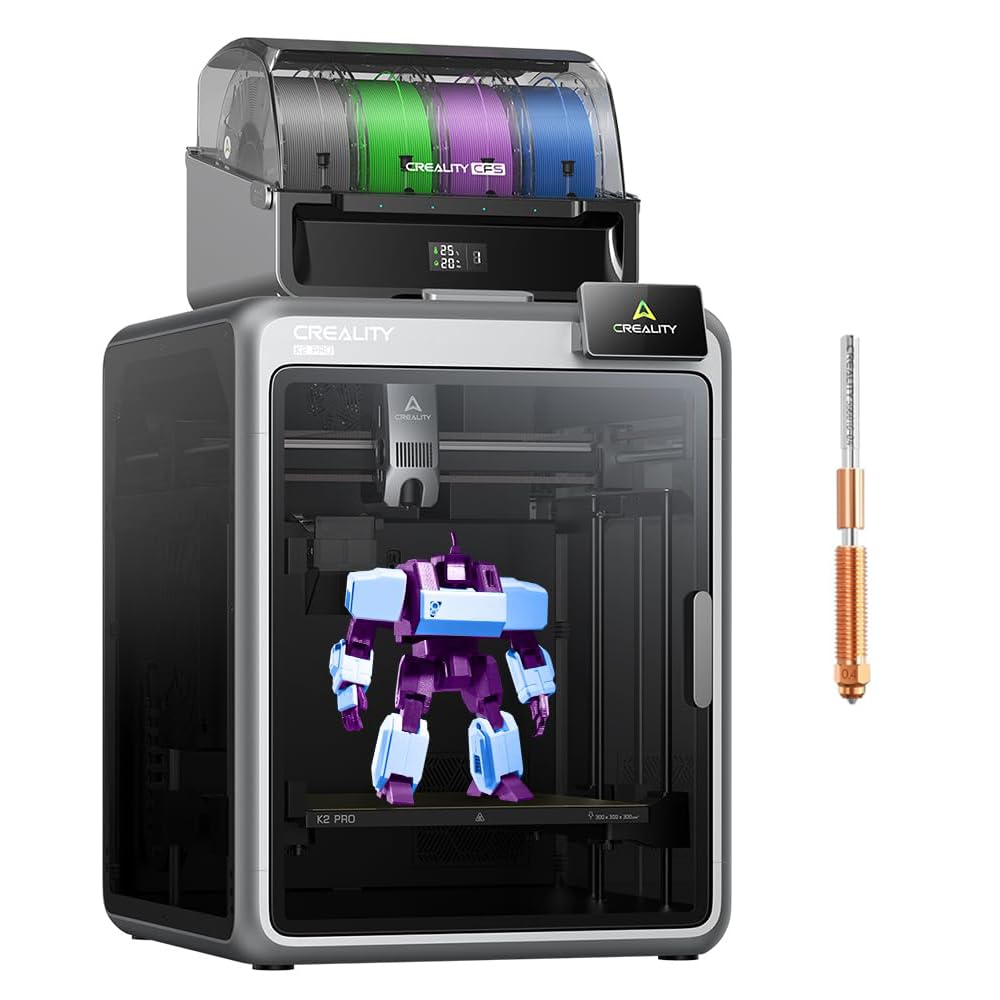
This second SKU of the K2 Pro Combo emphasizes the same 350°C nozzle and 40mm³/s flow rate, making it ideal for rapid, high-volume ASA production. The 80W high-power heater ensures the hotend maintains temperature even at high flow rates, preventing the underextrusion seen on weaker hotends.
The printer features a nozzle AI camera that dynamically adjusts flow rate in real-time, and a chamber AI camera for big-picture monitoring. The dual-axis leveling system probes only the area where the model will be printed, drastically reducing bed leveling time. Users praise its ability to push out large, complex prints with sharp detail and no layer artifacts.
A known issue is that the test print file included in the initial setup is poorly sliced, taking over 11 hours and using excess filament. Additionally, some units shipped with the voltage switch set to 230V, which can cause startup problems in North America. Double-check the voltage before the first run.
Why it’s great
- 40mm³/s high flow rate for rapid part production.
- Dual AI cameras for real-time flow and failure monitoring.
- Active chamber heating up to 60°C for warp-free parts.
Good to know
- Voltage select switch may be in wrong position from factory.
- Included test print is poorly configured and wasteful.
8. ELEGOO Jupiter 2

While the Jupiter 2 is a resin printer and not directly an FDM machine for ASA, it earns a spot for those seeking high-resolution, large-scale prototypes. The 16K screen provides a stunning 20 × 26 µm XY resolution, capturing textures and details impossible with FDM. The build volume is massive at 302mm tall, ideal for printing large tooling masters or display models.
It features a smart tank heating system that maintains a precise 30°C, ensuring consistent resin viscosity for flawless layer curing. The auto resin feeding system prevents mid-print dry-outs, and the multi-point auto leveling takes the guesswork out of setup. Users who bought two units report that the Jupiter 2 is the only printer in its class worth buying for mass production of high-detail parts.
Resin printing has its own workflow for post-processing, and the Jupiter 2 requires a substantial workspace. The LCD screen can be a wear item over time, with replacements costing around . For those needing small-run, high-fidelity parts that mimic injection molding, this is the tool for the job.
Why it’s great
- 16K resolution captures exceptional surface detail.
- Auto resin feeding and smart heating simplify the process.
- 302mm build height for large-scale models.
Good to know
- Resin printing has a longer post-processing workflow than FDM.
- LCD screen is a consumable part requiring eventual replacement.
9. Phrozen Sonic Mega 8K S

For resin-printed prototypes, the Sonic Mega 8K S is unmatched in production speed. It can print 80 detailed miniatures in under 90 minutes using ACF film and TR300 high-speed resin. The 43µm XY resolution ensures sharp edges and fine internal geometries, making it ideal for jewelry casting patterns, dental models, and collectibles.
The space-saving lift-up lid design is a practical feature for cramped workspaces, and the built-in metal drip hanger allows zero-waste workflows by draining excess resin back into the vat. The build plate is massive, and the vat is large, though the sheer size can make maintenance tricky for beginners.
That said, reliability is a mixed picture. While some users report thousands of hours of trouble-free printing, others have suffered from LCD cable failures and power supply issues. The warranty support is responsive but can involve shipping costs for replacement parts. It is a serious investment that pays off for high-volume commercial users.
Why it’s great
- Extremely fast batch production (80 models in 90 minutes).
- 43µm XY resolution for industrial-grade detail.
- Zero-waste drip hanger design.
Good to know
- Not as reliable as consumer-grade resin printers.
- Large size requires dedicated workspace for maintenance.
10. QIDI Max4 Combo

The Max4 Combo is the behemoth for ASA, offering a 390mm³ build volume and a 65°C actively heated chamber. This combination allows you to print full-size industrial parts, complex molds, and custom prototypes in one go. The closed-loop motors on the X/Y axes achieve 800mm/s, and the 2mm lead screw on the Z-axis ensures tight vertical tolerances.
The 40mm³/s high-flow hotend handles standard plastics and abrasive carbon fiber-reinforced nylon without a hitch. The Polar Cooler system (sold separately) optimizes part cooling for high-speed overhangs. Users transitioning from a QIDI Q2 to the Max4 report the same excellent precision and consistency, just on a much larger scale.
This machine is heavy—120 pounds—and requires a sturdy table. The UI is somewhat choppy, and the pre-print warmup time is long due to the massive chamber. However, for engineers and shops that need to produce large, strong ASA parts reliably, this is a cost-effective alternative to industrial Stratasys machines.
Why it’s great
- Immense 390mm³ build volume for true production scale.
- Closed-loop motors ensure high-precision motion.
- 65°C heated chamber for the most demanding ASA parts.
Good to know
- Very heavy (120 lbs), requires a dedicated work table.
- Long warmup time and high initial power draw.
11. Original Prusa CORE One

Prusa’s CORE One is an engineering workhorse that prioritizes longevity and open-source repairability. The enclosed chamber holds a stable 55°C, making it ideal for ASA, PC, and Nylon. The all-steel exoskeleton frame is exceptionally rigid, and the CoreXY design delivers high speed without sacrificing print quality.
It comes fully assembled and tested, with a free spool of Prusament PLA included. The software ecosystem is mature and intuitive, and the printer is designed for minimal maintenance. The right-to-repair philosophy means you can source parts and upgrade it years down the line. Users have praised its solid build and the fact that it is not cloud-locked, allowing for local or online use.
The main drawback is the 250mm³ build volume, which is smaller than comparably priced machines. The multicolor MMU3 add-on is expensive and can be cumbersome to set up. If you value reliability and long-term support over raw build size, the CORE One is the most future-proof choice for ASA.
Why it’s great
- Premium build quality with open-source repairability.
- 55°C actively heated chamber for reliable ASA prints.
- Prusa’s proven software and customer support network.
Good to know
- Build volume is smaller than competitors in the same price range.
- Multicolor add-on is expensive and complex to set up.
FAQ
Do I need an active chamber heater for printing ASA or is an enclosure enough?
Can I print ASA on an open-frame printer?
Final Thoughts: The Verdict
For most users, the best 3d printer for asa winner is the Bambu Lab P1S because it offers a complete, reliable system with active chamber heating and a proven track record for out-of-box performance. If you want a massive build volume for large-scale production, grab the QIDI Max4 Combo. And for open-source longevity and the right to repair, nothing beats the Original Prusa CORE One.