
Our readers keep the lights on and the weekend projects moving. As an Amazon Associate, I earn from qualifying purchases.
An engineering student’s first printer can accelerate a capstone project or derail a thesis deadline. The difference between a machine that churns out functional prototypes overnight and one that demands constant tinkering comes down to build volume, hotend temperature for advanced filaments, and the reliability of an enclosed CoreXY frame.
I’m Rikta — the co-founder and writer behind FitlyFast. I’ve spent over a hundred hours analyzing the market, reading through real engineering student reviews, and comparing hardware specs like nozzle temperature ceilings and bed-leveling automation to separate the lab-worthy printers from the frustrating time-sinks.
Whether you need high-speed FDM for tough ABS prototypes or a resin machine for precise mechanical fits, the right setup saves both time and material. Read on for a deep, data-backed breakdown of the best 3d printer for engineering students.
How To Choose The Best 3D Printer For Engineering Students
An engineering workflow demands more than a hobbyist printer. You need a machine that can handle dimensional accuracy, repeatable results, and materials that actually survive functional testing. Here are the three specs that separate a lab-grade tool from a desk ornament.
Build Volume & CoreXY Frame
For mechanical prototypes, heat sinks, or drone frames, a build volume of at least 220mm³ is the minimum. A CoreXY structure moves the print head with a fixed gantry, which gives you higher speeds without sacrificing rigidity. This matters when you’re iterating multiple parts in a single session — the frame absorbs vibration so layer lines stay sharp at 500mm/s.
Hotend Temperature & Enclosed Chamber
PLA is fine for concept models, but real engineering materials like ABS, PETG, PA (Nylon), and PC require a nozzle capable of 300°C or higher. An enclosed chamber keeps the ambient temperature stable, reducing the warping that plagues large ABS prints. Look for printers advertising a 320°C nozzle and a heated chamber if you plan on printing functional, impact-resistant parts.
Auto Leveling & Filament Compatibility
Manual bed leveling wastes study time. A printer with one-click auto leveling (and preferably a sensor that probes the bed directly via the nozzle) ensures the first layer sticks every time. Multi-material support (via an AMS or CFS unit) lets you print dissolvable supports for complex geometries, but make sure the extruder handles abrasive materials like carbon-fiber reinforced filaments.
Quick Comparison
On smaller screens, swipe sideways to see the full table.
| Model | Category | Best For | Key Spec | Amazon |
|---|---|---|---|---|
| Bambu Lab P1S | FDM | Reliable enclosed speed | 500mm/s CoreXY | Amazon |
| ELEGOO Centauri Carbon | FDM | High-temp engineering materials | 320°C nozzle, 256mm³ | Amazon |
| QIDI Q2 | FDM | Heated chamber for ABS/PC | 65°C chamber, 600mm/s | Amazon |
| Flashforge AD5X | FDM | Multi-color prototyping | 4-color IFS, 600mm/s | Amazon |
| Creality K2 Combo | FDM | 16-color multi-material | CFS unit, 260mm³ | Amazon |
| Original Prusa MK4S KIT | FDM | Open-source, educational build | Input shaping, DIY kit | Amazon |
| ELEGOO Saturn 4 Ultra 16K | Resin | Ultra-high detail parts | 16K LCD, 150mm/h | Amazon |
| Flashforge Adventurer 5M | FDM | Budget high-speed FDM | 600mm/s, 280°C nozzle | Amazon |
| Entina Tina2 Plus | FDM | Entry-level easy start | 250mm/s, auto-leveling | Amazon |
In‑Depth Reviews
1. Bambu Lab P1S

The P1S is engineered for students who need a printer that just works. Its fully enclosed CoreXY frame hits 500mm/s with 20,000mm/s² acceleration, and the auto bed leveling ensures every first layer is flawless — no manual probing probes wasted before an exam. The 260mm³ build volume fits most mechanical assemblies without requiring split parts.
This machine handles PLA and PETG effortlessly out of the box, but the enclosed design makes ABS and ASA viable without a draft shield. The Bambu Studio slicer streamlines the entire workflow, from part orientation to filament swapping. Reviewers consistently note that setup takes under 30 minutes, and the print quality rivals machines costing three times as much.
One caveat: the P1S does not ship with an AMS unit, so multi-color printing requires an additional purchase. Also, carbon-fiber reinforced filaments are not recommended. For pure, repeatable, high-speed FDM prototyping, this is the standard that other printers in its class aspire to reach.
Why it’s great
- Exceptional out-of-box reliability and print quality
- Fast print speeds with minimal vibration artifacts
- Enclosed chamber enables ABS/ASA printing
Good to know
- Multi-color AMS sold separately
- Not recommended for carbon-fiber filaments
2. ELEGOO Centauri Carbon

The Centauri Carbon arrives fully assembled and pre-calibrated — you unbox, plug in, and print. Its rigid die-cast aluminum frame keeps vibrations dampened even at 500mm/s, and the 320°C brass-hardened steel nozzle means you can run carbon-fiber reinforced PLA, PETG, and even polycarbonate blends without worrying about nozzle wear.
The 256mm³ build volume is generous for a printer in this segment, and the built-in chamber camera with dual LED lighting allows remote monitoring. The auto-leveling probe is integrated into the nozzle itself, which eliminates the offset errors that plague separate sensor designs. Reviewers praise the bed adhesion on the dual-sided PEI plate, especially for large ABS prints that normally warp.
Some users reported a communication error in the first week of ownership, though ELEGOO’s support resolved it with a replacement hotend. The custom slicer (ElegooSlicer) works well but lacks some of the advanced tuning options found in open-source alternatives. For an engineering student who wants to focus on the prototype, not the printer, this is a strong mid-range choice.
Why it’s great
- Fully assembled and pre-calibrated out of box
- 320°C hotend for engineering-grade materials
- Rigid die-cast frame for high-speed stability
Good to know
- Slicer software is proprietary and less customizable
- Occasional hotend communication errors reported
3. QIDI Q2

The QIDI Q2 is purpose-built for engineering materials. Its 2nd-generation PTC heated chamber maintains a steady 65°C, which virtually eliminates warping on large ABS prints. The 370°C high-temp nozzle opens the door to polycarbonate, Nylon, and advanced composites — materials that most hobbyist printers cannot touch.
The triple filtration system (G3 pre-filter, H12 HEPA, and activated carbon) reduces fumes from ABS and PC, making it safe for a dorm room or shared lab. The auto-leveling uses the nozzle itself as the sensor, giving you first-layer accuracy that doesn’t drift. Reviewers consistently mention the quiet operation and the responsive touchscreen interface.
However, some owners reported early firmware issues, including a UI that was partially untranslated and network connectivity drops. The AI spaghetti detection also had false positives. The QIDI support team resolved most issues with replacements, but the out-of-box experience is not as polished as the Bambu P1S. For students prioritizing material capability over plug-and-play simplicity, this is a compelling option.
Why it’s great
- 65°C heated chamber prevents ABS warping
- 370°C nozzle supports advanced materials
- Triple filtration system for safer indoor printing
Good to know
- Early firmware had UI and connectivity bugs
- AI detection can generate false alarms
4. Flashforge AD5X

The AD5X brings multi-color printing to the mid-range segment without requiring a separate AMS unit. Its integrated filament switching (IFS) supports up to four colors simultaneously, which is useful for printing parts with embedded labeling or aesthetic housings. The CoreXY frame delivers 600mm/s maximum travel speed, and the 300°C direct-drive extruder handles standard engineering filaments.
Auto-leveling is one-click, and the dual-sided PEI platform provides strong adhesion for PLA and PETG. The vibration compensation system reduces ringing on fast prints, making detailed parts like gears and brackets come out clean. Reviewers note that the printer is quiet during operation, though the filament waste ejection mechanism adds some noise.
The main drawbacks are the software stack. The stock Orca slicer lacks native IFS color import, which requires manual configuration. Some users also reported occasional clogs at the 4-in-1 connector. For students who need color-coded prototypes or multi-material supports, the AD5X offers value that the single-color machines cannot match.
Why it’s great
- Integrated 4-color filament switching no extra box
- Fast 600mm/s CoreXY with good surface finish
- Vibration compensation for sharp details
Good to know
- Stock slicer lacks IFS color import profiles
- Occasional clogs at connector point
5. Creality K2 Combo

The K2 Combo includes a single CFS unit that supports up to four colors, with the option to daisy-chain four units for 16-color printing. This is overkill for most engineering students, but if your project requires visual differentiation between components (like internal wiring or movable parts), it saves hours of post-processing painting. The 260mm³ build volume accommodates large assemblies without splitting.
The step-servo motors dynamically adjust torque in under a millisecond, which translates to extremely quiet operation — quieter than a laptop keyboard. The AI camera monitors for spaghetti failures and idling, and the auto-leveling only probes the print area, speeding up calibration. Reviewers consistently report excellent print quality with smooth layers.
Setup is advertised as plug-and-play but takes about an hour due to screen installation and cable routing. Some users reported defective power cords and CFS feeder slot errors, and the AI spaghetti detector missed an adhesion failure. Also, the CFS requires non-standard spool sizes, forcing you to print adapters. It is a capable machine if you don’t mind some initial tinkering.
Why it’s great
- Expandable to 16 colors with additional CFS units
- Step-servo motors for ultra-quiet operation
- Large 260mm³ build volume
Good to know
- CFS requires non-standard spools or printed adapters
- Setup takes longer than advertised one hour
6. Original Prusa MK4S KIT
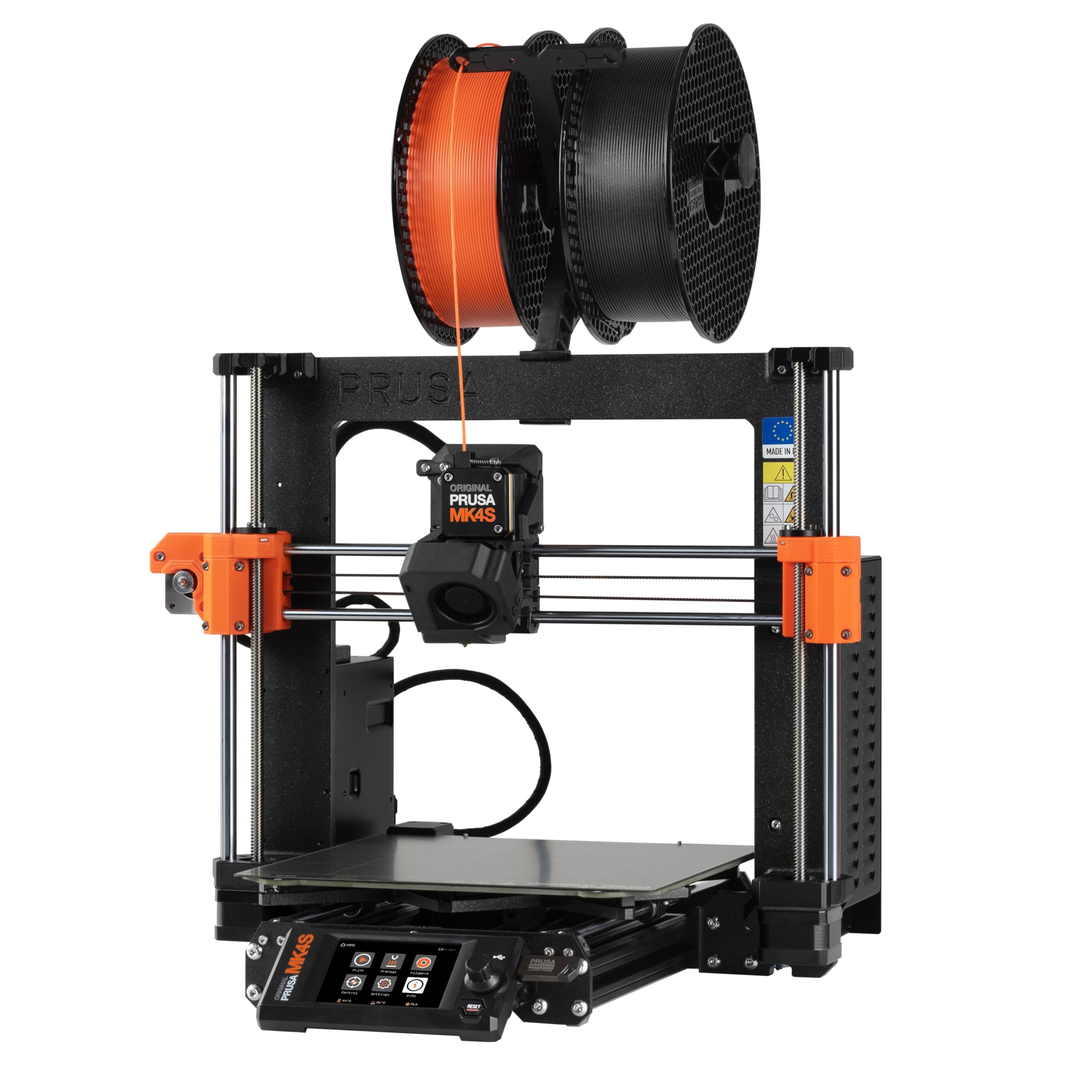
The Prusa MK4S KIT is the antithesis of the plug-and-play machines. You assemble the printer yourself from a box of parts, guided by detailed step-by-step instructions. This hands-on process teaches you the mechanical and electrical fundamentals of 3D printing — a distinct educational advantage for an engineering student. The print size is 9.84 x 8.3 x 8.6 inches, suitable for most small to medium prototypes.
Once assembled, the MK4S delivers professional-grade reliability. Input shaping reduces ringing at higher speeds, and the automatic calibration ensures consistent first layers. The open-source design means you can upgrade components over time, and Prusa’s long-term firmware support keeps the machine relevant for years. Reviewers note that the print quality from the default Prusa Slicer profiles is exceptional.
The main trade-off is the time investment — assembly takes a full weekend for most users. The price is also higher than comparable pre-assembled machines. But if you value understanding the printer’s internals and want a platform that can grow with your skills, the MK4S KIT is unmatched.
Why it’s great
- Educational DIY assembly teaches printer mechanics
- Open-source platform allows future upgrades
- Exceptional print quality from default profiles
Good to know
- Assembly takes a full weekend
- Higher price than comparable pre-built printers
7. ELEGOO Saturn 4 Ultra 16K

For engineering students who need micron-level precision — think microfluidic devices, custom connectors with tight tolerances, or detailed mold patterns — the Saturn 4 Ultra 16K is the answer. Its 16K monochrome LCD produces 10-inch prints with astonishing detail, capturing textures like fabric weave and fine hair. The tilt release technology peels the model from the vat quickly, enabling speeds up to 150mm/h.
The smart tank heating maintains resin at a steady 30°C, which reduces defects like bubbles and layer separation. The AI camera monitors for empty build plates and warped models, sending alerts to your phone. The auto-leveling is truly one-click — no manual adjustment required. Reviewers fresh to resin printing report excellent first prints out of the box.
The downsides are inherent to resin printing itself: you need proper ventilation for fumes, post-processing involves washing and curing, and the build volume is smaller than FDM alternatives. The Saturn 4 Ultra also generates moderate noise from the cooling fans. For students focused on FDM-printable prototypes, this machine is overkill. But for those needing ultra-high detail, it is the class leader.
Why it’s great
- 16K resolution for extreme detail and smooth surfaces
- Heated resin tank reduces print defects
- Auto-leveling and tilt release for fast, reliable prints
Good to know
- Requires ventilation for resin fumes
- Post-processing washing and curing needed
- Smaller build volume than FDM printers
8. Flashforge Adventurer 5M

The Adventurer 5M brings CoreXY speed to a budget-friendly price. With a maximum travel speed of 600mm/s and 20,000mm/s² acceleration, it can finish a benchy in under 30 minutes. The 280°C direct-drive extruder with quick-detach nozzle handles PLA, PETG, and ABS, making it a versatile option for students who need fast iteration cycles.
One-click auto-leveling and a dual-sided PEI platform make first-layer adhesion reliable. The dual-channel cooling fan reduces stringing on overhangs, and the vibration compensation helps maintain quality at high speeds. The Flash Maker app enables remote monitoring if you add the optional camera kit. Reviewers praise the 15-minute setup time and the intuitive software.
The main compromises are the noise level — the printer is louder than enclosed alternatives — and the small included filament sample. Some users reported connectivity issues with Orca slicer and random freezes after firmware auto-updates. For the price, however, the Adventurer 5M is an excellent entry point into high-speed FDM without breaking the bank.
Why it’s great
- Very fast 600mm/s printing in its price bracket
- Quick-detach nozzle for easy maintenance
- Rapid 15-minute setup out of box
Good to know
- Louder than enclosed printers
- Firmware updates can cause instability
9. Entina Tina2 Plus

The Tina2 Plus is the most accessible printer on this list. It comes fully assembled with a preloaded TF card, so you can start printing within minutes. The 250mm/s speed is modest compared to the CoreXY machines above, but it is adequate for learning basic FDM principles. The ceramic hotend heats to temperature in 40 seconds, reducing downtime.
The auto-leveling and dual Z-axis structure improve print stability, and the PEI spring steel platform makes model removal easy. WiFi connectivity via the Poloprint Cloud app gives access to over 1,500 models, which is helpful for brainstorming projects. The compact footprint fits easily on a dorm desk, and the partially enclosed frame adds a layer of safety.
The App is the weak point — several reviewers report registration errors and limited functionality. The printer only includes a small sample of white filament, and adapters are needed for larger spools. For a mechanical engineering student designing functional parts, the small build volume (8.6-inch cube) and low speed will be limiting. This is best for early exploration, not serious prototyping.
Why it’s great
- Truly plug-and-play out of the box
- Compact size fits in a dorm or classroom
- Auto-leveling and dual Z for better reliability
Good to know
- Small build volume limits engineering projects
- App can be buggy and unreliable
- Only 250mm/s speed is slow vs CoreXY machines
FAQ
Is a resin or FDM printer better for engineering prototypes?
What build volume do I need for mechanical engineering projects?
Can I print carbon-fiber reinforced filaments on a student budget printer?
Do I need an enclosed printer for ABS?
Final Thoughts: The Verdict
For most users, the 3d printer for engineering students winner is the Bambu Lab P1S because it delivers consistent, fast, and reliable FDM prints with an enclosed chamber that handles ABS without fuss. If you need a 320°C hotend for carbon-fiber materials and a rigid die-cast frame, grab the ELEGOO Centauri Carbon. And for heated chamber performance and 370°C nozzle capability for polycarbonate prints, nothing beats the QIDI Q2.