
Our readers keep the lights on and the weekend projects moving. As an Amazon Associate, I earn from qualifying purchases.
An engineering-grade 3D printer is the difference between a prototype that fails under load and a functional part that survives real-world stress testing. The wrong machine wastes hundreds of hours on unstable beds, weak layer adhesion, and material incompatibility that no amount of tweaking can fix.
I’m Rikta — the co-founder and writer behind FitlyFast. I’ve spent hundreds of hours researching and comparing the hardware specifications, material compatibility, and print precision of the latest FDM and resin printers to find the machines that genuinely serve engineering workflows.
Whether you need carbon-fiber reinforced parts, multi-material assemblies, or micron-level accuracy for tight-tolerance components, this guide delivers the data you need to choose the right 3d printer for engineering without getting buried in marketing hype.
How To Choose The Best 3D Printer For Engineering
Selecting a printer for engineering applications requires more than checking maximum speed or build volume. You need to evaluate material compatibility, dimensional accuracy, and the reliability of the motion system under continuous use. These factors determine whether your end-use parts meet functional requirements or simply look good on a shelf.
Material Compatibility
Engineering filaments demand higher extrusion temperatures and often require an enclosed, heated chamber. If your work involves carbon-fiber reinforced nylon, polycarbonate, or PEEK, look for an all-metal hotend rated above 300°C. A heated chamber between 55°C and 70°C minimizes warping and improves interlayer adhesion on large functional parts. For resin-based workflows, verify that the printer supports high-viscosity engineering resins (up to 8,000 cP) for durable, heat-resistant models.
Motion System and Build Volume
CoreXY architecture delivers the best balance of speed and precision for mechanical parts, especially on tall or wide prints. The rigid frame and reduced moving mass minimize vibration artifacts that can ruin dimensional accuracy on bearing surfaces or threaded components. Evaluate the build volume against your largest anticipated part — a 350mm³ volume allows one-piece production of many automotive, drone, or jig components without splitting and gluing.
Print Precision and Reliability Features
Auto bed leveling, vibration compensation, and filament runout detection are not luxuries for engineering work; they are necessities that prevent failed prints that waste expensive material. A nozzle-based leveling sensor provides more reliable first-layer results than inductive probes on textured or coated build plates. For multi-material or multi-color assemblies, look for independent toolheads or purge-efficient systems that minimize material waste during transitions.
Quick Comparison
On smaller screens, swipe sideways to see the full table.
| Model | Category | Best For | Key Spec | Amazon |
|---|---|---|---|---|
| Prusa XL 5-Tool | Premium CoreXY | Industrial multi-material | 5 independent toolheads | Amazon |
| Creality K2 Plus Combo | Large-Format FDM | Large functional prototypes | 350mm³ build volume | Amazon |
| Anycubic Photon P1 | Pro Resin | Dual-material engineering resin | 8,000 cP viscosity support | Amazon |
| ELEGOO Saturn 4 Ultra 16K | Resin | Ultra-high detail prototypes | 16K mono LCD | Amazon |
| QIDI Q2 | Enclosed FDM | Advanced composites | 65°C heated chamber | Amazon |
| Bambu Lab P1S | Enclosed CoreXY | Fast iterative prototyping | 500mm/s / 20,000mm/s² | Amazon |
| Bambu Lab A1 Combo | Multi-Color FDM | Multi-color functional parts | AMS lite 4-color support | Amazon |
| Creality K2 SE Combo | Multi-Color FDM | Desktop multi-material | CFS auto-switching | Amazon |
| FLASHFORGE AD5M Pro | Enclosed CoreXY | Entry-level enclosed printing | 3s quick-swap nozzle | Amazon |
| ELEGOO Centauri Carbon | CoreXY FDM | Carbon-fiber reinforced parts | 320°C hardened nozzle | Amazon |
| Anycubic Kobra X | Multi-Color FDM | Budget multi-color prototyping | 4-color built-in printing | Amazon |
In‑Depth Reviews
1. Original Prusa XL 5 Independent Toolhead

The Prusa XL redefines what a desktop engineering platform can do with its five independent toolheads and massive 360mm³ build volume. Each toolhead can carry a different material or color, allowing you to print soluble supports alongside carbon-fiber nylon or polycarbonate without manual swapping. The segmented heated bed intelligently zones energy to reduce warping on large ABS parts, a feature critical for dimensional stability in jig and fixture production.
The open-source Prusa ecosystem gives you full control over firmware, slicer profiles, and maintenance — no forced cloud logins or proprietary filament locks. Users report that the EtherNet model can occasionally have connectivity hiccups, but once networked via Wi-Fi, Prusa Connect offers seamless remote monitoring. The assembly process requires about half a day for the toolheads and display, but the resulting print quality is unmatched in its class for multi-material engineering work.
For engineering teams that need maximum flexibility in material selection and zero compromises on part strength, the XL delivers. The five-tool system dramatically reduces post-processing time compared to manual filament swaps, and the durable all-metal frame ensures years of reliable service under heavy use.
Why it’s great
- Five independent toolheads for true multi-material printing with soluble supports
- Segmented heated bed minimizes warping on large engineering-grade parts
Good to know
- Assembly requires half a day — not truly ready-to-print out of the box
- EtherNet model has occasional connection issues; Wi-Fi setup is more reliable
2. Creality K2 Plus Combo

The K2 Plus Combo tackles large-format engineering production with a 350mm³ build volume and a step-servo motor system that hits 30,000mm/s² acceleration. This is not a desktop toy — the rigid die-cast matrix frame and four linear rods on the Z-axis virtually eliminate layer shift on tall, dense prints. The actively heated chamber and hardened steel hotend unlock PA-CF, PPA-CF, and other high-temperature composites essential for automotive or drone components.
The Creality Automatic Material System (CFS) enables up to 16 colors or materials when linking four units, and the integrated filament cutter automates filament changes mid-print. The dual AI cameras provide real-time spaghetti detection and time-lapse recording, though first-unit quality control has been inconsistent — some users report needing to reseat cables or reverse motor directions. The sheer weight of the machine makes it a permanent installation, not something you move between desks.
Once dialed in, the K2 Plus produces large functional parts that rival the output of printers costing twice as much. The magnetic build plate simplifies part removal, and the strain gauge-based auto leveling ensures a perfect first layer across the entire 350mm bed. Heavier documentation would help new users navigate the initial setup, but the print quality and speed justify the learning curve.
Why it’s great
- 350mm³ build volume enables one-piece production of large functional parts
- Step-servo motors deliver 30,000mm/s² acceleration with quiet operation
Good to know
- Quality control can be inconsistent — some units require immediate troubleshooting
- Extremely heavy machine needs two people for unboxing and permanent placement
3. ANYCUBIC Photon P1
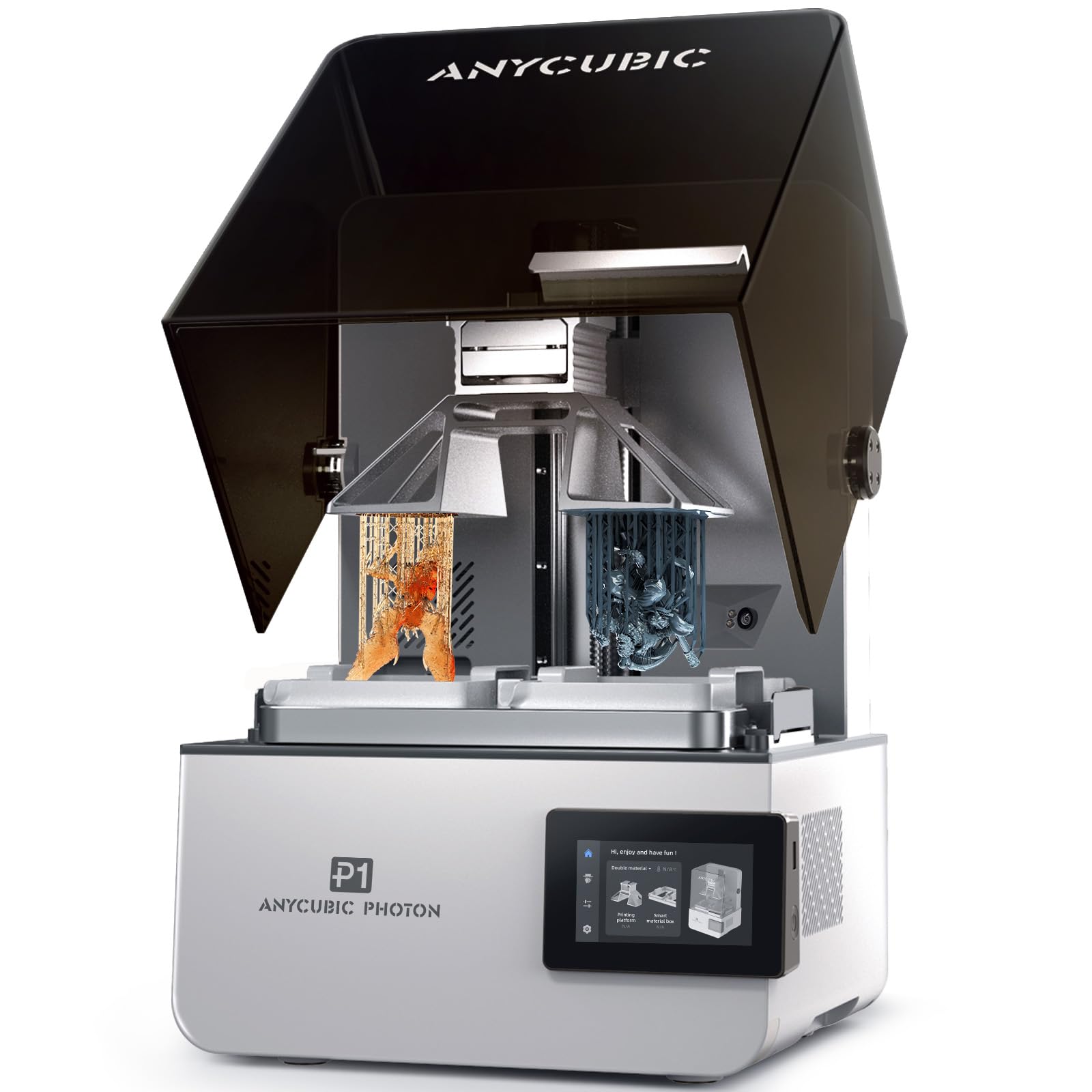
The Photon P1 bridges the gap between hobbyist resin printing and professional engineering applications. Its dual-color capability uses a forked build plate and two resin vats to print with two different materials or colors simultaneously, ideal for overmolded prototypes or rigid-flex assemblies. The machine handles resins up to 8,000 cP viscosity — 40 times thicker than standard resins — meaning you can use tough, heat-resistant engineering resins directly out of the bottle.
The ball screw Z-axis and precision guide rails eliminate the layer wobble common in lead-screw systems, producing consistent 16.8µm XY resolution across the 8.78″ x 4.96″ build area. Smart Leveling 3.0 uses real-time pressure feedback at four corners to self-calibrate before every print, removing the guesswork from first-layer optimization. Wave Release Technology reduces peel force by 60%, which significantly lowers failure rates on tall, delicate models.
Users consistently praise the build quality and the fact that it just works — first prints come out perfect with factory settings. The included AI monitoring detects resin levels and residue in the vat, preventing failed prints before they start. The slicer can occasionally crash on complex multi-vat configurations, but the hardware reliability makes this the top choice for dental labs and engineering shops running production resin parts.
Why it’s great
- Ball screw Z-axis delivers industrial-grade precision with zero play
- Dual-material printing with high-viscosity engineering resins up to 8,000 cP
Good to know
- Slicer can crash on complex dual-material profiles
- Steep learning curve for multi-vat configuration
4. ELEGOO Saturn 4 Ultra 16K

For engineering work that demands extreme surface detail — think microfluidic channels, intricate cooling geometries, or dental aligners — the Saturn 4 Ultra’s 16K mono LCD delivers the highest XY resolution in this comparison. The smart tank heating system maintains resin at 30°C for consistent viscosity, dramatically reducing bubbles and layer separation that plague cold resin prints. Tilt release technology peels each layer quickly and gently, allowing print speeds up to 150mm/h without sacrificing precision.
The AI camera provides real-time monitoring with alerts for empty build plates and warped models, though detection accuracy varies with lighting and resin color. The flip-up lid and auto-leveling make it accessible for users new to resin printing, while the large 8.33″ x 4.66″ build plate accommodates multiple small parts or a single large dental arch. WiFi file transfer eliminates the need for USB sticks, streamlining the workflow for batch production.
Users consistently highlight the print quality as exceptional — hair-thin details and fabric textures come out crisp with zero visible layer lines. The resin pooling on the build plate can be addressed with a printed drip bracket, and increasing base exposure to 40-45s improves adhesion on the first layer. The Saturn 4 Ultra is the go-to for engineering applications where surface finish and detail resolution are more critical than raw material strength.
Why it’s great
- 16K mono LCD produces the highest detail resolution for precision prototypes
- Smart tank heating at 30°C eliminates cold-resin defects
Good to know
- Resin pools on build plate without a printed drip bracket
- AI detection can give false positives depending on resin and lighting
5. QIDI Q2

The QIDI Q2 strikes the best balance of features, material versatility, and price for engineering users. Its 2nd-generation PTC heated chamber maintains a stable 65°C, which is the sweet spot for printing ABS, ASA, and polycarbonate without warping or delamination on large parts. The 370°C hardened steel nozzle unlocks carbon-fiber and glass-fiber composites, while the nozzle-based leveling sensor delivers unmatched first-layer accuracy regardless of bed surface texture or condition.
The triple filtration system (G3 pre-filter, H12 HEPA, and activated carbon) makes this one of the safest enclosed printers for office or classroom environments, effectively neutralizing styrene fumes from ABS. The 1.5GT synchronous belt reduces vibration artifacts (VFA) for ultra-smooth surface finishes on functional prototypes. Users report flawless first prints with PLA, PETG, PETG-CF, and ABS straight out of the box, with setup taking under 20 minutes.
Some users have reported false positives from the AI spaghetti detection and occasional chamber heater fan errors, but QIDI’s customer support is praised for sending replacement parts quickly. The QIDI BOX enables up to 16-color multi-material printing, though early reviews suggest waiting for the firmware to mature. For engineers who need one machine that handles everything from rapid PLA prototyping to carbon-fiber reinforced production parts, the Q2 is the smartest investment.
Why it’s great
- 65°C heated chamber prevents warping on large ABS and polycarbonate prints
- Nozzle-based auto leveling ensures perfect first layers on any bed surface
Good to know
- AI spaghetti detection can generate false positives during normal printing
- Chamber heater fan can fail early; support is responsive for replacements
6. Bambu Lab P1S

The Bambu Lab P1S is a speed-centric enclosed printer that dramatically shortens the design-print-test cycle for iterative engineering. Its CoreXY motion system reaches 500mm/s with 20,000mm/s² acceleration, turning a Benchy into a 20-minute proposition. The fully enclosed body maintains stable temperatures for ABS and ASA, and the auto bed leveling system checks the bed before every print, eliminating a major failure point for busy engineering workflows.
The 265mm³ build volume is generous for a desktop printer, fitting most jigs, brackets, and small enclosures without splitting. The Bambu Studio slicer offers deep profile customization for PLA, PETG, TPU, PVA, PET, ABS, and ASA, though Bambu Lab recommends against using carbon or glass-fiber reinforced polymers in this model. The AMS unit adds up to 16-color multi-material capability, but it’s a separate purchase that pushes the total investment higher.
Users consistently report that the P1S buries older printers in terms of reliability and speed. The print quality is rated 95/100 out of the box, with minimal layer lines and perfect first-layer adhesion. TPU can be finicky to dial in, but once tuned, it prints flexibles reliably. The P1S is the go-to for teams that need fast, repeatable results across a range of standard engineering filaments without constant maintenance.
Why it’s great
- 500mm/s print speed dramatically reduces iterative design cycle time
- Auto bed leveling and filament detection deliver near-zero failed prints
Good to know
- Not recommended for carbon or glass-fiber reinforced composites
- TPU requires careful tuning for reliable flexible printing
7. Bambu Lab A1 Combo + LED Lamp Kit

The A1 Combo brings Bambu Lab’s fast, reliable printing to a more accessible price point without sacrificing the multi-color capability of the AMS lite. The bed-slinger design with 10,000mm/s² acceleration is not as rigid as the P1S for demanding materials, but for PLA, PETG, and TPU prototyping, it produces excellent results with full-auto calibration that handles Z-offset and bed leveling automatically. The active flow rate compensation algorithm ensures consistent extrusion across the entire print.
The included LED Lamp Kit allows you to print illuminated functional models for lighting projects or custom décor — a nice bonus for product designers creating display prototypes. The 1-clip quick-swap nozzle makes maintenance easy, and the quiet operation stays below 48 dB, making it suitable for shared workspaces. Users consistently praise the easy setup and the huge library of free prints available through the MakerWorld app.
For engineering teams that prioritize multi-color prototypes over high-temperature materials, the A1 Combo delivers incredible value. The AMS lite handles third-party PLA with spool adapters, and the app alerts you when prints finish or encounter issues. The open-frame design means it’s best for non-warping filaments, but for PLA-driven design iterations with color differentiation, it’s a hard machine to beat for the money.
Why it’s great
- Full-auto calibration eliminates manual Z-offset and bed leveling adjustments
- AMS lite enables 4-color printing with reliable flow rate compensation
Good to know
- Open-frame design limits material compatibility to non-warping filaments
- No built-in camera for remote monitoring — requires external setup
8. Creality K2 SE Combo
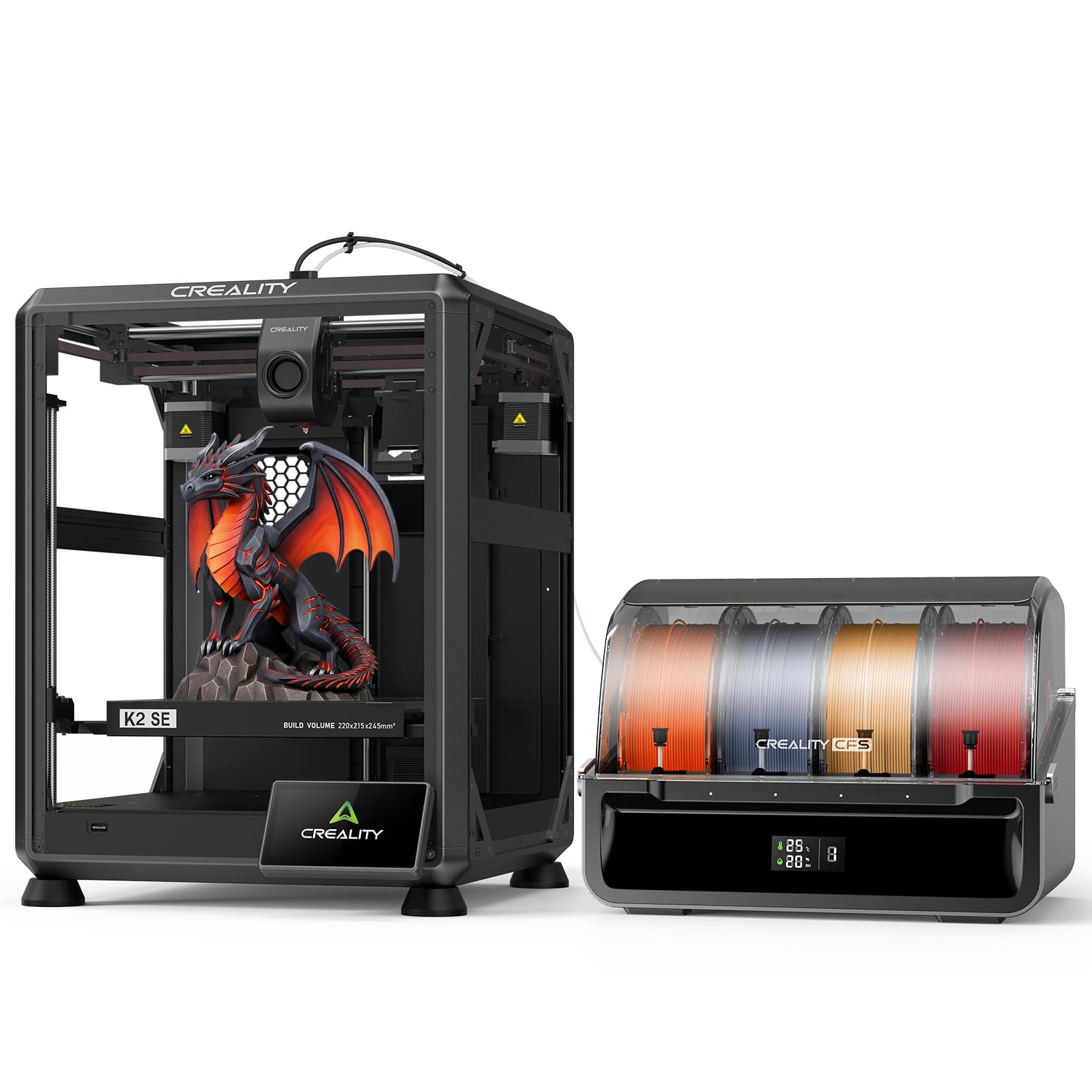
The K2 SE Combo is Creality’s answer to the demand for compact multi-color printing on a budget. The Creality Filament System (CFS) handles auto-switching between up to four filaments, with color recognition and moisture-proof storage to keep hygroscopic materials dry. The direct-drive extruder with hardened steel gears feeds flexible and rigid filaments smoothly, and the smart auto leveling scans only the required print area to speed up preparation.
The die-cast aluminum frame minimizes vibration at speeds up to 500mm/s, and the 220mm x 215mm x 245mm build volume is sufficient for most desktop engineering parts. The modular quick-swap nozzle makes maintenance easy, though stock cooling fans are slightly underpowered for aggressive overhangs. Users report 45-minute assembly and very reliable operation for non-stop hobbyist and light production use.
The main downside is the software: the Creality OS app and cloud connectivity have been problematic for some users, with connection drops and account sharing issues. The firmware update process is also more complex than competitors, requiring a hidden USB-C connector on the screen. Despite the software frustrations, the hardware is solid and the CFS multi-color system works reliably once the initial hurdles are cleared.
Why it’s great
- CFS auto-switching handles up to 4 filaments with moisture-proof storage
- Solid die-cast frame maintains print quality at 500mm/s
Good to know
- Creality OS app and cloud connectivity are unreliable for some users
- Stock cooling fans are underpowered for steep overhang geometries
9. FLASHFORGE AD5M Pro

The Adventurer 5M Pro offers an easy entry point to enclosed CoreXY printing with dual-layer filtration for safe classroom or home-office use. The 3-second quick-swap nozzle system (0.4mm and 0.6mm included) makes switching between detailed and fast prints effortless, and the direct-drive extruder handles flexible TPU without jamming. The built-in vibration compensation keeps layers smooth at 600mm/s, though the 220mm³ build volume is on the smaller side for large engineering parts.
The enclosed chamber maintains stable temperatures for ABS, ASA, and PETG, and the dual-layer filtration blocks dust and smoke effectively. The Maker app and built-in camera allow remote monitoring, and the power-loss recovery and filament runout detection prevent failed prints.
The main concerns are the single extruder design (no multi-color without external modifications) and the price, which some users feel is higher than comparable competitors. The software guidance is minimal, requiring users to download the latest version from the website rather than using the outdated USB version. For teams new to enclosed printing who want a reliable, safe, and fast machine, the AD5M Pro delivers consistent results.
Why it’s great
- 3-second quick-swap nozzle enables rapid switching between detail and speed profiles
- Dual-layer filtration makes it safe for classrooms and indoor offices
Good to know
- 220mm³ build volume is smaller than many competing mid-range printers
- Software guidance is minimal — needs manual download for latest version
10. ELEGOO Centauri Carbon

The Centauri Carbon is ELEGOO’s push into the CoreXY FDM market, and it arrives fully assembled and pre-calibrated for immediate use. The 320°C brass-hardened steel nozzle and enclosed chamber with enhanced cooling are optimized for carbon-fiber reinforced filaments, making it a strong contender for engineering users who need lightweight, heat-resistant parts for drones, automotive, or athletic applications. The 256mm³ build volume is a practical size for most functional prototypes.
The rigid die-cast aluminum frame minimizes vibrations at 500mm/s, and the automatic vibration compensation and pressure advance ensure consistent first layers. The built-in chamber camera with dual LED lighting supports real-time monitoring and time-lapse capture. The dual-sided build plate features a PLA Specific Surface for excellent adhesion at lower bed temperatures — a thoughtful detail that saves energy on PLA prints.
Users consistently rate the print quality highly, with the benchy completing in 18 minutes. The auto-leveling is flawless, and preset slicer profiles for ABS work perfectly out of the box. There have been some reports of USB-C cable routing issues on early units causing communication errors, but replacement units have been error-free. For budget-conscious engineering teams needing carbon-fiber capability without the premium price tag, the Centauri Carbon is a compelling choice.
Why it’s great
- 320°C hardened nozzle handles carbon-fiber and glass-fiber composites
- Fully assembled and pre-calibrated — ready to print in under 30 minutes
Good to know
- Early units had USB-C cable routing issues on moving parts
- Multi-color capability is not available — single extruder only
11. Anycubic Kobra X

The Kobra X brings 4-color built-in multi-material printing to a budget price point, making it accessible for engineering students and makers who need color differentiation in prototypes without investing in an expensive AMS system. The ACE 2 Pro system enables up to 19 colors when adding extra units, with a dual-speed purging mechanism that reduces filament and machine travel path by 81.25% — cutting material costs in half during color changes.
The LeviQ 3.0 auto bed leveling uses 49-point calibration and a proprietary algorithm to ensure 100% bed flatness, and the 300°C all-metal hotend handles PLA, PETG, TPU, PVA, and ASA. The smart AI monitoring includes spaghetti detection and foreign object detection through the app, and the large 260mm³ build volume accommodates most desktop engineering parts. Users report 265 hours of continuous operation in one month with zero adhesion or clogging issues.
The main drawback is the first-unit failure rate — some users report prints not sticking to the bed and dragging across the surface, likely due to inconsistent factory calibration. The phone app could be more polished, and the open-frame design limits material compatibility to non-warping filaments. For budget-constrained engineering projects where multi-color PLA is sufficient, the Kobra X delivers tremendous value, but it requires patience with occasional quality control issues.
Why it’s great
- Built-in 4-color printing at a price point that normally buys a single-color machine
- 49-point LeviQ 3.0 auto leveling ensures reliable first layers
Good to know
- Quality control inconsistencies can cause first-layer adhesion failures out of the box
- Open-frame design limits material compatibility to low-warp filaments like PLA and PETG
FAQ
Can a 3D printer for engineering print carbon-fiber reinforced filament?
What is the difference between CoreXY and bed-slinger motion for engineering?
Final Thoughts: The Verdict
For most users, the 3d printer for engineering winner is the QIDI Q2 because it combines a 65°C heated chamber, a 370°C nozzle for advanced composites, and triple filtration at a price that undercuts many competitors with similar specs. If you need true multi-material independence with soluble supports, grab the Prusa XL 5-Tool. And for cost-sensitive engineering teams who need carbon-fiber capability, nothing beats the ELEGOO Centauri Carbon for its pre-calibrated out-of-box experience and 320°C hardened nozzle.