
Our readers keep the lights on and the weekend projects moving. As an Amazon Associate, I earn from qualifying purchases.
Stepping past entry-level machines means you no longer tolerate constant bed leveling, slow print speeds, or single-color limitations. As an intermediate user, you need a printer that handles advanced filaments like PETG, TPU, and ABS without constant tinkering, yet offers enough open-source flexibility to satisfy your growing curiosity about tuning and upgrades. The market now delivers CoreXY speed, multi-color capability, and heated chambers at prices that make professional-grade results accessible to hobbyists.
I’m Rikta — the co-founder and writer behind FitlyFast.
This guide evaluates eleven machines on build volume, nozzle temperature range, auto-leveling reliability, and multi-material support so you can confidently choose the right 3d printer for intermediate users.
How To Choose The Best 3D Printer For Intermediate Users
Intermediate users face a different set of trade-offs than beginners. You no longer need a machine that holds your hand through every step, but you also don’t have time to rebuild a hotend every weekend. The right choice balances speed, material versatility, and community support without locking you into a proprietary ecosystem.
Motion System: Bed Slinger vs CoreXY
Bed slingers use a moving Y-axis bed, which limits speed because heavy beds create momentum that degrades layer quality above 150 mm/s. CoreXY printers fix the print head to two stationary belts driven by independent motors, allowing accelerations of 20,000 mm/s² and speeds up to 600 mm/s without sacrificing precision. For intermediate users tackling larger, more complex models, CoreXY is the clear recommendation.
Nozzle Temperature and Material Range
A stock nozzle that maxes out at 260°C restricts you to PLA, PETG, and TPU. If you plan to print ASA, polycarbonate, nylon, or carbon-fiber composites, you need a nozzle rated to at least 300°C. A bimetal or hardened steel nozzle prevents wear from abrasive filaments and extends the machine’s usable lifespan. Heated chambers (60°C+ for ABS) eliminate warping and layer separation in engineering-grade materials.
Auto-Leveling and First Layer Reliability
Intermediate users value dependability over manual ritual. Look for inductive probes or loadcell-based sensors that perform 25‑ to 49-point bed mesh calibration before every print. Systems that combine vibration compensation with pressure advance — like Bambu Lab’s Active Flow Rate Compensation or Elegoo’s automatic vibration compensation — produce consistent first layers even on imperfect beds.
Ecosystem and Slicer Compatibility
Closed ecosystems force you to use the manufacturer’s slicer, filament, and cloud service. Open-source machines (Prusa, QIDI, Creality) let you use Orca Slicer, PrusaSlicer, or Cura and connect to OctoPrint for full control. If you enjoy tweaking retraction, acceleration, and temperature profiles, choose hardware that supports standard G-code without authentication locks.
Quick Comparison
On smaller screens, swipe sideways to see the full table.
| Model | Category | Best For | Key Spec | Amazon |
|---|---|---|---|---|
| Bambu Lab P1S | Enclosed CoreXY | Versatile multi-material printing | 500mm/s, 20,000mm/s² | Amazon |
| Original Prusa MK4 | DIY Kit | Learning construction and maintenance | Loadcell auto-leveling | Amazon |
| Original Prusa MK4S | Assembled CoreXY | Professional-grade reliability out of box | Input shaping, 9.84″ x 8.3″ x 8.6″ | Amazon |
| Creality K2 Combo | Multi-Color CoreXY | 16-color large-volume printing | 600mm/s, 260mm³ build | Amazon |
| QIDI Q1 Pro | Heated Chamber | ABS, PC, and carbon fiber prints | 350°C bimetal nozzle | Amazon |
| Anycubic Kobra X | Multicolor FDM | Entry-level multi-color printing | 49-point auto leveling | Amazon |
| FLASHFORGE AD5M Pro | Enclosed Direct Drive | Low-fume classroom and office use | Dual-layer filtration | Amazon |
| FLASHFORGE AD5X | Multi-Color CoreXY | Affordable 4-color prints | 600mm/s, 20,000mm/s² | Amazon |
| Bambu Lab A1 Mini Combo | Compact Bed Slinger | Small prints with multi-color | 10,000mm/s² acceleration | Amazon |
| ELEGOO Centauri Carbon | Enclosed CoreXY | Carbon fiber and advanced filaments | 320°C hardened steel nozzle | Amazon |
| Creality K2 Combo | Premium Multi-Color | 16-color with CFS dry box | 300°C direct drive extruder | Amazon |
In‑Depth Reviews
1. Bambu Lab P1S 3D Printer

The P1S delivers the speed and enclosed reliability that intermediate users crave. Its CoreXY motion system hits 500 mm/s with 20,000 mm/s² acceleration, and the automatic bed leveling runs before every print — no more manual calibration before tight deadlines. The fully enclosed chamber keeps temperatures stable for ABS and ASA, while the dual-gear direct-drive extruder handles flexible TPU without jamming.
Multi-color capability requires adding the AMS unit separately, but the P1S supports up to 16 colors when paired with multiple AMS modules. The Bambu Studio slicer offers detailed profiles for PLA, PETG, TPU, and ABS, though TPU can occasionally struggle with retraction at high speeds. Users consistently report consistent first layers out of the box, with minimal layer lines even on tall models.
Setup takes under 30 minutes, and the built-in camera lets you monitor long prints remotely. The footprint is larger than a typical bed slinger, so measure your workspace. The P1S strikes an excellent balance between professional print quality and ease of use for the intermediate market.
Why it’s great
- Fast 500 mm/s CoreXY motion with vibration compensation
- Reliable auto-leveling with inductive probe
- Enclosed chamber enables ABS/ASA printing
Good to know
- AMS multi-color unit sold separately
- TPU retraction can be inconsistent at high speeds
- Requires Bambu Studio slicer for full feature access
2. Original Prusa MK4 3D Printer Kit

The MK4 kit is the ultimate learning tool for intermediate users who want to understand every component of their machine. The Loadcell sensor eliminates manual Z-offset adjustment by measuring nozzle pressure against the print bed — a genuinely intelligent solution. The Nextruder direct-drive extruder supports quick-swap nozzles and handles PLA, PETG, and TPU with excellent consistency.
Assembly takes several hours but provides deep knowledge of wiring, belt tension, and frame alignment that pays off during maintenance. The 250 × 210 × 220 mm build volume is moderate, but the PrusaSlicer profiles produce exceptionally smooth surfaces and dimensional accuracy within 0.004 inches on test cubes. Users report over 5 kg of filament printed without hotend jams when using quality brands.
The open-source firmware means you can customize acceleration curves, add OctoPrint, or upgrade to the MK4S input-shaping kit later. The Prusa community is one of the most active for troubleshooting niche materials. This printer rewards patience and curiosity, making it ideal for users who want to graduate from plug-and-play to deep understanding.
Why it’s great
- Loadcell-based auto-leveling eliminates manual Z-offset
- Open-source firmware and community support
- Exceptional dimensional accuracy out of the box
Good to know
- Kit assembly takes several hours
- Moderate build volume compared to CoreXY competitors
- No heated chamber for ABS/ASA
3. Original Prusa MK4S High-Speed 3D Printer

The pre-assembled MK4S delivers the same legendary Prusa reliability with input shaping for high-speed motion compensation. This means sharper corners and reduced ringing on overhangs even at faster speeds. The 32-bit connected platform supports remote printing through Prusa Connect, and the Nextruder v2 handles quick nozzle swaps without recalibrating the Z-offset.
Print quality is professional-grade: a 12-hour dragon cup printed without supports showed flawlessly smooth surfaces according to one owner. The MK4S ships with a 1 kg spool of Prusament PLA Galaxy Black, so you can start printing immediately. The open-source ecosystem allows compatibility with Orca Slicer and Cura, and the firmware receives regular updates addressing community feedback.
The main limitation remains the moderate build volume (9.84 × 8.3 × 8.6 inches) and the lack of an actively heated chamber. For ABS and PC, you will need an aftermarket enclosure. But for PLA, PETG, and TPU, the MK4S delivers unmatched surface finish and dimensional stability.
Why it’s great
- Pre-assembled with input shaping for high-speed precision
- Quick-swap nozzles without Z-offset re-calibration
- Open-source firmware with regular updates
Good to know
- No heated chamber for advanced engineering materials
- Build volume moderate for large helmet prints
- Higher price than comparable CoreXY machines
4. Creality K2 Combo (A) 3D Printer

The K2 Combo combines Creality’s largest build volume (260 mm³) with a CFS multi-color system that supports up to 16 colors when connecting four units. The step-servo motors dynamically adjust torque in under a millisecond, resulting in consistent extrusion and quiet operation at high speeds — owners describe it as quieter than a laptop keyboard. The enclosed chamber and 300°C direct-drive extruder handle PLA, PETG, ABS, and PLA-CF without modification.
The auto-leveling sensor probes only the area where the model will print, dramatically reducing calibration time. The AI camera detects spaghetti failures and filament runout, though some users report the AI missed operator errors with adhesion. The included spare parts kit and dry box show Creality’s commitment to long-term ownership. Setup takes under an hour, with one user printing four-color models on the same day.
Reliability concerns appear in some reviews — a defective power cord and 5 GHz Wi-Fi incompatibility with the camera were noted. The CFS requires spool adapters for non-Creality filament, and printing four adapters takes four to five hours. If you are comfortable with occasional troubleshooting, the K2 Combo delivers massive multi-color potential.
Why it’s great
- 260 mm³ build volume — largest in this comparison
- 16-color multi-printing with up to four CFS units
- Quiet step-servo motors and enclosed chamber
Good to know
- CFS requires spool adapters for third-party filaments
- AI camera can miss some adhesion failures
- Build quality inconsistencies reported in early units
5. QIDI Q1 Pro 3D Printer

The Q1 Pro is the machine you buy when you need to print ABS, polycarbonate, or carbon-fiber composites reliably. Its actively heated chamber reaches 60°C, eliminating warping on large ABS parts, and the 350°C bimetal nozzle handles abrasive filaments without degradation. The independent dual Z-axis motors and CoreXY motion system achieve 600 mm/s with 20,000 mm/s² acceleration while maintaining sub-0.02 mm repeatability.
Full-auto calibration uses dual sensors for precise leveling, and the intelligent Hall filament runout sensor detects tangles before they ruin a print. The 1080p HD camera supports real-time monitoring and time-lapse photography. QIDI’s slicer is based on the open-source Klipper firmware, giving advanced users access to custom macros and PID tuning.
The side spool mount feels flimsy — many users 3D-print a replacement bracket. The exhaust fan lacks a carbon filter, so ventilate the area when printing ABS. Despite these minor inconveniences, the Q1 Pro consistently produces flawless ABS parts straight out of the box with stock profiles, making it the best option for functional prototyping with engineering materials.
Why it’s great
- 350°C nozzle and actively heated 60°C chamber
- Excellent ABS and polycarbonate print quality out of box
- Open-source Klipper-based firmware
Good to know
- Side filament spool mount is poorly designed
- No built-in carbon filter for fumes
- WiFi-only connectivity, no ethernet port
6. Anycubic Kobra X Multicolor 3D Printer
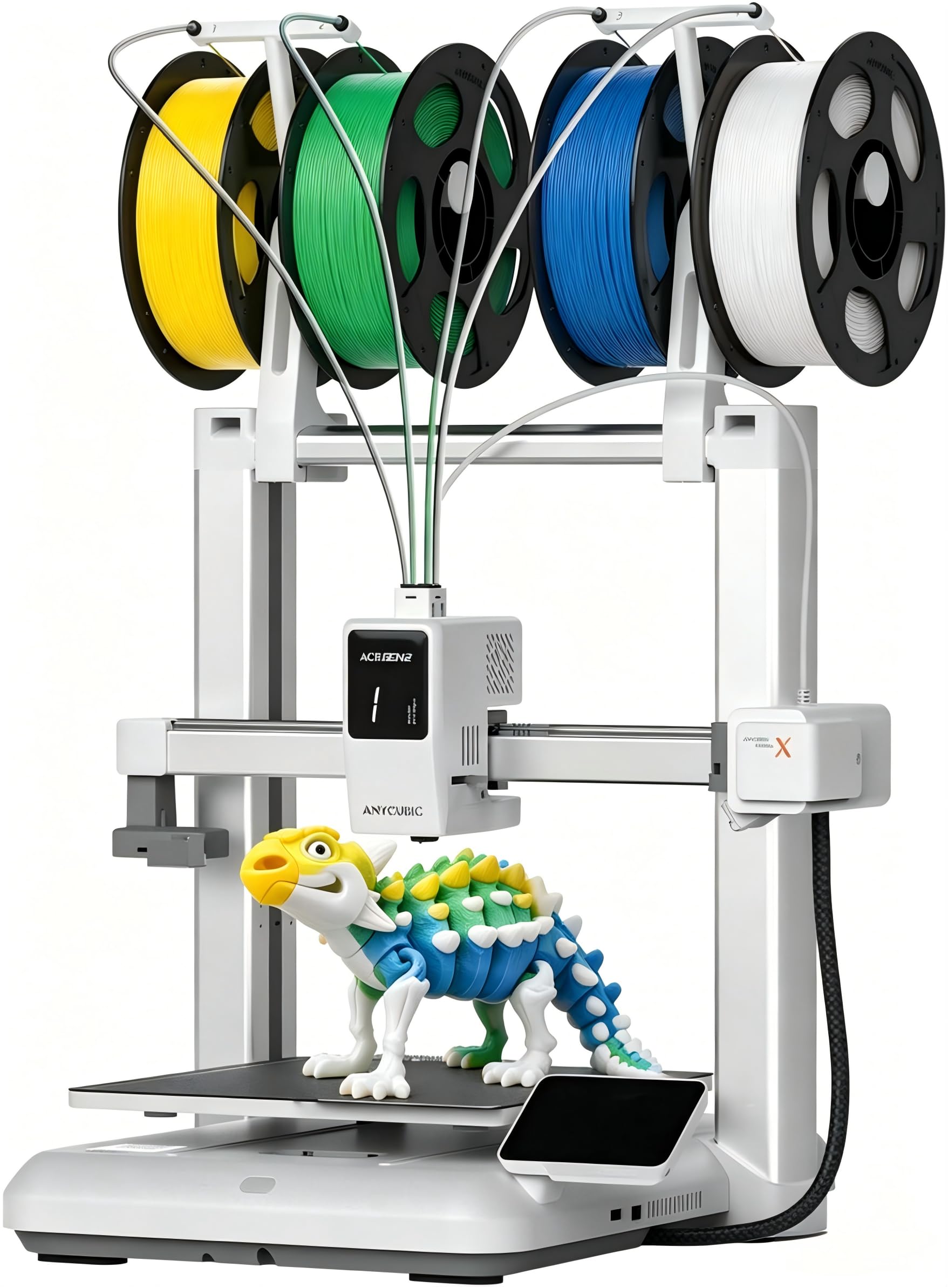
The Kobra X introduces multicolor printing at an accessible price point by integrating four colors natively with the option to expand to 19 using multiple ACE 2 Pro units. Anycubic’s LeviQ 3.0 auto-leveling performs 49-point calibration for perfect first layers, and the hardened steel nozzle rated to 300°C handles PLA, PETG, TPU, and PVA without issues. The 600 mm/s max speed reduces print times without sacrificing surface quality.
The AI camera detects spaghetti failures and foreign objects, and the top-mount spool holder frees up desktop space. The Anycubic Slicer integrates seamlessly with the app for remote monitoring, and the cloud-based model library offers thousands of ready-to-print designs. Users with over 250 hours of printing report zero clogs or adhesion failures, praising the build quality.
Some users experience inconsistent bed adhesion on the first few prints — cleaning the PEI sheet with isopropyl alcohol typically resolves this. The phone app could be more polished, and the ACE Pro and ACE 2 Pro systems are incompatible, so choose your accessory path carefully. For users wanting multicolor without the Bambu Lab premium, the Kobra X is an excellent alternative.
Why it’s great
- Native 4-color printing expandable to 19 colors
- Reliable 49-point auto-leveling system
- 300°C hardened nozzle for flexible filaments
Good to know
- ACE Pro and ACE 2 Pro are not cross-compatible
- Bed may need cleaning for optimal adhesion
- Phone app interface needs refinement
7. FLASHFORGE AD5M Pro 3D Printer

The AD5M Pro targets users who need a low-fume printing environment without sacrificing speed. The fully enclosed chamber with dual-layer filtration traps dust and smoke, making it suitable for classrooms and shared home offices. The CoreXY motion system hits 600 mm/s, and the 3-second quick-swap nozzle system lets you switch between 0.4 mm and 0.6 mm nozzles for different detail levels and layer heights.
The direct-drive extruder feeds TPU, PLA, ABS, PETG, and carbon-fiber filaments without jamming. The built-in camera supports remote monitoring through the Maker app, and the vibration compensation system keeps layers smooth at high speeds. Users report over a month of nonstop printing with only three nozzle clogs, attributed to cheap filament rather than the printer design.
Some users experienced extruder failure after only a few prints, with customer service sending faulty replacement extruders. The included USB stick contains outdated software — download the latest version from Flashforge’s website. The platform is slightly noisier during Z moves than competitors. Overall, the AD5M Pro is a solid choice for environments where fume control matters, but inspect your unit for build quality upon arrival.
Why it’s great
- Dual-layer filtration for low-fume operation
- 3-second quick-swap nozzle system
- 600 mm/s CoreXY with vibration compensation
Good to know
- Extruder failure reported in early units
- USB stick contains outdated software
- Z-axis movements are louder than competitors
8. FLASHFORGE AD5X Multi-Color 3D Printer

The AD5X brings multi-color printing to the value segment with support for up to four colors simultaneously. The 1-Click Auto Leveling and vibration compensation system produce consistent first layers, and the 300°C direct-drive extruder handles PLA, PETG, and TPU. The dual-channel cooling fan ensures sharp overhangs even at 600 mm/s.
The 220 mm³ build volume is standard for this class, but the nozzle flexibility (0.25 mm to 0.8 mm) makes the AD5X versatile for miniatures, functional parts, and fast prototypes. The Flash Maker mobile app provides remote monitoring, and the power-loss resume function protects long prints. Users praise the fast setup and excellent bed adhesion, with one owner noting successful prints with SunLu PLA Plus without any clogs.
Some units suffer from frequent jams at the 4-in-1 filament connector, and the included Flashforge slicer lacks full IFS color support — using Orca Slicer resolves this but requires configuration. The multicolor printing increases noise during filament purging. For budget-conscious intermediate users who want color, the AD5X offers good value but may require software workarounds.
Why it’s great
- 4-color multi-printing at an accessible price
- 0.25 mm to 0.8 mm nozzle compatibility
- Fast setup with 1-click auto leveling
Good to know
- Jams reported at 4-in-1 filament connector
- Stock slicer lacks full IFS color support
- Multicolor mode increases operational noise
9. Bambu Lab A1 Mini Combo

The A1 Mini Combo delivers the Bambu Lab experience in a compact, affordable form factor. The AMS Lite enables multi-color printing, and the 10,000 mm/s² acceleration produces fast prints despite being a bed-slinger design. Full-auto calibration handles Z-offset, bed leveling, and flow rate compensation without any manual steps — simply load filament and press print.
The 1-Clip quick-swap nozzle makes maintenance easy, and active motor noise cancellation keeps operation ≤48 dB. The Bambu Handy app offers hundreds of ready-to-print models, and the seamless cloud integration means you can start prints from your phone. Users transitioning from entry-level printers report this is a massive step up in speed and reliability.
The build volume (180 × 180 × 180 mm) is the smallest in this comparison, limiting it to smaller projects. The bed-slinger design requires a sturdy desk to avoid shaking at high speeds. For users who print small functional parts, toys, or multi-color prototypes, the A1 Mini Combo is a reliable, quiet companion with an unbeatable user experience.
Why it’s great
- Excellent user experience with full auto calibration
- Very quiet operation under 48 dB
- AMS Lite supports true multi-color printing
Good to know
- Small build volume limits large projects
- Bed slinger design shakes on soft surfaces
- AMS Lite wastes significant filament during color changes
10. ELEGOO Centauri Carbon 3D Printer

The Centauri Carbon arrives fully assembled and pre-calibrated, targeting users who want high-performance materials without the setup headache. The 320°C brass-hardened steel nozzle and enclosed chamber with enhanced cooling are optimized for carbon-fiber reinforced filaments. The CoreXY motion system achieves 500 mm/s with 20,000 mm/s² acceleration, and the die-cast aluminum frame minimizes vibrations for consistent layer lines.
The automatic vibration compensation and pressure advance ensure smooth first layers, and the built-in chamber camera with dual LED lighting captures time-lapse videos. The dual-sided build plate features a PLA-specific surface for excellent adhesion at lower bed temperatures. Users report successful prints with PETG and PLA+ after a replacement unit, though the first unit failed after six days due to a USB-C cable design issue.
The ElegooSlicer works well with WiFi connectivity, but it struggled with a complex STL file on an older laptop. The 256 mm³ build volume is generous for an enclosed machine. Reliability remains the main question mark — early adopters experienced mixed results, though Elegoo’s responsive replacement policy helps offset the risk.
Why it’s great
- 320°C hardened nozzle optimized for carbon fiber filaments
- Rigid die-cast frame minimizes high-speed vibrations
- Fully assembled and pre-calibrated out of box
Good to know
- Early units had USB-C cable failures
- Slicer can struggle with complex STL files on older hardware
- Long-term reliability still unproven
11. Creality K2 Combo

This second Creality K2 listing focuses on the premium experience with the CFS dry box and 16-color capability. The 600 mm/s speed is driven by three step-servo motors that dynamically adjust torque for consistent extrusion. The 300°C hardened steel direct-drive extruder handles abrasive filaments, and the adaptive mesh leveling probes only the print area for faster calibration.
The chamber AI camera monitors for spaghetti, foreign objects, and idle states, though it missed an operator error with adhesion in one review. The aerospace-grade aluminum alloy frame provides exceptional rigidity, and the 260 mm³ build volume supports helmet-sized prints without splitting. Users who upgraded from Ender 3 machines describe the K2 Combo as a night-and-day improvement in speed and quiet operation.
The CFS dry box only accepts specific spool sizes — you may need to print adapters for standard 1 kg spools, which takes four to five hours per adapter. The voltage switch arrived set to 230V for some North American customers, requiring a manual adjustment. The manual lags behind the hardware design in some areas. If you are willing to invest setup time, the K2 Combo offers the most complete multi-color and material handling package in the premium segment.
Why it’s great
- 16-color printing with CFS dry box and auto-feed
- Aerospace-grade aluminum frame for stability
- 300°C hardened steel direct drive for abrasives
Good to know
- CFS requires printed spool adapters for standard filament
- Voltage switch may need manual adjustment
- Documentation lags behind hardware features
FAQ
What is the minimum nozzle temperature I need for ABS?
How much does multi-color printing increase filament consumption?
Is a heated chamber necessary for PLA printing?
What firmware features should an intermediate user look for?
How much build volume do I need for functional prototyping?
Final Thoughts: The Verdict
For most users, the 3d printer for intermediate users winner is the Bambu Lab P1S because it combines fast CoreXY motion, an enclosed chamber for engineering materials, and excellent user experience with automatic bed leveling and remote monitoring through the Bambu Handy App. If you want deep customization and open-source flexibility, grab the Original Prusa MK4 Kit — building it teaches you printer mechanics better than any other machine on this list. And for multicolor printing without the premium price tag, nothing beats the Anycubic Kobra X for introducing color transitions without the Bambu Lab premium.