
Our readers keep the lights on and the weekend projects moving. As an Amazon Associate, I earn from qualifying purchases.
The pursuit of a flawless, smooth surface finish often dictates the choice between resin and FDM 3D printing. Visible layer lines, post-processing sanding, and inconsistent surfaces are the primary frustrations that drive makers toward specific hardware. The goal is a print that looks injection-molded right off the build plate, minimizing or eliminating the need for extensive manual finishing.
I’m Rikta — the co-founder and writer behind FitlyFast. My focus on this guide has been analyzing print head mechanics, XY resolution metrics, light source uniformity, and anti-aliasing algorithms to determine which printers deliver the smoothest surfaces with the least post-processing effort.
Whether you are printing detailed miniatures, functional prototypes, or wearable parts, identifying the right 3d printer for smooth finish requires understanding the interplay between layer height, pixel resolution, and material flow control.
How To Choose The Best 3D Printer For Smooth Finish
A smooth finish is the sum of several precise technical attributes working in harmony. Choosing the right printer means understanding how resolution, motion control, and material handling contribute to that final polished surface. Beginners often fixate on layer height alone, missing the more critical spec: XY resolution on resin printers or vibration compensation on FDM machines.
Resin vs. FDM: The Surface Finish Divide
The first and most important decision is printer technology. MSLA (resin) printers cure liquid photopolymer layer by layer, inherently producing a smoother surface with finer detail than FDM printers, which extrude molten plastic through a nozzle. For objects requiring a near-injection-molded finish without sanding or priming, a resin printer with high XY resolution is the logical choice. FDM printers have improved dramatically with input shaping and high-flow hotends, but they still produce visible layer lines on curved surfaces at standard layer heights. A 9K or 14K monochrome LCD screen delivers pixel dimensions small enough to minimize visible stepping.
Light Source Uniformity and Anti-Aliasing
On resin printers, the quality of the light source directly impacts surface smoothness. A COB (Chip on Board) light source with Fresnel lenses ensures even light distribution across the entire screen, preventing over-cured or under-cured areas that create texture inconsistencies. Look for a light uniformity rating of 90% or higher. Anti-aliasing, controlled through the slicer software, blurs the edges of cured pixels slightly, rounding off sharp square corners into a smoother surface. A printer with an open-source slicer or advanced grayscale anti-aliasing options gives you more control over this smoothing effect.
Motion Systems and Vibration Control
For FDM printers, the motion system is the primary contributor to surface quality. CoreXY designs with rigid frames and input shaping algorithms cancel out ringing and ghosting artifacts that cause rippled surfaces. A printer with automatic vibration compensation and pressure advance tuning will produce consistently smooth walls and top surfaces, even at high speeds. A direct-drive extruder, as opposed to a Bowden tube setup, offers more precise filament retraction and flow control, reducing stringing and blobs that mar the finish. The Z-axis lead screw quality also matters — a 2mm pitch lead screw with an anti-backlash nut reduces vertical banding.
Quick Comparison
On smaller screens, swipe sideways to see the full table.
| Model | Category | Best For | Key Spec | Amazon |
|---|---|---|---|---|
| ANYCUBIC Photon Mono M7 Pro | Resin | Ultra-fine jewelry & dental models | 14K LCD, 16.8×24.8µm res, 90% light uniformity | Amazon |
| Original Prusa MK4S | FDM | Professional prototypes & production parts | Input shaping, 9.84×8.3×8.6 in build, 1kg PLA included | Amazon |
| QIDI Max4 Combo | FDM | Large engineering-grade prints | 800mm/s, 390x390x340mm, 65°C heated chamber | Amazon |
| Creality K1C | FDM | Carbon fiber & high-temp materials | 600mm/s, 300°C nozzle, auto-leveling | Amazon |
| ELEGOO Centauri Carbon | FDM | Reliable enclosed high-speed printing | 500mm/s, 320°C nozzle, die-cast frame | Amazon |
| ELEGOO Mars 5 Ultra | Resin | Detailed miniatures with tilt-release speed | 9K LCD, 18µm XY res, 150mm/h, AI camera | Amazon |
| FLASHFORGE AD5X | FDM | Multi-color precision printing | 600mm/s CoreXY, 300°C, 4-color support | Amazon |
| ELEGOO Mars 5 Ultra 9K | Resin | Efficient multi-printer setups | 9K LCD, 18µm XY, WiFi cluster printing | Amazon |
| ANYCUBIC Photon Mono 4 Ultra | Resin | Value-focused fast resin printing | 10K LCD, 17µm XY res, 120mm/h, ACF film | Amazon |
| Anycubic Kobra X | FDM | Beginner-friendly multicolor printing | 600mm/s, 260mm³, 4-color built-in, 49-point leveling | Amazon |
| Phrozen Sonic Mini 8K S | Resin | Budget-friendly entry into high-res resin | 8K LCD, 22µm XY res, 6.5×2.8×6.7 in volume | Amazon |
In‑Depth Reviews
1. ANYCUBIC Photon Mono M7 Pro 14K Resin 3D Printer

The Photon Mono M7 Pro represents the pinnacle of consumer resin printing resolution with its 14K monochrome LCD screen, offering a staggering 13312×5120 pixel count and a 16.8 x 24.8 µm XY resolution. This pixel density is the defining factor for achieving an exceptionally smooth finish, as the individual pixel stepping becomes indistinguishable to the naked eye. The holes as small as 0.3 mm in diameter are printed cleanly, making it the prime choice for jewelry masters and dental technicians who demand flawless surface detail right off the build plate.
The COB LighTurbo 3.0 system, using Fresnel lenses and front-facing reflectors, keeps the light angle within 3 degrees and maintains over 90% light uniformity across the entire build area. This eliminates inconsistent curing that causes patchy textures on large parts. The dynamic temperature-controlled resin vat and auto-fill system further ensure that the resin viscosity remains stable, preventing layer separation or rough spots caused by temperature shifts.
Six types of intelligent detection, including build plate installation and failed print detection, reduce operational errors that could compromise surface quality. While the top cover is notably heavy and bulky, the overall design prioritizes stability. The print speed of 170 mm/h with high-speed resin means you get that mirror-like finish without waiting days for a single model.
Why it’s great
- Highest 14K resolution for invisible layer stepping
- Excellent 90%+ light uniformity for consistent surfaces
- Heated resin vat eliminates temperature-related artifacts
- Auto-fill and drain system reduces resin handling mess
Good to know
- Heavy and bulky top cover can be cumbersome
- Some reports of initial USB folder reading issues
- Requires increased light-off delay for optimal results
2. Original Prusa MK4S High-Speed 3D Printer

The Prusa MK4S is the gold standard for FDM surface finish, thanks to its advanced input shaping algorithm that actively cancels out ringing and ghosting artifacts. This motion compensation allows it to print at higher speeds without sacrificing the crisp edges and smooth walls that professionals require. The 9.84 x 8.3 x 8.6-inch build volume is ideal for functional prototypes and production parts where dimensional accuracy and a consistent texture are non-negotiable.
The direct-drive extruder and precise Z-axis control ensure that filament flow is consistent, eliminating the under-extrusion and over-extrusion patterns that create rough layers. Users report that complex prints requiring no supports come out with a surface that needs only a light sanding to become completely smooth. The printer arrives fully assembled and tested, with a 1 kg spool of Prusament PLA included, so the first print can be a quality benchmark without any calibration guesswork.
The open-source ecosystem and long-term firmware updates mean the MK4S remains compatible with future slicer profiles and materials. Its reliability is legendary in the maker community; many users report hundreds of hours of consistent output without any degradation in print quality. The main trade-off is the higher upfront investment, but the build quality and part support justify the cost for serious professionals.
Why it’s great
- Input shaping eliminates ringing for clean surfaces
- Open-source design allows infinite customization
- Fully assembled and pre-calibrated out of the box
- Reliable day-to-day operation with minimal tweaking
Good to know
- Higher price point than many comparable FDM printers
- Build volume may be too small for large parts
- Some users report mid-print warping during cooldown
3. QIDI Max4 Combo 3D Printer

The QIDI Max4 Combo tackles the two biggest enemies of a smooth FDM finish on large parts: vibration and thermal warping. Its massive 390x390x340mm build volume is supported by closed-loop motors and an anti-backlash nut on the Z-axis, which together reduce vertical gaps and ensure each layer is deposited with consistent precision. The 65°C active heated chamber maintains a stable thermal environment, critical for printing engineering materials like ABS-CF and PC without the layer separation that ruins surface uniformity.
The high-flow hotend and hardened steel nozzle allow printing at up to 800 mm/s without sacrificing layer adhesion. Users report that the surface quality on large panels is remarkably clean, with minimal visible layer lines even at standard speeds. The built-in AI camera automatically detects spaghetti failures and pauses prints, preventing the waste of long-duration builds. The QIDI BOX add-on enables multicolor and multi-material printing up to 16 colors, adding creative flexibility without compromising the primary print surface.
While the printer weighs 120 pounds and requires a dedicated workspace, its build quality and material compatibility are unmatched at this price tier. The fully open-source nature and support for multiple slicers like Orca and Cura make it a favorite among production engineers. The initial setup can involve a longer pre-print time for thermal stabilization, but the resulting surface quality on engineering prototypes is worth the wait.
Why it’s great
- Enormous 390mm build volume for large parts
- 65°C heated chamber prevents warping in high-temp materials
- Closed-loop motors ensure precision at high speeds
- 16-color/multi-material expandability
Good to know
- Very heavy at 120 pounds; not portable
- High filament purge waste on initial extrusion
- Filament can jam in multi-material sensor setup
4. Creality K1C 3D Printer

The Creality K1C brings a clog-free direct extruder with a strengthened spring and ball plunger to ensure consistent filament grip, which directly translates to a smoother surface finish. The clog-free design prevents the common FDM defect of under-extruded layers that create rough patches. The 300°C high-temperature capability and hardened steel nozzle allow it to print carbon fiber reinforced filament, which produces parts with a matte, uniform surface that hides layer lines more effectively than standard PLA.
The fully automatic calibration — including auto Z offset, auto leveling, and auto input shaping — removes the most common source of surface defects: an unleveled bed. The AI camera monitors for spaghetti failures and foreign matter, allowing the printer to run unattended without the risk of a ruined surface from a crashed print. The upgraded cooling structure uses three separate fans to minimize stringing and warping on bridges and overhangs, which are the areas where roughness most often appears.
Users upgrading from older Ender models notice a massive improvement in surface quality, with the K1C producing prints that need minimal post-processing. The printer is pre-assembled and mostly ready to print in under 5 minutes. The UI is intuitive and the auto calibration is genuinely reliable, but some users report that the magnetic bed surface wears over time, potentially affecting first-layer smoothness after extended use.
Why it’s great
- Clog-free direct extruder ensures consistent layers
- Pre-assembled with true plug-and-play auto calibration
- Capable of printing carbon fiber filament for smooth matte parts
- Triple-fan cooling minimizes stringing on complex geometries
Good to know
- Magnetic bed surface may wear, affecting adhesion
- Some users note minor bed warp requiring mesh leveling
- USB power issue can cause print hangs if not addressed
5. ELEGOO Centauri Carbon 3D Printer

The Centauri Carbon is built around a rock-solid die-cast aluminum frame that minimizes vibration, the primary cause of FDM surface ringing. With automatic vibration compensation and pressure advance, the printer maintains clean walls and smooth first layers even at 500 mm/s and 20,000 mm/s² acceleration. The 320°C brass-hardened steel nozzle expands material compatibility to carbon fiber reinforced filament, which produces exceptionally smooth, matte surfaces that reflect light uniformly.
The enclosed chamber with enhanced cooling provides a stable thermal environment for advanced filaments, reducing the risk of thermal shrinkage that creates rough texture. The upgraded dual-sided build plate features a PLA-specific surface that offers excellent adhesion without warping, ensuring the first layer is perfectly flat. Users report that the printer transitions from beginner-friendly to production-capable, with many noting that the surfaces produced rival those from printers costing twice as much.
The built-in camera with dual LED lighting supports real-time monitoring and time-lapse capture, useful for documenting the surface quality of long prints. The printer arrives fully assembled and pre-calibrated, with an intuitive touchscreen interface. The 256x256x256mm build volume is a sweet spot for most hobbyist and professional projects, and the reliability after hundreds of hours is well-documented in user reviews.
Why it’s great
- Rigid die-cast frame eliminates vibration artifacts
- Automatic vibration compensation and pressure advance
- Fully assembled and pre-calibrated out of the box
- Reliable for carbon fiber and engineering filaments
Good to know
- First units had cable routing and hotend comm issues
- Heavy at 38.5 pounds
- Tech support response can be slow for initial issues
6. ELEGOO Mars 5 Ultra Resin 3D Printer
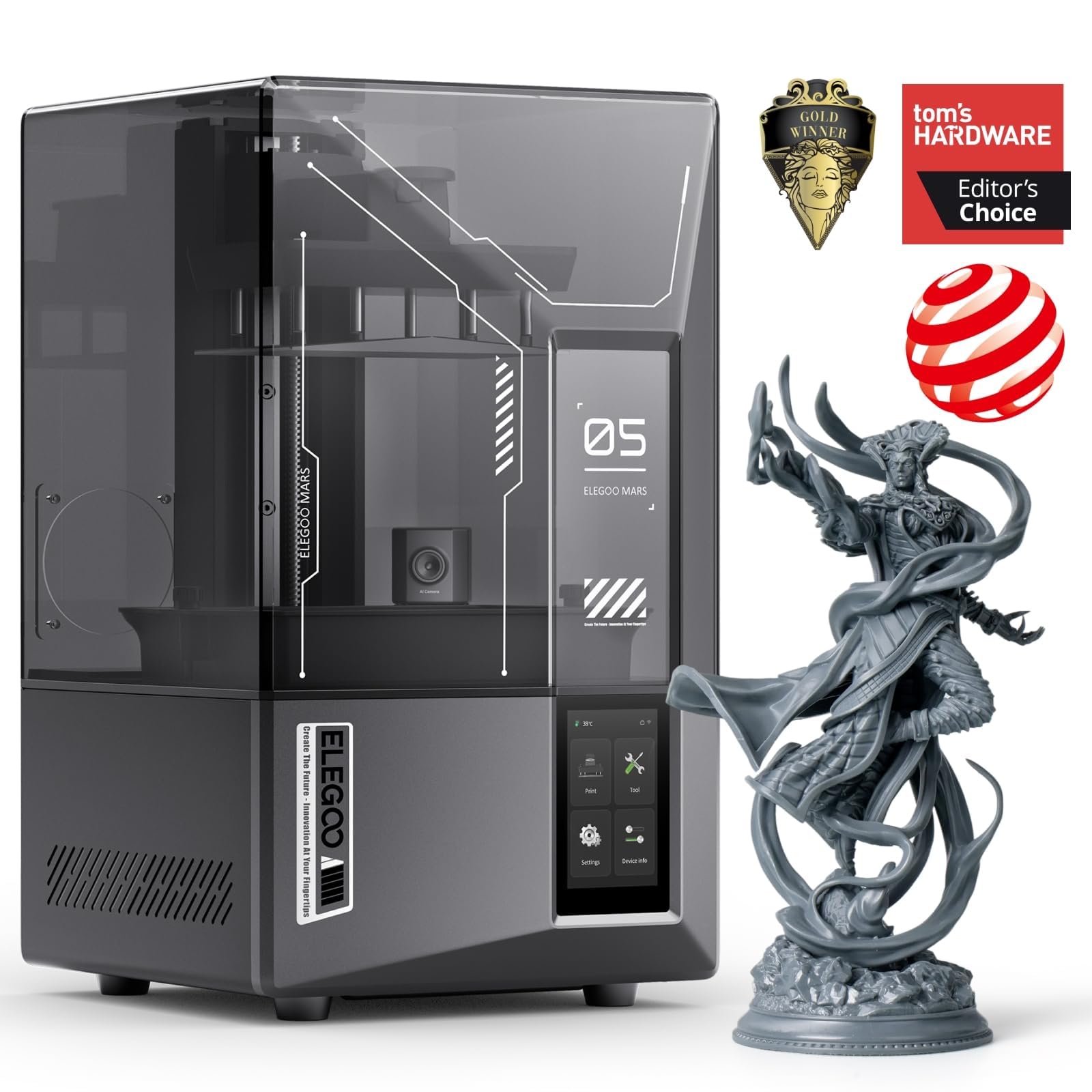
The Mars 5 Ultra achieves a 9K resolution with an 18µm XY pixel size, making it a top contender for producing miniatures and detailed models with a nearly texture-free surface. Its revolutionary tilt-release vat technology peels the printed layer from the release film by tilting the vat, rather than lifting the build plate vertically. This reduces the separation force on the model, allowing for more delicate supports and thinner layers that contribute to a smoother final surface.
The AI camera integrated into the printer monitors for failed prints, such as empty build plates or model warping, which are the main causes of wasted resin and rough surfaces from mid-print errors. The Wi-Fi cluster printing feature allows control of multiple Mars 5 Ultra printers from one device, making it a powerful option for small production runs. Users who upgraded from the Mars 2 report a massive improvement in surface consistency, describing the output as so smooth that it requires little to no sanding before painting.
The smart self-check and automatic leveling functions eliminate the most common user error that leads to uneven first layers and surface defects. The Chitubox Pro subscription included with the printer provides advanced auto-orientation and magic supports, further reducing the manual intervention needed to achieve a flawless finish. The only consistent criticism is the small build plate size and the fact that the lid lacks hinges, making access slightly less convenient.
Why it’s great
- Tilt-release vat reduces layer separation force for smoother surfaces
- 9K LCD with 18µm XY resolution for fine detail
- AI camera detects failures before they ruin prints
- Wi-Fi cluster printing for efficient production
Good to know
- Small build volume limits part size
- Lid without hinges can be cumbersome
- Some users report dependency on specific resin types for best results
7. FLASHFORGE AD5X Multi-Color 3D Printer

The AD5X combines a CoreXY structure with a dual-channel cooling fan and vibration compensation system to deliver outstanding print quality at 600 mm/s. The advanced cooling ensures that each layer of plastic hardens instantly, preventing the sagging or warping that creates rough overhangs. The direct-drive extruder reaches 300°C, enabling the use of high-flow materials that deposit smoothly without the visible banding often seen on cheaper Bowden systems.
The 1-Click Auto Leveling system ensures that the first layer is perfectly calibrated every time, eliminating the most common source of FDM surface defects. Users highlight that the print quality is comparable to the Bambu Lab P1S, but without the proprietary ecosystem. The ability to support up to four colors simultaneously does not degrade the surface finish, as each nozzle swap is managed by the firmware to minimize oozing and stringing. The printer supports nozzle sizes from 0.25 mm to 0.8 mm, allowing for ultra-fine detail on small parts.
The resume printing function handles unexpected power loss, preventing mid-print failures that would ruin a near-complete smooth surface. The Flash Maker mobile app allows remote monitoring and control. Some users report that the 4-in-1 filament connector can occasionally jam, and the phone app has a learning curve, but the overall print quality is praised as excellent for the price.
Why it’s great
- Dual-channel cooling hardens layers instantly for clean overhangs
- Vibration compensation eliminates ringing at high speeds
- Multi-color support without compromising surface finish
- Interchangeable nozzles for fine detail or fast prints
Good to know
- 4-in-1 filament connector can jam with some materials
- Stock slicer is basic; Orca works but lacks IFS color support
- Filament rewind mechanism can cause tangling
8. ELEGOO Mars 5 Ultra 9K MSLA Resin 3D Printer

This version of the Mars 5 Ultra offers the same tilt-release innovation and 9K resolution but adds a dedicated AI camera and smart mechanical sensor for enhanced print reliability. The tilt-release vat speeds up printing to 150 mm/h while maintaining the low separation force that prevents layer distortion. The 18µm XY resolution ensures that even the smallest features are rendered without visible pixel stepping, resulting in a surface that feels smooth to the touch immediately after washing.
The built-in mechanical sensor detects low resin levels, foreign objects, and high light board temperature, alerting the user before these issues can cause a print failure that ruins the surface. The Wi-Fi cluster printing allows multiple printers to be controlled from a single device, which is a significant productivity boost for print farms. Users report that the print quality for miniatures is exceptional, with crisp edges and no visible layer lines on organic shapes.
The printer is compatible with a wide range of resins, including water-washable types, which simplifies post-processing and reduces the risk of damaging the smooth surface during cleaning. The intuitive UI and OTA firmware upgrades keep the printer current. Some users have reported LCD failure after a few months, but customer service has been responsive with replacements. The main barrier is the need to warm the resin and build plate in cooler environments to maintain layer adhesion.
Why it’s great
- Tilt-release for fast, low-force printing
- AI camera for real-time failure detection
- WiFi cluster printing for multiple printer management
- Broad resin compatibility, including water-washable
Good to know
- LCD can crack after heavy use; repair cost is moderate
- Resin and plate must be warmed in cold environments
- Vague manual requires some online research
9. ANYCUBIC Photon Mono 4 Ultra 10K Resin 3D Printer

The Photon Mono 4 Ultra delivers a remarkable balance of resolution, speed, and affordability, making it our top pick for achieving a smooth finish without overspending. Its 10K monochrome LCD screen with a 9024×5120 resolution and 17×17µm pixel size produces prints with incredibly fine detail where individual layer lines are nearly invisible. The use of a new-generation ACF film minimizes the frosted texture typically caused by the release process, and combined with the Intelligent Release Algorithm, it ensures a smooth separation that preserves surface integrity on every layer.
The advanced COB light source with Fresnel lenses achieves a light angle within 3 degrees and a uniformity rate of 90% or higher. This eliminates the over-cured edges that create a rough, speckled texture on resin prints. The printer features five intelligent detection modes, including residual resin detection and failed print detection, which prevent the most common errors that lead to surface defects. The 4.3-inch HD screen and intuitive UI make operation straightforward, even for those new to resin printing.
At a maximum speed of 120 mm/h, the printer is fast enough for practical use without sacrificing quality. Users consistently praise the ease of setup and the impressive detail for the price point, noting that the prints often exceed expectations for smoothness. The main considerations are the strong resin odor, which requires an enclosure or filter, and the fragile nature of the FEP film, but these are standard challenges in the resin printing category, not unique flaws.
Why it’s great
- 10K resolution with 17µm pixels for near-invisible layer lines
- ACF film minimizes frosted texture for a smoother surface
- Rapid 120mm/h print speed for efficient production
- Five smart detection modes reduce print failure risks
Good to know
- Strong resin odor requires ventilation or an enclosure
- FEP film is fragile and requires careful handling
- Small build volume limits part size
10. Anycubic Kobra X Multicolor 3D Printer
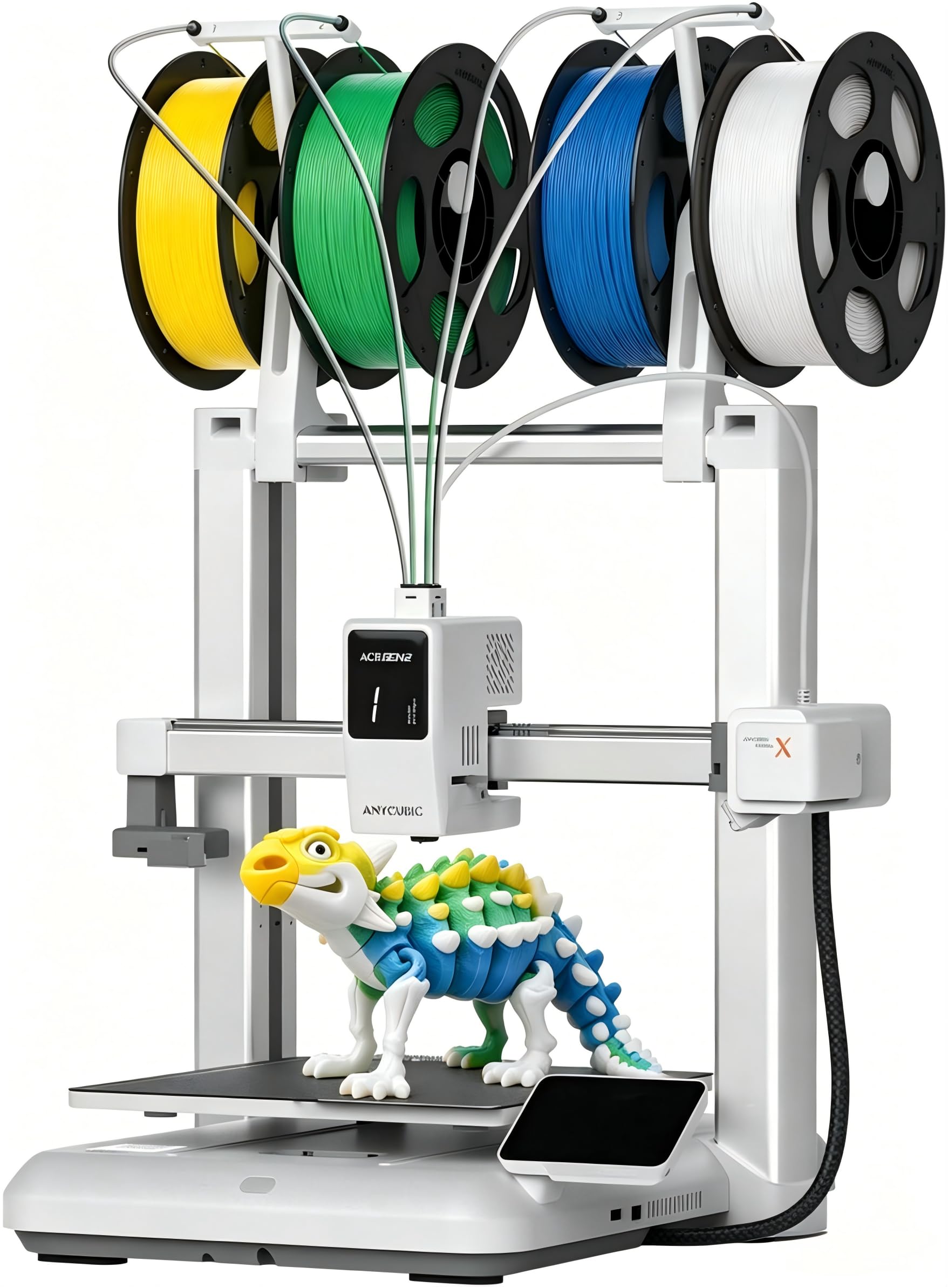
The Kobra X is an innovative FDM printer that integrates native 4-color printing (expandable to 19 colors with additional ACE units) while maintaining a focus on surface quality. The hardened steel nozzle and vibration compensation ensure each layer is deposited smoothly, even at the maximum speed of 600 mm/s. The LeviQ 3.0 auto bed leveling system uses a 49-point calibration grid to guarantee 100% bed flatness, which is the foundation of a defect-free first layer and a consistently smooth top surface.
The printer uses a proprietary purge reduction system that claims to cut material waste by 81.25%, but more importantly for finish quality, it reduces the filament travel path, which minimizes stringing and oozing during color changes. The AI camera detects spaghetti failures and foreign objects, automatically pausing the print to prevent surface damage. The 260mm³ build volume is generous, and the machine is quiet at 45 dB, making it suitable for office or home environments.
Users with 265+ hours of printing report zero adhesion or clogging issues, which are the primary causes of rough surfaces on FDM prints. The multi-color capability adds a creative dimension without sacrificing print quality. The phone app could use more polish, and the 2.4G Wi-Fi is a bit slower than ideal, but the print quality out of the box is described as crisp, with smooth layers that require minimal post-processing.
Why it’s great
- 49-point auto leveling ensures perfect first-layer adhesion
- Hardened nozzle and vibration compensation for smooth layers
- Multi-color printing without compromising surface finish
- Very quiet operation at 45 dB
Good to know
- Phone app has room for improvement
- Wi-Fi transfer is limited to 2.4G bands
- Some users report initial adhesion issues on complex models
11. Phrozen Sonic Mini 8K S LCD Resin 3D Printer

The Sonic Mini 8K S is an approachable entry point into high-resolution resin printing, offering an 8K monochrome LCD with a 22µm XY resolution. While not the sharpest on paper, this resolution is still sufficient to produce prints with an impressively smooth finish that far surpasses standard 4K or 2K printers. The precise Z-axis calibration ensures even and accurate printing, preventing the banding that occurs when the Z-axis moves inconsistently between layers.
The printer is designed to be beginner-friendly, with an attractive value proposition and support for open-source slicers like Lychee, Chitubox, and Tango. This means users have full control over anti-aliasing settings, which can be tuned to blur pixel edges for an even smoother surface. The compact 6.5 x 2.8 x 6.7-inch build volume is best suited for small models, miniatures, and action figures, but the detail achievable in that space is remarkable.
Users consistently praise the reliability of the unit, with many noting that it prints consistently without the maintenance headaches of more complex machines. The default leveling procedure and flexible build plate make removal easy without damaging the delicate bottom layers. The main limitation is the requirement to use a USB drive for file transfers, which adds a step compared to Wi-Fi-enabled competitors. The supplied scraper can be sharp and may damage the build plate on the first use, so careful handling is advised.
Why it’s great
- 8K LCD delivers impressive smoothness at an accessible price
- Open-source slicer compatibility allows detailed anti-aliasing control
- Reliable and consistent performance for small resin parts
- Compact footprint ideal for limited desk space
Good to know
- Requires USB drive for file transfer; no built-in Wi-Fi
- Sharp scraper can damage build plate if not handled carefully
- Small build volume may restrict larger project ambitions
FAQ
Which resin printer resolution is enough for a smooth finish without sanding?
Does tilt-release vat technology actually improve surface smoothness?
Can anti-aliasing alone fix a rough finish on a low-resolution printer?
What layer height should I use for the smoothest possible FDM print?
Why does my resin print have a rough texture on one side only?
Final Thoughts: The Verdict
For most users, the 3d printer for smooth finish winner is the ANYCUBIC Photon Mono 4 Ultra because it delivers a near-invisible 17µm pixel step and fast 120mm/h printing at a mid-range price that leaves room for a washing station and resin. If you want the absolute highest surface detail for jewelry or dental patterns, grab the ANYCUBIC Photon Mono M7 Pro with its 14K resolution and heated vat. And for production-scale FDM parts with a professional matte finish, nothing beats the QIDI Max4 Combo.