
Our readers keep the lights on and the weekend projects moving. As an Amazon Associate, I earn from qualifying purchases.
A 3D printer that works for a tween is a different machine than one for an adult hobbyist. Tweens need a printer that delivers consistent, successful prints without constant tinkering, but also one that offers enough creative freedom to keep them engaged beyond the first week. The wrong choice leads to frustrated kids and abandoned hardware gathering dust.
I’m Rikta — the co-founder and writer behind FitlyFast. I spent dozens of hours cross-referencing print volumes, filament types, auto-leveling systems, noise levels, and app ecosystems to find the machines that genuinely fit a tween’s patience and skill level.
Whether you want a simple starter that works in minutes or a more capable machine that grows with their skills, the right 3d printer for tweens balances safety, ease of use, and reliable print quality.
How To Choose The Best 3D Printer For Tweens
Buying a 3D printer for a tween means prioritizing machines that reduce friction between the idea and the finished object. Adults will troubleshoot bad bed adhesion or clogged nozzles; a tween will lose interest. The critical factors boil down to how the printer handles setup, calibration, and day-to-day reliability.
Auto Leveling Is The Gatekeeper
Manual bed leveling — turning four screws with a piece of paper — is the single biggest frustration for new users. A printer with automatic bed leveling (16-point or similar) removes this barrier entirely. For a tween, this means every print attempt starts from a level bed, drastically improving first-layer adhesion and reducing failed prints.
Build Volume Matches Ambition
Small build volumes around 100x100x100 mm are common in tween-focused printers and are actually a feature, not a flaw. They force projects into sizes that complete in 1–3 hours rather than overnight, which keeps a tween’s attention span aligned with the machine’s pace. Larger volumes above 200 mm allow bigger projects but require more patience and priming.
App Ecosystem And Pre-Loaded Models
Tweens rarely want to learn slicing software on day one. Machines that pair with a mobile app offering a curated library of models (500+ or more) let them browse, select, and print without touching a computer. AI-powered features like text-to-print or photo-to-print are rapidly becoming differentiators for this age group.
Safety And Noise
An open-frame printer on a tween’s desk poses risks from hot nozzles and moving belts. Fully enclosed designs with child locks prevent access to moving parts. Noise levels below 48 dB ensure the printer can run in a bedroom or shared space without causing distraction. Non-toxic PLA filament and enclosed bodies are the baseline for parent peace of mind.
Quick Comparison
On smaller screens, swipe sideways to see the full table.
| Model | Category | Best For | Key Spec | Amazon |
|---|---|---|---|---|
| Bambu Lab A1 | FDM | Speed and multi-color | 256x256x256 mm | Amazon |
| AOSEED X-Maker Joy AI+ | FDM | AI creativity & complete kit | 0.05 mm precision | Amazon |
| SainSmart PrintyGo | FDM | Independent tween use | Fully enclosed | Amazon |
| FLASHFORGE AD5X | CoreXY | Multi-color performance | 600 mm/s speed | Amazon |
| Geeetech M1 | FDM | Highest speed in compact frame | 250 mm/s print | Amazon |
| Geeetech M1S | FDM | Budget-friendly speed | 1:5 gear ratio | Amazon |
| Entina Tina2C | FDM | App-guided STEM learning | 100 mm cube | Amazon |
| Fully Assembled Mini TINA2S | FDM | True plug-and-play start | Auto leveling | Amazon |
| Entina Tina2 Basic | FDM | Entry-level value | Dual Z-axis | Amazon |
In‑Depth Reviews
6. Bambu Lab A1

The Bambu Lab A1 sets a new standard for what a tween-friendly printer can deliver. With a 256 mm cubic build volume and acceleration up to 10,000 mm/s², it prints detailed models in a fraction of the time smaller machines take. The optional AMS Lite enables multi-color printing, turning single-color designs into vibrant projects without manual filament swaps.
Full-auto calibration handles Z-offset and bed leveling entirely on its own, and active flow rate compensation ensures consistent extrusion across the entire build plate. The noise level stays at or below 48 dB, and the 1-Clip quick-swap nozzle makes maintenance approachable even for a beginner. Setup from unboxing to first print is genuinely fast, and the Bambu app gives tweens access to an extensive library of community models ready to print with one tap.
Reviews consistently highlight the printer’s reliability and the app’s intuitive design, with parents noting that tweens as young as 13 learned to design their own models within days. The larger footprint requires desk space, but the performance and speed justify it for families who want a printer that stays relevant as the child’s skills grow.
Why it’s great
- Full-auto calibration eliminates all manual setup friction
- Multi-color printing unlocks creative projects beyond simple shapes
- Fast print speeds keep young attention spans engaged
Good to know
- Larger footprint needs dedicated desk space
- AMS Lite for multi-color is sold separately
- Initial cost is higher than entry-level options
7. AOSEED X-Maker Joy AI+

The AOSEED X-Maker Joy AI+ redefines the tween printing experience by embedding artificial intelligence directly into the workflow. Kids can generate 3D models from voice, text, or image prompts — the AI Doodle feature turns a simple drawing into a printable object without any CAD skills. The built-in camera creates time-lapse videos of each print, adding a layer of social sharing that keeps tweens engaged.
The machine ships with 8 rolls of PLA filament, a magnetic build plate, and essential tools, making it a true out-of-box starter kit. Print speeds reach peaks of 400 mm/s, with precision down to 0.05 mm, so small toys complete in about 20 minutes. The leveling-free platform and filament runout detection reduce failed prints, and the enclosed design features pinch-resistant edges and TÜV-tested PLA filament for safety.
Parents report that children as young as 8 can operate the printer independently within the first session, thanks to the app-driven one-tap printing workflow. The 8,000+ model library and 17 themed design modules provide near-infinite project variety. The only real limitation is the small print volume, but that is by design to keep print times short and success rates high.
Why it’s great
- AI voice and text-to-print removes all design barriers
- Complete kit includes abundant filament and accessories
- Time-lapse camera adds excitement and sharing potential
Good to know
- Small build volume limits larger project possibilities
- AI features require consistent app connectivity
- Bed adhesion issues reported on some tile-based models
8. SainSmart PrintyGo
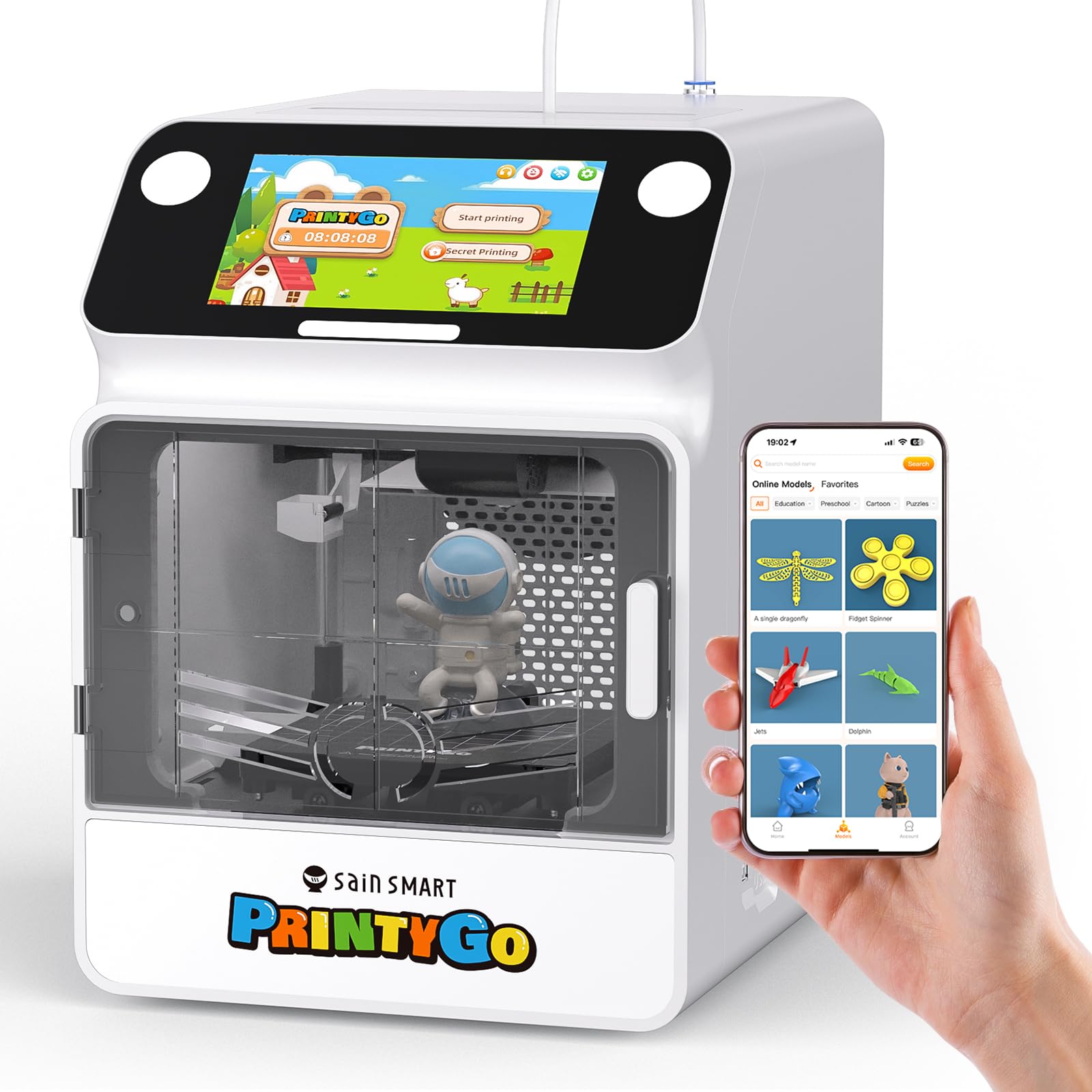
The SainSmart PrintyGo is the only printer on this list purpose-built for ages 4–12, making it the strongest contender for younger tweens. The fully enclosed body prevents contact with the hot nozzle and moving belts, and the child lock pauses printing immediately when the door opens. The 5-inch interactive touchscreen replaces the need for a phone or computer, so a tween can operate the printer entirely independently.
With over 1,500 built-in models and weekly updates, the PrintyGo offers a curated selection of animals, puzzles, geometric shapes, and landmarks that match classroom STEM themes. The printer ships pre-assembled and requires zero slicing software knowledge — kids tap a model on the screen and the printer handles the rest. The magnetic, self-leveling bed and included glue stick improve first-layer adhesion, though some users report needing patience with initial leveling adjustments.
Reviews from parents emphasize that the PrintyGo’s price premium is justified by the independence it gives their children. The printer does not rely on phone pairing or Wi-Fi for basic operation, though Wi-Fi unlocks the full model library. Print times of 3–4 hours per model teach patience, and the child-safe design allows placement in a bedroom without constant supervision.
Why it’s great
- Fully enclosed with child lock for maximum safety
- Touchscreen operation eliminates phone/computer dependency
- Over 1,500 pre-loaded models for instant printing
Good to know
- Higher price point reflects the safety-focused design
- Some units reported manual bed leveling issues
- Wi-Fi connectivity can be inconsistent initially
9. FLASHFORGE AD5X

The Flashforge AD5X brings CoreXY architecture and multi-color printing to a price point that competes directly with bed-slinger designs. With speeds up to 600 mm/s and acceleration of 20,000 mm/s², it completes complex multi-color models in hours rather than days. The 1-click auto leveling and 300°C direct-drive extruder handle PLA, TPU, and PETG without modification, giving a tween room to experiment with different materials.
The printer supports up to four colors simultaneously through an IFS (independent filament system) that feeds into a single nozzle. The vibration compensation system and dual-channel cooling fan produce sharp corners and smooth overhangs even at high speeds. Setup takes under 30 minutes, and the Flash Maker mobile app enables remote monitoring and control. The 220 mm cubic build volume balances project size with reasonable print durations.
User feedback highlights strong print quality and reliable auto leveling, with multi-color printing described as smooth and free of clogs. The noise level is noticeable on high-speed prints, and the software ecosystem is less polished than Bambu’s. For a tween ready to move beyond simple single-color prints, the AD5X offers a fast, colorful upgrade path.
Why it’s great
- CoreXY design delivers professional-grade speed and quality
- Multi-color IFS system requires no expensive add-on unit
- Versatile extruder handles PLA, TPU, and PETG filaments
Good to know
- Software stack is less refined than competing platforms
- Noisy during high-speed operation
- Some units required initial troubleshooting for setup
4. Geeetech M1
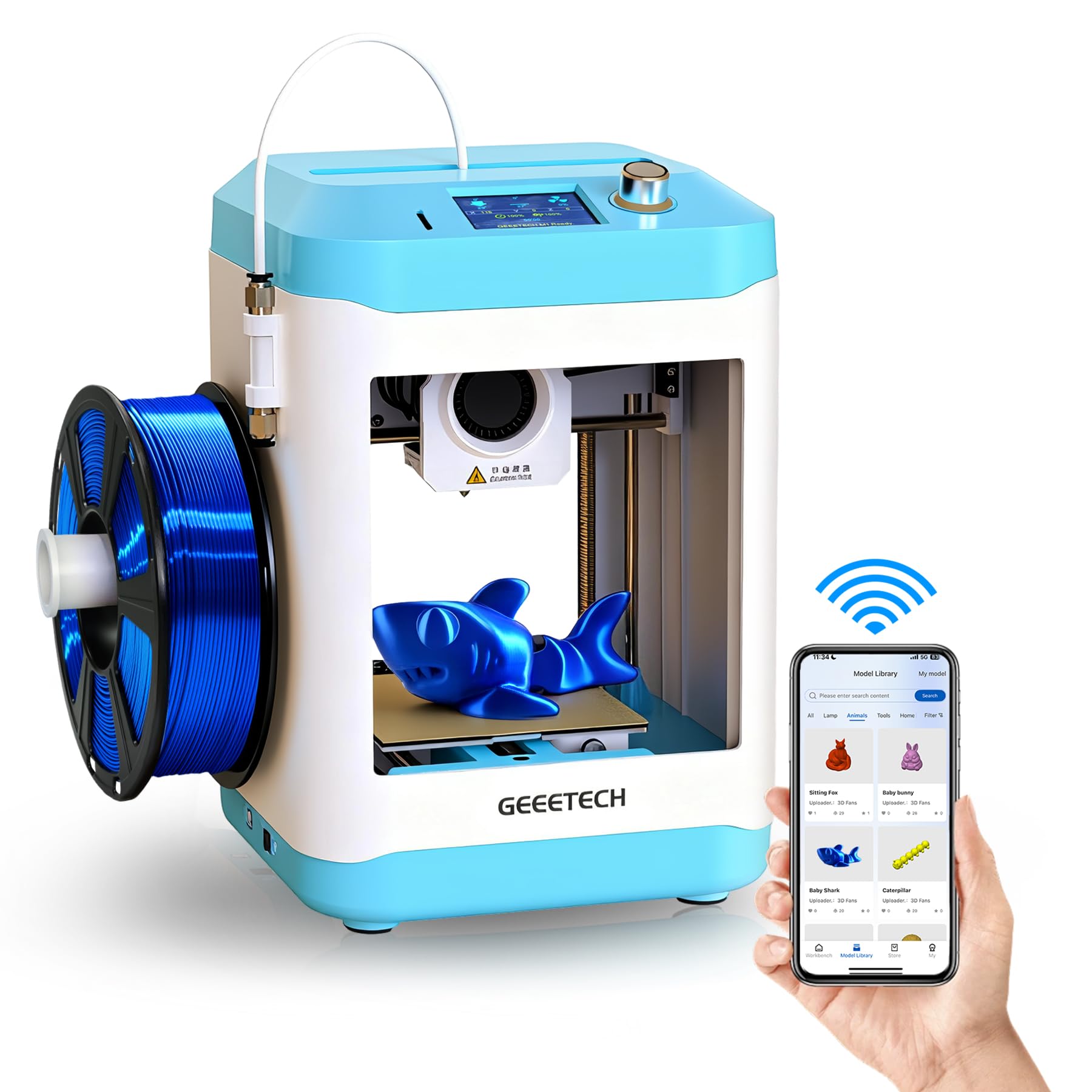
The Geeetech M1 packs a high-performance direct-drive extruder with a 1:5 gear ratio into a compact footprint that fits neatly on a tween’s desk. Printing speeds reach 250 mm/s, which is competitive with mid-range machines, yet the printer’s small build volume (3.94 inches cubed) intentionally limits project size to reduce waste and failure points. The 16-point auto leveling and heated magnetic build plate make first-layer adhesion reliable enough for independent operation.
Setup from unboxing to first print takes about 10 minutes, according to multiple verified reviews, and the Geeetech app provides a one-tap printing workflow similar to premium models. The 50W heating rod and efficient heat dissipation allow stable long prints without thermal drift. The printer supports both 500g and 1kg filament spools, though a printable filament holder is needed for larger reels.
Parents consistently describe the M1 as an ideal stepping stone into 3D printing. The biggest shortcoming is the small build volume, but this is a deliberate trade-off for speed and reliability at a mid-range price point. For a tween making fidgets, keychains, and small figures, it delivers consistent quality.
Why it’s great
- Direct-drive extruder handles flexible TPU filament easily
- Compact size fits on a desk or shelf without dominating the room
- Pre-assembled with minimal setup required
Good to know
- Small build volume limits project size significantly
- 1kg spools require printing a separate holder
- Some units had minor quality control variance
5. Geeetech M1S

The Geeetech M1S is essentially the M1’s refined sibling, featuring the same 250 mm/s print speed and direct-drive extruder but with a PEI print plate that improves adhesion for PLA and TPU without glue. The 16-point auto leveling and heated platform remain, and the compact build volume (3.94 inches cubed) keeps print times short enough for a tween’s patience. The 2.4-inch LCD color screen and high-brightness lighting provide clear visibility during operation.
Reviews highlight that the M1S works consistently right out of the box, with one parent noting their children ages 3 and 5 enjoyed picking designs and watching them print. The Geeetech app offers a clean interface for selecting models and monitoring prints, and the printer supports both 2.4G Wi-Fi and standard slicing software like Cura. The 1:5 gear ratio dual-drive metal extruder provides strong extrusion force for detailed models.
The M1S positions itself as a reliable daily driver for a tween who wants to print small toys, keychains, and educational models. The small build volume is the primary constraint, but it also means the printer produces finished projects frequently enough to maintain excitement. The included filament is limited, so ordering additional spools early is recommended.
Why it’s great
- PEI build plate offers excellent adhesion without glue stick
- Quiet operation fits well in a bedroom or study environment
- Strong direct-drive extruder handles detailed prints well
Good to know
- Very small print volume limits project creativity
- Wi-Fi connectivity required reset on some units
- Comes with very little sample filament
3. Entina Tina2C

The Entina Tina2C brings app-driven simplicity and STEM learning modules to the entry-level price bracket, making it a strong option for families who want guided educational content alongside the printer. The Poloprint Cloud app provides AI-powered search, photo-to-print features, and 20+ creative modules that turn a simple print job into a learning exercise. Setup is guided through the app, and the printer claims an 8-minute timeline from unboxing to first print.
The 100 mm cubic build volume is standard for this tier, and the self-cleaning nozzle design reduces maintenance for first-time users. Auto leveling and power-loss recovery help ensure a high print success rate, which is critical for keeping a tween engaged. The printer supports both 2.4G Wi-Fi and TF card offline printing, so it works even in rooms without stable internet. The rounded edges and low-noise operation suit home and classroom environments.
Reviews emphasize how quickly tweens take to the app-based workflow, with one parent noting their 10-year-old uses only a phone to manage the printer. The STEM courses update regularly, adding fresh educational material without requiring parent intervention. The small build volume is fine for keychains, toys, and simple models, but larger projects are out of reach.
Why it’s great
- STEM learning modules add educational value beyond printing
- AI-powered app makes model discovery effortless
- Self-cleaning nozzle reduces maintenance frustration
Good to know
- Small build volume limits project ambition
- Wi-Fi connectivity required for full app features
- No enclosed body for heat protection
1. Fully Assembled Mini TINA2S

The TINA2S delivers a genuine plug-and-play experience at a budget-friendly price point, and it earns its place as the most accessible entry point in this list. The printer arrives fully assembled, and multiple verified reviews report printing a perfect Benchy within minutes of unboxing. The auto leveling and dual Z-axis rails provide stable, high-precision printing in a compact 120x100x100 mm build volume.
One-touch filament loading and retraction simplify material changes, and the magnetic flexible build plate makes removing completed prints as easy as bending the plate. The Wi-Fi capability and open-source compatibility with Cura, Simplify3D, and Slic3r give a tween room to grow into more advanced workflows. The machine uses small 250g PLA spools, which keeps per-project material costs low and prevents waste.
Positive reviews far outweigh negatives, with parents specifically praising the printer’s reliability for children ages 11 and 12. The few negative reports center on inconsistent bed adhesion and a perception of cheap build quality, but these appear to be isolated cases. For families on a tight budget who want a tween’s first taste of 3D printing without risk, the TINA2S is the most practical option.
Why it’s great
- Truly plug-and-play with verified out-of-box success
- Open-source compatibility supports skill progression
- Low filament consumption keeps costs manageable
Good to know
- Small 250g spools run out quickly on larger projects
- Only uses magnetic metal build plates
- Occasional adhesion issues require glue stick use
2. Entina Tina2 Basic

The Entina Tina2 Basic strips away app complexity and Wi-Fi reliance in favor of pure offline simplicity, and at a budget-friendly price, it is one of the easiest printers to get running. The TF card ships with test models and slicing software pre-loaded, so the first print can start within five minutes of unboxing. The 2.4-inch LCD screen with knob operation provides straightforward control without needing a phone or computer.
The dual Z-axis rail design improves print stability and precision compared to single-Z machines at this price point. Auto leveling removes the manual calibration step, and the magnetic build plate allows easy model removal. The 100x105x100 mm build volume is standard for this class, keeping print times around one to three hours for typical tween projects. The printer is open-source compatible, so tweens who outgrow the included software can transition to Cura or Simplify3D.
Reviews consistently mention that children as young as 10 operate the printer independently, using their phones to manage prints when paired with the entina app. The printer is described as quiet and compact, with one user noting it produces usable small parts like keychains and figures. The lack of Wi-Fi may seem like a drawback, but for many families, the offline reliability eliminates a common point of frustration.
Why it’s great
- Pre-loaded SD card enables printing without any software setup
- Offline operation eliminates Wi-Fi connectivity issues
- Dual Z-axis rails improve print quality at this price tier
Good to know
- No Wi-Fi means no app-based model library or remote control
- Very small build volume limits project possibilities
- Downloads from phone require workaround workflow
FAQ
What age is appropriate for a 3D printer for tweens?
Is PLA filament safe for a child’s bedroom?
Do tweens need a computer to use a 3D printer?
How much does filament cost for a tween 3D printer?
Final Thoughts: The Verdict
For most users, the 3d printer for tweens winner is the Bambu Lab A1 because it combines full-auto calibration, fast print speeds, and optional multi-color capability in a package that a tween can master quickly. If you want independent operation for a younger child, grab the SainSmart PrintyGo with its fully enclosed child-safe design and touchscreen interface. And for the most complete creative experience, nothing beats the AOSEED X-Maker Joy AI+ with its AI-powered design tools and generous included filament kit.