
Our readers keep the lights on and the weekend projects moving. As an Amazon Associate, I earn from qualifying purchases.
Choosing a printer that consistently delivers tight tolerances, smooth layer lines, and reliable multi-material output without constant tinkering is the real challenge in additive manufacturing. The gap between a machine that prints parts you can trust and one that produces scrapped prototypes comes down to specific engineering decisions in the motion system, chamber control, and extruder design.
I’m Rikta — the co-founder and writer behind FitlyFast. I’ve spent hundreds of hours analyzing the structural mechanics, thermal management, and firmware ecosystems of the leading FDM printers in this bracket to separate the true workhorses from the hype.
Whether you need a closed-loop production tool or a fast prototyping rig, this breakdown of the 3d printer under $5000 focuses on what actually determines print reliability and material versatility at scale.
How To Choose The Best 3D Printer Under $5000
Not all sub-$5000 machines are built alike. The difference between a reliable production tool and a weekend project machine comes down to four structural decisions that define how the printer handles speed, heat, materials, and long-term calibration stability.
Motion System Architecture
The CoreXY design dominates this bracket for good reason: the stationary bed and lightweight toolhead enable higher accelerations without introducing the layer-shifting artifacts common to moving-bed Cartesian designs. Look for linear rails on all axes, independent dual Z-motors for tilt compensation, and closed-loop stepper drivers if you plan to run 24-hour engineering-material prints where a missed step means a failed part.
Chamber Temperature & Extruder Ceiling
If your work involves ABS, PC, PA-CF, or PPS-CF, a passively warm chamber is insufficient. A printer with an active chamber heater capable of maintaining 60°C to 65°C, paired with a nozzle rated for at least 350°C, is the threshold for reliable high-temperature performance. The extruder’s hotend flow rate (measured in mm³/s) and the use of a hardened steel or multi-metal nozzle directly determine whether abrasive filaments clog or run smoothly for days.
Multi-Material Strategy
Multi-color and multi-material printing at this level typically relies on a filament buffer system (AMS, CFS, or QIDI BOX). The key metric is purge waste — some systems waste over 30% of filament during color changes, while optimized setups with shorter filament paths and intelligent flushing algorithms cut that in half. Soluble support capabilities (using PVA or BVOH) add another layer of complexity that requires a dedicated second extruder or a well-integrated material switching unit.
Firmware Philosophy & Ecosystem Lock-in
Open-source firmware like Klipper or Marlin offers unlimited tuning but demands technical comfort. Closed-ecosystem machines (Bambu Lab, newer Creality firmware) deliver one-click perfection at the cost of hardware repairability, software modifications, and reliance on cloud services. For production shops, the ability to bypass manufacturer servers and run offline via local network or USB is a critical consideration that many buyers discover only after a firmware update breaks their workflow.
Quick Comparison
On smaller screens, swipe sideways to see the full table.
| Model | Category | Best For | Key Spec | Amazon |
|---|---|---|---|---|
| Original Prusa XL 2-Toolhead | Premium Industrial | Dual-material production | Segmented heated bed, 2-toolhead | Amazon |
| QIDI Max4 Combo | Large-Format Pro | Oversized engineering prints | 390×390×340mm volume, 65°C chamber | Amazon |
| Creality K2 Plus Combo | Enclosed Flagship | Multi-color production | 30000mm/s² acceleration, CFS system | Amazon |
| Original Prusa MK4S | Open-Source Workhorse | Reliable daily prototyping | Input shaping, open-source ecosystem | Amazon |
| Creality K2 Pro Combo | Mid-Range Multi-Material | Balanced color & engineering filament | Active 60°C chamber, dual AI cameras | Amazon |
| QIDI PLUS4 | High-Temperature Specialist | PPS-CF & PPA-CF parts | 370°C extruder, 65°C chamber | Amazon |
| Creality Ender 5 Max | Large Budget Build | Oversized PLA prototypes | 400mm³ build volume, linear rail X | Amazon |
| Bambu Lab P1S Combo | Plug-and-Play Enclosed | Beginner-friendly enclosed printing | 500mm/s, 4-color AMS, 15-min setup | Amazon |
| Anycubic Kobra X Multicolor | Budget Multi-Color | Entry-level color prints | 600mm/s, native 4-color, AI camera | Amazon |
| FLASHFORGE Adventurer 5M Pro | Compact Beginner Enclosed | First enclosed printer for home | 600mm/s, HEPA filtration, 280°C nozzle | Amazon |
| ELEGOO Centauri Carbon | Value CoreXY Enclosed | Budget carbon fiber capable | 320°C nozzle, die-cast frame, 500mm/s | Amazon |
In‑Depth Reviews
1. Original Prusa XL 2-Toolhead

The Prusa XL represents the upper echelon of what a sub-$5000 printer can deliver: a segmented heated bed that heats only the area under your part, reducing energy consumption and warping over large 14.17-inch cubic prints. The dual-toolhead system enables true multi-material printing with soluble supports, not just color changes, which is a distinct advantage for complex functional prototypes that require both rigid and flexible zones in the same part.
The CoreXY motion platform provides the stability needed for consistent layer adhesion across the full build area, and the open-source Prusa ecosystem means you are not locked into proprietary slicers, filaments, or cloud services. Users report reliable 24-hour engineering-grade prints with minimal tuning once the initial setup, which requires installing the extruder and display out of the box, is completed properly.
Some buyers note that the assembly is more involved than advertised, and the software interface can feel dated compared to modern competitors. Shipping damage to the LCD or extruder assembly is also a recurring mention. Still, for professional teams that value repairability, community support, and long-term firmware updates, the XL sets the benchmark for industrial-grade desktop printing at this price ceiling.
Why it’s great
- Segmented heated bed eliminates large-print warping
- True dual-toolhead for engineering multi-material
- Fully open-source with lifetime support
Good to know
- Partial assembly required despite “assembled” label
- Software interface is less intuitive than competitors
2. QIDI Max4 Combo

The QIDI Max4 Combo offers the largest build volume in its price tier at 390×390×340mm, making it the clear choice for industrial parts that cannot be split into smaller components. The 65°C actively heated chamber and 370°C nozzle, combined with a 40mm³/s high-flow hotend, allow consistent printing with PA-CF, PC, and PPS-CF — materials that warp in passively heated enclosures. The closed-loop motors on the X/Y axes maintain accuracy even during aggressive 800mm/s accelerations of 30,000mm/s².
The QIDI BOX multi-material unit supports up to 16 colors with intelligent filament management, though the purge waste is higher than the AMS or CFS systems. Users highlight the plug-and-play assembly, with on-screen prompts guiding the setup, and the AI camera reliably catches spaghetti failures before they ruin a multi-hour print. The Polar Cooler, which enhances part cooling for PLA and PETG, must be purchased separately, which is a notable omission at this price.
Long-term owners report that the machine handles 4000+ hours of engineering filament with only routine maintenance, and QIDI’s customer service is responsive for sending replacement parts, though some users experienced a warped bed out of the box that required quick replacement. For those who need a large-format workhorse capable of high-temperature production, the Max4 Combo delivers solid value without sacrificing build quality.
Why it’s great
- Massive 390mm build volume for industrial parts
- 65°C active chamber handles PPS-CF reliably
- Closed-loop motors for print accuracy
Good to know
- Polar Cooler must be bought separately
- Some reports of warped beds on arrival
3. Creality K2 Plus Combo

The Creality K2 Plus Combo pairs a 350mm cubic build volume with the new CFS (Creality Filament System) that supports up to 16 colors across four units. The step-servo motor system delivers 30,000mm/s² acceleration without the audible high-frequency whine of traditional steppers, and the actively heated chamber maintains 60°C to prevent warping on ABS and PA-CF. The dual AI cameras monitor the nozzle flow and chamber for failures, pausing prints automatically when a defect is detected.
Users consistently praise the out-of-box experience: minimal setup, no manual calibration required, and the CFS automatically manages filament drying and swapping. The magnetic PEI bed provides excellent adhesion for PLA and PETG, while the enclosed case keeps ambient temperature stable during multi-hour production runs. The large touchscreen interface is responsive, and the printer is compatible with both Creality Print and third-party slicers, though the firmware remains partially closed.
Quality control is a recurring concern — some units arrive with DOA components like Y-axis communication failures or extruder motor wiring issues, and Creality’s support has a slower response time compared to Prusa or QIDI. The machine is also heavy and requires two people for setup. For those who want a turnkey multi-color production machine with proactive failure detection, the K2 Plus Combo delivers strong performance when the QC gods align.
Why it’s great
- Step-servo motors for ultra-smooth 30k acceleration
- CFS handles drying and multi-color seamlessly
- Dual AI detection prevents spaghetti failures
Good to know
- QC issues on arrival are not uncommon
- Support response times can be slow
4. Original Prusa MK4S

The Prusa MK4S is the gold standard for open-source reliability. Its input shaping firmware compensates for resonance artifacts without requiring manual calibration, producing clean edges and flat surfaces even at higher print speeds. The 9.84 x 8.3 x 8.6 inch build volume is modest by comparison, but the print quality consistency across hundreds of hours of PLA, PETG, and ABS is unmatched by closed-ecosystem competitors at a similar price point.
The printer comes as a kit that takes about three days to assemble, or as a fully assembled unit. Users consistently note that once calibrated, the MK4S prints without intervention for days, with smooth filament loading, automatic cleaning, and silent part cooling. PrusaSlicer defaults produce exceptional results out of the box, and the open firmware allows custom modifications without voiding warranties.
The primary limitation is the price tag, which equals a fully loaded Chinese CoreXY machine that offers faster speeds and larger build volumes. Users also mention warping during mid-print cooling cycles when printing tall ABS parts, though this is operator dependent. For makers who value long-term support, upgrade paths, and repairability over top speed, the MK4S is the most trustworthy workhorse in its class.
Why it’s great
- Exceptional print consistency over hundreds of hours
- Open-source firmware with lifetime updates
- Silent part cooling and smooth filament loading
Good to know
- Higher price for slower speeds and smaller build area
- Assembly kit requires 2-3 days for beginners
5. Creality K2 Pro Combo

The Creality K2 Pro Combo bridges the gap between entry-level multicolor and professional production, offering an actively heated 60°C chamber, a 350°C hardened steel nozzle, and the CFS for up to 16 colors. The dual AI cameras monitor both the nozzle flow rate and the chamber, adjusting extrusion in real time to prevent under- or over-extrusion, while catching spaghetti failures before they waste material. The 40mm³/s high-flow hotend, powered by an 80W heater, can push ABS at 280°C without bogging down during infill-heavy prints.
Users report that the assembly takes about an hour, with a few caveats: the manual is outdated for the bed attachment system, and the test print dog profile slices conservatively, taking an unnecessarily long 11 hours. Once running, the print quality is excellent for both PLA and PA-CF, and the magnetic nozzle cover simplifies hotend swaps. The CFS effectively manages multiple spools and maintains a dry environment for hygroscopic filaments.
The main issue is the same Creality QC inconsistency — some users experience bed warping after a few weeks, and the support process can be slow, though replacement parts are eventually sent. The active chamber heating is a genuine advantage for ASA and ABS, preventing corner warping without requiring an external enclosure. For users who want a balanced machine that handles both color prints and engineering materials without stepping up to the XL’s price point, the K2 Pro is a capable middle ground.
Why it’s great
- Real-time nozzle flow AI monitoring
- Active 60°C chamber for warp-prone filaments
- 80W heater for high-flow ABS/PA-CF
Good to know
- Bed warp reported in some units after a few weeks
- Outdated manual and overly cautious test print
6. QIDI PLUS4

The QIDI PLUS4 is engineered specifically for high-temperature filaments that most printers in this bracket cannot handle consistently. The 370°C multi-metal integrated throat nozzle and 400W second-generation active chamber heating system maintain a balanced 65°C chamber temperature, which is the critical threshold for printing PPS-CF and PPA-CF without delamination. The 12 x 12 x 11 inch build volume allows for multiple parts in one run, and the CoreXY structure keeps up with 600mm/s speeds.
Users who run engineering materials report exceptional results after thousands of hours, with zero maintenance beyond hotend swaps. The open-source Klipper firmware gives full tuning flexibility, and QIDI’s support is noted for proactively shipping upgrade kits for components like the SSR board on 110V systems. The dual independent Z-axis motors with 10mm lead screws ensure the 6mm aluminum bed stays level across repeated high-temp cycles.
However, the PLUS4 is not beginner friendly. The OTA update system sometimes fails, requiring manual USB flashing, and the initial setup may require troubleshooting network detection issues. Some users have reported hotend clogs and inconsistent bed leveling, though these are less common with later production units. For professionals who need a reliable PPS-CF or PA6-CF production printer without paying double, the PLUS4 delivers specialized capability that few competitors match.
Why it’s great
- 370°C hotend for PPS-CF and PPA-CF
- 65°C active chamber with 400W heater
- Open-source Klipper for full firmware control
Good to know
- Not plug-and-play; requires firmware tinkering
- OTA updates can fail, need manual USB flash
7. Creality Ender 5 Max
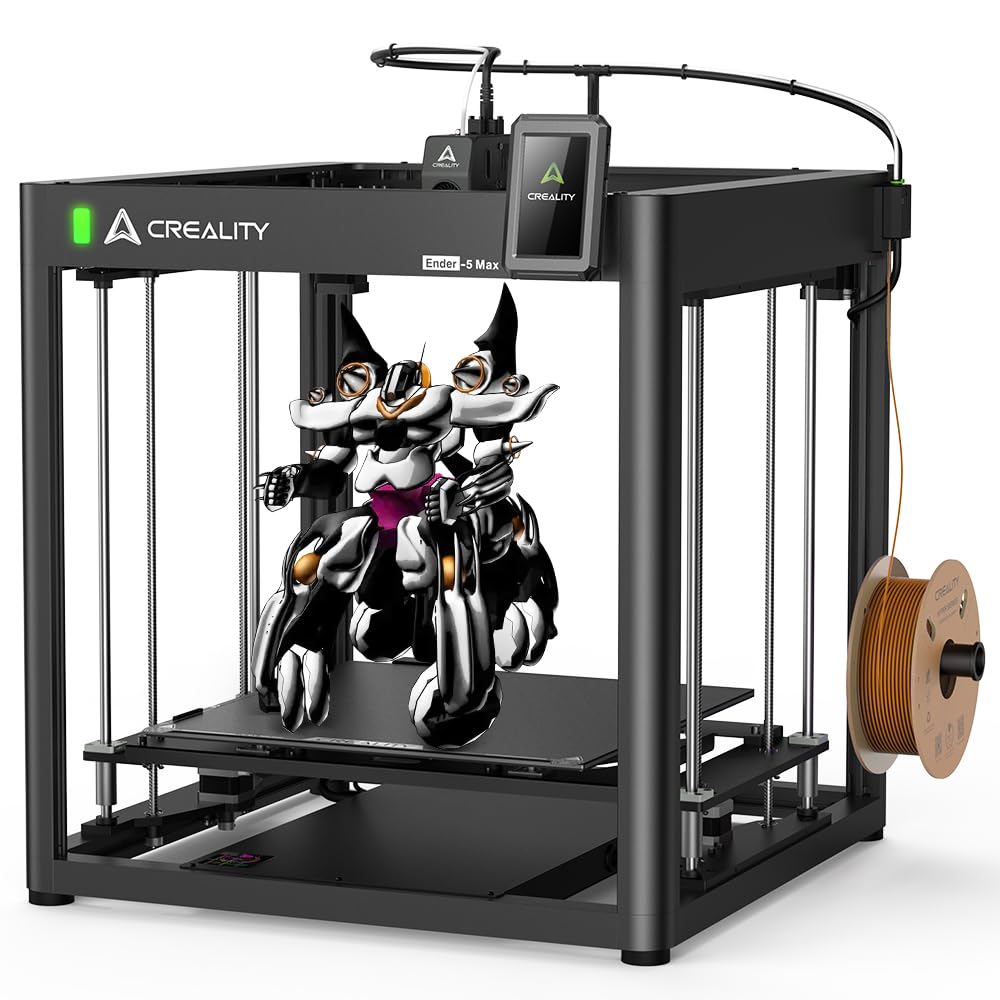
The Creality Ender 5 Max prioritizes one thing above all else: a massive 400mm cubic build volume at an aggressive entry point. The CoreXY structure stays out of the way of the moving platform, and the X-axis uses a precision linear rail for smoother motion at 700mm/s. The 300°C direct drive extruder with hardened gears is rated for 500 hours of continuous extrusion, and the dual Z-axis motors with four linear rods prevent the heavy bed from sagging over time.
The print quality from this machine at standard layer heights is impressive for the price, with users reporting excellent first-layer adhesion after the 36-point auto-leveling calibration. The large build volume enables projects like storage boxes, full-sized helmet visors, and multi-piece household items that smaller printers cannot accommodate in a single print. The 3-color status indicator light is visible from a distance, which aids in multi-machine workshops.
The Ender 5 Max demands patience in setup and maintenance. Assembly takes over two hours, the stock instructions are minimal, and users must calibrate frame squareness, belt tension, and Z-offset manually. The magnetic build surface works well for PLA but can show wear after heavy use, and the lack of an actively heated chamber means ABS printing requires an external enclosure. For makers with experience who need a huge build plate for medium-fidelity prototypes, the Ender 5 Max offers the most cubic volume per dollar in the lineup.
Why it’s great
- 400mm build volume at very low cost
- Linear rail on X-axis ensures smooth motion
- High-flow 300°C extruder for long prints
Good to know
- Assembly takes >2 hours with poor instructions
- No active chamber means limited high-temp materials
8. Bambu Lab P1S Combo

The Bambu Lab P1S Combo is the most user-friendly enclosed printer on this list. The fully enclosed CoreXY design improves print quality for ABS and ASA right out of the box, and the bundled AMS (Automatic Material System) enables four-color printing without manual filament swaps. The auto bed leveling and nozzle calibration are fully automated, and users report a 15-minute unbox-to-print time that is unmatched by any comparably equipped alternative.
Print speeds of 500mm/s with 20,000mm/s² acceleration are genuine, delivering a small Benchy in under 20 minutes with the default profile. The print quality consistency over a hundred prints is notably high, with a 95% success rate attributed mostly to user error rather than machine faults. The device connectivity via WiFi and the Bambu Handy app makes remote monitoring and print queue management seamless for a small workshop.
The limitations are in material capacity and ecosystem lock-in. The P1S cannot reliably print carbon or glass fiber reinforced polymers, as the standard hotend is not designed for abrasive filaments. The AMS is proprietary, and firmware updates are controlled by Bambu, preventing hardware modifications. Users who need engineering materials like PA-CF or PPS will outgrow this printer quickly. For a first enclosed printer or a secondary unit for rapid PLA/PETG production, the P1S Combo delivers reliable speed with zero calibration headaches.
Why it’s great
- Fastest time-to-first-print in class
- Enclosed design handles ABS without warping
- AMS multi-color is seamless and reliable
Good to know
- Cannot print carbon/glass fiber filaments
- Ecosystem lock-in limits upgrades and firmware freedom
9. Anycubic Kobra X Multicolor

The Anycubic Kobra X Multicolor brings native four-color printing to the entry-level bracket without requiring an external AMS unit. The Gen 2 ACE system handles filament swaps quickly, and the purge waste is reduced by 81% compared to earlier designs, cutting material costs significantly over a long multi-color project. The 600mm/s print speed with vibration compensation keeps layer quality consistent even at the high end of the acceleration curve.
The LeviQ 3.0 auto leveling system uses 49-point calibration to ensure a perfectly flat first layer, and users report 265 hours of trouble-free printing with PLA, PETG, and TPU. The AI camera provides spaghetti detection and foreign object detection, which is rare at this price point. The top-mount spool holder frees desk space, and the 260mm cubic build volume is generous for a machine that costs less than many competitors’ single-color offerings.
Some users have experienced adhesion failures and reliability issues, with one reviewer calling the machine unusable out of the box. The phone app could be more polished, and the machine is not recommended for those who want to print abrasive or high-temperature materials. For a family setting or a beginner who wants to explore multicolor without a major investment, the Kobra X delivers the most accessible color printing experience in the budget tier.
Why it’s great
- Native 4-color printing at an entry-level price
- 81% reduction in purge waste vs. earlier designs
- 49-point auto leveling for a perfect first layer
Good to know
- Not suited for high-temp or abrasive filaments
- Adhesion and reliability can be inconsistent
10. FLASHFORGE Adventurer 5M Pro

The FLASHFORGE Adventurer 5M Pro targets the beginner who wants an enclosed printer with air filtration, a segment often overlooked by premium models. The dual circulation system with HEPA and active carbon filtration reduces airborne particles during ABS printing, making it safer for home offices and bedrooms. The nozzle heats to 200°C in 35 seconds, and the maximum travel speed of 600mm/s with 20,000mm/s² acceleration means quick turnaround on small prototypes.
The pressure sensing auto leveling ensures reliable first layers, and the removable dual-sided PEI platform allows tool-free model removal. The FlashMaker mobile app provides real-time remote monitoring, progress tracking, and parameter adjustments. Users find the printer easy to set up, with most reporting a working print within 10 minutes of unboxing. The material compatibility list includes PLA, ABS, PETG, TPU, PC, and even PLA-CF, broadening its utility beyond typical beginner machines.
The filtration system is not as effective as marketed, as the doors do not seal tightly enough to fully capture PM1.0 particles, which is a concern for fume-sensitive users. Some units arrive with defects like filament feeding failures or calibration errors, though the replacement service is generally responsive. The software requires a computer running FlashPrint 5 or Orca-Flashforge, and the installer is not compatible with macOS Sequoia. For a budget-friendly enclosed printer with reasonable speed and a good safety feature set, the Adventurer 5M Pro covers the basics well.
Why it’s great
- 35-second nozzle heat-up time speeds up start of print
- HEPA/active carbon filter for fume-sensitive spaces
- Easy 10-minute unbox-to-print process
Good to know
- Filtration seals are not airtight for PM1.0
- Software incompatible with macOS Sequoia
11. ELEGOO Centauri Carbon

The ELEGOO Centauri Carbon is a fully assembled CoreXY printer that arrives pre-calibrated and ready to print with zero assembly. The 320°C brass-hardened steel nozzle and enclosed chamber with enhanced cooling support carbon fiber reinforced filaments, a capability usually reserved for machines costing significantly more. The die-cast aluminum frame minimizes vibration even at the advertised 500mm/s speeds, and the automatic vibration compensation and pressure advance ensure smooth initial layers across the 256mm cubic build area.
Users consistently highlight the value proposition: CoreXY structure, auto bed leveling, a built-in chamber camera with time-lapse capture, and a dual-sided plate with a specialized PLA surface for excellent adhesion at lower hotbed temperatures. The WiFi file transfer via ElegooSlicer works reliably, and the machine processes a 20-minute Benchy at high speeds. The print quality from the stock profiles is good enough for functional parts without post-processing.
Reliability is the weak point. Some units fail within the first week due to hotend communication issues or USB-C connector design flaws, and the cable routing could be improved. Tech support is responsive but the process can be slow for US-based customers. The ELEGOO Centauri Carbon is a compelling option for budget-conscious buyers who need carbon fiber capability and CoreXY precision, provided they are comfortable dealing with potential early-life hardware issues under warranty.
Why it’s great
- Pre-assembled CoreXY with carbon fiber capability
- Die-cast aluminum frame reduces high-speed vibration
- Built-in camera with time-lapse monitoring
Good to know
- Early-unit reliability issues with hotend/USB-C
- Tech support can be slow for US customers
FAQ
What is the minimum heated chamber temperature I need for ABS?
Can I print carbon fiber reinforced nylon with a sub- printer?
Does multi-material printing require a dedicated second extruder?
Final Thoughts: The Verdict
For most users, the 3d printer under $5000 winner is the QIDI Max4 Combo because it combines the largest build volume, a 65°C active chamber, closed-loop motors, and multi-color support in a single machine that handles both standard PLA and engineering PPS-CF without compromise. If you want true dual-toolhead multi-material production with the best long-term software support, grab the Original Prusa XL 2-Toolhead. And for a budget-friendly enclosed printer that gets you printing carbon fiber parts the same day with zero assembly, the ELEGOO Centauri Carbon is the most accessible entry point.